
Why the Pipeline Shape Matters
A video processing pipeline for an online editor has a different job than a traditional backend upload service. It has to make the first creative moment feel immediate, preserve enough media to survive refreshes and failures, feed AI systems with durable context, and eventually produce a verified export. If the pipeline is designed as one massive upload followed by one opaque server job, the product becomes slow to trust and hard to repair. Upload a real shoot
VibeChopper uses a more practical split. The browser handles work that benefits from being close to the user's file: local preview, frame sampling, early progress, audio preparation, and lightweight metadata. The server handles work that needs authority and repeatability: authentication, project ownership, persistence, AI analysis, server-side fallback, render jobs, and object storage writes. Object storage holds the durable media artifacts: originals, derived frames, audio, generated overlays, music, thumbnails, transcripts, and final renders.
That split is not only an implementation preference. It is a product contract. A creator sees footage become editable quickly. A returning user can reopen the project and find derived media still attached. An AI edit run can explain which frames, transcript segments, generated assets, and timeline version it used. A render worker can resolve media through trusted storage references instead of arbitrary client URLs. A repair workflow can retry a failed derived-media step without asking the user to reconstruct the entire upload session.
The important lesson is that browser, server, and object storage are not competing places to do video work. They are stages in a pipeline. Each stage should produce a typed handoff that the next stage can validate, retry, and explain.
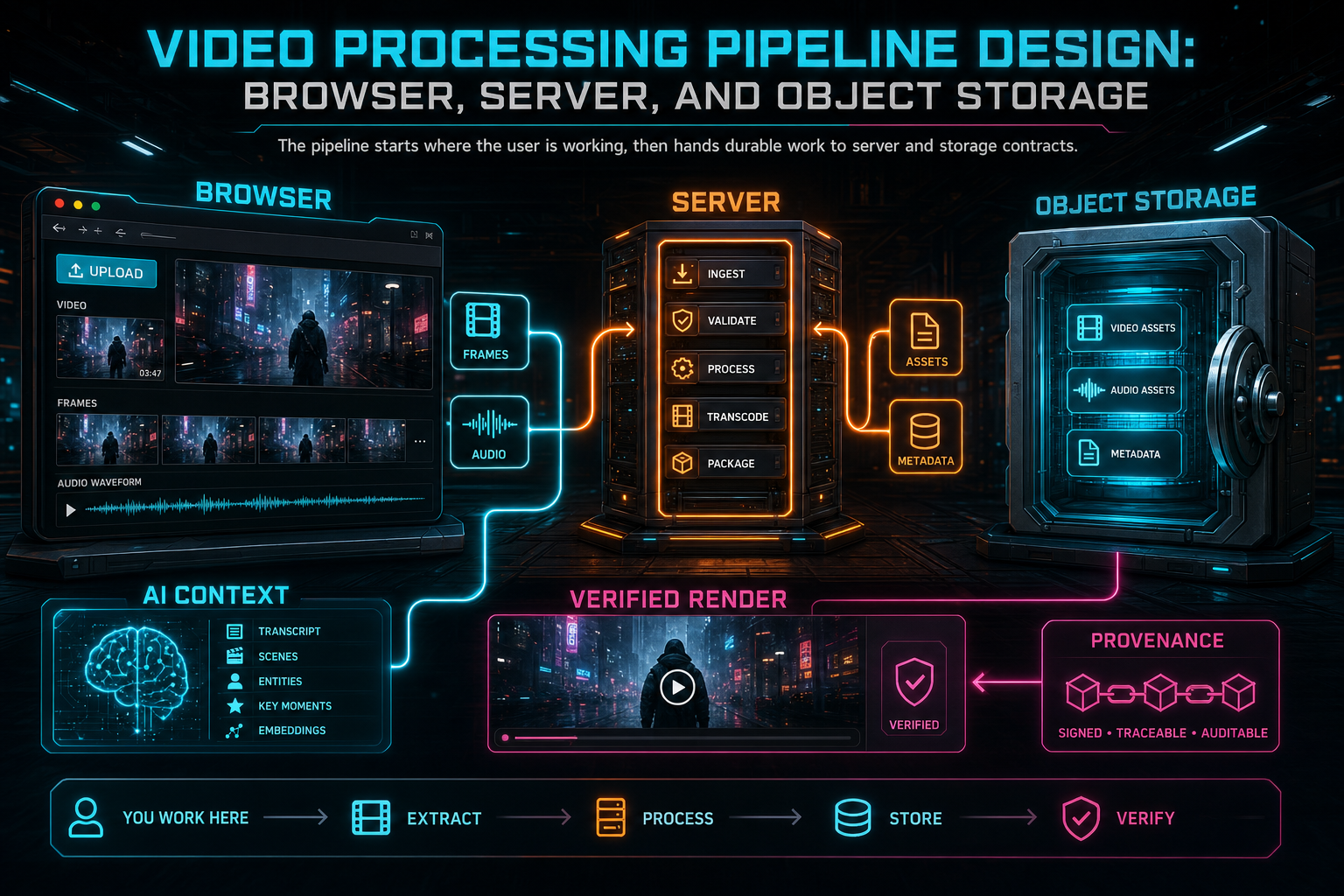
The pipeline starts where the user is working, then hands durable work to server and storage contracts.
The Browser Is the First Processing Surface
The browser is valuable because it is where the user's source file already exists. A browser video editor can inspect metadata, play the source, seek through the file, draw frames to a canvas, compress frame samples, prepare audio, and show visible progress before the server has finished every durable write. That gives the user a sense that the editor is alive instead of waiting behind a blank upload screen. Upload a real shoot
But browser-first cannot mean browser-only. Browser decode behavior depends on the operating system, hardware acceleration, memory pressure, codecs, tab lifecycle, mobile throttling, and network conditions. A file can play but fail to seek reliably. A batch can create more frame blobs than memory should hold. An upload can succeed for the original while derived frame batches fail. A mobile browser can pause work when the tab backgrounds. Treating the browser path as the only path turns normal media variability into product failure.
The better browser contract is bounded and replaceable. The client should sample frames in predictable intervals, upload in batches, limit the number of blobs held in memory, track bytes and derived artifact counts separately, and report progress by stage. It should treat uploaded artifacts, not temporary canvas output, as the durable success condition. If frame sampling creates local images but none reach storage-backed records, the media pipeline is not complete yet.
This distinction matters for AI editing. A frame that lived briefly in browser memory cannot help a later AI command. A persisted frame record with a timestamp, URL, and description can. The browser's job is to accelerate the common path, not to become the source of truth.
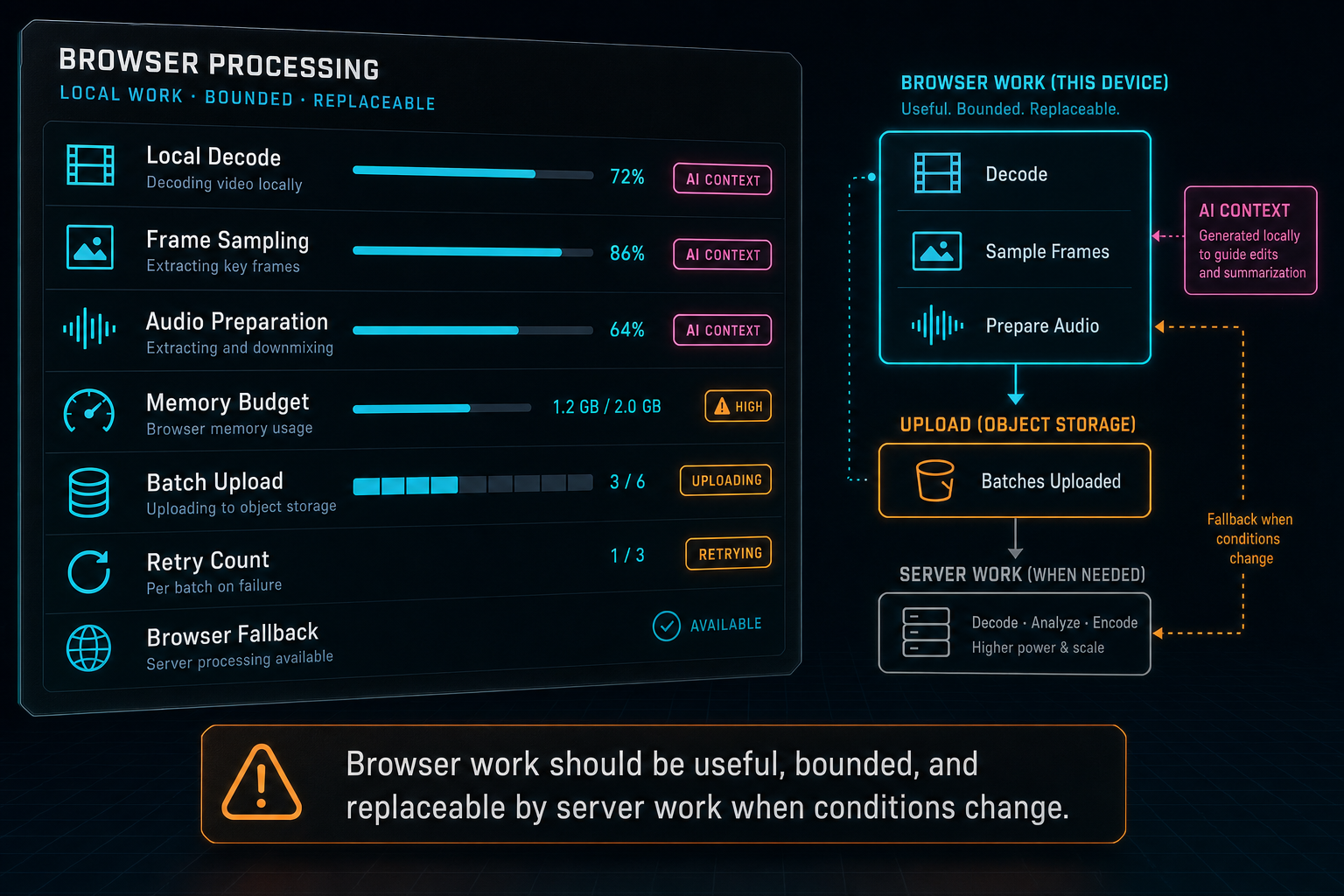
Browser work should be useful, bounded, and replaceable by server work when conditions change.
The Server Is the Authoritative Processor
The server is where media processing becomes authoritative. It can authenticate the user, check project ownership, validate request shape, create upload and processing records, write metadata, enforce limits, call AI providers through server-side harnesses, and resolve object storage paths without trusting user-supplied URLs. That authority is what lets a browser editor behave like a real production tool. Explore your media graph
A good server media API accepts product concepts rather than loose file operations. It should know about videos, projects, frames, transcript segments, source originals, generated assets, render exports, and processing summaries. The browser can send media bytes and progress signals, but the server decides which records exist and which user owns them. That keeps the rest of the app from building critical behavior around temporary client state.
Server fallback is the most obvious example. When browser frame extraction fails or produces an incomplete set, the server can use FFmpeg to derive frames from a newly posted file or from a stored original. The output should converge on the same frame records that browser extraction uses. There should not be one frame model for canvas output and another for server output. The product needs a single durable frame contract so the frame grid, AI analysis, metadata generation, and media graph do not care which processor won.
The same pattern applies to audio, transcripts, generated assets, and renders. Server processing is not a backup closet full of special cases. It is the authoritative layer that turns media bytes into user-scoped product state.
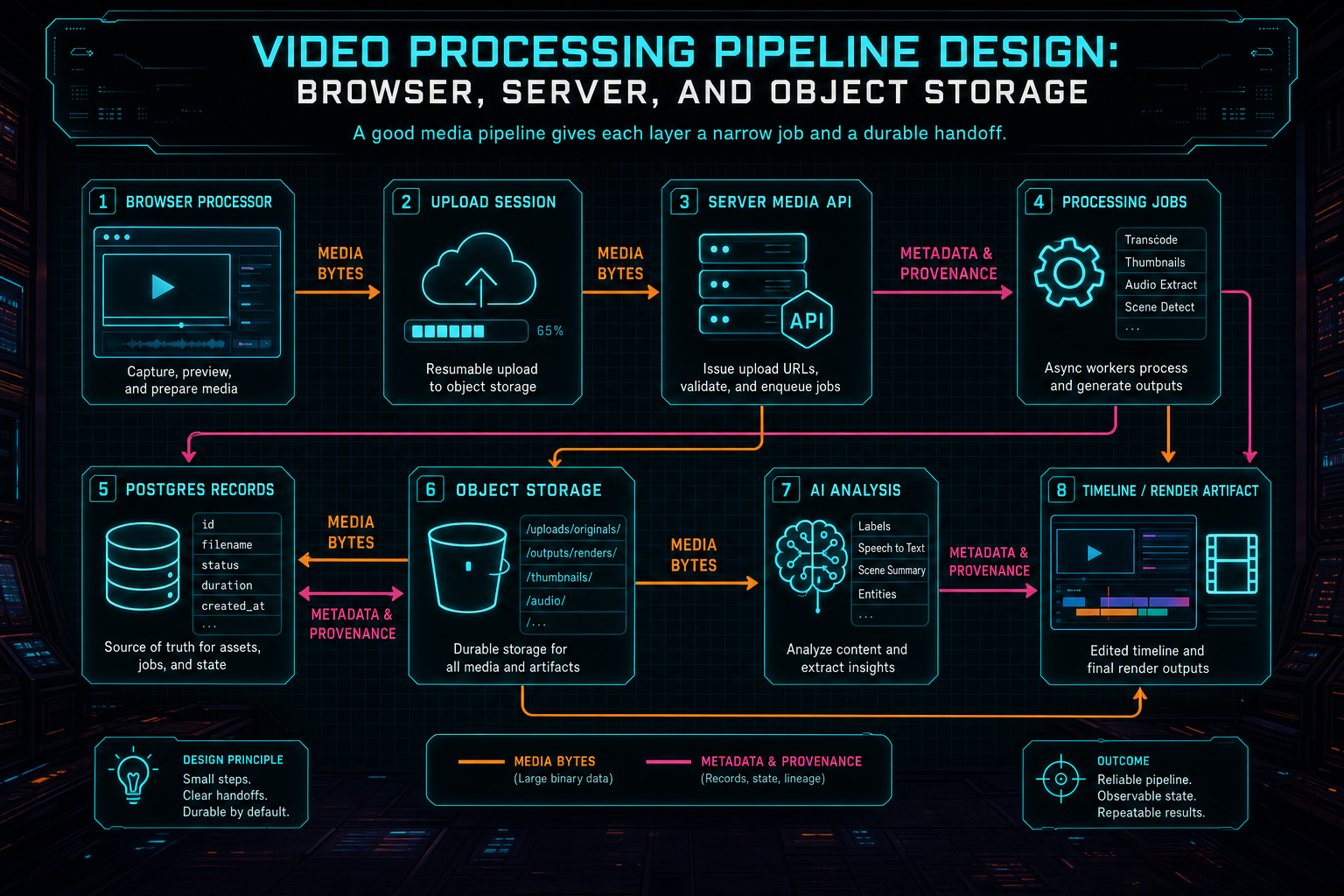
A good media pipeline gives each layer a narrow job and a durable handoff.
Object Storage Is a Product Contract
Object storage is often described as an infrastructure detail: put bytes somewhere durable and return a URL. In a video editor, especially an AI video editor, storage paths are part of the product model. They define what can be retried, what can be explained, what can be rendered later, and what can be attached to a project after the original browser tab is gone. Explore your media graph
Stable object paths should be scoped by ownership and purpose. Originals, frame samples, audio files, thumbnails, generated overlays, music beds, and render exports deserve different prefixes and metadata. A derived frame is not the same kind of object as a source original. A render output is not the same kind of object as an intermediate scratch file. When paths encode project and artifact identity, downstream systems can reason about them safely.
The server should write and read object storage through trusted services. A render worker should download source media by looking up project media records, not by accepting arbitrary URLs from the client. An AI analysis job should read frame images from known storage references. A media graph should attach object paths to database records that include user scope, project scope, timestamps, derivation type, and provenance. The URL may be temporary. The storage reference should be durable.
This is what makes uploads repairable. If the original file is stored, the server can derive missing frames or audio after a refresh. If generated assets are stored with provenance, the render path can resolve them later. If final exports are stored under stable export IDs, verification and sharing can use the same artifact instead of asking the user to rerender blindly.
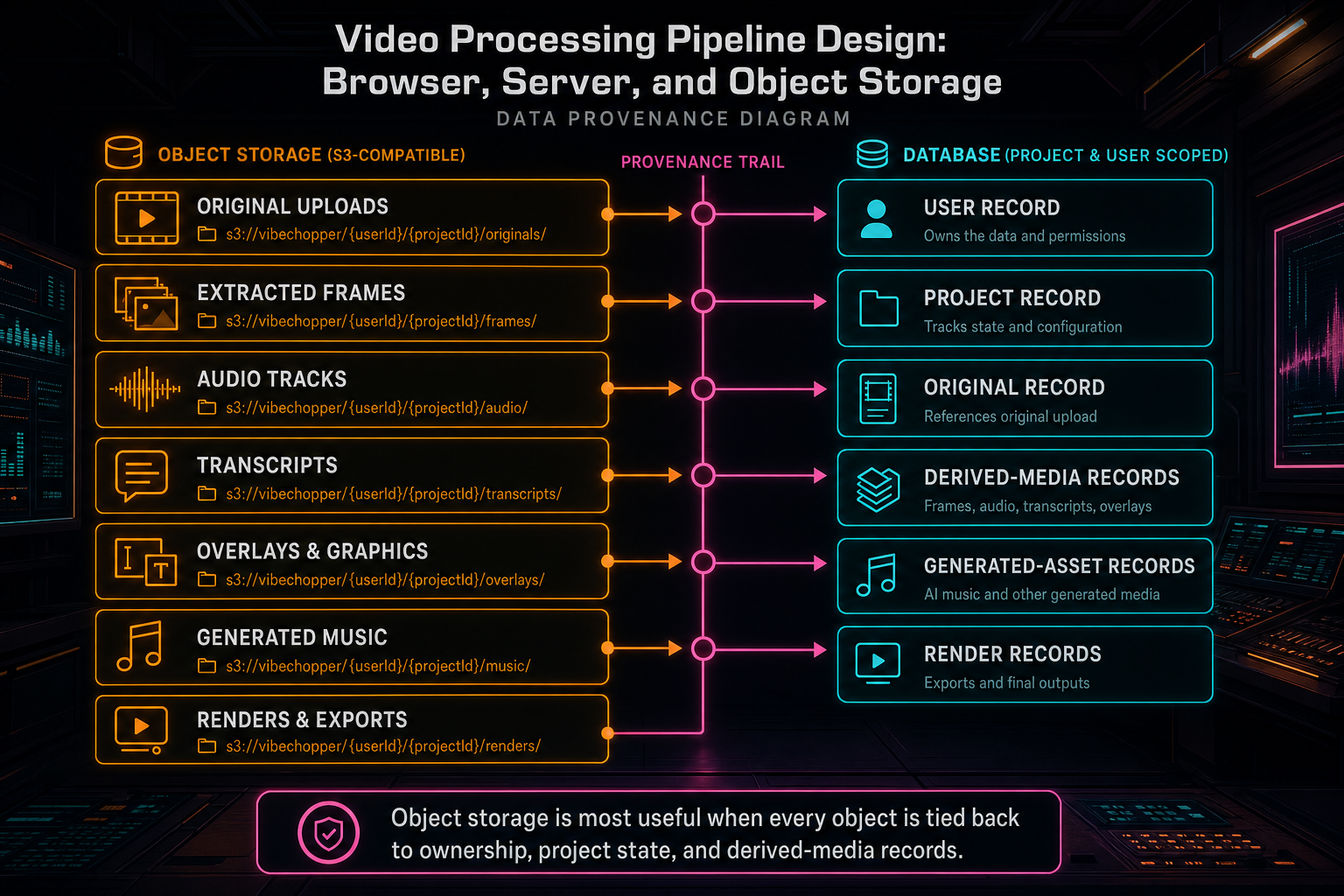
Object storage is most useful when every object is tied back to ownership, project state, and derived-media records.
Progress and Recovery Are Core API Fields
Video processing is too long-running for a single spinner. Users need to know whether the system is uploading originals, extracting frames, storing audio, transcribing dialogue, analyzing visuals, generating metadata, processing in the background, or rendering a final output. Developers need the same stages to diagnose failures. AI edit runs need stable artifact IDs to attach work that may finish after the initiating request has returned. Upload a real shoot
That is why progress belongs in the public shape of the pipeline. A useful processing record can include stage, percent, bytes uploaded, frames extracted, frames uploaded, frames analyzed, audio status, transcript status, original storage status, retry count, last error code, and whether the next step is browser-local, server-side, or background repair. These fields make the UI more honest and make state recovery possible.
Recovery should reuse work that is already durable. If complete frame records exist, use them. If only a partial frame set exists and cannot represent the source, replace it. If the original is stored but derived audio failed, derive audio from storage. If analysis descriptions are missing from otherwise valid frames, analyze the missing records instead of re-extracting the whole video. If a render job already exists for the same timeline version and settings, return that job rather than creating an expensive duplicate.
This approach turns failure from a dead end into a route. The user may still see that processing is delayed or that an item needs attention, but the product is not confused. It knows which artifacts exist, which are missing, and which layer should attempt the next step.
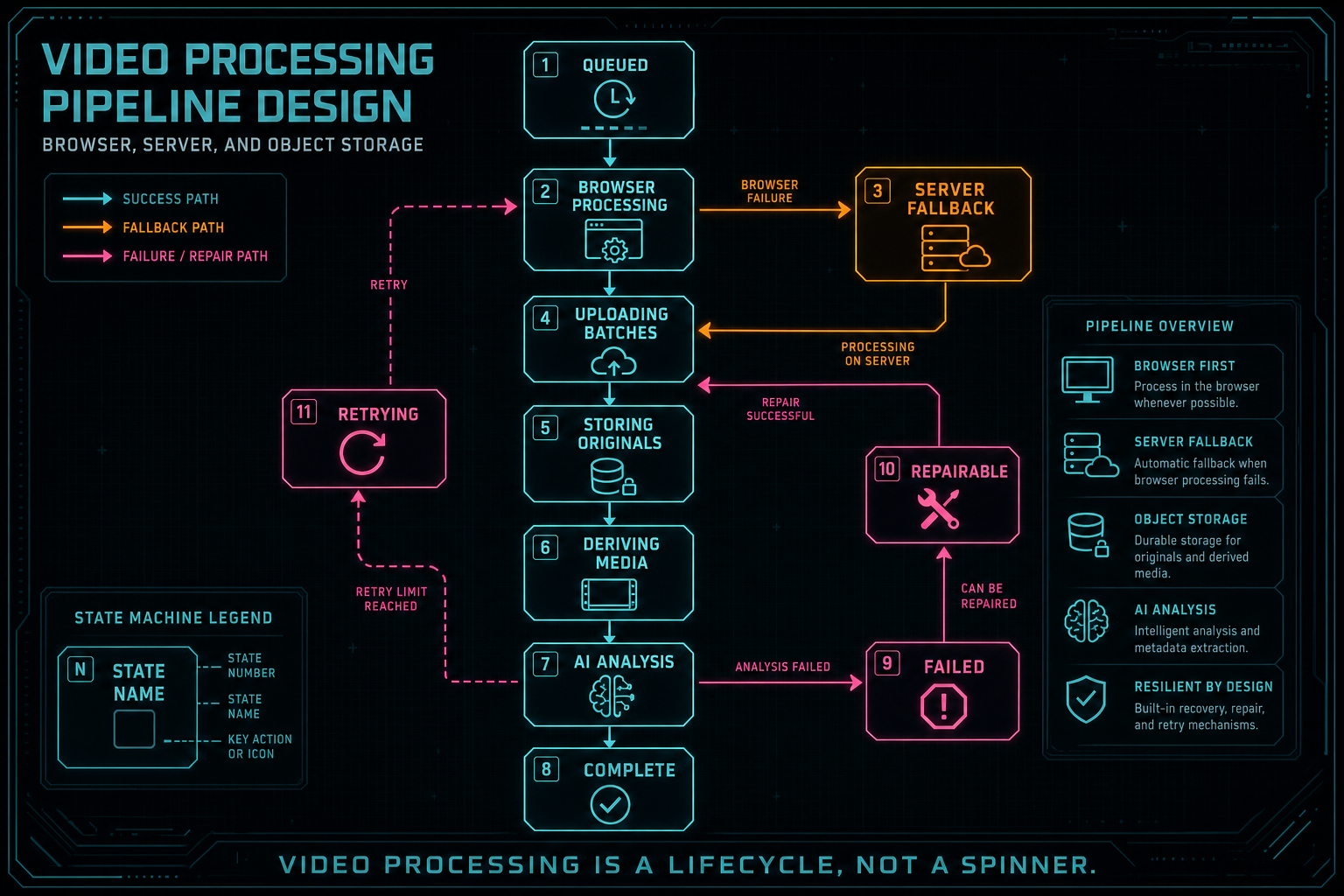
Video processing is a lifecycle, not a spinner.
AI Editing Needs Durable Context
An AI video editor cannot rely on temporary files and vague prompt memory. It needs durable media context. Frame records tell the model what appears across the footage. Transcript segments tell it what was said and when. Metadata summarizes the clip. Generated music, overlays, and voiceovers carry prompts and provenance. Timeline records show which source ranges and effects are active. Render artifacts show what the system produced. Explore your media graph
The processing pipeline is responsible for creating that context. Browser frame extraction feeds visual samples. Server analysis writes descriptions. Audio processing feeds transcripts. Object storage keeps source and derived assets available. The timeline uses those records when an AI command asks for an edit. The render path then turns the resulting timeline into a verified artifact. Each step is stronger because the previous step wrote structured state instead of loose files.
This is where product-final architecture matters. A user should be able to upload footage, ask VibeChopper to make the intro faster, find the best product shot, cut around a transcript moment, add generated music, and render the result. Under the hood, that workflow crosses browser processing, server jobs, object storage, AI analysis, timeline mutation, and rendering. The user does not need to manage those boundaries. The system does.
For developers, the design lesson is clear: AI editing quality depends on media durability. The model can only reason over what the platform preserved, indexed, and connected. A pipeline that stores strong media records gives the AI assistant better inputs and gives users a better explanation of the final edit.
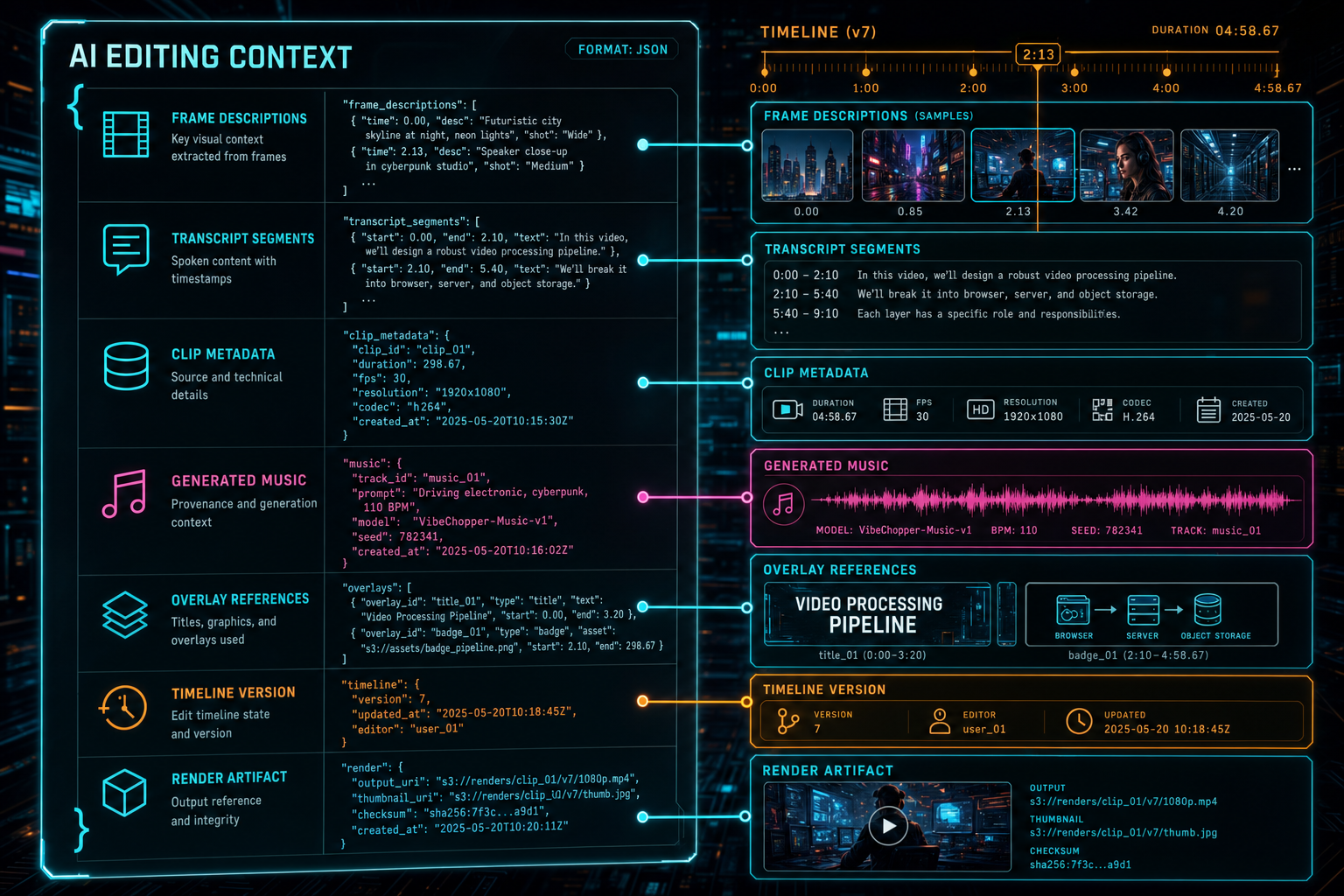
AI editing quality depends on durable media context, not temporary files.
What Developers Should Copy
If you are building a browser or cloud video editor, copy the handoff model. Let the browser do useful early work, but cap memory and treat uploaded artifacts as the success condition. Put authoritative records on the server. Store originals and derived media in object storage through scoped paths. Make server fallback converge on the same model as browser processing. Keep progress as structured state, not decorative UI. Try the effects pass
Copy the provenance model too. Every generated or derived artifact should answer a few basic questions: who owns it, which project it belongs to, which source or timeline produced it, where the bytes live, what processing stage created it, and whether it is complete. Those answers help the editor render timelines, help AI runs explain themselves, help support flows diagnose issues, and help users trust that the product is preserving their work.
Also copy the separation between media bytes and media meaning. Bytes live in object storage. Meaning lives in database records, transcripts, frame descriptions, metadata, timeline state, and AI run artifacts. The pipeline is the process of converting one into the other without losing ownership or context.
Finally, design for retry from the beginning. Networks fail. Browser decode fails. Object storage can return transient errors. AI providers can rate-limit. Long renders can be interrupted. A product-grade pipeline persists enough state before each expensive step that the system can retry, resume, or explain the failure without starting from zero.
The Result
A strong video processing pipeline makes the product feel simple because the internal contracts are precise. The browser starts quickly. The server validates and persists. Object storage keeps bytes durable. Derived media records make AI context reusable. Progress records make long-running work understandable. Fallback paths keep normal browser and network variability from becoming user-facing dead ends. Render verification closes the loop with an artifact the product can trust. Render a timeline free
That is the architecture VibeChopper exposes as a creative surface. Upload footage, inspect media, ask for edits, refine the timeline, apply effects, and render a finished video. The product feels direct, but the pipeline underneath is deliberately layered: browser, server, object storage, AI context, timeline, render, verification.
For developers, the deeper point is that video processing is not a background chore. It is the foundation of the editor. The choices made at upload time determine whether AI commands have context, whether renders can resolve sources, whether users can refresh safely, and whether generated artifacts remain explainable. Get those handoffs right, and the rest of the AI video editor has something solid to build on.
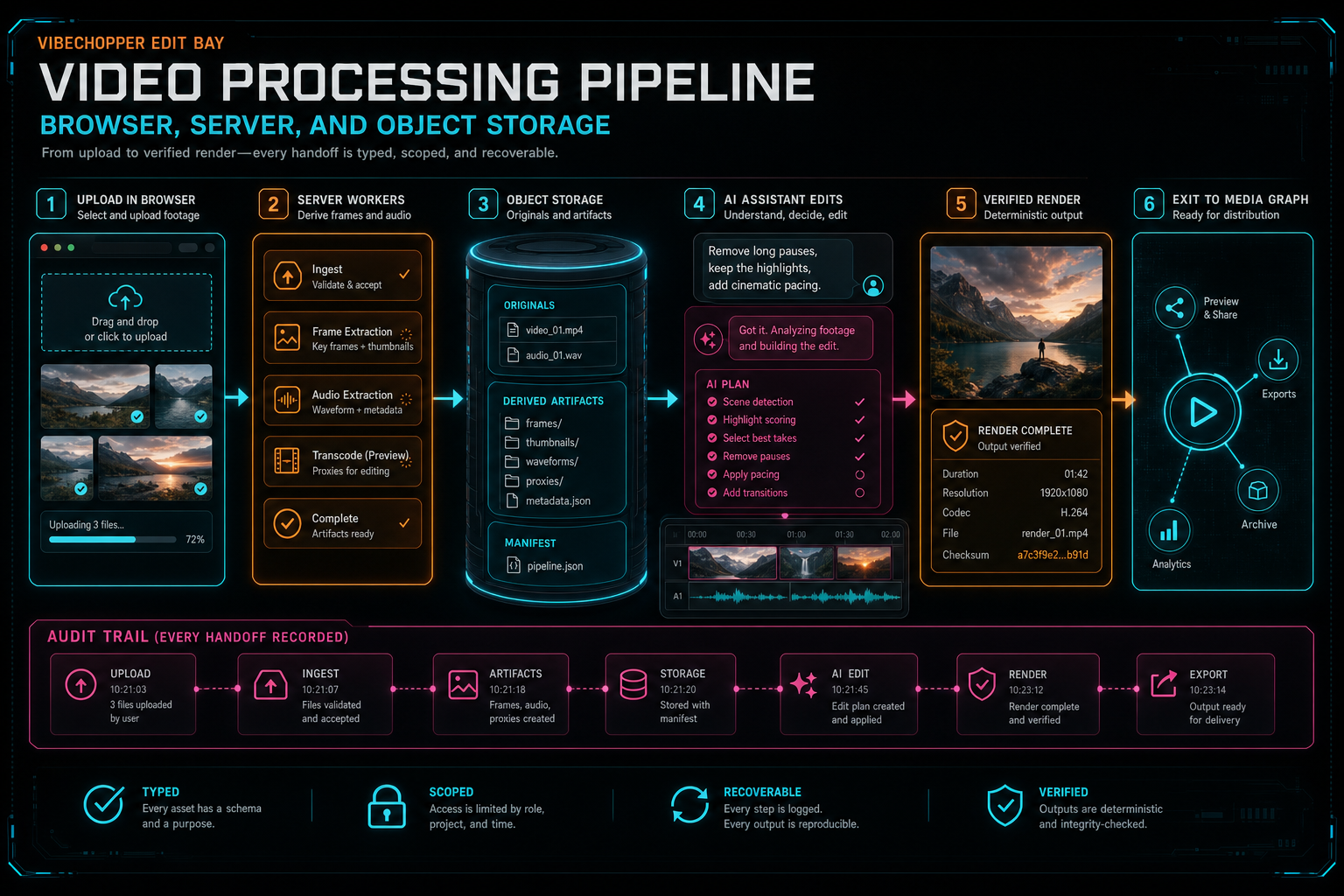
The final system feels simple because every media handoff is typed, scoped, and recoverable.
Try the workflow
Open every feature from this post in the editor
These panels collect the features discussed above. Sign in once, finish your profile if needed, then the editor opens the first highlighted surface and walks through the tutorial.
Step 1
Upload footage with progress you can trust
Watch large video uploads, processing, transcript work, and original-file storage from one monitor.
Upload a real shoot →Step 2
Open the media asset graph
See generated audio, rendered assets, source clips, metadata, and provenance in the media panel.
Explore your media graph →Step 3
Render a verified timeline
Export a project through the same storage-backed render path described in this article.
Render a timeline free →Step 4
Try voice-driven timeline edits
Describe the edit you want and let VibeChopper translate intent into timeline changes.
Talk a cut into shape →Step 5
Apply timeline effects
Try clip effects, speed ramps, color passes, and export-ready compositor behavior.
Try the effects pass →