
Batch Upload Is a Memory Problem
Single-file upload is a useful milestone. Batch upload is the product test. A creator does not want to add one clip, wait, add the next clip, wait again, and rebuild context by hand. They want to select the source material for a project and let the editor start building usable media state: frames, audio, transcript, metadata, thumbnails, original storage, and AI context. That is the right workflow for an online video editor. It is also exactly where browser memory pressure shows up. Upload a real shoot
Video is not like uploading a profile photo. The file is large, the browser needs to decode it, the app often needs to seek through it, draw frames to a canvas, compress images, upload derived artifacts, prepare audio, update progress, and keep previews alive. Multiply that by a batch of clips and a naive implementation can run out of memory without doing anything surprising. The product did what the user asked. The browser just had a finite heap.
VibeChopper's batch upload work, called out in audit commits a064077, f381fd0, 3cb00c9, and 24796b1, moved the upload flow from optimistic concurrency toward controlled media processing. The core files are client/src/components/BatchUploadDialog.tsx and client/src/hooks/useBatchVideoProcessor.ts, with server-side support in server/routes.ts and memory-aware frame analysis behavior in server/ai.ts. The feature is not only a dialog. It is a coordination layer for media work under pressure.
The central rule is straightforward: memory is shared. If ten clips are in a batch, they are not ten isolated tasks. They are ten consumers of the same browser heap, the same decoder budget, the same network pipe, and the same user attention. Reliable batch upload starts when the implementation protects those shared resources instead of assuming every file can run its own happy path at full speed.
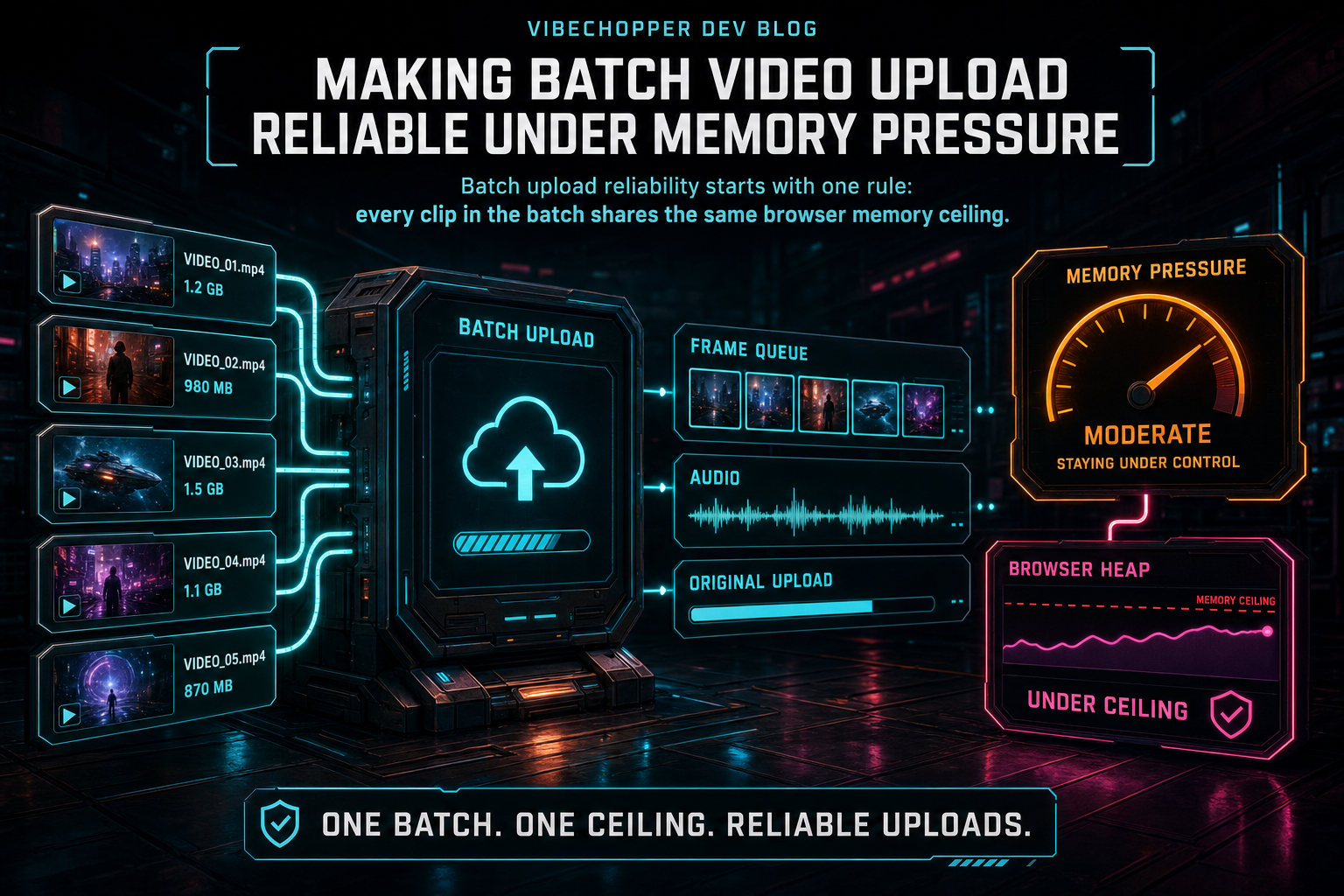
Batch upload reliability starts with one rule: every clip in the batch shares the same browser memory ceiling.
Why the Naive Flow Fails
The naive browser flow is easy to write. Loop over files. Load a video element for each file. Seek every half second. Draw each frame to canvas. Convert the frame to a blob. Push blobs into an array. Upload them when extraction is done. Extract audio. Start transcription. Upload the original. Show one progress bar. It can work beautifully with one short test clip.
It breaks when the product meets real footage. A ten-minute clip can produce hundreds of sampled frames. A batch can contain several long clips, several 4K clips, or a mix of formats that decode at different speeds. Holding all compressed frame blobs in memory until the end makes the browser pay the cost twice: source video decode state plus derived image blobs. If audio extraction runs at the same time, it adds another temporary payload. If original uploads are also active, the network queue can back up and keep more derived data resident longer than expected.
The visible failure is often vague. The tab slows down. Canvas extraction starts skipping seeks. Upload promises stall. The browser kills the page. A user sees an upload card that reached some percentage and stopped telling the truth. That is worse than a simple failure because partial media state is now scattered across the client and server.
VibeChopper treats this as a pipeline problem rather than a spinner problem. The goal is not to make one giant upload promise survive. The goal is to keep each stage bounded, let durable artifacts leave browser memory as soon as possible, and make the UI honest about which stages are complete, active, pending, or recoverable.
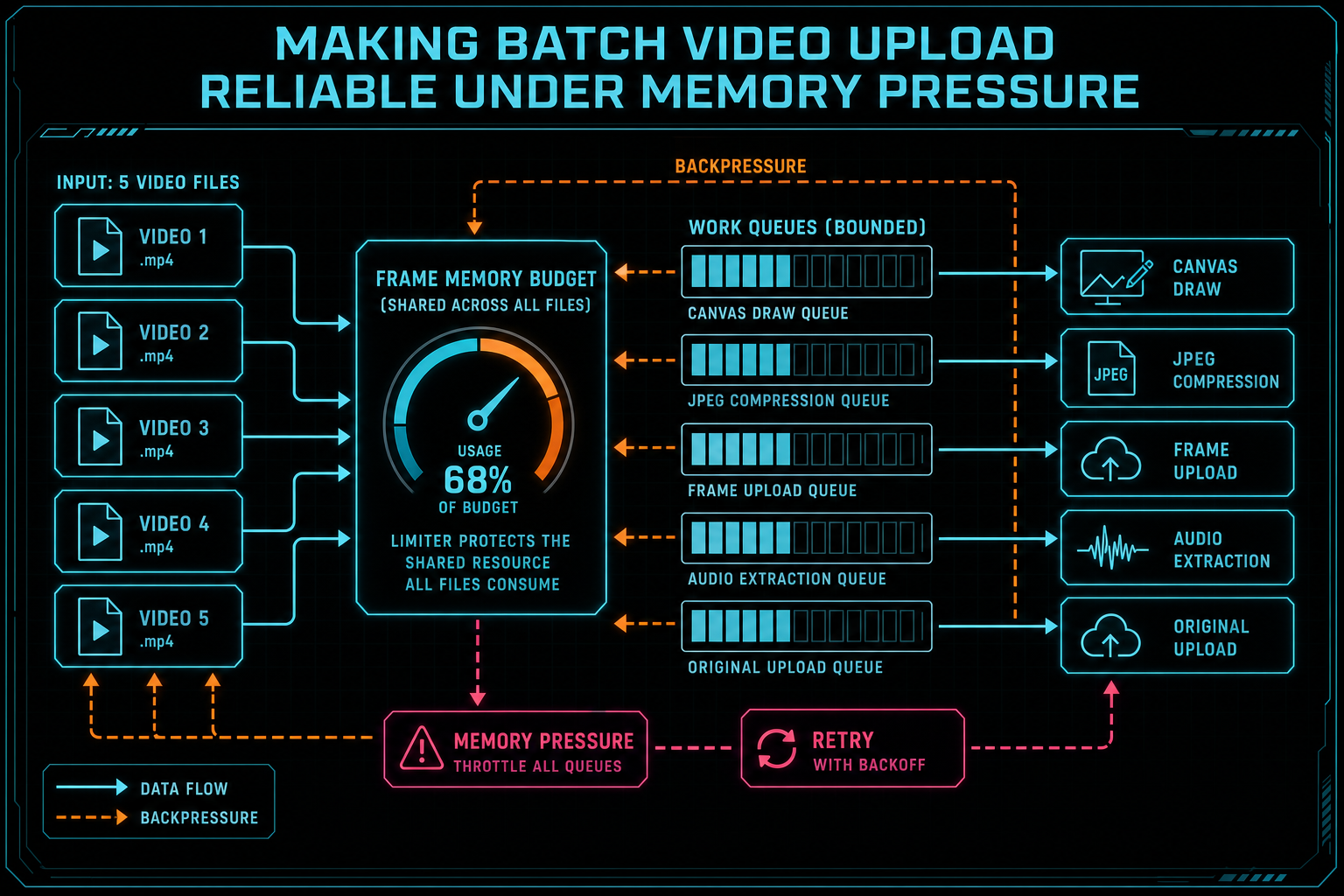
Per-file throttles are not enough. The limiter has to protect the shared resource that all files consume.
Limit the Resource That Grows
The most important design choice is to limit the thing that actually grows: frames waiting in memory. A batch uploader can limit how many files process at once and still fail if each file accumulates too many JPEG blobs before upload. Per-file concurrency is a coarse control. VibeChopper also needs backpressure around frame extraction and upload because derived frames are the resource that expands with video duration. Upload a real shoot
The hook uses a shared frame memory limiter so extraction can wait when too many frames are already held. That changes the shape of the system. Instead of every file extracting as fast as it can, each file participates in a shared budget. When the upload path releases frames, extraction can continue. The batch behaves more like a controlled production line than a pile of independent loops.
Streaming frame upload is the second half of the design. Frames should not wait for the entire source clip to finish extraction. Once a bounded group of frames is compressed, the app can send that group to the server and free the local references. The server then creates durable frame records and stores image data through the existing media path. That is the handoff: temporary browser objects become user-scoped product state.
This is also why VibeChopper tracks extracted frames separately from uploaded frames. Extracted is not enough. A frame sitting in memory is useful for a moment, but it cannot support reload, AI analysis, search, metadata generation, or collaboration. Uploaded frames are the durable milestone. The UI can celebrate extraction progress, but the pipeline only counts durable frame records as the foundation for downstream work.
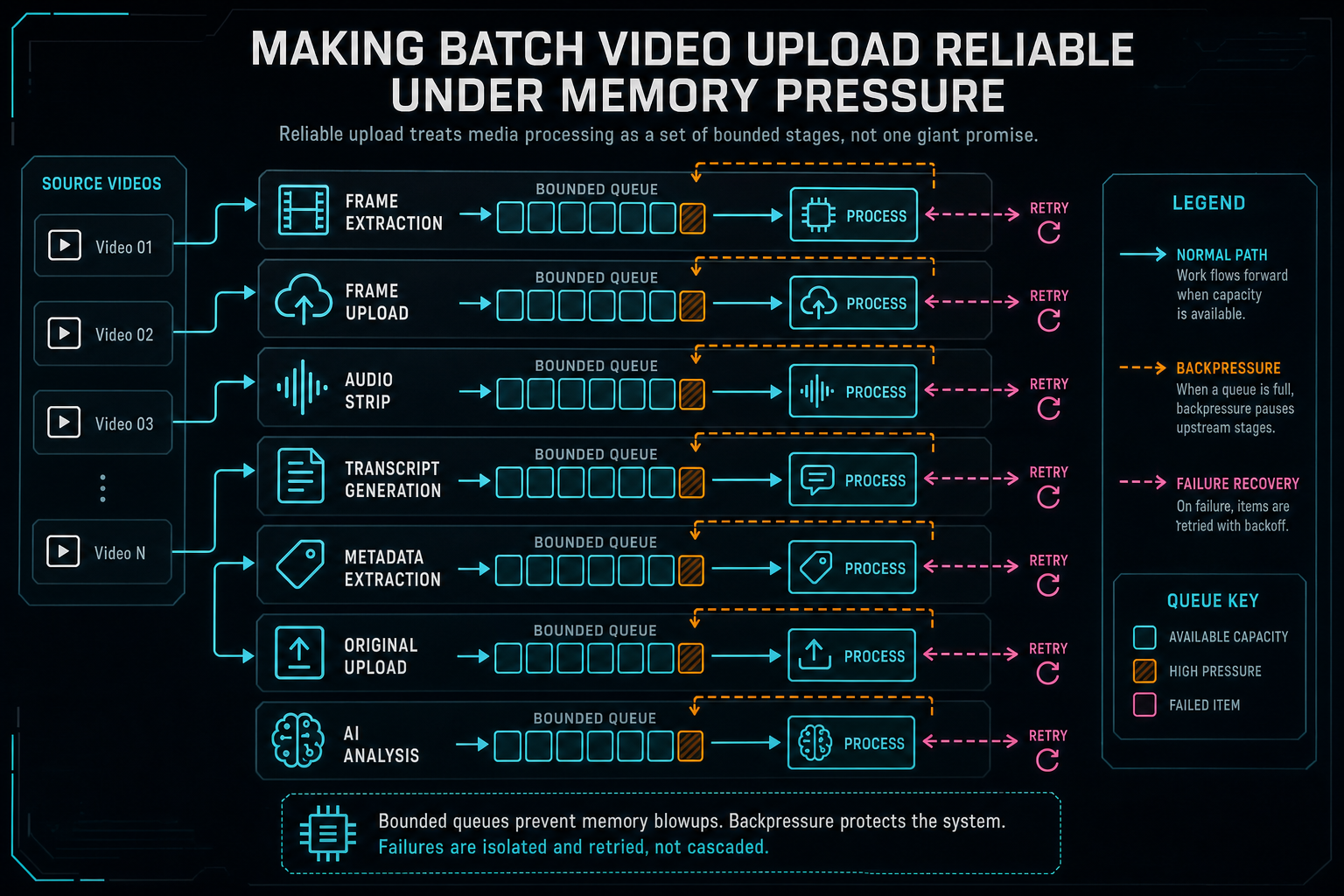
Reliable upload treats media processing as a set of bounded stages, not one giant promise.
Separate the Media Stages
A batch upload is not one operation. It is a bundle of related operations with different failure modes. Frame extraction can fail because a codec cannot be decoded in the browser. Frame upload can fail because the network dropped. Audio extraction can fail because the source has no audio track or because browser media APIs behave differently on the device. Transcription can fail because no speech was detected, because the audio is unavailable, or because a model call fails. Original upload can still be running after useful derived artifacts are already available. Explore your media graph
VibeChopper's upload monitor reflects those differences. The product tracks frames extracted, frames uploaded, frames analyzed, audio readiness, transcript status, metadata status, original-file upload progress, and pending server work. That is more information than a single progress bar, but it is the information the workflow needs. A user can understand that the original file is still uploading while frames are already usable. The system can understand that transcript work needs a retry while frame analysis can proceed.
The separation also protects retry behavior. If metadata generation fails, the app should not discard uploaded frames. If original upload is pending, the UI should not hide the fact that audio and transcript are complete. If frame extraction fails locally but the original is stored, server-side extraction can repair the gap. Each stage has a contract, and the batch card reports the contracts instead of flattening them into one opaque percentage.
This is where the media graph matters. Once a source video, frame set, audio artifact, transcript, metadata summary, and original upload are modeled as related artifacts, the editor can reason about the project rather than about one upload request. The graph gives AI edits, render verification, and repair flows a shared truth to inspect. Batch upload becomes the front door to durable media state.
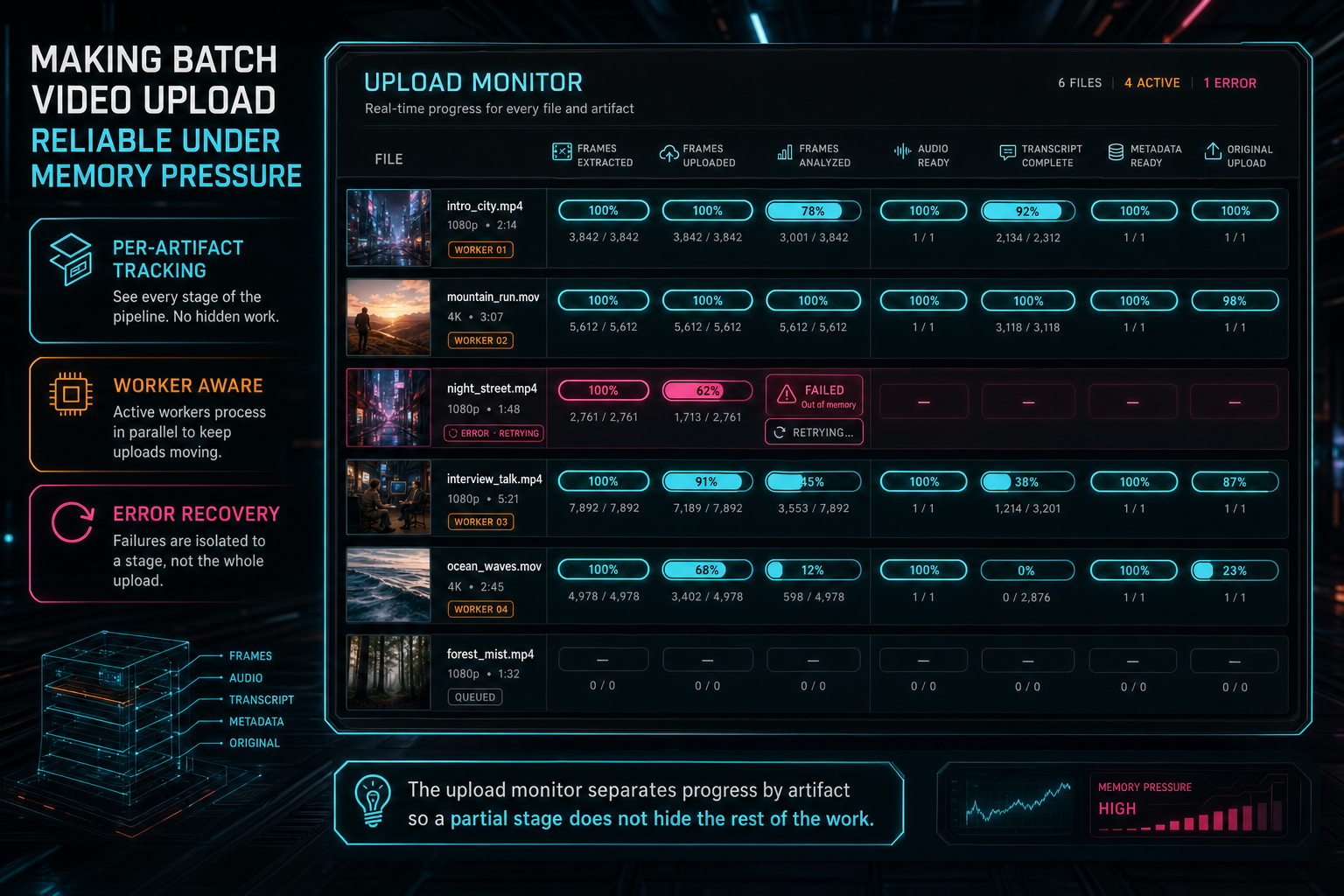
The upload monitor separates progress by artifact so a partial stage does not hide the rest of the work.
Pressure Is Not Always Failure
Memory pressure should slow the pipeline before it breaks the pipeline. That sentence sounds obvious, but a lot of web media code does not behave that way. It tries to finish as quickly as possible until the browser refuses, then it reports a generic error. VibeChopper instead treats pressure as a signal for backpressure, pausing, staging, and repair.
On the client, bounded frame processing means the app can wait for slots to open instead of creating more blobs. On the server, frame analysis has its own memory-aware behavior. Large frame analysis jobs can be processed in sub-batches, with memory usage logged around the work and recovery pauses when pressure is high. Server memory is different from browser memory, but the principle is the same: a product should keep throughput high without pretending memory is infinite.
The audit commit 3cb00c9 is the clearest evidence point for this philosophy. It covered video processing memory management and stability across the hook, editor, server AI work, and route behavior. The later commit 24796b1 fixed frame extraction slot release, which is the kind of small reliability detail that decides whether a limiter helps or slowly deadlocks the workflow. Reliability often lives in slot accounting, cleanup, and release paths rather than in the glamorous first implementation.
For users, this means batch upload can feel calmer. The app may process fewer things at once, but it keeps making truthful progress. It can show active workers, queued files, pending server work, and stage-specific status. It can keep the editor responsive enough for the user to understand what is happening. That is a better product than a fast start followed by a silent tab crash.
Server Truth After Refresh
A reliable batch uploader has to survive interruption. The user can refresh the tab. The browser can reclaim memory. A laptop can sleep. A mobile device can background the page. If the app only knows about upload state inside React component state, every interruption turns partial progress into confusion. Upload a real shoot
VibeChopper hydrates from durable state whenever it can. Existing videos, frames, transcript status, generated metadata, original upload records, and pending server work can all inform the UI after a reload. Local resume storage can help match remembered files to the current project and prompt the user to select the remaining originals when the browser needs access again. TanStack Query invalidation keeps the media panels and upload cards aligned with server results after mutations finish.
The important distinction is that resume UX is not only about bytes. Byte progress matters, but a video editor also needs artifact progress. Did frames make it to storage? Did audio extraction finish? Is the transcript missing because there was no speech, or because processing failed? Is the original file stored, so the server can derive missing media without asking the browser to decode again? Those answers decide the next action.
When the UI hydrates from server truth, it can avoid duplicate work and avoid false failure. A file whose frames already exist does not need to repeat frame extraction. A file whose original is stored can use server repair for derived media. A file whose transcript is complete can keep that result even if metadata still needs attention. The batch becomes recoverable because each artifact has somewhere durable to live.
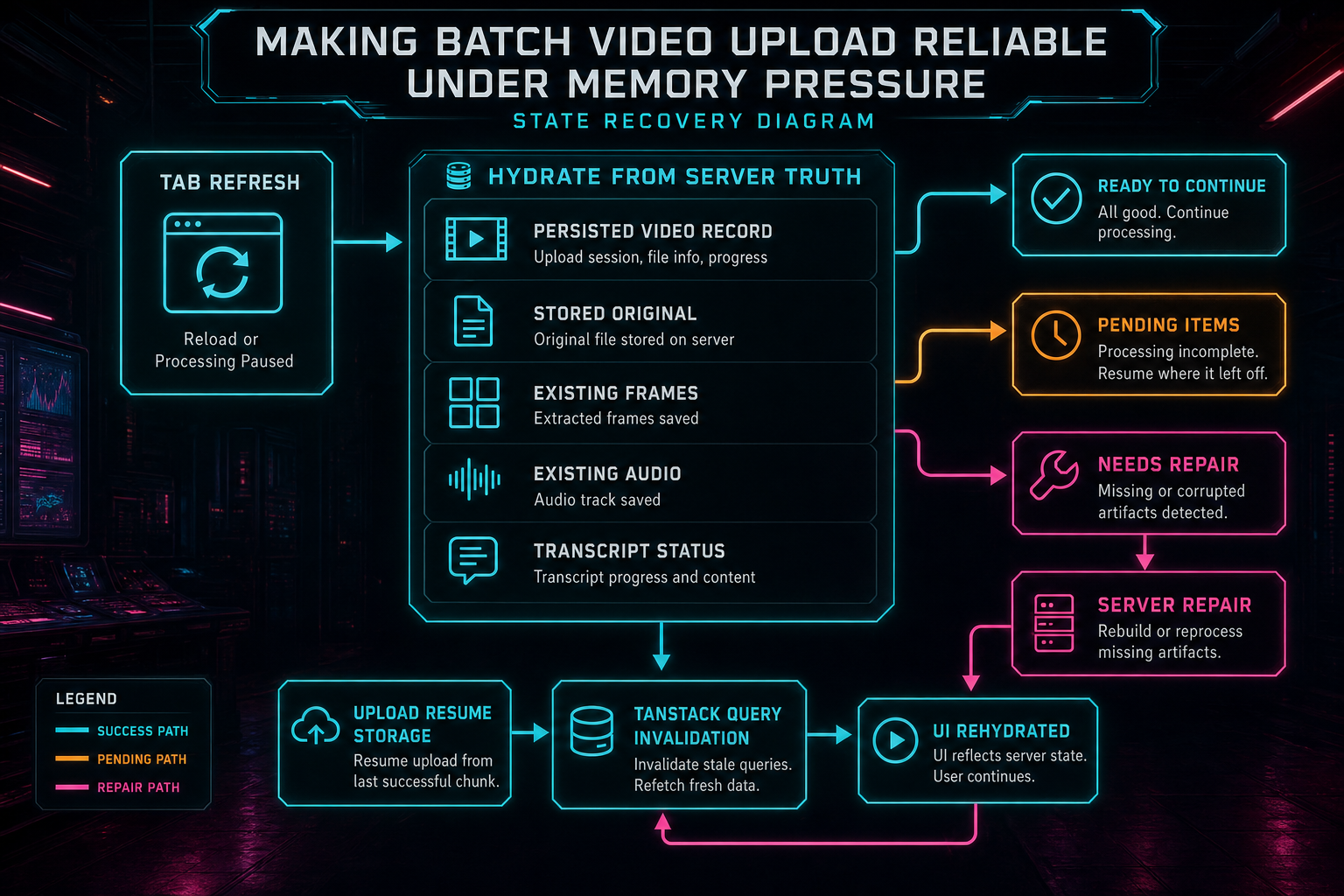
When the tab reloads or processing pauses, the UI hydrates from durable server truth instead of guessing.
AI Editing Depends on Upload Reliability
Batch upload is not a side utility in VibeChopper. It feeds the intelligence layer. Frames become visual descriptions. Audio becomes transcript segments with speaker context. Metadata gives the editor a useful project summary. Original storage gives later repair and export flows a durable source. If those inputs are missing or inconsistent, natural-language editing loses the context that makes it precise. Talk a cut into shape
That is why the upload pipeline uses product-final language in the UI. The user does not need to manage a frame extraction subsystem. They need to know whether VibeChopper understands their footage well enough to edit it by voice and vibe. Under the hood, that means the upload hook, server routes, AI analysis, object storage, transcript handling, and media summaries all have to agree on state.
The connection to AI edit runs is direct. A prompt like 'cut this into the strongest thirty seconds and keep the customer quote' depends on visual context, transcript context, and durable clip records. The provider harness can validate JSON and the edit run can record tool events, but those systems are only as useful as the media context they receive. Reliable upload is the foundation under the assistant.
This is why VibeChopper invests in upload monitoring instead of hiding it. Creators should be able to start with several clips, watch the platform build understanding, and move into editing without wondering which file secretly failed. Developers should be able to inspect artifact state when something does go wrong. Reliability serves both audiences.
What Developers Should Copy
If you are building a browser video editor, do not start by maximizing concurrency. Start by naming the resources you can exhaust: browser heap, decoder work, canvas operations, compressed frame blobs, audio buffers, network requests, server analysis batches, and user attention. Then put explicit budgets around the resources that grow with file count and duration.
Stream derived artifacts out of memory as soon as you can. A frame blob should be a short-lived object on the way to durable storage, not a trophy collected in an array until extraction is finished. Track extracted and uploaded counts separately. Treat uploaded artifact records as the boundary for downstream systems. Keep progress granular enough that retries can target the missing stage instead of restarting the whole upload.
Design pressure states before designing error copy. A queue is not an error. A pending server repair is not an error. A transcript with no speech is not the same as a transcription failure. A stored original changes the retry strategy. A partial frame set may need replacement rather than reuse. These distinctions are tedious in code, but they are what make the product feel stable when real footage arrives.
Finally, make cleanup and slot release part of the feature, not a later optimization. The 24796b1 audit reference exists because releasing frame extraction slots correctly matters. A limiter that never releases is just a slower failure mode. A pipeline that releases memory, clears object references, invalidates queries, and hydrates from durable state is the version users can trust.
The Result
The final behavior is straightforward from the creator side. Select multiple clips. VibeChopper shows which files are active, which are waiting, which artifacts are complete, and which server work remains. Frames move from browser extraction into durable records. Audio and transcript work advance independently. Original uploads continue without blocking every derived artifact. The editor gains enough context for AI-assisted editing. Upload a real shoot
The engineering underneath is a set of small contracts. Shared memory budget. Bounded frame queues. Streaming upload. Stage-specific progress. Durable artifact records. Server-side fallback. Hydration after refresh. Query invalidation. Careful slot release. None of those pieces is dramatic alone. Together, they turn batch upload from a risky browser stunt into a reliable product surface.
VibeChopper's promise is to help people edit videos with voice, vibe, and timeline precision. That promise starts before the first edit command. It starts when the footage enters the system. Making batch video upload reliable under memory pressure is how the editor earns the right to understand a project made of real clips, real formats, real networks, and real machines.
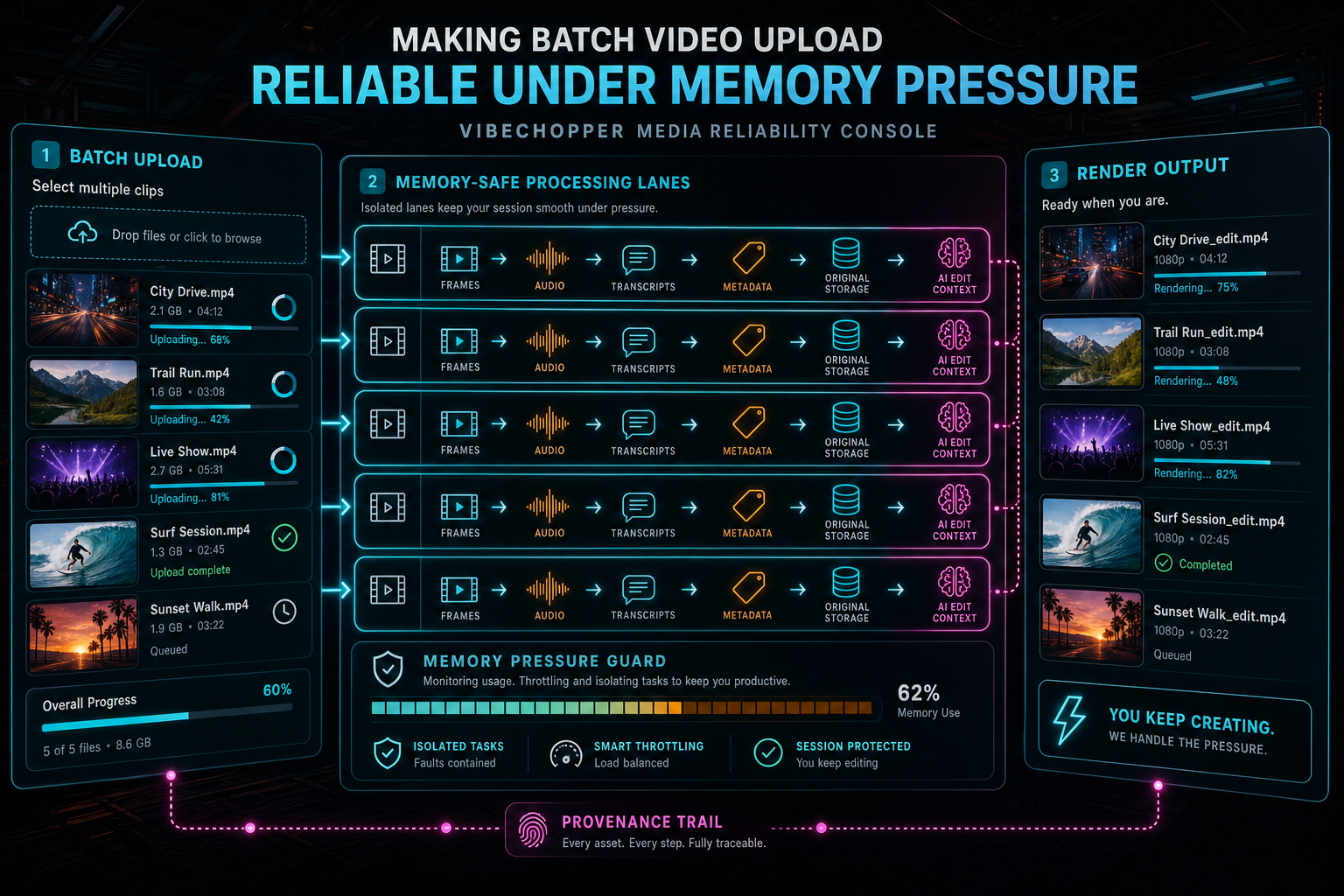
The outcome is simple for creators: select several clips, watch progress, and keep editing while the platform handles pressure.
Try the workflow
Open every feature from this post in the editor
These panels collect the features discussed above. Sign in once, finish your profile if needed, then the editor opens the first highlighted surface and walks through the tutorial.
Step 1
Upload footage with progress you can trust
Watch large video uploads, processing, transcript work, and original-file storage from one monitor.
Upload a real shoot →Step 2
Open the media asset graph
See generated audio, rendered assets, source clips, metadata, and provenance in the media panel.
Explore your media graph →Step 3
Try voice-driven timeline edits
Describe the edit you want and let VibeChopper translate intent into timeline changes.
Talk a cut into shape →Step 4
Render a verified timeline
Export a project through the same storage-backed render path described in this article.
Render a timeline free →