
Long Uploads Need a Product Model
A small image upload can get away with a single progress bar. A real video editor cannot. When a creator drops a batch of large clips into VibeChopper, the product is doing several kinds of work at once: reading media metadata, extracting frame samples, uploading compressed frame artifacts, extracting and uploading audio, transcribing dialogue, generating a title and description, optionally storing the original source file, and repairing missing derived media on the server when browser processing cannot finish. Upload a real shoot
Those jobs do not share one clock. Frame extraction is CPU and codec sensitive. Frame upload is request and object-storage sensitive. Transcription depends on durable audio. Original-file upload is bandwidth heavy and can continue after lightweight artifacts are already useful. Server repair may start only after the original file lands. If the UI collapses all of that into one percent, it lies to the user. Worse, it gives the system no reliable way to recover after refresh, network loss, memory pressure, or codec fallback.
The VibeChopper upload session work exists because uploads are not merely transport. They are a product state machine. The evidence is spread across shared/schema.ts upload session tables, the /api/upload-sessions routes in server/routes.ts, storage methods in server/storage.ts, client/src/lib/uploadMonitorModel.ts, client/src/lib/uploadResumeStorage.ts, the batch upload UI, and the focused upload monitor model tests. Together they turn long uploads into something visible, resumable, and auditable.
The public promise stays simple: upload footage with progress you can trust. The implementation underneath is intentionally more precise. A user should be able to see which file is active, which subprocess is waiting, which original bytes are resumable, which server repair task is pending, and which action is safe to take. That clarity is what keeps a browser-based AI video editor from feeling fragile when the footage is big and the network is ordinary.
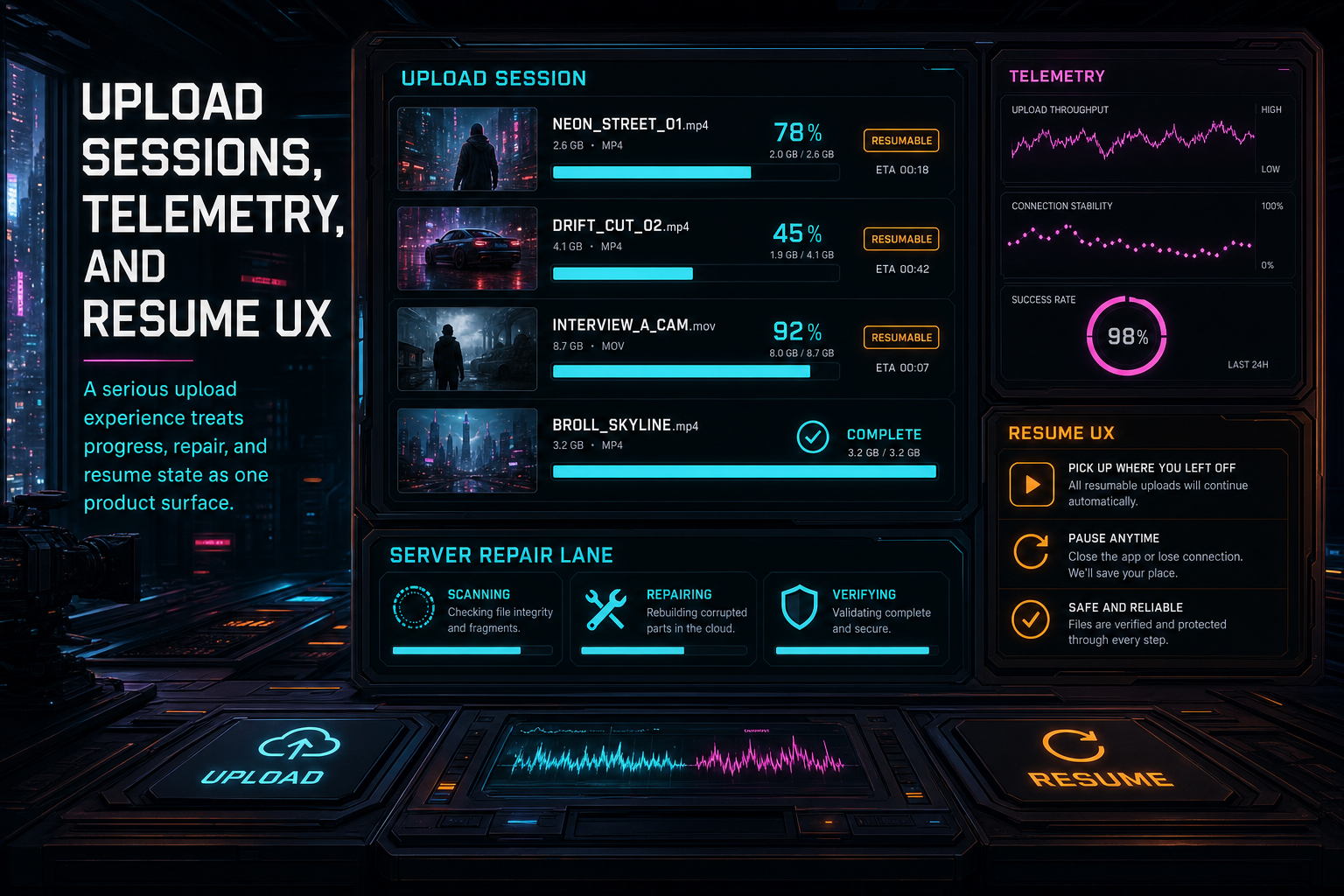
A serious upload experience treats progress, repair, and resume state as one product surface.
Sessions Give Uploads a Durable Shape
The server-side upload session model starts with a narrow contract. The browser posts to /api/upload-sessions with a project ID and a device fingerprint. The route authenticates the user, cleans up stale sessions, checks whether the same device already has an active session for the same project, and either reuses that session or creates a new one. The session stores user ownership, project scope, device session ID, device ID, device type, operating system, browser, network type, status, video count, heartbeat time, completion time, and retention metadata.
That sounds administrative until you look at the recovery behavior it enables. If a tab refreshes, a second editor surface opens, or another device needs to know whether an upload is active, the product has a durable row to ask about. The active upload endpoint can return current sessions for the authenticated user. A heartbeat endpoint can keep a session alive without rewriting every file row. Deleting a session marks it completed with an ended reason and retention expiry rather than pretending it never happened.
Each file in the batch has its own upload_session_videos row. The route that updates videos receives the current client batch state and upserts records by video ID when possible, or by stable filename and size when a video row does not exist yet. It records file name, file size, MIME type, MD5, local ID, client batch ID, stage, progress, frames extracted, frames uploaded, frames analyzed, total frames, audio progress, transcription progress, original upload progress, error, and metadata. It also prunes rows that are no longer in the current batch view.
This per-file model matters because a batch rarely fails as a batch. One file can be complete, one can be waiting on original chunks, one can need server frames, and one can be blocked by a reselect-file prompt after refresh. The monitor needs to show those states side by side without converting them into an average that helps nobody.
The routes also publish progress over the upload session bus for server-sent event listeners. That stream gives other authenticated surfaces a way to observe progress without polling every row. The database is the durable source, the event stream is the live signal, and the monitor model is the client-side translation layer. Each piece has a clear job.
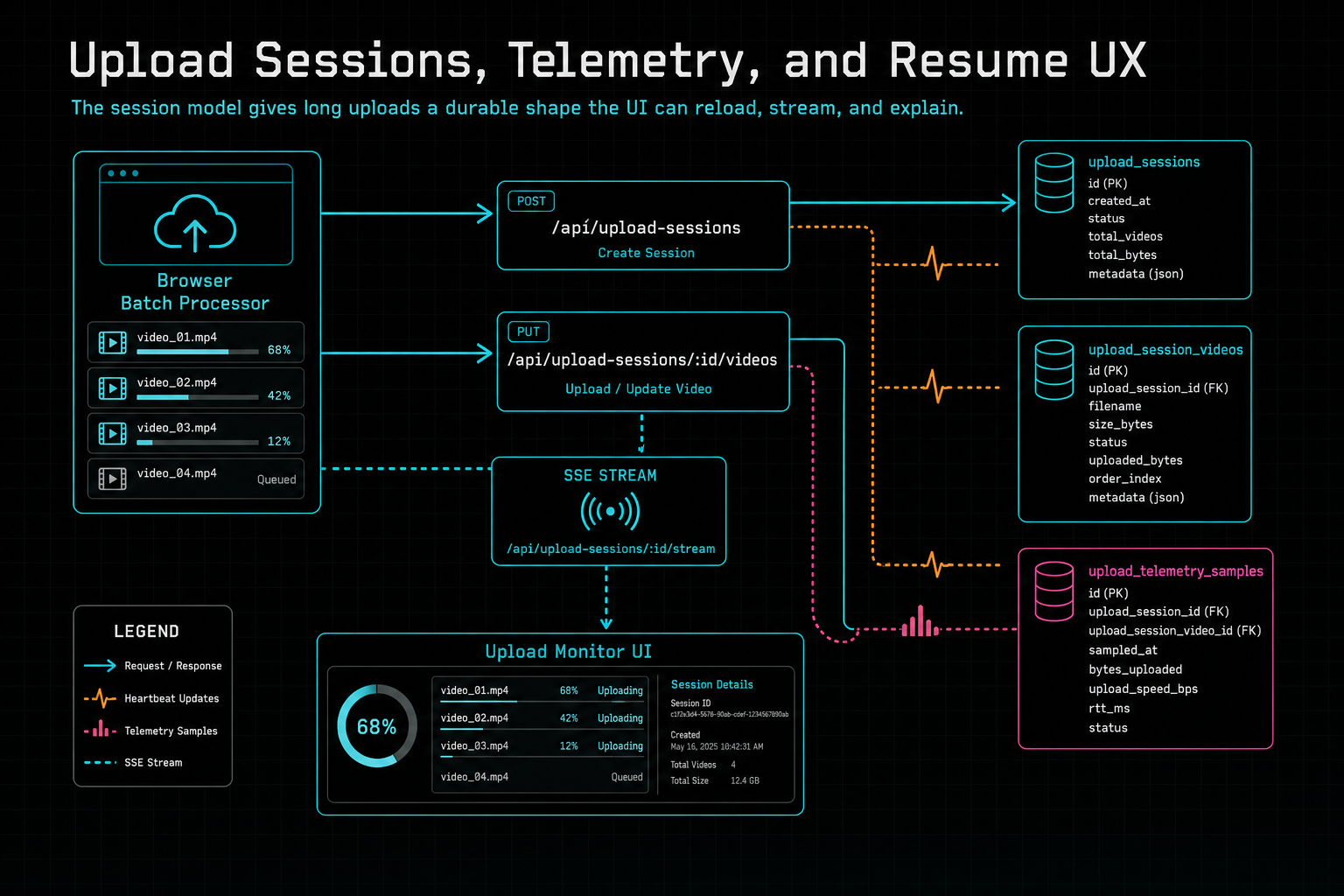
The session model gives long uploads a durable shape the UI can reload, stream, and explain.
Telemetry Is Not Just Logging
Telemetry earns its place only when it changes product behavior. VibeChopper collects upload telemetry samples during the same progress update that upserts session video state. The route looks for a telemetry object on each video, ties the sample to the user, project, upload session, upload session video, optional video row, local ID, file name, file size, stage, uploaded bytes, total bytes, bytes per second, predicted ETA, elapsed time, actual duration, sample kind, connection context, device context, upload breakdown, and request context. Send feedback with context
That list is deliberately grounded in upload decisions. Throughput and byte counts power ETA. Stage and breakdown make it possible to distinguish artifact work from original upload. Connection and device fields help explain why one environment repeatedly resumes while another completes cleanly. Request context helps operations correlate reports without asking the user to describe their network headers by hand. This is not a vanity analytics feed. It is infrastructure for support, repair, and better progress prediction.
The upload monitor model consumes related ETA and status data through a plain TypeScript input, not React state. That makes the core logic testable. The model can calculate total bytes, transferred bytes, remaining bytes, bytes per second, artifact ETA, original ETA, whole ETA, active counts, queued counts, completed counts, failed counts, resumable counts, and an artifact-first timer state. The UI can then present a calm, consistent monitor instead of spreading calculations across a dialog.
The distinction between artifact ETA and original ETA is important. VibeChopper often wants lightweight artifacts first because frames, audio, transcript, and metadata make the clip useful to the editor quickly. The full original source file is still valuable for server repair, export, sync, and durable media workflows, but it can have a different upload timeline. Users need to know when the editor can start understanding footage and when the original bytes will finish backing that footage.
Telemetry also feeds the human side of reliability. When a creator reports that a large upload got stuck, the product can point to a stage, file, throughput pattern, retryable step, server repair lane, or resumable original upload. That is the same philosophy behind the DATA remediation work elsewhere in VibeChopper: turn incidents into structured state instead of anecdotes.
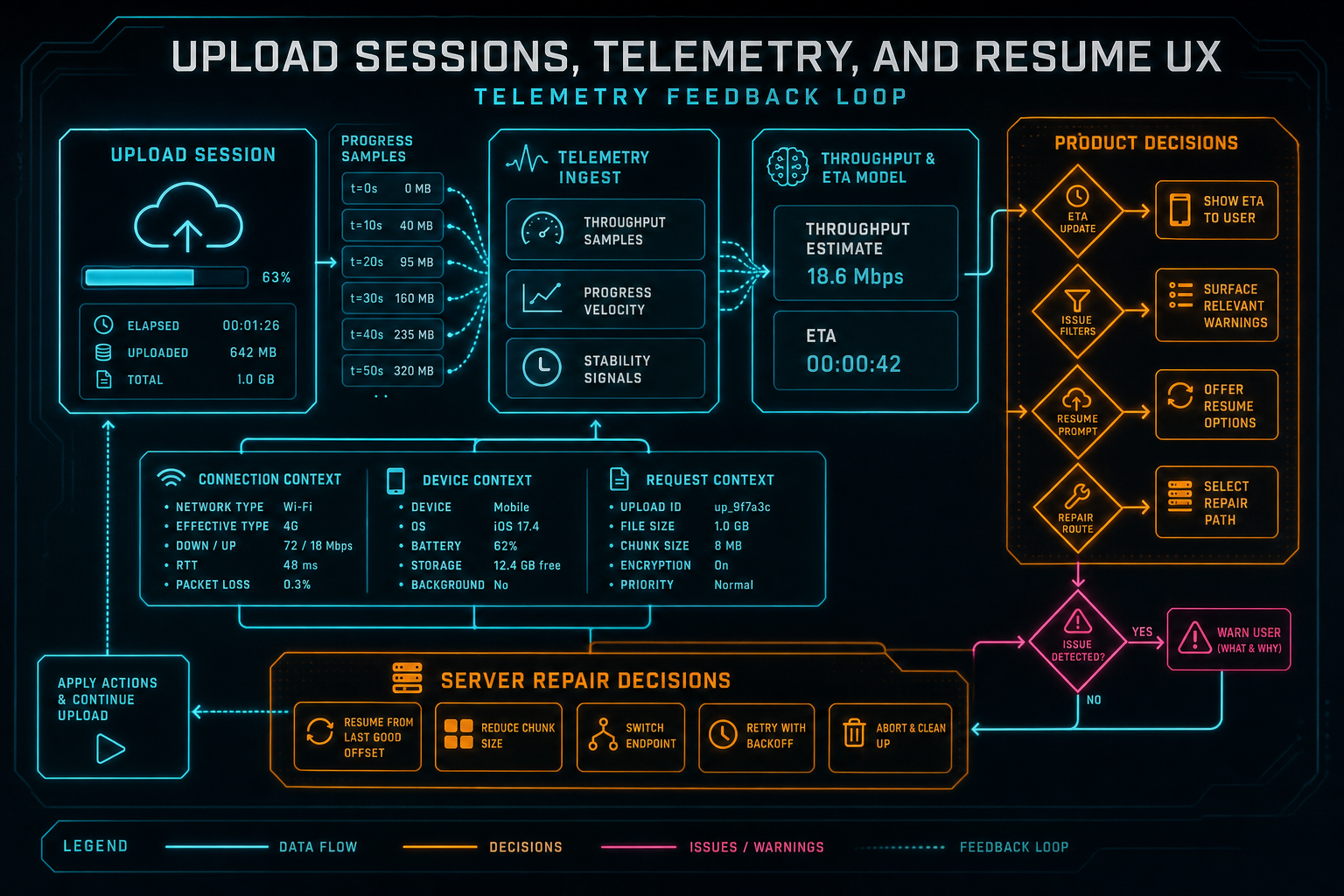
Telemetry is useful when it feeds decisions: ETA, issue filters, resume prompts, and repair routes.
The Monitor Model Is the Contract
client/src/lib/uploadMonitorModel.ts is the contract between messy processing state and readable UX. It takes lightweight video processing records plus optional upload status and returns a stable UploadMonitorModel. That model contains files, a summary, filter buckets, and safe action hints. Each file contains phases, subprocesses, filters, retry flags, resumable flags, status, percent, and issue text. Upload a real shoot
The model divides work into three phases: client artifacts, original upload, and server repair. Client artifacts include metadata, frame extraction, frame upload, frame AI analysis, audio extraction, audio upload, transcription, and title-description generation. Original upload includes original hash and original chunks. Server repair includes server frames, server audio, server transcript, server metadata, and proxy. This split reflects the real pipeline. A browser can finish artifacts while original chunks continue. Server repair can wait on a stored original. A proxy can complete after other derived media is ready.
Each subprocess gets a status vocabulary: done, active, waiting, warning, error, skipped, or resumable. That vocabulary is small enough for the UI to render consistently and rich enough to avoid false choices. A codec problem can be a warning because server extraction may recover it. Partial original bytes can be resumable. Server work can be active without implying the browser is still doing local extraction. A skipped proxy is not a failure.
The model also owns filters. Files can appear under active, issues, queued, resumable, complete, and all. This is a product decision, not just a convenience method. In a large batch, the user should be able to ask practical questions: What is still moving? What needs attention? What can I resume? What finished? The filter buckets are generated from the same status logic as the cards, which keeps the monitor honest.
The focused tests prove the core cases without mounting the dialog. One test maps active client artifact subprocesses into the client artifacts phase. Another marks partial original bytes as resumable and emits the reselect-files action hint. Another maps server repair work and codec fallback warnings. Another checks summary counts, ETA fields, buckets, and artifact-first timer state. That test shape is the right one for upload UX: keep the state machine deterministic before the UI makes it pretty.
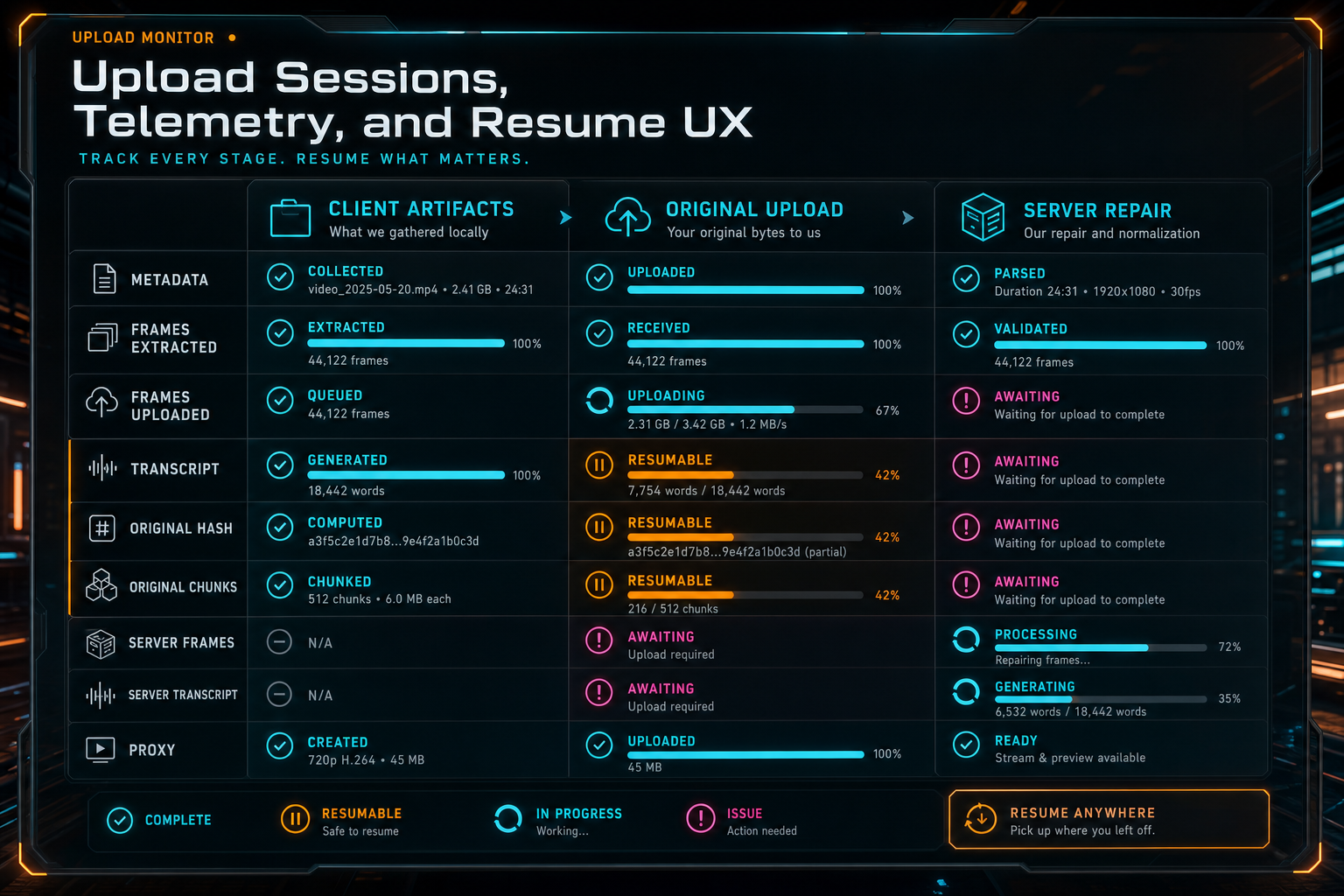
The monitor separates client artifacts, original bytes, and server repair because they fail and recover differently.
Resume UX Starts in Browser Storage
Resume UX is constrained by browser reality. A web app cannot assume it can reopen a local file after refresh. It cannot assume every browser supports the same persistent storage features. It cannot assume storage quota is generous or that permissions will still be granted. VibeChopper handles that by separating resume artifacts, file handles, capabilities, and safe actions.
client/src/lib/uploadResumeStorage.ts defines a small persistence layer for upload recovery. It can detect IndexedDB, OPFS, File System Access support, persistent storage support, current persistence state, quota, and usage. It can request persistent storage. It can store artifacts with keys scoped by project ID, batch ID, file ID, artifact kind, and artifact ID. Artifact kinds include frame, audio, transcript, metadata, thumbnail, original chunk, and custom. The storage backend can be IndexedDB, OPFS, or automatic selection.
That design gives VibeChopper room to preserve useful work even when the full original cannot continue automatically. A generated transcript, compressed frame, chunk record, or metadata artifact can survive long enough to avoid repeating expensive work. When a file handle is available and permission is granted, the product can resume from the local file. When the browser cannot reopen the handle, the monitor can say what the user needs to do: reselect files to resume original bytes.
That action hint is explicit in the monitor model. If original bytes are partially uploaded but the upload is no longer active, the file becomes resumable and the model emits reselect_files_to_resume_originals. The reason is clear: browsers cannot reopen local file handles after refresh. This is better than a silent retry loop. The product tells the user which file needs attention and why.
The resume system is not trying to beat browser security. It works with it. Ask for persistence when available. Use OPFS or IndexedDB for artifacts. Store file handles when the platform permits. Check permission before reading. Fall back to a user-driven reselect flow when automatic resume is not allowed. That makes the UX credible because it reflects the actual platform contract.
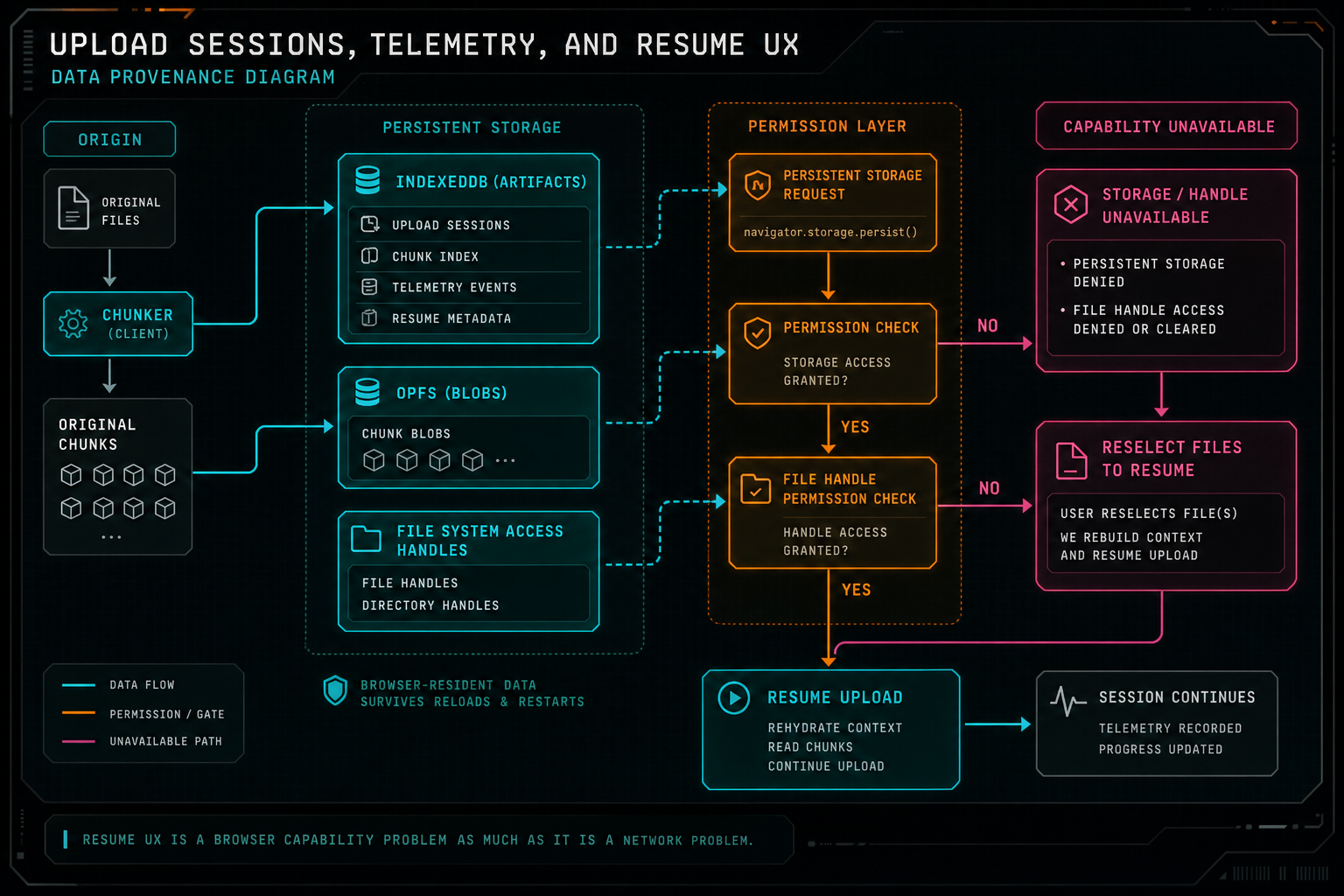
Resume UX is a browser capability problem as much as it is a network problem.
Safe Actions Keep Recovery Understandable
A good upload monitor does not only describe state. It offers the next safe move. VibeChopper's model emits safe action hints for recurring recovery choices: start originals now, retry failed work, continue without originals, reselect files to resume originals, and open details. Each action carries an enabled state, optional file ID, phase, subprocess, confirmation requirement, and reason. Explore your media graph
Those details prevent destructive ambiguity. Continuing without originals is only safe before original byte upload starts, so that action requires confirmation and is tied to the original upload phase. Starting originals needs a video row or hash first, so it can be disabled with a reason. Retrying failed work can point to the current issue text. Reselecting files is enabled when the browser needs user participation to regain local file access.
The same pattern applies to server repair. If browser frame extraction hits an unsupported codec or derived media is missing, the server repair phase can show active steps for frames, audio, transcript, metadata, or proxy. That keeps background work visible without asking the user to understand every route. The monitor can say, in effect: the browser could not finish this part, the server is working on the missing media, and here is the current lane.
This is where upload sessions connect to the broader VibeChopper media system. Original uploads are not just backup copies. They make server-side frame extraction, audio repair, transcript retry, proxy generation, media summaries, and later export workflows more reliable. The upload monitor is the place where that infrastructure becomes legible to the creator.
What Developers Should Copy
If you are building uploads for a browser video editor, do not start with a prettier spinner. Start with a durable session model. Track the upload as a user-scoped session, track each file independently, keep a heartbeat, record why the session ended, and retain enough metadata to recover after refresh or inspect support issues. Make the database row boring and explicit.
Then separate the phases that users experience differently. Client artifacts are not original source bytes. Original chunks are not server repair. Server repair is not AI analysis. Mixing those into one progress number makes every problem harder to explain. A three-phase model gives your UI and your support tools language that matches the pipeline.
Make telemetry operational. Store bytes, throughput, ETA, stage, elapsed time, connection context, device context, and request context only if those fields will help the product make or explain a decision. Then route those fields into summary math, issue filters, retry decisions, and support workflows. Telemetry that never feeds behavior becomes noise.
Treat resume as permission-aware storage, not magic. Persist artifacts where the browser allows it. Use OPFS or IndexedDB deliberately. Store handles when available, check permission before use, and design the reselect-file path as a first-class recovery route. Users forgive being asked to reselect a file when the product explains why and preserves the work it can preserve.
Finally, test the model outside the UI. Upload dialogs are large because they coordinate real files, workers, object URLs, progress events, network requests, auth, and user interaction. The status model should be plain TypeScript. Feed it representative states and assert the phases, filters, counts, ETA fields, retry flags, and safe actions. That is how you keep upload UX from becoming a pile of conditional rendering.
The Result
The finished product behavior is straightforward. A creator selects footage. VibeChopper starts an upload session for the authenticated user and device. Each file reports its own artifact progress, original-byte progress, telemetry, and errors. The session heartbeats while work is active. Progress streams to listeners. The monitor groups files by active, issues, queued, resumable, complete, and all. Safe actions tell the user what can be retried, resumed, skipped, or opened for detail. Upload a real shoot
If the browser can finish all client artifacts, the editor gets frames, audio, transcript, metadata, and original upload progress without drama. If the browser cannot decode, upload, or continue automatically after refresh, the monitor has a vocabulary for that too. It can show server repair. It can ask for a file reselect. It can preserve stored artifacts. It can keep original upload separate from the immediate editing context. It can turn an interruption into a recovery path.
That is the standard VibeChopper needs because the rest of the editor depends on media state. AI edit planning needs durable frames and transcripts. The media panel needs provenance. Render and export paths benefit from original storage. Feedback and remediation flows need enough context to turn a user report into an actionable job. Upload sessions are not an isolated feature; they are the front door to the media pipeline.
Edit videos with your voice based on vibes sounds effortless at the surface. Underneath, a lot of infrastructure has to keep its footing while real files, real browsers, and real networks do uneven things. Upload sessions, telemetry, and resume UX are how VibeChopper keeps that footing. The user sees progress they can trust. The system gets state it can repair. The editor gets the media context it needs to make precise edits.
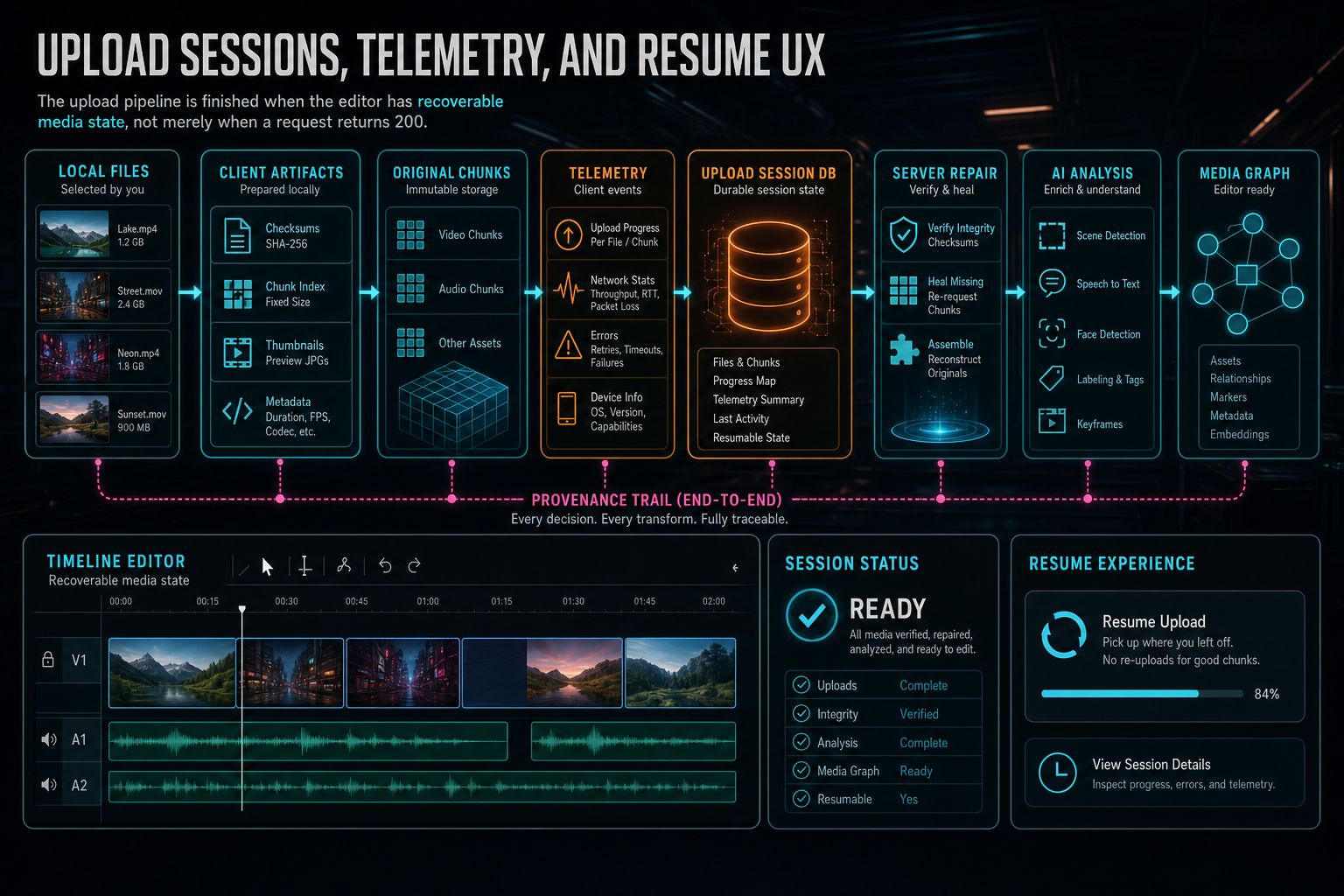
The upload pipeline is finished when the editor has recoverable media state, not merely when a request returns 200.
Try the workflow
Open every feature from this post in the editor
These panels collect the features discussed above. Sign in once, finish your profile if needed, then the editor opens the first highlighted surface and walks through the tutorial.
Step 1
Upload footage with progress you can trust
Watch large video uploads, processing, transcript work, and original-file storage from one monitor.
Upload a real shoot →Step 2
Send contextual feedback
Capture voice or written feedback with project context so issues can become repairable jobs.
Send feedback with context →Step 3
Open the media asset graph
See generated audio, rendered assets, source clips, metadata, and provenance in the media panel.
Explore your media graph →Step 4
Try voice-driven timeline edits
Describe the edit you want and let VibeChopper translate intent into timeline changes.
Talk a cut into shape →