
Browser-First Cannot Mean Browser-Only
VibeChopper is built around a browser-first media workflow. The product can extract frames, compress useful visual samples, prepare audio, show progress, and let the editor start building timeline context without treating every source video as a giant server upload. That design is fast, practical, and respectful of the user's machine. It also has a hard truth baked in: browsers are not identical video processing environments. Upload a real shoot
A video file that plays on one device can fail to decode cleanly on another. A codec can be supported by the operating system but not by the browser path the app needs for canvas extraction. A large batch can run into memory pressure while several files are being processed. A frame can be drawn successfully but fail to upload after retries. Mobile browsers add more variability around memory, hardware decode, background throttling, and network state. If frame extraction is the gateway to AI video understanding, those misses cannot turn into a dead end.
That is why VibeChopper has a server-side frame extraction fallback. The preferred path still starts in the browser. The browser extracts frames from the local file, compresses them, streams them to the server in small batches, and keeps only a lightweight preview set in memory. When that path produces durable frame records, the product uses it. When it cannot, the editor routes the video through an authenticated server endpoint that uses FFmpeg to extract frames, stores those frames through object storage, and creates the same database records the AI analysis pipeline expects.
The evidence for this post lives in client/src/hooks/useBatchVideoProcessor.ts, server/routes.ts, and audit commit 298357b. The client hook tracks whether server-side extraction was used, decides when browser extraction has failed, and keeps the upload card in a recoverable state. The server route POST /api/videos/:id/extract-frames-server performs the fallback extraction, stores frame images, creates frame records, updates thumbnails, and can kick off AI analysis. The interesting part is not just that FFmpeg exists on the server. The interesting part is how the product makes both paths converge on one durable media model.
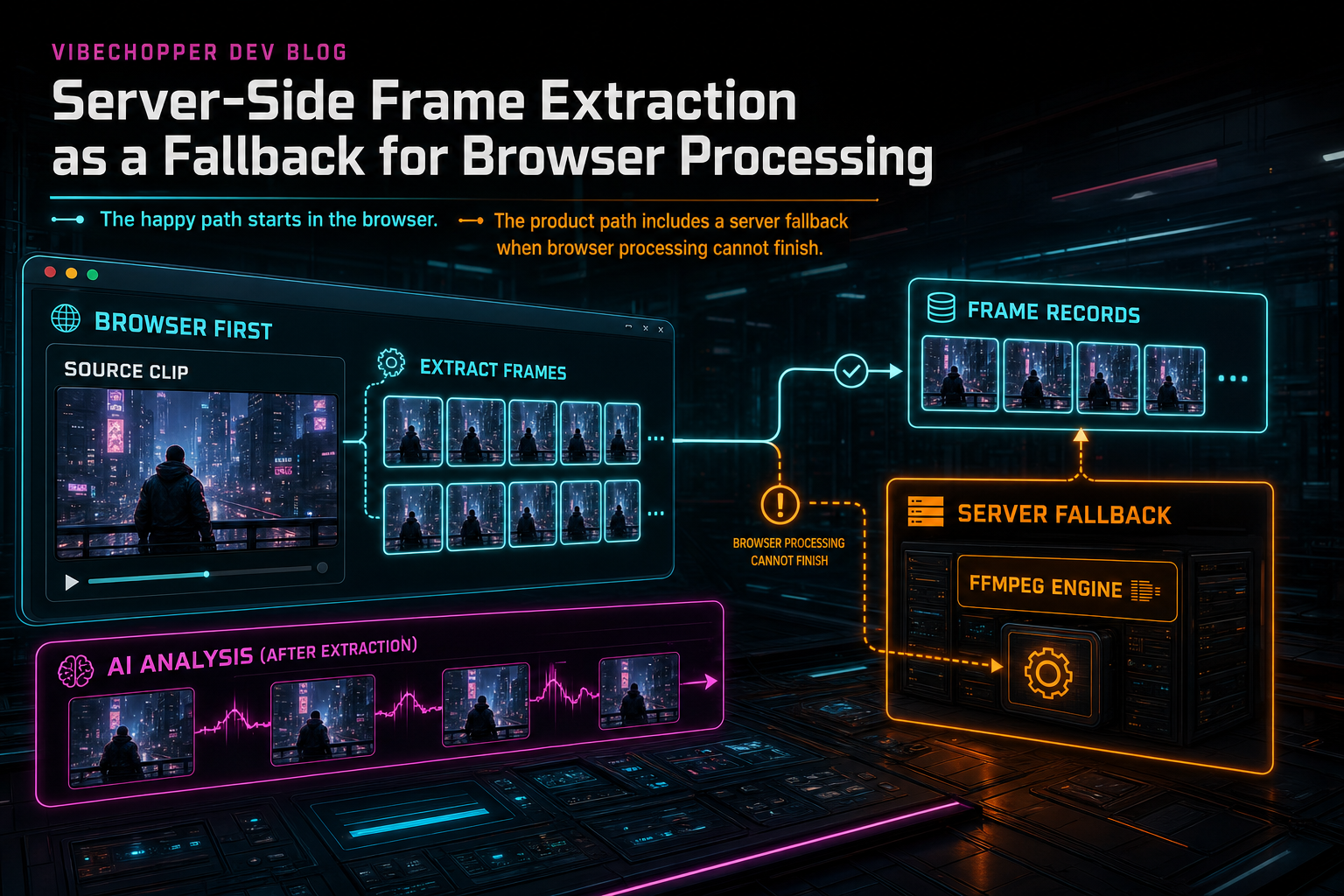
The happy path starts in the browser. The product path includes a server fallback when browser processing cannot finish.
The Browser Path
The browser path is optimized for responsiveness and memory discipline. The hook estimates frame count from the video duration and extraction interval, seeks through the source, draws frames to a canvas, compresses them as JPEG blobs, and uploads them in small batches. The upload starts during extraction instead of waiting for every frame to sit in memory. That detail matters for real footage, where a few long clips can become hundreds of image blobs.
The hook also uses a shared frame memory limiter. The limiter is simple by design: it counts frames currently held in memory and makes extraction wait when the total would exceed the configured cap. For a batch uploader, limiting per-video concurrency is not enough. Ten videos extracting a few frames each can still exhaust memory if all of those frames stay resident. VibeChopper limits the resource that actually grows: compressed frame blobs waiting to upload.
Progress state is tracked at a granular level. The upload card knows how many frames were extracted, how many were uploaded, how many were analyzed, how many bytes were extracted and uploaded, whether audio work is waiting or complete, whether transcript work has finished, and whether original-file upload is still active. That lets the UI tell a more accurate story than a single spinner could. It also gives the fallback logic enough state to recover without pretending all processing stages are the same.
On the happy path, uploaded frames are invalidated through TanStack Query so the frame panel and analysis flows can refresh. If AI analysis is enabled, the hook asks the server to analyze missing frames after upload. That keeps analysis tied to durable frame records rather than temporary canvas data. The browser does the lightweight media sampling. The server owns persistence, user scoping, object storage, and model calls.
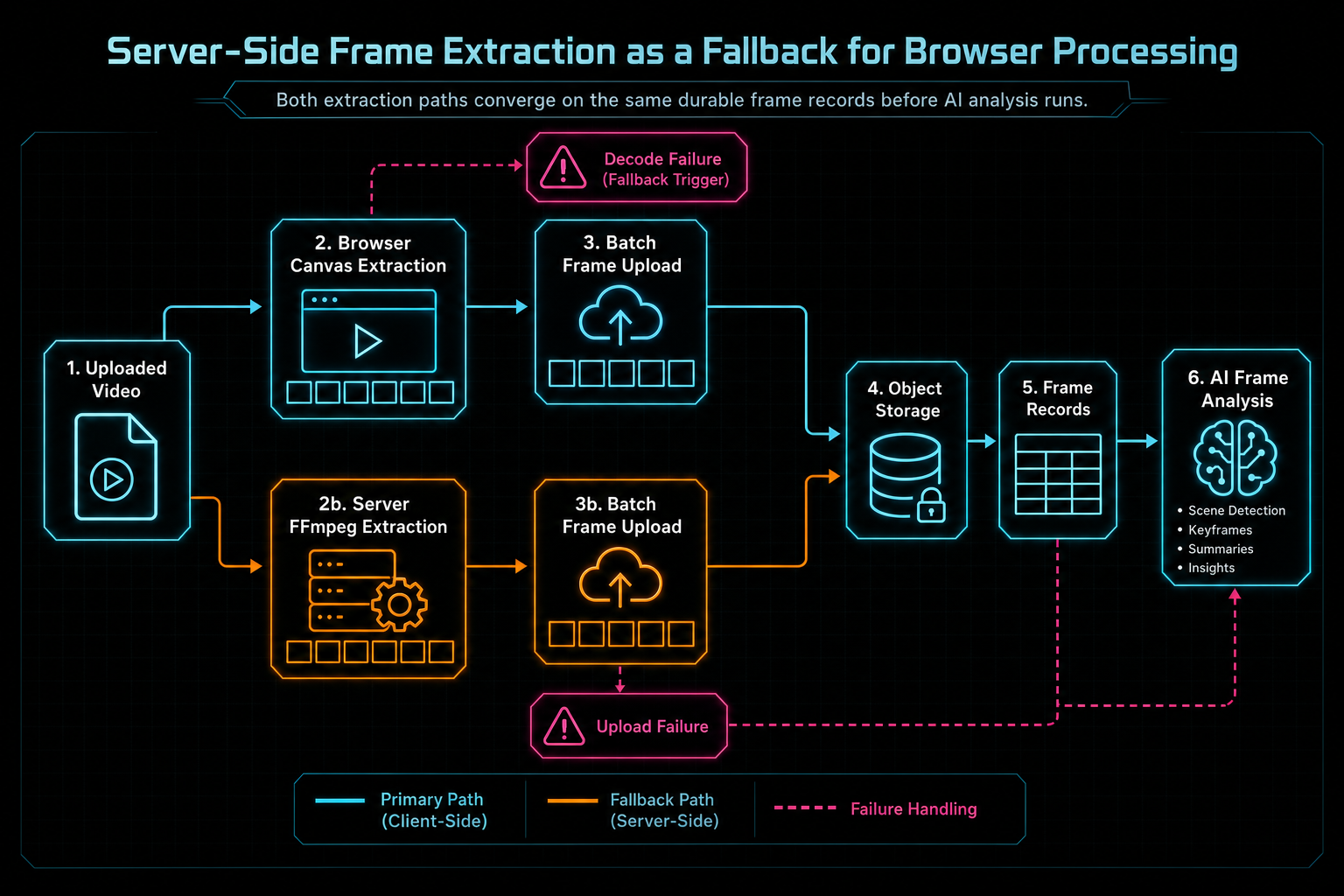
Both extraction paths converge on the same durable frame records before AI analysis runs.
Where Browser Extraction Breaks
Browser extraction can fail before it really starts. If metadata cannot be loaded, if a codec is unsupported, or if the video element cannot seek and draw to canvas, the client cannot produce frames. That is the obvious case. The less obvious case is partial progress. A browser can extract several frames, then start skipping frames as seeks fail. It can create blobs, then fail every upload attempt. It can upload a subset of frames that does not cover the source duration well enough to be useful.
VibeChopper treats uploaded frames, not merely extracted frames, as the success signal. The client extraction function returns success based on durable uploaded frames. If frames were drawn locally but none reached the server, the processing result is a failure for product purposes. That distinction keeps the UI honest. A frame that existed briefly in browser memory cannot support AI analysis, project reload, search, thumbnails, transcript-aware editing, or media provenance.
When extraction or upload returns no usable frames, the hook branches. If the original upload mode is active, the product can leave server-side frame extraction pending and let the stored original feed server repair after upload completes. If original upload is not part of the current flow, the hook immediately attempts server-side extraction by posting the video file to the fallback endpoint. In both cases, the user should see that processing continues rather than watching a card collapse into a vague error.
The fallback state is explicit. The hook marks serverSideExtraction, clears codec unsupported flags when the fallback route is in play, sets background processing when work needs to continue outside the immediate client attempt, and records the last error when a repair path fails. This is not decoration. It is the difference between a product that can explain what is happening and one that only knows something went wrong.
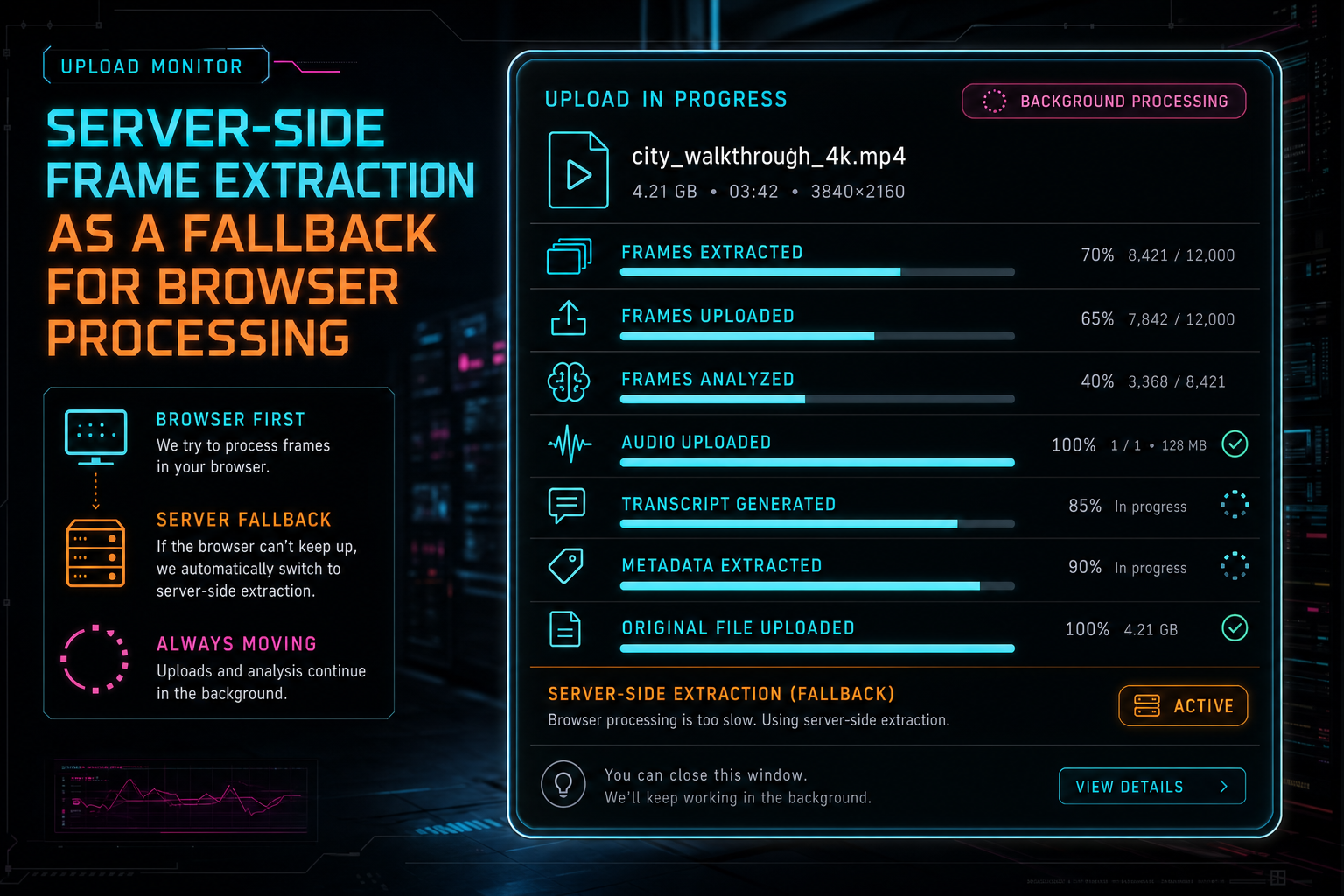
The upload card tracks frame, audio, transcript, metadata, original-file, and background processing state separately.
The Server Route
The fallback endpoint is intentionally boring in the right ways. It is authenticated. It resolves the user ID from the request. It checks that the video exists for that user before doing media work. It accepts intervalSeconds, maxFrames, analyze, and useStoredOriginal. It can work from a multipart video upload, or it can download the stored original from object storage when the client no longer needs to send the full file again. Explore your media graph
Before extracting, the route looks for existing frames. If the existing set appears to cover the source duration, the route reuses it and returns the existing records. If there are frames but they do not cover the source, the route deletes the partial set before regenerating. That avoids a common media-pipeline trap: mixing stale partial output with new output and calling the result complete. Frame extraction is not useful just because at least one image exists. The frame set needs to be coherent enough for the source video.
When extraction runs, the route calls the server-side extractFrames helper from server/videoProcessor.ts, which uses FFmpeg. Each extracted frame is uploaded to object storage under a user and video scoped path. The server creates frame records with timestamps and image URLs. If frames exist, it sets the video's thumbnail to the middle frame. Then, if analysis was requested, it starts asynchronous AI analysis in small batches by downloading frame buffers from object storage, converting them to base64, and updating frame descriptions as results come back.
That final convergence is the important product move. Whether a frame came from browser canvas extraction or server-side FFmpeg, the rest of the system sees durable frame records. The media graph can show them. The editor can use them. AI metadata generation can summarize them. Natural-language edit planning can reason over them. The user does not need to know which decoder path won unless the upload monitor is explaining processing state.
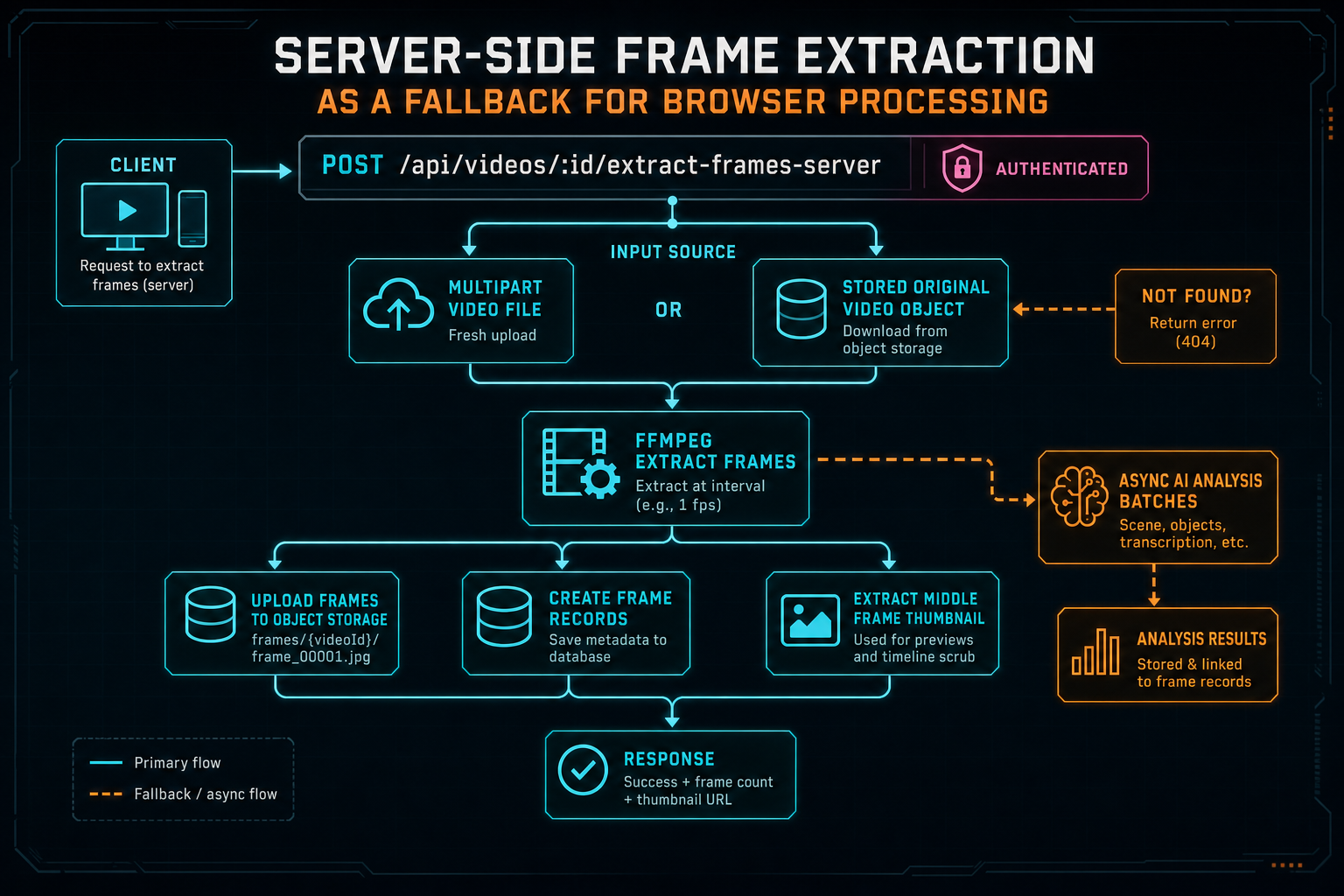
The server endpoint can accept a fresh upload or download the stored original, then extract frames with FFmpeg.
Stored Originals Change the Retry Story
The most reliable fallback is not always an immediate re-upload. Once the original video is safely stored, the server can derive frames and audio from that object without asking the browser to resend a huge file. That is why the client distinguishes between direct fallback with a multipart file and fallback that uses useStoredOriginal. The same server route supports both routes. Upload a real shoot
This matters for long uploads and refreshes. A user can start processing a large file, lose a tab, come back, and still have a path to derived media if the original upload completed or can resume. The hook loads existing artifacts, hydrates frames, transcript status, generated metadata, and original upload status from server state, then decides which gaps remain. If frames already exist, it reuses them. If audio exists but transcript work is missing, it can retry transcription from stored audio. If server-derived media is incomplete, it can queue reconciliation instead of forcing the browser to repeat work.
The pattern is bigger than frame extraction. Original storage turns media processing from a one-shot client event into a repairable server workflow. A browser-first app still benefits from having durable source assets when the user opts into upload. Server-side frame extraction becomes one of several derived-media jobs that can be retried, reconciled, or completed after the initial UI flow has moved on.
That is why the upload monitor CTA belongs in this article. Frame fallback is not a hidden technical checkbox. It is part of a broader upload experience where users can see original-file status, derived artifacts, background processing, and progress that survives imperfect browser conditions.
State Recovery Is the Hard Part
The easiest version of a fallback is a try-catch block. The product-grade version is state recovery. VibeChopper has to decide whether frames already exist, whether they are complete enough, whether partial output should be deleted, whether analysis should be retried, whether the UI should show a final error, and whether background server processing should continue after the immediate client task returns.
The client hook contains small helpers for those decisions. reusePersistedFramesIfAvailable reloads artifacts and uses existing frame records when possible, then asks the server to analyze missing descriptions if analysis is enabled. markServerFrameExtractionPending changes the upload card into a non-fatal background processing state instead of failing the card outright. scheduleServerDerivedMediaRepair queues server reconciliation and hydrates the video state again after the repair attempt.
Those details are not glamorous, but they are where reliability lives. Without reuse, a refresh can cause duplicate work. Without partial-frame cleanup, the editor can believe a few early frames represent the whole source. Without pending state, the UI can turn a recoverable server job into a scary error. Without query invalidation, the media panel and frame grid can show stale state even after the backend did the right thing.
A good fallback route should not merely succeed in isolation. It should leave the app in a state that every consumer understands. In VibeChopper, that means uploaded frame counts, analyzed frame counts, thumbnail URLs, media summaries, transcript fields, generated metadata, and project queries all need to converge after fallback processing. The user asked to upload footage and edit it by vibe. They should not have to supervise a distributed media pipeline.
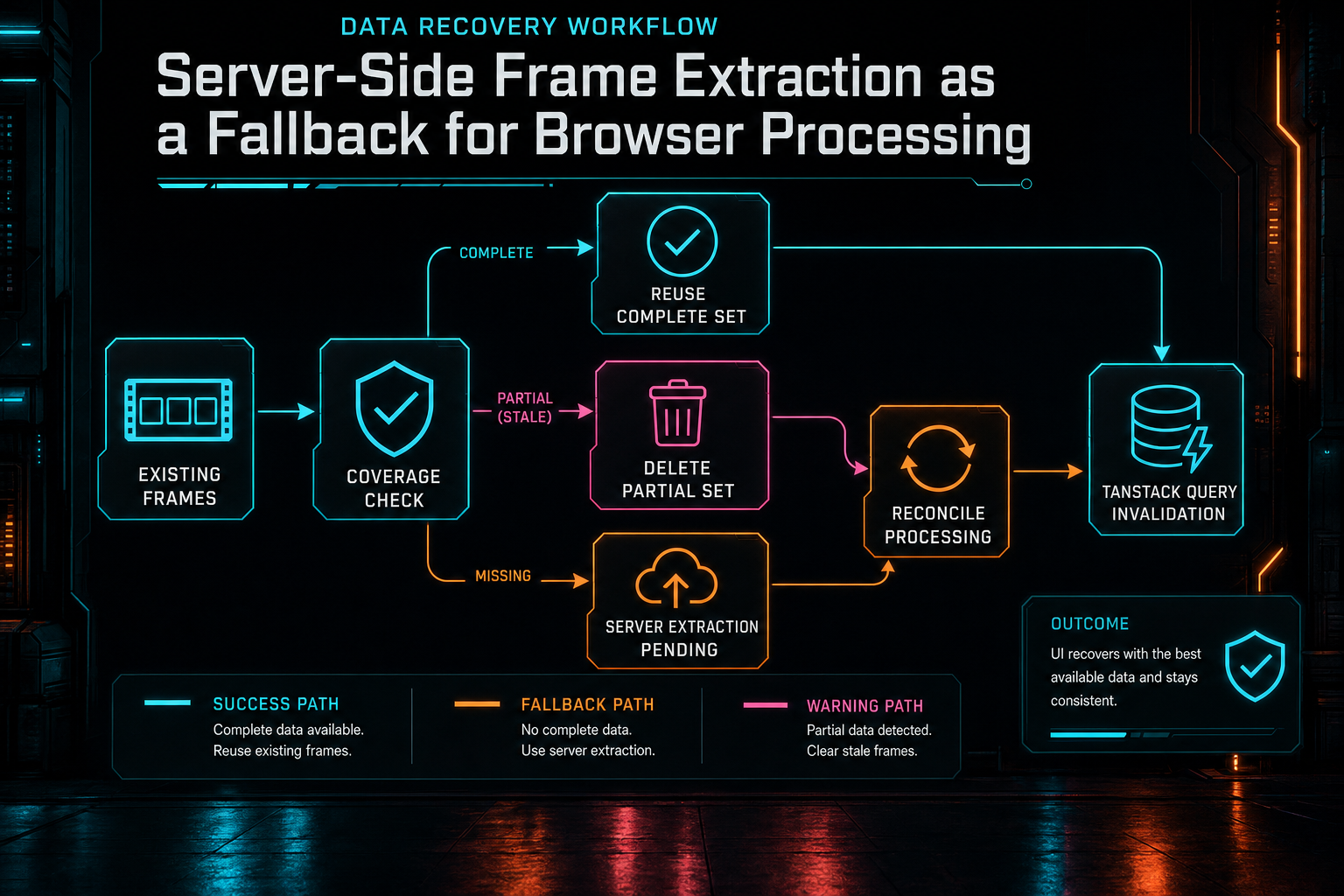
Fallback is also a state-management problem: reuse complete work, clear partial work, and keep the UI recoverable.
AI Analysis Needs Durable Frames
Frame extraction is not only a preview feature. It is one of the inputs that lets VibeChopper understand video content. Frame descriptions give AI edit planning visual context. They help metadata generation name the footage. They give later systems a way to search, summarize, and reason over a clip without re-decoding the full source every time. A missing frame set weakens the whole editing stack. Talk a cut into shape
That is why durable frame records are the boundary. Browser memory is temporary. Canvas output is temporary. A local object URL is temporary. A frame record with a timestamp, object-storage image URL, optional description, and user-scoped video ID is product state. The AI analysis endpoint can fetch that frame from storage, analyze it, write the description back, and let every downstream feature share the same result.
The server fallback preserves that boundary. It does not return loose images for the client to manage. It uploads each extracted JPEG, creates frame rows, and optionally starts analysis. From there, the same provider harness and AI edit run philosophy can apply: model work happens behind server contracts, validation, ownership checks, and traceable artifacts. The user sees a simple promise: tell the editor what you want, and it has enough context to act.
The nearby CTA points to voice-driven edits because this infrastructure is ultimately in service of editing. Server-side frame extraction is not an end-user feature by itself. It is the safety rail that keeps visual context available when the browser cannot produce it locally.
What Developers Should Copy
If you are building a browser video editor, copy the shape of this system more than the exact implementation. Start with browser processing when it gives users speed and privacy advantages. Stream work in small batches. Limit the memory resource that actually grows. Treat uploaded artifacts, not temporary local artifacts, as the success condition. Keep frame records durable and user-scoped.
Then build a server fallback that writes to the same canonical model. Do not create a second kind of frame just because FFmpeg produced it. Do not let the fallback return a one-off response shape that the rest of the editor has to special-case forever. The fallback should converge on the same object storage paths, database rows, thumbnails, analysis queues, progress fields, and query invalidation behavior as the primary path.
Make partial progress explicit. Reuse complete work. Delete or replace incomplete derived output when it cannot represent the source reliably. Report pending background work as pending, not as failure. Record enough error detail for repair flows, but keep the user's current editing path calm. Most media processing bugs become worse when the UI has only two states: done or broken.
Finally, separate decoding from intelligence. FFmpeg can recover frames. The AI analysis system can describe frames. The editor can plan with those descriptions. The media graph can preserve the provenance. Each layer should do its job and hand off typed state to the next layer. That separation is what lets VibeChopper stay browser-first without being fragile.
The Result
The final product behavior is straightforward. Upload footage. Let the browser extract frames when it can. If the browser cannot decode, cannot upload, or cannot produce a useful frame set, let the server take over. Store the resulting frames in object storage. Create frame records. Set a thumbnail. Analyze frames when requested. Rehydrate the UI from server truth. Keep the media pipeline moving. Explore your media graph
That is the right tradeoff for an AI video editor. Browser-first processing keeps the common path fast and responsive. Server-side FFmpeg fallback keeps uncommon media conditions from becoming user-facing dead ends. Stored originals make derived media repairable. Durable frame records make AI analysis reusable. Progress state makes the experience understandable.
VibeChopper's product promise is simple: edit videos with your voice based on vibes. The engineering underneath that promise is less mystical. It is a chain of small contracts that keep media state reliable when real video files, real browsers, and real networks refuse to behave perfectly. Frame fallback is one of those contracts. It turns failure into another route through the pipeline.
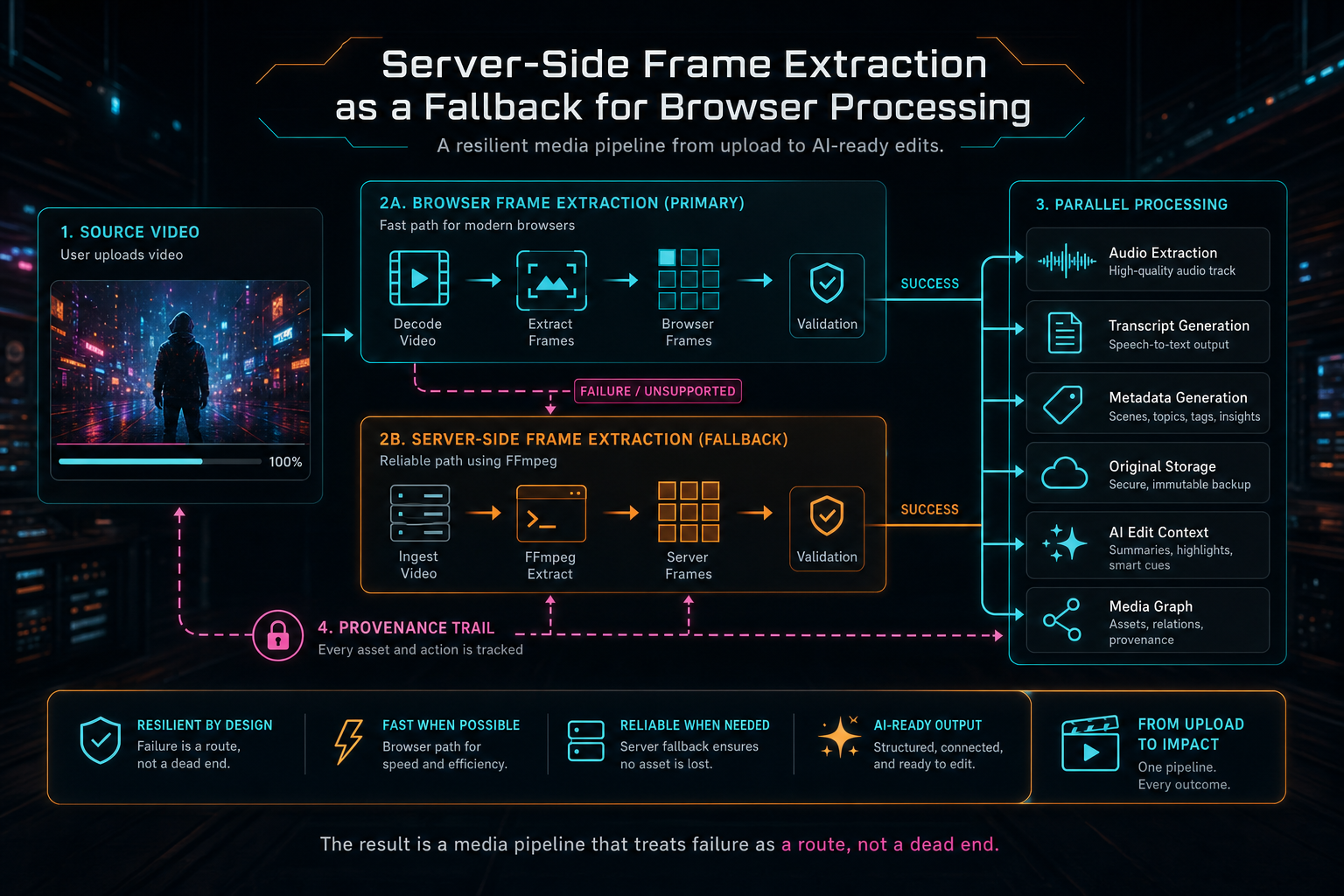
The result is a media pipeline that treats failure as a route, not a dead end.
Try the workflow
Open every feature from this post in the editor
These panels collect the features discussed above. Sign in once, finish your profile if needed, then the editor opens the first highlighted surface and walks through the tutorial.
Step 1
Upload footage with progress you can trust
Watch large video uploads, processing, transcript work, and original-file storage from one monitor.
Upload a real shoot →Step 2
Open the media asset graph
See generated audio, rendered assets, source clips, metadata, and provenance in the media panel.
Explore your media graph →Step 3
Try voice-driven timeline edits
Describe the edit you want and let VibeChopper translate intent into timeline changes.
Talk a cut into shape →Step 4
Render a verified timeline
Export a project through the same storage-backed render path described in this article.
Render a timeline free →