
An Agent API Is Not Admin Access
The fastest way to make an AI agent look powerful is to give it broad access to application internals. Let it read project rows, patch timeline JSON, invent storage paths, call FFmpeg, and write the result back. That can produce a convincing demo. It is also the wrong boundary for production video editing software. Talk a cut into shape
A video editor API for AI agents should behave like a set of native editor controls. The agent can request a trim, split a clip, add a transition, generate a music bed, insert captions, inspect media readiness, or queue a render. It should not bypass the same ownership, validation, timeline, storage, and render rules that protect human users. The agent is a caller of product tools, not an administrator of the product database.
VibeChopper is designed around that distinction. Natural language can drive real timeline changes, but the system keeps deterministic control over what those changes mean. A prompt becomes a structured plan. A plan becomes validated tool calls. Tool calls become editor events and media artifacts. A render becomes a verified object storage output. The API boundary is where model intent is translated into product-owned behavior.
That boundary matters for users because video editing has high consequence density. One bad clip ID can delete the wrong shot. One stale timeline write can overwrite a manual adjustment. One generated asset without provenance can make a project impossible to explain. One duplicate render request can waste compute and confuse review state. AI agents need useful power, but that power has to be shaped by the editor's contracts.
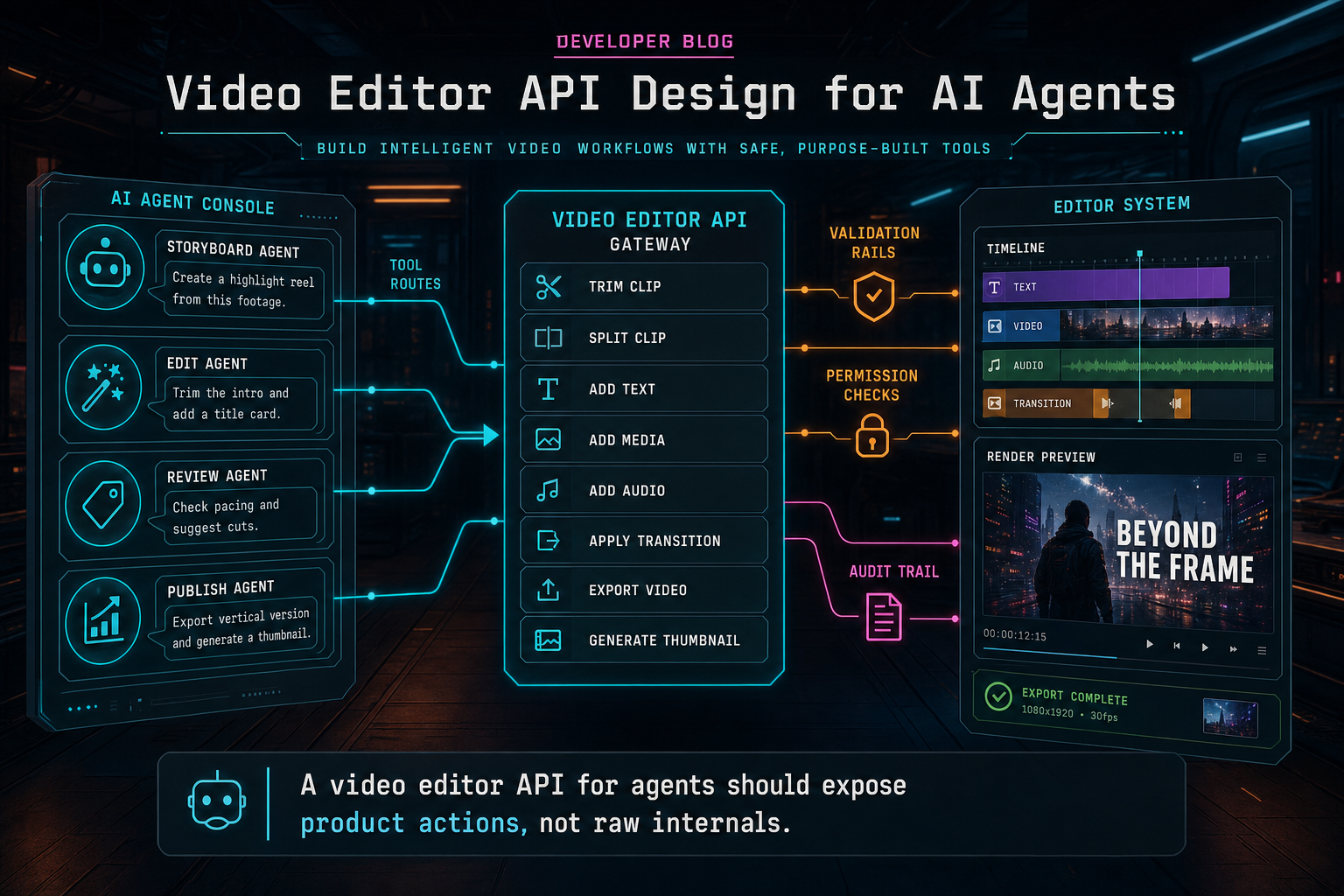
A video editor API for agents should expose product actions, not raw internals.
Start With Product Tools, Not Database Mutations
The first design decision is the tool catalog. If the API exposes the editor as raw persistence, every agent has to understand implementation details that should remain private. If the API exposes product tools, the agent can reason in the language users already understand: trim this clip, remove this silence range, move this segment earlier, add captions, place this overlay, generate music, render a preview. Open the edit-run receipts
A compact catalog is easier to validate and easier to improve. Example tools might include inspect_project, inspect_media, trim_clip, split_clip, move_clip, delete_clip, add_transition, insert_caption, add_overlay, generate_music, queue_render, and explain_run. Each tool should have a schema, required fields, optional fields, permission rules, and stable result shape.
The tool names are less important than the rule behind them: tools should map to editor semantics. A trim should know source range and timeline range. A transition should know neighboring clips and duration bounds. A caption insertion should know transcript spans and display style. A render request should know project ID, timeline version, output preset, and optional agent run ID. The agent should not have to author a database patch or an FFmpeg filter graph.
This approach also makes product behavior testable. You can test that trim_clip rejects negative duration. You can test that add_transition rejects incompatible edges. You can test that queue_render reuses an existing export for the same idempotency key. You can test that generate_music creates a media artifact with prompt and model metadata. Those tests protect every caller: chat UI, automation, future native app integrations, and support tools.
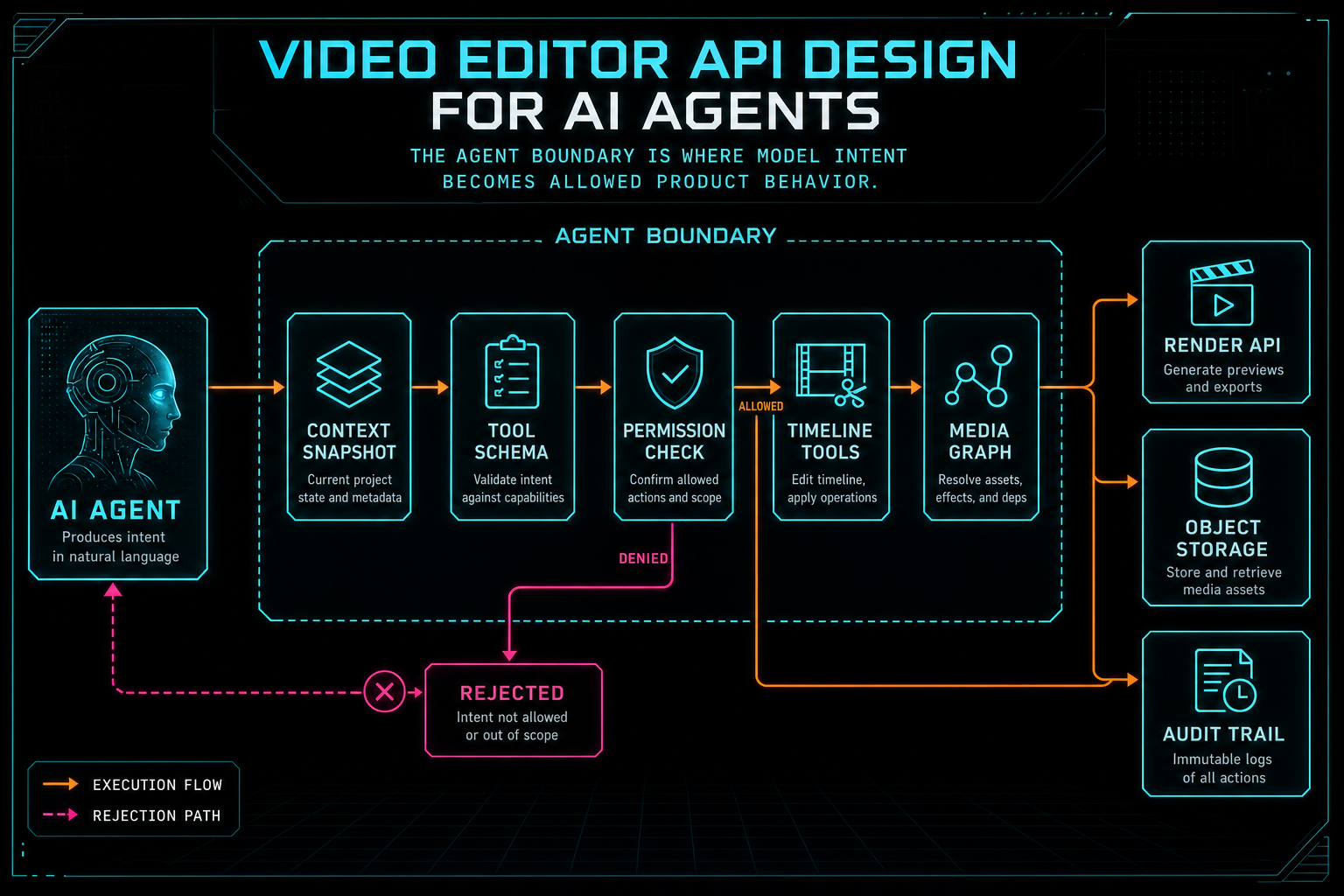
The agent boundary is where model intent becomes allowed product behavior.
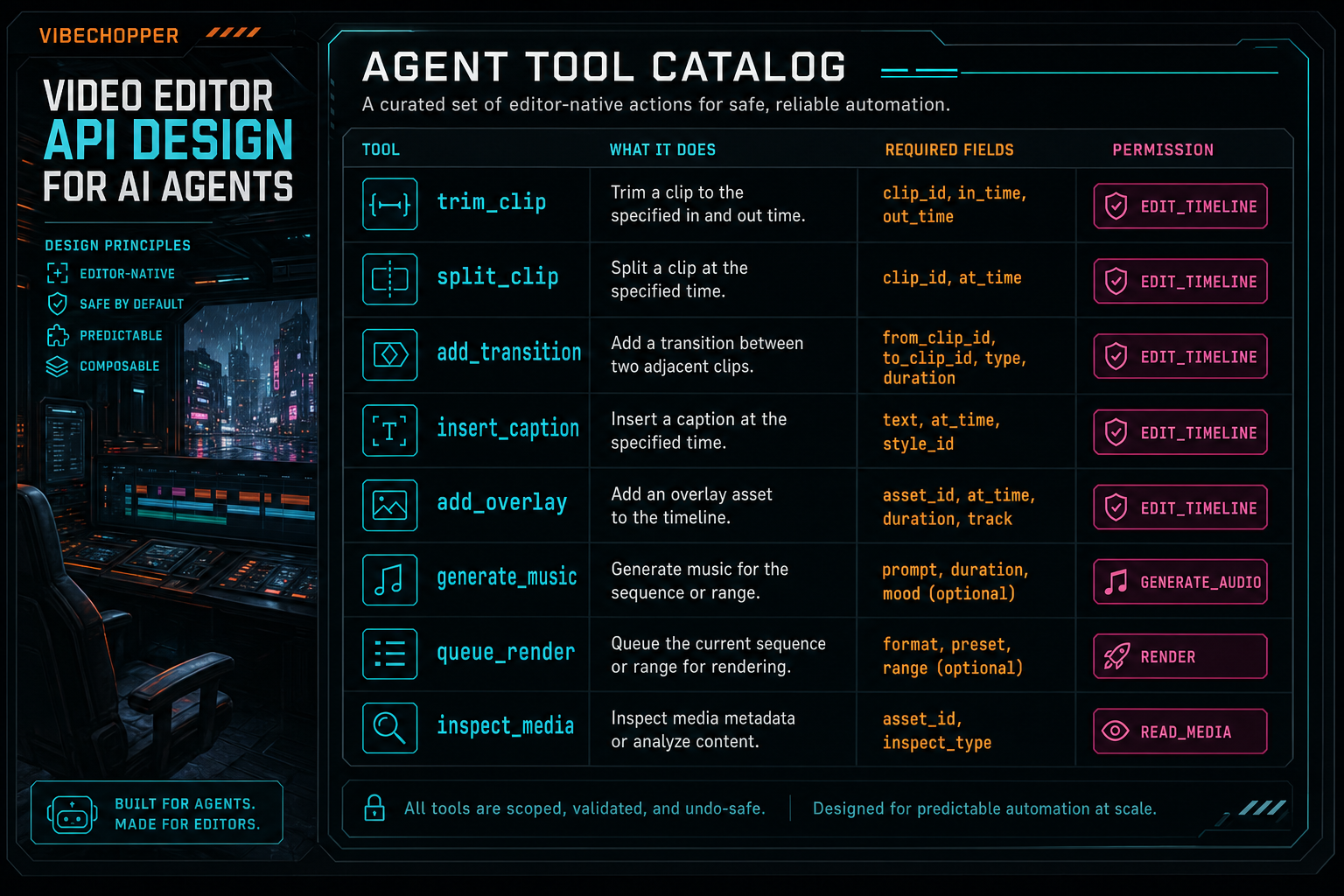
A useful agent API starts with a small catalog of editor-native actions.
Context Is a Contract
An AI agent cannot edit a video from a prompt alone. It needs context: project identity, selected clips, current playhead, timeline version, transcript segments, frame descriptions, generated assets, upload status, render status, and user intent. The API should package that context deliberately instead of letting the agent wander through every record it can access. Upload a real shoot
A context snapshot is the right pattern. It is a bounded view of the project assembled for a specific task. For a dialogue edit, the snapshot may include transcript spans, speaker labels, clip IDs, time ranges, and current cuts. For a visual search task, it may include frame descriptions and media summaries. For a render request, it may include timeline version, media readiness, output presets, and prior export state.
This snapshot has to be connected to validation. If an agent proposes to trim clip clip_123, the tool layer should confirm that clip exists in the project and was visible in the snapshot or canonical state. If an agent references a transcript span, the API should confirm that the span belongs to a media item the user owns. If an upload is incomplete, the agent should receive a blocked state rather than hallucinating that media is ready.
Context also protects cost and privacy. Video projects can contain large files, long transcripts, generated assets, collaborator notes, and logs. A serious API should send only the facts needed for the requested editing job. The AI layer can be capable without being overfed. The product retains a stable model of what was shown to the agent and why.
Schemas Are the Safety Rail
Structured output is not a nice-to-have for agentic video editing. It is the interface. A model can propose edits in prose, but the application should execute only data that passes a schema. The schema should define action type, target IDs, time ranges, track references, media references, parameters, idempotency key, and expected result shape.
A strong schema is narrow. It does not expose arbitrary expressions or command strings. It uses enums for action types, bounded numbers for durations and effect values, known IDs for clips and media, and predictable objects for generated assets. It also separates planning from execution. A plan can include explanation and rationale. A tool call should include only the data needed to perform one validated operation.
This split helps with provider independence. Models differ in how they format JSON, recover from invalid output, and follow tool constraints. If the application owns schemas and validation, the provider harness can retry malformed output, fall back to another provider, or ask for repair without changing the editor's internal contract. The API remains product-shaped even as model infrastructure changes.
Validation should produce useful failures. clip_not_found, timeline_version_stale, media_not_ready, range_out_of_bounds, permission_denied, and unsupported_output_preset are better than vague agent errors. They can be shown to the agent, summarized to the user, counted in observability, and attached to remediation workflows. The goal is not to make every agent call succeed. The goal is to make every outcome explicit.
Agents Retry, So Design for Idempotency
Human users double-click. Browsers retry. Mobile networks drop. AI agents retry after timeouts, repeat a tool call when they do not receive a result, or resume work after a refresh. If the API treats every repeated request as new intent, it will create duplicate clips, duplicate renders, duplicate generated assets, and contradictory audit trails.
Every write-capable agent tool should support idempotency. The key can be scoped by user, project, agent run, action type, and timeline version. If the same request arrives again, the API can return the existing tool event or artifact instead of replaying the mutation. For expensive jobs such as rendering or generated media, this is not only correctness. It is cost control.
Timeline version checks are the other half of the design. An agent may plan against one version of the project while a user continues editing. The API should detect stale assumptions before applying changes. Sometimes the correct response is to reject the tool call and ask the agent to refresh context. Sometimes the correct response is to apply a conflict-aware operation. The important point is that stale state is a first-class response, not a silent overwrite.
Idempotency also improves inspection. A run inspector can show that a tool call was accepted once and later requests returned the same result. Support can distinguish retry noise from real user actions. A second-pass reviewer can evaluate the final timeline without wondering whether duplicate agent calls changed the evidence.
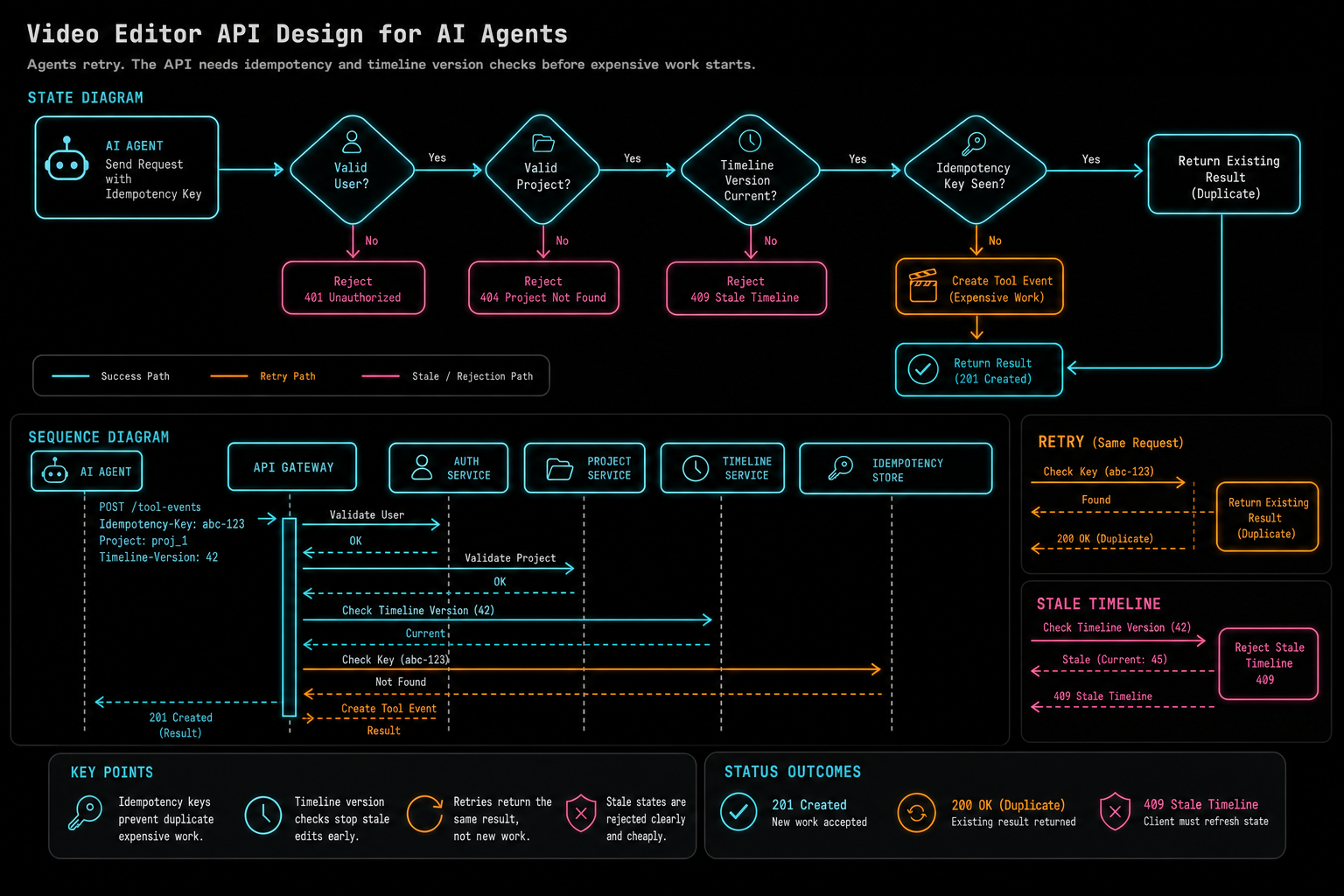
Agents retry. The API needs idempotency and timeline version checks before expensive work starts.
Media Provenance Is Part of the API
Agents do not only mutate timelines. They create and select media. They may choose shots from frame descriptions, cut based on transcript spans, generate music, create overlays, place voiceovers, or queue renders. Each of those actions needs provenance. Without it, the editor becomes a pile of files and explanations that cannot be verified later. Explore your media graph
The API should attach generated and transformed media to durable product records. A generated music bed should know its prompt, model, duration, storage path, project, user, placement, and agent run. An overlay should know its source prompt or upload, target timeline range, storage path, and ownership. A render artifact should know the timeline version, output preset, object storage path, verification status, and run that requested it.
This is where a media graph becomes more than a library view. It is the evidence layer for agentic editing. It lets the product answer practical questions: which assets did the agent create, which source clips were used, which transcript spans influenced a cut, which render came from this run, and what artifact should be reviewed or shared?
Provenance also protects future automation. If a later agent wants to revise a draft, it can inspect the media graph instead of guessing from filenames. If a user reports a problem, support can see whether the failure came from upload, generation, timeline placement, render, or object storage. If an export needs to be regenerated, the system has the inputs needed to do it deliberately.
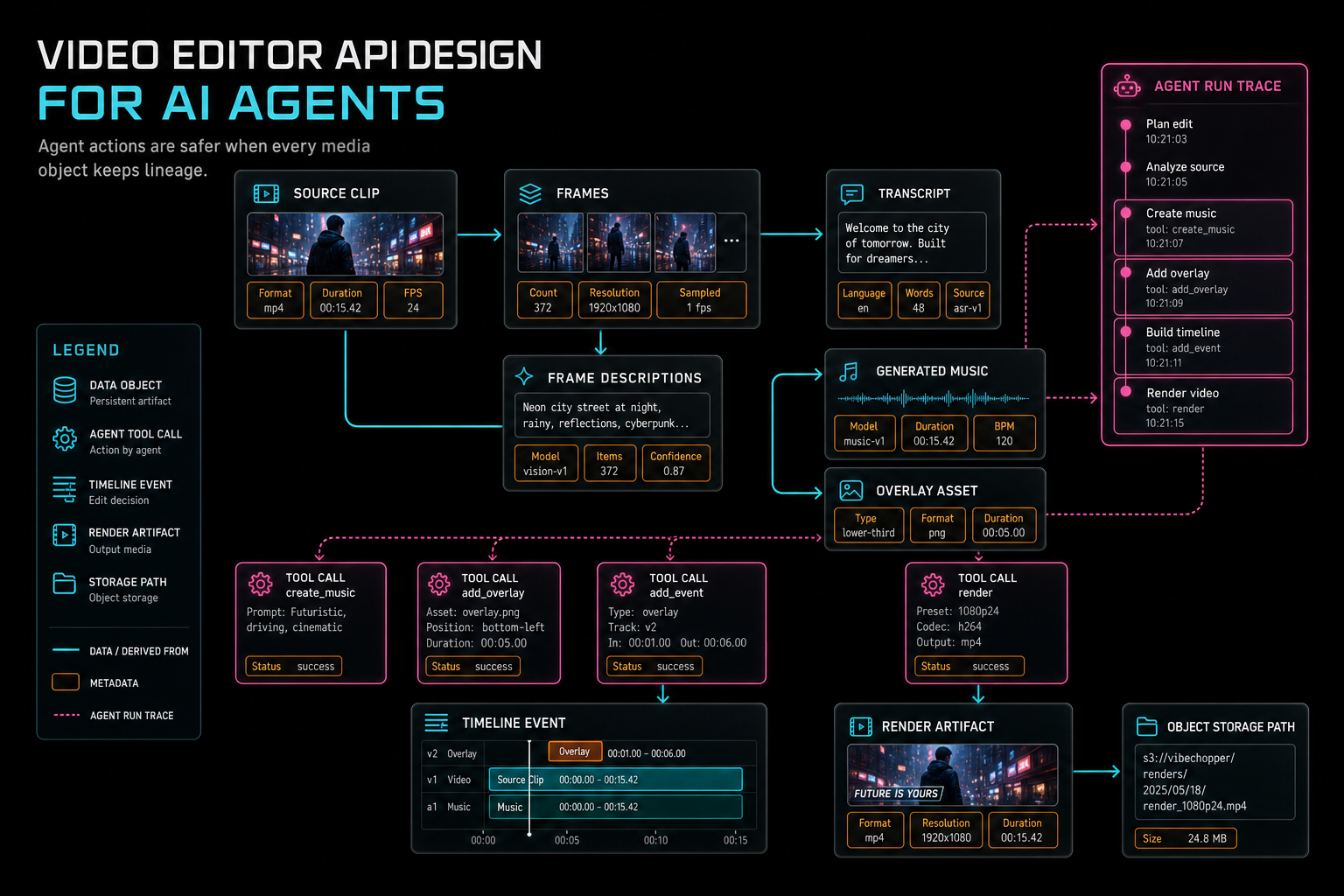
Agent actions are safer when every media object keeps lineage.
Rendering Is an Agent Tool, Not a Side Effect
A common mistake is to let an agent make timeline edits and then hope the normal export path catches up. In a production editor, rendering should be a tool with its own contract. The agent can request a preview or final export, but the render API should validate the project, timeline version, output settings, media readiness, ownership, and idempotency before work begins. Render a timeline free
The render result should be inspectable as an artifact. It needs status, stage, progress, output metadata, object storage path, verification result, and failure code when applicable. The agent run should reference the export ID. The media graph should ingest the completed render. The user should be able to refresh the page and still find the same job.
This is especially important for natural language video editing. A user may say, make the intro tighter and render a preview. That sentence contains both edit intent and export intent. The correct architecture turns the edit part into timeline tools and the export part into a render job. It does not ask the model to compose a file directly. It does not hide the render as an untracked side effect of chat.
Keeping rendering as a first-class tool also makes failures honest. If the timeline edit succeeded but the render failed because object storage was unavailable, the API can preserve the timeline, mark the artifact failed, and explain the recovery path. That is much better than collapsing the whole interaction into a single failed chat message.
The Audit Trail Is the User Interface for Trust
An AI agent that changes a video timeline should leave a record users can understand. The record does not need to expose every provider token or internal stack trace. It should show the prompt, relevant context, structured plan, tool calls, validation outcomes, media artifacts, render jobs, and final status. That is the difference between magic and trust. Open the edit-run receipts
For engineers, the audit trail is also the debugging surface. Provider outage, malformed output, rate limits, missing records, stale state, upload interruption, object storage failure, duplicate request, and render verification failure all need somewhere to land. If the API records these outcomes as structured events, the product can recover and improve. If they are only chat text or logs, every incident becomes a reconstruction exercise.
The audit trail should connect to native editor events. If an agent trims a clip, the run should point to the tool call and the timeline event that actually changed the project. If an agent creates music, the run should point to the media artifact. If an agent queues a render, the run should point to the export and verification record. The user can then inspect cause and effect without reading backend logs.
Trust is not only about preventing bad actions. It is about making good actions explainable. A creator should be able to ask what changed, why it changed, and where the result lives. A developer should be able to answer with structured state instead of guesswork.
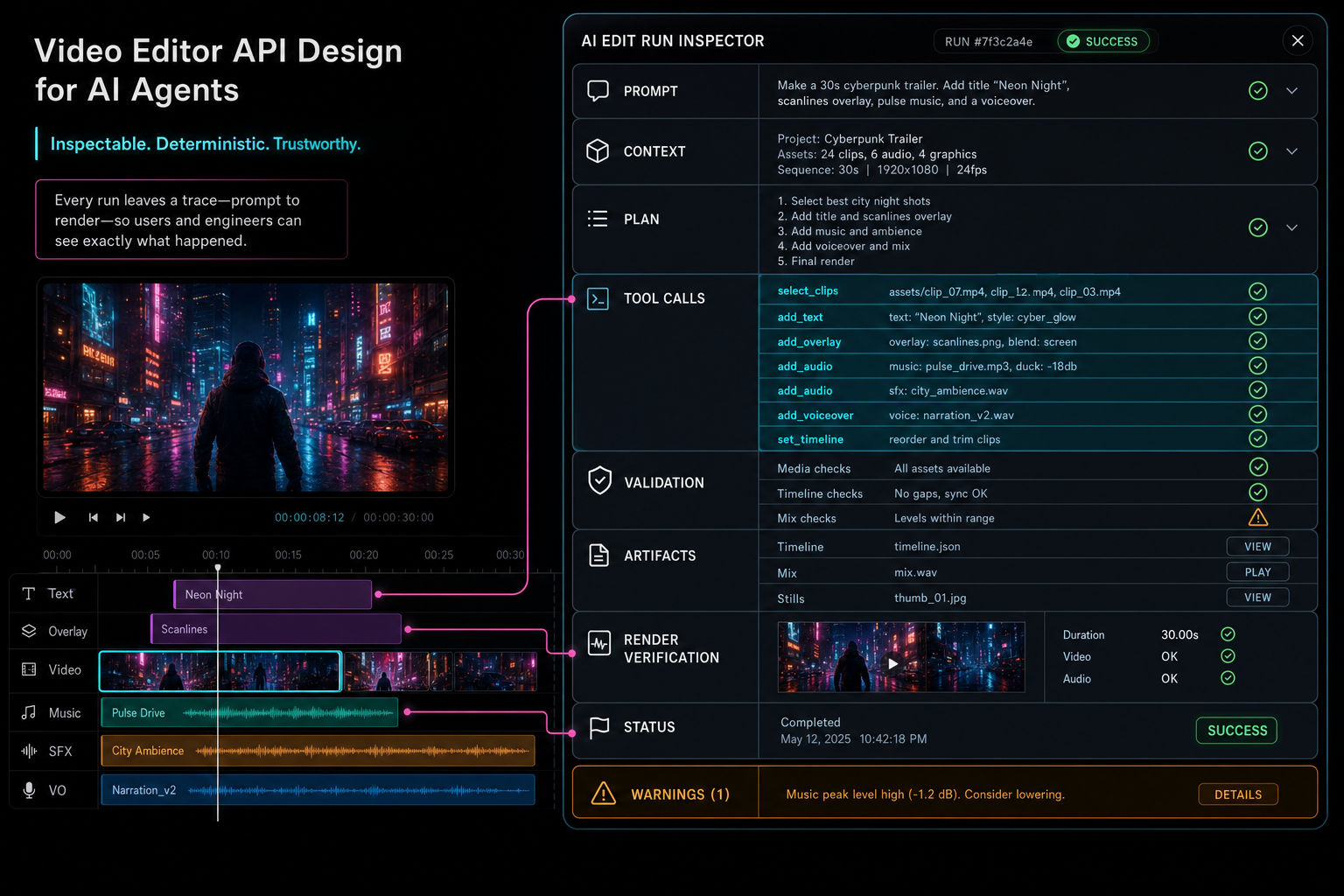
A good API leaves an inspection trail that users and engineers can trust.
A Practical Checklist
Design the API from the editor outward. Define the timeline concepts and media records first. Then expose tools that map to those concepts. Avoid raw database patches, arbitrary command strings, or user-supplied storage destinations. Agents should call the same product operations that a careful UI would call.
Use schemas at every boundary. Validate action type, IDs, ownership, time ranges, effect values, output presets, and timeline version. Return stable failure codes. Keep planning prose separate from executable tool calls. Let provider-specific behavior live behind a harness so the editor contract remains stable.
Make every write idempotent. Persist tool events and artifacts. Attach generated media and renders to provenance records. Treat render jobs as first-class agent tools. Verify final artifacts before marking them complete. Give the client and the run inspector enough state to survive refreshes, retries, and partial failures.
Finally, make the audit trail useful to humans. AI video editing software should feel fast and creative, but the backend should stay precise. When an agent edits a timeline, VibeChopper's standard is that the product can explain which request came in, which context was used, which tools ran, which assets were produced, which render was verified, and what the user can do next.
The Result
The best video editor API for AI agents is deliberately constrained. It gives agents enough surface area to be useful and enough structure to be safe. Instead of handing over internals, it exposes timeline tools, media inspection, generated asset creation, render jobs, and run inspection through schemas the product can enforce. Talk a cut into shape
That design makes the user experience better. A creator can describe an edit in natural language and still get deterministic timeline behavior. A developer can inspect the run and understand what happened. A support workflow can attach feedback to facts. A future agent can revise work using media provenance instead of guessing from chat history.
For VibeChopper, the API is the bridge between creative intent and production-grade video editing. Agents can help assemble, revise, explain, and render. The editor still owns identity, permissions, timeline truth, object storage, verification, and durable history. That is the architecture that lets AI move quickly without making the video project fragile.
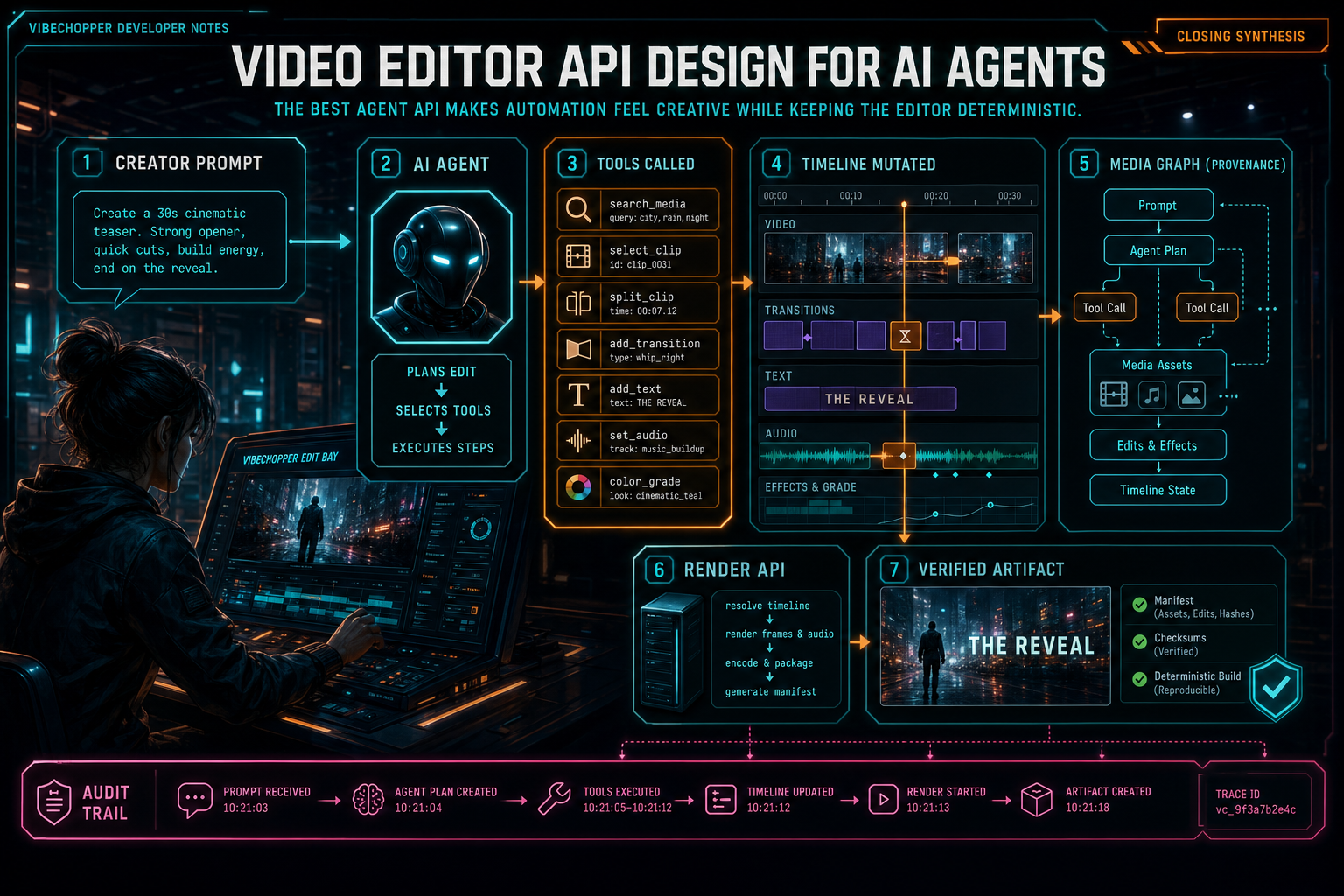
The best agent API makes automation feel creative while keeping the editor deterministic.
Try the workflow
Open every feature from this post in the editor
These panels collect the features discussed above. Sign in once, finish your profile if needed, then the editor opens the first highlighted surface and walks through the tutorial.
Step 1
Try voice-driven timeline edits
Describe the edit you want and let VibeChopper translate intent into timeline changes.
Talk a cut into shape →Step 2
Inspect an AI edit run
Open the editor and see how plans, tool calls, artifacts, and render results stay connected.
Open the edit-run receipts →Step 3
Upload footage with progress you can trust
Watch large video uploads, processing, transcript work, and original-file storage from one monitor.
Upload a real shoot →Step 4
Open the media asset graph
See generated audio, rendered assets, source clips, metadata, and provenance in the media panel.
Explore your media graph →Step 5
Render a verified timeline
Export a project through the same storage-backed render path described in this article.
Render a timeline free →