
The Prompt Box Is Not the Architecture
A serious AI video editor starts with a prompt, but it cannot end there. The product has to translate human intent into precise operations on clips, tracks, transcript spans, generated assets, effects, storage records, and export jobs. That is the difference between a demo that says it edited a video and video editing software that can be trusted with real project state. Talk a cut into shape
VibeChopper is built around that distinction. A user can describe the edit they want in natural language: tighten the first thirty seconds, cut to the second speaker when the energy drops, add a fade before the music bed, remove the dead air, or render a short preview. The surface feels conversational, but the backend treats the request as the beginning of a controlled workflow. Prompt interpretation, context gathering, structured planning, validation, native tool execution, provenance, and render verification all have to cooperate.
That matters because the AI video editor market mixes very different products under one label. Adobe Premiere Pro, DaVinci Resolve, and Final Cut Pro are deep desktop NLEs with growing AI assistance. Descript popularized text-based editing around transcript workflows. CapCut, VEED, Kapwing, Runway, Riverside, Pictory, and OpusClip each emphasize different combinations of online editing, generative media, captions, templates, clips, or automation. VibeChopper's architectural bet is narrower and more concrete: an online editor where natural language can drive real timeline changes while the system preserves explainability and control.
For developers, the useful question is not whether a model can produce a plausible edit suggestion. It can. The useful question is how a product turns that suggestion into a safe timeline mutation. The answer is an architecture where the model reasons about intent, but the application owns state, validation, persistence, and rendering.
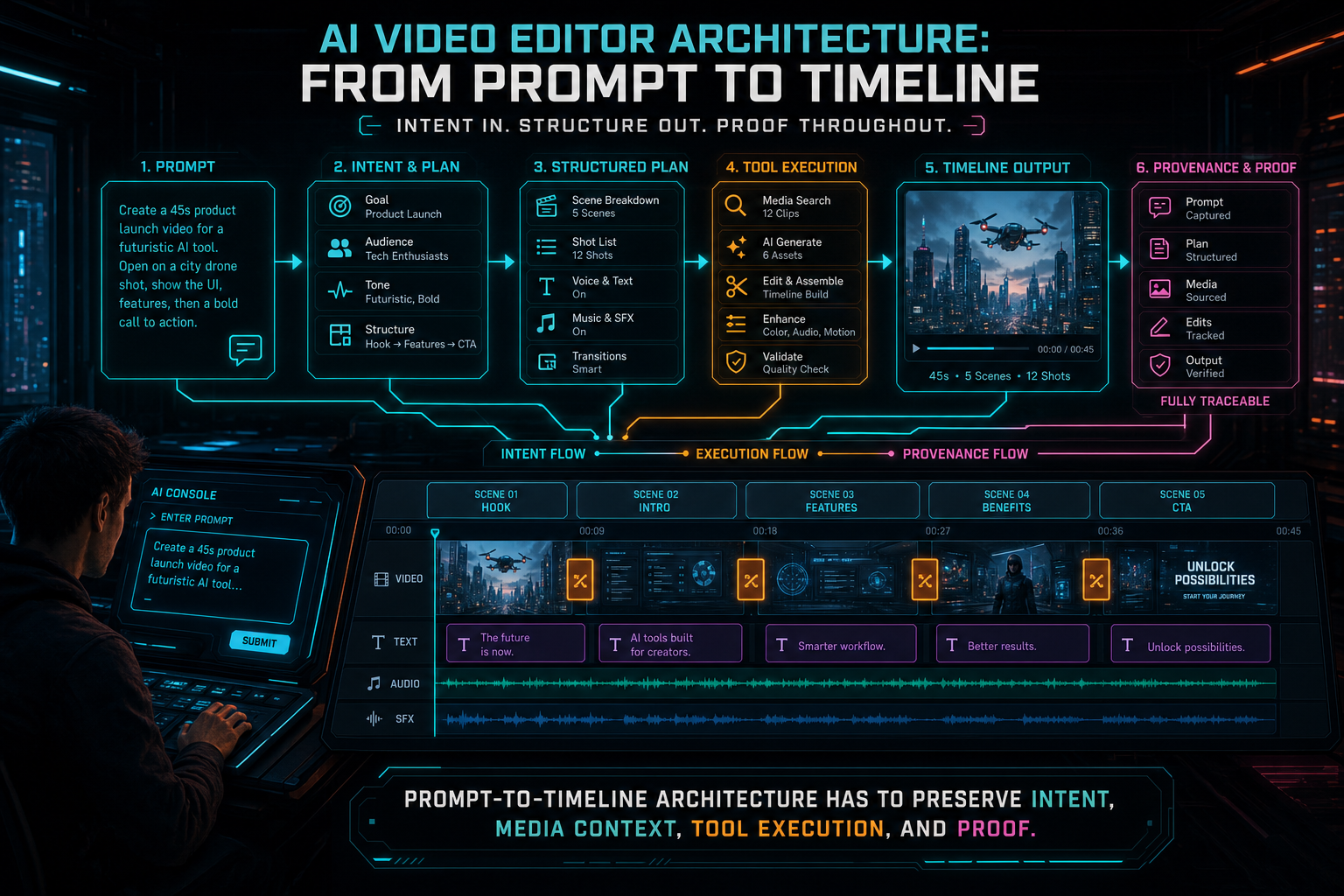
Prompt-to-timeline architecture has to preserve intent, media context, tool execution, and proof.
A Layered Prompt-to-Timeline System
The cleanest way to reason about AI video editor architecture is as a layered system. At the top is the user request: a typed prompt, a voice command, or a contextual instruction while the playhead sits on a clip. Below that is the project context: selected media, clips, tracks, transcript segments, frame descriptions, generated assets, prior chat state, and the current timeline. Below that is an AI harness that normalizes model calls and returns structured output. Below that are validation and execution layers that decide whether proposed actions can touch the editor.
This layering is not ceremony. It prevents the model from becoming a privileged side door into project state. A completion can propose a trim, but it cannot bypass ownership checks. It can propose a transition, but it cannot invent a clip ID. It can suggest a render, but it cannot choose an object storage path outside the server's rules. The product contract stays stronger than the model output.
In VibeChopper, this design lines up with the broader platform architecture: provider-independent completions, AI edit runs, native editor tool events, media processing summaries, object storage paths, server-side composition, and render verification. Each layer contributes one kind of certainty. The harness normalizes model behavior. Validation proves shape and permissions. Tool events prove timeline mutation. Media records prove where assets came from. Render verification proves the output artifact is connected to the expected timeline.
A common failure mode in AI application design is to make the first working prompt the architecture. That can ship a demo quickly, but it leaves every later feature fighting hidden assumptions. If the prompt directly describes database rows, provider-specific response objects, or UI-only state, then the product becomes brittle. A layered system gives the team room to change providers, add tools, expand media analysis, improve retry policy, or expose inspection views without rewriting the editor around one prompt.
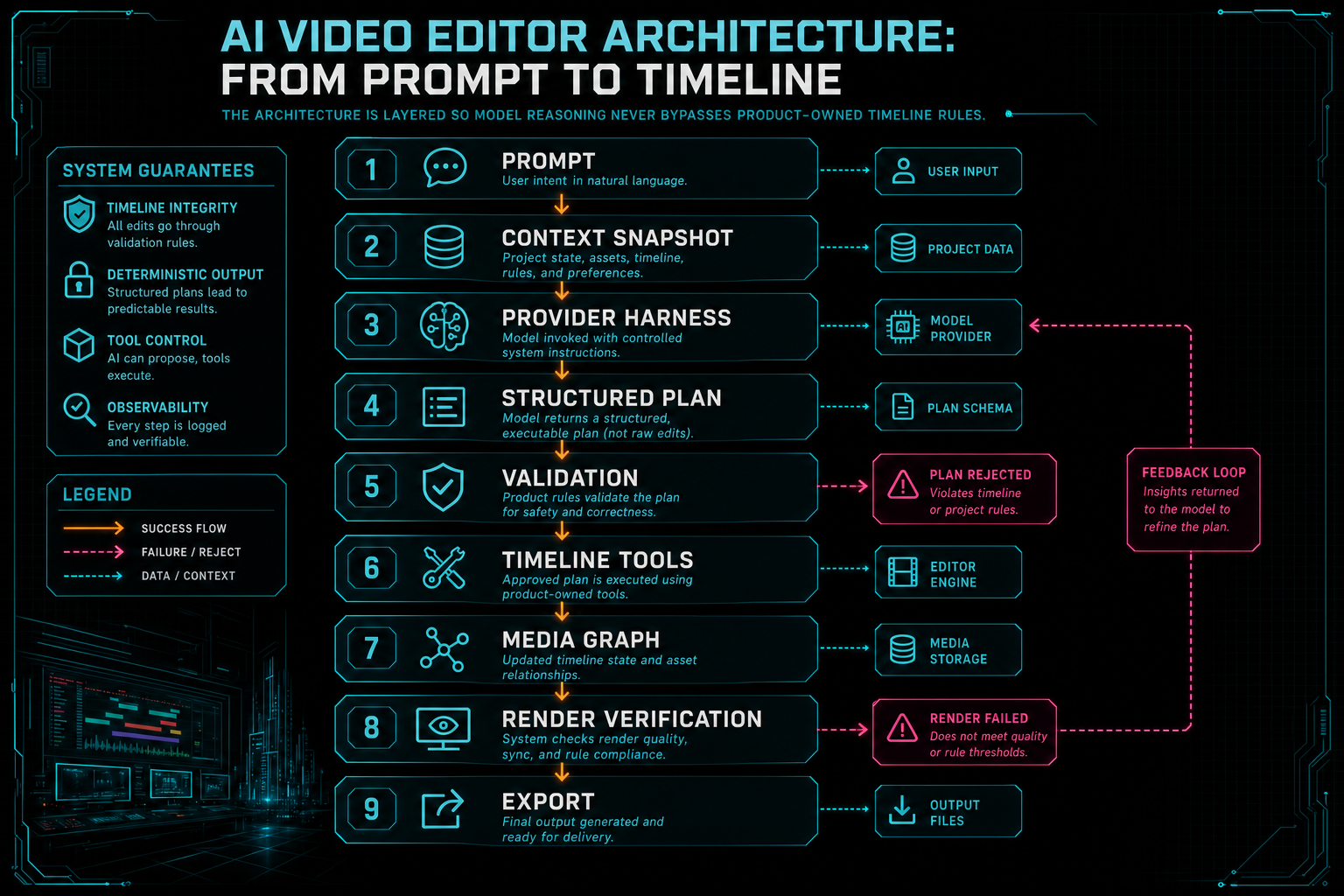
The architecture is layered so model reasoning never bypasses product-owned timeline rules.
The Context Snapshot
An AI editor is only as good as the context it can safely use. A generic chatbot sees messages. A video editor needs to reason over media. That means source clip metadata, timeline positions, selected ranges, transcript segments with speaker labels, frame descriptions, upload status, generated assets, effects, transitions, and sometimes previous AI edit plans. The architecture needs a context snapshot that gathers the relevant pieces without handing the model an unbounded copy of the project. Upload a real shoot
The snapshot has three jobs. First, it narrows the problem. If the user selected a clip and asked for a tighter cut, the model should focus on that clip, nearby transcript spans, and the current timeline state. Second, it protects the system. The snapshot should include only data the authenticated user can access and only the fields needed for the editing task. Third, it makes validation possible. If the model references a clip, transcript span, or asset, the server can check that reference against the snapshot and the canonical database state.
This is where upload and media processing reliability become part of AI quality. If frames are missing, transcript work is still pending, or a large video upload did not finish, the AI planner has less evidence. VibeChopper treats upload sessions, frame extraction, transcript processing, and media summaries as product infrastructure because they feed the editing brain. The user may experience this as a simple upload monitor, but the architecture sees a readiness signal for future AI operations.
A context snapshot is also the place to avoid over-promising. Not every edit request needs every asset. Not every provider needs the same prompt packaging. The application should assemble the editing facts once, then let the provider harness translate those facts into the right completion request. That keeps the product model stable even as upstream AI APIs evolve.
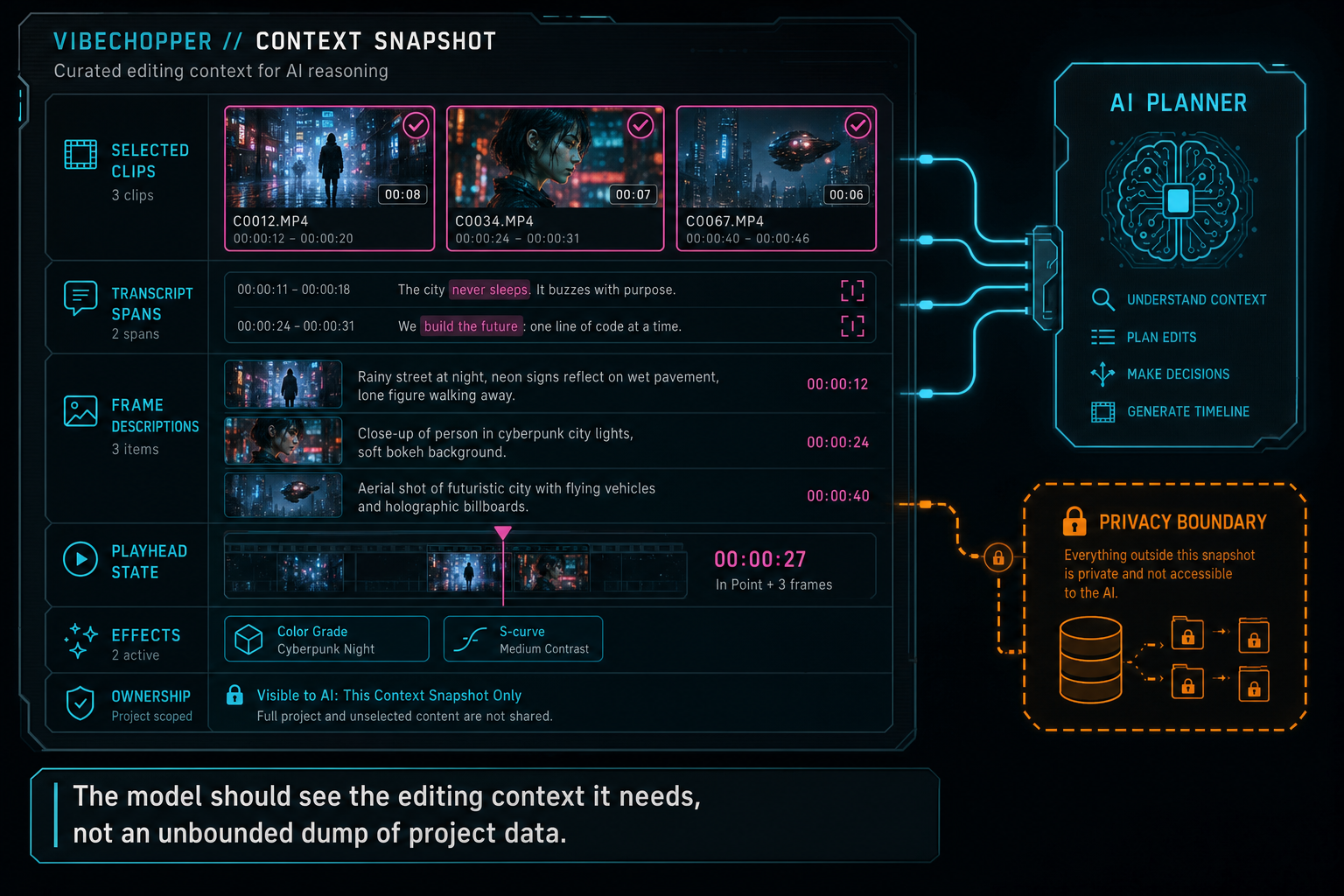
The model should see the editing context it needs, not an unbounded dump of project data.
From Prompt to Structured Plan
The first durable output from the AI layer should be a structured plan, not an immediate mutation. A plan can say which clips appear relevant, what actions should be considered, which transcript ranges explain the decision, what generated media may be needed, and whether the request is ambiguous. It is the difference between model reasoning and product execution.
For example, a user might ask VibeChopper to make a customer interview feel faster. A weak architecture sends that sentence to a model and hopes for a list of edits. A stronger architecture provides transcript spans, frame summaries, selected timeline context, and known tool capabilities. The model returns a structured plan: remove two silence ranges, tighten one answer, add a lower-third overlay, keep the emotional pause after the testimonial, and render a preview. That plan can be inspected, scored, repaired, or rejected before any tool changes the timeline.
Structured planning is especially important for keyword-heavy categories like text to video editor, AI video editing software, and natural language video editing. Those phrases sound magical from the outside, but the backend reality is ordinary engineering discipline. You define allowed actions. You define schemas. You define the context each action needs. You record the result. The model can be creative within the allowed space, but it does not own the space.
This also improves UX. When a system can show the planned actions, users understand what is about to happen. When a system can store the plan, developers and support teams can understand what did happen. The plan becomes the bridge between the fuzzy language of the request and the exact language of timeline tools.
Validation Turns Plans Into Timeline Tools
A plan is still just a proposal. The next layer decides whether each action can become a native editor command. This is the most important security and reliability boundary in the system. It is where the product checks schema shape, project ownership, clip existence, media readiness, time ranges, track compatibility, duplicate requests, stale context, and tool-specific constraints. Open the edit-run receipts
The rule is simple: the model may suggest, but the server validates and the editor tools execute. A trim command has to point at a real clip and a legal boundary. A split has to happen inside clip duration. A transition has to target compatible clip edges. A generated overlay has to become a media artifact with provenance before it can be placed. A render request has to use storage and compositor paths the backend controls.
This validation layer is one reason VibeChopper can make AI editing inspectable. The AI edit run records the prompt, plan, tool calls, artifacts, status, and verification results. Native tool events record the actual editor mutations. When a creator asks why the timeline changed, the answer is not hidden in model text. It is visible as product state.
Competitor-aware architecture does not mean copying a competitor feature list. It means understanding user expectations created by the category. People who use Descript expect text to map to edits. People who use CapCut or VEED expect fast online workflows. People who use Premiere Pro, Resolve, or Final Cut expect timeline control. An AI-first editor has to combine conversational speed with timeline-grade correctness. Validation is where that combination becomes real.
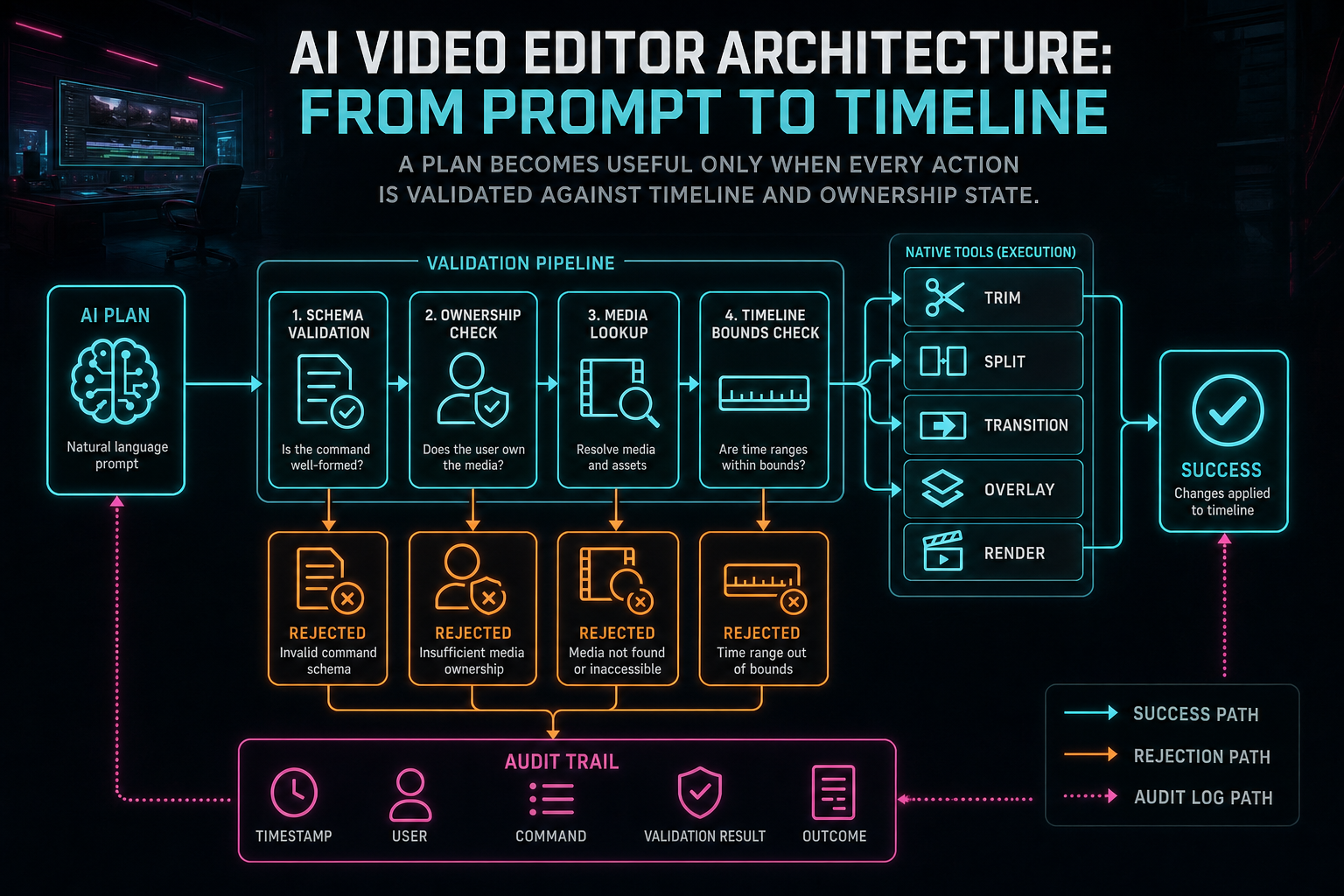
A plan becomes useful only when every action is validated against timeline and ownership state.
The Media Graph Behind AI Editing
Timeline commands are only half the story. Video editing is asset editing. Source videos, extracted frames, audio tracks, transcript segments, generated music, AI overlays, thumbnails, render outputs, and export metadata all need durable identities. Without a media graph, an AI editor becomes a pile of files and chat messages. With one, every generated or transformed asset can answer where it came from and how it was used. Explore your media graph
This matters for trust. If an AI music bed is generated for a timeline, the editor should know the prompt, model metadata, placement, and project relationship. If an overlay is generated, it should be attached to a user, project, storage path, and timeline event. If a render output is produced, verification should connect it back to the timeline and source assets. Provenance is not a paperwork feature. It is how an editor supports undo, repair, search, sharing, and future automation.
The media graph also helps AI reasoning get better over time. Frame descriptions can support visual search and shot selection. Transcript segments can support dialogue-aware cuts. Render artifacts can support previews and review loops. Upload summaries can tell the editor which assets are ready. Every piece of structured media context becomes a future input to a better prompt-to-timeline flow.
This is one place where online video editor architecture diverges from desktop-only assumptions. A desktop NLE can rely heavily on local files and a user's machine state. A browser and cloud-backed AI editor needs explicit records for uploads, processing, object storage, generated assets, and server renders. That explicitness is useful: it gives the AI layer a reliable map of the project.
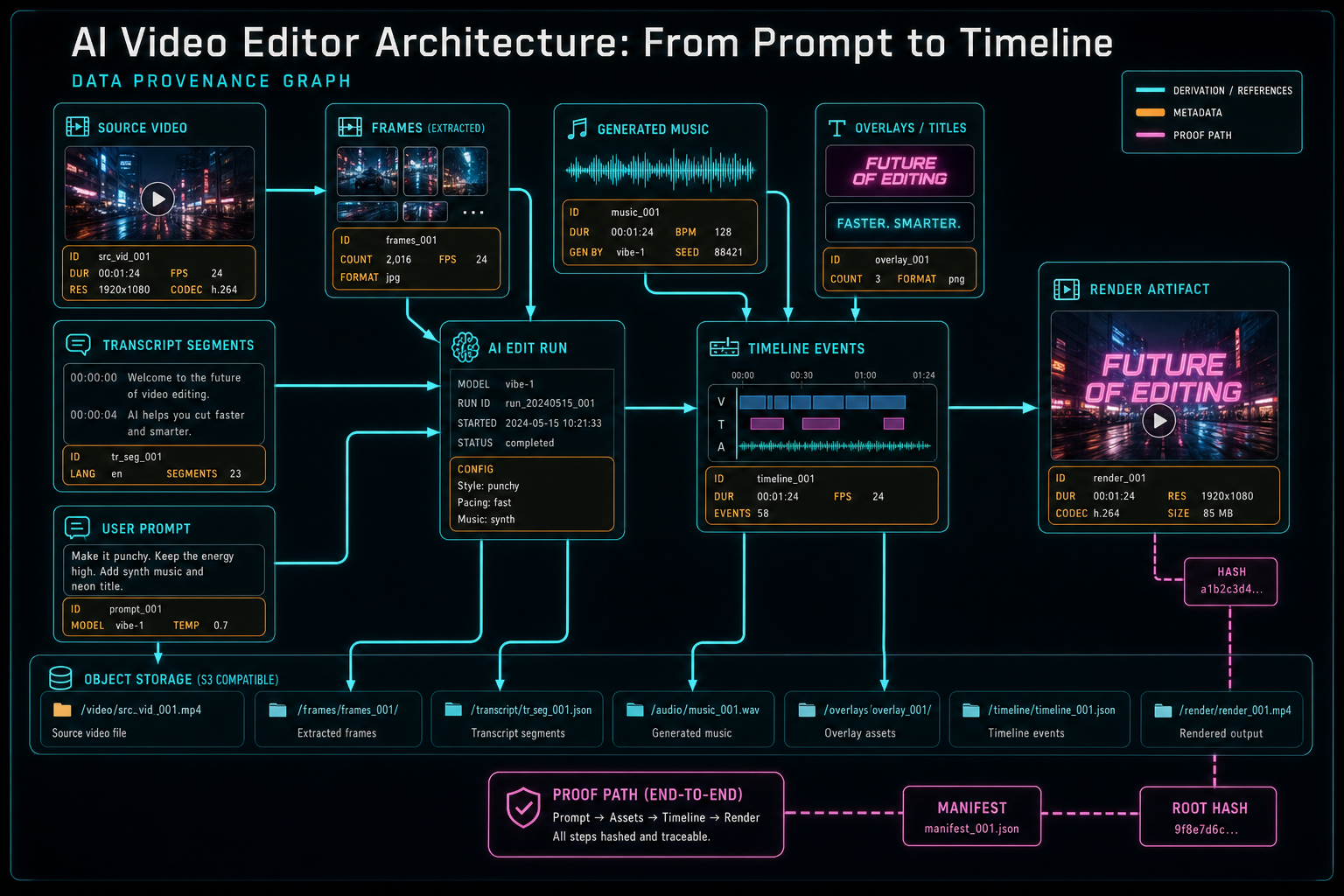
AI editing needs a media graph so generated and source assets stay explainable after the edit lands.
Rendering Is Part of the AI Contract
A prompt-to-timeline workflow is incomplete until the result can be rendered or exported. That is where many AI editing demos get thin. They can describe edits, but they do not prove that the timeline can survive composition, effects, storage writes, and final asset verification. VibeChopper treats rendering as part of the same architecture because the user does not care that a plan looked good if the exported video is wrong. Render a timeline free
Server-side rendering introduces its own constraints: clip timing, audio alignment, transitions, effects, scratch storage, output paths, object storage durability, and failure recovery. If an AI edit changed the timeline, the render system should be able to consume that timeline through the same deterministic rules as a manual edit. The model should not get a special render path.
Verification closes the loop. A completed render should be attached to the right project, timeline, user, and storage object. Its metadata should make sense. Its status should be visible. If verification fails, the system should preserve project state and mark the output problem instead of pretending the edit succeeded. For long-running work, that status also gives the user a better experience than an opaque spinner.
In SEO terms, this is the difference between claiming to be an AI video editor and explaining the backend of AI video editing software. The product promise is creative: describe the edit and get a usable result. The backend promise is mechanical: every step from prompt to output has a record and a boundary.
Inspection and Recovery Are Product Features
The best AI editor architecture assumes that some runs will fail. Providers time out. Structured output can be malformed. Uploads can be interrupted. Transcripts can be missing. Users can refresh mid-flow. A duplicate request can arrive after someone clicks twice. A render can finish without the expected artifact metadata. These are not rare edge cases in a media product. They are normal production events.
The fix is not to hide complexity. The fix is to make the workflow inspectable. An AI edit run should expose the phase where work currently sits: prompt received, context gathered, plan generated, validation failed, tools running, artifacts created, render queued, verification complete, or remediation needed. A creator does not need every backend detail, but they do need honest status and a preserved timeline.
Inspection also helps developers build safer features. When the prompt, context snapshot, plan, tool calls, and artifacts are connected, support and remediation workflows start with facts instead of screenshots and guesses. A future AI review pass can evaluate the same run. A feedback-to-fix loop can attach user reports to real project context. A provider fallback investigation can see which model answered and whether validation passed.
This is why VibeChopper's Developer Notes keep returning to audit trails, tool events, durable media summaries, and render verification. They are not separate concerns bolted onto the editor. They are the evidence system that lets AI editing stay useful after the first impressive prompt.
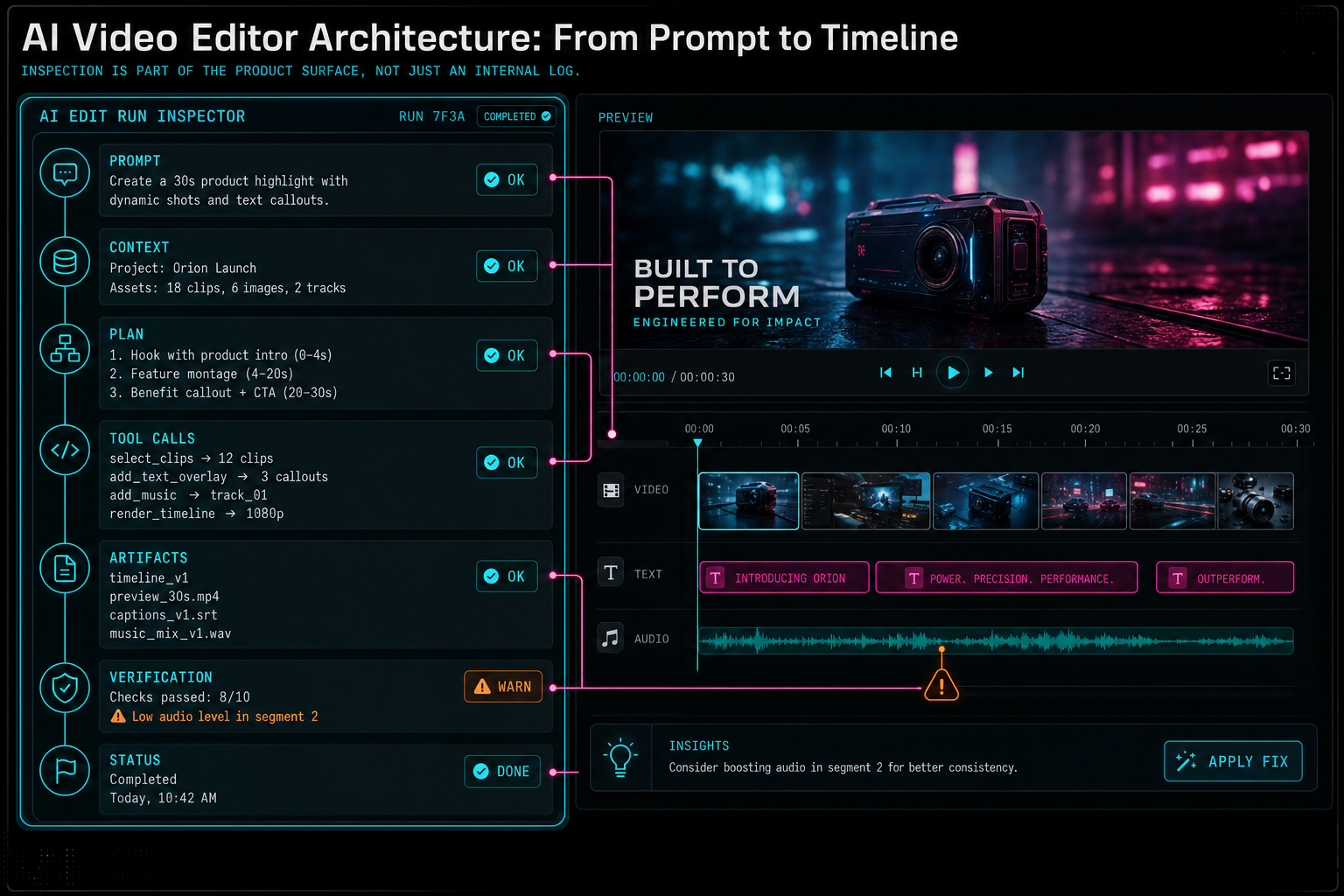
Inspection is part of the product surface, not just an internal log.
What to Build First
If you are designing an AI video editor from scratch, resist the urge to start with the biggest model call. Start with the timeline contract. Define what a trim, split, transition, overlay, generated media insertion, transcript edit, and render request mean in your product. Define the permission checks and persistence rules. Define how those operations are recorded. Only then should the AI layer propose those operations.
Next, build the context snapshot. Decide which media facts are useful for each editing job. Transcript-aware editing needs different context than music generation. Frame-aware search needs different context than render verification. Context should be assembled deliberately, not dumped wholesale into a prompt.
Then build structured planning and validation. Use schemas. Prefer explicit enums. Treat time ranges, clip references, asset IDs, and operation types as data, not prose. Make invalid output a normal recoverable event. Record enough metadata to understand provider choice, latency, validation, and failure categories.
Finally, connect execution to provenance. Tool events, media graph records, and render verification turn AI suggestions into accountable product behavior. That is where the architecture becomes more than prompt engineering. It becomes video editing software.
The Final System
An AI video editor should feel simple to the creator. Upload footage. Describe the change. Watch the timeline respond. Render the result. But the architecture underneath has to be strict because creative simplicity depends on technical discipline.
The final system has a clean path. A prompt enters with authenticated project context. The server builds a scoped context snapshot. The provider harness asks a model for structured reasoning. Validation turns acceptable plans into native editor tool calls. Tool events and media records capture what happened. Render infrastructure produces output through deterministic rules. Verification connects the artifact back to the project. Inspection and recovery keep the workflow understandable when the path is not perfect.
That is the real meaning of prompt to timeline. It is not a slogan for letting a model freestyle on project state. It is an architecture for translating human creative intent into bounded, inspectable, renderable video edits. VibeChopper's product surface is built for creators who want to edit by vibe, voice, and timeline context. Its backend is built so that every vibe still has to pass through a timeline the product can prove.
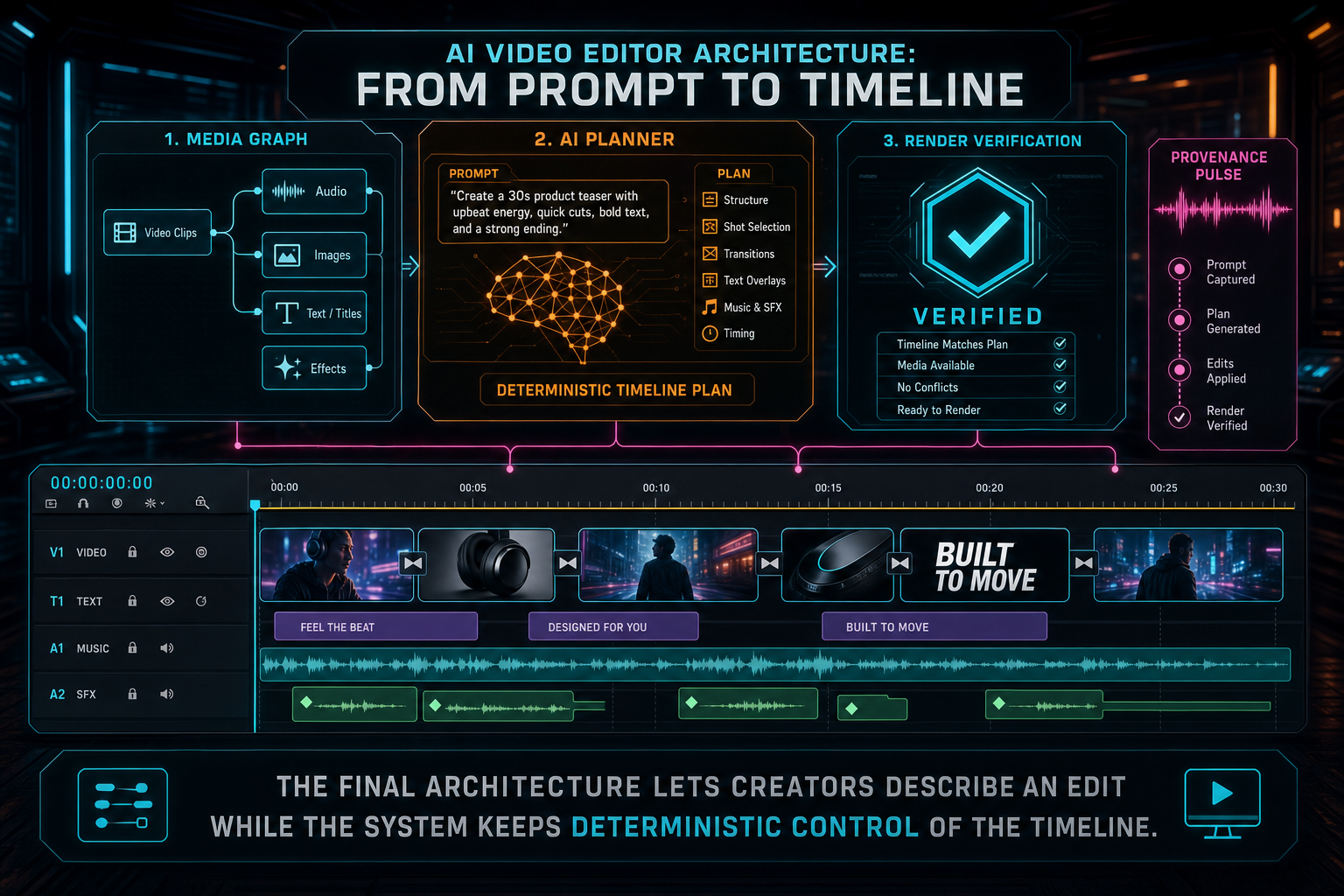
The final architecture lets creators describe an edit while the system keeps deterministic control of the timeline.
Try the workflow
Open every feature from this post in the editor
These panels collect the features discussed above. Sign in once, finish your profile if needed, then the editor opens the first highlighted surface and walks through the tutorial.
Step 1
Try voice-driven timeline edits
Describe the edit you want and let VibeChopper translate intent into timeline changes.
Talk a cut into shape →Step 2
Upload footage with progress you can trust
Watch large video uploads, processing, transcript work, and original-file storage from one monitor.
Upload a real shoot →Step 3
Inspect an AI edit run
Open the editor and see how plans, tool calls, artifacts, and render results stay connected.
Open the edit-run receipts →Step 4
Open the media asset graph
See generated audio, rendered assets, source clips, metadata, and provenance in the media panel.
Explore your media graph →Step 5
Render a verified timeline
Export a project through the same storage-backed render path described in this article.
Render a timeline free →