
Why Tool Events Deserve a Stream
A video editor is a state machine with a creative interface on top. A creator drags a trim handle, splits a clip, adds a transition, accepts an AI suggestion, inserts generated music, or asks for a tighter opening. The product may present those actions as simple gestures, but the backend needs a durable account of what changed and why. VibeChopper treats those moments as native editor tool events, not as incidental console logs. Open the edit-run receipts
That distinction matters because AI-assisted editing raises the trust bar. If a user says, "make the intro move faster and cut the pause before the product demo," the final timeline cannot feel like it appeared from a black box. The editor should be able to show which tools ran, which clips were touched, which time ranges moved, and how the changes connect to the original request. The user does not need raw implementation noise. They need readable traceability.
The implementation evidence for this Developer Note is server/projectEditorEvents.ts, server/editorToolVisualizations.ts, and audit commit c54632f. Those references mark the point where native editor tool events became a first-class backend stream for VibeChopper. The stream gives the product a shared vocabulary for timeline mutations, and the visualization layer turns that vocabulary into something a creator can actually inspect.
This sits next to the larger AI edit infrastructure. The provider harness normalizes model calls. AI edit runs connect plans, tool calls, artifacts, and outcomes. Render verification checks exported results. Tool events are the timeline-facing layer in that stack. They answer the concrete product question: what did the editor do to the project?
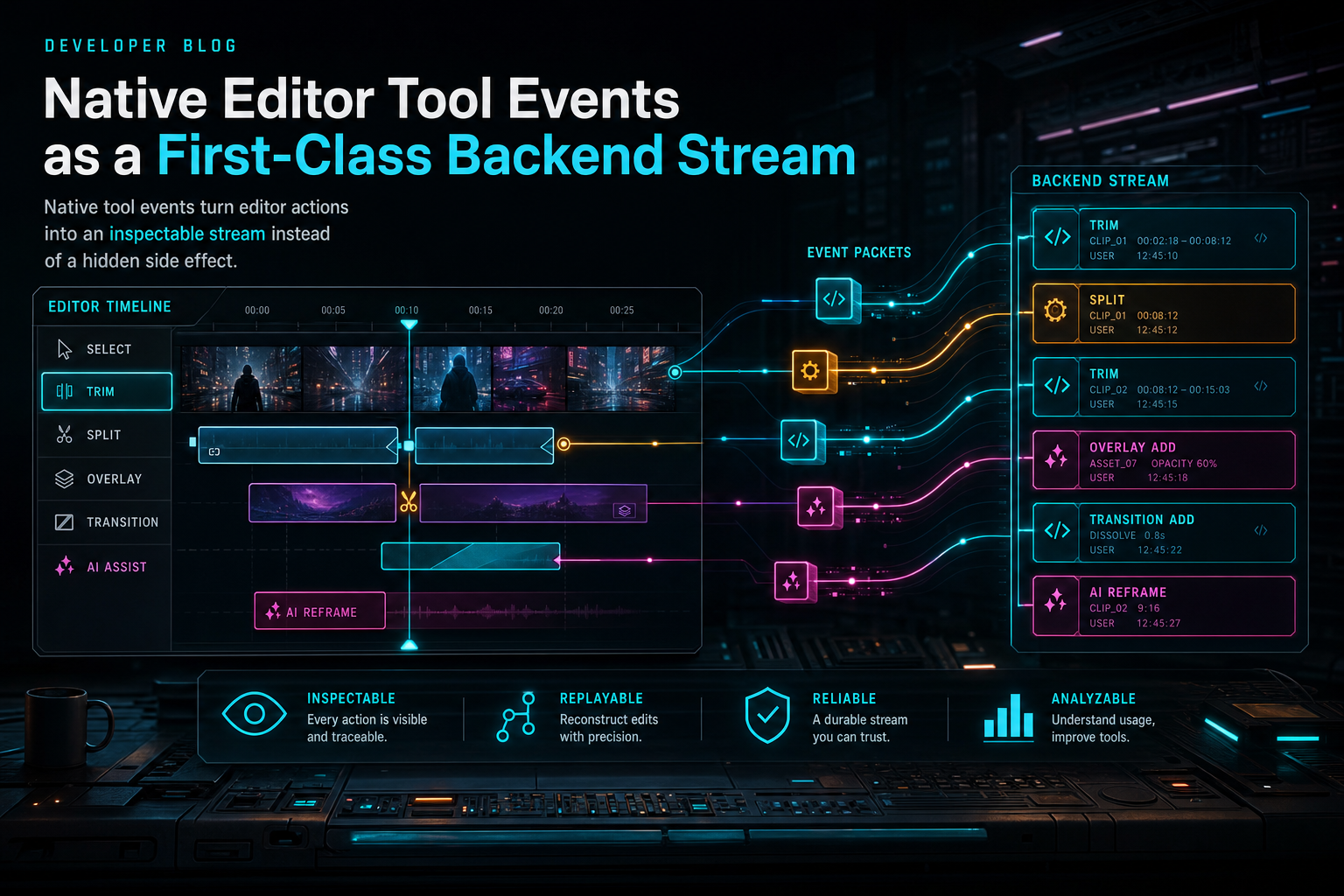
Native tool events turn editor actions into an inspectable stream instead of a hidden side effect.
From Action to Event
A first-class event stream starts with a simple rule: every meaningful editor mutation should have a structured record. Not every mouse move deserves persistence. Not every preview scrub belongs in a backend table. But actions that change the project should be recordable in the same language the rest of the system understands: tool name, target entities, input parameters, result, actor, project scope, timestamps, and enough before-and-after context to explain the change.
That rule applies whether the actor is a human user or an AI edit run. A human can click a split button. An AI planner can decide to split at a transcript boundary. The source of intent differs, but the project mutation still needs the same shape. If the system records AI changes in one format and manual editor changes in another, the product eventually pays for that split in every downstream feature: undo history, collaboration, debugging, analytics, support, and render verification.
The backend stream is also a boundary. The server still owns validation, authorization, and persistence. An event should not be a permission bypass. It should be the record produced after the server has decided that the user owns the project, the target clip exists, the timeline range is valid, and the tool result can be persisted. In other words, the event does not replace domain logic. It documents domain logic that succeeded, failed, or produced a recoverable result.
This gives VibeChopper a useful lifecycle: intent enters the editor, the tool invocation is validated, the timeline mutation is applied, the event is persisted, and a visualization can describe the result. That lifecycle is short enough to reason about, but complete enough to support serious product behavior.
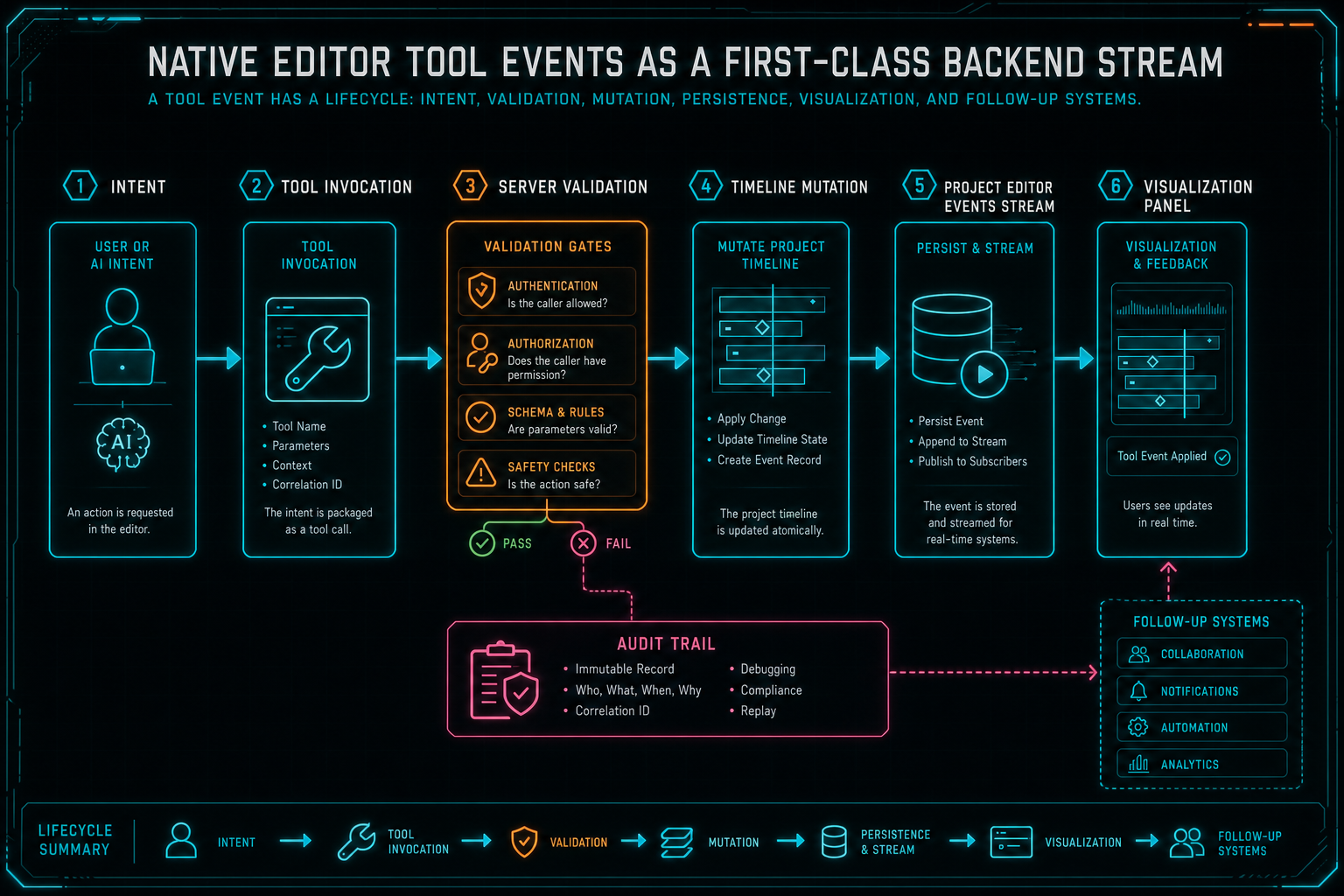
A tool event has a lifecycle: intent, validation, mutation, persistence, visualization, and follow-up systems.
Visual Traceability Beats Raw Logs
Developers like logs because logs are honest. Creators do not want to read logs while editing a video. The right product surface is a visualization that makes the event stream legible: this clip was trimmed, that transition was added, this transcript range was used, this overlay was inserted, this render artifact came from that timeline state. The backend record is the source of truth, but the UI has to translate it into editorial language. Talk a cut into shape
server/editorToolVisualizations.ts is the key evidence reference for that idea. The goal is not to dump database rows into the editor. The goal is to convert tool events into visual summaries that preserve meaning. A split event can point at a clip and a timestamp. A trim event can show the removed range. A transition event can show the adjacent clips and effect type. An AI edit event can link back to the larger run that requested the tool.
This is especially important for voice-driven editing. VibeChopper's promise is direct: describe your edits, and the editor understands your intent and executes precise edits. That promise becomes more credible when the product can show its work. If the user asks for a faster intro and sees three trims plus a transition adjustment, the timeline feels understandable. If the result is wrong, the user has a concrete starting point for correction.
Visual traceability also reduces support ambiguity. "The AI messed up my edit" is hard to debug. "The intro trim event removed 2.4 seconds from clip A and shifted clip B left" is actionable. It can be inspected, reversed, explained, tested, and compared against the request that produced it. That is the difference between a feature demo and a tool creators can trust with real projects.
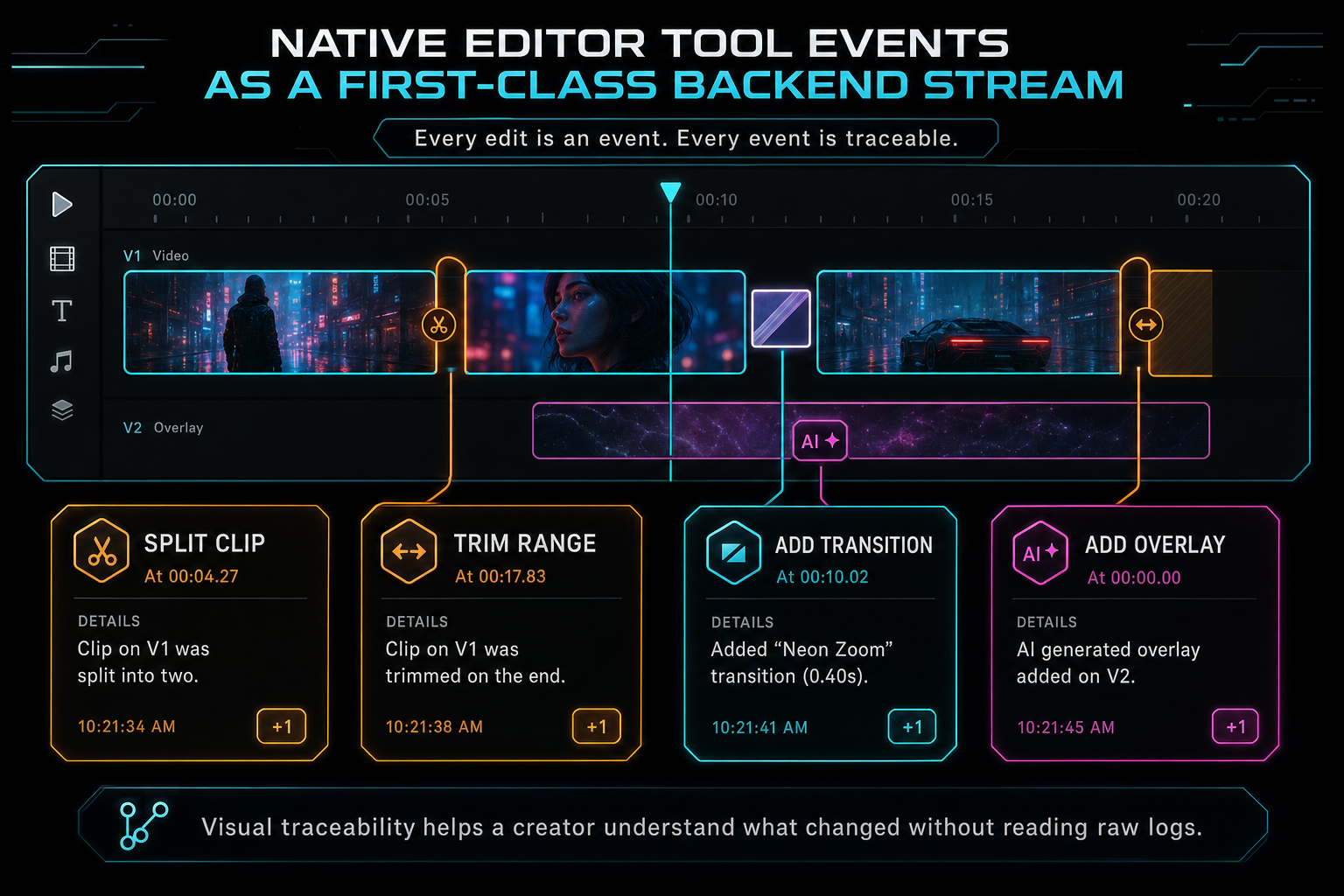
Visual traceability helps a creator understand what changed without reading raw logs.
The Event Shape Has to Carry Context
A weak event schema records that something happened. A useful event schema records enough context to explain the change later. In a timeline editor, that context usually spans several dimensions: project identity, actor identity, tool identity, target media or clip IDs, time ranges, input parameters, resulting state, error state, and links to higher-level workflows like an AI edit run or render job.
The exact payload should stay typed and boring. Tool events are infrastructure, so cleverness is a liability. The server should be able to ask ordinary questions without parsing prose: which tools ran during this edit run, which clip IDs were touched, which events failed validation, which events produced artifacts, which project version was current, and what should the visualization show?
Before-and-after data deserves careful handling. You do not always need to snapshot an entire project for every event. That can be expensive and noisy. But you do need enough delta data to tell the truth about the change. A trim event can store the previous and new in/out points. A split event can store the source clip, split time, and resulting clip IDs. A transition event can store the transition type, duration, and adjacent clips. An overlay event can store asset references, placement, and generated provenance.
This is where typed backend streams beat ad hoc client state. Client state is optimized for interaction. Backend events are optimized for durability, inspection, and downstream systems. They can feed UI callouts, audit trails, render verification, edit history, analytics, and future collaboration surfaces without asking the editor to reconstruct old intent from current timeline state.
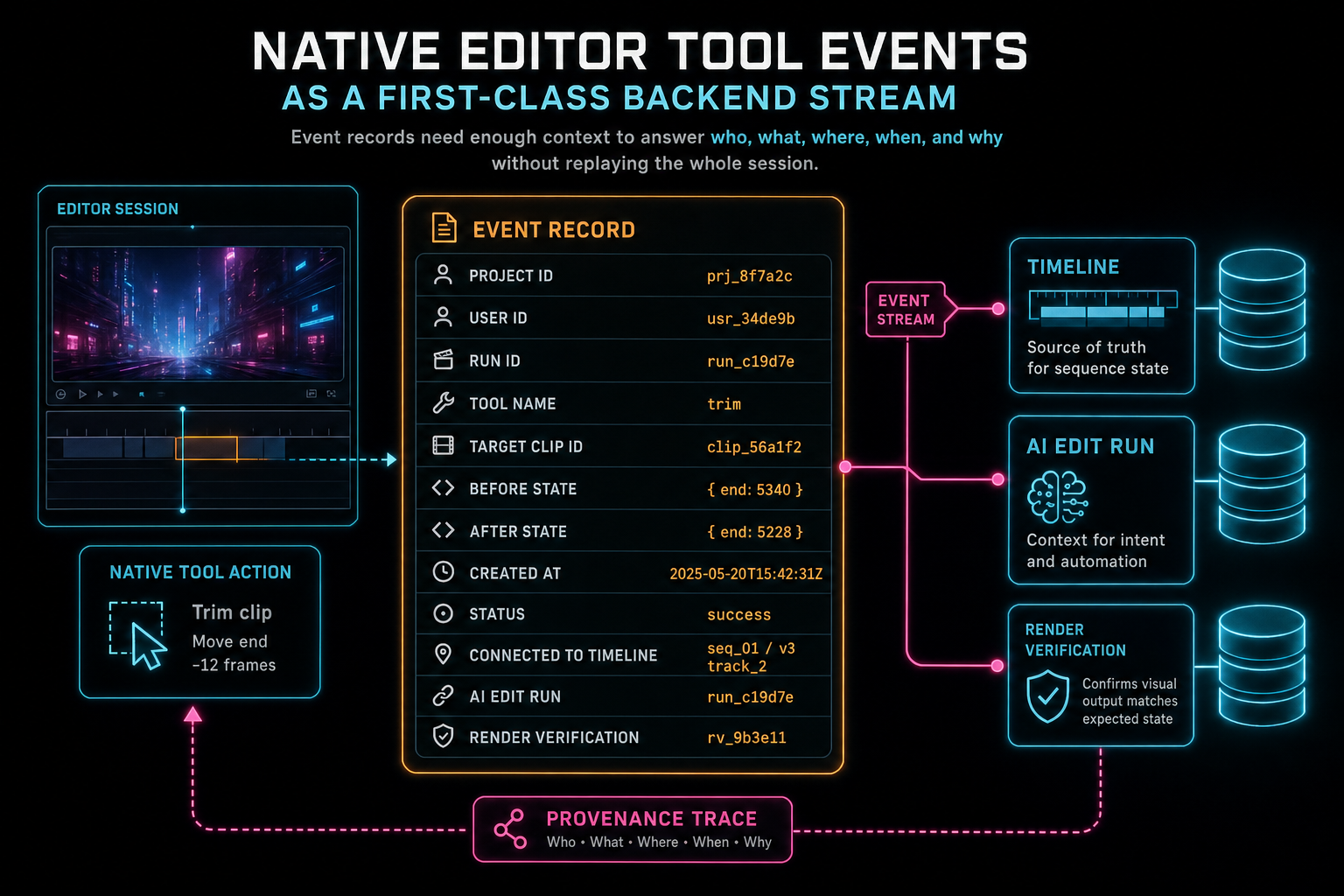
Event records need enough context to answer who, what, where, when, and why without replaying the whole session.
Human and AI Actions Share a Language
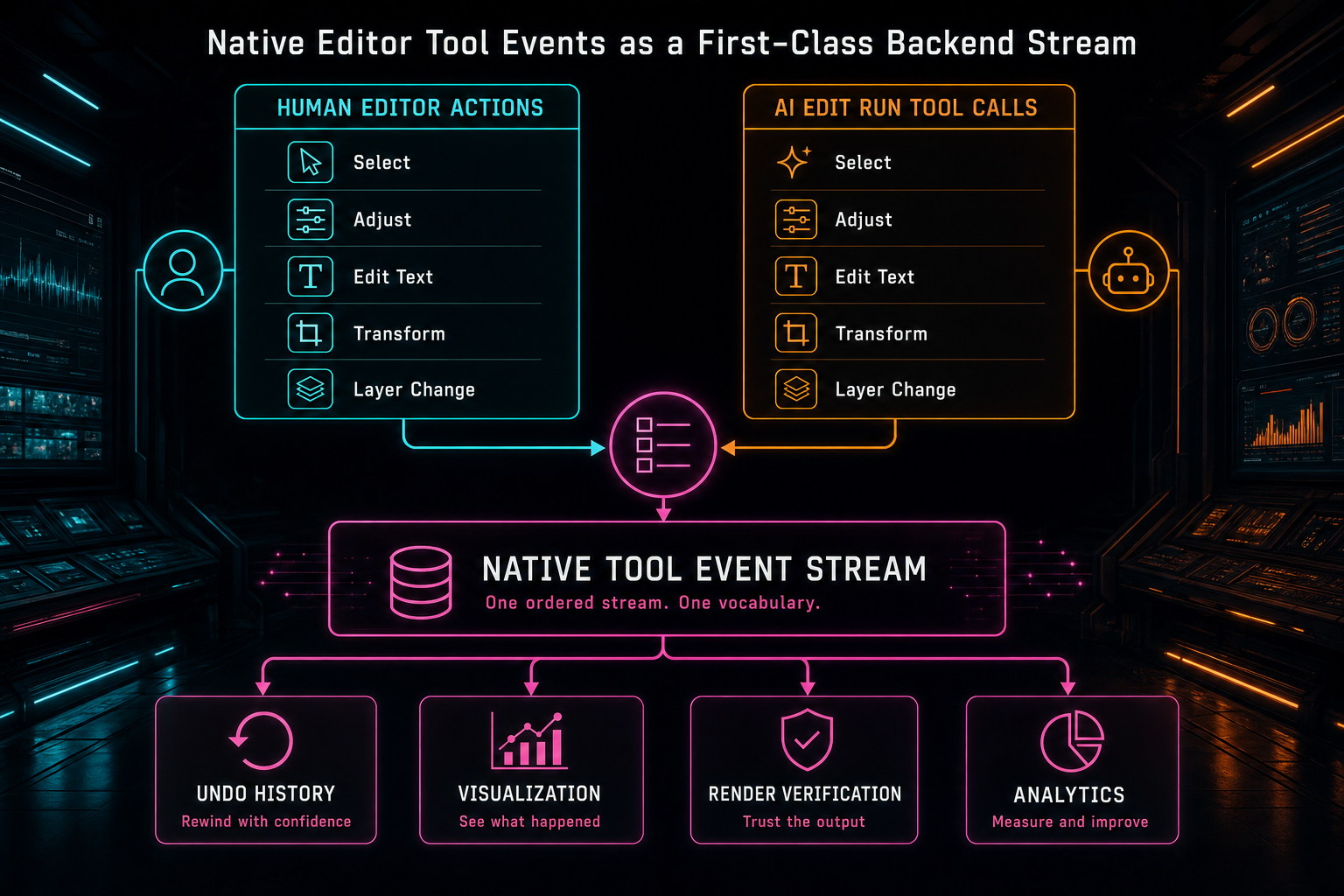
Human edits and AI edits become easier to reason about when they share one vocabulary of tool events.
Failure Is Part of the Stream
A production editor should record more than successful mutations. Failed or rejected tool attempts can be just as important, as long as the product stores them carefully. A malformed AI tool call, an unauthorized target project, a missing clip, an invalid time range, or an object storage issue can all explain why a requested edit did not happen. Without that record, the user sees silence and the team sees guesswork.
The event stream should distinguish between planned, attempted, applied, rejected, and failed states. Those states do not all belong in the timeline as visible edits, but they belong in the operational story. If an AI edit run asked for five changes and four were applied, the product should be able to show which one did not land and why. If a render later fails, verification can inspect the sequence of applied events that led to the export request.
This is where the stream connects to broader reliability infrastructure. VibeChopper already treats upload telemetry, media processing summaries, render verification, and DATA remediation as product surfaces rather than back-office trivia. Tool events follow the same pattern. They make failure legible enough to recover from, not just noisy enough to alert on.
A failed event record also protects user trust. The safest behavior for an AI editor is often to preserve the current timeline and explain what blocked the requested change. Recording the rejected tool attempt gives the product a specific explanation: the transcript span was missing, the clip reference was stale, the generated asset was not ready, or the requested range was outside the media duration. That is better than pretending the request never happened.
Events Connect to Render and Media Provenance
Tool events become more valuable when they connect to media and rendering. A timeline mutation is not isolated. It may reference a source clip, a transcript segment, an AI-generated overlay, a generated music bed, an object storage path, or a render artifact. When the event stream preserves those references, the product can answer lineage questions that matter in real editing work. Render a timeline free
For example, an AI music insertion is not only an audio clip on a track. It has a prompt, a model, metadata, duration, storage location, and placement decision. A render verification record is not only an exported file. It is tied to a project, timeline state, storage path, and expected output. Tool events are the bridge between the editor operation and those asset records.
That bridge is useful for both trust and repair. If a generated overlay appears in the wrong place, the system can inspect the event that inserted it and the media record behind it. If an export is missing a transition, the render path can be compared against the transition event and the timeline state. If a user wants to understand where a rendered asset came from, the media graph can point back to the editing actions that produced it.
This is why the event stream should be treated as backend product infrastructure. It is not only for the editor UI. It gives the rest of the platform a stable way to refer to change. The render CTA nearby exercises the export side of that story, and the media graph CTA shows the asset side.
Design Lessons for Backend Streams
The first lesson is to design events around product questions. A generic event table that says action = update will not help anyone understand a timeline. A product-shaped event says a clip was trimmed, which clip changed, what range changed, who initiated it, and which workflow produced it. The schema should make the important questions cheap.
The second lesson is to keep the stream append-friendly. Timeline state can change, but the historical record should remain stable enough to inspect later. If an event points at an entity that no longer exists, the event should still carry enough label or snapshot data to be meaningful. The current project state and the historical event stream answer related but different questions.
The third lesson is to separate event capture from visualization. Capture should be precise, typed, and durable. Visualization should be readable, compact, and editorial. Conflating those layers usually makes one of them worse. Raw event payloads become too presentation-driven, or UI summaries become too verbose because they are compensating for missing backend context.
The fourth lesson is to assume concurrency and stale context. Users refresh mid-flow. AI runs can take multiple steps. Media processing can finish after the initial edit request. A robust stream needs stable identifiers, clear statuses, and server-side validation at the moment a mutation is applied. The event should describe what actually happened, not just what an earlier plan hoped would happen.
What This Unlocks
Making native editor tool events a first-class backend stream unlocks a more honest version of AI video editing. The product can accept creative, vibe-based instructions without asking the user to surrender visibility. It can show a readable path from prompt to timeline. It can connect generated assets, transcript decisions, render artifacts, and correction flows to the actual mutations that changed the project.
For developers, the benefit is architectural. The editor gets a common mutation vocabulary. AI edit runs get concrete tool outcomes. Visualizations get structured source data. Render verification gets a traceable path back to project changes. Media provenance gets links to the moments assets entered the timeline. Support and remediation get records that are specific enough to act on.
For creators, the benefit is simpler: the editor feels less mysterious. Voice edits can move fast, but they do not vanish into a black box. Manual changes, AI-assisted changes, and generated-media insertions all become inspectable parts of the same project story. If the edit is right, the stream confirms the path. If the edit needs adjustment, the stream gives the product a precise place to respond.
That is the product-final version of the idea. VibeChopper is not just calling AI and hoping the timeline behaves. It is building a video editor where intent, tools, media, and output stay connected. Native tool events are the backend stream that makes those connections visible.
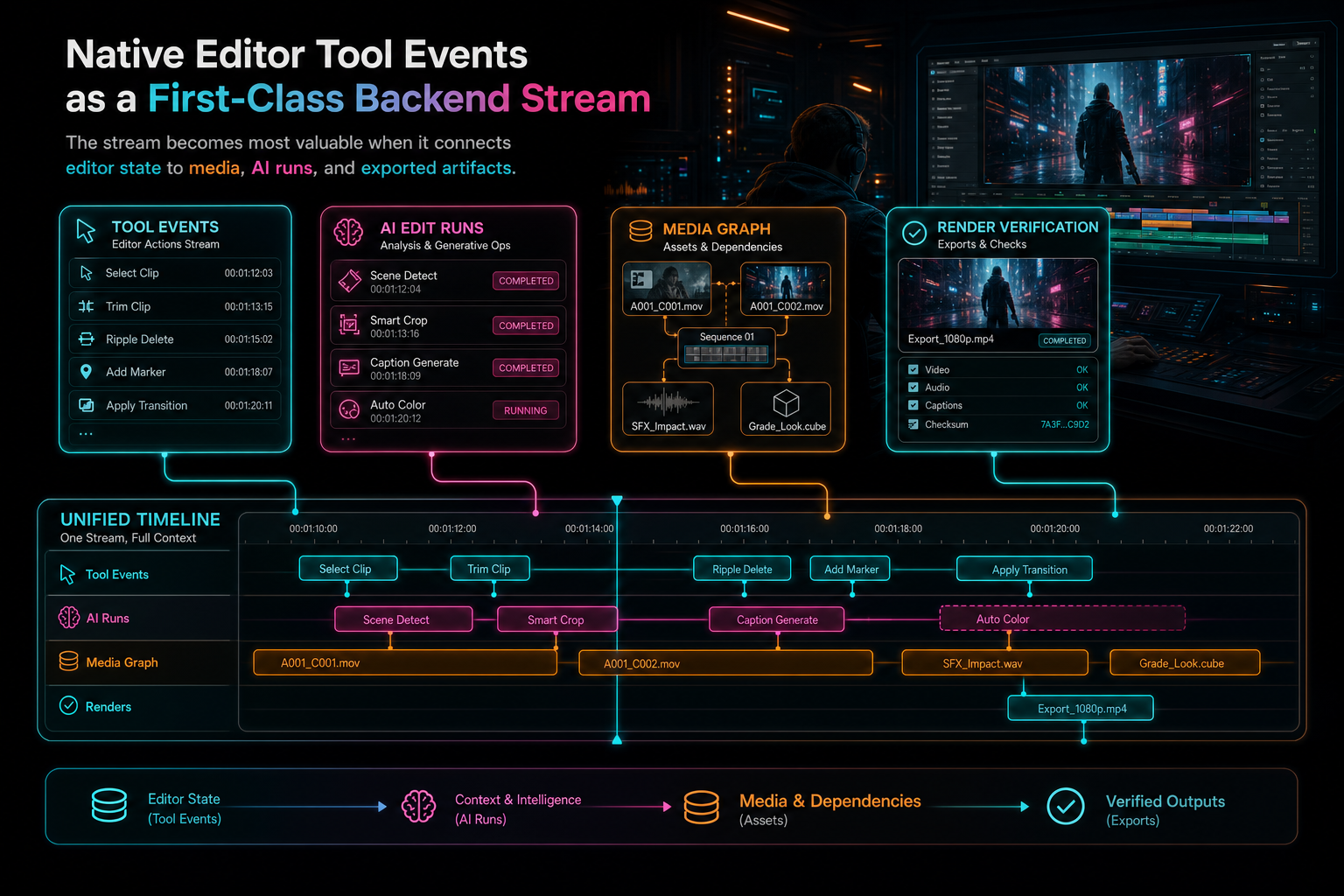
The stream becomes most valuable when it connects editor state to media, AI runs, and exported artifacts.
Try the workflow
Open every feature from this post in the editor
These panels collect the features discussed above. Sign in once, finish your profile if needed, then the editor opens the first highlighted surface and walks through the tutorial.
Step 1
Inspect an AI edit run
Open the editor and see how plans, tool calls, artifacts, and render results stay connected.
Open the edit-run receipts →Step 2
Try voice-driven timeline edits
Describe the edit you want and let VibeChopper translate intent into timeline changes.
Talk a cut into shape →Step 3
Open the media asset graph
See generated audio, rendered assets, source clips, metadata, and provenance in the media panel.
Explore your media graph →Step 4
Render a verified timeline
Export a project through the same storage-backed render path described in this article.
Render a timeline free →