
A Prompt Is Not a System
Natural-language editing feels simple at the surface. A user opens VibeChopper, types or says what they want, and expects the timeline to move: trim the slow opening, cut to the second speaker, add a fade before the beat drops, make the ending tighter. The product promise is direct. Edit videos with your voice based on vibes. Just describe the edit. Open the edit-run receipts
The backend cannot be that casual. A chat prompt is a request, not proof. It does not tell the server which clips were considered, which transcript spans mattered, which tool calls were authorized, which artifacts were created, which timeline events landed, or whether the final render still matches the project. If an AI video editor stops at model text, the user is left trusting a black box with their timeline.
That is why VibeChopper treats the AI edit run as a first-class product object. The run is the connective record between intent and execution. It starts with the user prompt, carries context through planning, records native tool calls, attaches artifacts, and gives verification systems something concrete to inspect. The result is not just an answer from a model. It is an accountable editing session.
The developer audit for this post points to server/aiChatEditHarnessRoutes.ts, server/aiEditRuns.ts, and commits 30331fd, 7e675ce, and 6daf963. Those references sit inside the broader 2026-05-17 to 2026-05-18 hardening wave: provider harness, AI edit runs, tool events, render verification, compositor effects, upload telemetry, owned auth, passkeys, and platform emails. In other words, this work was not a cosmetic chat feature. It was infrastructure for making AI edits observable.
The key lesson is blunt: if AI can change project state, the product needs a durable record of how that change happened. The edit run is that record.
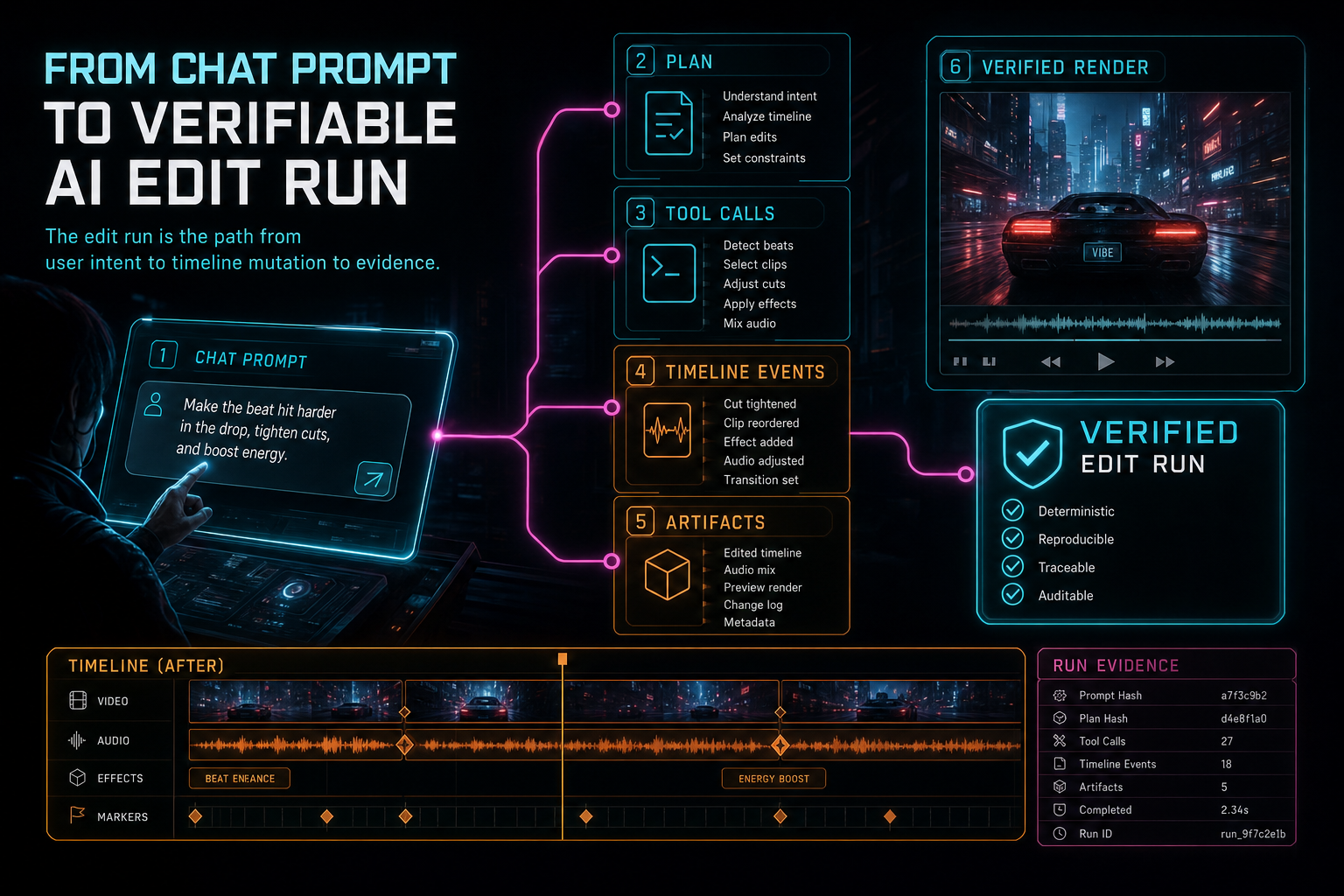
The edit run is the path from user intent to timeline mutation to evidence.
The Edit Run Lifecycle
A verifiable edit run follows a lifecycle that looks more like a production job than a chat reply. First, the server receives a natural-language request in the context of an authenticated editor session. That context matters. The project has an owner. The timeline has clips. The media library has source assets, generated assets, frame analysis, transcript segments, and maybe prior AI messages. The server has to preserve those boundaries before asking any model to reason about the edit.
Next comes the context snapshot. The system gathers the parts of the project that are relevant to the request: selected clips, timeline duration, transcript spans, frame descriptions, current playhead position, existing effects, generated media, and previous planning context where applicable. The snapshot is intentionally narrower than the whole database. It should be rich enough for the model to reason, but scoped enough to protect privacy, limit cost, and keep validation tractable.
The planning step turns the prompt into a proposed course of action. That plan may identify target clips, intended edits, required assets, or uncertainty that needs user clarification. A good plan is not yet a mutation. It is a structured claim about what should happen next. VibeChopper can display, store, validate, score, or reject that plan before tools do real work.
Tool execution is where the run becomes concrete. Native editor tools can trim, split, add clips, insert transitions, attach generated music, create overlays, request renders, or update metadata. Each tool has its own input contract. Each tool is still subject to authorization and validation. The model may propose; the server and tool layer decide.
Finally, the run gathers evidence. Timeline events show what changed. Artifact records point to generated or rendered files. Render verification can prove that an output exists, belongs to the right timeline, and carries the expected metadata. The edit run ties those pieces together so a user, support workflow, or later AI reviewer can answer the practical question: what happened after I asked for this edit?
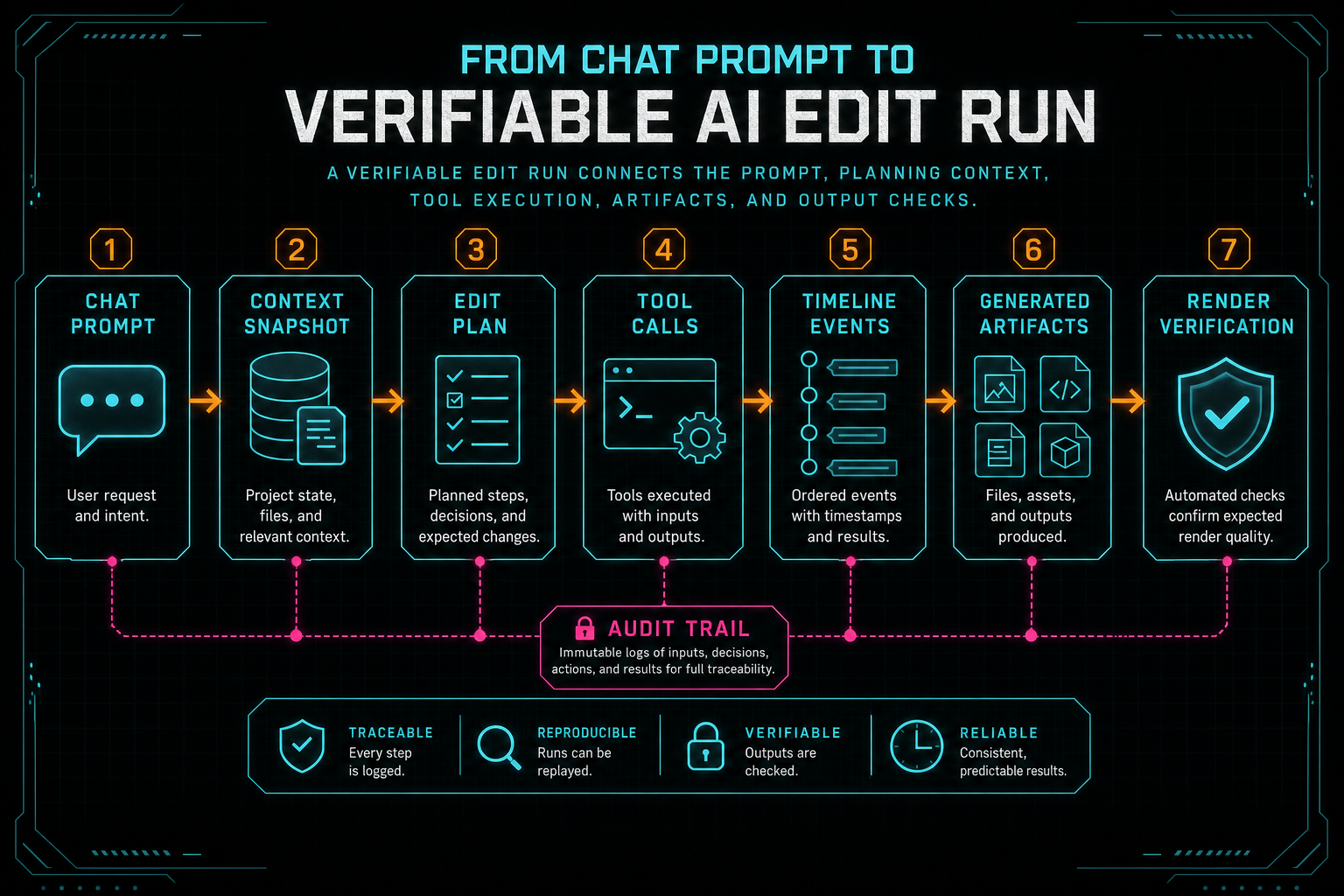
A verifiable edit run connects the prompt, planning context, tool execution, artifacts, and output checks.
Tool Events Beat Magic Text
A model response saying "I trimmed the intro" is not the same thing as a trim. A real trim has a target clip, a start or end boundary, a timeline position, a project owner, an undo story, and a persistence result. VibeChopper's edit run design keeps that distinction sharp by routing changes through native editor tools and recording tool events. Talk a cut into shape
Tool events matter because they translate AI assistance into editor-native language. Instead of asking the user to trust a paragraph, the product can show that a split occurred at a specific time, a transition was inserted between two clips, a generated music bed was placed on an audio track, or a render job produced an output artifact. The event stream becomes the receipt.
This is especially important for a video editor because small state changes can have large creative consequences. Moving a cut by half a second can change the rhythm of a scene. Deleting the wrong silence can remove a reaction shot. Applying a transition to the wrong clip boundary can make an export feel amateur. A tool event gives the product a durable point of inspection when the user asks why the timeline changed.
The audit names server/projectEditorEvents.ts and server/editorToolVisualizations.ts as related infrastructure for native editor tool events. This post's primary run references are server/aiChatEditHarnessRoutes.ts and server/aiEditRuns.ts. Together, those systems form the spine of explainable AI editing: chat intent enters through the harness, editor tools perform bounded work, and event visualization makes the result legible.
From the user's side, this still feels fast. Tell the editor what you want, and it makes the edits. From the backend side, every meaningful action has a shape the product owns.
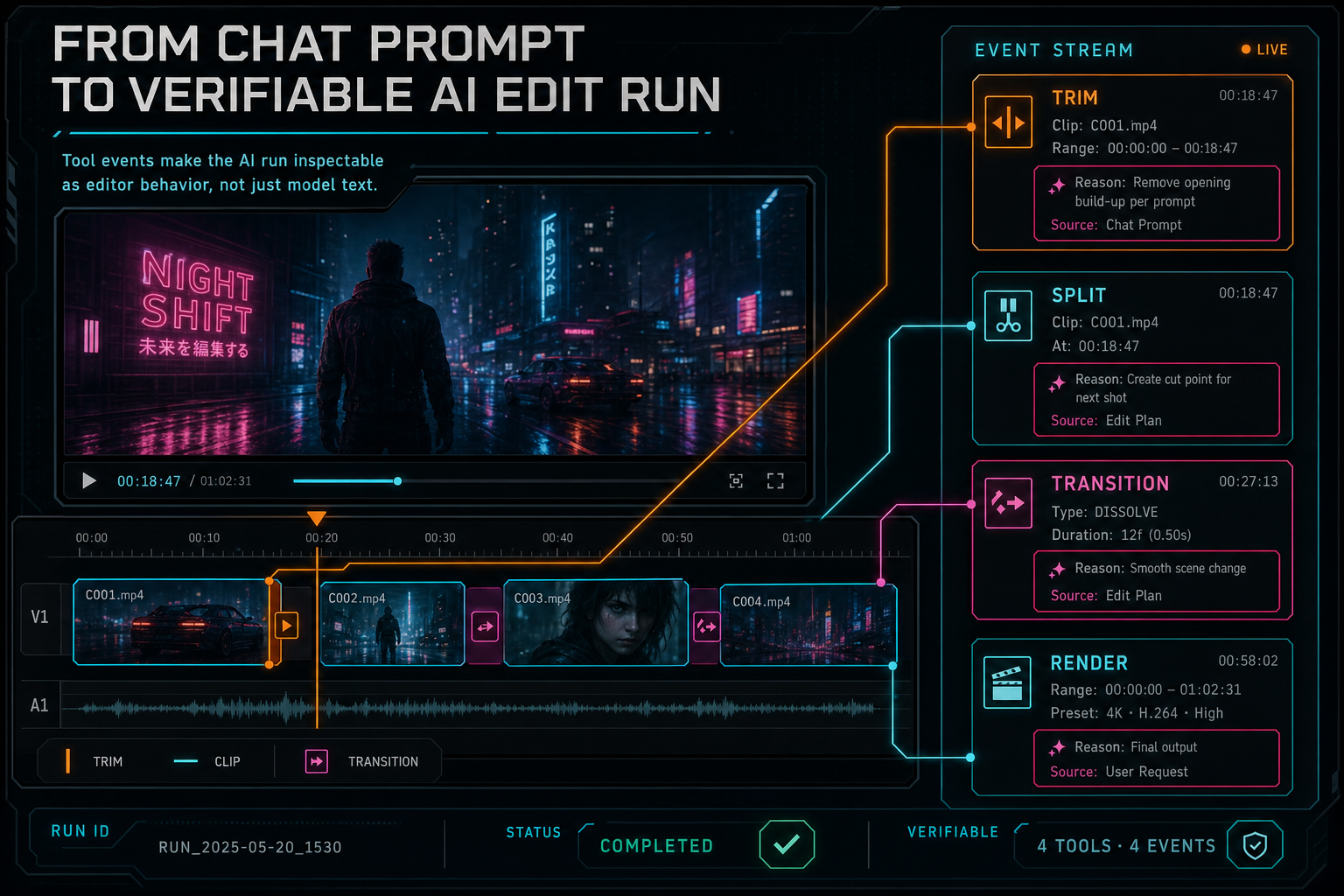
Tool events make the AI run inspectable as editor behavior, not just model text.
What the Run Record Needs to Know
The run record is not useful because it stores a lot of text. It is useful because it stores relationships. A practical AI edit run needs to connect the user request, project identity, model interaction, planning output, tool calls, editor events, generated artifacts, render jobs, and final status. Without those links, every investigation becomes archaeology. Explore your media graph
A minimal record should answer operational questions. Who initiated the run? Which project did it target? What prompt started it? Which provider and model interpreted the request? Was the structured output valid? Which tools were attempted? Which tools succeeded? Which artifacts were generated? Did a render run? Was verification successful? What error category ended the run if it failed?
Those questions are not only for engineers. They also shape product UX. A user can inspect an AI edit run and see that the editor planned a cleanup pass, trimmed three dead-air regions, added a fade, generated a music artifact, then rendered a verified preview. If something looks wrong, the run gives support and remediation systems a starting point. If the output is good, the run becomes provenance: the creative result has a visible path.
The relationship to the media graph is direct. VibeChopper already treats media and generated assets as objects with metadata and provenance. An edit run should be able to point at those objects instead of burying them in a transcript. That is how generated audio, overlays, render outputs, and source clips stay connected after the chat message scrolls out of view.
This is also where provider-agnostic completion infrastructure pays off. The provider harness can normalize model metadata and usage records. The edit run can store the normalized result alongside tool and artifact records. The product does not have to choose between model observability and editor observability. It needs both.
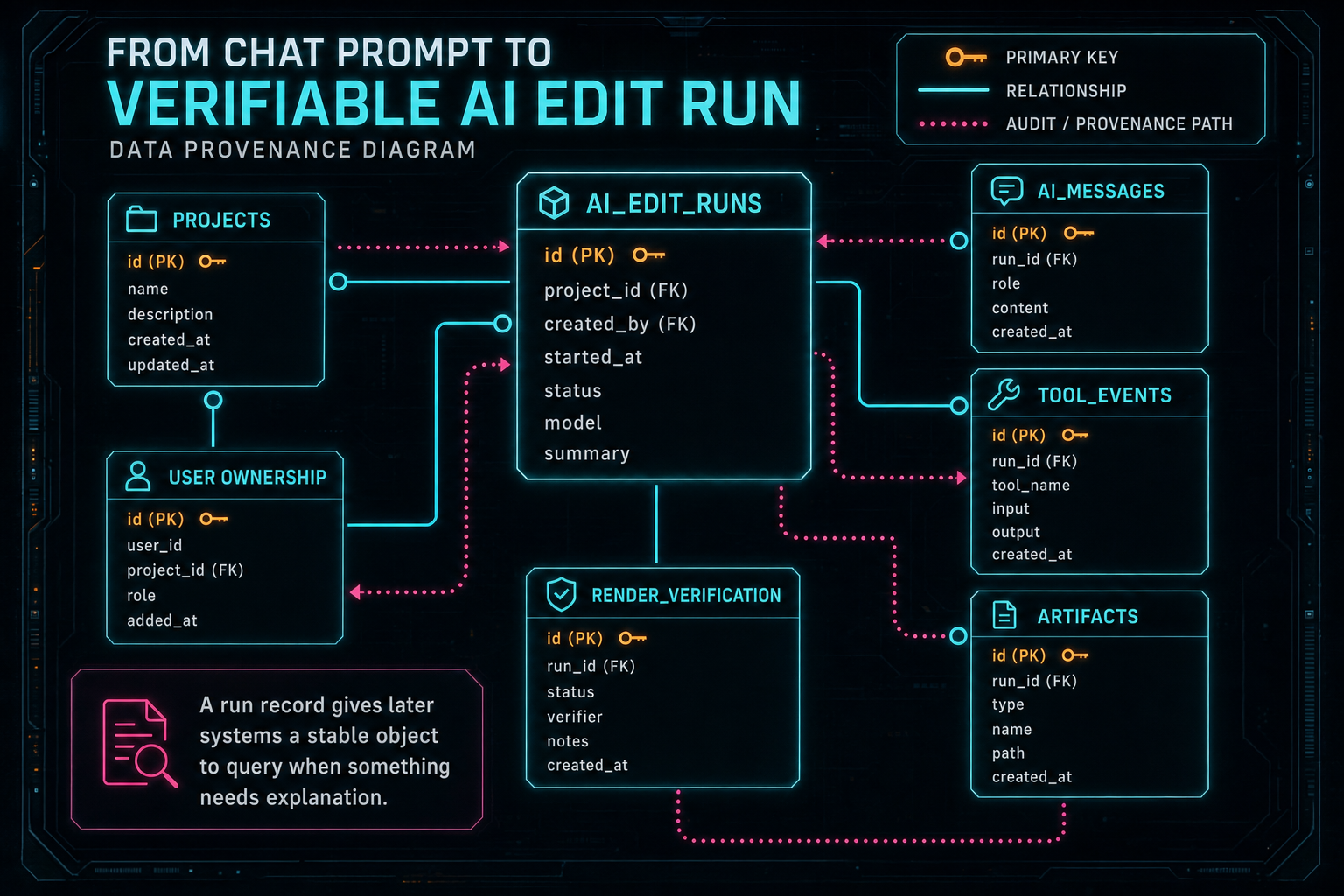
A run record gives later systems a stable object to query when something needs explanation.
Verification Is Built for the Bad Days
The happy path is easy to demo. A user asks for a tighter intro, the plan is valid, tools run, a render completes, and everyone feels the neon. The serious architecture shows up when something breaks. Render a timeline free
The model may return malformed JSON. The provider may time out. A transcript may not be ready. A referenced clip may have been deleted. Object storage may reject an artifact write. A render may finish without the expected metadata. A duplicate request may arrive after the user retries. Without a run record, these failures blur together into one bad spinner. With a run record, each failure lands in a known phase.
That phase information changes recovery. Malformed output can be retried or repaired before any tool runs. Provider failure can route through fallback policy. Missing media can produce a user-visible processing status. Tool validation failure can preserve the timeline unchanged. Render verification failure can keep the edit state while marking the output artifact as suspect. Duplicate callbacks can be idempotent because the system knows which run and artifact they belong to.
The audit's hardening wave includes render verification and DATA remediation alongside AI edit runs. That connection is practical. A verifiable run makes remediation less vague. Instead of receiving a bug report that says "the AI edit was wrong," the system can inspect the run, its context, its tool events, and its artifacts. That gives agents and engineers a real trail to follow.
For creators, this is not about reading backend logs. It is about confidence. If VibeChopper says an AI edit completed, the product should be able to show what completed. If it failed, the product should preserve work, explain the phase, and give the next action.
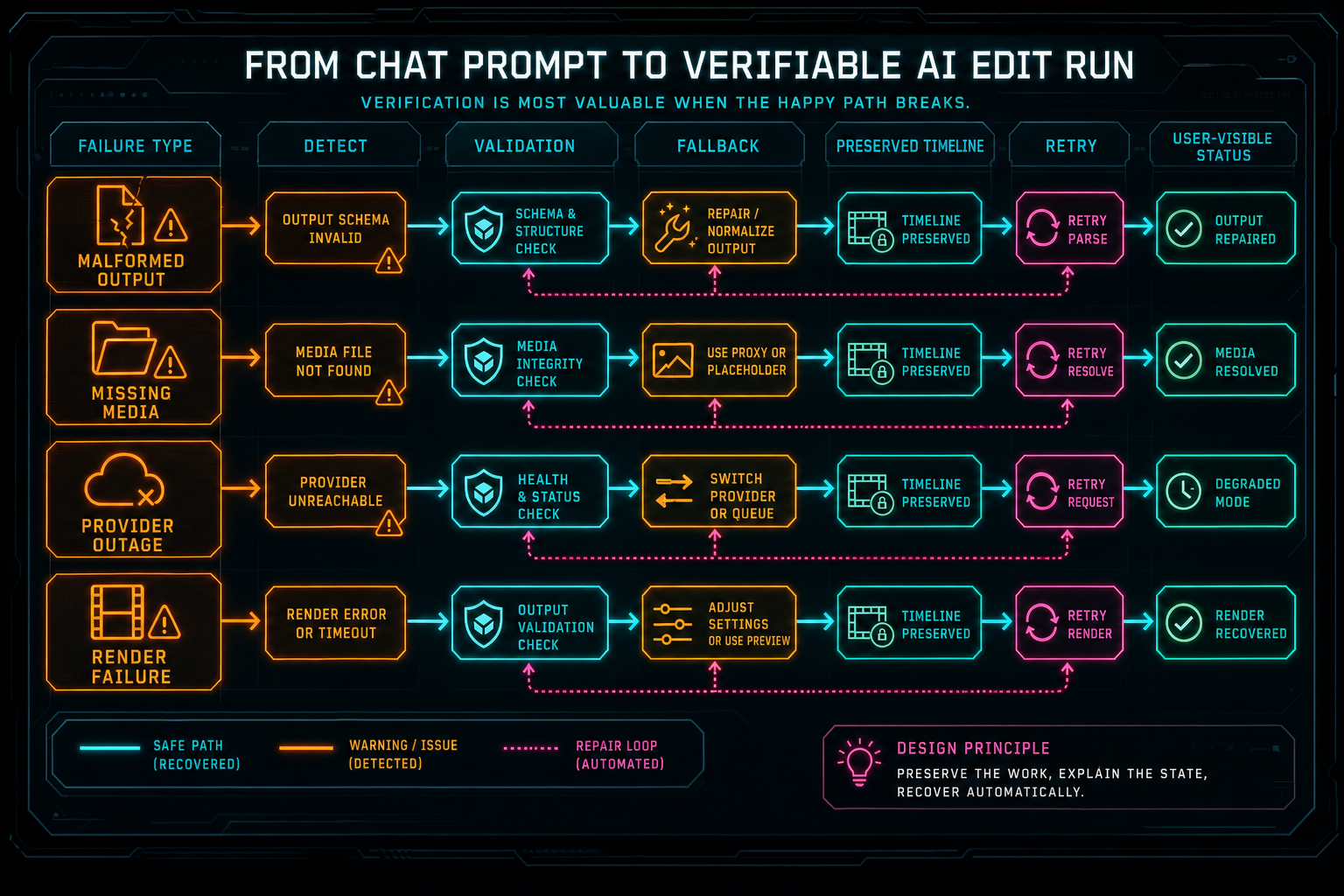
Verification is most valuable when the happy path breaks.
Inspection Is a Product Feature
AI transparency often gets treated as compliance language. In an editor, it is a usability feature. Creators do not need a research paper every time they make a cut, but they do need to understand why their timeline changed. Developers do not need every token in the UI, but they do need enough structured state to debug, retry, verify, and improve the system.
The edit run becomes the shared surface between those needs. A compact user-facing view can show the prompt, status, planned actions, completed actions, and generated artifacts. A deeper developer or support view can expose provider, model, validation status, error category, timing, and linked records. The same underlying run supports both levels without inventing two separate histories.
Readable inspection also changes how teams build new AI features. Once the run object exists, second-pass review, rubric scoring, attached briefs, generated music, render verification, and tool visualizations can all plug into the same evidence trail. The feature set grows, but the user's mental model stays stable: this was the request, this was the plan, these were the actions, these were the outputs.
That stability is important for a product that edits by vibe. Vibes are human. Timelines are precise. The edit run is the translation layer that respects both. It lets a creator ask for something intuitive while the system records the exact work it performed.
Implementation Lessons
The first lesson is to create the run before the expensive work starts. If the provider call fails, the run still records that the request existed and where it failed. If tool execution begins, the tool calls have a parent. If the user refreshes, the UI has a status object to query.
The second lesson is to keep plans and actions separate. A plan is reasoning. A tool call is intent to mutate. An event is a record that something actually happened. Blending those layers makes the UI harder to explain and the backend harder to recover. Separate layers let the system reject a plan, retry a tool, or display completed work without pretending every phase is the same.
The third lesson is to store identifiers, not prose, wherever possible. Prose is helpful for humans, but identifiers let systems connect records. Project IDs, clip IDs, artifact IDs, render IDs, provider request IDs, and event IDs turn the edit run into infrastructure instead of a chat transcript with decorations.
The fourth lesson is to make failure boring. Every run should have clear statuses and error categories. Pending, planning, executing, verifying, completed, failed, and canceled are more useful than a generic loading state. The point is not to make failures disappear. The point is to make them legible enough that the product can respond without damaging the user's timeline.
The final lesson is that verification should sit close to the artifact. If a run creates or renders something, the proof should attach to that object and link back to the run. That keeps generated media, exports, and timeline changes from becoming orphaned side effects.
The Result
From the outside, the feature is simple. Open the editor, describe the edit, and watch the timeline change. From the inside, VibeChopper treats that moment as a verifiable run: prompt, context, plan, tool calls, events, artifacts, verification, and status. Open the edit-run receipts
That structure is what lets AI editing graduate from impressive demo to repeatable workflow. The model can reason about the vibe. The server can enforce ownership and shape. Native tools can make precise changes. Event streams can explain what landed. Artifact records can preserve provenance. Render verification can confirm that the output exists where the product says it does.
This is the practical standard for AI-assisted creative tools: do not ask users to trust magic. Give them speed, then give them receipts. VibeChopper's AI edit run is the receipt for natural-language video editing.
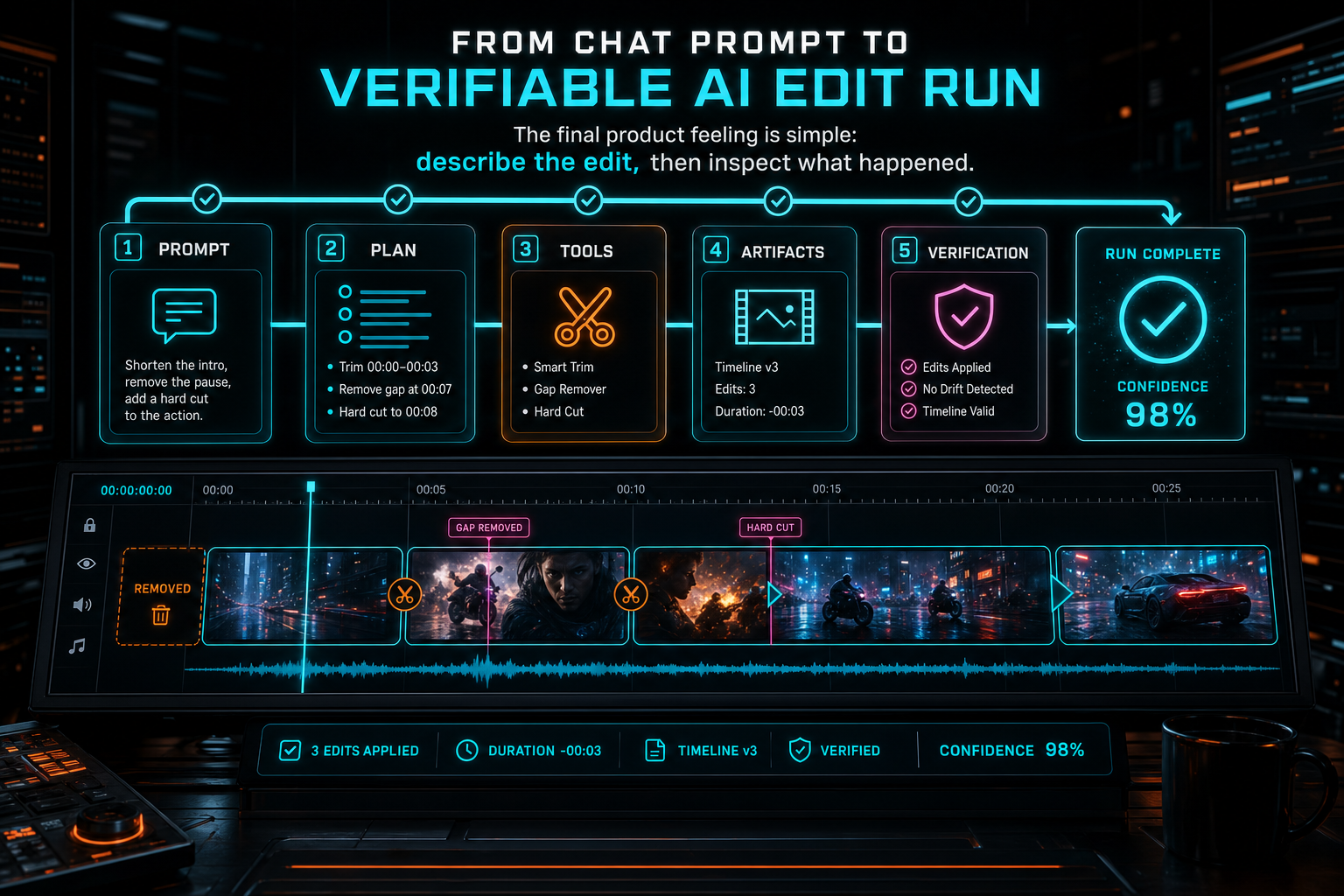
The final product feeling is simple: describe the edit, then inspect what happened.
Try the workflow
Open every feature from this post in the editor
These panels collect the features discussed above. Sign in once, finish your profile if needed, then the editor opens the first highlighted surface and walks through the tutorial.
Step 1
Inspect an AI edit run
Open the editor and see how plans, tool calls, artifacts, and render results stay connected.
Open the edit-run receipts →Step 2
Try voice-driven timeline edits
Describe the edit you want and let VibeChopper translate intent into timeline changes.
Talk a cut into shape →Step 3
Open the media asset graph
See generated audio, rendered assets, source clips, metadata, and provenance in the media panel.
Explore your media graph →Step 4
Render a verified timeline
Export a project through the same storage-backed render path described in this article.
Render a timeline free →