
Why the Schema Matters
An AI video editor can look magical from the outside. A creator types a request, asks by voice, or describes a vibe: tighten the intro, cut around the awkward silence, add a transition before the beat drops, generate a music bed, render a preview. The product should feel that direct. VibeChopper's promise is that natural language can become real timeline work without asking the creator to think like a database. Open the edit-run receipts
The backend has the opposite responsibility. It has to be explicit. A prompt is not a durable unit of work. A model response is not a timeline mutation. A generated file is not trustworthy just because a chat message mentioned it. If AI can alter project state, the system needs a schema that records the path from request to plan, from plan to bounded tool execution, from tool execution to editor events, and from generated work to artifacts and verification.
That is the role of the AI edit run database schema. It is not just a logging table. It is the contract that lets a product answer practical questions after the edit lands. What did the user ask for? Which project and timeline did the run target? Which plan did the model produce? Which plan items were accepted, skipped, retried, or rejected? Which tools actually executed? Which clips, transcript spans, effects, generated assets, object storage paths, and render outputs were touched? Which phase failed if the run did not complete?
Those questions matter for product trust, support, AI quality, and search intent around AI workflow audit trails. A serious AI video editor backend needs more than a prompt table. It needs normalized records for reasoning, execution, evidence, and media provenance. The schema described here is the shape behind that idea: plans, items, tool events, and artifacts, all anchored to a run.
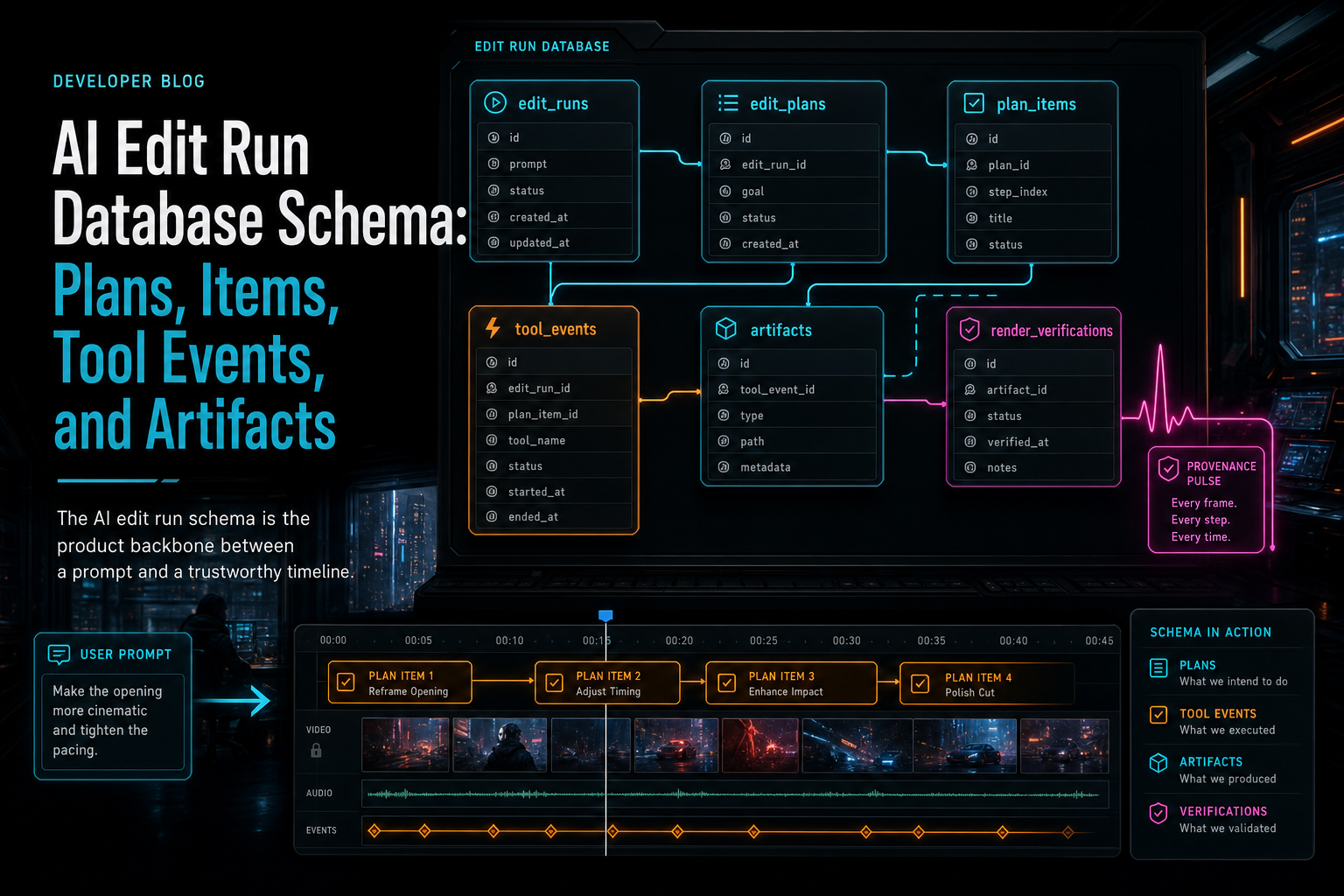
The AI edit run schema is the product backbone between a prompt and a trustworthy timeline.
The Core Entities
A useful AI edit run schema starts with one parent object: the run. The run represents a single user-initiated AI editing workflow against a project. It should hold stable operational fields such as run ID, project ID, user ID, initiating message ID where applicable, status, phase, requested intent, provider metadata, started and completed timestamps, cancellation fields, and an error category when work fails. Explore your media graph
The next entity is the plan. A plan is the model's structured interpretation of the request. It is reasoning, not execution. A plan might summarize the intended creative change, identify relevant clips, cite transcript ranges, note missing prerequisites, and propose a set of actions. Keeping the plan separate from the run matters because a run may need a revised plan, a second-pass review, or a user confirmation step before execution.
Plan items turn the plan into units of work. Each item should be specific enough to validate and track independently: trim this clip range, split this clip at this timestamp, insert this transition, generate this overlay, create this music artifact, run this render verification. Plan items need ordering, dependency information, item status, target references, proposed arguments, validation results, and a link back to the parent plan.
Tool events are the execution ledger. They record what the product's native tools attempted and what happened. A tool event should never be only a prose note. It should include the run, plan item if one exists, tool name, validated input, target object references, before and after state where practical, idempotency key, timing, result status, and error details. This is the layer that proves a proposed action became editor behavior.
Artifacts are the durable outputs. Generated music, overlays, extracted media, render previews, transcripts, thumbnails, and verification reports should have records with ownership, project linkage, object storage identity, source run, source tool event, model metadata when relevant, content type, checksum or size where available, and lifecycle status. Artifact records keep generated media from becoming orphaned files attached only to a chat bubble.
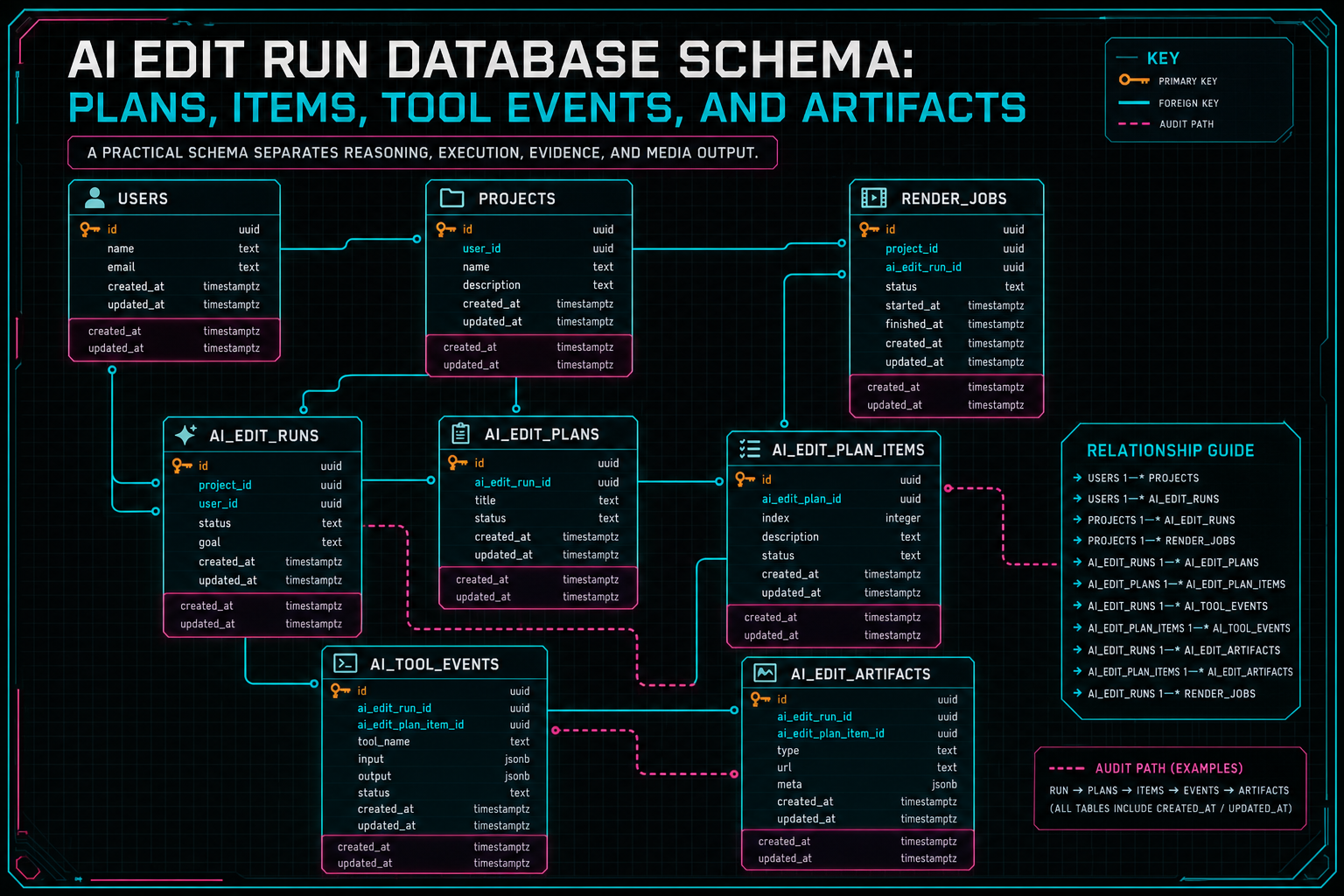
A practical schema separates reasoning, execution, evidence, and media output.
Model Run Status as Product State
Status design is one of the easiest places to underbuild. A single boolean like completed will not survive real AI video editing. Long-running media workflows need phase-aware status because different failures require different recovery behavior. A run that failed during planning is not the same as a run that failed after three timeline tools succeeded and a render verification failed.
A practical status model usually includes queued, planning, awaiting_confirmation, executing, verifying, completed, failed, and canceled. Some products may add retrying, partially_completed, or needs_media_processing. The exact names matter less than the contract: status should tell both the UI and the backend what kind of work has happened and what can safely happen next.
Phase-aware status improves the user experience. If the run is planning, the editor can show that the AI is interpreting the request. If the run is awaiting confirmation, the user can review plan items before mutation. If the run is executing, the UI can display completed tool events as they land. If the run is verifying, the product can explain that the timeline edit exists and the export is being checked. If the run fails, the phase tells the user whether the timeline was preserved, partially changed, or waiting for a retry.
It also improves developer operations. Duplicate requests can use idempotency keys and run status to avoid applying the same trim twice. Session expiry can halt a run before private state changes. Provider outage can fail the planning phase without touching the editor. Object storage failure can attach to the artifact phase instead of being misreported as a model problem. A good schema makes boring recovery possible.
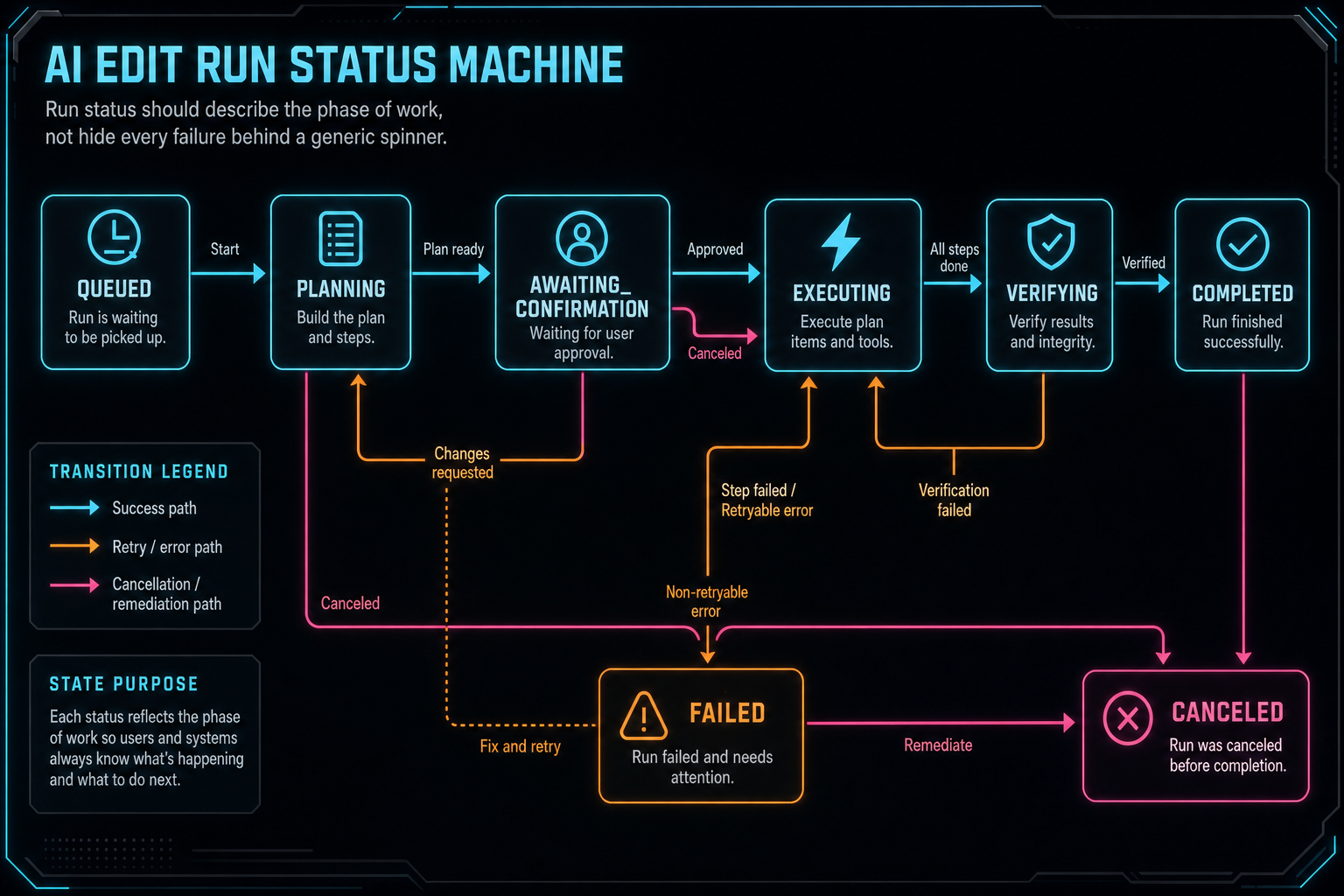
Run status should describe the phase of work, not hide every failure behind a generic spinner.
Plans Are Not Tool Calls
The plan table is where an AI editor preserves reasoning without pretending that reasoning has already mutated the timeline. This distinction is more than tidy modeling. It is the boundary that lets the product review, score, repair, or reject model output before it becomes project state. Talk a cut into shape
A plan record should include the structured summary of the intended edit, the context snapshot version used to produce it, model and provider metadata, confidence or rubric scores where the product supports review, and a normalized list of plan items. If the editor supports attached briefs, creative direction, selected assets, or prior draft evaluation, the plan should reference those inputs explicitly. Otherwise, later systems cannot explain why a plan favored one cut over another.
Plan items should be small enough to validate on their own. For example, make the intro tighter is too broad for an item. Trim clip 8 from 00:00:00.000 to 00:00:03.200 is concrete. Generate a 20 second electronic music bed for the montage is concrete enough to route to a generation tool. Render a low-resolution preview after timeline changes is concrete enough to schedule as a downstream item. This granularity lets the editor show progress item by item and retry the right piece when a single step fails.
Plan items also give the UI a natural review surface. A creator can see the intended edits before execution: remove silence, preserve a reaction shot, add a fade, create music, render preview. The backend can track the same list with statuses such as proposed, validated, running, completed, skipped, rejected, and failed. That shared structure turns AI planning into product state instead of hidden prompt text.
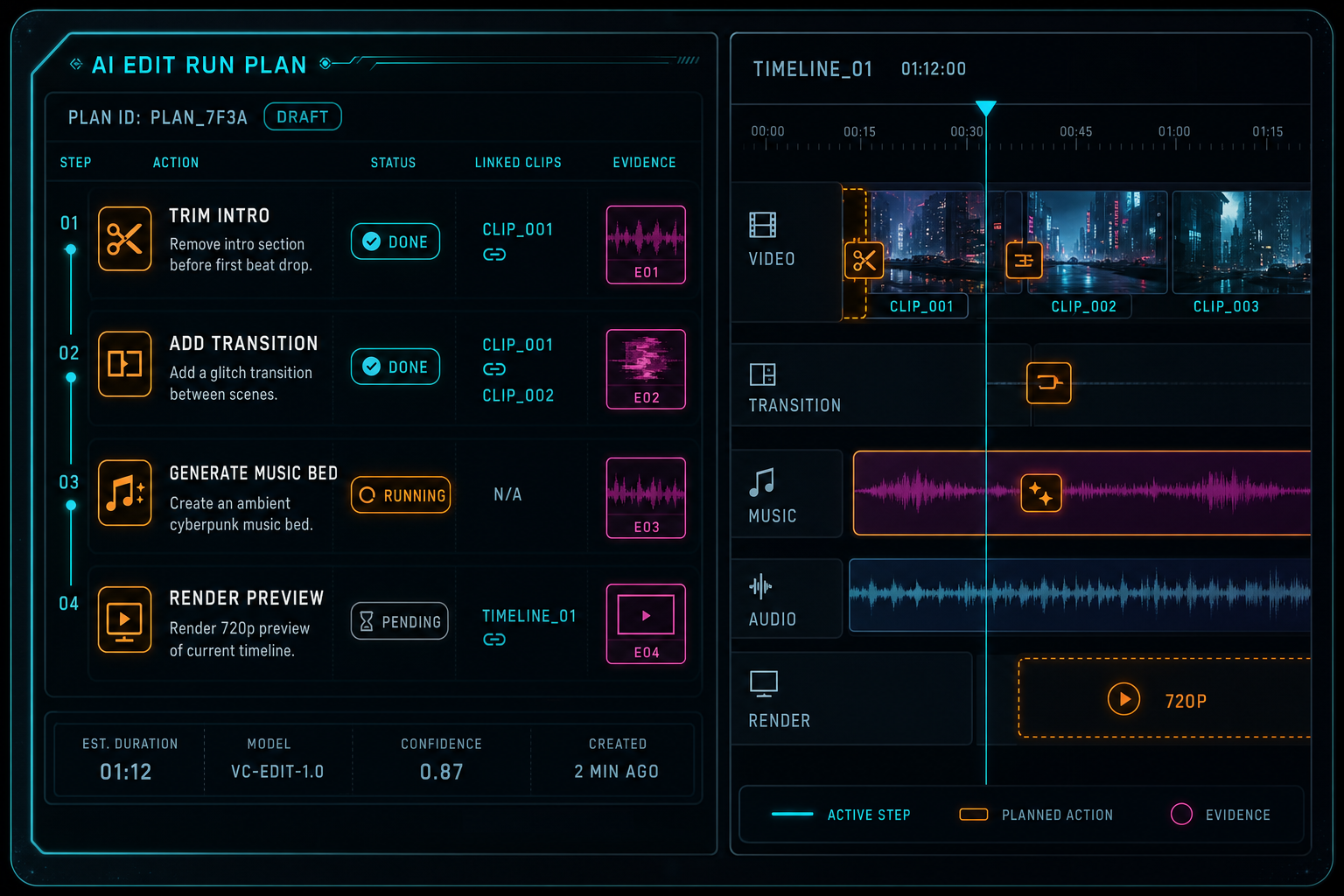
Plan items make the model's intent reviewable before tools mutate the timeline.
Tool Events Are the Execution Ledger
Tool events are where an AI edit run becomes auditable. The model can propose work, but native editor tools perform bounded actions. Each meaningful action should create an event that records what was attempted, what inputs were validated, which objects were touched, and what result landed. Open the edit-run receipts
This ledger needs more structure than a generic JSON log. A trim event should identify the clip, old range, new range, track, project, user, and plan item. A transition event should identify both sides of the cut, transition type, duration, and validation result. A generated music insertion should identify the artifact, the audio track, the intended range, and whether placement succeeded. A render event should identify the render job, output artifact, verification status, and storage path.
Before and after state is especially valuable when the blast radius is small enough to store safely. It supports user-facing explanations, support diagnostics, undo flows, and automated remediation. The event does not have to duplicate the whole project. It should capture the state needed to understand the action. For timeline editing, that usually means target IDs, timing values, operation arguments, and result references.
Tool events also need idempotency. AI editing runs are full of retry pressure: provider retries, user double clicks, network reconnects, worker callbacks, and render completion notifications. Without an idempotency key or equivalent dedupe strategy, a repeated request can become a repeated timeline mutation. A database schema that treats tool execution as a ledger can reject duplicates while preserving a record that the duplicate arrived.
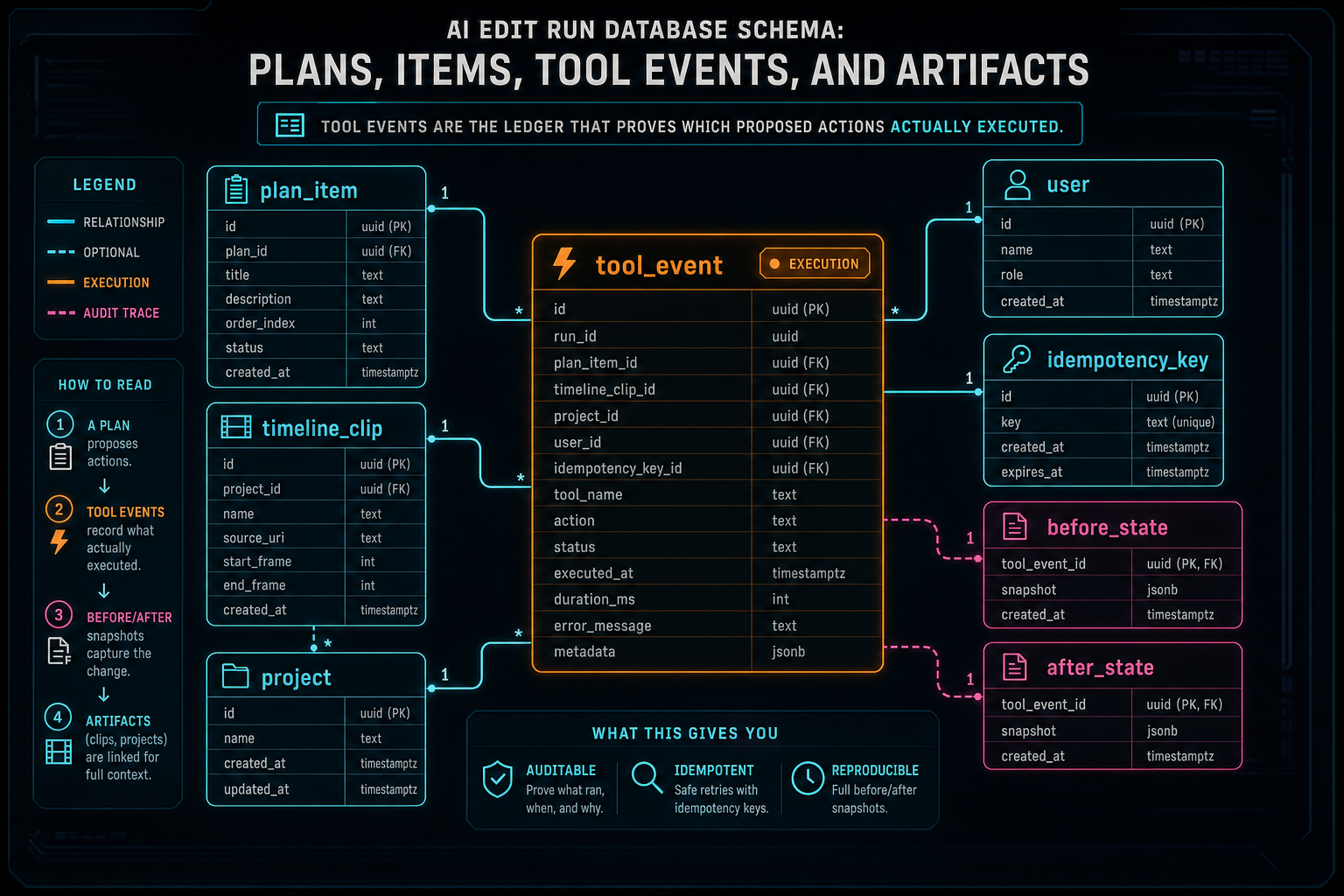
Tool events are the ledger that proves which proposed actions actually executed.
Artifacts Need Provenance
Artifacts are where AI editing becomes media infrastructure. A generated music bed, overlay, render preview, transcript, caption file, thumbnail, or verification report cannot live as an anonymous blob. The product needs to know who owns it, which project created it, which run requested it, which tool event produced it, where it is stored, and how it can be reused or deleted. Explore your media graph
A strong artifact table includes artifact type, project ID, user ID, source run ID, source tool event ID, storage bucket or object key, mime type, size, duration where relevant, checksum where available, generation prompt or prompt reference, provider and model metadata, lifecycle status, and visibility rules. For render artifacts, it should also link to render verification. For generated music or overlays, it should link to timeline placement events.
This is the database side of generated asset provenance. It lets the editor answer simple product questions: which AI run created this music? Is this render verified? Which timeline used this overlay? Can this asset appear in the media panel? If a user deletes a project, which generated objects belong to it? If support investigates a broken output, which model and tool produced the file?
Artifact provenance also helps future AI work. The next planning pass can see that a project already has a generated music bed, a verified render preview, and a transcript. It can avoid regenerating assets unnecessarily. It can use existing media as context. It can produce better plans because the schema preserves the creative memory of the project.
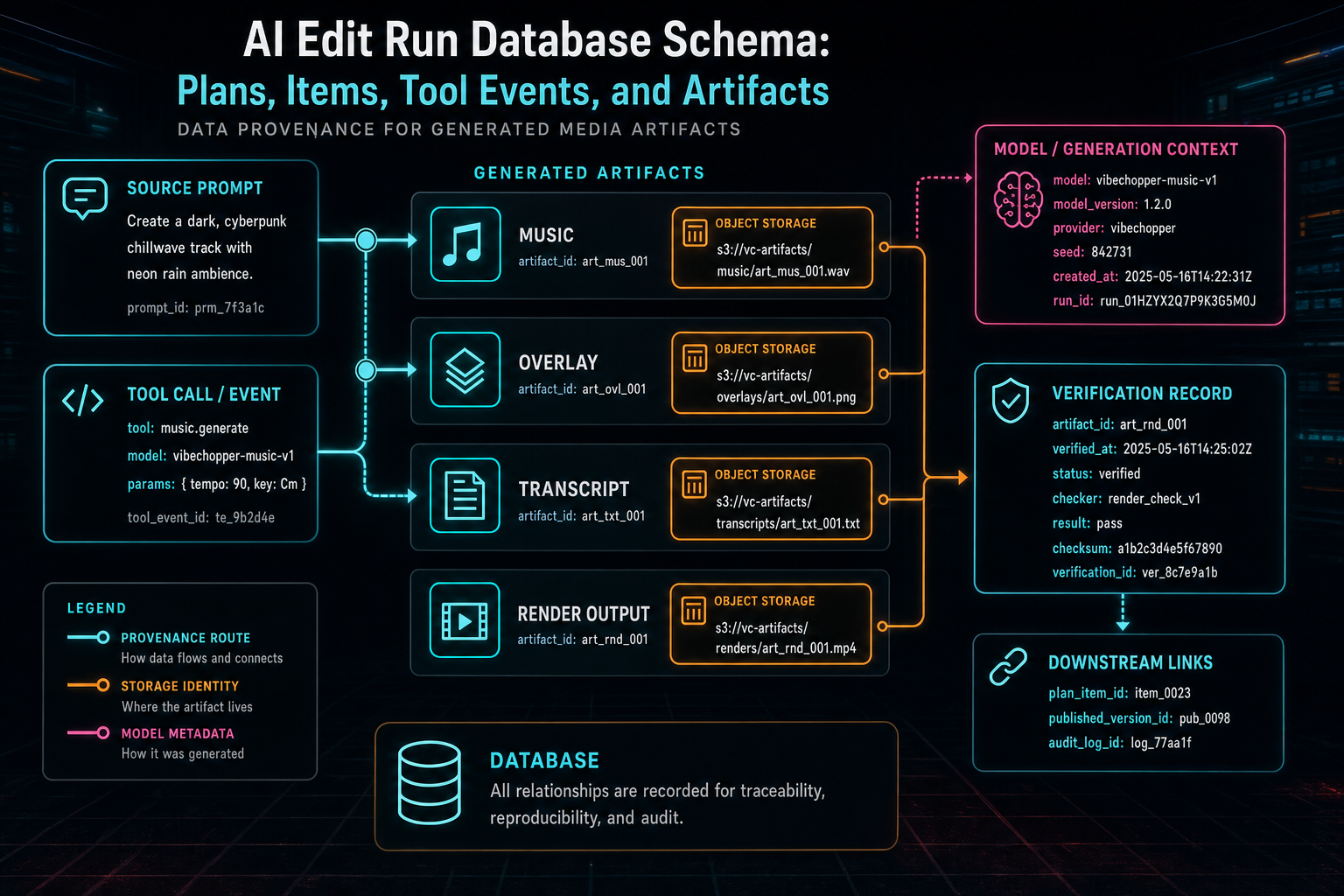
Artifacts need ownership, storage identity, model context, and downstream verification links.
Constraints Belong at the Boundary
The schema is only useful if the application enforces it at the right boundaries. Model output should be validated before it becomes a plan. Plan items should be validated before they become tool calls. Tool calls should be authorized against the current project before they mutate anything. Artifacts should be verified before they appear as completed product outputs.
For a TypeScript and Drizzle-style stack, that usually means pairing database tables with Zod or equivalent boundary schemas. The model may return structured JSON, but the server still needs to prove that fields are present, enum values are allowed, timestamps and durations are parseable, IDs refer to accessible records, and requested tools are supported. The AI provider is not the source of truth for project permissions.
Transaction boundaries matter as well. Creating a run and initial plan can be one durable step. Applying a sequence of timeline mutations may need smaller transactions per tool event so partial progress is explicit. Creating an artifact record and writing object storage may need a pending status until the storage write and verification complete. The right answer depends on the tool, but the schema should make partial saves visible instead of pretending every workflow is atomic.
The most important constraint is ownership. Every run, plan, item, event, and artifact should be reachable through project and user scope. AI features should not create a parallel permission system. They should reuse the same ownership model as the editor, storage, media library, render pipeline, and collaboration surfaces.
Query Patterns Shape the Schema
The schema should be designed around the screens and jobs that will query it. The editor needs a recent run list for the current project. A run inspector needs the prompt, status, plan, item statuses, tool event timeline, artifacts, and verification result. A media panel needs artifacts by project and type. A remediation workflow needs failed runs by error category. Analytics needs aggregate phase durations, provider failures, and tool failure rates.
Those query patterns suggest practical indexes: project and created time on runs, run ID on plans and plan items, plan item ID on tool events, artifact type and project ID on artifacts, status and updated time for workers, provider and error category for operations reporting, and idempotency key uniqueness where duplicate execution would be harmful.
JSON columns can be useful for provider payloads, validation details, and tool-specific arguments, but they should not swallow core relationships. If the product needs to join by project, user, run, plan item, tool event, artifact, or render job, those should be first-class columns. The more the system relies on buried JSON for identity, the harder it becomes to build reliable inspection, cleanup, and recovery.
A good AI edit run database schema is therefore not maximal. It is deliberately relational around the entities the product needs to trust, and flexible only around provider-specific or tool-specific detail. That balance lets the schema evolve as tools change without losing the audit trail.
The Product Result
The user does not open VibeChopper to admire a schema. They open it to edit. They want to describe the change, watch the timeline respond, inspect the result when needed, and render something usable. The database schema succeeds when it disappears behind that flow while still giving the product a durable explanation for every important step. Open the edit-run receipts
Plans preserve intent. Plan items break intent into reviewable work. Tool events prove which native editor actions executed. Artifacts preserve the media created along the way. Verification links outputs back to the project. Together, those records turn natural-language video editing from a chat trick into software with memory, ownership, recovery, and provenance.
That is the practical standard for AI video editor architecture. Let the model reason about the vibe, but make the database remember the work. The result is faster editing for creators and a system that can still answer the engineering question that matters after every AI action: what exactly happened?
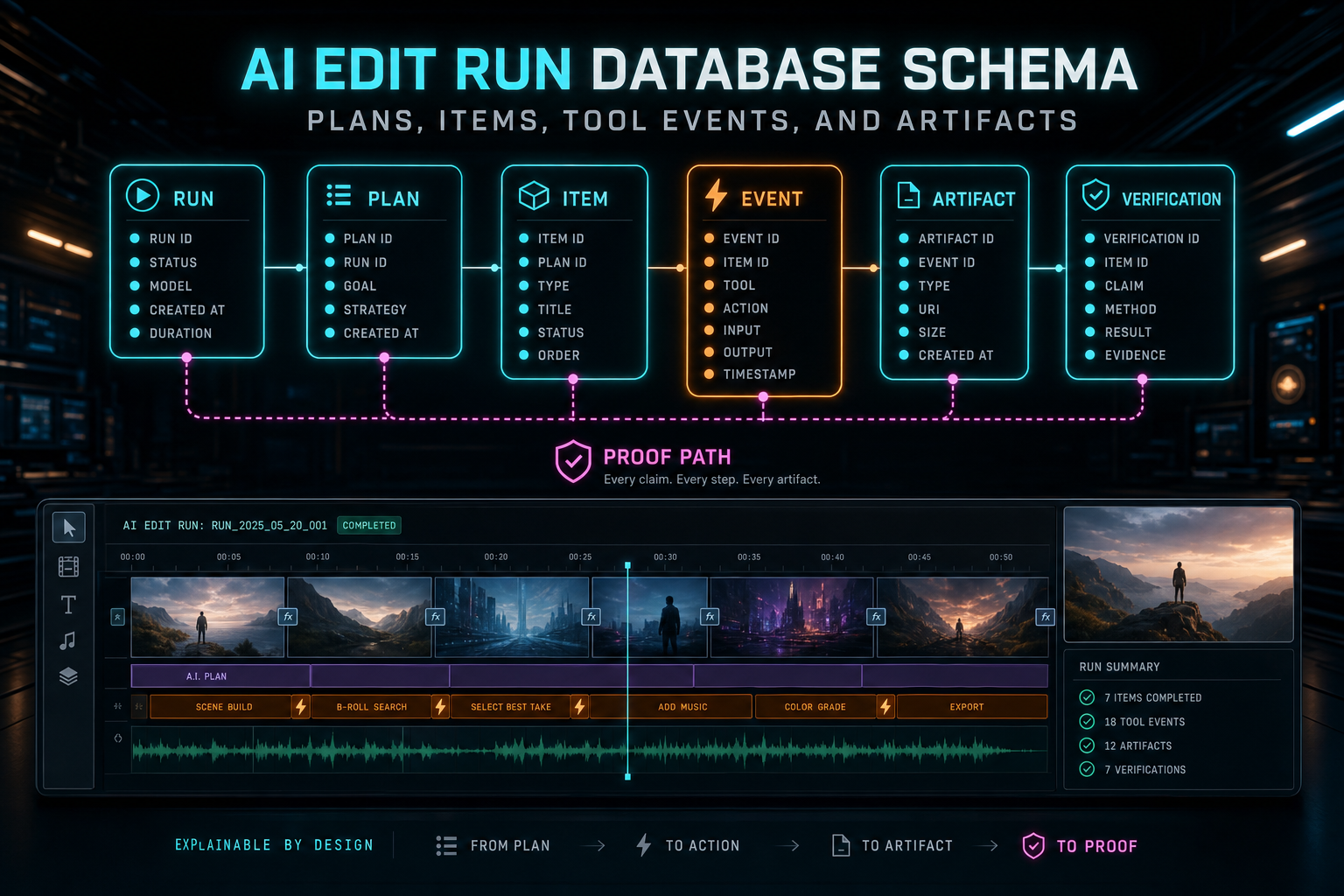
The schema disappears into the product, but it is why the product can explain itself.
Try the workflow
Open every feature from this post in the editor
These panels collect the features discussed above. Sign in once, finish your profile if needed, then the editor opens the first highlighted surface and walks through the tutorial.
Step 1
Inspect an AI edit run
Open the editor and see how plans, tool calls, artifacts, and render results stay connected.
Open the edit-run receipts →Step 2
Open the media asset graph
See generated audio, rendered assets, source clips, metadata, and provenance in the media panel.
Explore your media graph →Step 3
Try voice-driven timeline edits
Describe the edit you want and let VibeChopper translate intent into timeline changes.
Talk a cut into shape →Step 4
Render a verified timeline
Export a project through the same storage-backed render path described in this article.
Render a timeline free →