
Text-Based Editing Is Not Just a Transcript Panel
Text-based video editing sounds simple from the outside: transcribe the audio, show the words, let the creator delete text, and cut the video to match. That is a good product metaphor, but it is not the infrastructure. A real editor has to keep transcript words, timecodes, source media, timeline clips, selected ranges, AI plans, tool calls, captions, and render output in sync after every change. Talk a cut into shape
VibeChopper treats text-based editing as a product surface over a stricter backend contract. The creator can work in a document-like view, select a phrase, ask the AI to tighten an answer, remove dead air, jump to a speaker, create a short pull quote, or render a preview. Underneath that surface, the system still has to validate every reference against project ownership and timeline state. The text is a control surface; the timeline remains the source of edit behavior.
That distinction matters in the broader AI video editor category. Products like Descript made transcript-first editing familiar. Online editors such as VEED, Kapwing, CapCut, and Clipchamp trained users to expect fast browser workflows. Professional tools like Adobe Premiere Pro, DaVinci Resolve, and Final Cut Pro trained editors to expect timeline precision. A credible AI editing system has to combine the speed of text selection with the rigor of timeline operations.
The useful engineering question is not whether a transcript can be displayed. It can. The question is how selected words become safe edits. The answer is a chain of explicit infrastructure: transcript segmentation, word timing, selection snapshots, context packaging, structured plans, validation, native tool calls, event records, media provenance, and render verification.
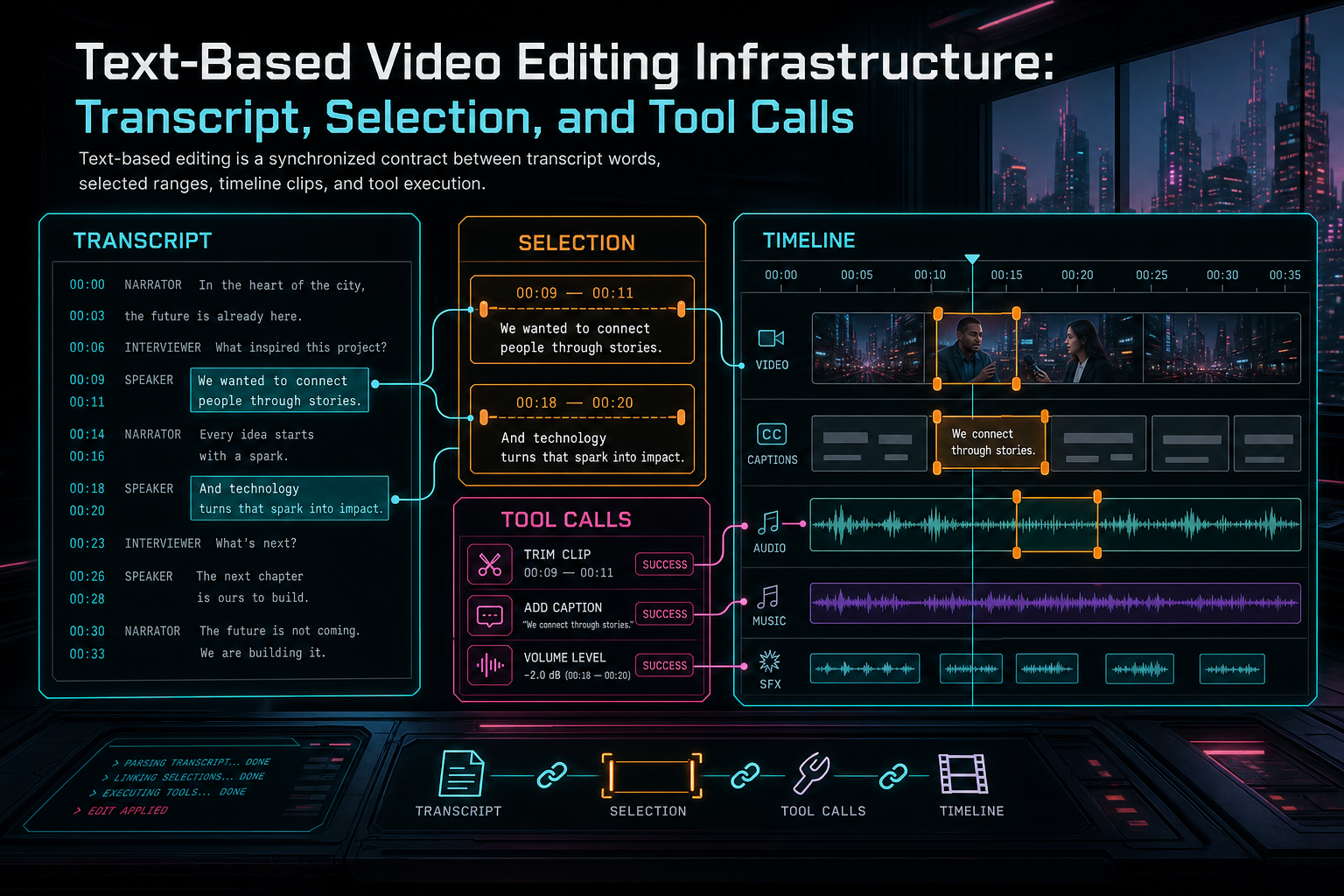
Text-based editing is a synchronized contract between transcript words, selected ranges, timeline clips, and tool execution.
Start With the Transcript Data Model
A transcript for editing is not the same as a transcript for reading. Reading can tolerate a paragraph with approximate timestamps. Editing needs stable segments, word or phrase timing, speaker labels, source media references, confidence signals, and enough version metadata to survive revisions. If a user deletes a sentence, the product must know which audio time range and which timeline clips are affected. Upload a real shoot
The model usually begins with source video and audio. Audio transcription creates transcript segments. Speaker diarization attaches speaker labels where available. Word timing or phrase timing anchors text to media time. The editor then maps those source media ranges onto timeline clips, where offsets, trims, speed changes, and inserted material can change the relationship between source time and timeline time.
That mapping is where many text editing systems become fragile. A transcript segment might refer to source time 130.2 to 136.8 seconds, but the clip on the timeline may start from source time 120.0, be trimmed at both ends, sit on track two, and appear at timeline time 18.4. A text selection cannot blindly issue a delete against source time. It has to resolve through the current timeline.
VibeChopper's architecture keeps media processing summaries, transcript segments, timeline clips, AI edit runs, and tool events as explicit product state. That gives the transcript UI a dependable foundation. The transcript can drive search and selection, but the backend can still prove which project, clip, asset, and time range a proposed edit would touch.
This model also supports recovery. If browser transcription or audio extraction is interrupted, the system can lean on stored media and processing state. If a transcript is regenerated, the new revision can be connected to the same source media rather than becoming an unrelated blob of text. If an AI run references a transcript range, the run can preserve the snapshot it used.
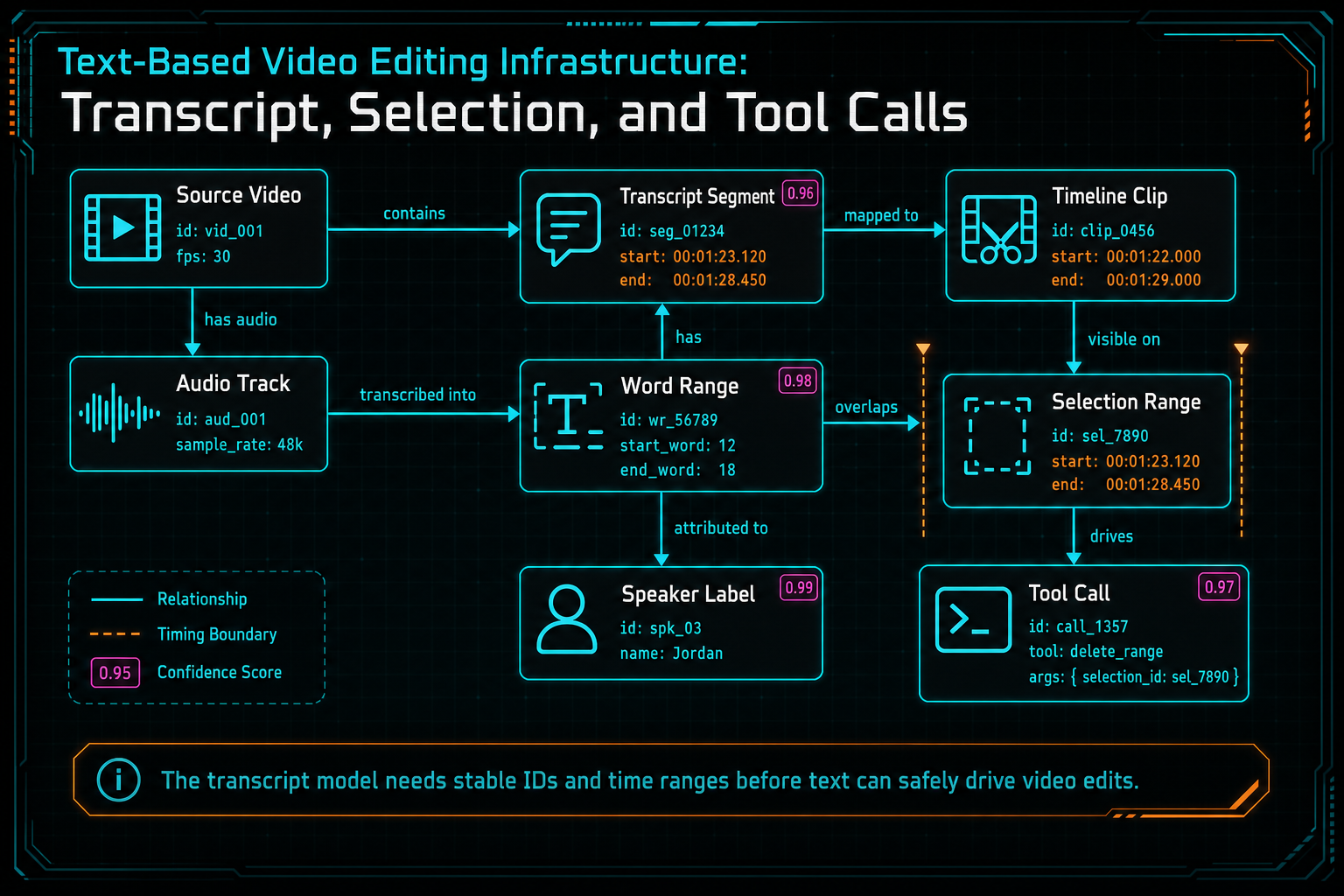
The transcript model needs stable IDs and time ranges before text can safely drive video edits.
Selection State Is a Contract
The selection is the most important object in a text-based editor. It is where user intent becomes concrete. A highlighted sentence may mean remove this line, tighten this answer, find similar moments, make a caption, ask the AI what to cut, or create a preview around this idea. The system should treat that selection as structured state, not as browser highlight decoration. Open the edit-run receipts
A useful selection snapshot includes transcript segment IDs, word indexes or phrase ranges, source media IDs, source time ranges, timeline clip IDs when resolved, timeline time ranges, speaker labels, current playhead, surrounding context, and the user action that created the selection. It should also include enough version information to detect staleness. If the transcript or timeline changed after the selection was captured, the next operation should re-resolve or ask the user to confirm.
This is especially important for AI workflows. A prompt like make this answer tighter is meaningless without the selected range and surrounding context. With a selection snapshot, the AI planner can see the exact transcript span, neighboring dialogue, speaker, current clip boundaries, and available tool capabilities. The result is a plan grounded in product state rather than a vague edit suggestion.
Selection state also protects the user experience after refresh or latency. A creator may highlight a phrase, trigger an AI action, switch tabs, and return after the plan is ready. If the selection was captured as data, the system can show what the AI acted on. If it only lived as DOM state, the workflow becomes hard to explain and harder to repair.
For developers, the rule is straightforward: never let selected text be the only source of truth. Convert UI selection into a typed selection object at the boundary. Validate it. Store it with the edit run when AI is involved. Reconcile it against the timeline before executing tools.
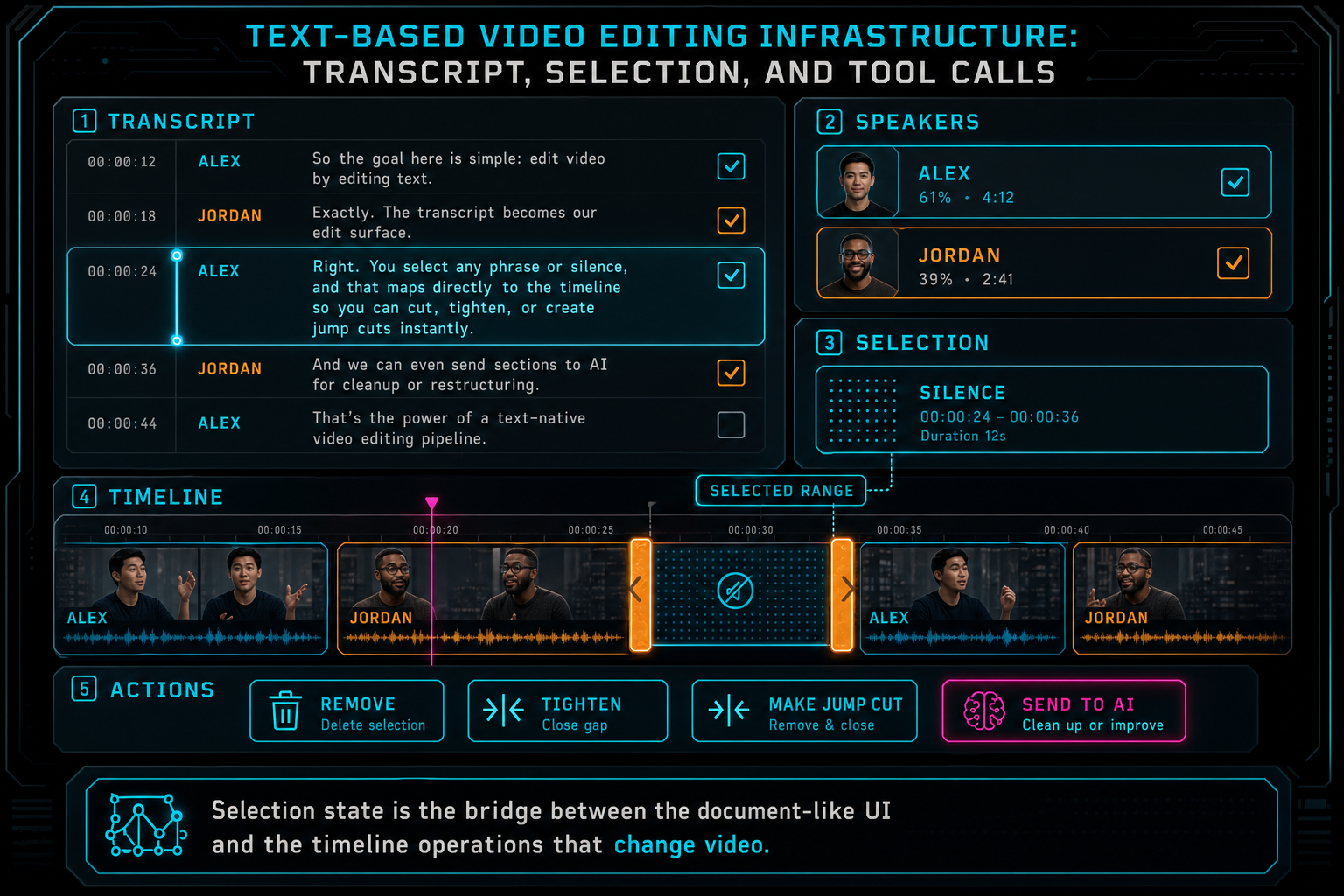
Selection state is the bridge between the document-like UI and the timeline operations that change video.
Transcript Context Makes AI Editing Useful
A transcript-aware AI editor should not send the whole project to the model by default. It should assemble the context needed for the task. If the user selected one answer, the model needs that answer, nearby transcript, speaker labels, current clip state, relevant frame descriptions, and the available tools. If the user asked for filler word removal across the project, the model needs a broader transcript index and a stricter plan for batch operations.
Context assembly is where text-based editing becomes more than chat with a transcript. The system can provide a compact description of the selected range, candidate cut points, silence gaps, speaker turns, visual continuity hints from frame analysis, and constraints such as minimum clip duration or protected sections. The model can reason over dialogue, but the application decides what evidence is relevant.
The first AI output should be a structured plan. For a selected paragraph, the plan might propose removing a repeated phrase, preserving the first sentence, cutting a pause, and adding a caption. For an interview, it might identify three pull quotes and recommend jump cuts between speaker turns. For a tutorial, it might preserve procedural steps while tightening filler words. In every case, the plan is not yet the edit. It is a proposed bridge from transcript intent to timeline operations.
This separation is the reason VibeChopper can make AI edits inspectable. The product can show the prompt, the selection snapshot, the transcript evidence, the plan, the tool calls, and the resulting timeline events. When the edit succeeds, users can understand what changed. When validation rejects an action, developers can see whether the failure came from stale context, invalid timing, missing media, provider output, or tool constraints.
Tool Calls Own Timeline Mutation
Text selection should not directly mutate the timeline, and neither should model prose. The timeline should change only through native tools with typed inputs. That boundary is what keeps text-based editing from becoming a fragile pile of string operations. Talk a cut into shape
A selected transcript range can lead to several tool calls. Removing dialogue may become split commands around a resolved time range, a delete command for the middle segment, and a ripple adjustment if the editor supports it. Tightening an answer may become a set of trim operations and silence removals. Creating a caption may become an overlay or subtitle artifact. Rendering a preview may become a render request scoped to a timeline range. The important part is that each operation uses the editor's normal command surface.
Validation sits between the AI plan and those tools. It checks schema shape, project ownership, media readiness, clip existence, legal time ranges, track compatibility, duplicate requests, stale selection versions, and tool-specific constraints. The model can suggest that a pause should be removed, but it cannot invent clip IDs or write arbitrary timeline state. The server and editor own that responsibility.
This boundary also makes undo, audit, collaboration, and remediation possible. Native tool events can record that a split happened at a particular timeline time because an AI edit run proposed it from a transcript selection. A later inspector can connect the user's prompt, selected words, tool input, and resulting clips. That evidence is much more useful than a chat message that says I removed the pause.
The same approach works for manual text operations. If a user deletes selected transcript words without invoking AI, the UI can still translate that intent into native split and trim tools. AI is an accelerator, not a privileged editing path. The product benefits when both manual text edits and natural language edits use the same timeline contract.
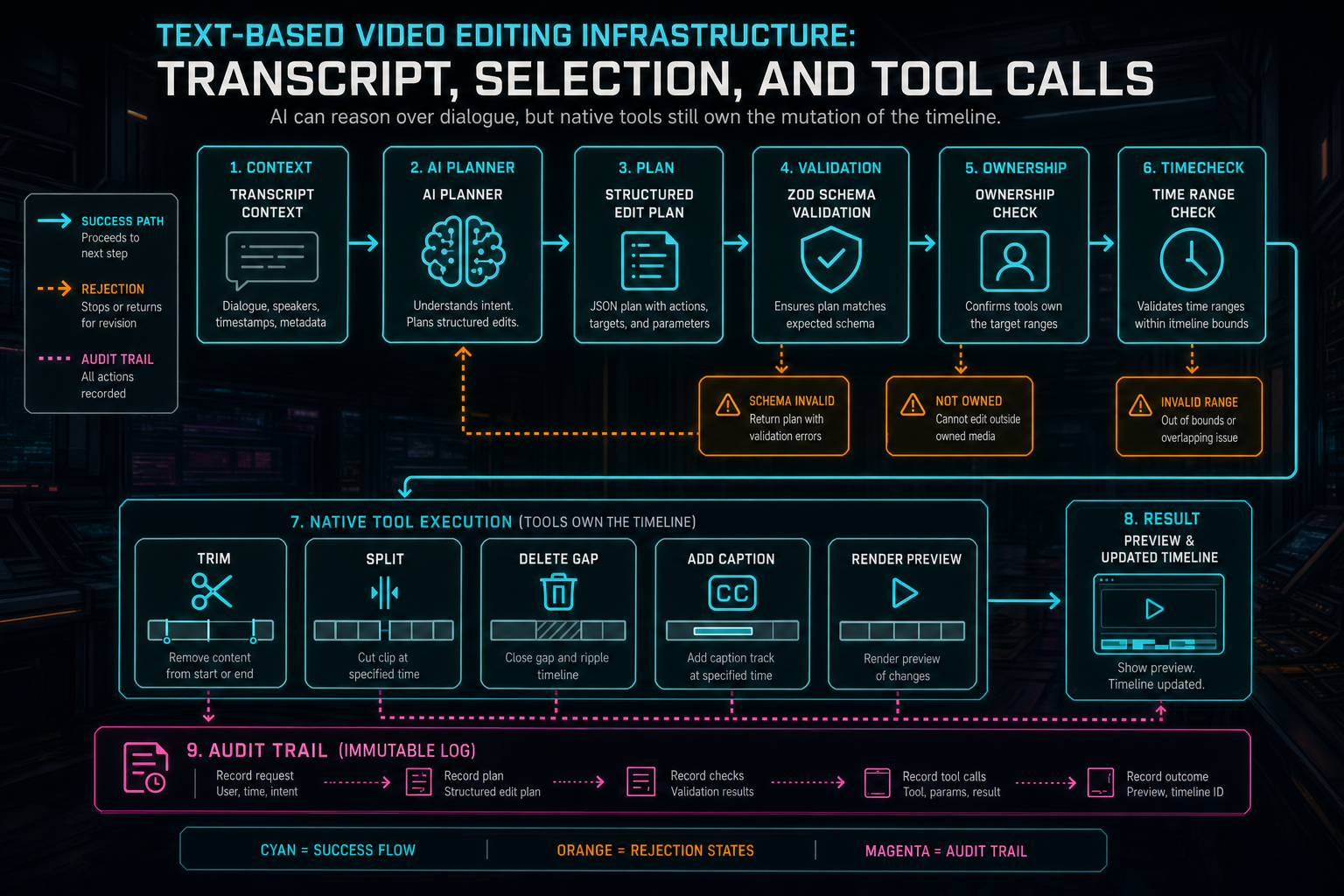
AI can reason over dialogue, but native tools still own the mutation of the timeline.
Provenance Keeps Text Edits Renderable
Text-based editing can feel lightweight, but the output is still video. Every transcript-driven change should leave the timeline in a renderable state. That means source assets remain attached, clip timing remains legal, generated captions or overlays have durable media records, and render jobs can consume the same timeline a manual edit would produce. Explore your media graph
Provenance is how the system keeps that promise. A transcript revision should know which source audio produced it. A selection snapshot should know which transcript version and media ranges it referenced. An AI edit run should record the selected text, plan, tool calls, artifacts, and status. Tool events should record actual timeline mutations. A render artifact should point back to the project and timeline state it represents.
This is not only useful for compliance or debugging. It improves creative workflows. A creator can ask why a clip moved. The editor can show the transcript selection and AI run that caused it. A support workflow can inspect missing transcript or render state. A future AI pass can evaluate the edit with the same evidence. A media graph can show how a source interview produced a short clip, captions, music, and final export.
Render verification closes the loop. After transcript-driven edits create a new sequence, the render system should verify output metadata, storage paths, project ownership, and timeline linkage. If rendering fails, the product should preserve the timeline and mark the output problem. A text editor that cannot explain render failure is still only a partial video editor.
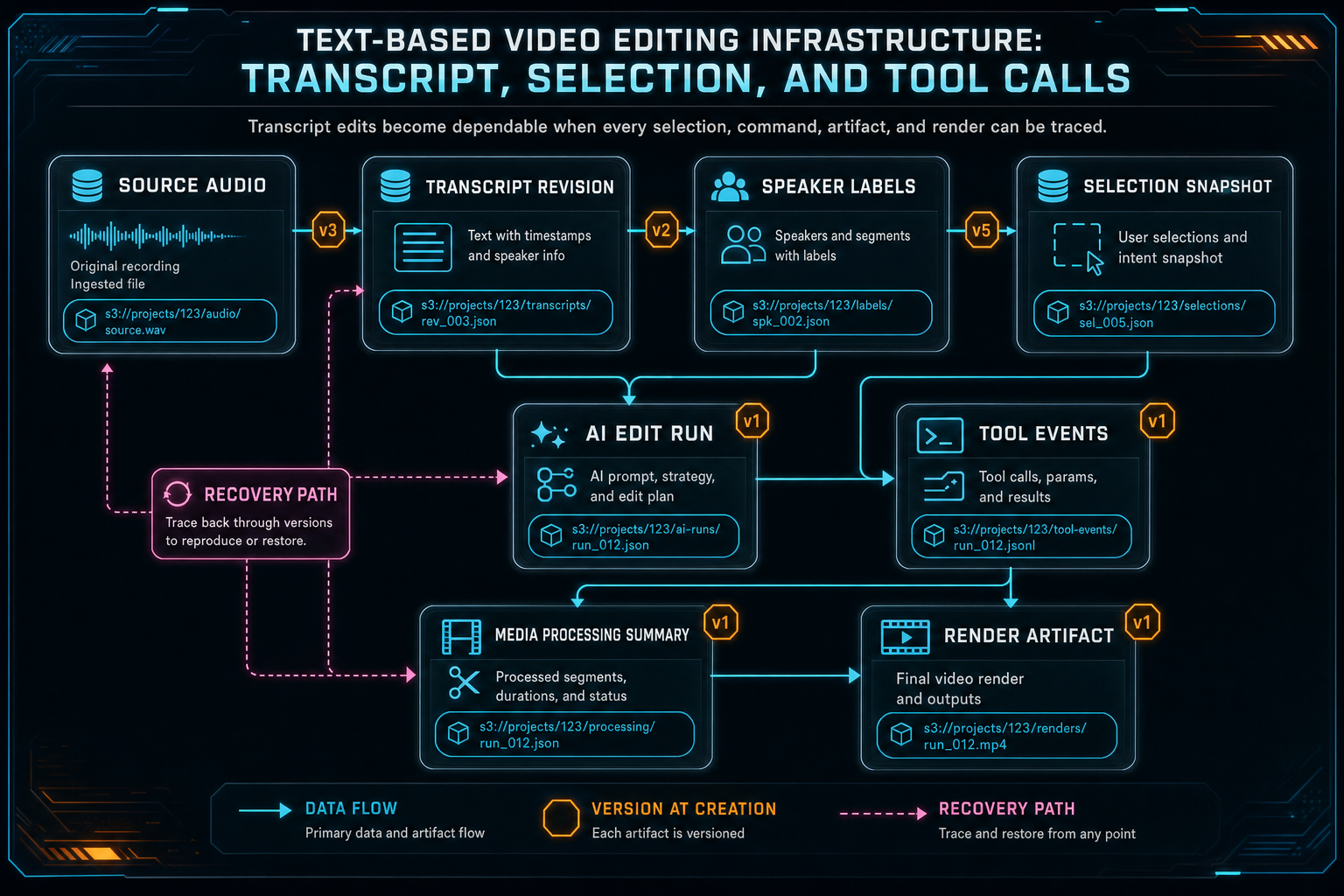
Transcript edits become dependable when every selection, command, artifact, and render can be traced.
Edge Cases That Shape the Design
The hard cases are not exotic. They are the normal cases of media software. A transcript may be incomplete. Speaker diarization may be wrong. A user may select text that crosses two clips. A clip may have been trimmed after the transcript was generated. The playhead may sit on a different timeline range than the highlighted words. An AI provider may return malformed JSON. A user may click the same action twice. A render may finish after the browser tab is gone.
The infrastructure should make those cases explicit. Incomplete transcripts should have readiness state. Speaker labels should be editable or treated as probabilistic metadata. Cross-clip selections should resolve into multiple tool calls or ask for confirmation. Stale selections should re-resolve against current timeline state. Duplicate requests should be idempotent where possible. Provider output should pass schema validation before tools run. Long-running actions should have inspectable status.
The most important UX rule is to keep the user's project understandable. If an operation cannot be performed safely, say what blocked it: transcript still processing, selected text no longer maps to a clip, source media unavailable, time range too short, or render verification failed. These messages do not have to expose every backend detail, but they should be grounded in real product state.
For AI video editing software, reliability is a feature. Users forgive a system that asks for confirmation before deleting the wrong range. They do not forgive a system that confidently damages a timeline because selected text was interpreted loosely. The architecture should prefer a recoverable pause over an irreversible guess.
What to Build First
If you are building text-based video editing, start with transcript identity and timing. Store transcript segments with stable IDs, source media references, speaker labels, timing, confidence, and revision metadata. Avoid making the displayed paragraph your only durable structure. The UI can group words for readability, but the backend needs edit-grade anchors.
Next, design selection snapshots. Convert highlighted text into a typed object with transcript IDs, word or phrase ranges, source time, resolved timeline ranges, current clip references, and version checks. Store that snapshot whenever it drives an AI plan or asynchronous operation.
Then define native timeline tools before asking AI to edit. Decide what operations are allowed: trim, split, delete range, ripple delete, caption insert, marker creation, clip extraction, preview render, or generated asset placement. Give each tool a schema and a validation path. The model should produce plans that call those tools, not freeform mutations.
After that, connect provenance. Record AI edit runs, tool events, media summaries, transcript revisions, generated artifacts, and render verification. A transcript-driven edit should be inspectable from prompt to output. That evidence is what lets the product support undo, review, repair, and future automation.
Finally, test the awkward states. Select text across clips. Refresh between plan and execution. Regenerate a transcript. Remove a source video. Return malformed AI output. Retry a duplicate command. Render after a transcript cut. Those tests will teach the architecture more than a perfect demo path.
The Final System
The finished text-based editing system should feel direct. Upload footage, read the transcript, highlight a line, ask for the cut, and watch the timeline respond. But the product only earns that simplicity when every layer underneath is explicit. Talk a cut into shape
A transcript is created from owned media and tracked as a revision. A selection becomes structured state. AI planning uses scoped context. Validation turns acceptable plans into native tool calls. Tool events record timeline changes. Media provenance connects source assets, generated artifacts, and render output. Verification proves the result can leave the editor as a real video.
That is the infrastructure behind editing video by text. It is not a transcript panel taped to a chat box. It is a controlled system for translating words into timeline changes without losing the proof that makes professional video editing dependable. VibeChopper is built around that contract: creative intent can arrive as text, voice, or selection, but every final edit still passes through tools the product can validate, inspect, and render.
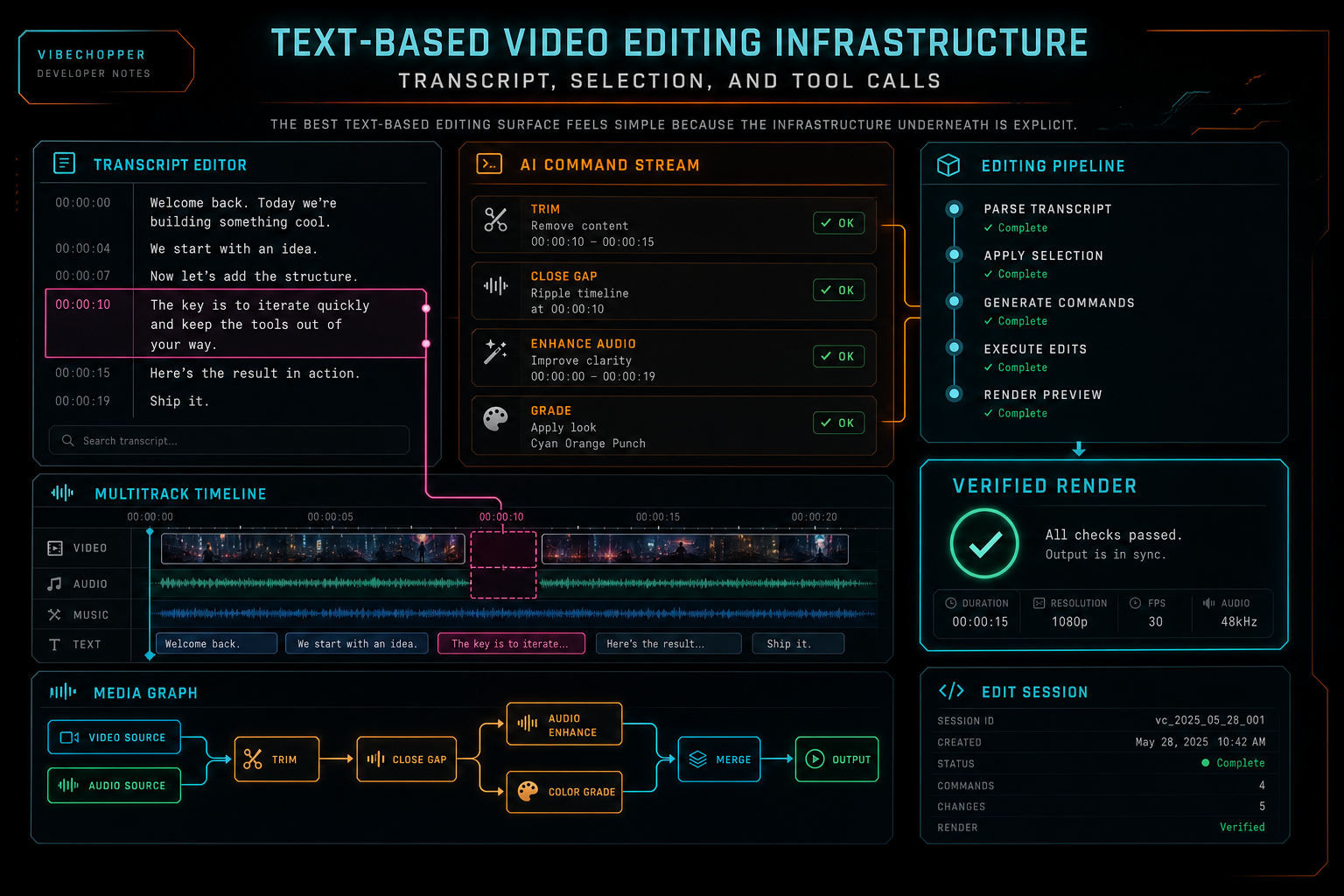
The best text-based editing surface feels simple because the infrastructure underneath is explicit.
Try the workflow
Open every feature from this post in the editor
These panels collect the features discussed above. Sign in once, finish your profile if needed, then the editor opens the first highlighted surface and walks through the tutorial.
Step 1
Try voice-driven timeline edits
Describe the edit you want and let VibeChopper translate intent into timeline changes.
Talk a cut into shape →Step 2
Upload footage with progress you can trust
Watch large video uploads, processing, transcript work, and original-file storage from one monitor.
Upload a real shoot →Step 3
Inspect an AI edit run
Open the editor and see how plans, tool calls, artifacts, and render results stay connected.
Open the edit-run receipts →Step 4
Open the media asset graph
See generated audio, rendered assets, source clips, metadata, and provenance in the media panel.
Explore your media graph →Step 5
Render a verified timeline
Export a project through the same storage-backed render path described in this article.
Render a timeline free →