
Autoscale Changes the Rendering Contract
Rendering video on a single long-lived server encourages bad habits. A local directory starts to feel durable. A half-finished output file can sit around until somebody inspects it. A worker can accidentally depend on media that was downloaded by an earlier request. The machine becomes part of the product model, even though nobody designed it that way. Render a timeline free
Autoscaled Replit infrastructure pushes the architecture in a healthier direction. A render worker should be treated as temporary compute. It can appear when demand increases, process a job, stream the final artifact to durable storage, and disappear without taking product state with it. That model is exactly what a cloud video editor needs, but only if the render pipeline is explicit about storage, job state, scratch space, and cleanup.
VibeChopper's rendering path is built around that contract. The browser editor and AI edit runs produce timeline state. The server creates an export record and resolves project-owned media. The worker downloads trusted objects into a scratch directory, runs the FFmpeg compositor, streams the finished file to object storage, records artifact metadata, and verifies the result. The filesystem is only a workspace. Object storage and database records are the product.
That distinction matters for AI video editing software because exports are not isolated button clicks. A render may come after transcript edits, generated music, overlays, speed changes, AI tool calls, and second-pass review. When the worker finishes, the user expects a durable video artifact that can be downloaded, inspected, shared, repaired, and connected back to the edit that produced it. Autoscale is a compute strategy. Render hygiene is the product discipline that makes it safe.
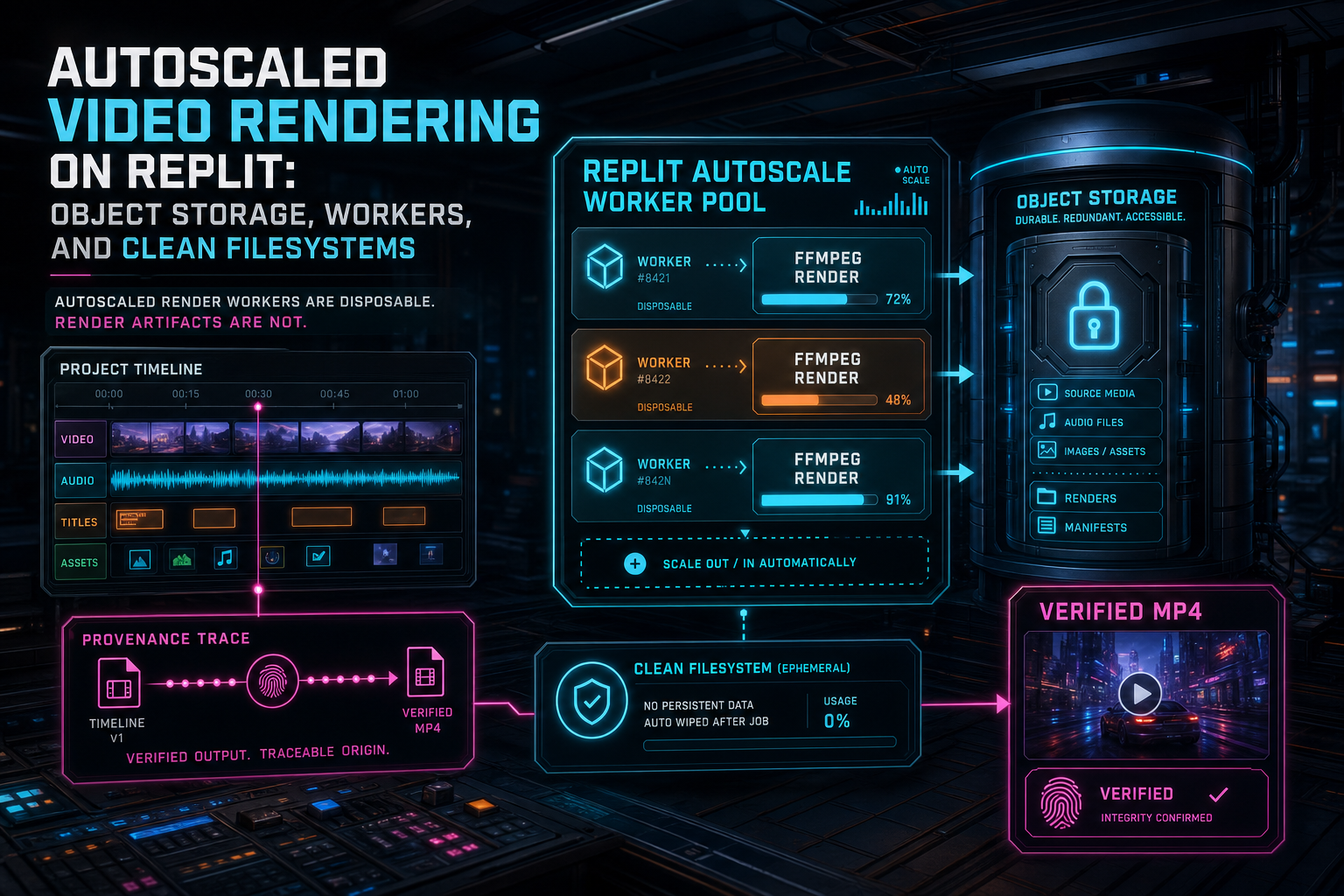
Autoscaled render workers are disposable. Render artifacts are not.
Separate Job State From Worker State
The first rule of autoscaled rendering is that the worker cannot be the source of truth. It can execute the job, but the job must exist outside the process before expensive media work begins. The server should persist the project ID, export ID, requested format, output settings, render status, stage, progress, requester, and any link to an AI edit run. The worker then updates that state as it moves through the lifecycle. Open the edit-run receipts
This separation lets the product survive normal cloud behavior. The user can refresh the editor while encoding continues. Another request can poll the export record. A duplicate submission can return the existing in-flight render instead of starting a second encode. A remediation workflow can inspect the failed stage without reading worker-local files. If the autoscaled instance is replaced, the product still knows what the render was supposed to be.
The render API should therefore speak in product concepts, not process concepts. It should return an export ID, current stage, progress, blockers, artifact metadata, and verification state. It should not ask the client to remember a temporary filename or worker hostname. In a well-shaped system, the browser, AI edit run, media graph, and support tools all look at the same export record.
This also improves trust. When an AI agent requests an export, the artifact can be attached to the run that created the timeline changes. The user can see the path from prompt to plan to tool calls to timeline to render. Autoscaled workers stay behind the curtain, but their work is still visible through durable job and artifact records.
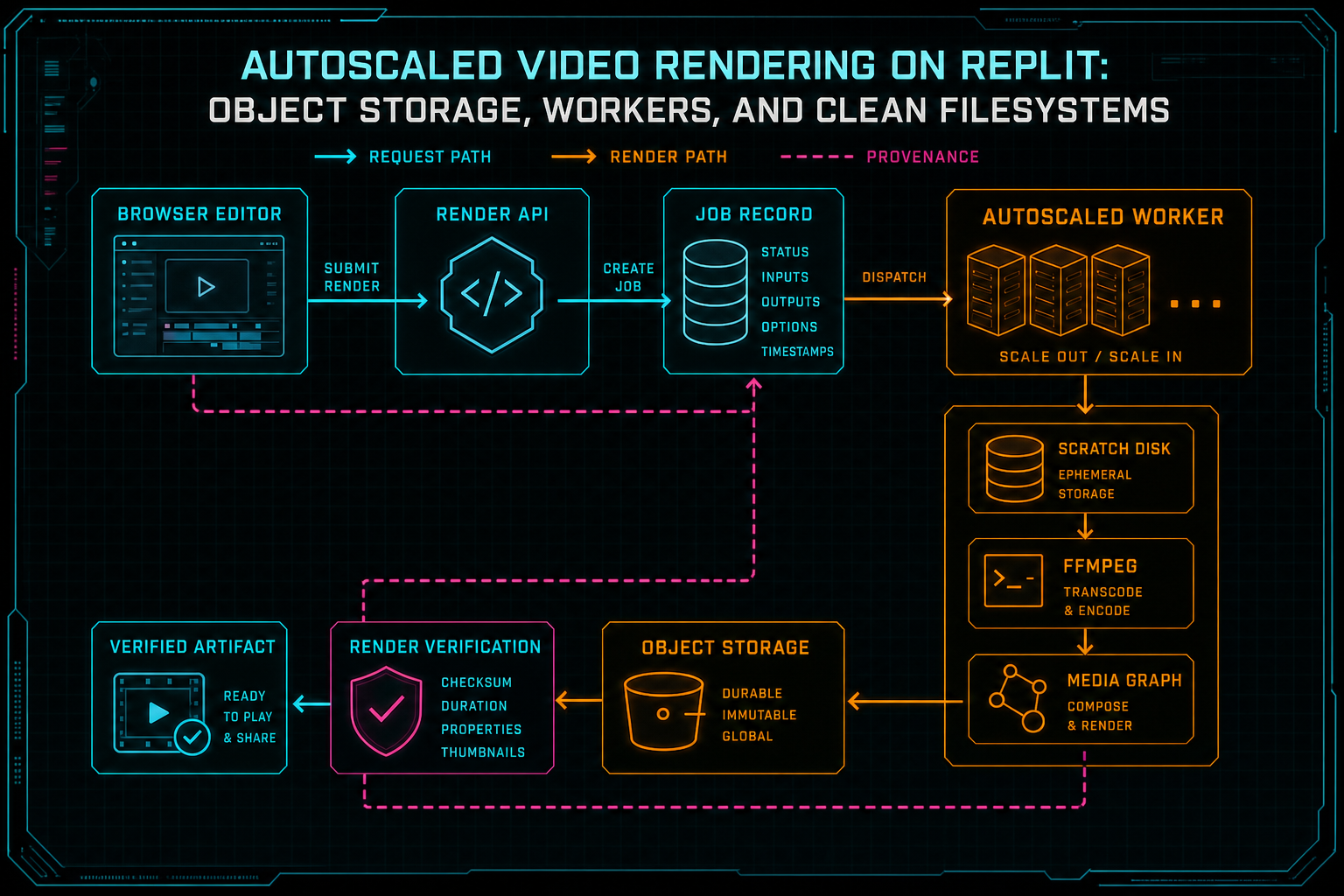
The worker is only one stage in a contract that starts with project state and ends with a verified artifact.
Object Storage Is the Durable Layer
A render worker needs local files because FFmpeg is happiest with filesystem paths. That does not make local disk durable. Source clips, generated music, overlays, thumbnails, and final exports should live in object storage with stable routes that the server controls. The worker's job is to transform trusted storage inputs into a new trusted storage output. Explore your media graph
VibeChopper uses object storage as the media boundary. Source media is resolved from project records. Generated assets already have stored paths and provenance. Overlays are downloaded from object-storage-like references instead of arbitrary external URLs. The compositor turns those objects into local scratch files only for the duration of the render. When the encode completes, the output is streamed back to a project-scoped render path such as /objects/projects/{projectId}/renders/{exportId}/output.mp4.
Stable render paths are important under autoscale because they remove any dependence on the worker that produced the file. A user does not need to know which instance encoded the video. A verification job does not need to search a temp directory. A media graph does not need to infer whether a random upload belongs to a render. The artifact address already says it is a project export.
Object storage also gives the product a safe place to enforce access rules. The editor can use server-routed object URLs while bucket names, private prefixes, and provider-specific details stay behind backend services. That makes the render pipeline easier to move, audit, and repair because the application surface speaks one normalized object route instead of leaking infrastructure paths throughout the codebase.
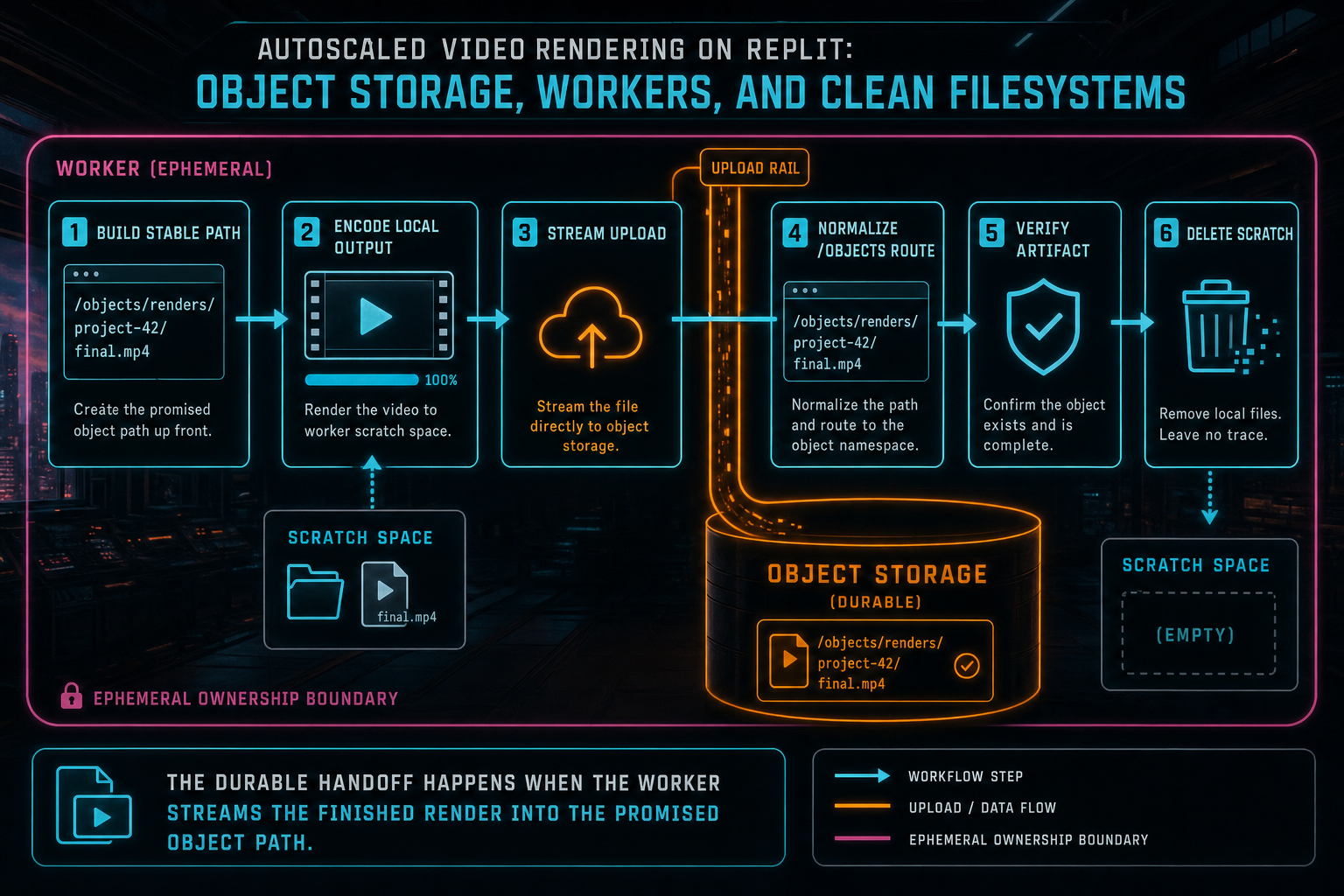
The durable handoff happens when the worker streams the finished render into the promised object path.
Treat Scratch as a Budget
Video render files are large enough that filesystem hygiene becomes a reliability feature. A few forgotten temporary files can consume the disk available to an autoscaled worker. A failed upload can leave a multi-gigabyte output behind. A retry loop can accidentally download the same source media several times. Under load, those small mistakes turn into capacity loss and confusing failures. Upload a real shoot
The practical answer is to treat scratch space as a budget. Each render gets its own scratch directory, usually named with the export ID so logs and cleanup can be connected to the job. Sources are downloaded into that directory. The compositor writes intermediate and final files there. The worker checks scratch usage before and after expensive operations. The final output is uploaded with a stream so the process does not read the full video into memory.
This is the same engineering posture that reliable upload systems need. Long-running media work should expose progress, contain memory pressure, and turn temporary process activity into durable product state. For rendering, the durable state is the export record plus the object storage artifact. The scratch directory is only the place where FFmpeg can do its work.
A useful test is simple: if the worker disappeared immediately after the artifact was uploaded and verified, would the product still have everything it needs? The answer should be yes. The editor should have a download route, file size, duration, format, progress history, and links back to the project and edit run. Anything important that exists only on the worker filesystem is a bug waiting for traffic.
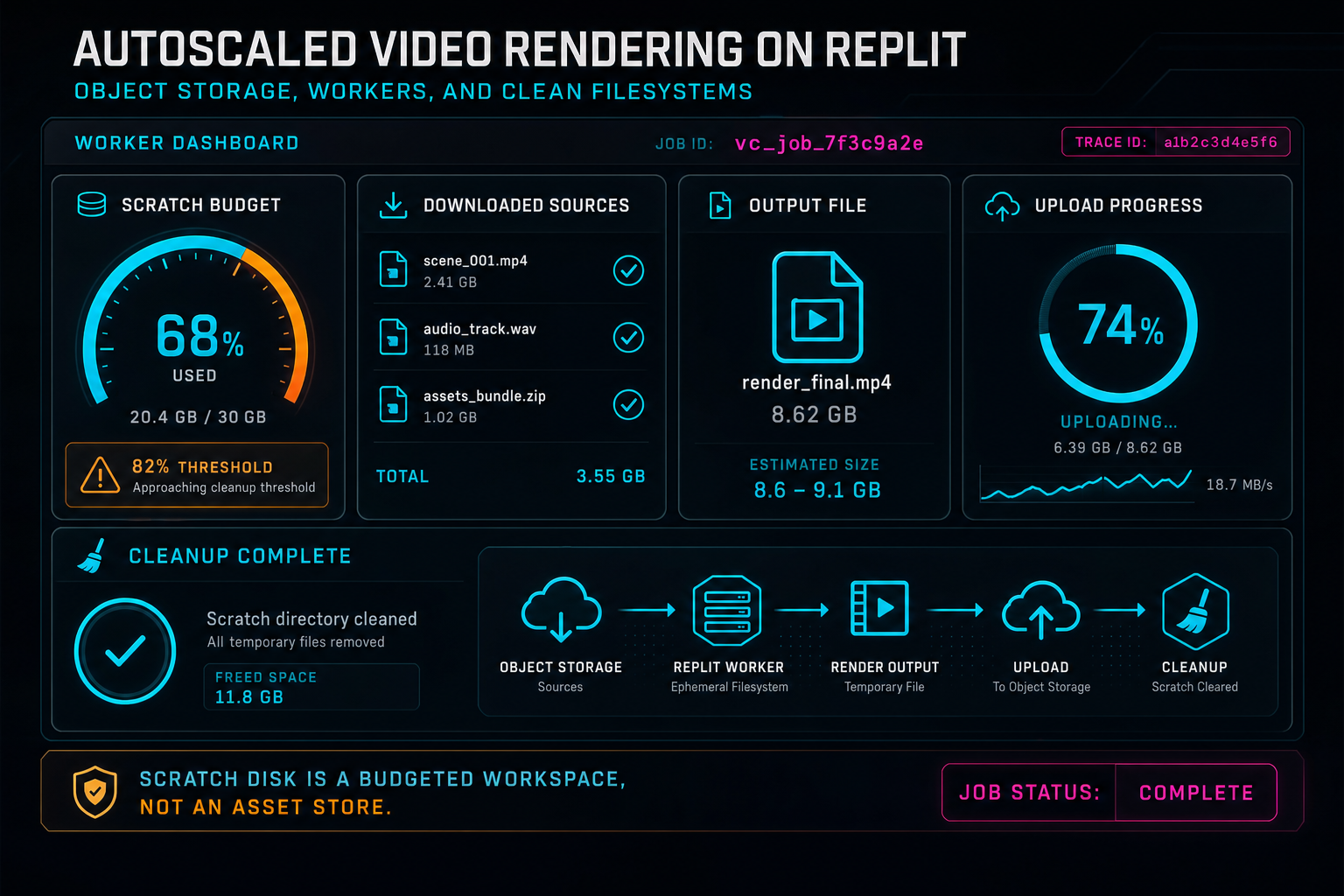
Scratch disk is a budgeted workspace, not an asset store.
Clean Filesystems Are a Production Feature
Cleanup should not be a cron job that tries to guess what old files mean. The render path should clean up after itself in the same code path that created the scratch directory. In practice, that means wrapping the render lifecycle so scratch deletion happens in a finally block after success, failure, or thrown exceptions. The worker can log cleanup failures, but it should always attempt to leave the instance ready for the next job.
This is especially important on autoscaled infrastructure because workers may process different projects over their lifetime. A clean filesystem protects users from accidental cross-job coupling. It prevents stale overlays from being reused by mistake. It prevents test artifacts or failed outputs from influencing later renders. It keeps disk usage predictable so scale-out adds compute capacity instead of inheriting storage debt.
Clean filesystems also reduce operational ambiguity. If a render fails, engineers should inspect the job record, storage references, structured logs, and verification result. They should not have to SSH into a machine and decide whether a temp file is current, stale, orphaned, or safe to delete. The product should already know which artifact exists and which stage failed.
The broader lesson is that cleanup is part of the render contract. Users experience it indirectly as fewer mysterious failures, more reliable retries, and more consistent export times. Developers experience it as simpler debugging. Autoscale works best when each worker can start a job from a known-empty workspace and end it the same way.
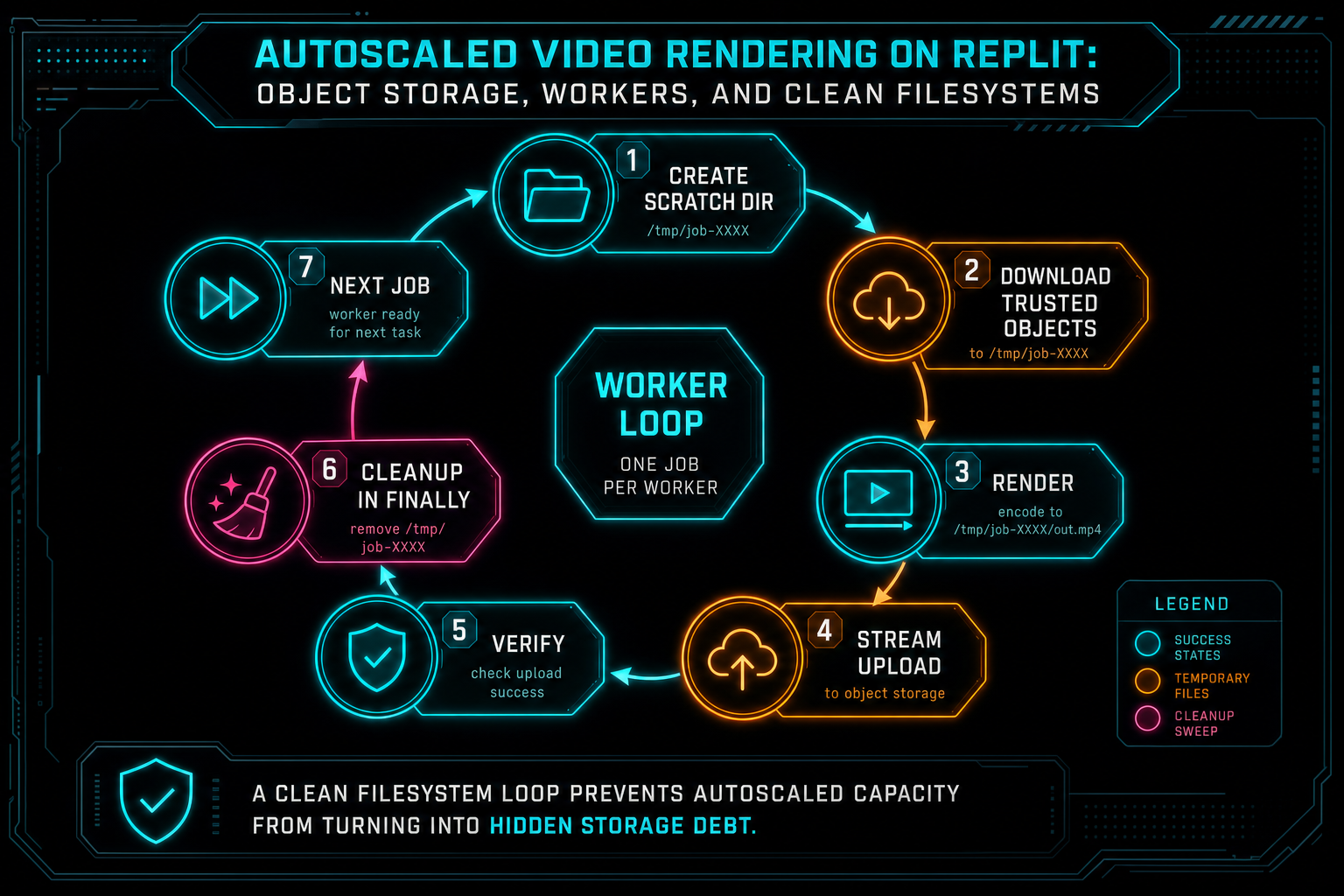
A clean filesystem loop prevents autoscaled capacity from turning into hidden storage debt.
Workers Should Resolve Trusted Media Only
Render workers fetch media, and that makes them security-sensitive. A compositor that accepts arbitrary remote URLs is not just flexible. It can become an uncontrolled network fetch path. For a creative tool, the safer model is narrower: render project-owned media that has entered the platform through upload, generation, or storage-backed asset creation. Try the effects pass
That boundary keeps authorization aligned with the product. The server checks the authenticated user and project ownership before a render job is created. The worker resolves source clips, generated audio, overlays, and other inputs through server-known records and object storage paths. FFmpeg receives local files after those checks have happened. The timeline can describe how media should be composed, but it does not get to tell the worker to fetch arbitrary internet resources.
The same approach helps with reproducibility. If every render input is a stored object with metadata, the final artifact can explain what it used. Source footage, generated music, captions, overlays, effects, and timeline ranges can all be connected to the export. That is much harder if render inputs are a loose bag of temporary URLs with different expiry and ownership behavior.
For AI editors, this matters because agents may create or modify timeline state quickly. The backend should give those agents powerful editing tools without turning the render worker into a general-purpose browser. Trusted media resolution keeps the AI workflow productive while preserving the storage and authorization boundary.
Verify Before You Call It Done
A worker finishing FFmpeg is not the same as the product finishing an export. The artifact still has to be uploaded to object storage, normalized into a product route, measured, connected to the export record, and verified. Verification should check that the object path exists, the file has nonzero size, the duration is plausible, the format matches the request, and the artifact belongs to the project and export that requested it. Render a timeline free
This verification step is where autoscaled rendering becomes user-visible reliability. The browser can show a completed export with a real download route. The media panel can list the render beside source clips and generated assets. An AI edit run can present the output as the artifact of a specific plan. A feedback or remediation flow can inspect a failed or incomplete render with enough context to act.
Verification should also be honest about what it proves. Structural checks can prove that a render artifact exists and matches important metadata. They do not prove every frame is creatively perfect. That is why VibeChopper separates artifact verification from AI review, rubric scoring, and user approval. Each layer answers a different question.
The important production habit is to make verification part of the normal render lifecycle instead of a separate troubleshooting step. When the worker uploads the output, the system should immediately turn that file into a verified product artifact or a clear failure state. The user should never have to wonder whether an export completed because a background process lost the final handoff.
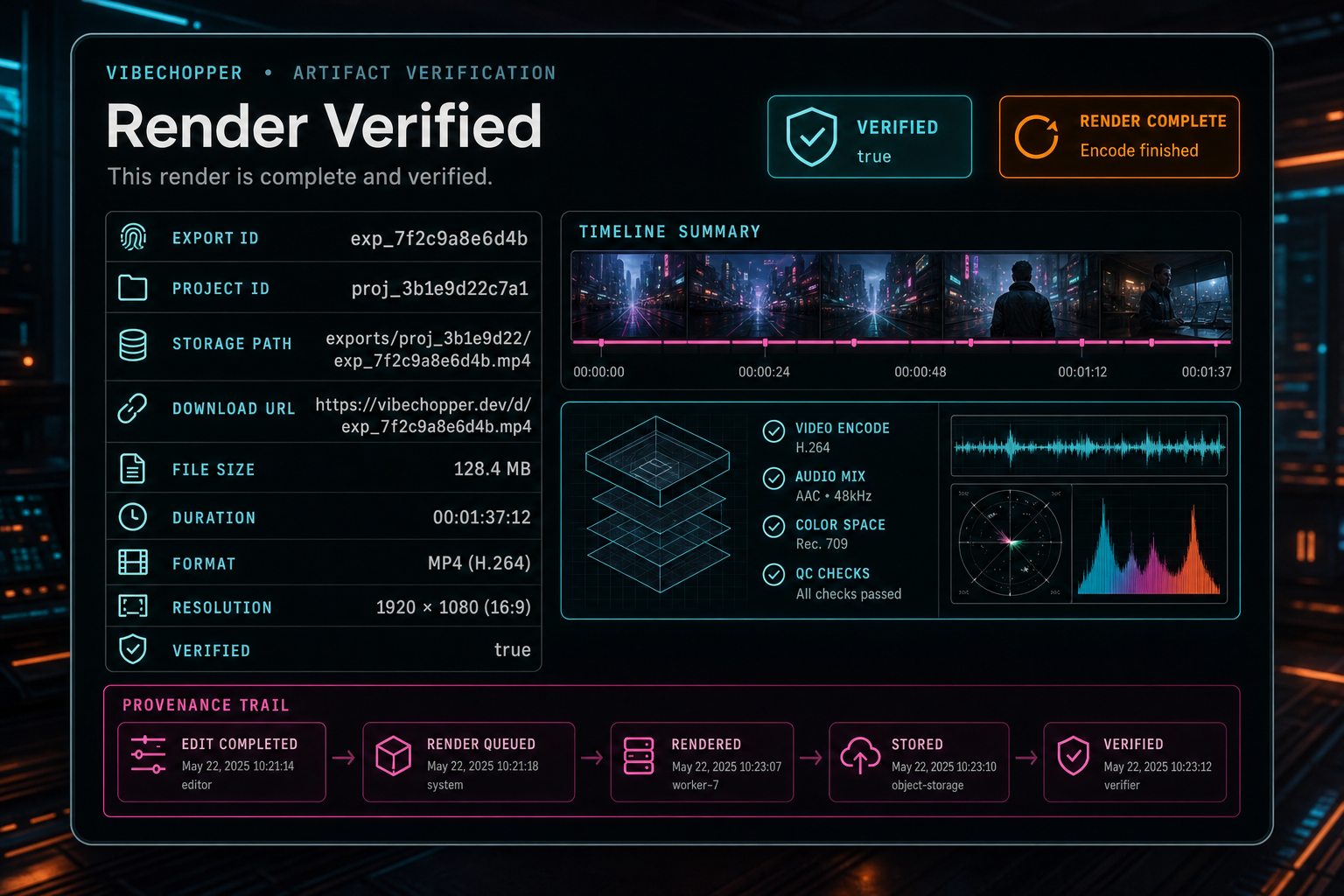
Verification turns a completed encode into a product artifact the editor can trust.
Operational Patterns That Hold Up
A durable autoscaled render system has a few repeatable patterns. Create the export record before the worker starts. Give the output a deterministic object path based on project and export identity. Resolve inputs from server-owned storage records. Download into an isolated scratch directory. Run FFmpeg against local paths. Stream the output to object storage. Verify the artifact. Clean scratch in the same lifecycle.
Add idempotency around expensive requests. If the same user asks for the same project, timeline version, and output settings twice, returning the active export is usually better than launching duplicate encodes. If the user intentionally wants a second export, create a new export ID and therefore a new object path. Duplicate callbacks and retries should converge on known records instead of producing orphaned media.
Report progress by stage. Users do not need perfect percentages, but they need to know whether the worker is downloading sources, building the graph, encoding, uploading, verifying, or blocked. Developers need the same stage data because each phase points to a different class of failure. Upload failures are not timeline failures. Graph construction failures are not object storage failures.
Keep raw implementation details behind the API. The client should not care which autoscaled instance ran the job, which temporary directory was used, or which provider-specific object storage prefix holds the file. The public shape should be stable: export ID, status, progress, artifact metadata, download route, verification result, and related project or AI run context.
What Developers Should Copy
If you are building video rendering on Replit Autoscale, copy the contract before copying any one implementation detail. Treat workers as disposable compute. Treat object storage as the durable media layer. Treat the database export record as the job source of truth. Treat scratch disk as a limited workspace that must be empty again when the job ends.
Use stable paths for final artifacts. A render output should not be an anonymous upload if the product already knows the project and export ID. Store the path, file size, duration, format, resolution, status, and verification result together. That bundle is what turns a video file into a product artifact.
Design the worker for hygiene. Create one scratch directory per render. Download only trusted project objects. Stream uploads instead of buffering complete videos in memory. Clean temporary files in finally blocks. Keep progress and failure states explicit enough that the UI, logs, AI edit runs, and repair workflows can all talk about the same job.
The result is a render system that scales with traffic without smuggling state into machines. Autoscale provides elastic capacity. Object storage preserves the media. Verification makes the artifact trustworthy. Clean filesystems keep the next job from inheriting the last job's mess. That is the practical foundation for production-scale AI video rendering.
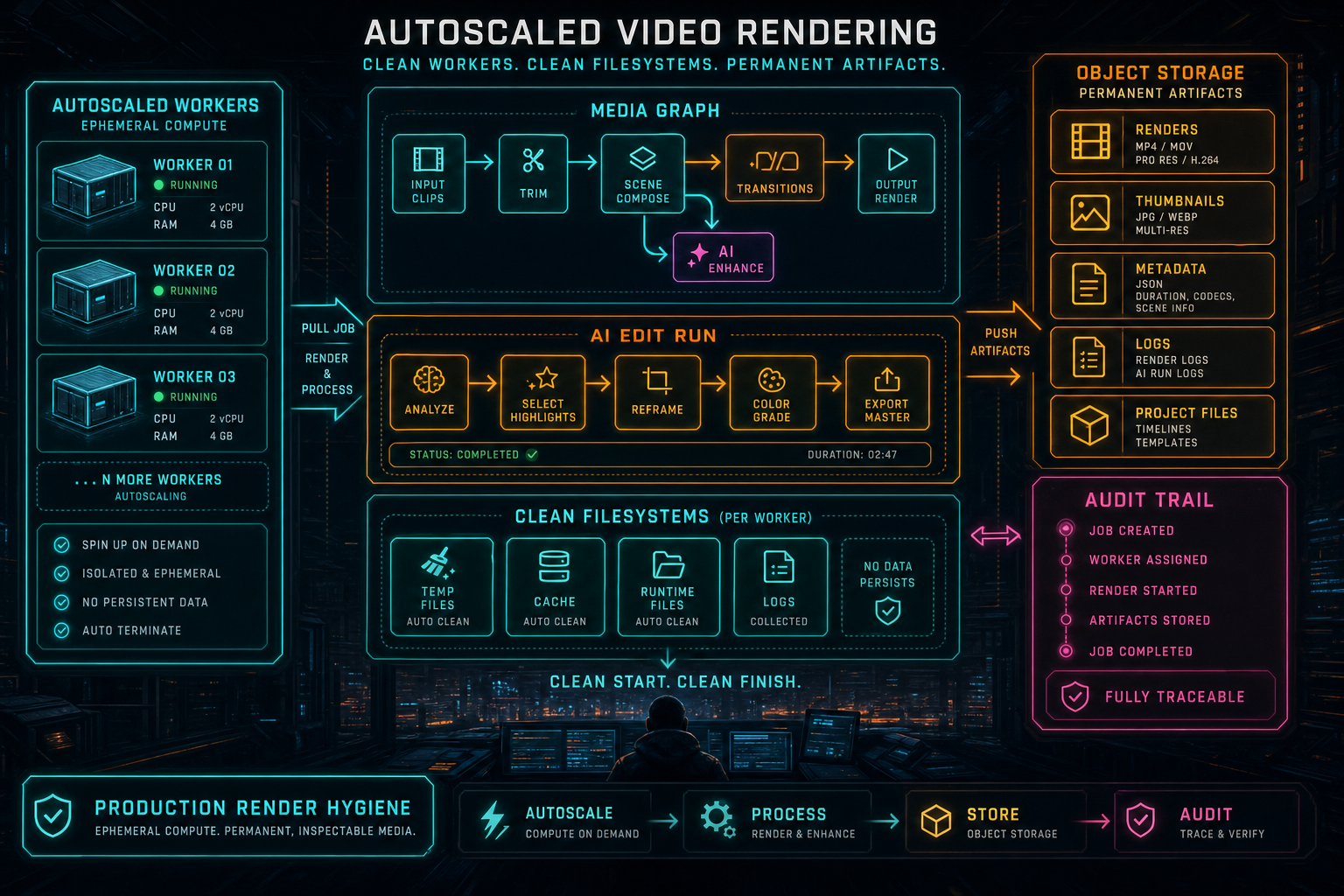
Production render hygiene is the discipline of making temporary compute produce permanent, inspectable media.
Try the workflow
Open every feature from this post in the editor
These panels collect the features discussed above. Sign in once, finish your profile if needed, then the editor opens the first highlighted surface and walks through the tutorial.
Step 1
Render a verified timeline
Export a project through the same storage-backed render path described in this article.
Render a timeline free →Step 2
Inspect an AI edit run
Open the editor and see how plans, tool calls, artifacts, and render results stay connected.
Open the edit-run receipts →Step 3
Open the media asset graph
See generated audio, rendered assets, source clips, metadata, and provenance in the media panel.
Explore your media graph →Step 4
Upload footage with progress you can trust
Watch large video uploads, processing, transcript work, and original-file storage from one monitor.
Upload a real shoot →Step 5
Apply timeline effects
Try clip effects, speed ramps, color passes, and export-ready compositor behavior.
Try the effects pass →