
Metadata Makes AI Music Editable
AI music for videos is easy to describe at the demo level. A user asks for a tense bed under the setup, a brighter lift under the reveal, or a clean ending sting for the final CTA. The model returns an audio file. The editor places it on the timeline. That experience is compelling, but it hides the hard part. In a real video editor, the generated music has to remain editable, searchable, attributable, recoverable, and renderable after the first moment of generation has passed. Score a timeline
That is the job of metadata. The audio waveform is the creative output, but the metadata is the product memory around that output. It records the request that created the music, the prompt that was sent to the model, the provider and model that answered, the file type that came back, the user and project that own it, the storage path that serves it, the timeline clip that uses it, the sync decisions that shaped placement, and the render outputs that include it.
VibeChopper treats AI music generation as a project asset workflow rather than a side-effecting download. The generated bed becomes part of the same media graph as uploaded footage, transcripts, frame analysis, overlays, voiceovers, edit runs, and renders. That is what lets a creator work naturally while the system keeps enough structure to explain what happened.
This matters because music is not passive decoration in an edit. It controls pace, emotion, transition energy, and perceived polish. A generated music bed that cannot be trimmed, replaced, audited, or mixed against dialogue is not ready for a serious editor. The metadata model is what makes the bed durable enough to behave like editor state instead of a temporary AI response.
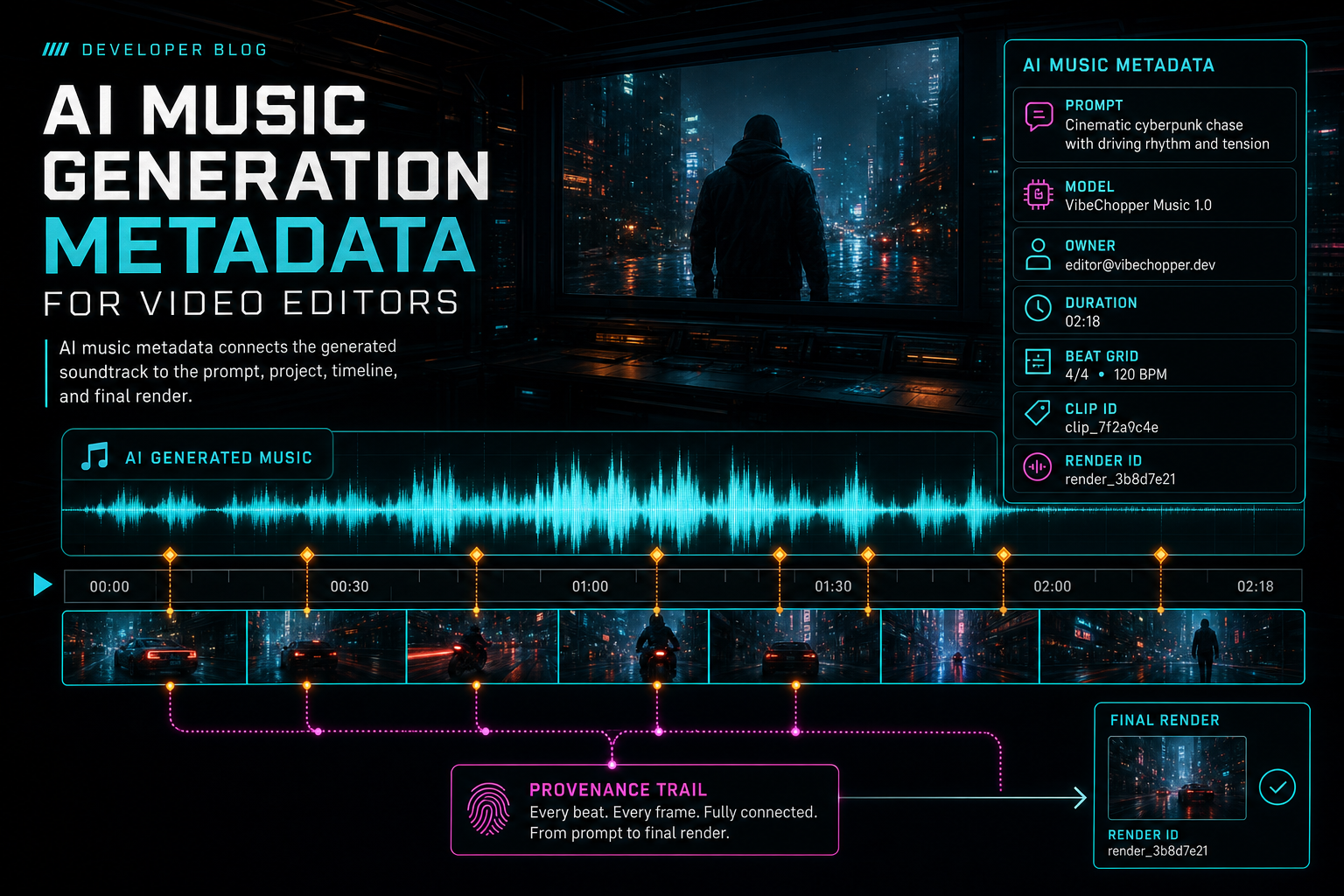
AI music metadata connects the generated soundtrack to the prompt, project, timeline, and final render.
Start With Request Metadata
The first metadata layer exists before any music model is called. The system needs to know why music is being requested. A direct user command is one source: add a moody electronic bed under the montage. An AI edit run is another source: the planner decides that a cold open needs low tension, a proof section needs restraint, and the last fifteen seconds need energy. A second-pass review can also request music changes after scoring pacing and emotional fit. Open the edit-run receipts
Those sources should not be flattened into one generic prompt string. A practical request record separates the visible user instruction, the AI planner's interpretation, selected project context, target timeline range, desired musical role, and constraints. For video editing, the constraints are often more important than genre. The bed should avoid vocals when dialogue is present. It should leave room around speech. It should be long enough for the segment. It should have a clean tail. It should not introduce a recognizable melody that distracts from the edit.
Request metadata also needs identity. The generated music should carry userId, projectId, optional planId, optional runId, optional runItemId, and optional toolEventId. These fields are not user-facing copy, but they give the product a reliable way to connect generation back to the edit workflow. If a creator opens an AI edit run later, the music generation step should be visible. If support needs to repair a project, the generated asset should point back to the operation that created it.
The request layer is also where idempotency and duplicate handling belong. Music generation is expensive enough and stateful enough that a repeated click or retried request should not create confusing duplicate beds without a trail. A request fingerprint can include project, source run item, target range, normalized prompt, provider, and duration. Even when the product chooses to allow multiple variations, the metadata should make it clear which variation came from which request.
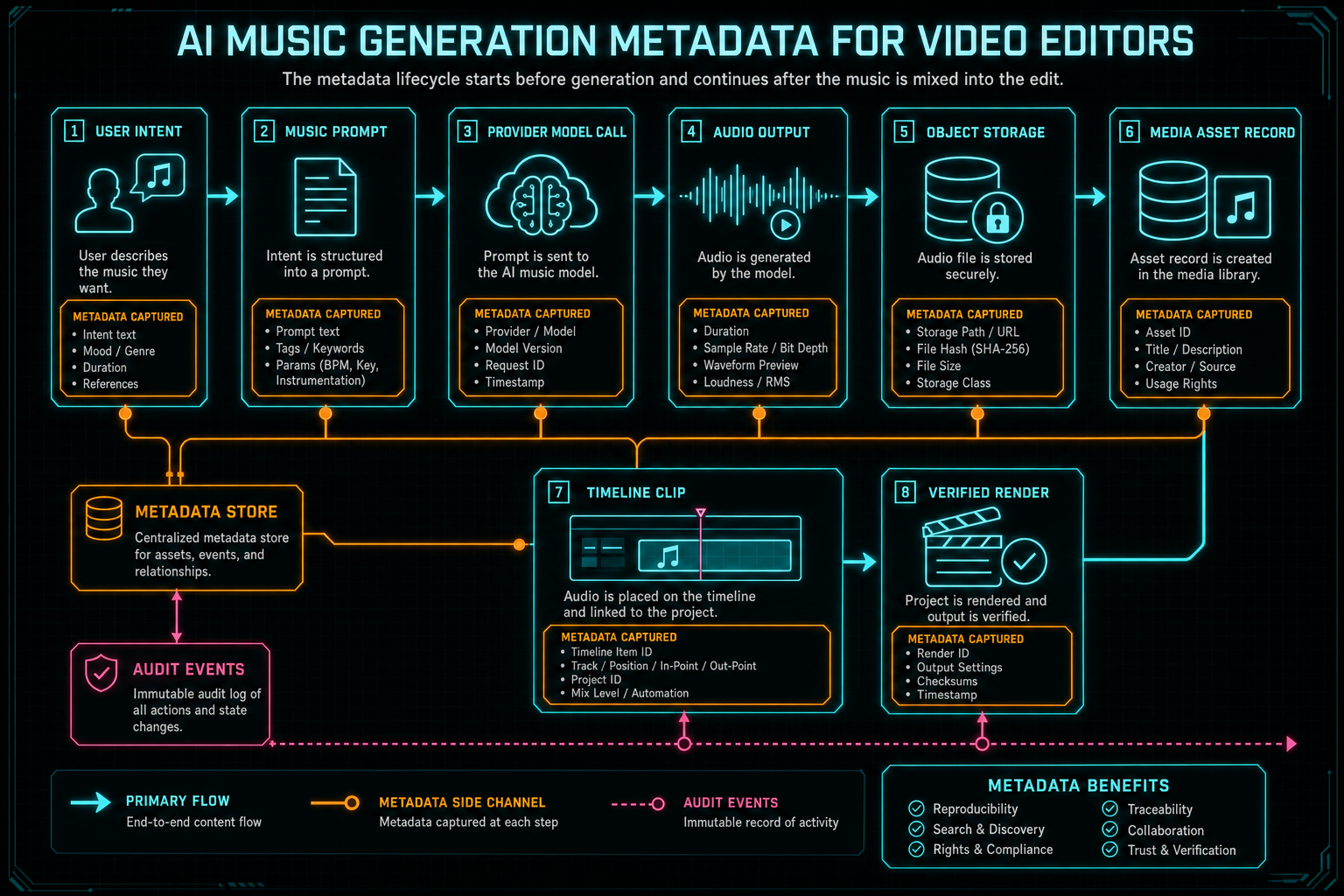
The metadata lifecycle starts before generation and continues after the music is mixed into the edit.
Record Prompt, Model, and Output Shape
The prompt that matters most is the prompt actually sent to the music provider. A user might type something casual, while the editor turns that instruction into a more exact model request: instrumental only, no vocals, no spoken words, target duration, mood, tempo, density, and transition behavior. Storing only the user's original sentence loses the operational detail that shaped the output. Score a timeline
A solid AI music metadata record keeps the original instruction, the generated or normalized prompt, the provider, model, model version when available, request timestamp, response status, usage metadata, target duration, detected duration, MIME type, extension, and any text parts returned by the provider. If the model returns WAV, MP3, OGG, or M4A data, the stored record should reflect the actual media type rather than pretending every response is the same.
The response status should be explicit. completed, skipped, and failed describe different product states. A skipped generation can mean the provider is not configured, the project had no usable prompt, or the requested path was intentionally bypassed. A failed generation can mean the model returned no inline audio, object storage failed, or the metadata write did not complete. Those states should be preserved because retry and remediation depend on knowing which edge broke.
Text returned by a music provider deserves careful handling. For a video editor, generated soundtrack should usually be instrumental and should not introduce surprise lyrics over dialogue. If the response includes text parts, the product can store them as transcript-like metadata with flags such as lyricsDetected or textPartsDetected. That does not mean the UI has to dramatize it. It means the system has a durable signal for review, filtering, search, or future warnings.
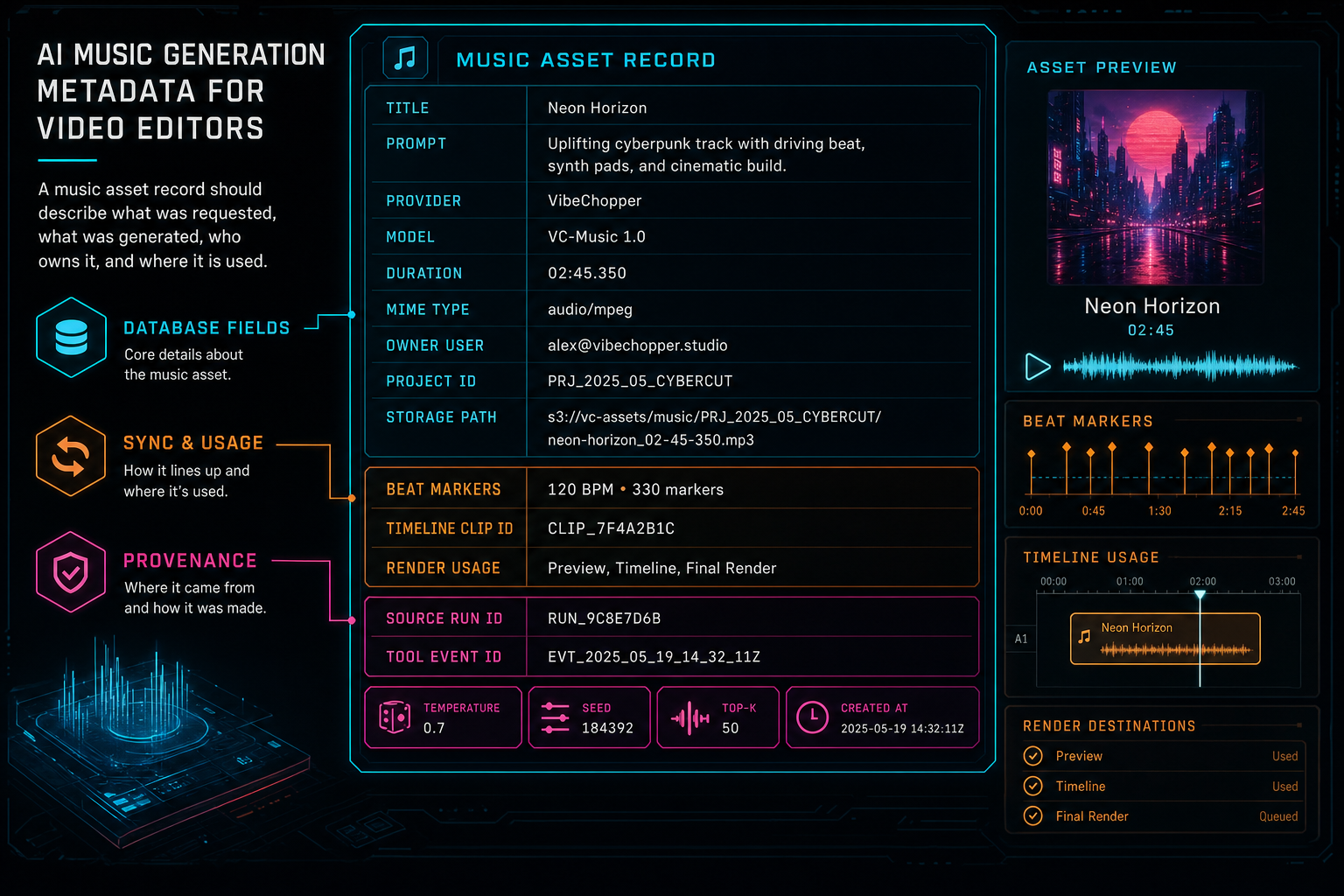
A music asset record should describe what was requested, what was generated, who owns it, and where it is used.
Make Ownership and Storage Boring
Generated music needs the same ownership discipline as uploaded source footage. The asset belongs to a user and project. It should be stored under project-aware object paths. It should not be accessible through a loose public URL unless the product deliberately creates a share or export surface. It should travel through server storage modules rather than direct client calls to cloud storage.
That boring ownership layer is what makes the creative layer safe to use. A creator can generate multiple beds, compare them, trim them, or remove them without wondering where the files went. The system can enforce project scoping, delete or archive assets when appropriate, and include generated music in media processing summaries. Search, repair, and render systems can look up the asset by stable IDs instead of guessing from filenames.
The storage metadata should include object path, URL or access handle, content type, byte size when known, checksum when available, upload time, source type, and project visibility. The human-facing title and description should be separate from those operational fields. A title like Generated upbeat synth bed helps a user scan the media panel. A storage path, run ID, and model field help the backend keep the artifact connected.
This is also where generated asset tags earn their place. Tags such as generated-audio, generated-music, music-bed, provider name, model family, and source workflow make the asset searchable without depending on one fragile string field. The goal is not to turn the media library into an internal database browser. The goal is to let the product answer simple questions: show generated music, show assets from this edit run, show music used in this render, or show audio that still needs placement.
Sync Metadata Is Editing Metadata
Video editors do not just need a generated audio file. They need a bed that behaves correctly against picture and dialogue. That means sync metadata belongs in the music model. Duration is the minimum. Better records include target in and out points, suggested start time, beat markers, downbeats, cue points, loop boundaries, fade-in and fade-out defaults, dialogue-safe regions, and transition alignment notes. Render a timeline free
Not every provider returns beat metadata directly, and not every edit needs deep musical analysis. The product can still store derived sync metadata. A waveform analysis pass can find loudness changes. The planner can mark that the first strong lift should land after a reveal. The editor can remember that a fade starts two seconds before the CTA. Once those decisions exist, they should be attached to the music asset or timeline clip instead of living only in a React component.
The distinction between asset sync metadata and clip sync metadata is useful. The asset can describe properties of the generated audio itself: duration, waveform preview, tempo estimate, beat markers, loopable regions, and safe fade points. The clip can describe how that asset is used in a particular timeline: start offset, trim in, trim out, volume, fade durations, track ID, role, and relationship to nearby dialogue or transitions.
When render time arrives, sync metadata helps the compositor behave predictably. The system can mix the generated bed at the intended volume, respect fades, align it to the right timeline span, and verify that the rendered output references the expected audio asset. Without those fields, the render path is forced to infer too much from clip placement alone.
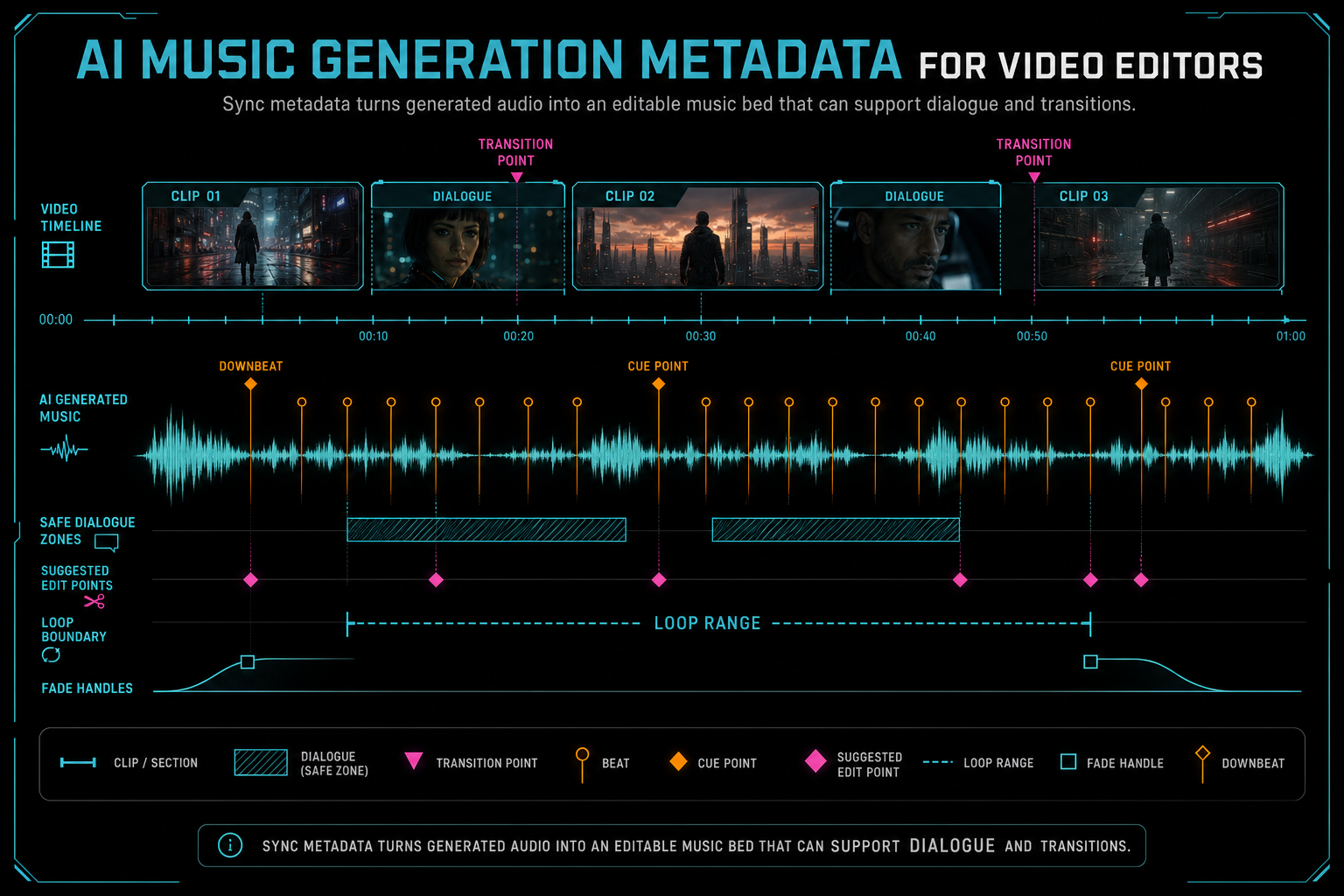
Sync metadata turns generated audio into an editable music bed that can support dialogue and transitions.
Connect the Asset to the Timeline
The critical transition happens when generated audio becomes timeline state. VibeChopper stores generated music as a media asset, then represents its editable use as a timeline clip on an audio track. That separation keeps the system flexible. The same generated bed can be referenced by a clip, replaced by a later variation, inspected from the media panel, and traced back to the AI edit run that requested it. Explore your media graph
Timeline linkage should include media source ID, clip ID, track ID, start time, duration, trim values, content type, role, and the tool event that inserted the clip. A role like generated_music_bed is useful because music behaves differently from dialogue, effects, and voiceover. It affects default volume, ducking, search filters, render expectations, and UI badges.
The media graph gives users and systems multiple entry points. From the generated music asset, the product can show where it appears in the timeline. From the timeline clip, the product can open the underlying generated asset and prompt summary. From an AI edit run, the product can show the music generation and insertion events. From a render artifact, the product can list which generated media contributed to the export.
This graph is also how the editor avoids black-box behavior. The user can stay focused on creative work, but the product can still explain that the selected music came from a specific prompt, provider, model, run, asset record, and insertion event. That is the difference between an AI feature that feels impressive once and an editing system that remains trustworthy through revision.
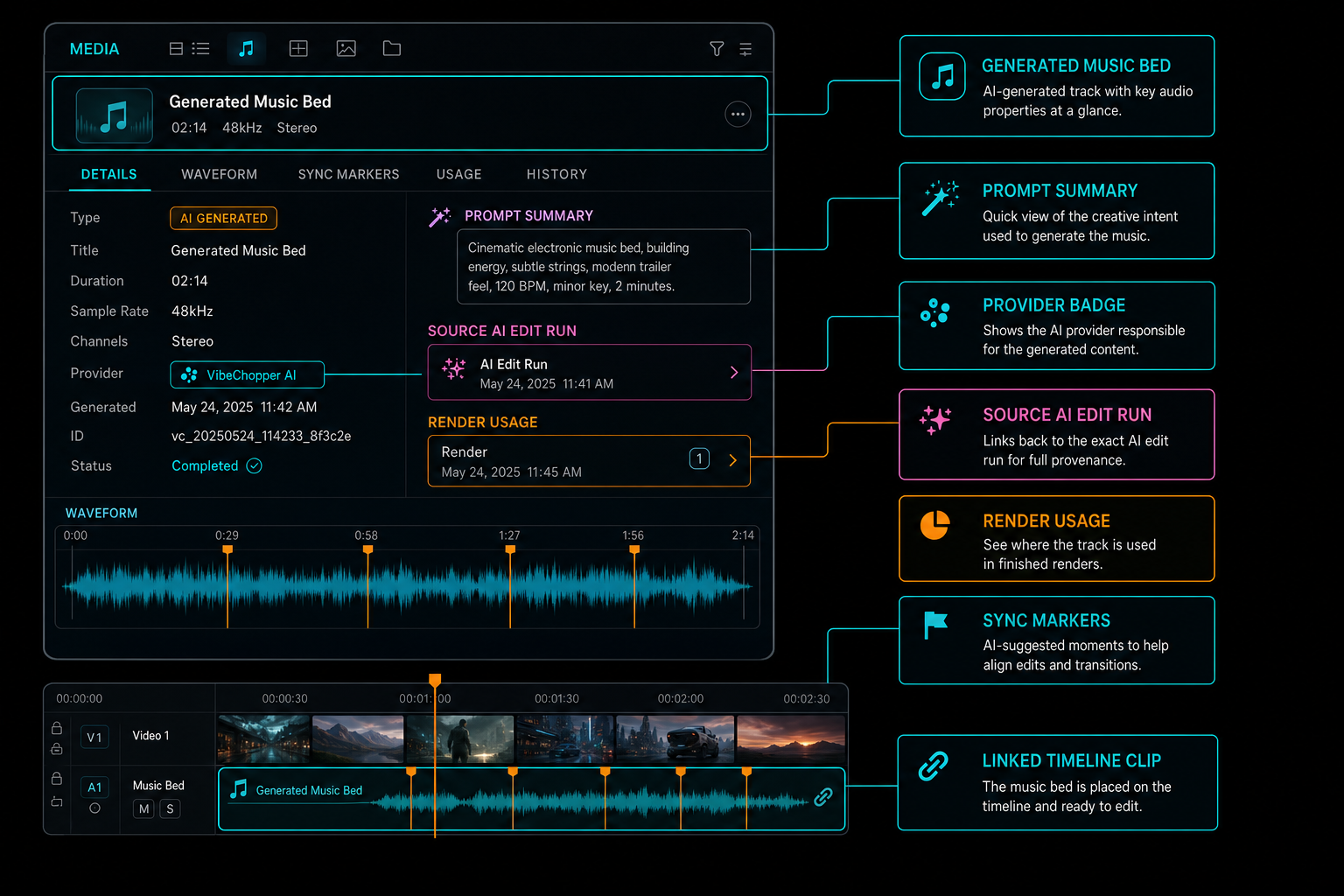
The media panel can keep generated music inspectable without interrupting the creative workflow.
Failure Metadata Protects the Workflow
Music generation has more than one failure point. The prompt might be missing. The provider might be unavailable. The model might return a response without usable audio. The upload can fail. The media asset write can succeed while timeline insertion fails. The clip can be inserted but later render verification can detect a missing object path. Treating all of those as one generic error makes the product harder to repair.
Good metadata records the stage, status, error message, retry count, timestamps, related run IDs, and any partial artifact that survived. If generation completed but insertion failed, the asset should remain visible as generated audio that needs placement or repair. If storage succeeded but render later fails, the render verifier should be able to point at the missing or unreadable object. If generation was skipped because provider configuration was unavailable, the AI edit run should show a skipped music step instead of silently omitting it.
This is where AI music generation metadata connects to observability and remediation. A repair workflow can retry only the broken edge. It can avoid re-running the model when the asset already exists. It can recreate a timeline clip from an existing media source. It can attach a clearer status to the edit run. That is better for users and cheaper for infrastructure.
The principle is simple: preserve state whenever possible. A failed timeline insertion should not erase a successful generated bed. A failed render should not erase the asset metadata needed to diagnose the mix. A duplicate retry should not hide the original request. Metadata turns failure from a vague interruption into a specific, repairable state.
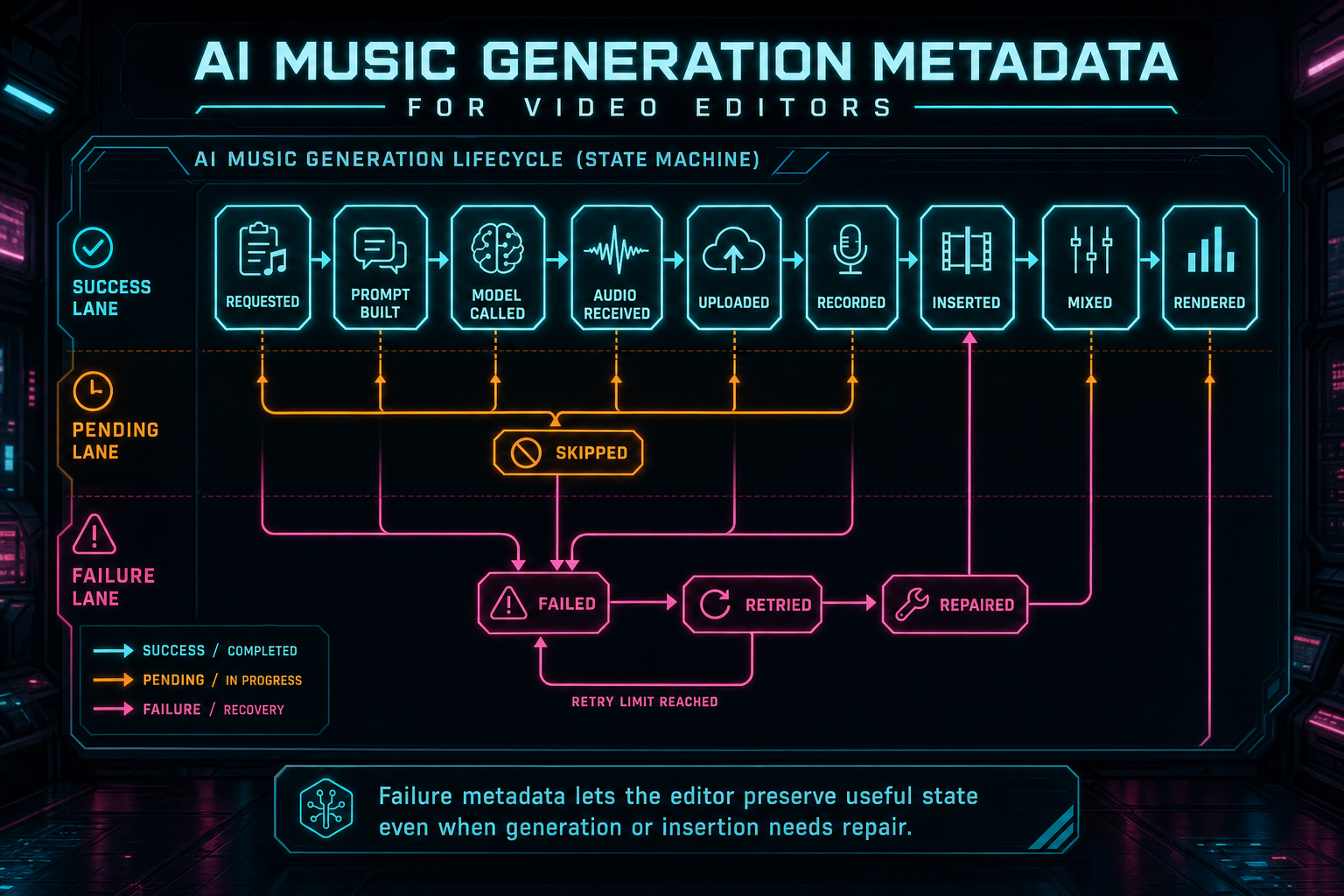
Failure metadata lets the editor preserve useful state even when generation or insertion needs repair.
The SEO Lesson Is a Product Lesson
Search queries like AI music for videos, generated music bed, and video soundtrack AI sound like feature keywords, but they point at a deeper product expectation. Users are not only asking whether a tool can generate music. They are asking whether that music can be used inside the real editing process. Can it be aligned to cuts? Can it stay under dialogue? Can it be adjusted? Can it be found later? Can it be exported reliably?
A credible AI video editor should answer those questions with architecture, not slogans. The music generation flow should have a request model, provider metadata, output records, project ownership, object storage, media graph links, timeline clips, sync fields, tool events, and render relationships. That is what turns a generated soundtrack from a novelty into editing infrastructure.
This is also why technical SEO content should be specific. The strongest answer to AI music generation metadata is not a generic explanation of tags. It is a concrete model for how generated music travels through a video editor. The metadata is valuable because it supports creative speed, product trust, search, rendering, repair, and future automation.
For VibeChopper, the public promise is practical: generate a music bed, keep its origin attached, place it on the timeline, mix it against the edit, and carry that context through export. The user sees a usable soundtrack. The system keeps the receipt.
Implementation Checklist
A production-ready AI music metadata model should include request identity: user ID, project ID, run ID, run item ID, plan ID, tool event ID, source command, target range, and idempotency key. It should include generation detail: original instruction, final provider prompt, provider, model, model version, request timestamp, response status, usage metadata, target duration, actual duration, MIME type, extension, and detected text parts.
It should include asset detail: asset ID, media source ID, title, description, tags, source type, storage path, content type, byte size, checksum when available, visibility, created time, and updated time. It should include sync detail: waveform preview, tempo estimate when available, beat markers, cue points, loop boundaries, dialogue-safe spans, default fades, and suggested placement notes.
It should include timeline detail: clip ID, track ID, clip role, start time, trim in, trim out, volume, fades, adjacent transition context, insertion tool event, and render usage. It should include failure detail: stage, status, error, retry count, skipped reason, partial artifact references, and repair status.
Most importantly, the model should keep these fields structured. A single JSON blob is better than nothing, but the product eventually needs typed boundaries: asset records, link records, tool events, timeline clips, and render artifacts. Structured metadata lets the editor search, filter, validate, repair, and display generated music as part of the project graph.
The Result
AI music generation is not finished when the provider returns audio. It is finished when the soundtrack becomes reliable editor state. That means the generated bed has an owner, a project, a prompt, a model, a storage path, an asset record, sync metadata, a timeline clip, an audit trail, and a relationship to final renders. Score a timeline
That structure does not make the creative experience heavier. It makes the creative experience smoother. The creator can ask for music, place it, revise it, trim it, fade it, render it, and find it again later. The system can explain where the music came from and repair the workflow if a later step fails.
The best metadata models are quiet in the UI and exact in the backend. They let AI feel fast without letting generated assets become mysterious. For video editors, that is the difference between a music generator bolted onto a timeline and a real AI editing system where soundtrack generation belongs to the project from prompt to export.
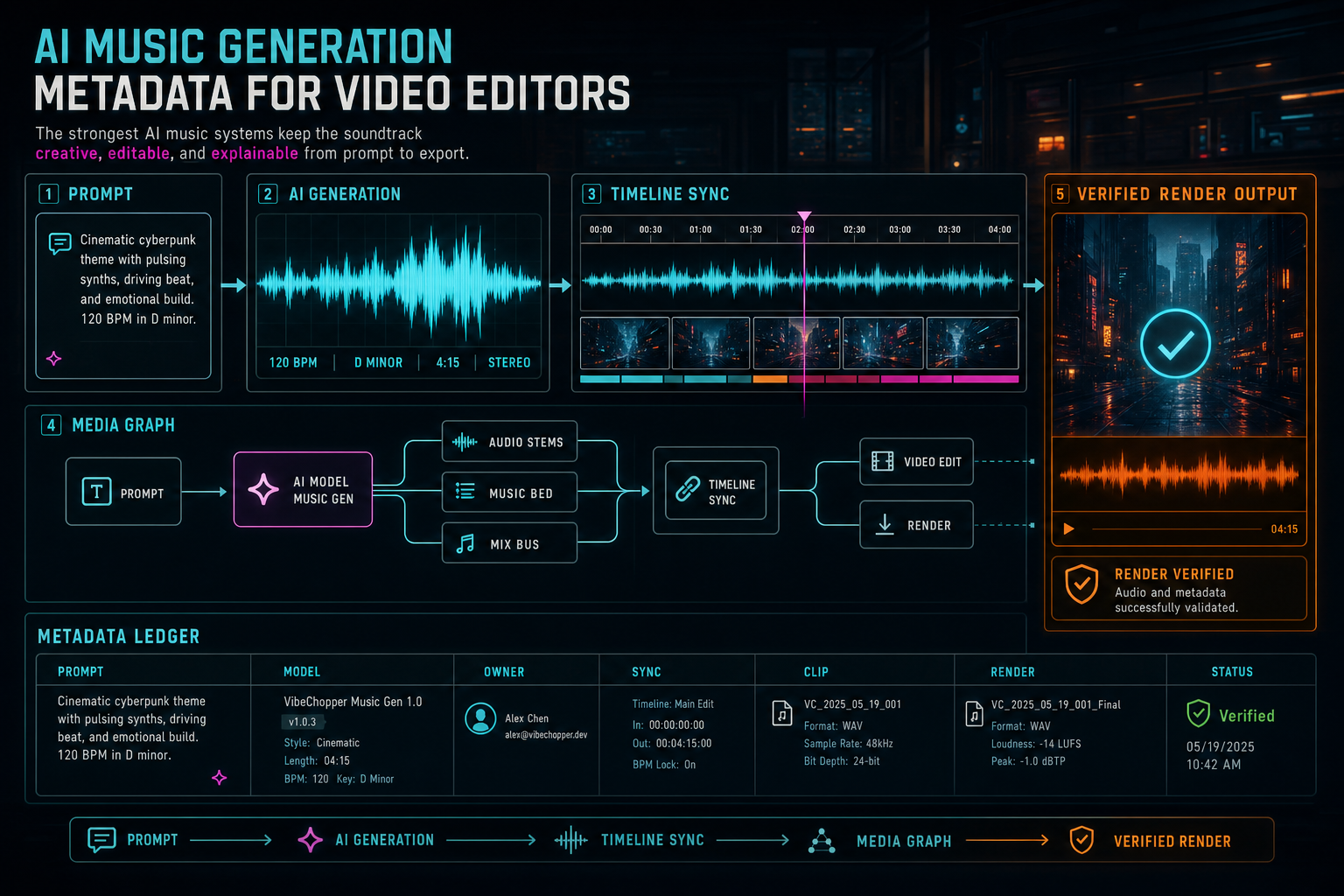
The strongest AI music systems keep the soundtrack creative, editable, and explainable from prompt to export.
Try the workflow
Open every feature from this post in the editor
These panels collect the features discussed above. Sign in once, finish your profile if needed, then the editor opens the first highlighted surface and walks through the tutorial.
Step 1
Generate a music bed
Create AI music assets with prompts, metadata, provenance, and timeline placement.
Score a timeline →Step 2
Inspect an AI edit run
Open the editor and see how plans, tool calls, artifacts, and render results stay connected.
Open the edit-run receipts →Step 3
Open the media asset graph
See generated audio, rendered assets, source clips, metadata, and provenance in the media panel.
Explore your media graph →Step 4
Render a verified timeline
Export a project through the same storage-backed render path described in this article.
Render a timeline free →