
Observability Is a Product Contract
An AI video editor does not fail like a simple form. It can fail while collecting context, calling a model, validating structured output, applying a trim, inserting generated media, uploading an asset, analyzing frames, rendering a timeline, verifying an artifact, or notifying the user that a repair is live. That means observability cannot be a single server log. It has to be a product contract that connects creative intent to technical evidence. Open the edit-run receipts
In VibeChopper, the user-facing promise is direct: upload footage, describe the edit, inspect the timeline, and render the result. The backend promise is stricter. Every important step should leave enough structured data to answer what happened, who triggered it, which project it touched, which model or tool ran, what media artifacts were involved, what failed, what was retried, and how the product recovered. That is AI video editor observability.
This is different from generic application monitoring. CPU, memory, HTTP status, and queue depth still matter, but they do not explain whether a natural language video edit preserved the intended testimonial pause or placed a generated music bed on the correct track. A creative tool needs operational telemetry plus editorial traceability. The system has to see model usage and timeline state in the same story.
That story matters for trust. Creators are comfortable with automation when the editor can show its work. Developers are comfortable shipping automation when the platform can debug, repair, and verify it. Searchers comparing AI video editing software may see a clean prompt box first, but the durable product advantage is the machinery underneath: tool events, usage logs, progress state, render verification, and repair loops.
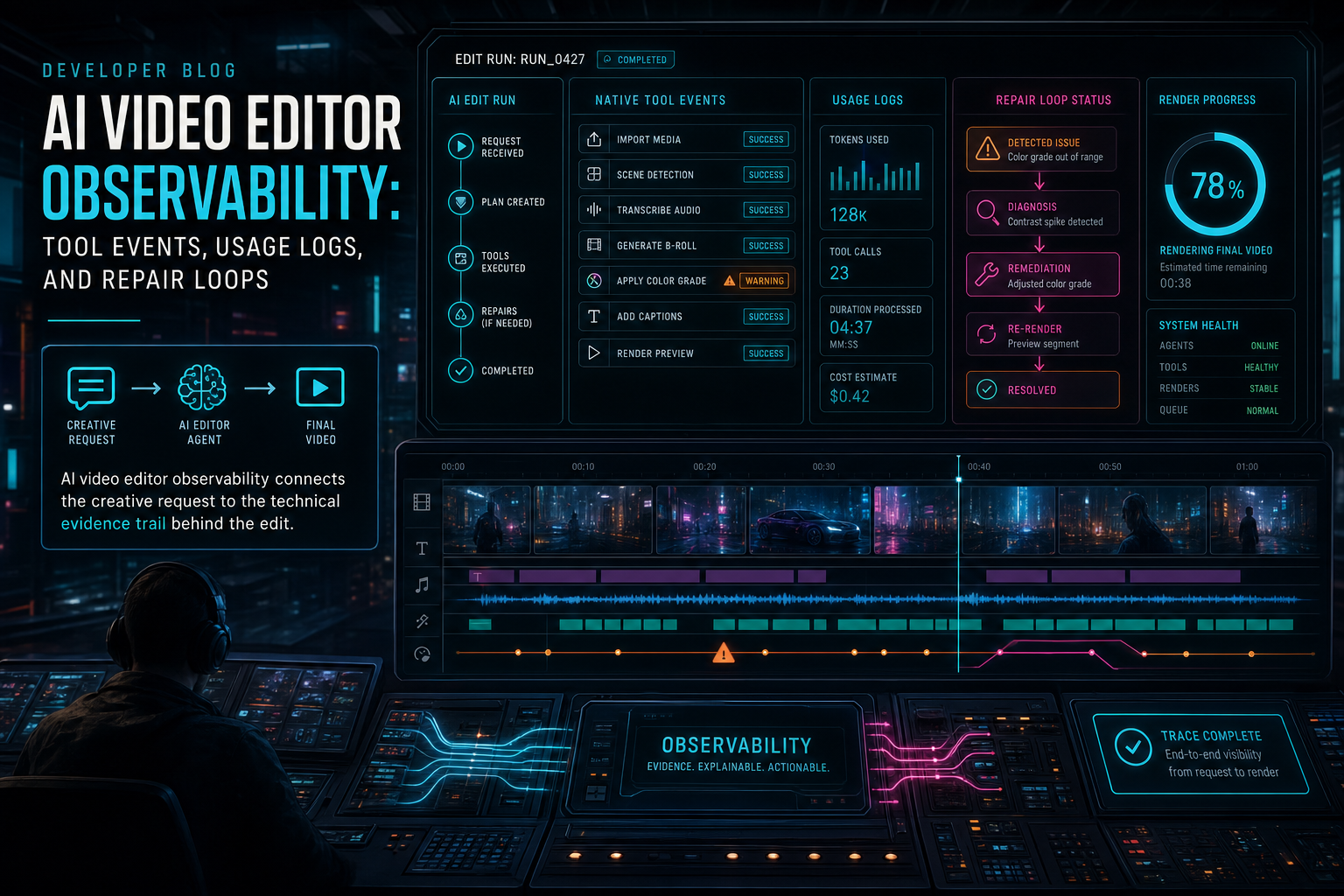
AI video editor observability connects the creative request to the technical evidence trail behind the edit.
The Observability Stack for AI Editing
A useful observability stack for AI video editing has several layers. The first layer records the request: the prompt, the authenticated user, the project, the selected clips, the current timeline context, and any attached briefs or assets. The second layer records model interaction: provider, model, latency, token usage, fallback path, structured output, validation status, and errors. The third layer records product execution: native tool events, media artifacts, storage writes, render jobs, and verification results.
Those layers should be connected by stable IDs. A usage log without an edit run ID is just a billable event. A tool event without a run ID can explain a timeline change but not the AI reasoning that requested it. A render verification record without the timeline and project context can prove a file exists but not that it represents the intended edit. Observability works when each record is narrow, typed, and linkable.
VibeChopper's architecture already separates the responsibilities that make this possible. The provider harness normalizes model calls and preserves fallback behavior. AI edit runs capture the higher-level plan and execution story. Native editor tool events capture timeline mutations. Upload telemetry and media processing summaries describe long-running media work. Render verification ties exported assets back to project state. DATA Remediation turns user incidents into agent-trackable jobs.
The practical lesson is to avoid one giant observability table. Prompts, provider calls, tool events, media jobs, renders, and repairs each have different lifecycles. They need their own schemas and status vocabularies. The important design choice is not to flatten them; it is to join them deliberately through project IDs, run IDs, artifact IDs, event IDs, source IDs, and status pages.
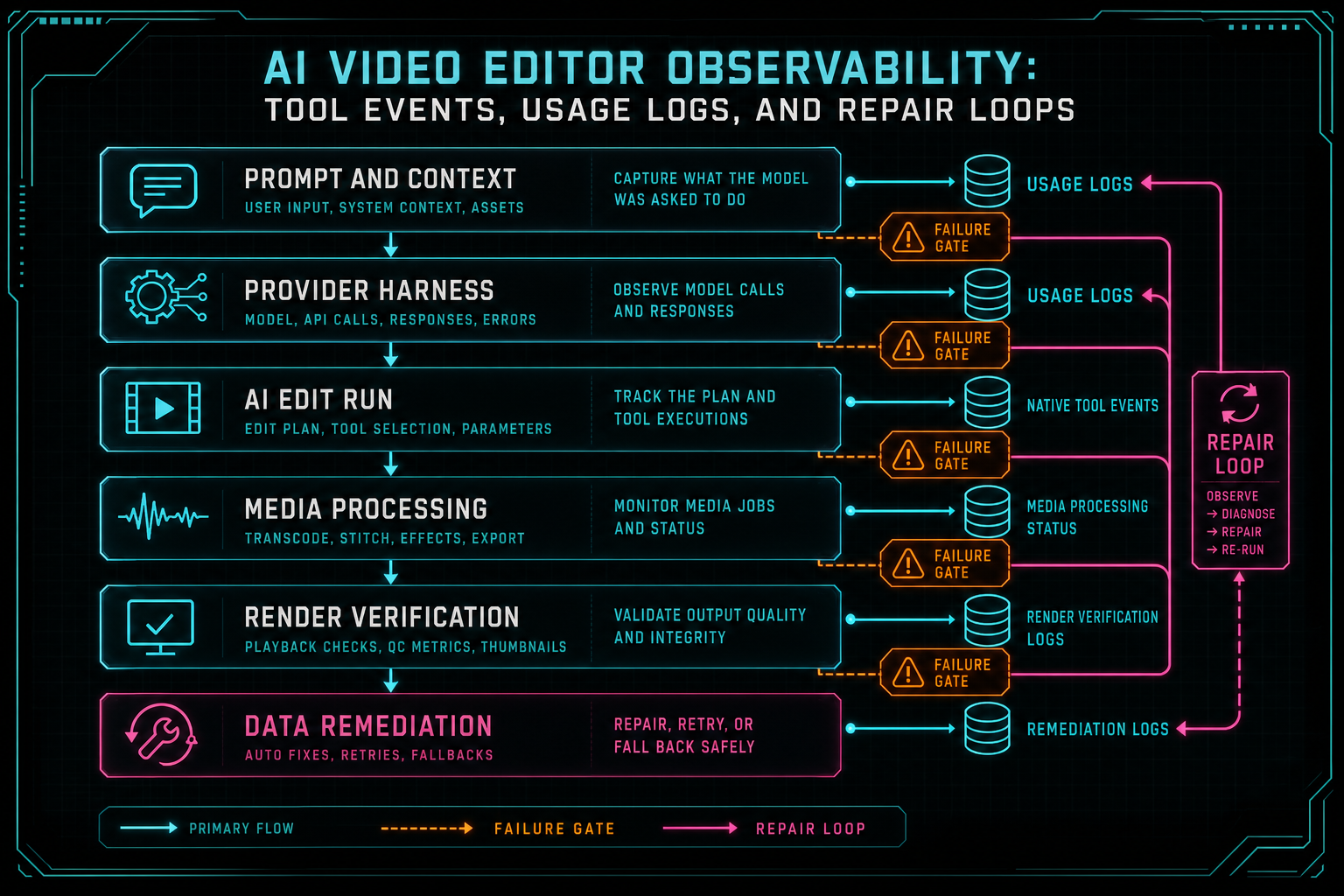
The observability stack needs layers because prompts, tools, media jobs, renders, and repairs fail in different ways.
Tool Events Explain Timeline Reality
The timeline is where an AI edit becomes real. A model can propose a sharper intro, a transcript-aware cut, a transition adjustment, or an overlay insertion, but the product only changes when native tools apply those actions to project state. Tool events are the observability layer for that reality. Talk a cut into shape
A strong tool event answers ordinary questions without requiring a developer to replay the entire session. Which tool ran? Was the actor a human gesture, an AI edit run, a batch action, or a repair workflow? Which clip, track, transcript segment, or media asset did it target? What parameters were accepted? What changed? Did the action apply, reject, or fail? Which validation rule made that decision?
This is especially important for AI-assisted edits because model output is probabilistic and project mutation should not be. The model may suggest a split at a transcript boundary, but the server has to validate that the clip exists, the timestamp is inside duration, the user owns the project, and the current timeline has not drifted too far from the context snapshot. The tool event records the result of that boundary.
Creators should not need to read raw logs to understand this. The product surface can translate tool events into compact editorial explanations: trimmed 2.1 seconds from the intro, added a crossfade between clips, placed a generated overlay at 00:14, rejected a split because the source clip was missing, or queued a render from the verified timeline. The event stream gives the UI honest material to work with.
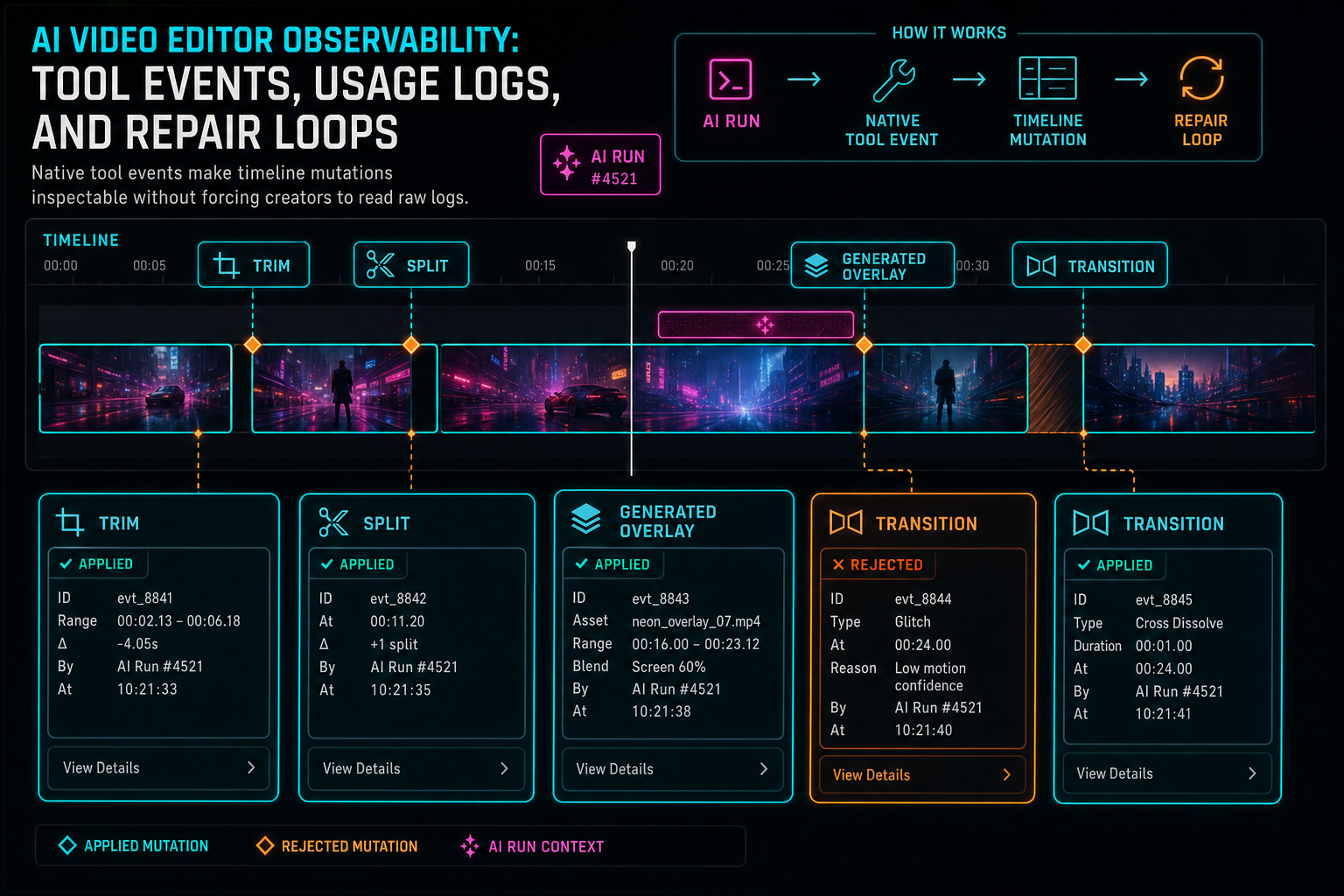
Native tool events make timeline mutations inspectable without forcing creators to read raw logs.
Usage Logs Explain Model Behavior
Usage logs are often treated as billing records. In an AI editor, they also explain behavior. A model call can be slow, malformed, too expensive, missing context, blocked by validation, or rescued by fallback. If the system only records that a completion happened, developers lose the evidence needed to improve reliability. Open the edit-run receipts
A useful AI usage log captures provider, model, request ID, latency, input and output token counts, fallback usage, response shape, validation status, retry count, error category, estimated cost, run ID, user ID, project ID, and feature surface. Some fields support cost control. Some support debugging. Some support rate-limit policy. Some support user-facing explanations. Together, they let the team ask whether a product outcome was a model problem, a prompt problem, a context problem, a validation problem, or an execution problem.
Provider independence makes these logs more valuable. If the editor can route through a harness instead of wiring every feature directly to a specific model API, usage logs become comparable across providers. The product can preserve fallback behavior while still understanding which model produced which output, which validation rules failed, and which completion path was attached to a given edit run.
Usage logs should not become transcript dumps or private project mirrors. The goal is observability, not careless retention. Store enough structured metadata to explain the operational path, and keep sensitive media context behind the product's normal authorization boundaries. In a video editor, the difference matters: creators need trust that the product can debug the edit without turning their source footage into unbounded log exhaust.
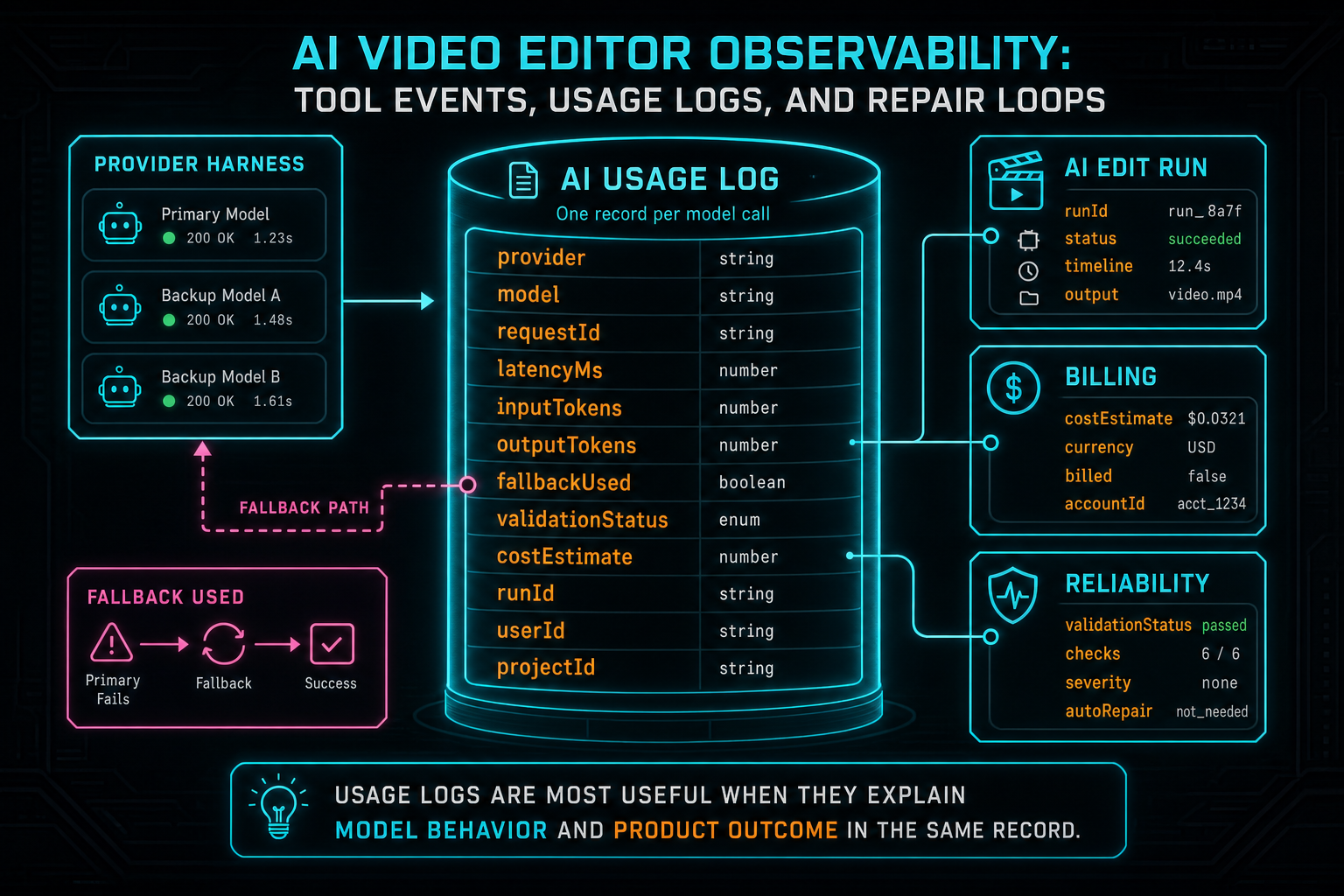
Usage logs are most useful when they explain model behavior and product outcome in the same record.
Long-Running Jobs Need User-Visible State
Video work is long-running by nature. Uploads take time. Browser extraction can fall back to server processing. Frame analysis and transcription can complete on different schedules. AI planning can call multiple providers. Renders can queue, compose, upload, and verify. Repairs can move through classification, human review, agent work, checks, publishing, and notification. Observability has to make these phases explicit. Upload a real shoot
For developers, explicit phases help avoid ambiguous failure handling. A stuck upload is not the same problem as a completed upload with missing frame analysis. A finished render without a verified storage artifact is not the same problem as a render that failed before composition. An AI edit run with a valid plan and a rejected tool event is not the same problem as a malformed model response. Different phases need different retries, messages, and repair paths.
For creators, explicit phases reduce anxiety. A progress monitor that says upload complete, frame analysis running, transcription queued, AI edit applying, render verifying, or repair published is better than an indeterminate spinner. The user does not need every backend field, but they do need status that maps to the work they asked the product to do.
This is why VibeChopper treats upload telemetry, media processing summaries, render verification, and remediation status as part of the product rather than a hidden operations dashboard. AI video editing is asynchronous. The editor should not pretend otherwise. It should show honest progress, preserve state across refreshes, and make duplicate requests safe.
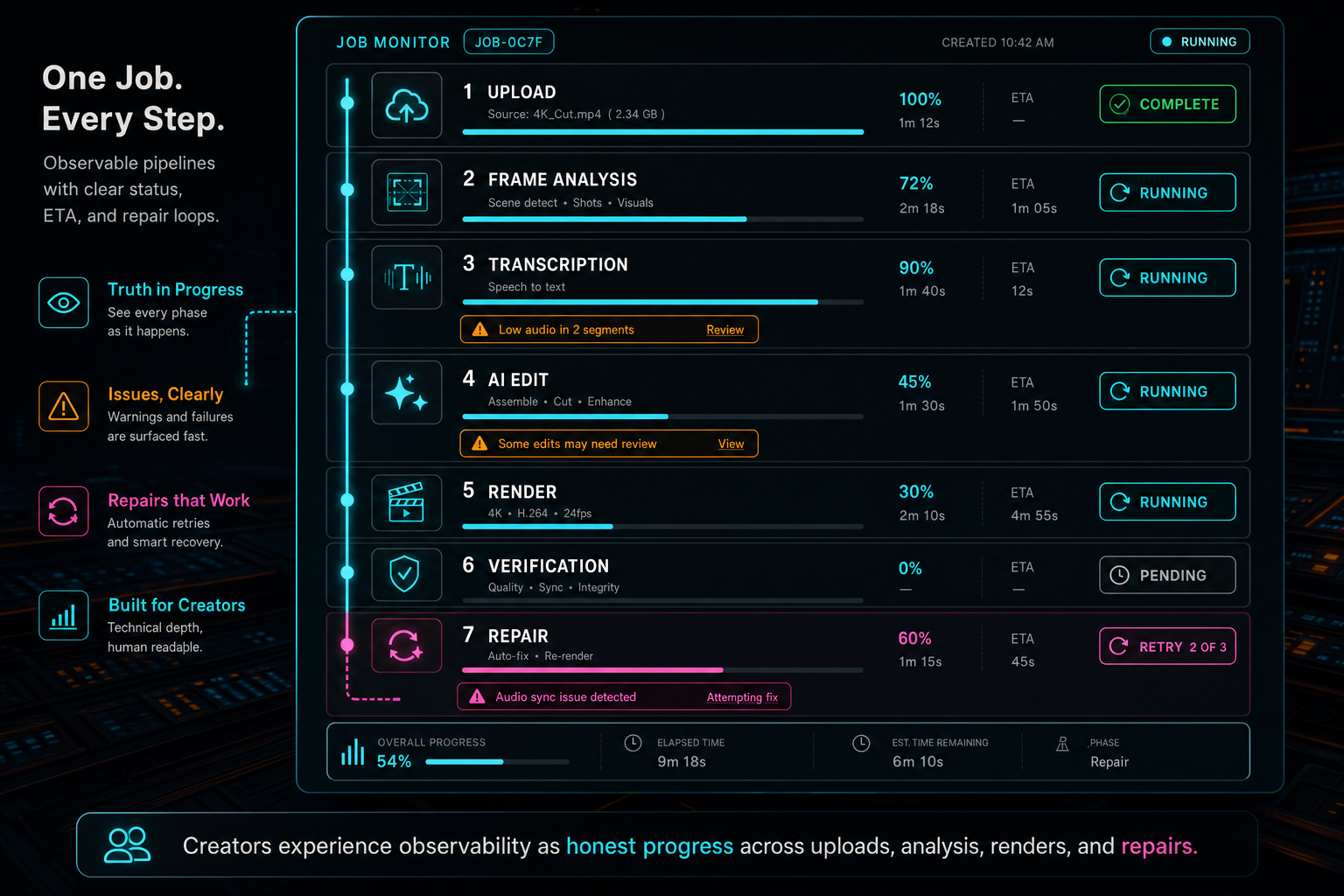
Creators experience observability as honest progress across uploads, analysis, renders, and repairs.
Repair Loops Turn Signals Into Fixes
Observability is passive until it can feed a repair loop. A failed render, confusing AI edit, upload interruption, invalid tool call, or user report should not disappear into a log viewer. It should become a structured signal that the product can classify, dedupe, scope, assign, verify, publish, and report back to the submitter. Send feedback with context
VibeChopper's DATA Remediation pipeline is the repair side of that philosophy. A user incident can become an agent-trackable job with source context, status, allowed file scope, worker events, check results, publish result, and notification result. That does not mean every report becomes an automatic code change. It means the system has a durable path from product signal to accountable work.
The link between observability and repair is context. A feedback item is much more useful when it can point to the project, route, AI edit run, tool event, media processing summary, render verification result, browser state, or user-visible phase where the problem occurred. The repair agent or human reviewer starts from a structured case file rather than a sentence that says the editor felt wrong.
A repair loop also changes how failures feel to users. The product can say the report was received, planning is underway, checks are running, a fix is published, or the submitter has been notified. The public status trail does not expose private project data, but it does show that the issue has a lifecycle. That is a higher-trust experience than a support inbox with no feedback path.
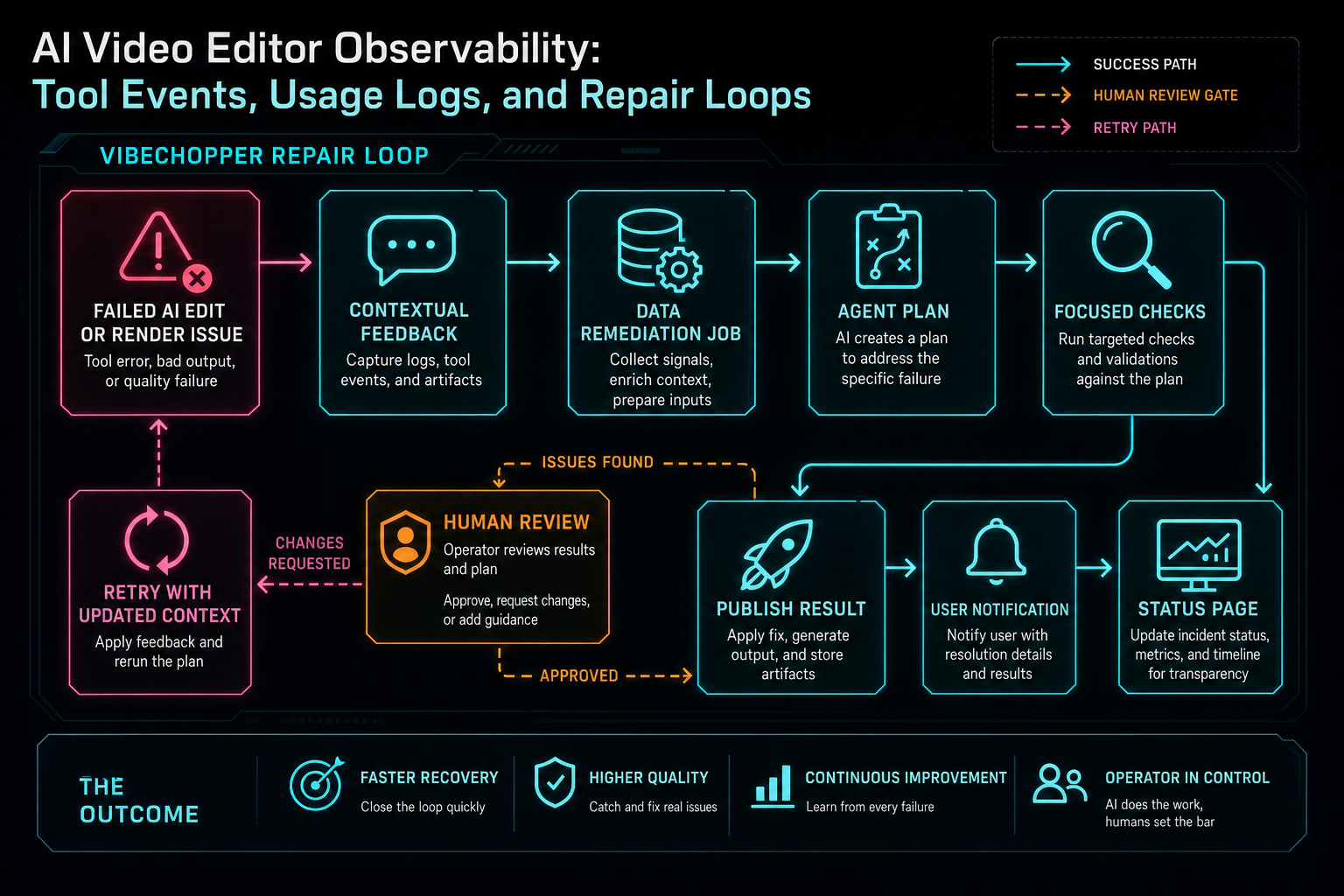
Repair loops turn observability from passive monitoring into a path back to a fixed product.
Metrics That Matter for AI Video Editing
AI video editor observability should include conventional metrics, but the most useful signals are product-shaped. Track edit run completion rate, plan validation failure rate, malformed output rate, provider fallback rate, model latency by feature, average tool events per run, rejected tool event reasons, media readiness at prompt time, render verification failures, upload resume rate, duplicate request rate, repair job conversion rate, and time from user report to published fix.
The key is to connect metrics to decisions. A high provider fallback rate may justify prompt changes, routing changes, or budget changes. A high validation failure rate around time ranges may mean context snapshots are stale or model instructions are too loose. Repeated render verification failures may point to compositor behavior, object storage writes, or timeline states that should be blocked earlier. Upload resume frequency can guide client-side memory and network handling.
Do not optimize only for model success. An edit run that produces a valid plan but confuses the user is still a product problem. A render that completes but loses provenance is still an observability problem. A repair job that publishes a fix but never notifies the submitter leaves the loop unfinished. Good metrics follow the work from request to outcome, not just from request to response.
This also helps prioritize SEO-informed product claims. If the product says video processing monitoring, render progress tracking, AI tool logs, or explainable AI editing, those phrases should map to real system behavior. Technical SEO is strongest when the article explains an architecture the product actually believes in.
Privacy, Retention, and Scope
Observability can become a liability if it stores everything forever. Video projects contain private footage, transcripts, identities, briefs, and client context. An AI editor needs enough evidence to debug and repair workflows, but it should avoid turning observability into a second copy of the user's project.
The practical pattern is to store structured operational metadata, stable references, bounded summaries, and redacted context rather than raw media or unbounded prompt dumps wherever possible. A usage log can record provider, model, latency, validation status, and run ID without exposing every frame description. A tool event can record target IDs and deltas without copying the entire timeline. A public remediation status page can show phases and bounded messages without revealing private project details.
Authorization still applies. If a record points to a project, media asset, render, or edit run, access should follow the same user-scoping rules as the rest of the editor. Observability records are not exempt from product security just because they are operational. In practice, they are often more sensitive because they connect multiple pieces of the workflow.
Retention policy should match the purpose of the data. Short-lived debug details, durable audit events, billing-relevant usage summaries, public status events, and media provenance records do not all need the same lifetime. Treating them differently keeps the platform useful without making every diagnostic field permanent.
A Practical Build Order
If you are adding observability to an AI video editor, start with the workflow identifiers. Make sure prompts, provider calls, edit runs, tool events, media jobs, renders, and repair jobs can point to each other through stable IDs. Without that connective tissue, every dashboard becomes a search exercise.
Next, define status vocabularies. A long-running media job needs different statuses than a provider call. An AI edit run needs phases that describe context, planning, validation, execution, artifacts, and verification. A remediation job needs phases that describe intake, review, agent work, checks, publishing, and notification. Status names should be boring, typed, and easy to map to user-facing labels.
Then build the capture points. Record usage logs in the provider harness. Record native tool events at the editor mutation boundary. Record upload and media processing state where files and analysis actually move. Record render verification after storage and timeline checks. Record remediation events as workers claim, update, complete, publish, and notify. Capture should happen where the fact becomes true.
Finally, build inspection surfaces. Internal dashboards help developers, but product-level inspectors help creators. AI edit run views, timeline event callouts, upload monitors, render status panels, and remediation status pages all translate observability into confidence. The point is not to show everything. The point is to show the right evidence at the moment it changes what a user or developer can do.
The Final Loop
The final version of AI video editor observability is a loop, not a dashboard. A creator asks for an edit. The system records the request and context. The provider harness records usage and fallback. The AI edit run records the plan. Validation turns acceptable actions into tool events. Media processing and render verification record long-running work. If something fails, contextual feedback and remediation jobs carry the evidence into repair. When the fix lands, the user can be notified.
That loop is how an AI editor stays credible after the novelty of the prompt box wears off. It gives creators visible progress and understandable outcomes. It gives engineers the records needed to debug model behavior, timeline mutations, media processing, rendering, and support incidents. It gives the business a responsible view of usage, cost, reliability, and repair.
For VibeChopper, observability is part of the editing experience because the product is built around AI actions that touch real timelines. Tool events keep timeline reality inspectable. Usage logs keep model behavior explainable. Repair loops keep failure from becoming silence. The result is AI video editing software that can move quickly without pretending that creative automation is magic.
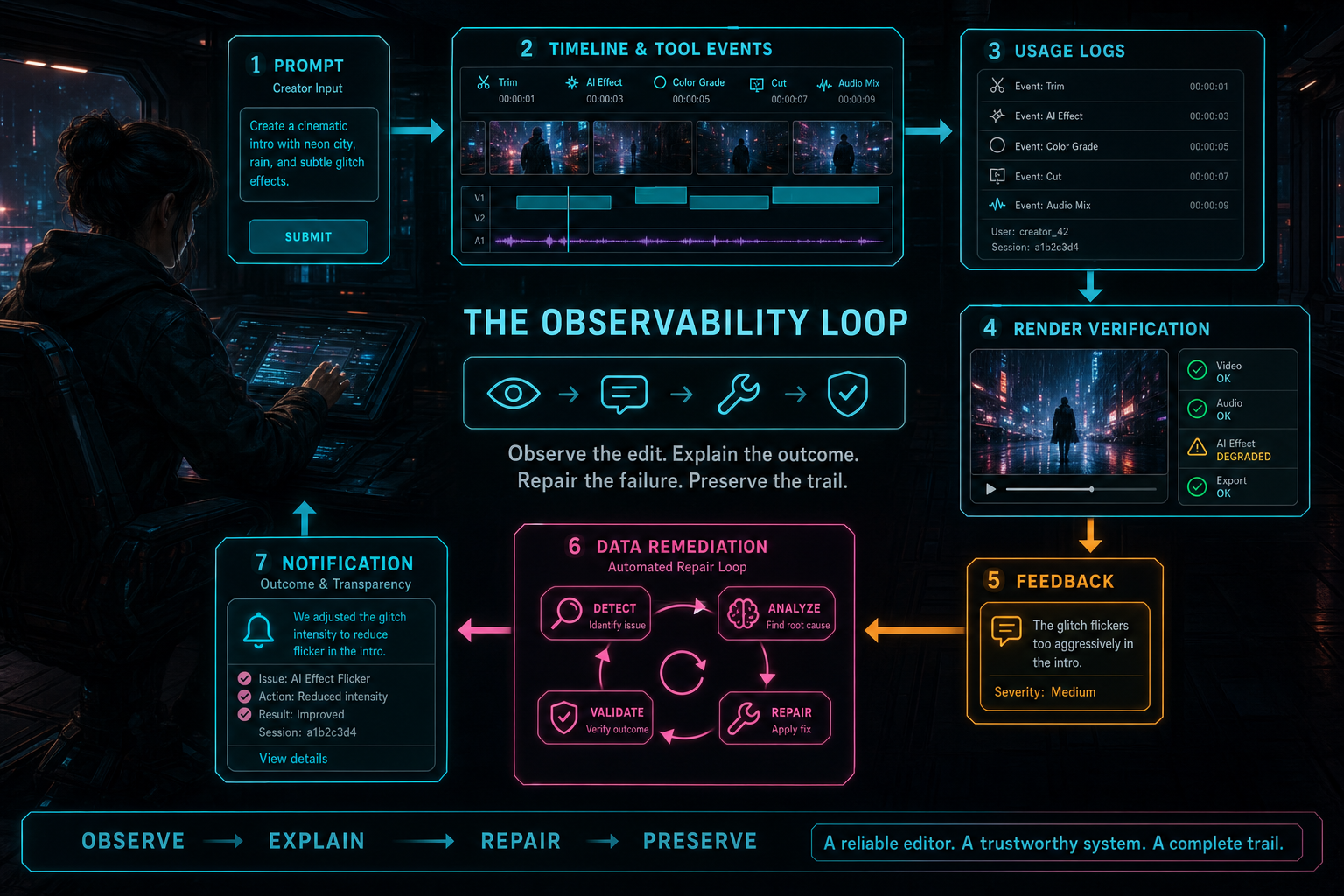
The final system is a loop: observe the edit, explain the outcome, repair the failure, and preserve the trail.
Try the workflow
Open every feature from this post in the editor
These panels collect the features discussed above. Sign in once, finish your profile if needed, then the editor opens the first highlighted surface and walks through the tutorial.
Step 1
Inspect an AI edit run
Open the editor and see how plans, tool calls, artifacts, and render results stay connected.
Open the edit-run receipts →Step 2
Try voice-driven timeline edits
Describe the edit you want and let VibeChopper translate intent into timeline changes.
Talk a cut into shape →Step 3
Upload footage with progress you can trust
Watch large video uploads, processing, transcript work, and original-file storage from one monitor.
Upload a real shoot →Step 4
Render a verified timeline
Export a project through the same storage-backed render path described in this article.
Render a timeline free →Step 5
Send contextual feedback
Capture voice or written feedback with project context so issues can become repairable jobs.
Send feedback with context →