
The Export Button Is Not Enough
The export button is one of the most familiar controls in video software. It looks simple because the user story is simple: I finished editing, so give me the file. In a traditional desktop editor, that button sits on top of a mature local project model, local media references, local render state, and years of user expectations about where the finished file lands. In an AI-native online video editor, the same button has to carry more responsibility. Render a timeline free
VibeChopper treats export as a visible action on top of a verified render pipeline. The button starts the work, but it is not the proof that the work succeeded. The proof is a durable export record, a render job lifecycle, object storage metadata, a normalized download route, file size, duration, format, timeline context, AI run context when applicable, blockers, and honest limitations. That is render verification.
This distinction matters for AI video tools because the render may not be the direct result of a human arranging every clip by hand. A user might ask the assistant to tighten an intro, remove dead air, add generated music, apply effects, and export a draft. The product then needs to explain what happened after the prompt. A plain download URL cannot do that. A verified render artifact can.
The export button is still important. It is the ergonomic surface. Users should not have to think about export records or object keys every time they want a file. But the engineering layer below that button should not be designed like a one-off click handler. It should be designed like a contract the rest of the product can inspect, reuse, repair, and trust.
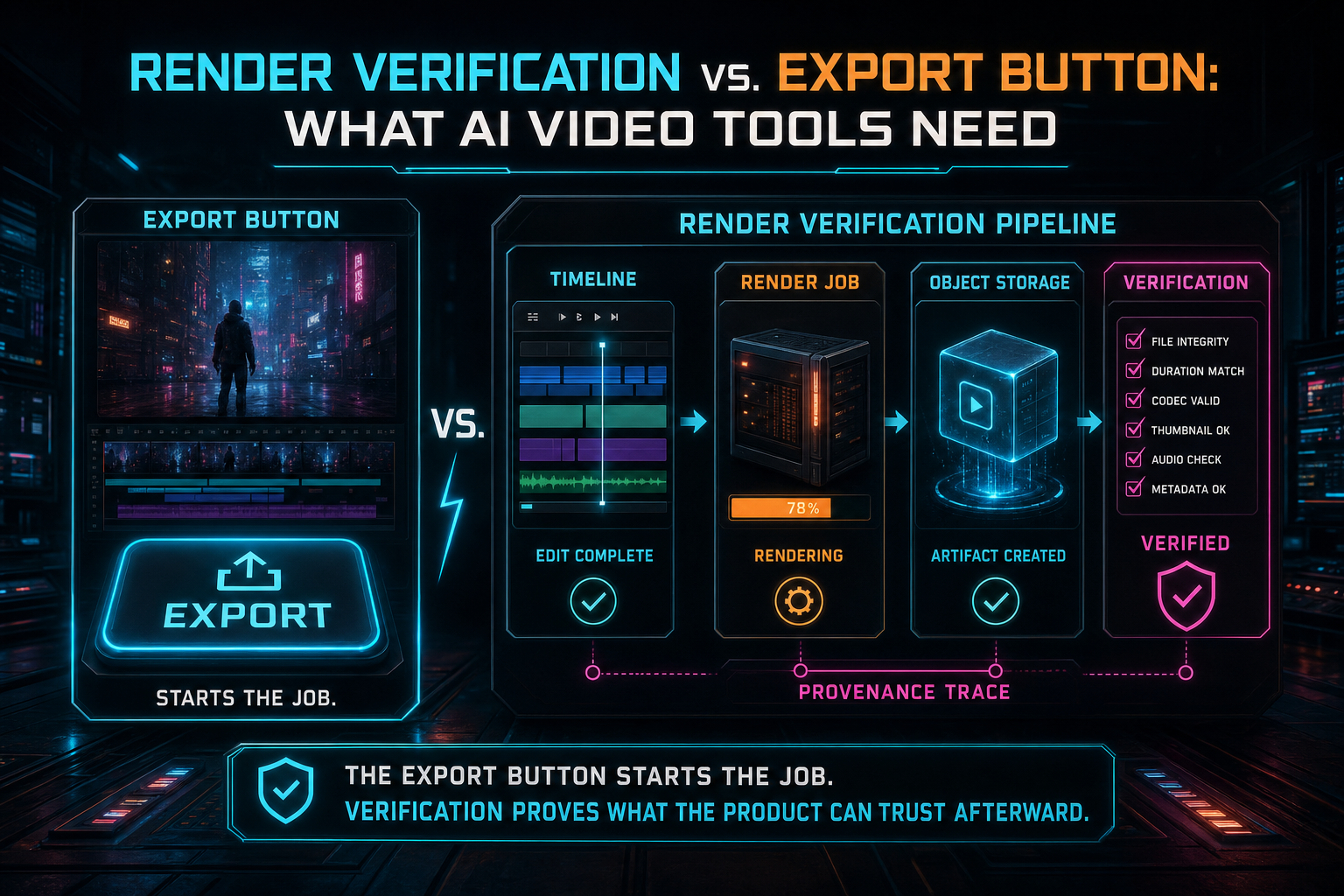
The export button starts the job. Verification proves what the product can trust afterward.
A Button Click Is Not a Contract
A button click is transient UI state. It can set a spinner, disable a control, and send a request. That is not enough for video rendering. Rendering is long-running work with expensive inputs and multiple failure modes. The browser can refresh. The network can drop. A user can click twice. A worker can fail after encoding but before upload. Object storage can return a temporary error. The product needs durable state outside the component that initiated the action. Open the edit-run receipts
The contract starts with identity. Which user requested the export? Which project owns it? Which timeline version or saved timeline state produced it? Which output preset did the user choose? Was the request created by a human click or by an AI edit run? These fields decide whether the job is authorized, deduplicated, recoverable, and explainable.
The contract continues through progress. A useful render job reports stages such as queued, loading media, building graph, encoding, uploading, verifying, complete, failed, canceled, or retrying. The exact stages vary by implementation, but the principle is stable: long-running media work needs product-level state, not only process-level logs. Users need to know whether work is alive. Operators need to know where it failed.
The contract finishes with the artifact. A completed render should return more than success: true. It should return an export ID, storage path, routed download URL, file size, duration, format, resolution, FPS, verification state, blockers, and limitations. Those fields make the export useful to the media panel, AI edit run, collaboration view, support tooling, and future remediation jobs.
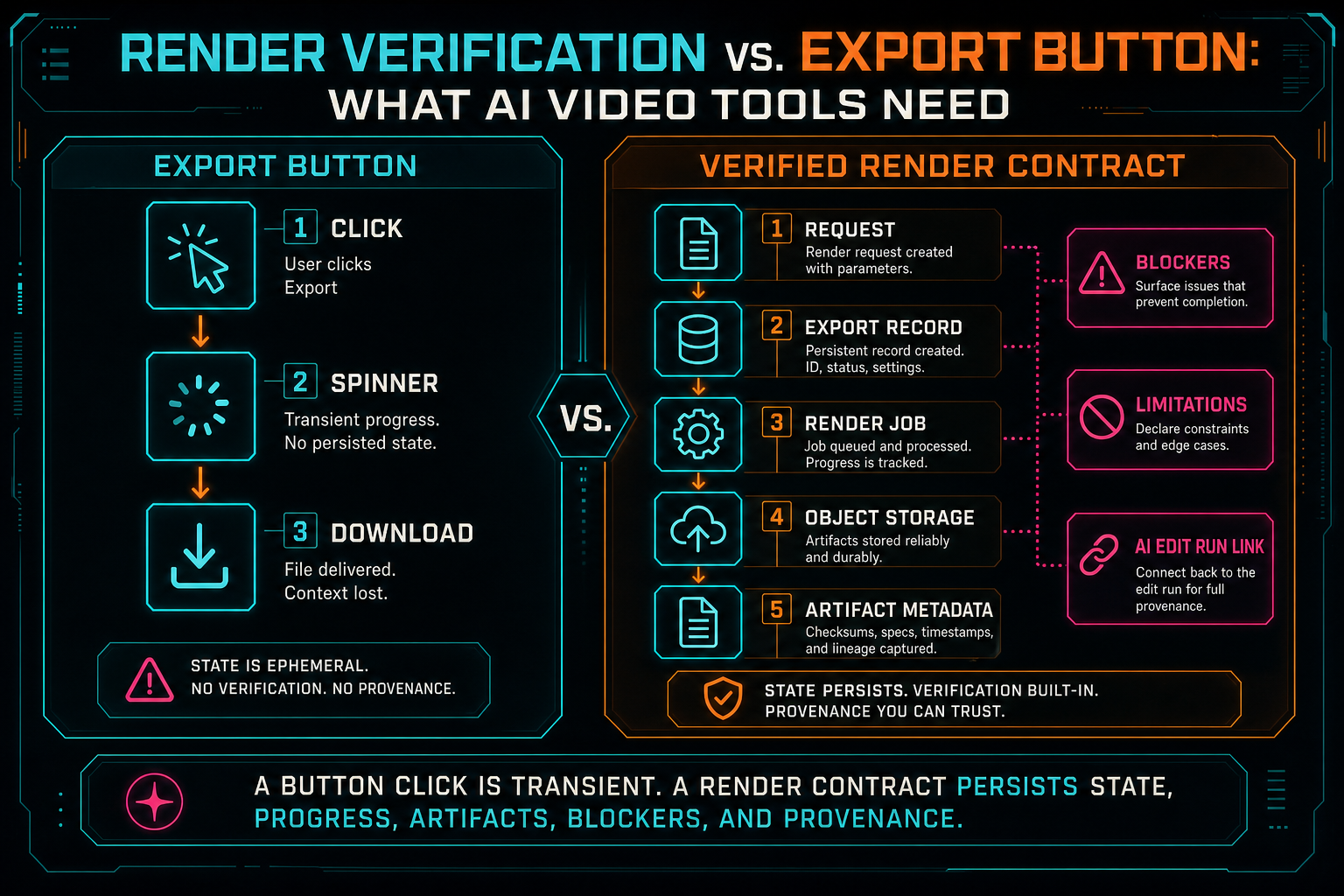
A button click is transient. A render contract persists state, progress, artifacts, blockers, and provenance.
Design the Status Object First
A practical way to avoid export-button thinking is to design the status object before designing the UI. The UI can always simplify a rich status object. It is much harder to reconstruct product truth from a thin response after real users start exporting large timelines. Upload a real shoot
A VibeChopper-style render status object includes exportId, projectId, status, stage, percent, createdAt, updatedAt, and optional requestedByRunId. It includes an artifact section with storagePath, downloadUrl, fileSize, duration, format, resolution, and fps. It includes verified, blockers, and limitations so clients know whether the artifact is dependable and what the verification pass did not prove.
That shape gives the frontend room to build a calm product experience. The export panel can show progress by stage. The AI run inspector can attach the export as an artifact. The upload and processing monitor can use the same language for long-running work. The media graph can ingest completed renders without parsing arbitrary logs. A support surface can show stable IDs instead of asking a user to describe what the spinner did.
The status object also makes duplicate requests safer. If the user double-clicks export, or an AI agent retries after a timeout, the server can return the existing export job when the request matches the same project, timeline version, output preset, and idempotency key. Without that contract, duplicate prevention becomes a collection of brittle UI guards.
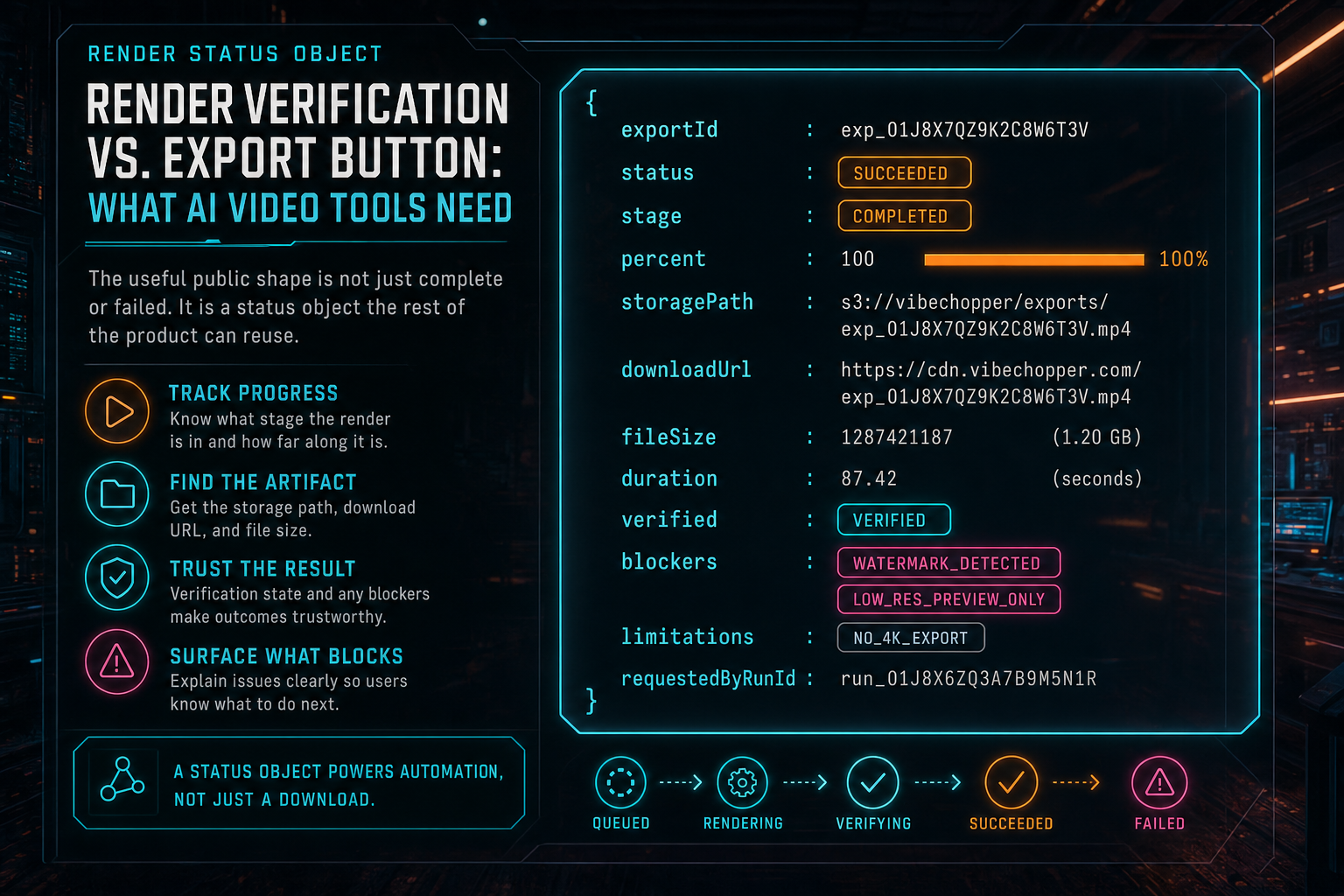
The useful public shape is not just complete or failed. It is a status object the rest of the product can reuse.
AI Exports Need Run Context
AI video editing changes the export question. The user is not only asking whether the file exists. They are asking whether the assistant produced the intended edit. The system cannot answer that question with a URL alone. It needs to connect the rendered file to the prompt, the plan, the tool calls, the timeline state, and the source media that participated in the result. Open the edit-run receipts
That does not mean the renderer should reinterpret the prompt. The render path should read saved product state: clips, tracks, source ranges, effects, captions, generated music, overlays, voiceovers, and export settings. Prompt intent belongs in the AI audit trail. Render inputs belong in timeline and media records. Verification joins the two at the artifact boundary by saying which run requested the render and which artifact was produced.
This is especially useful for second-pass review. A review agent can evaluate the draft that actually rendered instead of guessing from the plan. A user can compare the run's stated goal with the output artifact. A remediation job can inspect whether the failure happened before timeline mutation, during media resolution, in the compositor, while uploading, or during verification. The export becomes part of the AI workflow rather than a disconnected endpoint.
The media graph benefits too. Source videos, transcript segments, generated audio, overlays, final renders, and repair records are all more useful when they are connected. A verified render is not just a file at the end of the line. It is a node that points backward to creative decisions and forward to review, sharing, download, and reuse.
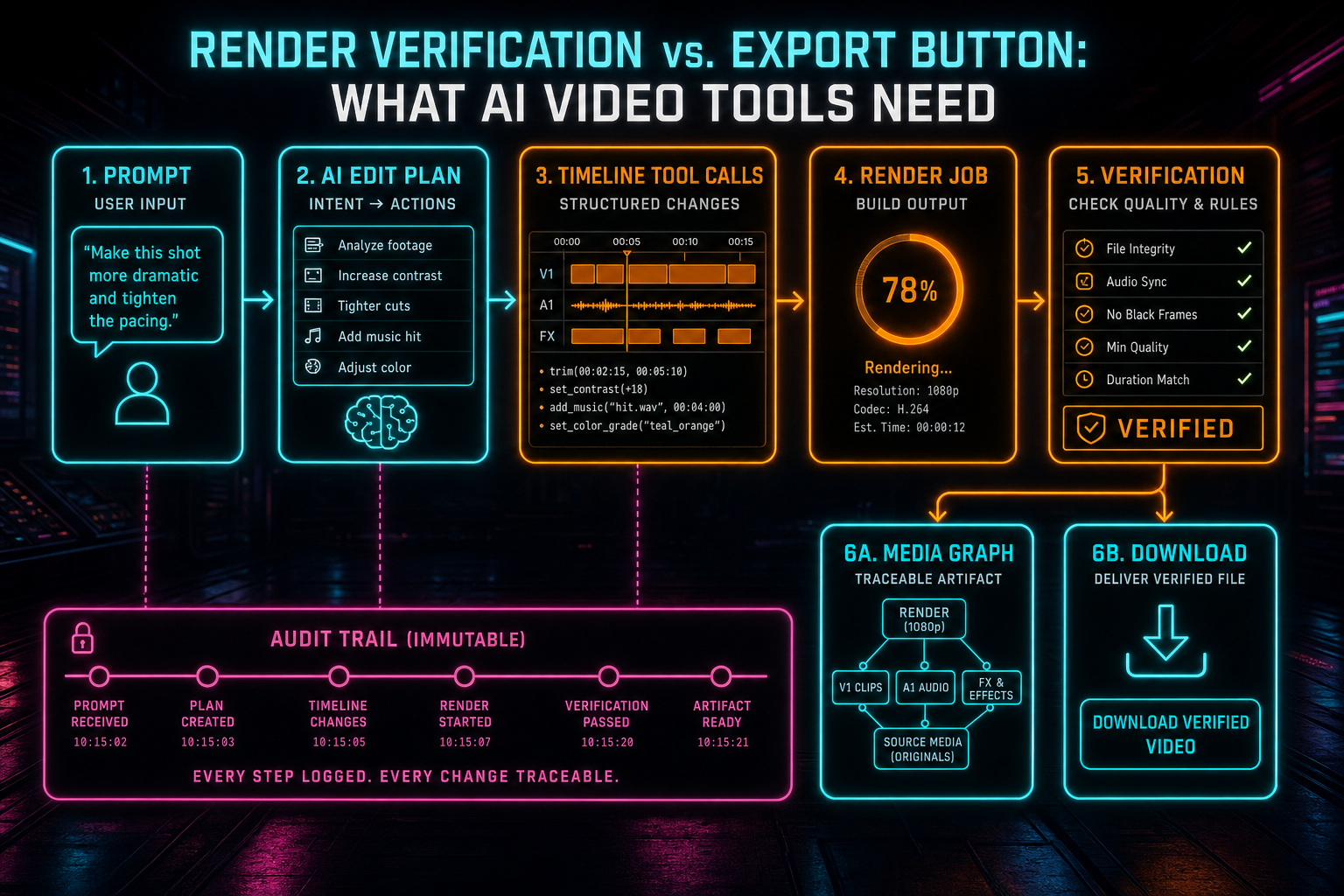
AI-generated exports need a trail from prompt to plan to timeline to verified artifact.
Storage Is a Product Surface
A simple export implementation often treats storage as a private detail. Write a file somewhere, return a URL, and move on. That breaks down quickly in an online video editor. Source media may live in object storage. Generated overlays and music may live there too. Final renders need stable routes for download, preview, collaboration, and future processing. Storage paths become part of the product surface whether the team admits it or not.
Verification should check storage explicitly. Is there a durable path? Is the URL normalized through the product's object route or signing strategy? Is file size present and nonzero? Is duration present? Does the export record point at the same artifact the renderer produced? If any of those answers are missing, the product should not pretend the render is cleanly complete.
This is not only about avoiding broken links. Durable storage metadata supports ownership checks, cleanup policies, media graph indexing, retry behavior, and incident repair. Scratch files can be deleted after the job. Durable render artifacts should remain discoverable through product records. That separation keeps autoscaled render infrastructure from leaking into the user experience.
The export button should feel instant when it can and patient when it must. But behind the button, the product needs a stable artifact path and a repeatable way to prove that path belongs to the project. Without that proof, the system is one refresh or retry away from confusion.
Blockers and Limitations Build Trust
A verification pass that only reports success metadata is not enough. The failure state is part of the contract. VibeChopper's render verification approach treats blockers as first-class output. Missing storage path, zero file size, missing duration, missing source media, invalid timeline structure, object storage upload failure, or scratch storage exhaustion are different problems. A useful product should not collapse them into one generic export failed message. Render a timeline free
Blockers help users because the UI can explain what happened in plain language. They help developers because failures become structured. They help AI agents because retry behavior can be selective. A transient upload failure may be retryable. Missing source media probably needs user action. An unsupported output preset should be rejected before expensive work begins. A disk quota problem should become a bounded, user-safe message rather than raw process output.
Limitations are equally important. Structural verification can prove that an export record exists, a storage path is present, file size is nonzero, duration is known, and timeline context is linked. It does not automatically prove that every rendered frame matches the user's taste. It does not inspect the audio waveform unless a waveform pass is part of the system. It does not replace human creative review.
That honesty makes the verification claim stronger. Users and downstream systems can trust the result because the product says exactly what it checked. Later, a platform can add frame sampling, visual similarity checks, subtitle validation, loudness analysis, or model-assisted review on top. The first pass stays valuable because its boundary is clear.
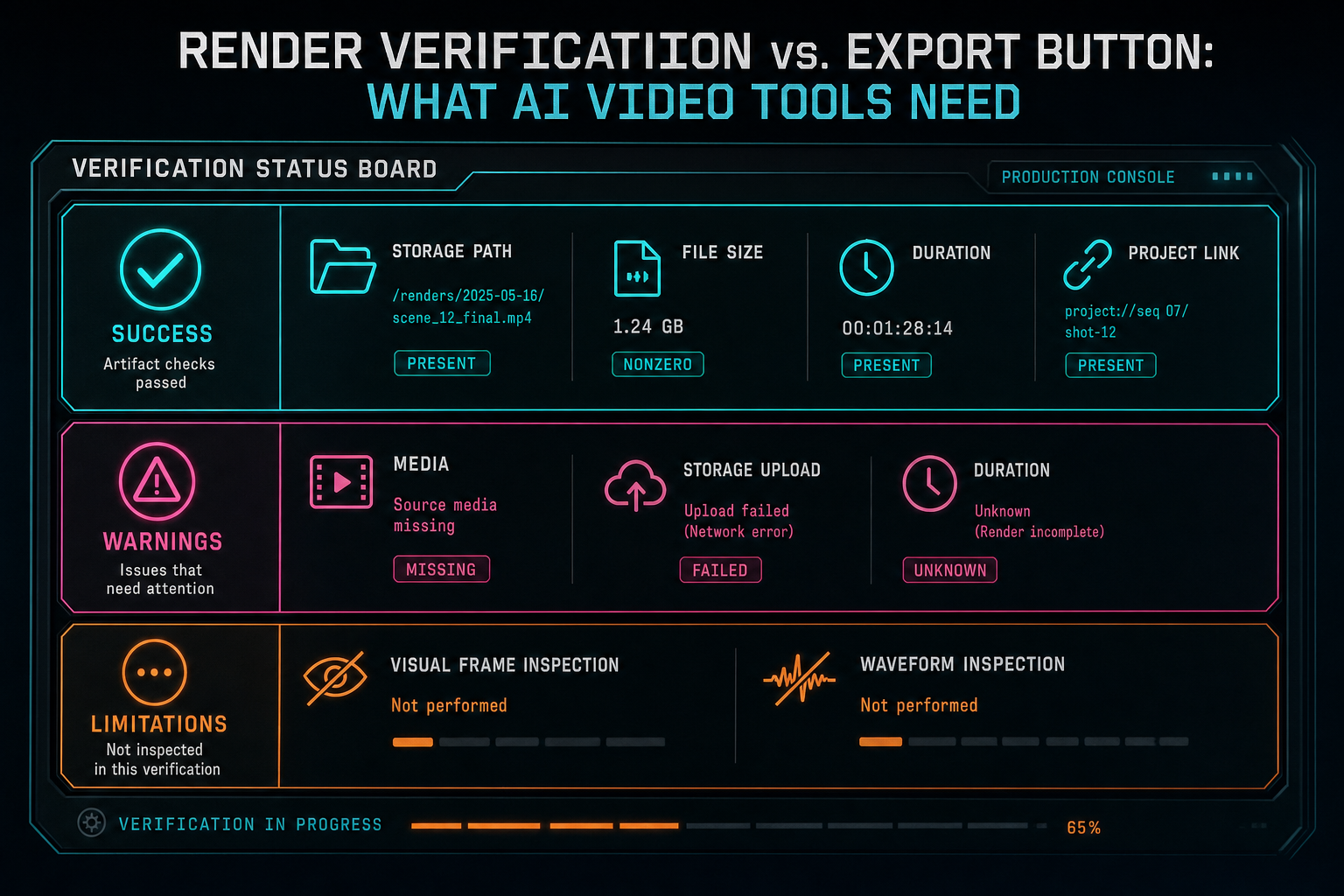
Verification is credible when it records both what passed and what it did not inspect.
The UI Should Hide Complexity, Not Erase It
None of this means the export UI should become an operations dashboard. Most users want a clear control, visible progress, and a dependable result. The job of the interface is to hide complexity without erasing the evidence that makes the result trustworthy. Try the effects pass
A good export panel can show a small number of high-value states: preparing media, rendering, uploading, verifying, ready, failed, or retrying. When ready, it can show duration, format, file size, and download. When the render came from an AI edit run, it can link back to that run. When the file enters the media graph, it can expose reuse and provenance. When something fails, it can show the blocker and next action.
This approach also makes mobile and refresh behavior cleaner. The render job is not trapped inside the component instance that started it. A user can leave and return. A native client can poll the same status shape. A collaborator can open a shared view after the artifact is ready. A repair job can update the same record after the original browser session is gone.
The export button remains simple because the backend contract is explicit. That is the right split for AI video editing software: approachable controls on the surface, durable product state underneath.
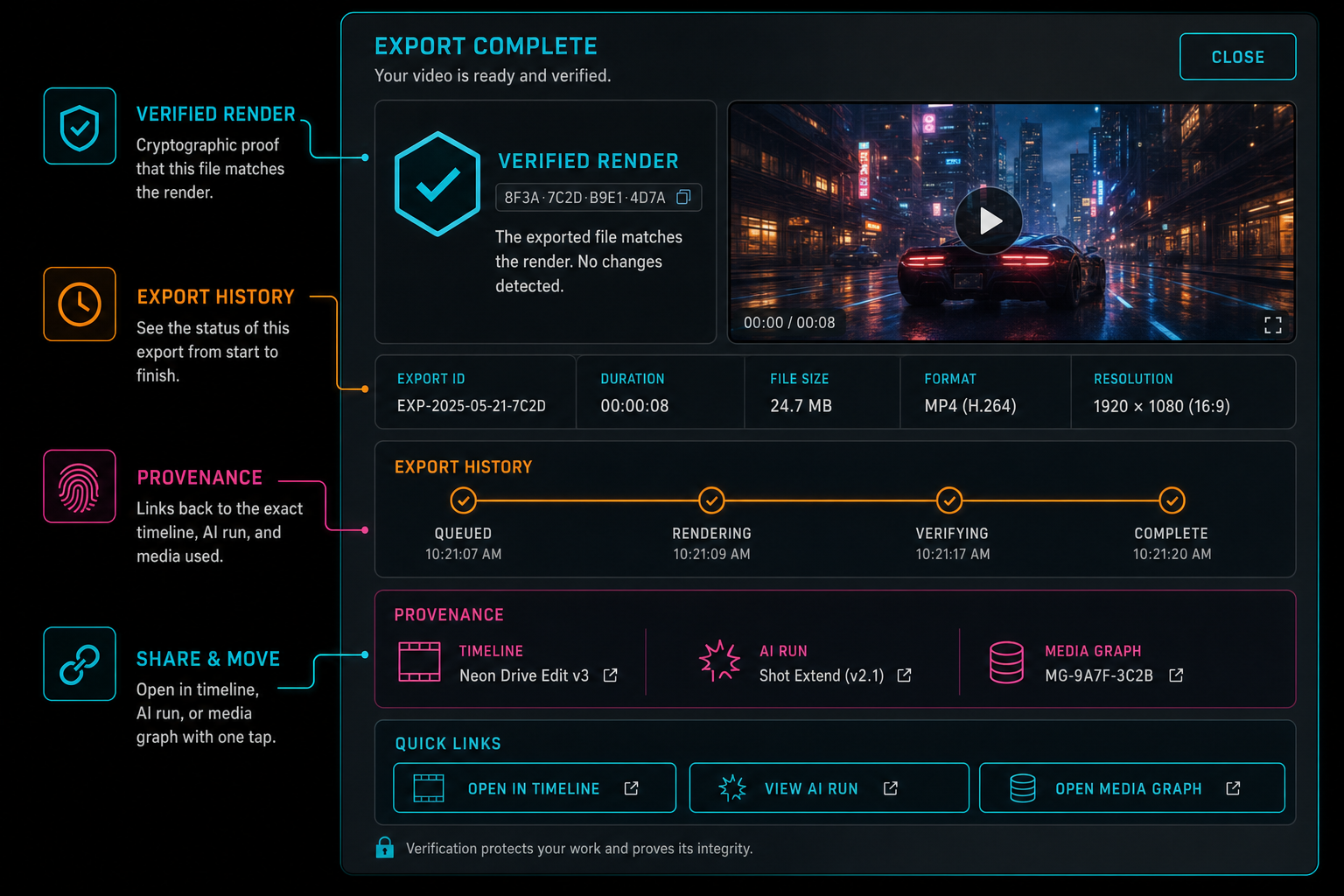
A good export panel shows the finished video and the evidence that makes it dependable.
What AI Video Tools Should Copy
If you are building an AI video tool, start by separating the user action from the render truth. The user action is click export, render draft, share cut, or create final. The render truth is the persisted job, artifact metadata, storage path, timeline context, AI run link, blockers, and limitations. Design the second part first, then give users a clean control for the first part.
Persist the render job before expensive work starts. Resolve media through authenticated project records instead of arbitrary URLs. Compile timeline state into a controlled compositor graph. Upload final artifacts to durable object storage. Normalize download routes. Verify file size and duration. Return stable error codes. Attach AI run context when an assistant initiated the work. Keep limitations visible in the data model even if the normal UI only shows them when needed.
Do not let the AI model become the owner of artifact truth. Models can plan, revise, summarize, score, and explain. The server should own authorization, media resolution, storage paths, export records, verification rules, and final artifact metadata. That separation is what lets an AI editor feel creative without becoming operationally vague.
Also make the same status object useful in multiple places. The export panel, AI run inspector, media asset graph, upload monitor, support tooling, and remediation jobs should not need separate interpretations of what a render means. A shared contract reduces bugs and gives users a more coherent product.
The Result
The export button is the beginning of the user's final step. Render verification is the engineering system that makes that step trustworthy. It records what was requested, what ran, where the output lives, what metadata proves it is usable, which workflow produced it, what failed if it failed, and what the system did not inspect.
That is what AI video tools need. A prompt can create an edit. A timeline can preview correctly. A compositor can produce bytes. But a product-grade editor should not stop until the artifact is durable, linked, inspectable, and honest about its own confidence.
For VibeChopper, the strongest export experience is not a louder button. It is a simple button backed by a verified render contract. The user gets the file. The product keeps the trail.
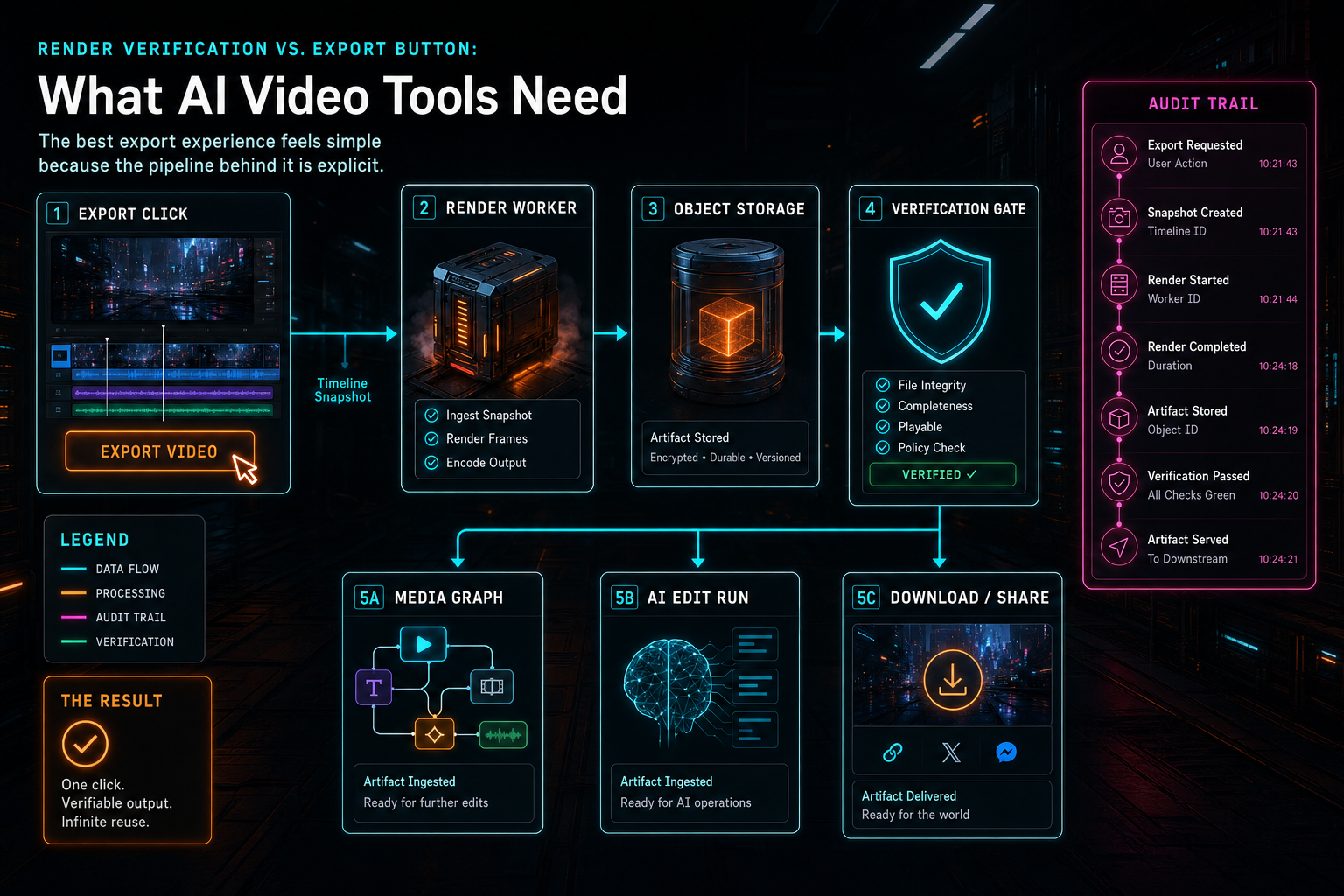
The best export experience feels simple because the pipeline behind it is explicit.
Try the workflow
Open every feature from this post in the editor
These panels collect the features discussed above. Sign in once, finish your profile if needed, then the editor opens the first highlighted surface and walks through the tutorial.
Step 1
Render a verified timeline
Export a project through the same storage-backed render path described in this article.
Render a timeline free →Step 2
Inspect an AI edit run
Open the editor and see how plans, tool calls, artifacts, and render results stay connected.
Open the edit-run receipts →Step 3
Upload footage with progress you can trust
Watch large video uploads, processing, transcript work, and original-file storage from one monitor.
Upload a real shoot →Step 4
Open the media asset graph
See generated audio, rendered assets, source clips, metadata, and provenance in the media panel.
Explore your media graph →Step 5
Apply timeline effects
Try clip effects, speed ramps, color passes, and export-ready compositor behavior.
Try the effects pass →