
Why Render Verification Exists
AI-generated timelines create a specific trust problem. The user describes an edit, the system plans it, timeline tools mutate clips, the compositor produces an output file, and the editor shows a finished render. Every step can look successful from the outside while still leaving an important question unanswered: what exactly did we produce, where is it stored, and how does it connect back to the timeline that created it? Render a timeline free
Render verification is the layer that answers that question in VibeChopper. It does not try to be mystical. It is a structural verification pass around a completed export. The helper receives the project ID, optional plan ID, export record, render result, clips, timeline URL, download URL, optional scores, and optional blockers. It returns a compact record that says whether the render is trustworthy enough to present as complete, which artifact fields are available, which timeline fields were observed, which limitations apply, and which blockers remain.
That sounds plain because it should be plain. Video editing systems become hard to operate when render success is implied by logs, temporary files, or happy-path UI state. VibeChopper treats the render as a durable artifact that needs explicit metadata. If the storage path is missing, that is a blocker. If the file size is missing or zero, that is a blocker. If duration is missing, that is a blocker. A completed export should carry enough information for the editor, the media panel, an AI edit run, and a future repair workflow to agree on what happened.
The implementation reference for this post is server/renderVerification.ts, with the developer audit pointing at commit da58e09. Focused coverage lives in tests/aiChatHarnessServices.test.ts, where the helper is exercised for object URL normalization, timeline summary metadata, limitations, blockers, and disk quota error sanitization. That test coverage matters because this is not only a blog topic. It is an operational boundary in the product.
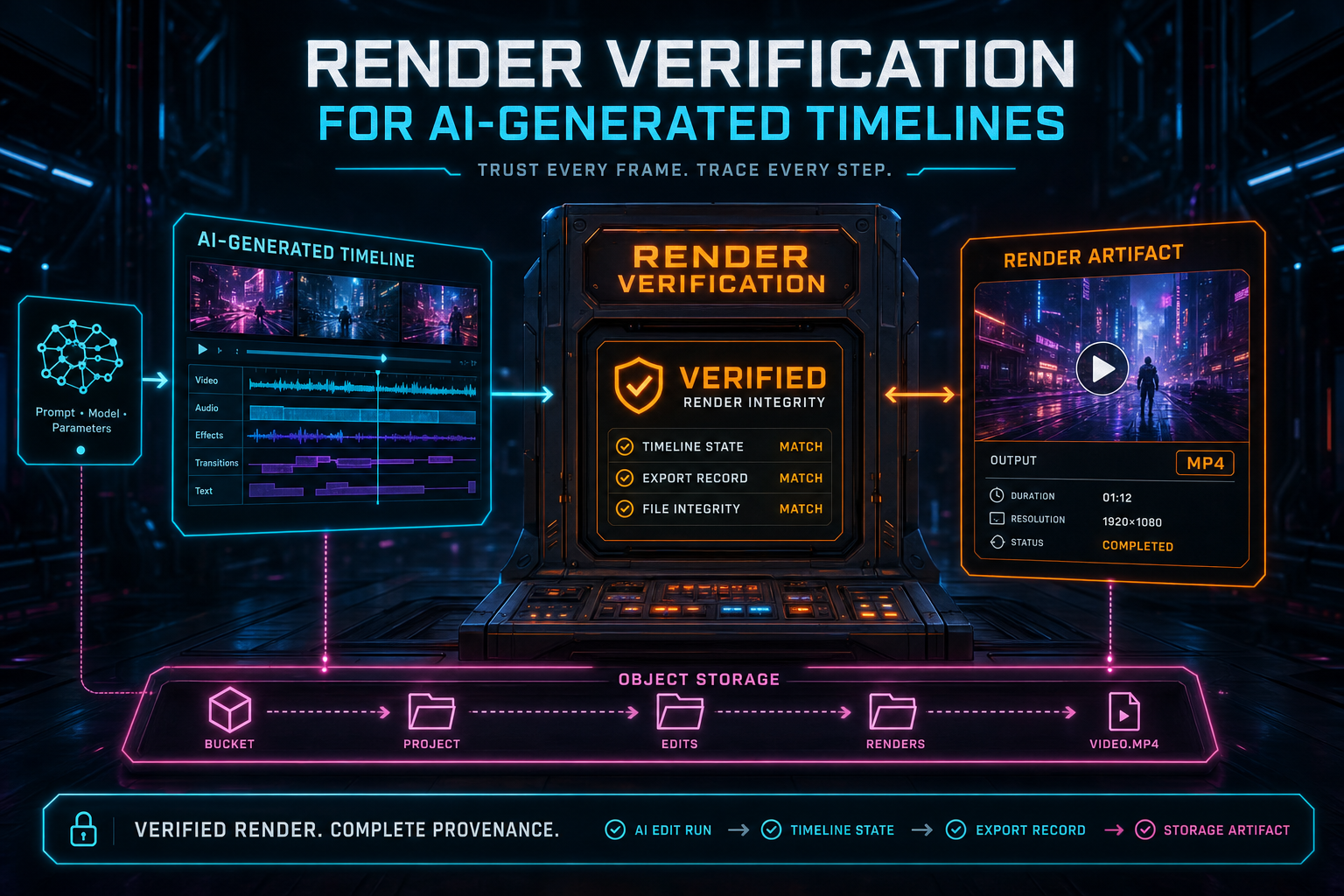
A verified render connects the AI edit run, timeline state, export record, and object-storage artifact.
The Timeline Is Not the Artifact
A timeline can be correct and still fail to produce a usable render. The source clips can be valid, the AI plan can be coherent, and the timeline can preview well in the browser, but export still depends on the compositor, scratch storage, object storage, codec behavior, and database updates that record the final result. That is why VibeChopper does not stop at "the AI edit plan completed." The render path needs its own proof.
The verification flow joins two worlds. On one side is the export record from the database: export ID, project ID, format, preset, resolution, FPS, progress, storage path, public URL, file size, duration, and completion timestamps. On the other side is the render result from the compositor: storage path, file size, and duration. The helper chooses the best available values across those sources, normalizes the public and download URLs, then records a structured artifact summary.
This protects the product from a subtle class of false positives. A renderer may finish writing a local file but fail to upload it. An export record may exist but have no durable storage path. A UI may have an export ID but no usable download URL. A retry may reuse a record after an earlier failure. Verification turns those cases into visible blockers instead of letting them become confusing user states.
The result is not a replacement for rendering. It is the receipt after rendering. In a creative tool, receipts matter. Creators want the file, but product systems also need to know which project created it, which AI plan caused it, which clips were included, and where the durable asset lives. That is what makes the render more than a blob of bytes.
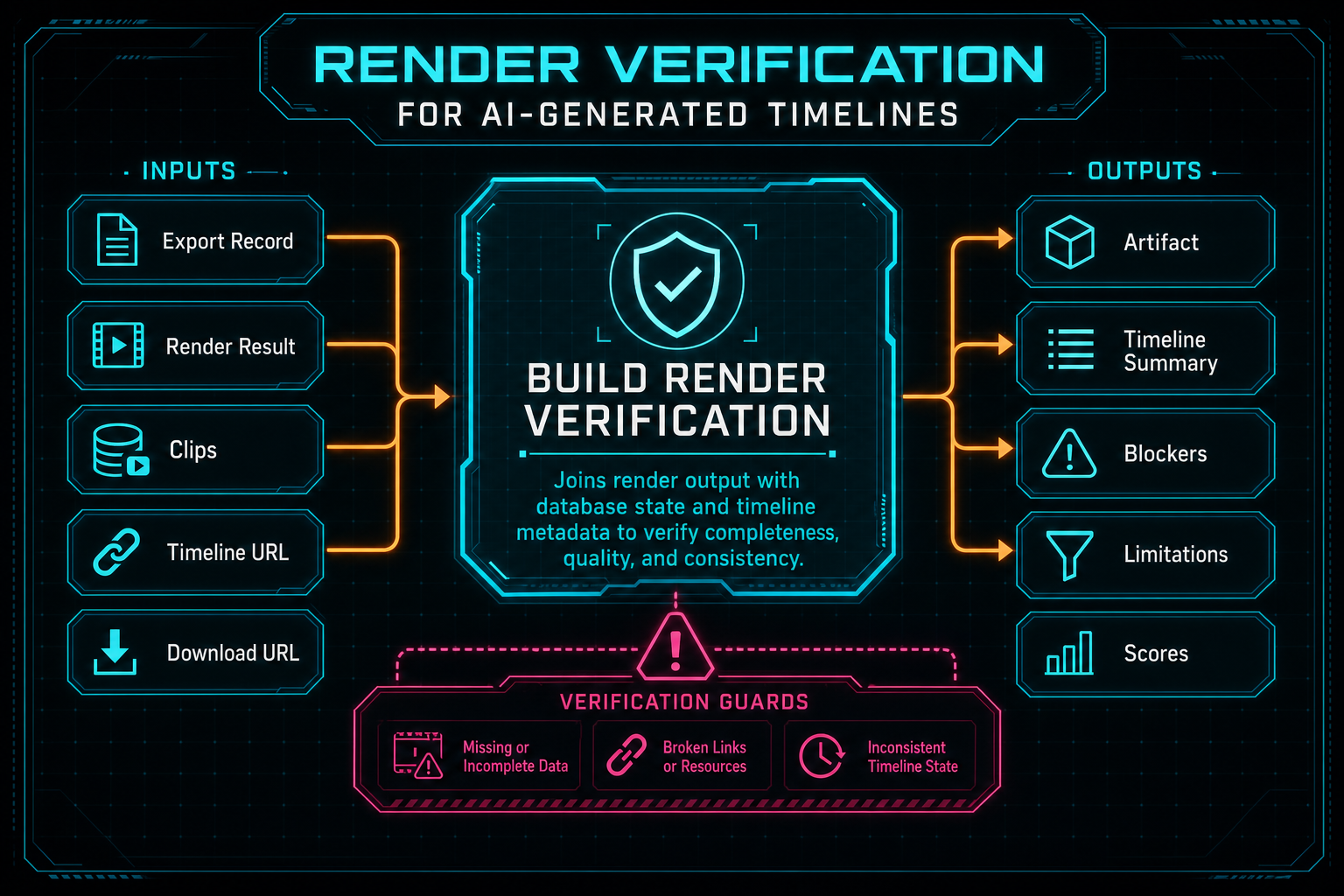
The verification helper joins render output with database state and timeline metadata before the editor treats the render as complete.
Artifact Records Need Concrete Fields
The artifact side of render verification is deliberately concrete. VibeChopper records the export ID, storage path, public URL, download URL, file size, duration, format, resolution, and FPS. None of those fields are decorative. They answer practical questions that show up in support, product UI, media management, and automated remediation. Explore your media graph
The storage path answers whether there is a durable object to retrieve. The public URL and download URL answer how the browser or a native client should open it. The file size catches empty or incomplete outputs. Duration catches renders that never measured the output timeline. Format, resolution, and FPS make the artifact inspectable without opening the file. Together, these fields make the render usable by the editor and understandable to the rest of the platform.
URL normalization is part of that credibility. normalizeRenderArtifactUrl accepts full HTTP URLs, /objects/... paths, objects/... paths, and bare object keys that should become /objects/... routes. That may sound small, but object path drift is one of the easiest ways to create broken download buttons. A render verification layer should not rely on every caller remembering the same URL rules.
The same discipline shows up in the media asset graph. Source clips, generated music, rendered exports, overlays, and processing summaries are more valuable when they carry usable provenance instead of loose strings. The nearby CTA opens the media graph because this article's core idea is easiest to understand there: a final asset should not be disconnected from the work that produced it.
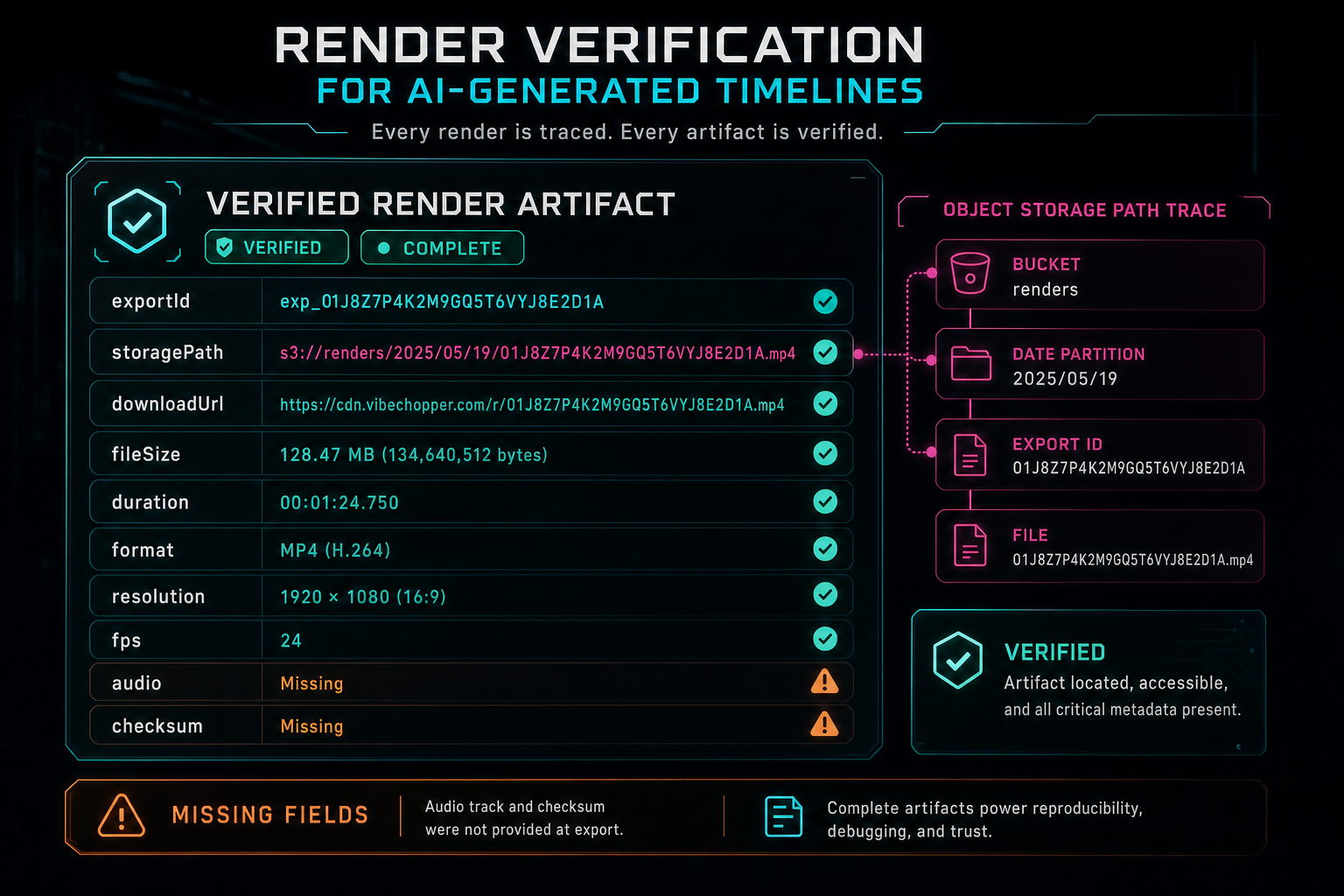
The artifact card is deliberately concrete: export ID, path, URL, size, duration, format, resolution, and FPS.
Timeline Links Make Renders Explainable
The other half of verification is the timeline summary. VibeChopper records the project ID, optional plan ID, timeline URL, clip count, timeline duration, video clip count, audio clip count, and linked video IDs. This is what connects a finished video file back to the timeline state that created it. Open the edit-run receipts
The helper calculates timeline duration from the minimum clip start and maximum clip end. It counts video and audio clips separately. It extracts unique linked video IDs from the clips. It keeps the plan ID when a render came from an AI edit plan. These are not deep semantic judgments about the final video. They are structural facts that make the render explainable and easier to debug.
That distinction is important. AI edit runs need to show a user the chain from prompt to plan to tool calls to render. A render artifact without a timeline link is hard to reason about. A timeline link without artifact metadata is not enough either. The useful state is the joined state: this export came from this project, this plan, this timeline view, this set of clips, and this set of source videos.
VibeChopper's AI edit run surfaces are built around that chain. Tool events explain how the timeline changed. Plan artifacts explain why the AI chose a route. Render verification explains what the output became. When those pieces stay connected, natural-language editing stops feeling like a black box and starts behaving like a production workflow.
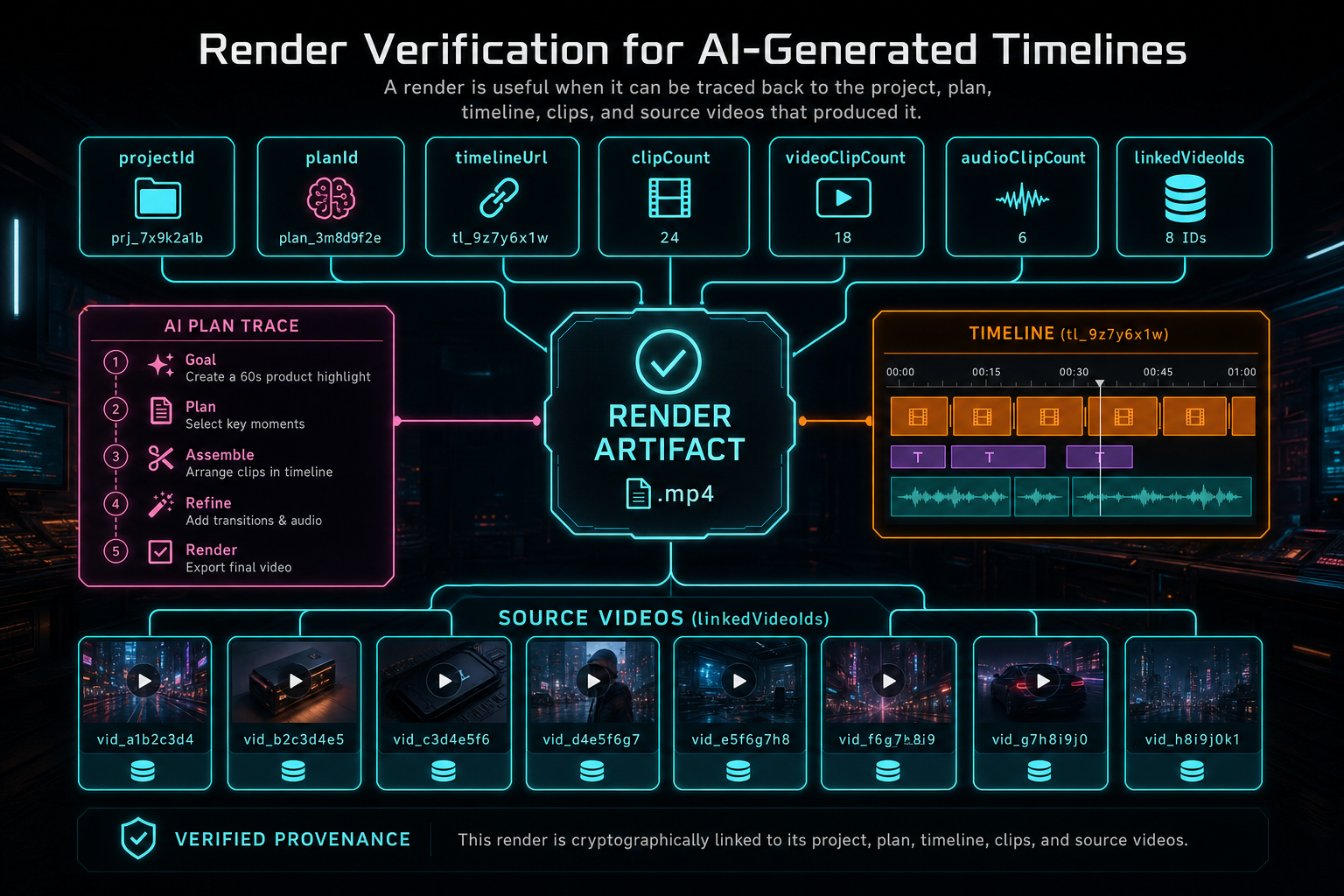
A render is useful when it can be traced back to the project, plan, timeline, clips, and source videos that produced it.
Blockers Are Part of the Contract
A verification helper that only returns success metadata is not a verification helper. It is a formatter. VibeChopper's render verification output includes blockers because the failure state is part of the product contract. The default blockers are intentionally simple: missing storage path, missing or zero file size, and missing duration. Callers can also pass additional blockers from the render path or higher-level workflow.
The final ok field is derived from the absence of those blockers and the presence of the required artifact fields. That makes the result easy for UI and automation to consume. A caller does not need to rebuild the same rules from scratch. If ok is false, the result also explains why. That is the difference between a render pipeline that leaves users guessing and one that can drive clear recovery.
Error sanitization belongs nearby. The helper includes sanitizeRenderError, which turns local disk quota and oversized-file failures into a user-actionable message: temporary render storage is full, so the user can try a shorter timeline, lower resolution, or fewer simultaneous renders. It also trims noisy errors to a bounded length. This keeps server internals from leaking into UI while still preserving a meaningful reason.
Blockers also help asynchronous systems. A remediation job, status panel, or future retry worker can inspect the verification result and decide whether the problem is a missing object path, an incomplete export record, a storage quota issue, or a higher-level workflow failure. That is much easier than scraping logs after the fact.
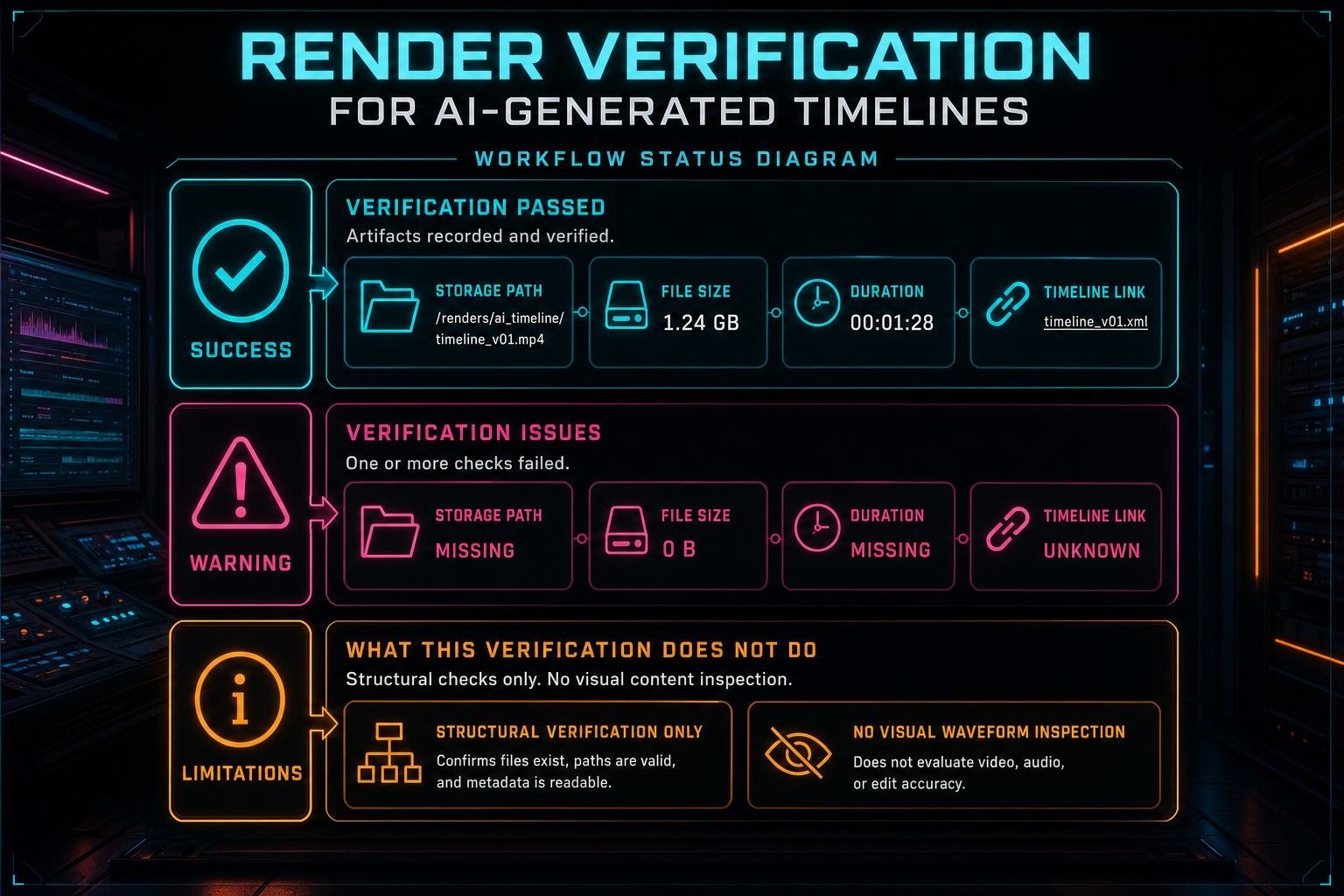
Verification is credible because it records what passed, what blocked trust, and what the helper did not inspect.
Limitations Keep the Claim Honest
The verification output contains a limitations array on purpose. The current helper says the pass is structural. It confirms the export record, object-storage path, timeline links, and clip metadata. It does not perform rendered-frame visual analysis. It does not inspect the audio waveform. It does not claim source-to-render visual certainty beyond earlier timeline and source verification events.
That honesty is a product feature. Render verification should not overstate what it proved. If a system checks that an MP4 exists and has a duration, it should not claim that every frame matches the user's creative intent. If a system checks clip metadata, it should not claim that color, audio sync, or motion effects were visually inspected. Strong engineering language is precise about boundaries.
There is still real value in structural verification. It catches broken storage references, incomplete records, missing durations, empty files, and disconnected timeline metadata. It also gives later systems a place to attach stronger checks. Frame sampling, perceptual checks, audio waveform inspection, subtitle validation, or model-assisted visual review can be layered on top. The first pass stays useful because it has a clean contract.
This is the same philosophy VibeChopper uses around AI output. The model can propose, but typed systems validate. The compositor can render, but verification records what finished. The product can move fast, but each boundary says what it knows and what it does not know.
Where It Fits in AI Edit Runs
Render verification becomes most useful when it is attached to the AI workflow that caused the render. In the AI edit harness, a planned edit can create an export record, run the compositor, update export progress, record render completion, build render verification, and attach the result to the run. That means the user can inspect the plan, the tools, the render, and the verification result in one chain.
This is different from treating export as a terminal button click. In an AI-generated timeline, the render is often the final observable proof that the plan became media. If verification sits next to the plan and tool events, the user gets a complete story: what they asked for, what the AI planned, what tools changed, what artifact was produced, and which structural checks passed.
It also helps with duplicate requests and refreshes. A user can refresh mid-flow and still see the export ID and run item. A future worker can update progress without inventing a separate truth source. A failed render can be recorded against the same plan instead of becoming an orphaned error. This is basic persistence discipline, but it matters more when AI is allowed to initiate complex edits.
The related Developer Notes posts on AI edit runs, tool events, and audit trails are part of the same platform shape. Natural-language editing is only credible when the product makes its work inspectable. Render verification is the late-stage checkpoint in that story.
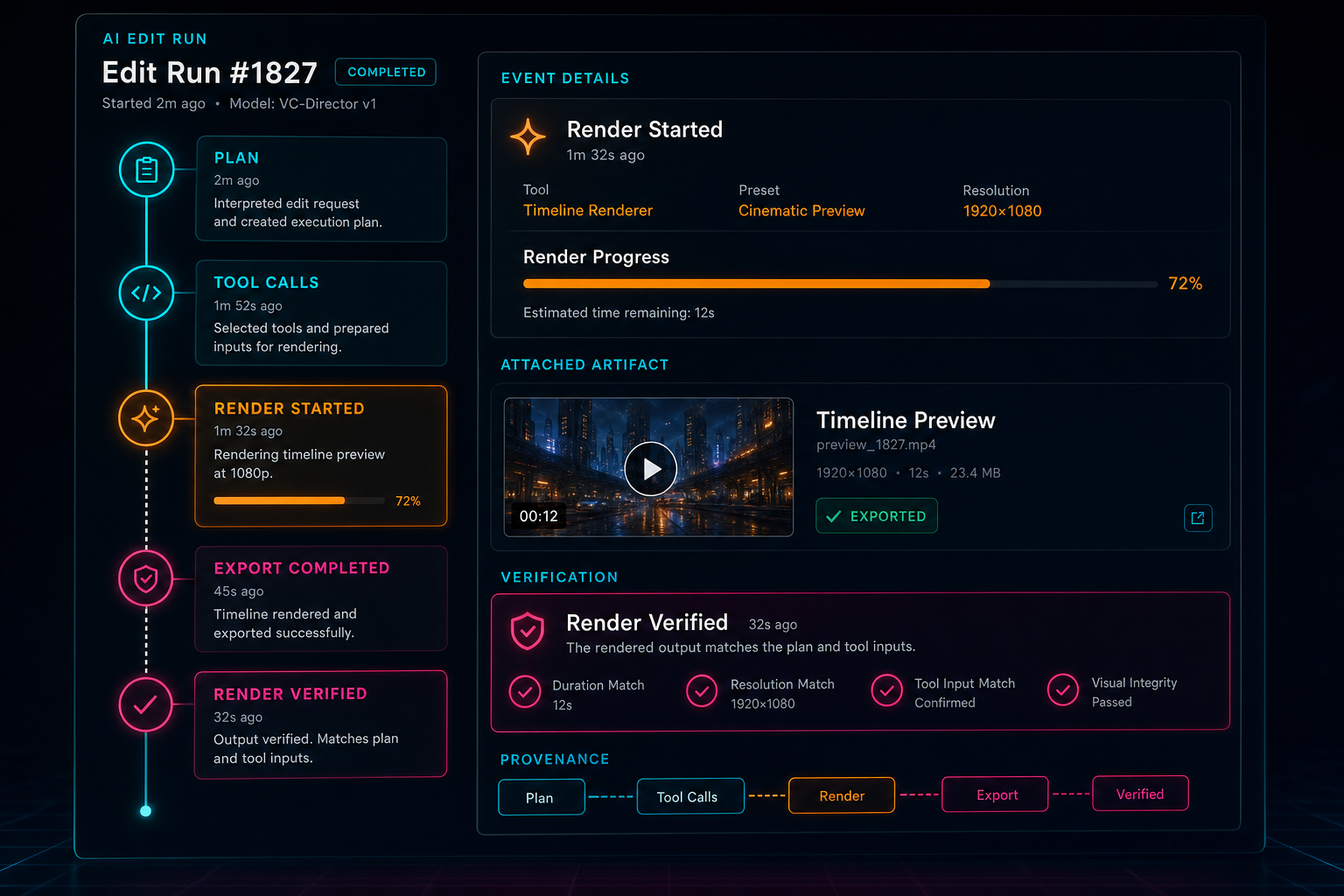
Render verification becomes more valuable when it appears inside the AI edit run that caused the render.
Object Storage and Compositor Lessons
The verification layer sits above the compositor, but it reflects lessons from render infrastructure. Durable object paths are part of the product surface. Scratch files are not. A render pipeline should clean up temporary work, stream output into object storage, update the export record, and leave the user with a stable route to the completed artifact. Render a timeline free
That is why the verification helper cares about normalized object URLs and concrete file metadata. If the compositor produced output but the object path is unstable, the final product is still fragile. If the route can serve the object but the export record does not point to it, the media panel and AI edit run lose the thread. If duration and file size are missing, users and agents cannot tell whether a completed render is actually usable.
Effects make this even more important. Speed changes, clip effects, adjustment layers, overlays, and generated audio can all contribute to the final media. The more expressive the compositor becomes, the more valuable it is to keep the finished artifact connected to the timeline and source metadata. Verification does not replace effect-level tests, but it makes the final export state visible.
The CTAs here point to rendering and effects because those are the user-facing sides of this infrastructure. Describe an edit, apply timeline effects, and render the result. The engineering promise behind those actions is that VibeChopper does not treat the output file as an afterthought.
What Developers Should Copy
If you are building an AI video editor or any AI-assisted creative tool, copy the shape more than the exact fields. Put a verification boundary after expensive artifact creation. Join runtime results with database records. Normalize URLs before UI touches them. Return both the artifact summary and the source context. Make blockers explicit. Include limitations so downstream code and users do not overread the result.
Do not make the model responsible for proving the artifact. AI can help plan the timeline, describe source footage, generate music prompts, or review a draft. The server should still own project authorization, storage paths, export records, media references, and the final verification shape. That separation keeps creative intelligence from becoming operational ambiguity.
Also avoid making verification depend on one happy-path caller. The same helper should support the editor UI, AI edit runs, media panels, remediation jobs, and tests. When the return shape is stable, each consumer can make local decisions without rebuilding render truth. UI can show a verified card. Automation can retry or report blockers. Support can inspect the export ID and object path. Tests can assert the contract.
The point is not to make rendering sound simple. Rendering is not simple. The point is to give rendering a final, typed handoff that the rest of the product can trust.
The Result
Render verification is one of those systems users notice only when it is missing. Without it, a completed export can be a vague promise. With it, the product can say something concrete: this export has an ID, a storage path, a download route, a file size, a duration, a format, a project, a plan, a timeline URL, a clip summary, linked source videos, known blockers, optional scores, and explicit limitations.
That is the right level of confidence for an AI-generated timeline. It does not claim the machine understood taste perfectly. It does not claim every frame has been visually inspected. It says the platform produced a durable artifact and can connect that artifact back to the editing workflow that made it.
For VibeChopper, that is the foundation of product-grade AI editing. The user describes the vibe. The editor turns intent into timeline operations. The compositor renders the media. Verification records the proof. The final artifact is not just a video file. It is a video file with a trail.
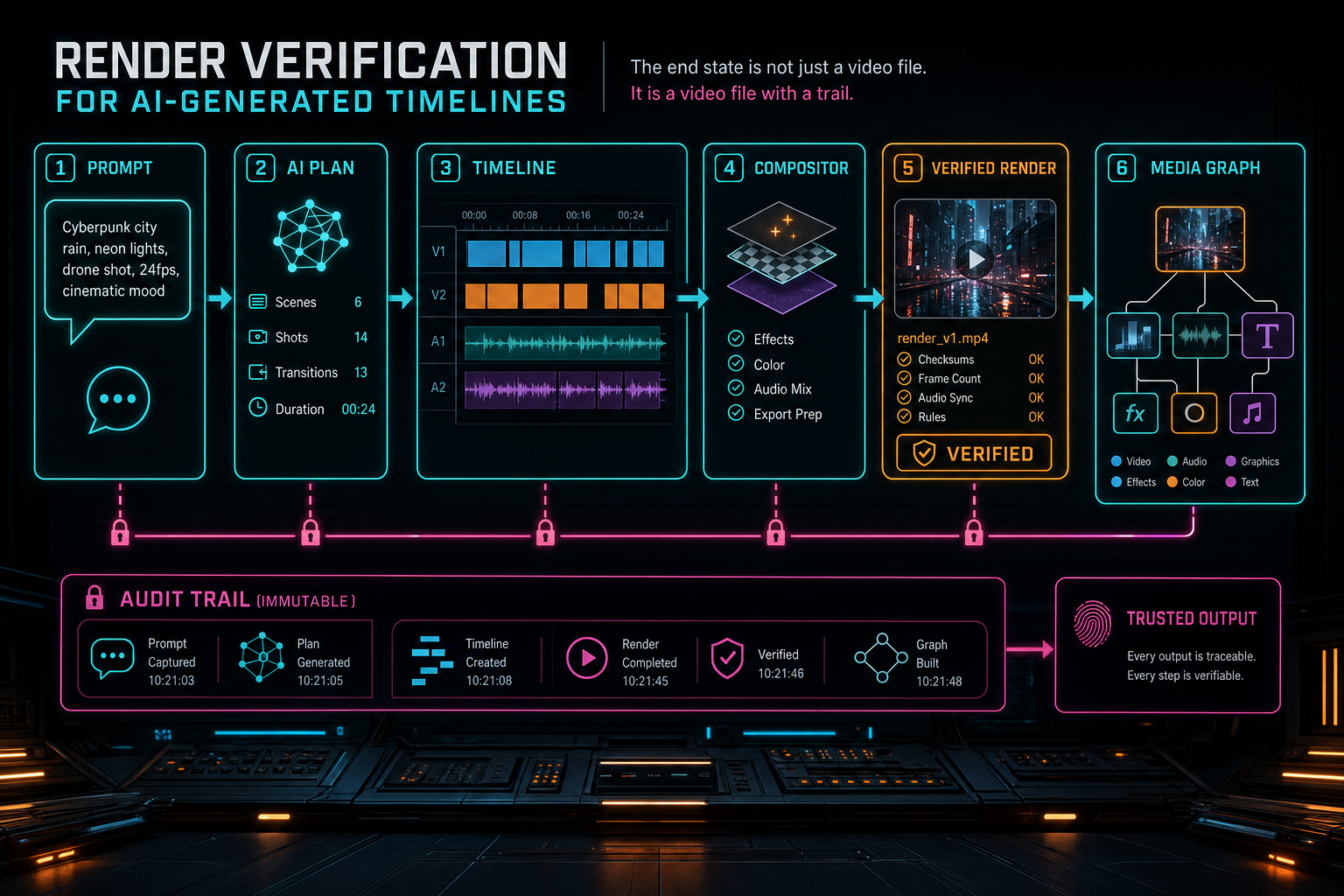
The end state is not just a video file. It is a video file with a trail.
Try the workflow
Open every feature from this post in the editor
These panels collect the features discussed above. Sign in once, finish your profile if needed, then the editor opens the first highlighted surface and walks through the tutorial.
Step 1
Render a verified timeline
Export a project through the same storage-backed render path described in this article.
Render a timeline free →Step 2
Open the media asset graph
See generated audio, rendered assets, source clips, metadata, and provenance in the media panel.
Explore your media graph →Step 3
Inspect an AI edit run
Open the editor and see how plans, tool calls, artifacts, and render results stay connected.
Open the edit-run receipts →Step 4
Apply timeline effects
Try clip effects, speed ramps, color passes, and export-ready compositor behavior.
Try the effects pass →