
The Command Is Not the API
Search for an FFmpeg API and you will find two very different ideas using the same words. One is a command wrapper: send inputs, generate a command line, run FFmpeg, and return a file. The other is a video editing API: accept product state, validate it, resolve media, render a timeline, store the result, report progress, and preserve enough metadata to explain what happened. The first can power a prototype. The second is what production apps need. Render a timeline free
VibeChopper treats FFmpeg as the media engine inside a larger editing contract. Users do not ask for filter_complex syntax. They upload footage, arrange clips, ask AI for edits, add captions, apply effects, generate music, and render a finished video. The backend translates that product language into controlled FFmpeg work. That translation layer is where the real API lives.
This distinction matters because video editing software has a higher trust bar than a batch converter. Adobe Premiere Pro, DaVinci Resolve, and Final Cut Pro keep much of the render machinery local and hidden behind a mature timeline model. Browser editors such as CapCut, Descript, VEED, Kapwing, Clipchamp, Runway, and similar tools make editing feel immediate online. An AI-native online video editor has to meet both expectations: web speed during iteration and dependable backend rendering at export.
A raw FFmpeg command wrapper does not know who owns the media, which timeline version the user approved, whether an AI run created the edit, whether an export is already in progress, where the final artifact should live, or how to recover after object storage fails. A production FFmpeg API needs those answers before the command starts.
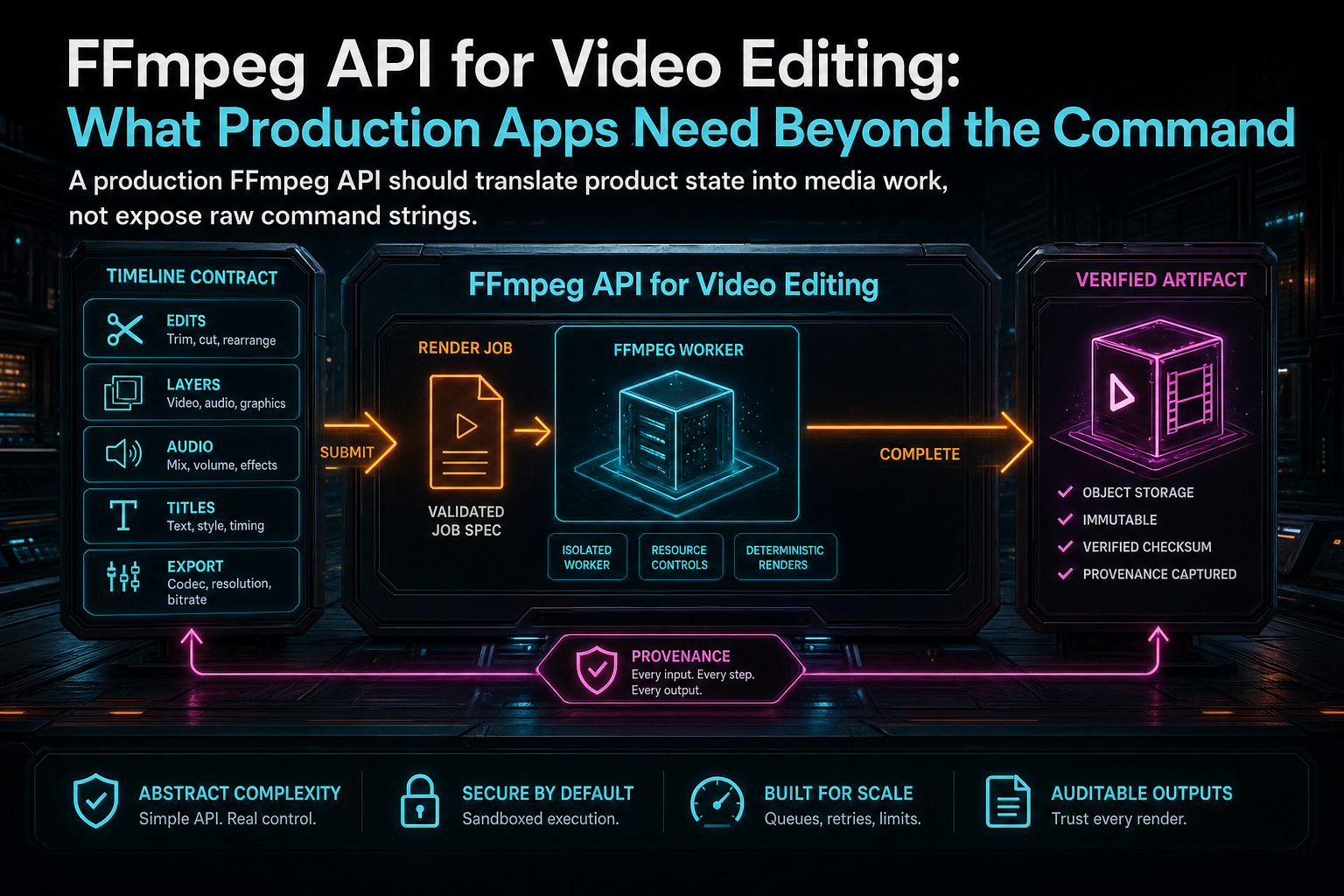
A production FFmpeg API should translate product state into media work, not expose raw command strings.
Command Wrapper vs Video Editing API
A command wrapper is attractive because it is simple. The client sends source paths and desired operations. The server builds a command string, runs a child process, captures output, and returns a downloadable file. That shape can be useful for internal automation, migration scripts, thumbnails, waveform generation, or tightly controlled admin tools. It is a weak public contract for editing. Open the edit-run receipts
The security problem is obvious: a public API should not let clients author arbitrary process work. Even if arguments are escaped carefully, the endpoint is still too close to a general media execution service. The product problem is less obvious but more important over time. A command wrapper cannot easily answer product questions: which project did this render come from, which clips were used, which generated assets were included, why did the result fail, can the user retry, and should this duplicate request create another expensive job?
A video editing API starts at a different level. The request names a project, output settings, timeline version, and optional AI edit run. The server loads canonical timeline and media records. It validates output presets. It checks ownership. It creates or reuses an export record. It then compiles timeline semantics into FFmpeg inputs and filters. The command becomes an implementation detail, not the interface.
That difference makes the API useful to more than the export button. The same render job can appear in a progress monitor, AI edit run, media panel, support trace, collaboration view, and repair workflow. The same artifact can be indexed as a media asset with duration, file size, format, storage path, source project, and verification result. You do not get that from stdout alone.
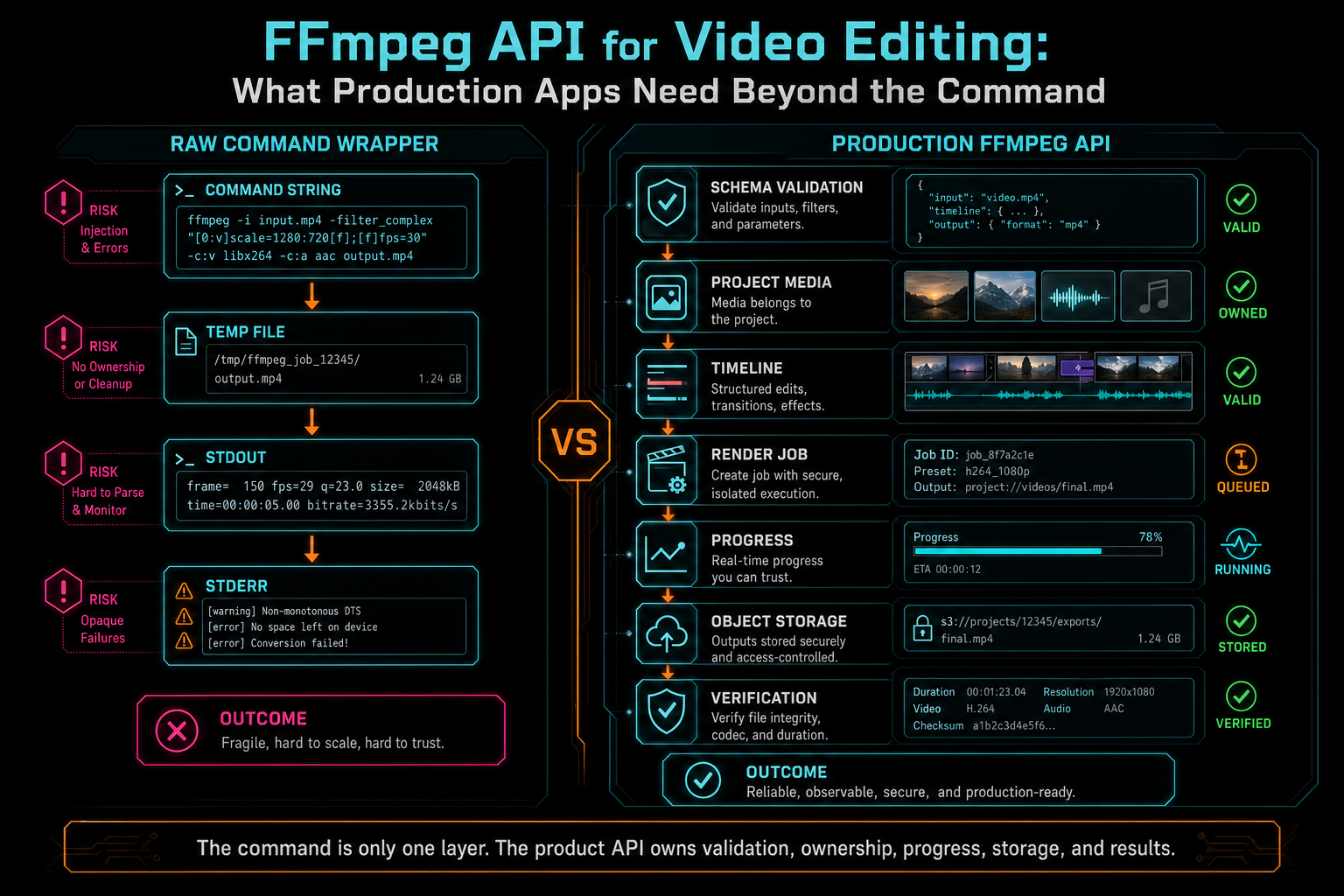
The command is only one layer. The product API owns validation, ownership, progress, storage, and results.
Design a Small Render Contract
The public request for an FFmpeg API should be narrower than the internal renderer. A practical shape is POST /api/projects/:projectId/renders with a body such as timelineVersion, format, resolution, fps, qualityPreset, includeCaptions, requestedByRunId, and idempotencyKey. That is enough to tell the server what the user wants without giving the client control over every FFmpeg flag. Upload a real shoot
Validation belongs at this boundary. Use a schema to reject unsupported formats, invalid resolutions, impossible frame rates, missing project ownership, stale timeline versions, and presets outside the user's entitlement. For an AI video editor, validate the optional run ID too. If an agent requested the render, the export should attach to the run that produced the timeline changes.
The response should also be product-shaped. A newly accepted render can return exportId, status, stage, percent, progressUrl, createdAt, blockers, and an optional artifact. A completed render can include storagePath, downloadUrl, fileSize, duration, format, resolution, fps, verified, and limitations. A failed render should return a stable failure code and a user-safe message, not a wall of FFmpeg stderr.
Idempotency is worth designing early. Users double-click. Browsers retry. Mobile networks drop. AI agents may repeat an action after a timeout. If the same user asks for the same project, timeline version, and output settings with the same idempotency key, the API should return the existing job rather than launching another encode. Media compute is expensive enough that duplicate prevention is core behavior.
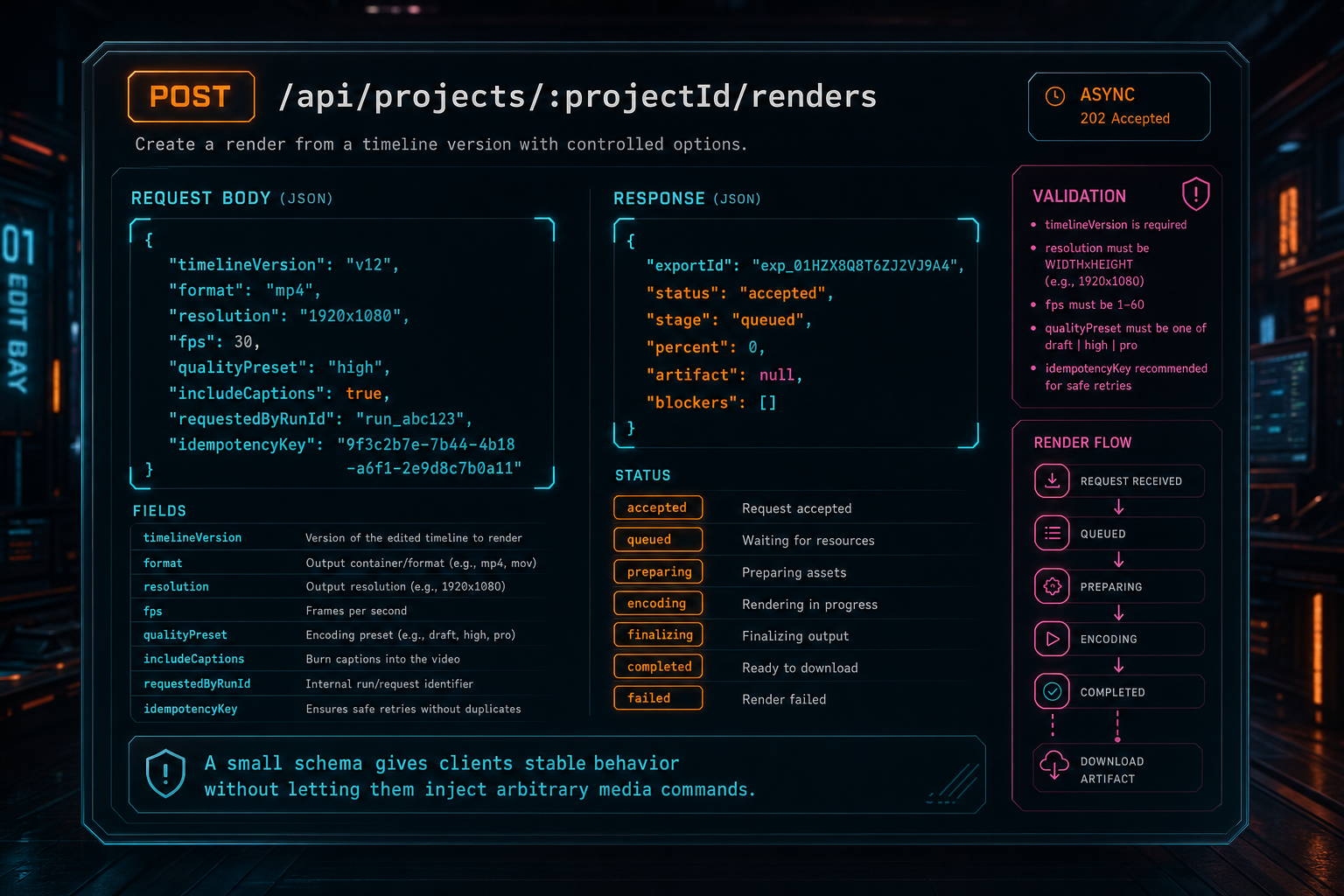
A small schema gives clients stable behavior without letting them inject arbitrary media commands.
The Timeline Contract Is the Product
An FFmpeg API for video editing should not ask the browser to build FFmpeg filters. The browser is a creative surface. It should express the edit in product terms: clips, source ranges, timeline positions, tracks, transitions, captions, overlays, speed changes, effects, generated music, voiceovers, and mute or solo state. The server compositor can then compile that state into a filter graph with consistent rules. Try the effects pass
This is where many video processing APIs stop short. They can trim one file, concatenate a list, burn subtitles, transcode formats, or create thumbnails. Those operations are useful, but a real editor needs composition. A clip may start at second 42 of the source and appear at second 8 of the timeline. It may be slowed down, faded in, color-adjusted, overlaid with a product shot, mixed under generated music, and captioned from transcript segments. The API needs to preserve those relationships until render time.
VibeChopper's rendering model treats FFmpeg as the engine that executes timeline semantics. Constant speed maps to timestamp filters. Effects map to bounded filter settings. Audio clips map to trims, delays, fades, volume, and mix behavior. Overlays resolve through object storage and land at specific timeline intervals. Generated assets carry provenance instead of becoming anonymous files.
That product-level contract also improves AI editing. When a user says, tighten the intro, add captions, and use the generated music under the demo, the AI assistant should call timeline tools and save the resulting edit. The render should read the saved timeline, not reinterpret the prompt. Prompt intent belongs in the audit trail. Render inputs belong in structured timeline and media records.
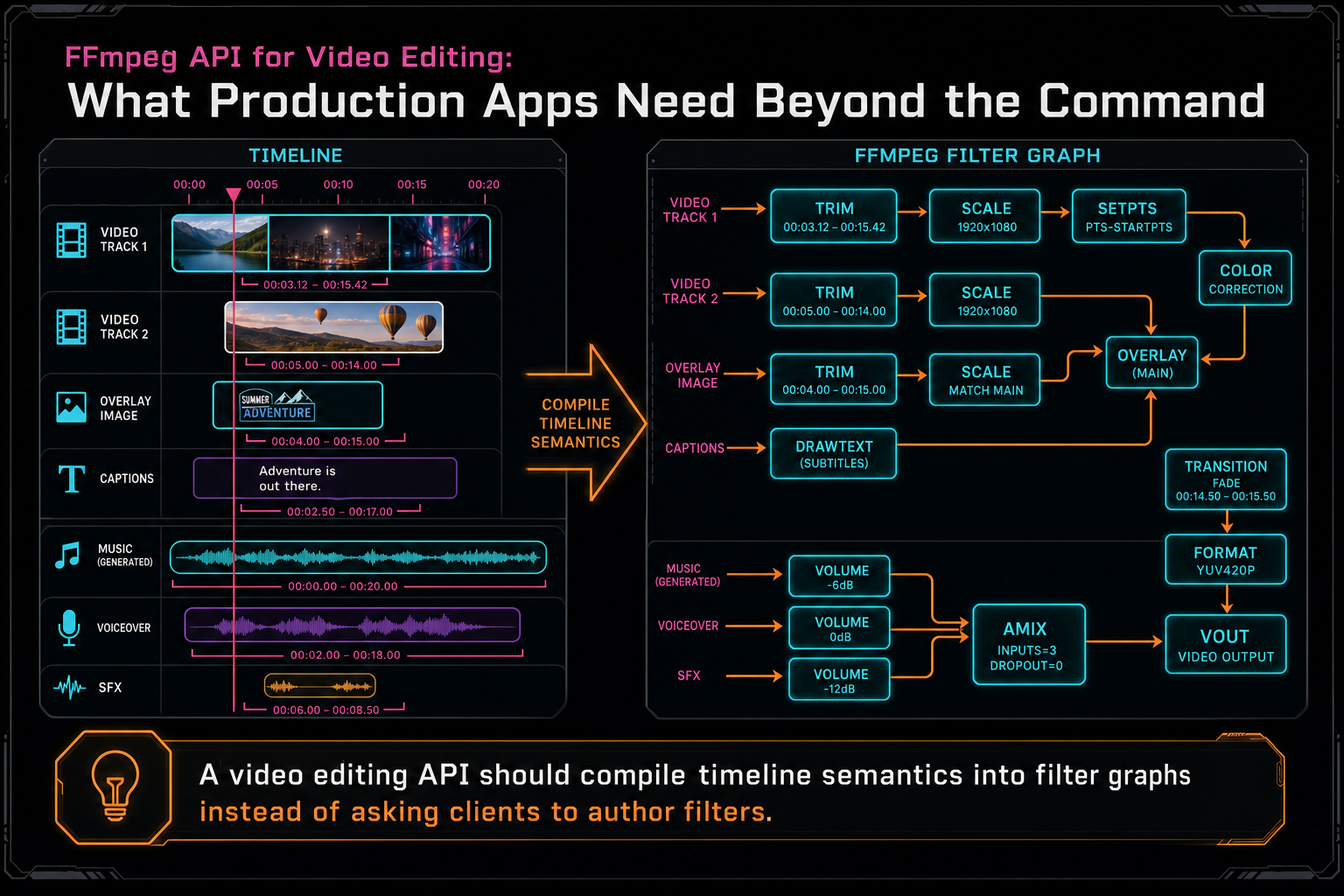
A video editing API should compile timeline semantics into filter graphs instead of asking clients to author filters.
Resolve Media Through Ownership, Not URLs
A production FFmpeg API should not accept arbitrary public URLs from a render request and hand them to a worker. That design turns a video editor into a fetch service and makes authorization harder to reason about. The server should resolve source media through authenticated project records and storage services. Explore your media graph
This rule applies to source clips, generated overlays, AI music, voiceovers, thumbnails, caption files, and any intermediate media. The render worker should receive storage references that the product already trusts. If media is missing, expired, unsupported, or owned by a different user, the API can fail before FFmpeg starts. That is better than discovering the problem as a codec error or a network timeout halfway through encoding.
Object storage paths are part of the product contract. A stable path such as /objects/projects/{projectId}/renders/{exportId}/output.mp4 carries project scope, export identity, and artifact purpose. The public API can still return signed download URLs or routed object URLs, but the internal storage path should remain durable for verification, media graph ingestion, audit trails, and repair jobs.
This structure is also better for SEO-relevant product truth. When VibeChopper says cloud video rendering, video rendering API, or FFmpeg API, it is not claiming a thin utility wrapper. The product has the infrastructure pieces users actually notice: upload tracking, media records, timeline state, render jobs, durable exports, and artifact provenance.
Progress and Failure Are API Features
A render endpoint that blocks until FFmpeg exits is not enough for an online video editor. Video exports are long-running jobs. They may wait in a queue, load project data, download sources, build a graph, encode, upload, verify, retry, fail, or be canceled. Each stage matters to users and to operators. Render a timeline free
The public status object should report stage and approximate percent. The stages can be concrete: queued, loading media, downloading sources, building graph, encoding, uploading, verifying, complete, failed, canceled, and retrying. Percentages do not have to be perfect. Users need to know the job is alive and where it is. Engineers need enough structure to isolate failures by stage.
Failure messages should be stable and safe. source_media_missing, unsupported_output_preset, scratch_quota_exceeded, object_storage_upload_failed, and ffmpeg_encode_failed are more useful than a raw stderr dump. The API can keep technical diagnostics in logs, admin panels, or remediation records while returning plain recovery guidance to the editor and AI run.
Retry policy should be explicit. Some failures are worth retrying automatically, such as transient storage errors or worker interruption. Others require user action, such as missing media, invalid timeline structure, unsupported settings, or quota boundaries. A production FFmpeg API should expose enough state for the client and AI assistant to avoid blind retries.
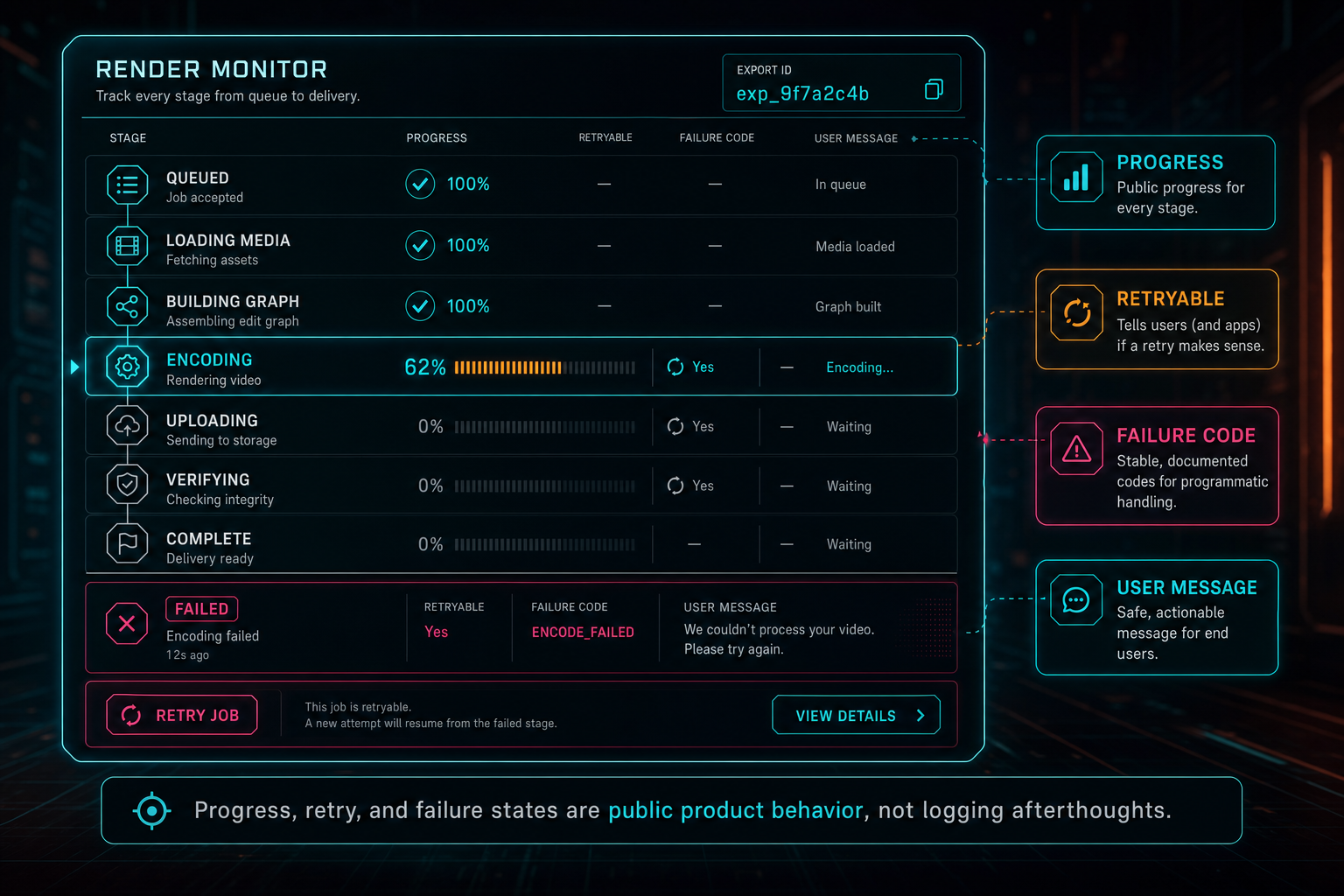
Progress, retry, and failure states are public product behavior, not logging afterthoughts.
Verification and Provenance Make the Export Trustworthy
The API should not mark a render complete just because a child process returned zero. The finished artifact should be verified as a product object. Does the output path exist? Is the file size nonzero? Does the duration make sense? Is the project link present? Does the export record include the requested format, resolution, and timeline version? Can the user or collaborator access it through the expected route? Open the edit-run receipts
Verification is especially important in AI video editing software. A user may ask an agent to assemble a rough cut, apply effects, add generated music, and render a draft. The final MP4 should sit inside that workflow as a traceable artifact. The platform should be able to connect prompt, plan, tool calls, timeline changes, media assets, render job, object storage path, and verification record.
That traceability is not only for debugging. It changes the product experience. A reviewer can inspect which timeline produced a render. A support job can see whether failure came from upload, graph construction, encode, or storage. A media panel can show final exports alongside source clips and generated assets. A second-pass AI reviewer can evaluate the artifact that actually shipped instead of guessing from the prompt.
A thin FFmpeg wrapper returns a file. A production FFmpeg API returns a file plus meaning: source lineage, render settings, ownership, status, and confidence that the export exists where the product says it exists.
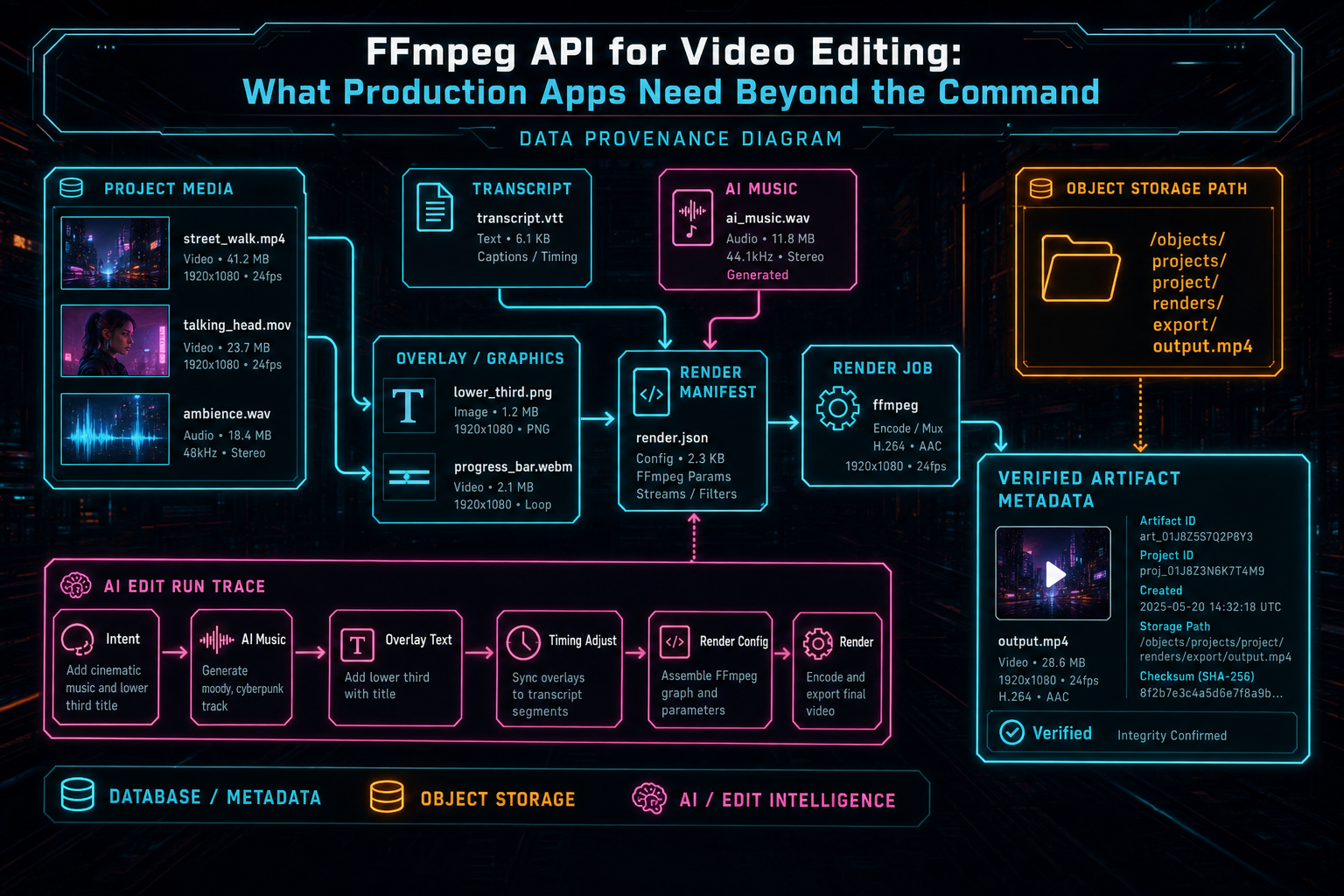
The final video is more useful when it stays connected to source media, AI edits, and storage metadata.
How to Compare FFmpeg API Options
Keyword searches for FFmpeg API, video rendering API, and video processing API often mix several categories. There are low-level libraries, hosted transcoding services, media workflow platforms, and editor-specific render backends. None of those categories is automatically wrong. The right choice depends on whether you are building media utilities or an editing product.
A hosted transcoding API is strong when the job is format conversion, adaptive bitrate packaging, thumbnails, or simple transformations. A command wrapper is strong when the environment is internal and controlled. A desktop NLE is strong when the user owns local compute and expects a full professional timeline. An online editor backend is different: it must preserve authenticated project state, timeline semantics, browser refresh behavior, collaboration links, AI provenance, and object storage artifacts.
For production video editing apps, compare vendors and internal designs on product questions, not only codec coverage. Can the API accept timeline concepts without arbitrary command injection? Can it report render progress by stage? Can it de-duplicate retries? Can it resolve media through user-scoped storage? Can it connect final artifacts to an AI edit run? Can it produce failure codes that are safe for users and useful for remediation?
This is where VibeChopper's architecture is intentionally opinionated. The browser stays fast for creative decisions. The server owns authenticated rendering. FFmpeg remains the proven media engine. The product API controls the contract around it, so editing behavior remains understandable even when AI assists the user.
What Developers Should Build
Start with a typed render request and a persisted export record. Do not start with a public command field. Accept project ID, timeline version, output preset, and idempotency key. Validate everything. Resolve media through server-side storage records. Create a render job before expensive work begins. Return status immediately and let the client poll or subscribe.
Build a compiler from timeline semantics to FFmpeg inputs and filters. Keep that compiler testable. Clips, transitions, effects, captions, overlays, speed changes, generated music, and voiceovers should be product data before they become filter graph syntax. Clamp effect values. Normalize paths. Treat audio as first-class. Keep scratch storage bounded and clean it up after every attempt.
Make object storage the durable handoff. Temporary files are working material. The final render should land in a stable user-scoped path with metadata. Verify the artifact. Attach it to the media graph and AI edit run when applicable. Keep raw logs available to engineers without exposing them as the product contract.
Finally, design for the boring behaviors users notice most: refresh mid-render, duplicate export clicks, network timeouts, missing media, failed uploads, canceled jobs, retries, and support follow-up. An FFmpeg API that handles those cases feels less like a process wrapper and more like video editing software.
The Result
The right FFmpeg API for video editing is deliberately less open than FFmpeg itself. It should not expose every flag to every client. It should expose the editing actions and render outcomes the product can support reliably. Under that boundary, FFmpeg can remain powerful, flexible, and battle-tested. Render a timeline free
For VibeChopper, that means product state flows into a controlled server render path. Uploads become media records. Prompts become AI edit runs and timeline tool calls. Timelines become compositor graphs. Renders become object storage artifacts. Verification connects the artifact back to the project. The user sees a direct editing workflow, while the backend keeps the hard parts auditable.
That is the practical standard for production apps: not can we run FFmpeg, but can we turn a user's approved edit into a dependable, traceable video artifact. Once the API answers that question, FFmpeg stops being a command at the edge of the system and becomes a reliable part of the editor.
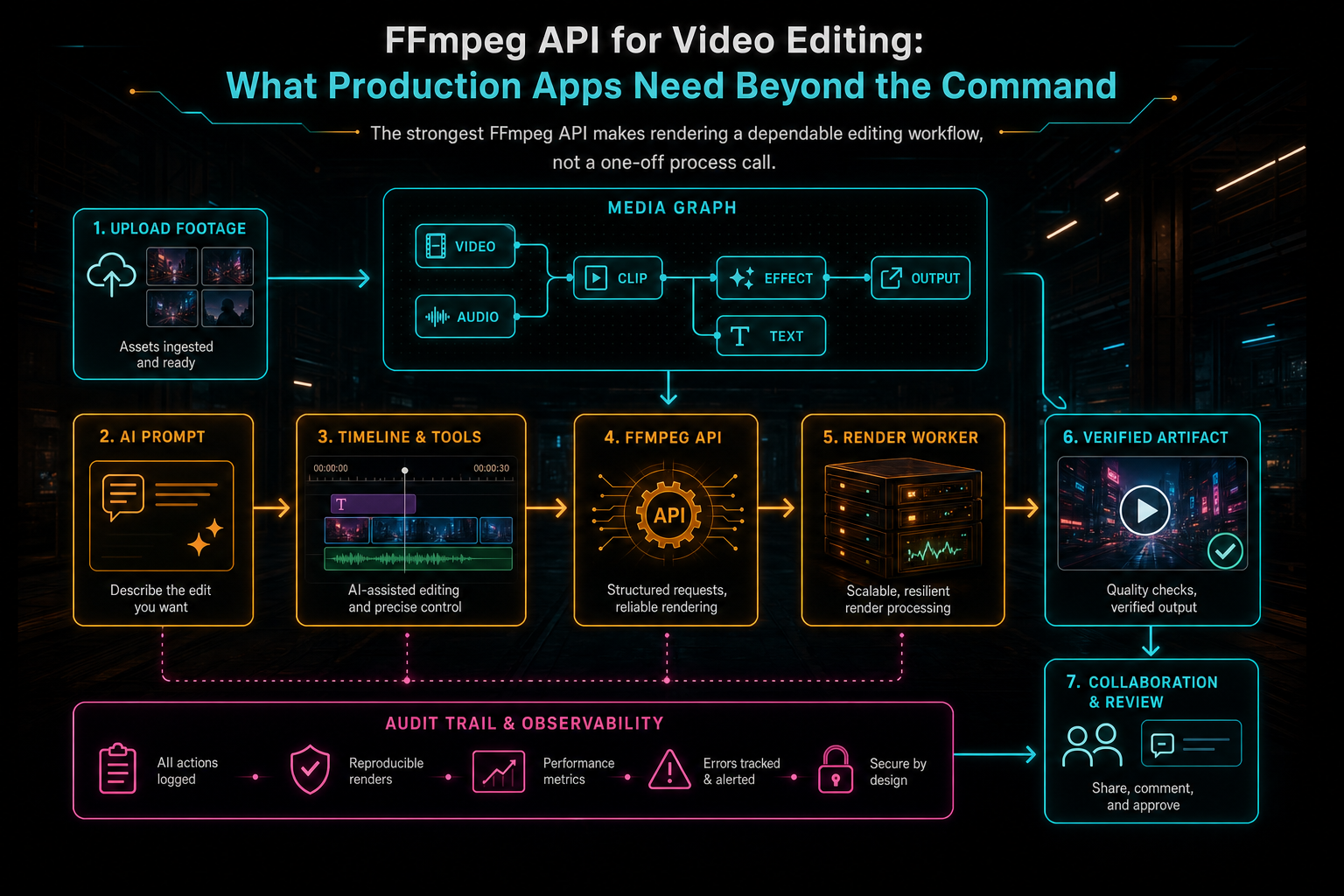
The strongest FFmpeg API makes rendering a dependable editing workflow, not a one-off process call.
Try the workflow
Open every feature from this post in the editor
These panels collect the features discussed above. Sign in once, finish your profile if needed, then the editor opens the first highlighted surface and walks through the tutorial.
Step 1
Render a verified timeline
Export a project through the same storage-backed render path described in this article.
Render a timeline free →Step 2
Inspect an AI edit run
Open the editor and see how plans, tool calls, artifacts, and render results stay connected.
Open the edit-run receipts →Step 3
Upload footage with progress you can trust
Watch large video uploads, processing, transcript work, and original-file storage from one monitor.
Upload a real shoot →Step 4
Apply timeline effects
Try clip effects, speed ramps, color passes, and export-ready compositor behavior.
Try the effects pass →Step 5
Open the media asset graph
See generated audio, rendered assets, source clips, metadata, and provenance in the media panel.
Explore your media graph →