
Why AI Editors Need a Rendering API
Cloud video rendering is easy to describe badly: upload files, run FFmpeg, return an MP4. That description is useful for a demo and dangerous for a product. An AI video editor needs more than a file converter. It needs an API that understands timeline state, project ownership, generated assets, long-running progress, object storage, duplicate requests, and the fact that the render may have been started by an AI edit run rather than a human clicking a plain export button. Render a timeline free
VibeChopper treats rendering as a product boundary. The browser can be the fast creative surface where users upload footage, arrange clips, inspect transcripts, and ask the AI editor for changes. The cloud render path owns the final export contract. It loads the project timeline, resolves source media through server storage, builds a server-side compositor graph, uploads the finished artifact to durable object storage, verifies the output, and connects the artifact back to the edit run and media graph.
That architecture matters because the competitive video editing market has trained users to expect reliability from very different products. Adobe Premiere Pro, DaVinci Resolve, and Final Cut Pro are desktop NLEs with local render stacks. Descript, CapCut, Runway, VEED, Kapwing, Clipchamp, and similar online editors make web-based workflows feel immediate. An AI-native editor has to compete with both expectations: creative speed in the browser and dependable exports from the backend.
The rendering API is where those expectations meet. If the API accepts arbitrary command strings, it is hard to validate. If it hides all progress behind one pending state, users lose trust during long exports. If it writes temporary files without durable object paths, completed renders disappear from the product graph. If it ignores AI provenance, an edit run cannot explain what it produced. The design goal is a narrow but expressive API that makes rendering inspectable.
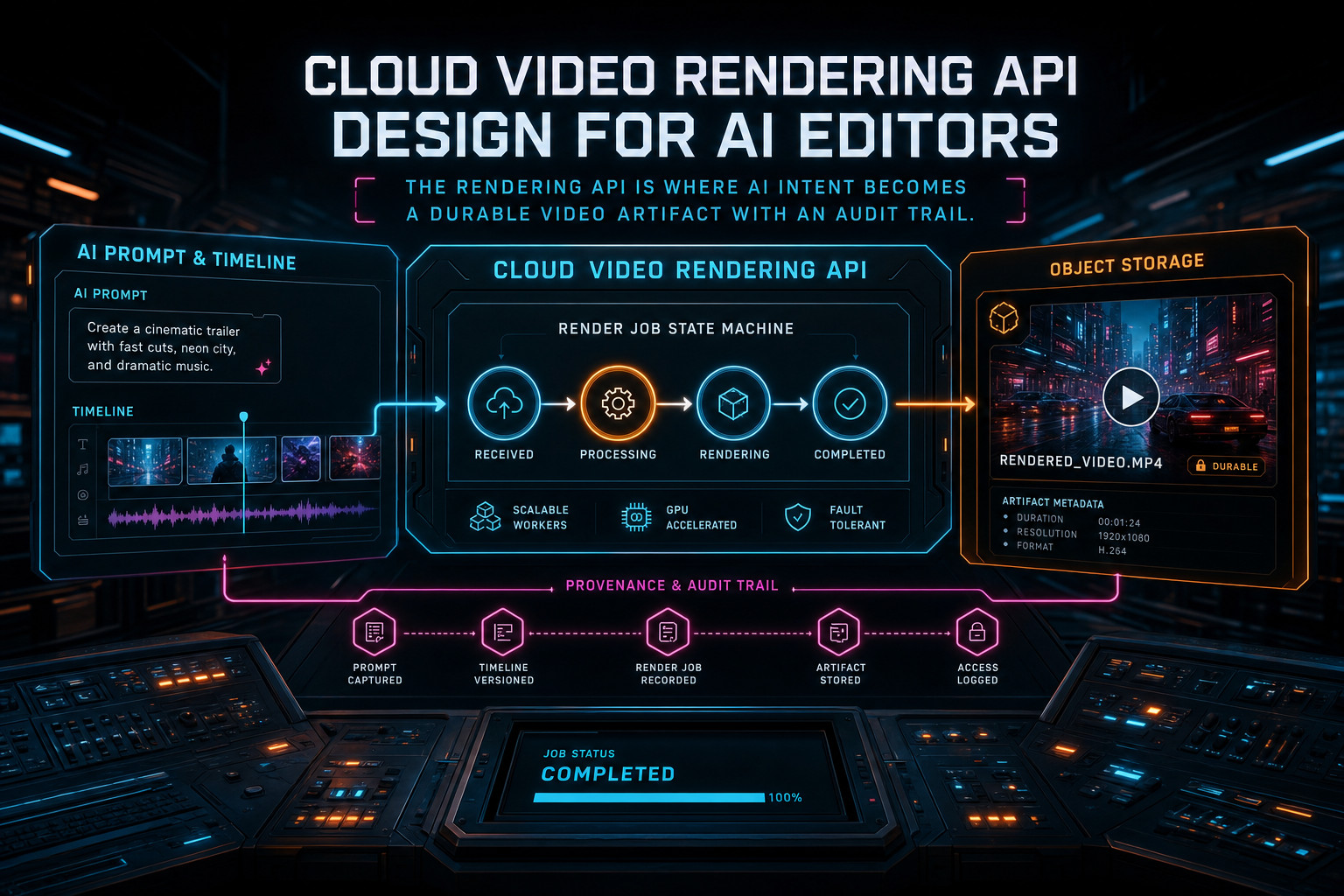
The rendering API is where AI intent becomes a durable video artifact with an audit trail.
Start With the Boundaries
A cloud video rendering API should not be the first place your product decides what a project means. That decision belongs in shared timeline and storage models. By the time a render request reaches the API, the server should already know who the user is, which project is being rendered, which media records belong to that project, which generated assets are allowed, and which timeline version the user expects to export. Open the edit-run receipts
A clean boundary looks like this: the client or AI edit harness sends a render request for a project, not for a list of untrusted URLs. The request names output preferences such as format, resolution, frame rate, preset, and optionally a timeline version or AI run ID. The server validates the request, creates or reuses an export record, and sends a typed job to the render worker or in-process compositor. The worker resolves sources through storage services, not through user-supplied network fetches.
This split gives every subsystem a job. The editor owns interaction and preview. The AI edit run owns intent, plan, tool calls, and user-facing explanation. The render API owns job creation, authorization, state, idempotency, and response shape. The compositor owns media graph construction and encoding. Object storage owns durable artifacts. Verification owns the final confidence record. Those boundaries keep the API from becoming a tangled mix of UI assumptions and FFmpeg flags.
The practical endpoint can be straightforward. In a REST-shaped system, POST /api/projects/:projectId/renders can create a render job and return an export ID plus an initial status. GET /api/projects/:projectId/renders/:exportId can return progress, artifact metadata, blockers, and verification state. POST /api/projects/:projectId/renders/:exportId/cancel can request cancellation when the backend supports it. The important part is not the exact route names. The important part is that the routes speak in product concepts.
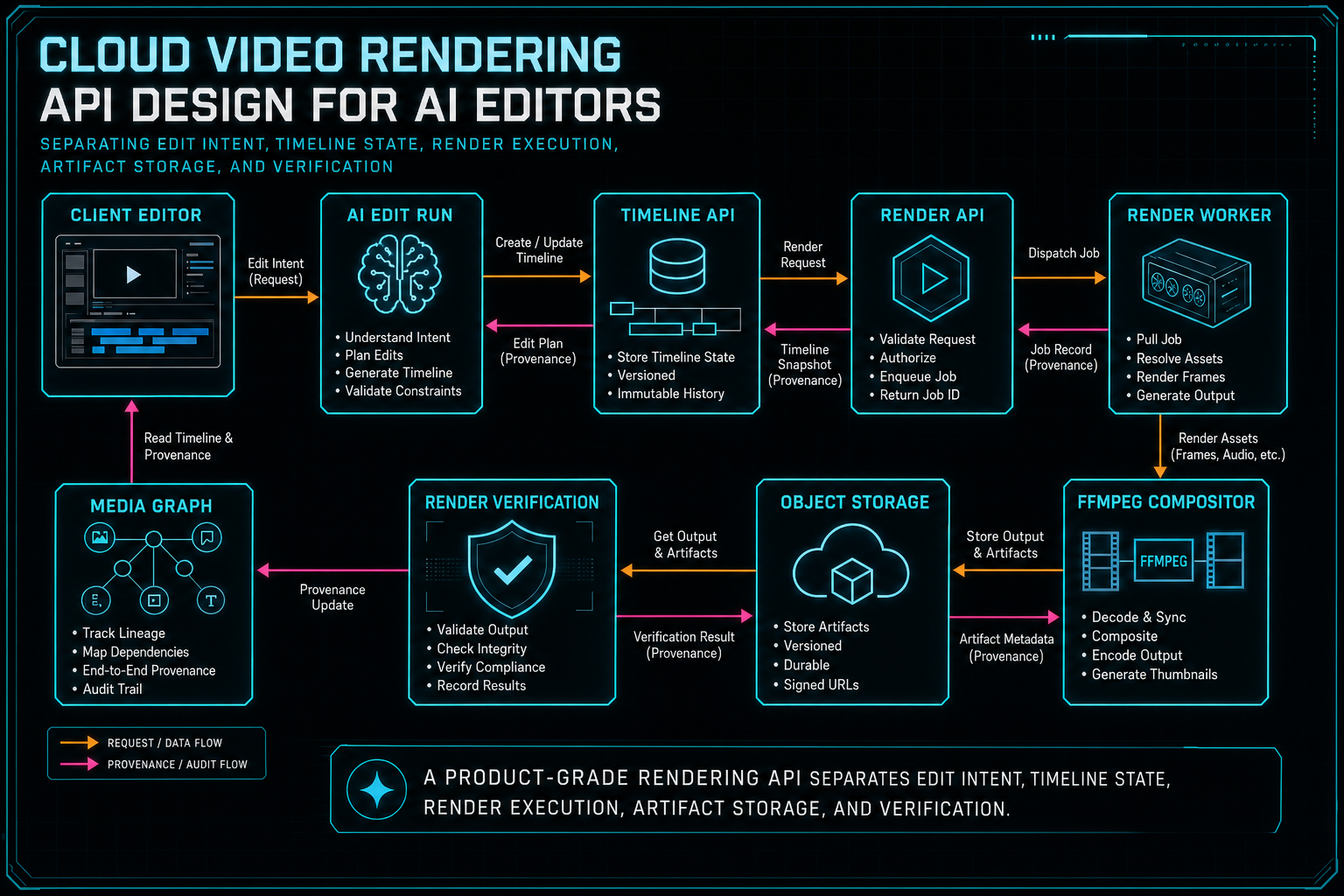
A product-grade rendering API separates edit intent, timeline state, render execution, artifact storage, and verification.
Design the Request and Response Contract
A good render request is small. It does not send the entire video project as an opaque payload unless the product is intentionally stateless. For an authenticated editor with saved project state, the request can name timelineVersion, format, resolution, fps, qualityPreset, includeCaptions, sourcePolicy, and requestedByRunId. The server can then load the canonical project state and decide what is valid. Upload a real shoot
That validation step is where many cloud rendering APIs become product-grade. The server can reject unsupported formats, missing project ownership, stale timeline versions, invalid resolution presets, or an export request that would exceed entitlement boundaries. It can also decide how to handle duplicate requests. If the same user submits the same project, timeline version, and output preset twice, the API can return an existing in-flight export instead of launching two expensive encodes.
The response should be equally explicit. For a newly accepted render, return exportId, status, stage, percent, progressUrl, createdAt, and a null or partial artifact. For a completed render, include storagePath, downloadUrl, fileSize, duration, format, resolution, fps, verified, blockers, and limitations. For a failed render, include a stable error code and a user-safe message. Keep raw stderr and provider traces in server logs or admin surfaces, not in public API fields.
This shape helps both the browser and AI workflow. A user can refresh the page and still find the export. An AI edit run can attach the export ID as an artifact. A support or remediation job can inspect the same status object. A media graph can ingest the completed artifact without special-case parsing. The API response becomes a durable handoff instead of a transient button result.
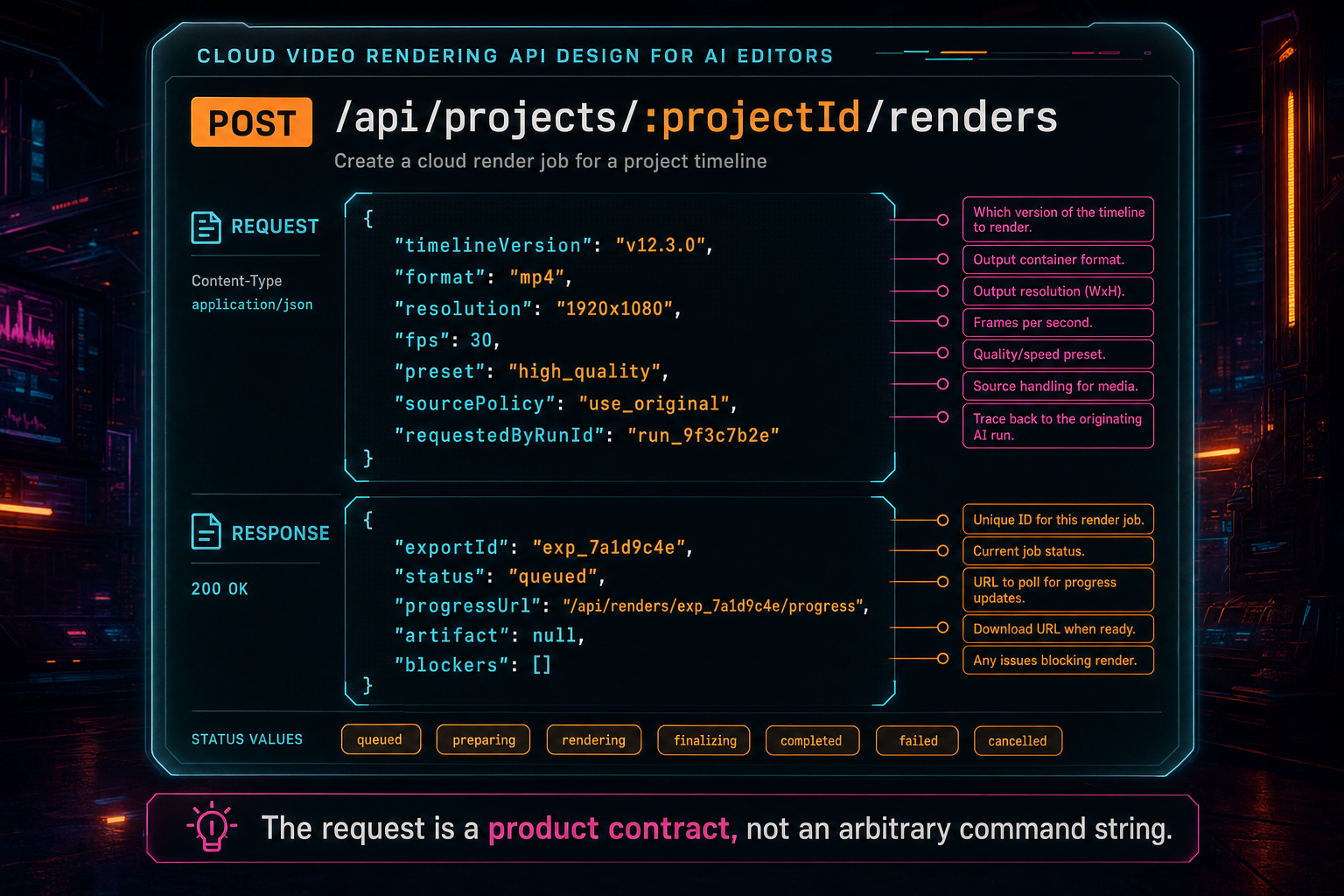
The request is a product contract, not an arbitrary command string.
Render Jobs Need a Lifecycle
Rendering is long-running work. That sounds obvious until the API is designed like a normal request-response handler. A video export can spend time loading project state, downloading sources, building a filter graph, encoding frames, uploading output, and verifying the artifact. Each stage has different failure modes. A single pending state hides the most important information from users and from the rest of the system. Render a timeline free
VibeChopper-style stages are intentionally concrete: queued, loading project, downloading sources, downloading overlays, building graph, encoding, uploading, verifying, complete, failed, canceled, and retrying. Those states are not only UI labels. They are operational checkpoints. If the job fails while downloading sources, look at storage references and permissions. If it fails while building the graph, inspect timeline semantics and effect mappings. If it fails while uploading, inspect object storage and network behavior.
The render job should be persisted before expensive work starts. That persistence lets the client poll or subscribe, lets the user refresh mid-export, and lets duplicate submissions resolve to the same job when appropriate. It also gives AI edit runs a stable artifact reference. If an agent creates a timeline, triggers a render, and then asks the user to review the result, the run should show the export ID even if the browser reconnects later.
Progress percentages should be treated as approximate product signals rather than mathematical promises. Encoding can report frame time or output time. Uploading can report bytes moved. Earlier stages may only deserve fixed ranges. That is fine. Users do not need a perfect physics model. They need to know that the job is alive, which stage is active, and whether the result is ready, blocked, or failed.
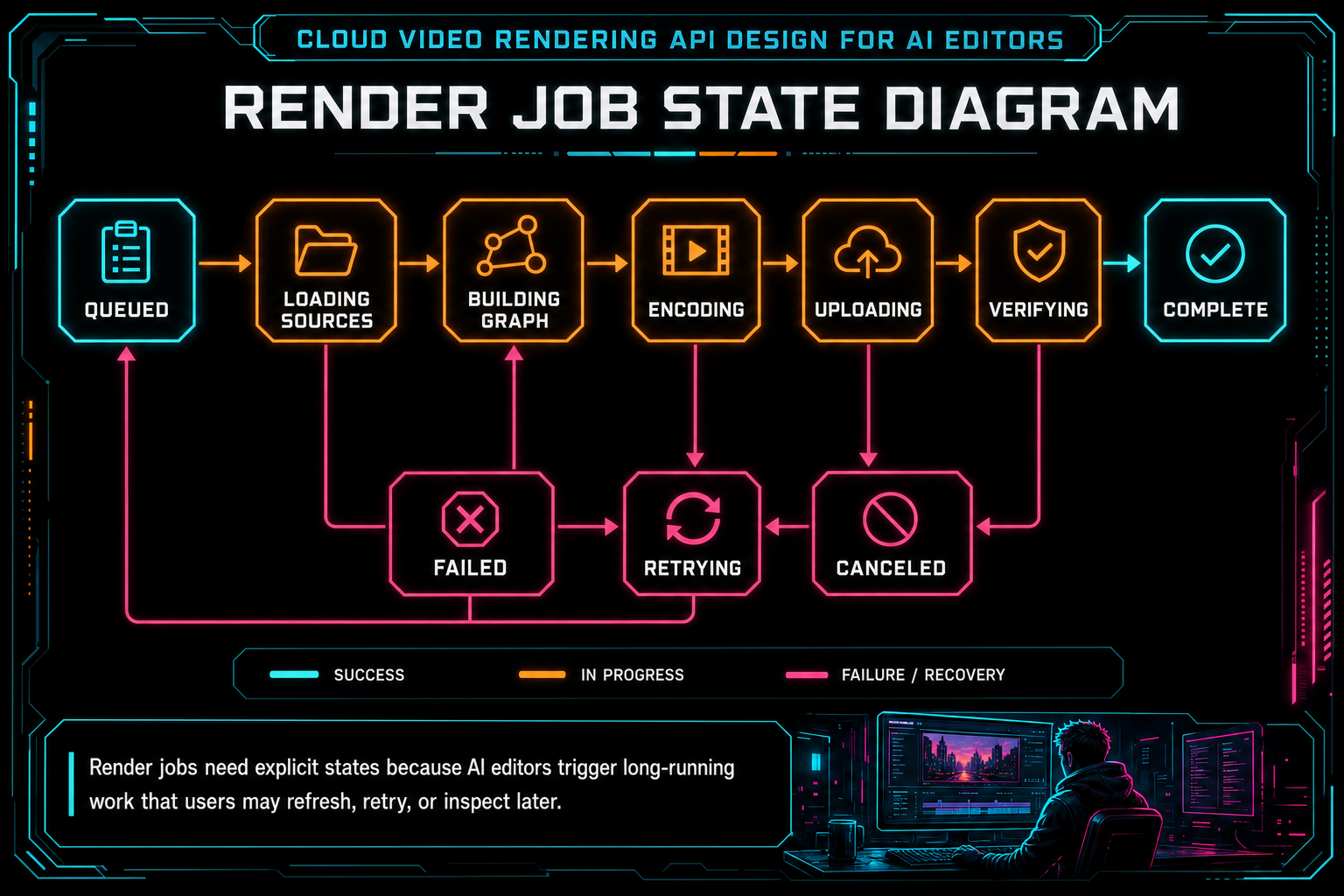
Render jobs need explicit states because AI editors trigger long-running work that users may refresh, retry, or inspect later.
The Timeline Contract Is the Hard Part
Most rendering API articles focus on infrastructure: queues, workers, FFmpeg, S3-style object storage, and CDN delivery. Those pieces matter, but the hardest part in an AI editor is often the timeline contract. A timeline is not a list of files. It is a structured edit with source ranges, timeline ranges, speed, fades, overlays, track state, generated music, voiceovers, captions, adjustment layers, effects, and sometimes motion keyframes. Try the effects pass
The render API should not flatten that richness too early. The compositor needs enough information to produce the same creative decision the user approved in the browser. A trim should map to source start and end. A speed ramp should map to segment retiming. A muted track should stay muted. A soloed track should suppress competing tracks. A generated music bed should carry provenance and mix behavior. An overlay should resolve through object storage and land in the correct timeline interval.
AI makes this contract more important. When a user says, make the intro faster, add captions, and put the product shot over the voiceover, the AI editor may call several timeline tools. The render should not depend on a vague memory of that prompt. It should read the resulting timeline state and encode exactly that state. Prompt intent belongs in the audit trail; render inputs belong in the timeline and media records.
A useful test is to ask whether the render can be explained after the fact. Can the system say which clips were used, which generated assets were included, which effect settings were active, which transcript segments became captions, and which AI run requested the export? If not, the rendering API is probably still too close to a command runner and too far from an editor backend.
Object Storage Is Part of the API
Cloud rendering systems often treat object storage as an implementation detail. In an AI editor, object storage is part of the product contract. Source footage, generated overlays, AI music, voiceovers, thumbnails, transcripts, and final renders all become more useful when their paths are stable, user-scoped, and connected to project records. Explore your media graph
The render worker should download sources from trusted storage references, not from arbitrary URLs in the request body. That protects project ownership and prevents the renderer from becoming a general-purpose fetch tool. It also lets the product enforce media rules before FFmpeg runs: missing source, unsupported asset type, empty file, expired reference, or object-storage outage can become explicit render blockers.
The output path should be predictable enough for the product and specific enough to avoid collisions. A path such as /objects/projects/{projectId}/renders/{exportId}/output.mp4 carries the right ideas: project scope, export identity, and one durable artifact location. The API can still return signed or routed download URLs, but the underlying storage path should remain stable for verification, media graph ingestion, and future repair jobs.
Provenance is the difference between a rendered file and a rendered asset. A plain MP4 can be downloaded. A VibeChopper render artifact can also point back to the project, timeline version, AI plan, source clips, generated assets, export settings, duration, file size, and verification result. That is the metadata an AI editor needs when users ask, what did the system do?
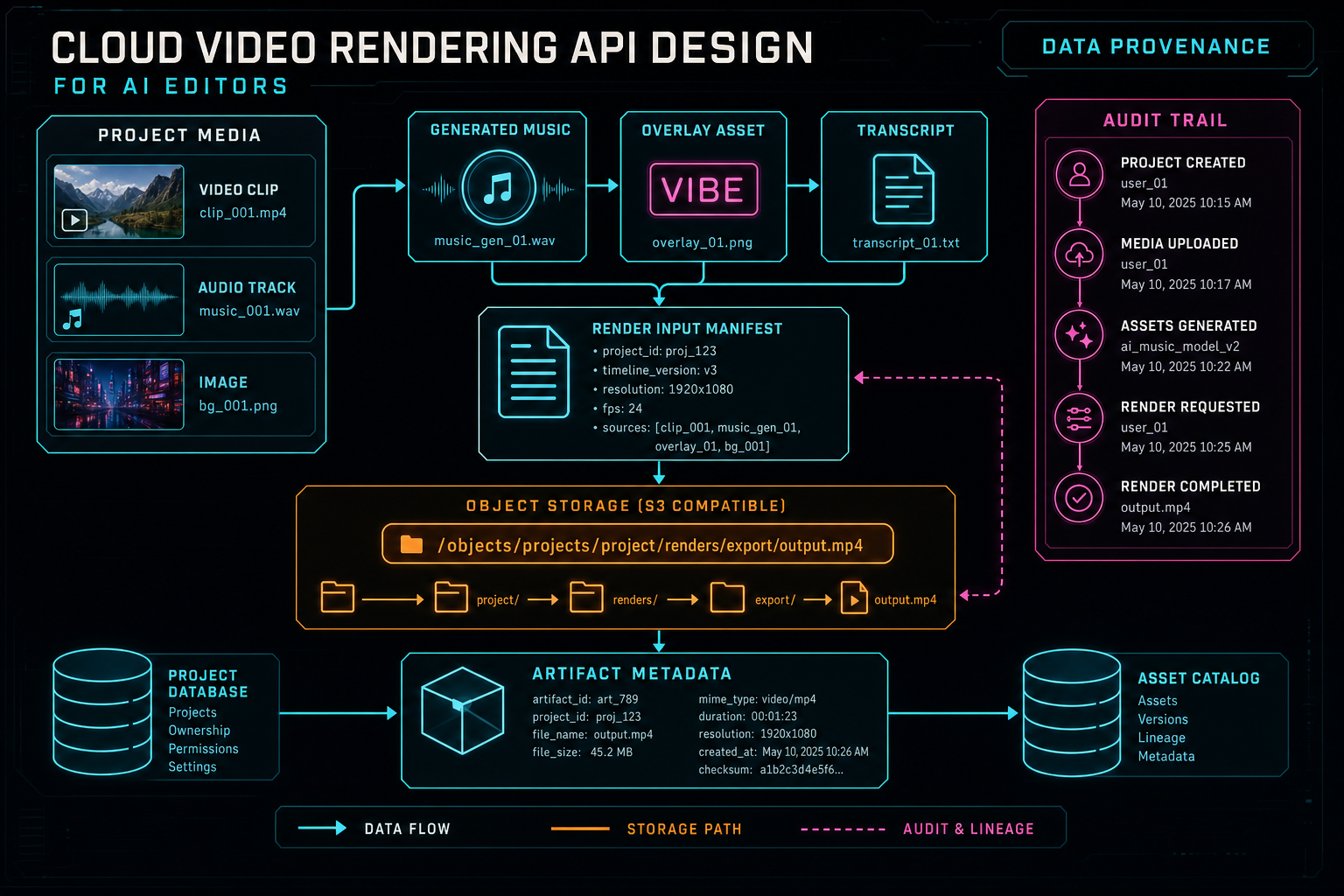
Object storage paths become dependable when they are connected to project ownership and media provenance.
Progress, Failure, and Retry Belong in the Public Shape
A cloud video rendering API should make failure legible without leaking internals. Users can act on messages like temporary render storage is full, source media is missing, object storage upload failed, or this output preset is not supported. They cannot act on a hundred lines of FFmpeg stderr. Developers need the detailed logs, but the product API should return stable codes and concise messages. Render a timeline free
Retry behavior should be deliberate. Some failures are retryable: transient object storage errors, worker interruption, network upload issues, or temporary provider outages in adjacent AI steps. Other failures need user action: missing source media, unsupported codec behavior, invalid timeline structure, quota boundaries, or entitlement limits. The API should distinguish those categories so the UI and AI edit run do not blindly retry bad inputs.
Cancellation also deserves a clear contract. If cancellation is best-effort, say so in state. A job may be canceling while FFmpeg exits or while an upload finishes. The API can report cancelRequestedAt, canceledAt, and the last known stage. This keeps user expectations aligned with how media processes actually shut down.
The same principle applies to timeouts and duplicate submissions. A user who refreshes during encoding should see the existing render job. A user who taps export twice should not accidentally spend twice the compute unless they requested two different outputs. An AI agent that retries after a network timeout should use an idempotency key or deterministic export identity. Rendering APIs are expensive enough that idempotency is not a nice-to-have.
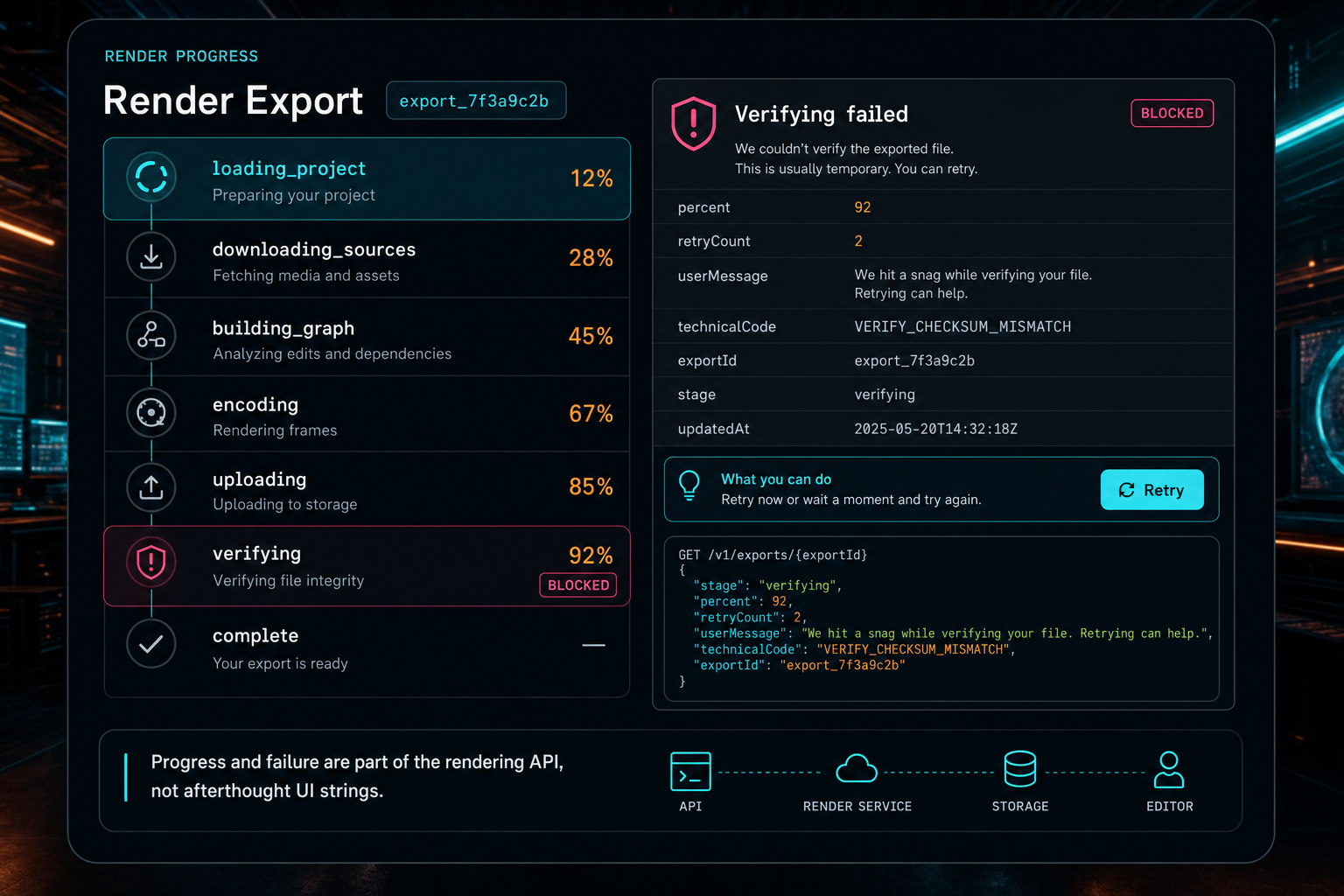
Progress and failure are part of the rendering API, not afterthought UI strings.
Verification Turns Export Into Trust
The render is not done when FFmpeg exits. It is done when the product can prove that a usable artifact exists and belongs to the workflow that requested it. Verification should check for a storage path, nonzero file size, duration, output format, project link, timeline summary, and download route. It should also record limitations. Structural verification does not prove every frame matches creative intent, and the API should not pretend otherwise. Explore your media graph
For AI editors, verification has a second job: it connects trust back to the model-driven workflow. The user did not only press export. They may have asked an AI assistant to assemble a rough cut, apply effects, add music, generate captions, and render a draft. The final artifact should sit inside that run with a clear trail from prompt to plan to tool calls to timeline to render to verification.
This is where AI video editing software can be more transparent than traditional tools. A desktop NLE often assumes the human editor knows what they changed. An AI editor can preserve a machine-readable edit trail by default. That trail is valuable for debugging, collaboration, creative review, and user trust. The rendering API should preserve the link instead of returning a disconnected URL.
A strong verification record also helps future automation. A remediation job can inspect blockers. A media graph can index the artifact. A second-pass review agent can score the draft. A collaboration surface can point a reviewer to the exact timeline and export. The API shape determines whether those systems get a dependable artifact or a loose file link.
What Developers Should Copy
If you are designing a video rendering API, copy the product boundaries first. Accept project-scoped render requests, not arbitrary FFmpeg commands. Validate output settings with a schema. Persist a render job before work starts. Resolve source media through storage records. Give each job an export ID. Return stages, progress, blockers, and artifact metadata. Upload finished renders to object storage. Verify the artifact before calling the job complete.
Copy the idempotency pattern too. Expensive media jobs should be hard to duplicate accidentally. Use idempotency keys, timeline versions, export records, or deterministic request hashes so retries are safe. This matters even more when AI agents can initiate actions, because an agent may retry after a timeout without knowing whether the first request reached the server.
Also copy the separation between user-facing messages and technical diagnostics. The browser and AI run need stable failure codes and plain-language recovery advice. Engineers need logs, FFmpeg stderr tails, worker IDs, source object paths, and timing data. Put both in the system, but do not confuse one for the other.
Finally, do not reduce rendering to infrastructure. Queues and workers are necessary, but the product contract is the real API. The endpoint should know about projects, timelines, assets, ownership, progress, verification, and provenance. That is what makes it useful inside an AI editor rather than merely available as a backend utility.
The Result
A cloud video rendering API for AI editors has to satisfy two groups at once. Creators want a simple promise: render the edit and give me the video. Developers need a stricter contract: validate the request, preserve ownership, load canonical timeline state, resolve sources safely, encode predictably, upload durably, report progress, handle retries, verify the artifact, and connect the result to the AI workflow.
That stricter contract is what lets the simple promise hold. The user does not need to think about scratch directories, FFmpeg graphs, object paths, idempotency keys, or verification blockers. The platform does. When those pieces are built into the API shape, cloud rendering stops being a fragile export button and becomes a dependable production workflow.
VibeChopper's product surface is direct: upload footage, ask for edits, refine the timeline, apply effects, and render a verified result. Under that surface, the rendering API keeps the final video connected to the project, the media graph, the AI edit run, and the durable storage artifact. That connection is the difference between an AI demo and an editor people can use for real work.
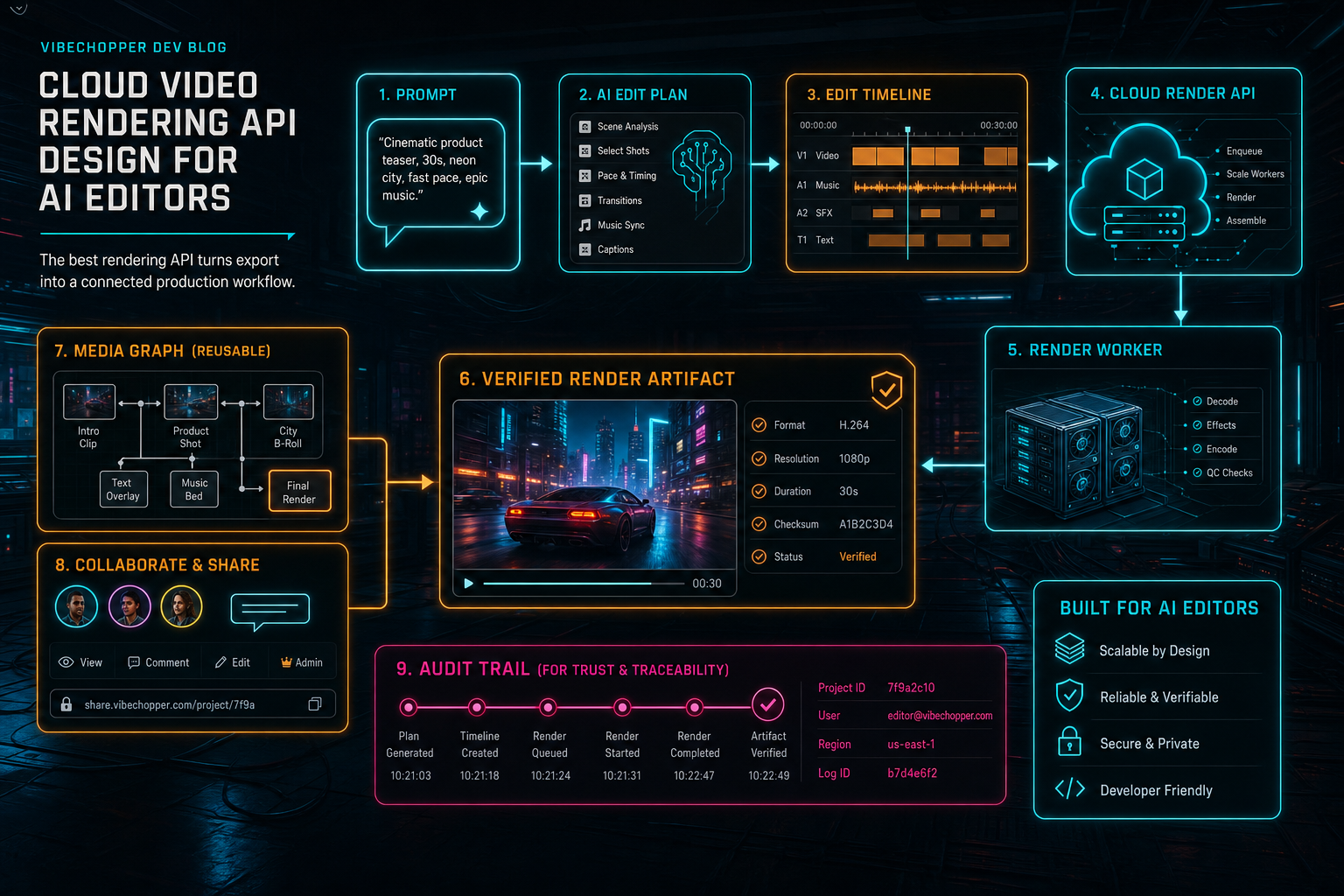
The best rendering API turns export into a connected production workflow.
Try the workflow
Open every feature from this post in the editor
These panels collect the features discussed above. Sign in once, finish your profile if needed, then the editor opens the first highlighted surface and walks through the tutorial.
Step 1
Render a verified timeline
Export a project through the same storage-backed render path described in this article.
Render a timeline free →Step 2
Inspect an AI edit run
Open the editor and see how plans, tool calls, artifacts, and render results stay connected.
Open the edit-run receipts →Step 3
Upload footage with progress you can trust
Watch large video uploads, processing, transcript work, and original-file storage from one monitor.
Upload a real shoot →Step 4
Apply timeline effects
Try clip effects, speed ramps, color passes, and export-ready compositor behavior.
Try the effects pass →Step 5
Open the media asset graph
See generated audio, rendered assets, source clips, metadata, and provenance in the media panel.
Explore your media graph →