
Why Object Paths Deserve Design
A render pipeline can look healthy while its storage contract is weak. FFmpeg can finish. A local output file can exist. The UI can see progress reach 100 percent. But if the final object lands at an anonymous upload path, leaks a bucket-specific URL, loses its project relationship, or leaves behind scratch files, the product has only created a fragile video file. VibeChopper treats that as unfinished work. Render a timeline free
The hardening pass described here is about making render output paths boring in the best way. A completed export should have a stable identity. It should belong to a project. It should belong to an export. It should preserve the chosen format. It should move from temporary scratch disk into object storage without reading the whole file into memory. It should return the same normalized object route that the rest of the product expects. And once the handoff is complete, the scratch directory should be cleaned.
The implementation evidence starts in server/objectStorage.ts and server/videoCompositor.ts, with the developer audit calling out commit bb932e7. Those files show the shape of the contract: object entity paths, upload helpers that return /objects/... routes, stable render paths built from project and export IDs, stream upload to a requested path, object downloads into scratch space, and best-effort cleanup for temporary render directories.
This is infrastructure, but it is not invisible. Creators experience it when an export button produces a durable file. AI edit runs depend on it when they attach a render artifact to a plan. Media panels depend on it when they show a completed export next to source clips and generated assets. Verification and remediation depend on it when they need a path that means something after the render worker is gone.
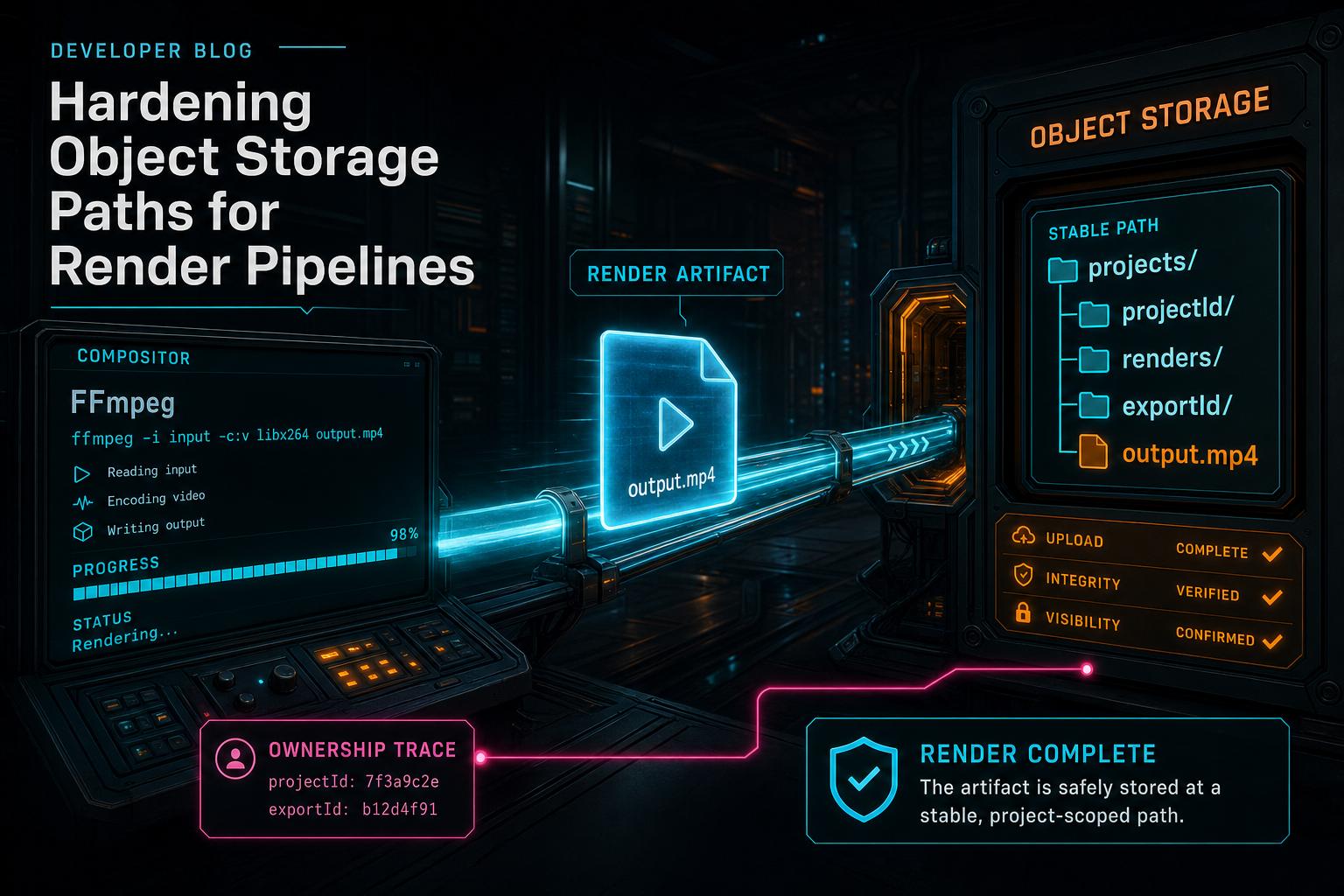
The render is not finished until the artifact lands at a stable project-scoped object path.
Stable Paths Beat Anonymous Uploads
Generic upload helpers are useful for user-provided media, generated overlays, and temporary project assets. They create random object IDs, upload content, and return a browser-openable object route. A render export needs a different shape. The output is not just another upload. It is the durable result of a specific project export. Explore your media graph
buildRenderObjectPath makes that explicit. Given a project ID, export ID, and format, the compositor writes to /objects/projects/{projectId}/renders/{exportId}/output.{ext}. MP4, MOV, and WebM each map to the expected extension. That path is short enough to read and structured enough to reason about. It says where the file belongs before anyone opens a database row.
The important detail is not the exact string. It is the decision to make render paths deterministic around product concepts. Random object IDs hide relationships. Stable render paths preserve them. When a support workflow, AI edit run, media graph, or verification helper sees the path, it can infer that this is a render output, not a source upload or generated overlay. That reduces the amount of context every downstream system has to rediscover.
Stable paths also help with retries and duplicate requests. An export record can own a path, and the render worker can write the final output to that path. A retry does not need to invent a new address unless the product intentionally creates a new export. The artifact identity stays tied to the export ID. That gives the UI and server a clean anchor for progress, completion, verification, and repair.
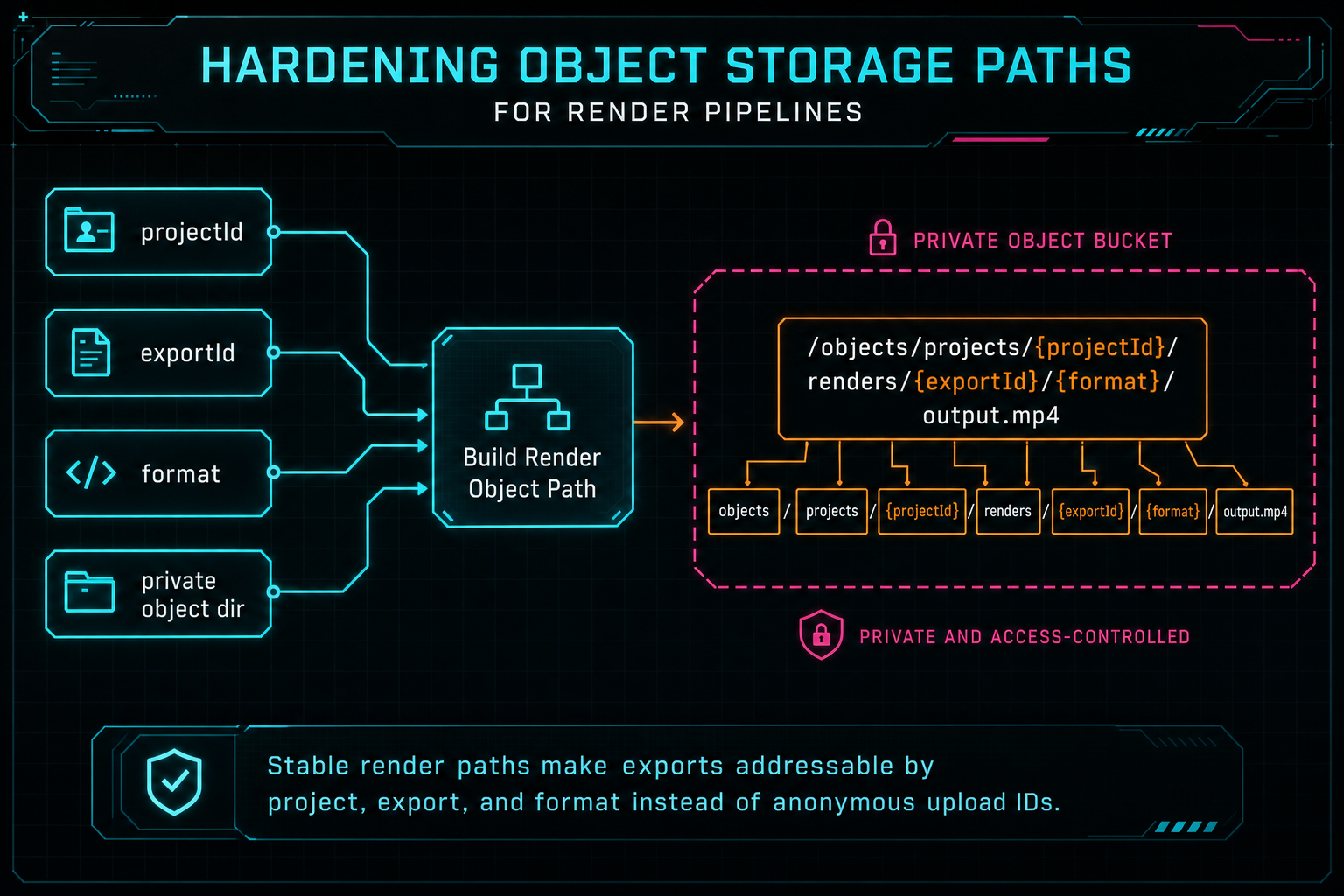
Stable render paths make exports addressable by project, export, and format instead of anonymous upload IDs.
Normalize at the Storage Boundary
Object storage systems naturally produce several path shapes. A caller might have a full https://storage.googleapis.com/... URL, a /objects/... route, an objects/... route, a bare object key, or a private bucket path. If those formats leak through the product unchecked, every caller starts carrying path cleanup logic. That is how download bugs spread.
VibeChopper keeps path normalization close to the object storage service and compositor. normalizeObjectEntityPath converts storage.googleapis.com URLs that point inside the private object directory into /objects/... routes. The compositor also normalizes source URLs before downloading into scratch space, stripping leading slashes and object route prefixes so downloadToFile can resolve the entity through the private object directory.
This is a small-looking boundary with large practical value. The editor should not need to know the private bucket prefix. A render verification helper should not care whether a caller handed it a full storage URL or an object route. The media panel should link to the same stable /objects/... route the server can serve. Normalization creates one product-facing address for the artifact.
The rule is straightforward: callers may receive object storage in different dialects, but the application surface speaks object routes. That lets the server keep ownership of bucket details, signed URL behavior, caching headers, and object entity lookup. It also makes future migrations easier because fewer components are coupled to raw storage provider paths.
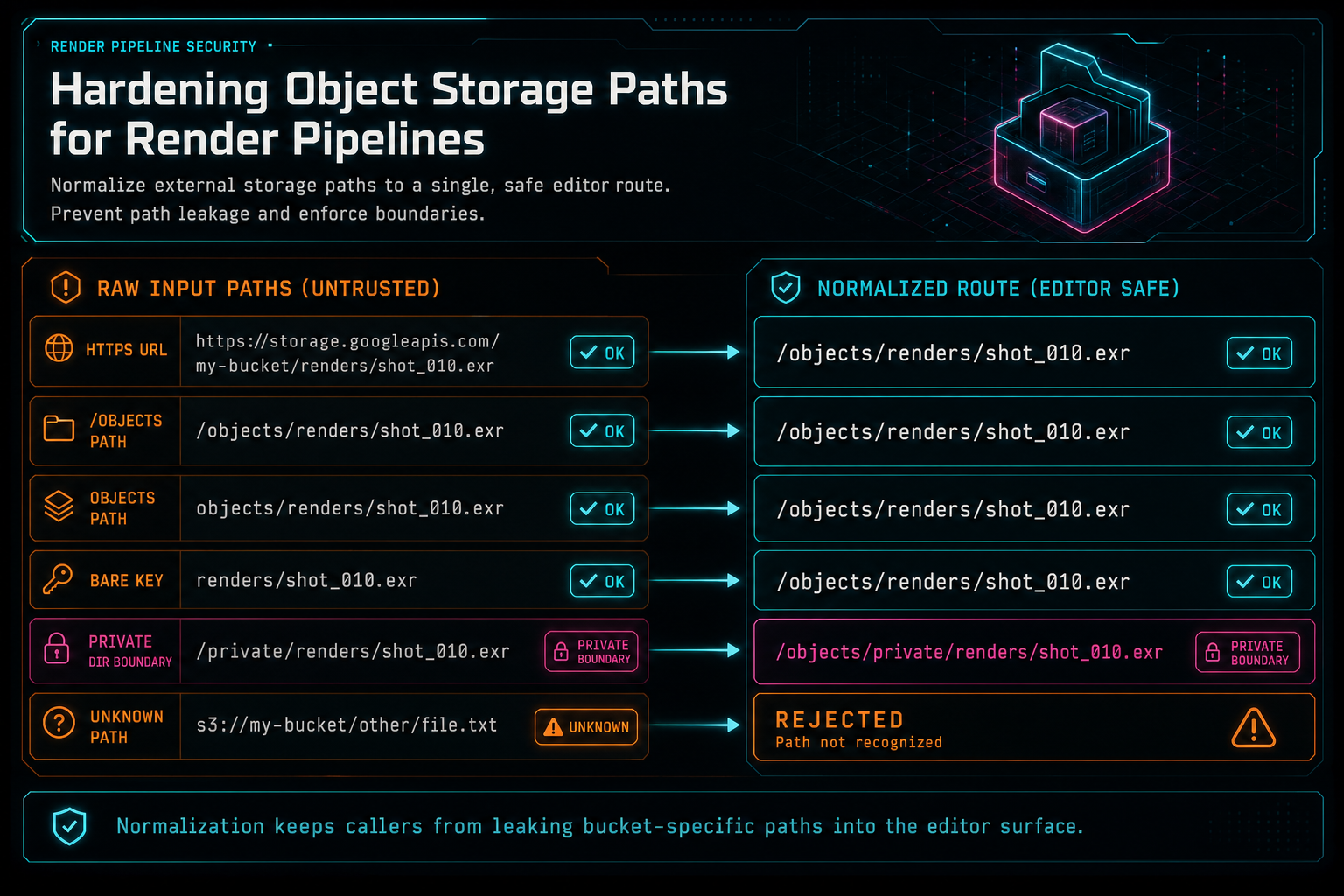
Normalization keeps callers from leaking bucket-specific paths into the editor surface.
Scratch Space Is Not Product State
Server-side rendering needs local files. Source media has to be downloaded. Overlay images need local paths for FFmpeg. The encoder writes an output file before it can be uploaded. That temporary workspace is necessary, but it should never become product state. Upload a real shoot
The compositor creates a render scratch directory under RENDER_SCRATCH_DIR or the operating system temporary directory. It names the directory with the export ID so logs and cleanup are easier to reason about. It then downloads only the source media needed by the render, builds the FFmpeg graph, writes the output file, checks scratch usage against a configured quota, streams the result to object storage, and removes the scratch directory in a finally block.
The cleanup step matters because video renders are large. A web app can survive a few forgotten JSON temp files. It cannot survive a steady leak of multi-gigabyte MP4s on autoscaled instances. Scratch cleanup is part of the export contract, not a housekeeping detail. If the worker succeeds, the durable file is in object storage. If the worker fails, the local work area still gets removed.
The upload path is also memory-aware. streamUploadFileAtPath reads the finished file from disk and writes it to object storage with a resumable GCS stream. It reports upload progress without loading the full render into memory. That is the same product posture VibeChopper uses around large uploads: progress should be observable, memory pressure should be contained, and long-running media work should produce durable state instead of hidden process state.
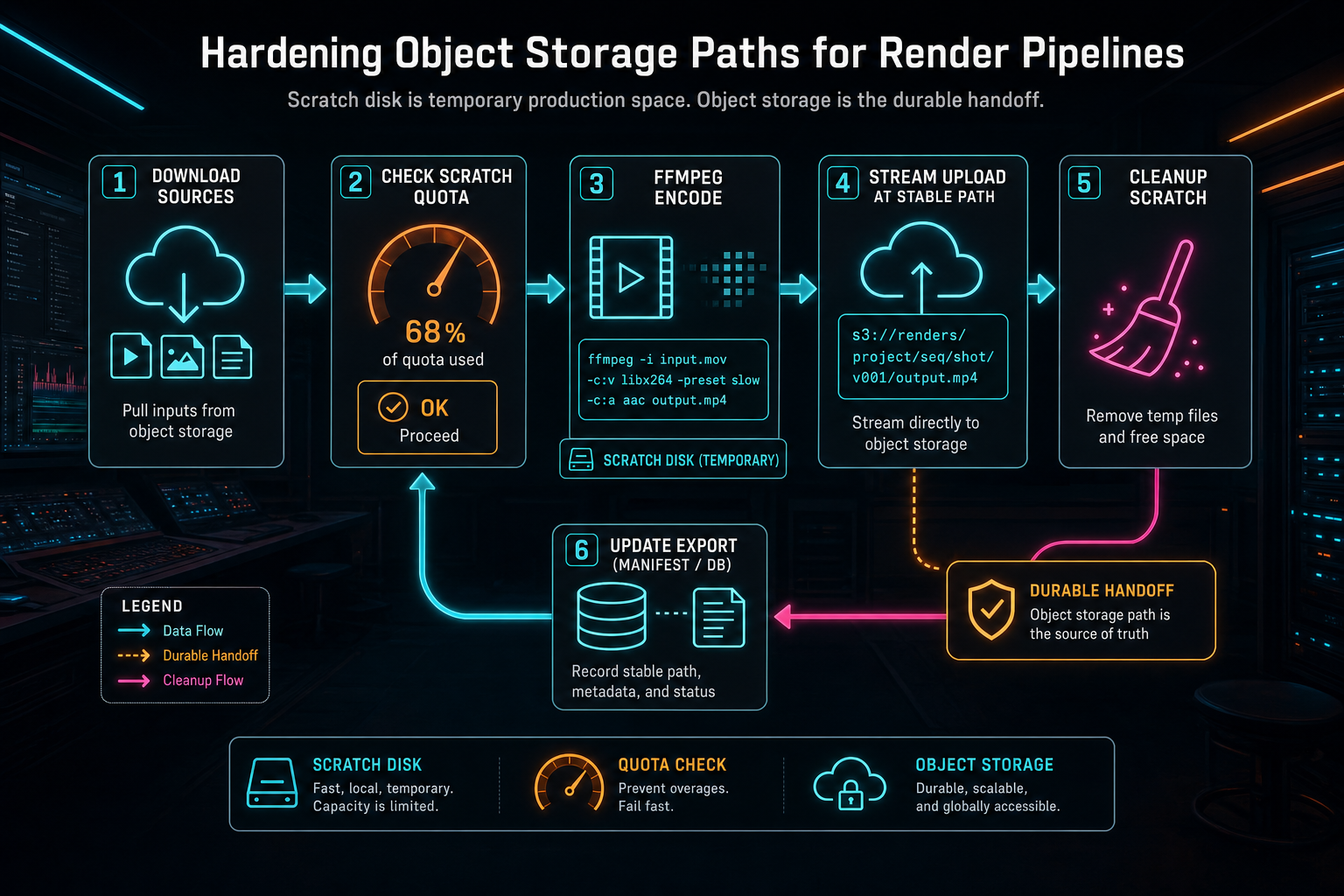
Scratch disk is temporary production space. Object storage is the durable handoff.
Stream to the Path You Promised
A subtle failure mode in render systems is splitting path selection from upload execution. One function decides where the render should live. Another function uploads to a random generated destination. A third function tries to update the database with whichever path came back. That can work on the happy path, but it weakens the artifact contract.
VibeChopper avoids that split for render output. The compositor computes the stable render path first, then passes it into streamUploadFileAtPath. The object storage service normalizes the requested path to /objects/..., maps it into the private object directory, streams the file to that exact object, and resolves with the same normalized path. The returned value always matches the requested render identity.
That makes database updates, verification, and UI links simpler. The export record can store the path the render pipeline intended to produce. Render verification can check that a storage path exists and normalize a download route. The media graph can attach the render artifact to the project and export without guessing whether an upload helper silently changed the address.
The broader lesson is to make durable artifact paths explicit before the expensive work starts. A render job should know its destination. A music generation job should know the project asset it will create. An overlay generation job should know how the image will enter object storage. Product systems are easier to repair when artifact identity is planned, not discovered after the upload finishes.
Object Storage Is a Security Boundary
Render pipelines fetch media. That makes them security-sensitive. If a compositor accepts arbitrary external URLs for overlays or source assets, it can become an SSRF path into infrastructure that was never meant to be reachable from user content. VibeChopper's compositor treats object storage as the media boundary.
Source clips are resolved from stored video records through storagePath or generated audio audioUrl. The object storage service maps object entity routes into the configured private object directory. Overlay downloads are stricter: the compositor accepts object-storage-like references such as /objects/..., objects/..., /replit-objstore-..., gs://..., or URLs that clearly include /objects/, and it refuses arbitrary external HTTP URLs.
That refusal is intentionally practical. The render path is not a web crawler. It is a compositor for project-owned media. If an image should be rendered as an overlay, it should enter the platform through the upload or generated-asset path first. Once it is an object entity, the compositor can download it through the same service used for source media.
This keeps the product model aligned with authorization. Users edit project media. The server owns the object storage lookup. The compositor consumes local scratch files after the server has resolved them. That is much safer than letting arbitrary timeline state tell FFmpeg or Node which remote URLs to fetch during export.
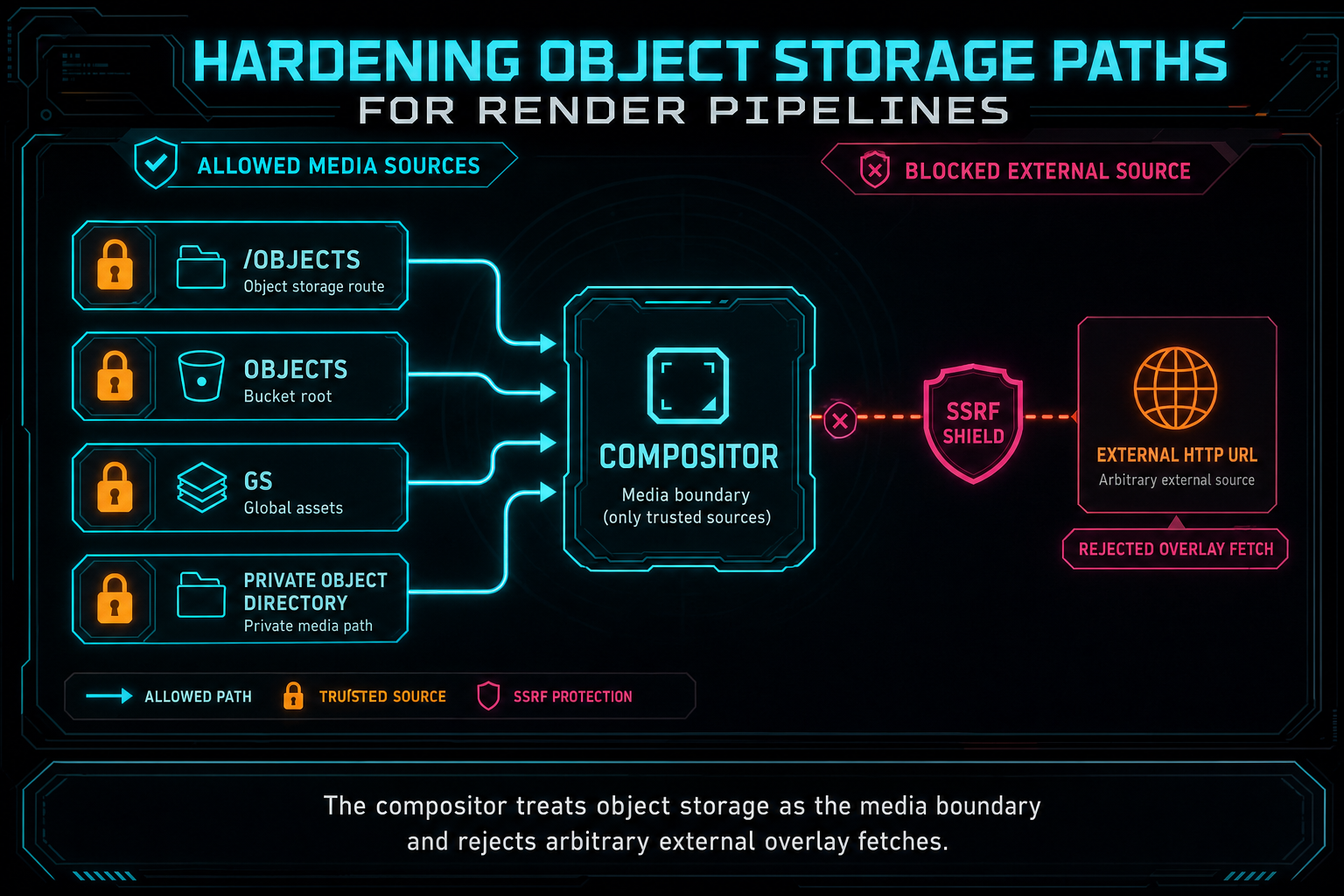
The compositor treats object storage as the media boundary and rejects arbitrary external overlay fetches.
Metadata Makes the Path Useful
A stable path is necessary, but it is not enough. The render result also returns file size and duration. The export record carries format, resolution, FPS, progress, and completion status. Render verification can then assemble an artifact card with export ID, storage path, download URL, size, duration, and timeline summary fields. That is what makes the path useful outside the compositor. Open the edit-run receipts
This matters more as the compositor gets more expressive. Effects, speed ramps, adjustment tracks, overlays, generated audio, fades, transitions, and AI-created timelines all contribute to the output. The final object path is the place where that complex timeline becomes a durable artifact. If the metadata is weak, the user sees a file but the platform loses the story.
VibeChopper keeps those pieces connected. Tool events can explain which timeline operations happened. AI edit runs can show which plan produced the render. Render verification can state whether the artifact has a path, size, duration, project link, plan link, and clip summary. The media graph can present the completed output alongside source clips and generated assets. The object path is the spine, but the metadata is the nervous system around it.
The CTA cards here point to AI edit runs and effects because those are where storage hardening becomes visible. Try an AI edit, apply effects, render the timeline, and inspect the artifact. The product feels straightforward because the backend is doing the unglamorous work of keeping paths, records, and generated media aligned.
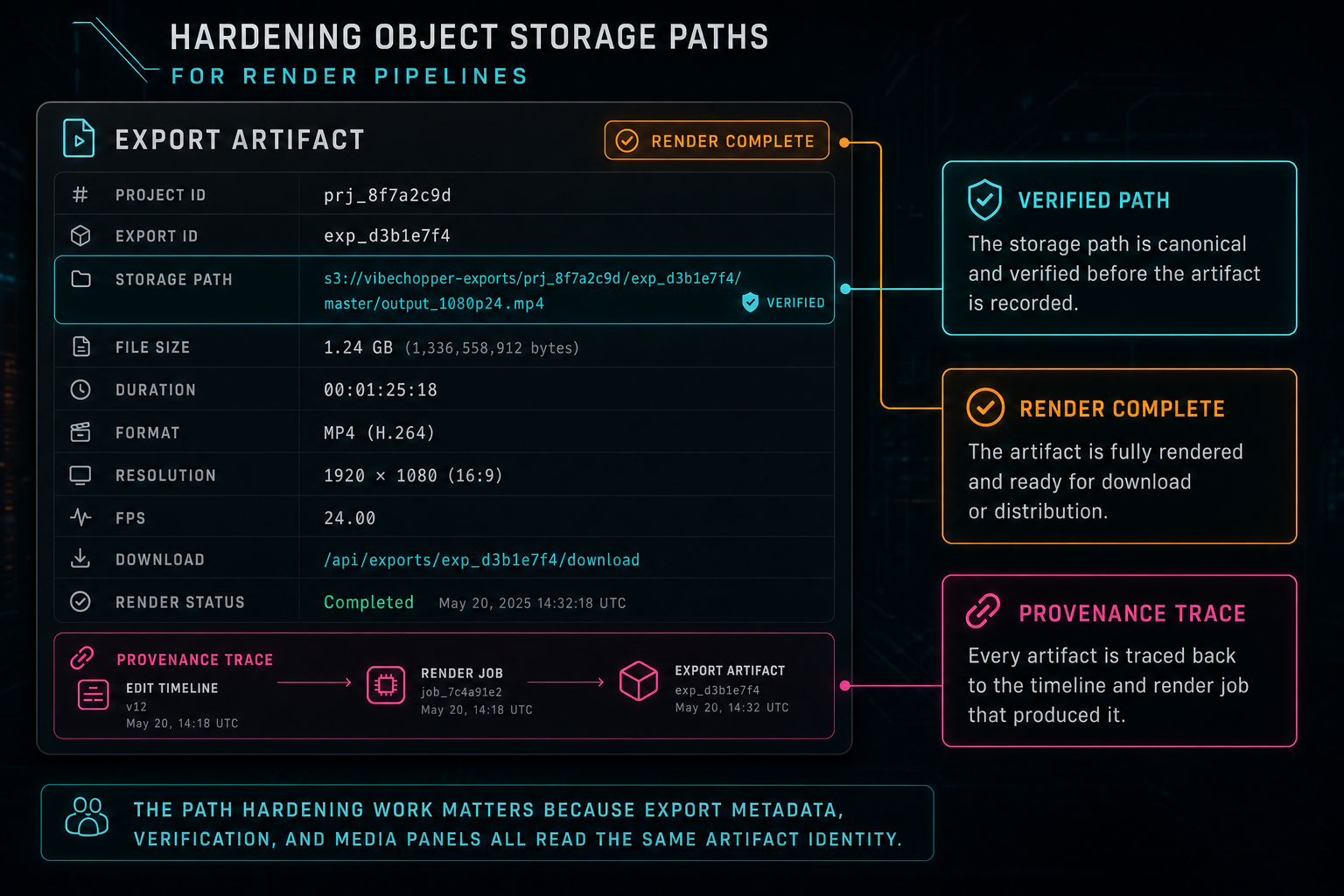
The path hardening work matters because export metadata, verification, and media panels all read the same artifact identity.
Failure States Need Addressable Artifacts
Object path hardening is not only about the successful export. It also improves the failure story. If a render fails before upload, the system knows there is no durable storage path yet. If upload succeeds but verification finds missing duration, the export has an addressable artifact with an incomplete metadata claim. If a later repair job needs to retry or inspect the output, the project/export path gives it a stable target.
That distinction is valuable for remediation. A user report that says an export failed can map to a project, export ID, render progress, storage path, object existence, file size, duration, tool events, and timeline state. Without stable paths, a repair agent is forced to search through anonymous upload folders or infer relationships from logs. With stable paths, the failure has structure.
Stable paths also make duplicate callbacks and retries less dangerous. A duplicate completion event can point at the same export path instead of creating a second orphaned artifact. A retry can decide whether to overwrite the same export output or create a new export record. Those are product decisions, not accidents caused by whichever upload helper happened to run last.
This is the same reliability theme that appears across VibeChopper's hardening wave: AI edit runs for traceability, tool events for timeline mutations, render verification for completed exports, upload telemetry for long-running media work, and remediation jobs for repair. Object storage paths are part of that system because every generated artifact eventually needs a durable address.
What Developers Should Copy
If you are building a cloud video renderer, copy the shape before you copy the exact code. Give render outputs deterministic paths based on product concepts. Keep provider bucket paths behind a server-owned object route. Normalize path formats at the storage boundary. Stream large files to object storage instead of loading them into memory. Treat scratch directories as temporary and clean them in finally blocks.
Add a storage helper that can upload to a caller-specified object path and return that exact normalized route. Generic upload helpers are fine, but render outputs deserve stable destinations. Keep object storage lookup behind a service so the editor, compositor, verification helper, and API routes do not each invent their own bucket parsing logic.
Treat media fetching as an authorization and safety boundary. Render project-owned object entities. Reject arbitrary external overlay URLs unless you have a deliberate fetch proxy and policy for them. Download sources into scratch through the same service that understands private object directories. Keep FFmpeg focused on local files and filter graphs.
Finally, design the path contract together with metadata. A storage path, file size, duration, format, resolution, FPS, project ID, export ID, plan ID, timeline URL, and linked media IDs become much more powerful together than any one field alone. The goal is not just to serve a download. The goal is to let the whole product agree on what the render became.
The Result
Hardening object storage paths turns rendering from a best-effort file operation into a product-grade artifact handoff. The compositor still does the heavy work: source downloads, filter graph construction, encoding, audio mixing, effects, overlays, and upload. The storage contract makes the result durable, addressable, and explainable.
In VibeChopper, the final render path says this output belongs to this project and this export. The object storage service maps that route into private storage. The upload streams from scratch disk to the promised destination. The scratch directory disappears after the attempt. The export record and verification layer can then attach concrete metadata to the artifact.
For creators, the result is simple: render the project and get the file. For the platform, the result is richer: a stable object path, a clean ownership boundary, durable metadata, and a trail that AI edit runs, media panels, verification helpers, and remediation jobs can all follow. That is what a render pipeline needs before it can be trusted with real creative work.
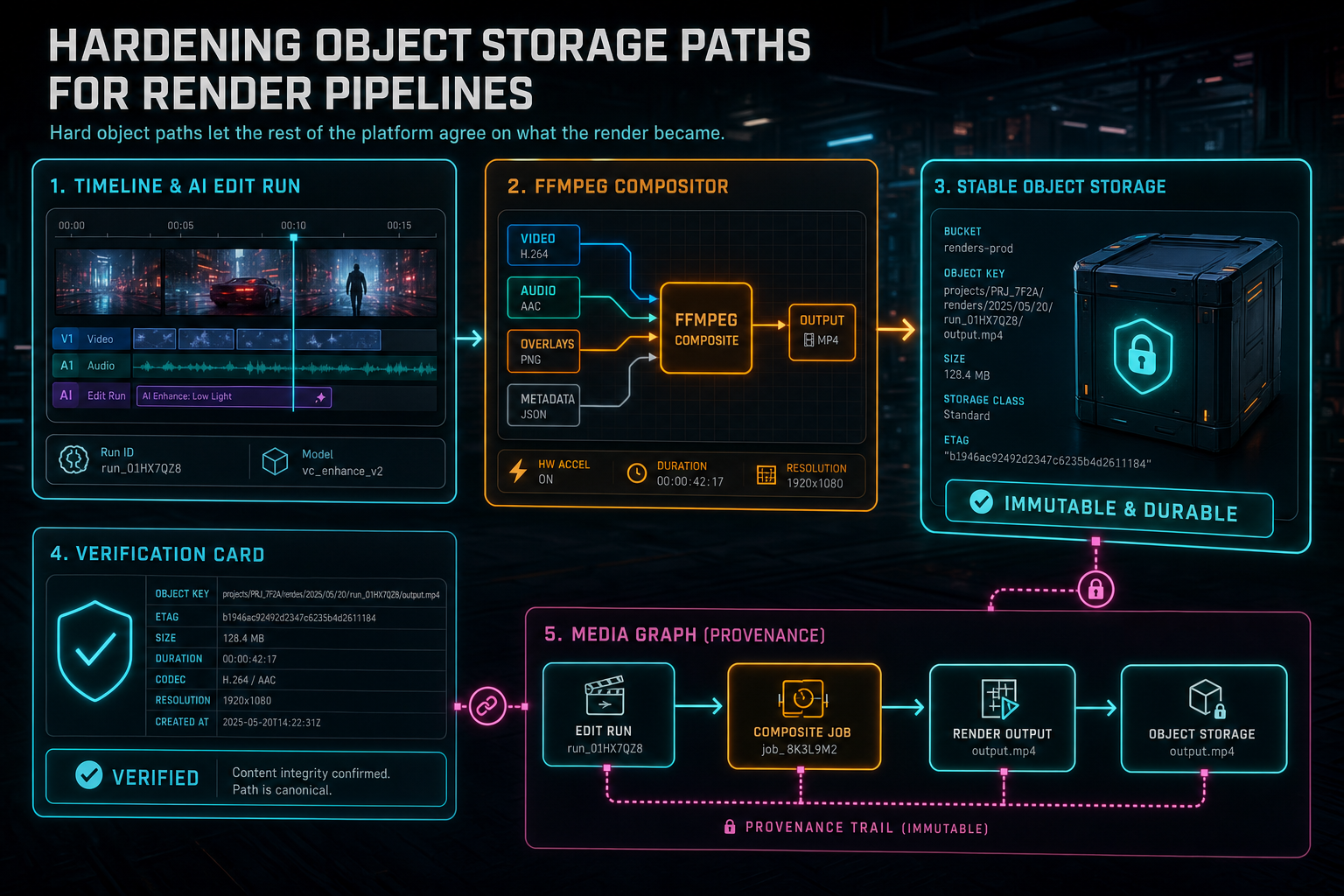
Hard object paths let the rest of the platform agree on what the render became.
Try the workflow
Open every feature from this post in the editor
These panels collect the features discussed above. Sign in once, finish your profile if needed, then the editor opens the first highlighted surface and walks through the tutorial.
Step 1
Render a verified timeline
Export a project through the same storage-backed render path described in this article.
Render a timeline free →Step 2
Open the media asset graph
See generated audio, rendered assets, source clips, metadata, and provenance in the media panel.
Explore your media graph →Step 3
Upload footage with progress you can trust
Watch large video uploads, processing, transcript work, and original-file storage from one monitor.
Upload a real shoot →Step 4
Inspect an AI edit run
Open the editor and see how plans, tool calls, artifacts, and render results stay connected.
Open the edit-run receipts →Step 5
Apply timeline effects
Try clip effects, speed ramps, color passes, and export-ready compositor behavior.
Try the effects pass →