
Why Project Provenance Graphs Matter
AI video editing creates a new kind of product state. A traditional editor can store project bins, clips, tracks, transitions, effects, and exports. That is already a lot. An AI editor has to store those same editing objects plus the reasons they exist: prompts, planning context, transcripts, frame descriptions, model outputs, tool calls, generated music, overlays, voiceovers, render verification, and repair work. If those records are not connected, the product becomes a pile of useful features that cannot explain itself. Open the edit-run receipts
A project provenance graph is the structure that keeps the explanation attached. It models a video project as connected facts rather than isolated tables or files. Source footage connects to extracted frames and transcript segments. Transcript segments connect to user intent and AI planning. AI edit runs connect to tool events. Tool events connect to timeline mutations. Generated assets connect to prompts, models, storage paths, timeline placement, and rendered exports. Repair jobs connect to the broken asset or edge they fixed.
That graph matters because the unit of trust in an AI editor is not the model response. It is the project after the response has been validated, applied, rendered, and reviewed. When a creator asks VibeChopper to assemble a rough cut, swap the intro shot, generate a music bed, or trim a section by dialogue, the system needs to know what evidence supported the action and what project state changed. The graph is how the product answers those questions after the chat bubble scrolls away.
This is not only an audit feature for engineers. It changes user experience. A provenance-aware editor can show why a clip was selected, which source range it came from, which generated asset is on a track, whether a render includes that asset, and what processing is still pending. It can recover from partial failures because it knows which relationship failed. It can let users search by meaning because frame and transcript intelligence stay connected to editable media. For AI video editing software, provenance is product memory.
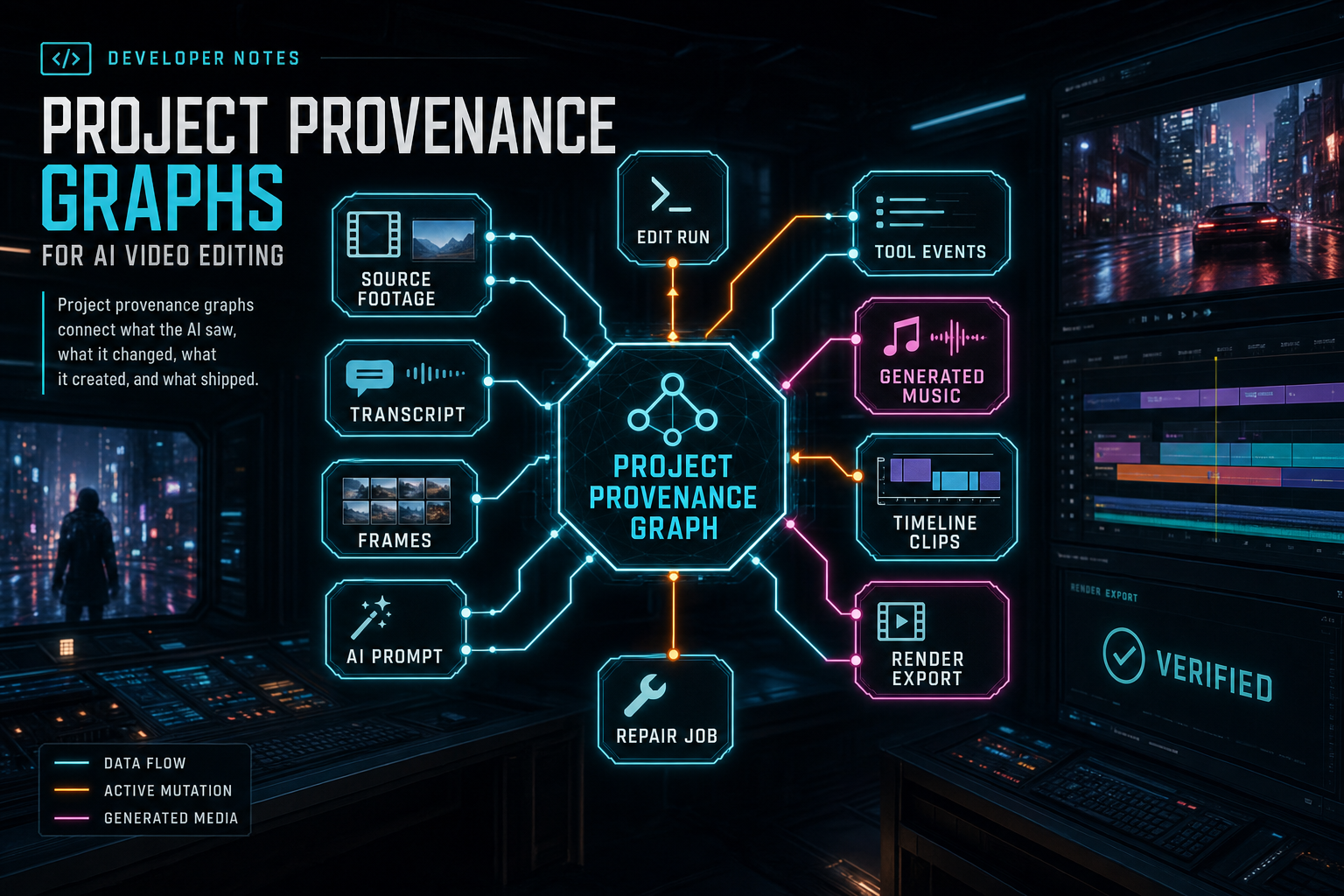
Project provenance graphs connect what the AI saw, what it changed, what it created, and what shipped.
Start With the Shape of the Graph
The graph does not require a graph database. In many product stacks, a relational database with clear IDs and relationship tables is the pragmatic first version. What matters is graph-shaped thinking. Every node should represent something the product can name. Every edge should represent a relationship the product can use. If an edge only exists in a log line or a filename convention, it will be hard to search, render, repair, or explain later. Explore your media graph
Useful node types include project, source media, original object, extracted frame, frame description, audio object, transcript segment, brief attachment, user instruction, AI edit run, planning result, tool event, timeline clip, transition, effect, generated asset, render artifact, review result, share link, and repair job. Some teams start smaller, but the important move is to avoid modeling all media as generic attachments and all AI activity as generic messages.
Useful edge types are just as important. A frame is extracted from a source video. A description describes a frame. A transcript segment covers an audio time range. A user instruction starts an AI run. A tool event mutates a timeline. A generated asset is created by a run. A timeline clip uses a source range or generated asset. A render artifact is rendered from a timeline state. A repair job repairs a missing object, failed transcript, broken render, or orphaned generated asset. Those relationships are what make the graph operational.
A good test is whether the graph can answer ordinary product questions. Which assets were used in this export? Which prompt created this music bed? Which AI run inserted this overlay? Which transcript sentence caused this cut? Which render failed because of a missing object? Which clips should be invalidated if the source file is deleted? If those questions require a human to read logs, the graph is still too implicit.
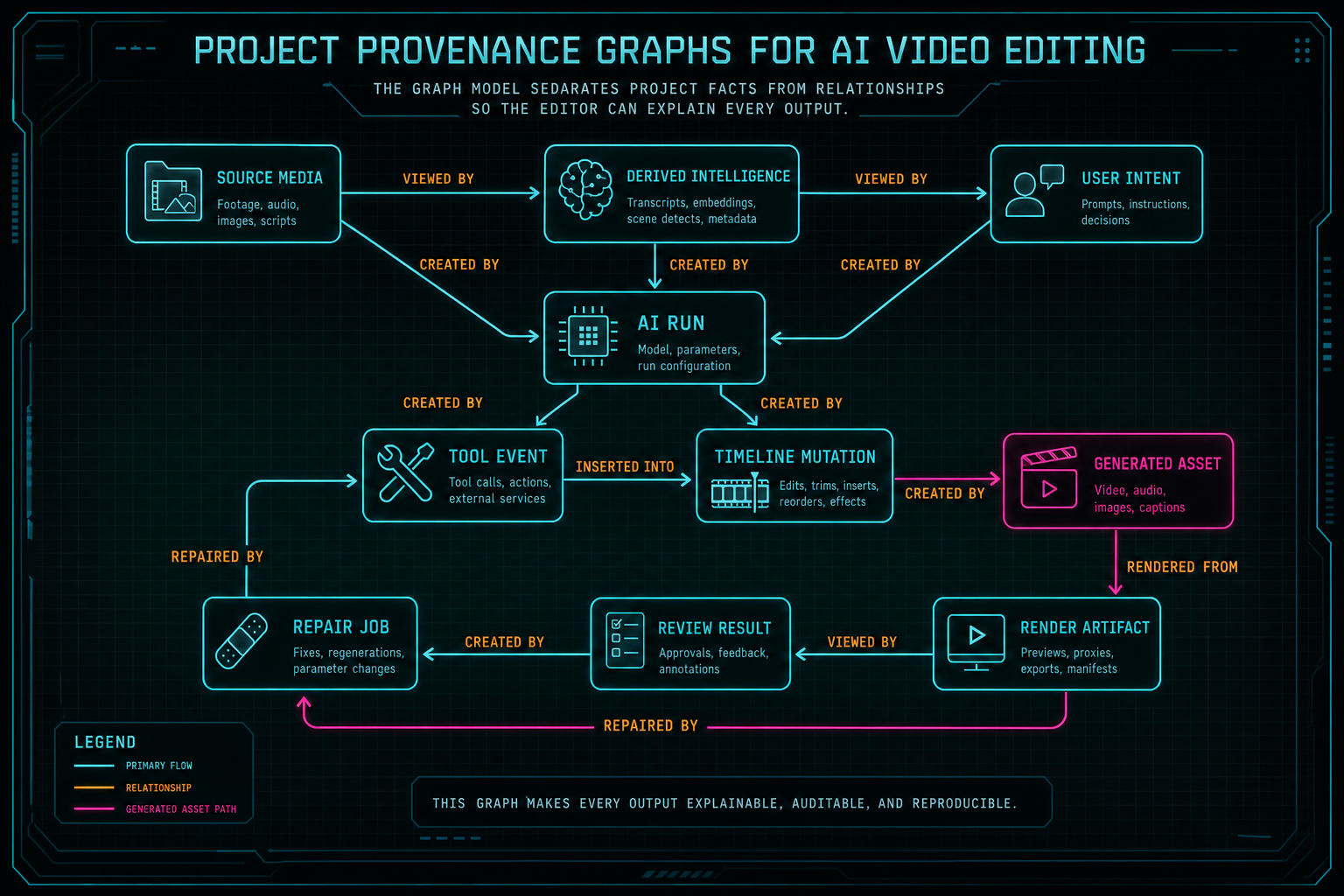
The graph model separates project facts from relationships so the editor can explain every output.
Treat AI Edit Runs as Graph Writes
An AI edit run should not be a private conversation between a prompt and a model. It should be a controlled write to the project provenance graph. The run starts with user intent and scoped project context. It may read source media summaries, transcripts, frame descriptions, selected timeline state, generated assets, and creative briefs. It plans actions. It calls tools. It creates or updates timeline records. It may generate assets. It may trigger a render. Each step should leave structured evidence. Open the edit-run receipts
This is where provider-agnostic completion infrastructure and tool events meet provenance. The model can propose structured actions, but the backend should validate and apply them through product tools. Those tools write durable records: split clip, add clip, move clip, set motion, add transition, add overlay, add music, render draft. The provenance graph then connects the user's request to the tool event and the resulting timeline change.
That separation is what makes the system explainable. The chat text can say I tightened the intro and added a driving bed. The graph can say the run trimmed source video A from 00:02.3 to 00:08.1, inserted clip B at track V1, generated music asset C with prompt D, placed it on track A2, applied a fade, and rendered draft E. One is a summary. The other is product state.
It also limits damage. If a model returns malformed JSON, the graph does not change. If a tool call is invalid for the current project, the backend rejects it before mutation. If music generation succeeds but insertion fails, the generated asset can still be attached to the run and offered for placement. A provenance graph makes partial success visible instead of forcing every AI action into all-or-nothing storytelling.
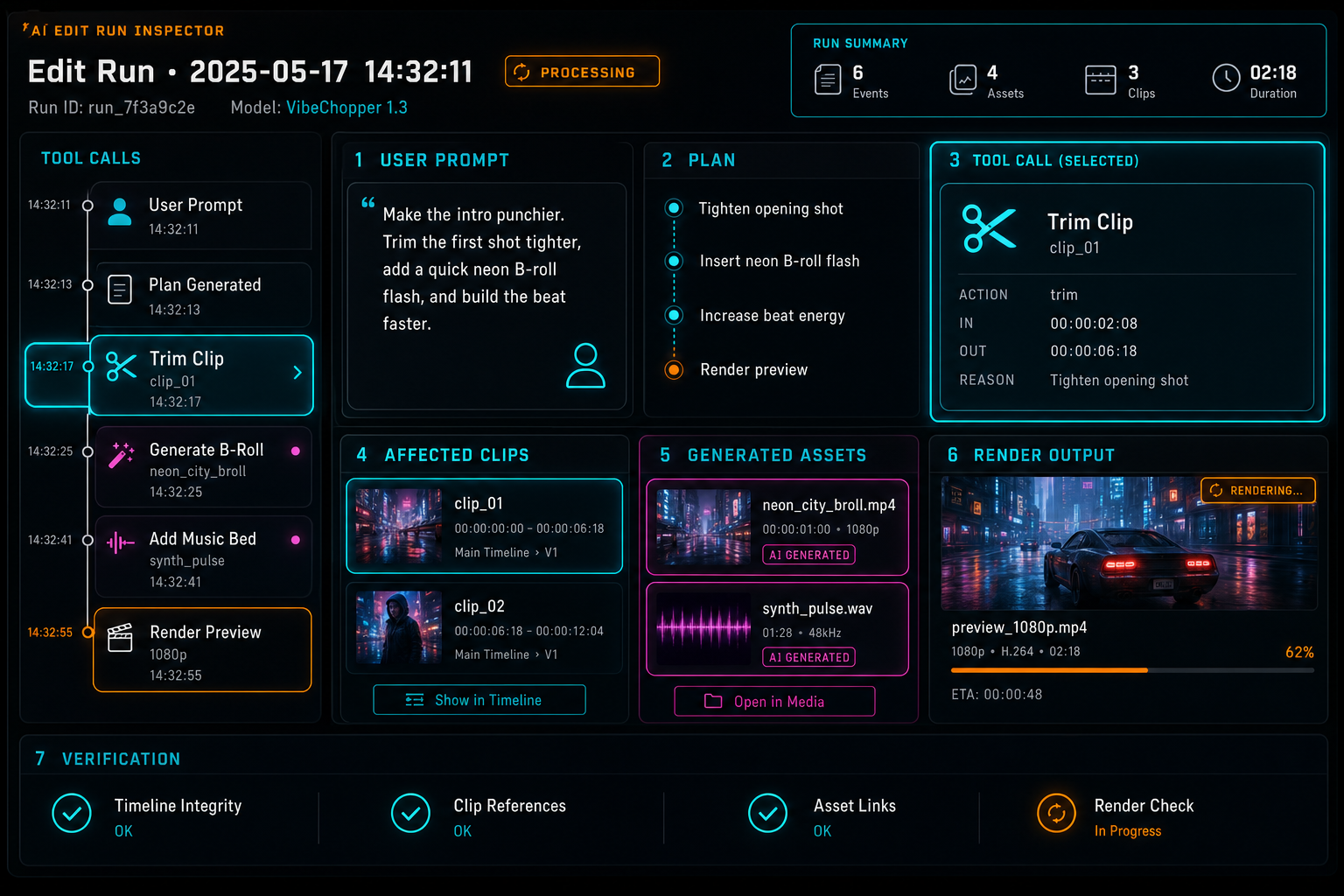
An AI edit run becomes useful when it points to concrete project state, not only a chat transcript.
Timeline Lineage Is the Core Editing Value
The timeline is where provenance becomes editing value. Users do not only want a record that an AI system did something. They want to understand and adjust the result. A clip on a timeline should be able to point back to its source video, source range, transcript segment, frame evidence, tool event, and run when those relationships exist. That lineage lets the editor show useful context without burying the creator in logs. Upload a real shoot
For transcript-aware editing, lineage answers why a cut happened. A user can ask to remove an awkward sentence, compress a long explanation, or build a short from the strongest quote. The final timeline clip should remain connected to transcript ranges and source media ranges. If the user later searches the dialogue, the timeline can jump to the derived edit. If a render needs captions, the same transcript relationships can support caption timing.
For visual editing, frame descriptions and source ranges play a similar role. A prompt like open on the product close-up, then cut to the reaction shot depends on visual intelligence. The AI run may select clips because frame descriptions identify a close-up, a logo, a face, or a scene change. Keeping that evidence attached gives reviewers a way to inspect the edit and gives later AI runs better context.
Lineage also protects render correctness. A server-side compositor needs source references, time ranges, track placement, effect parameters, transitions, generated assets, and audio mix state. If those records are explicit, rendering is a deterministic reconstruction of timeline state. If they are implicit, rendering becomes a guessing exercise based on the current UI. Provenance is not separate from the compositor; it is one of the inputs that makes the compositor reliable.
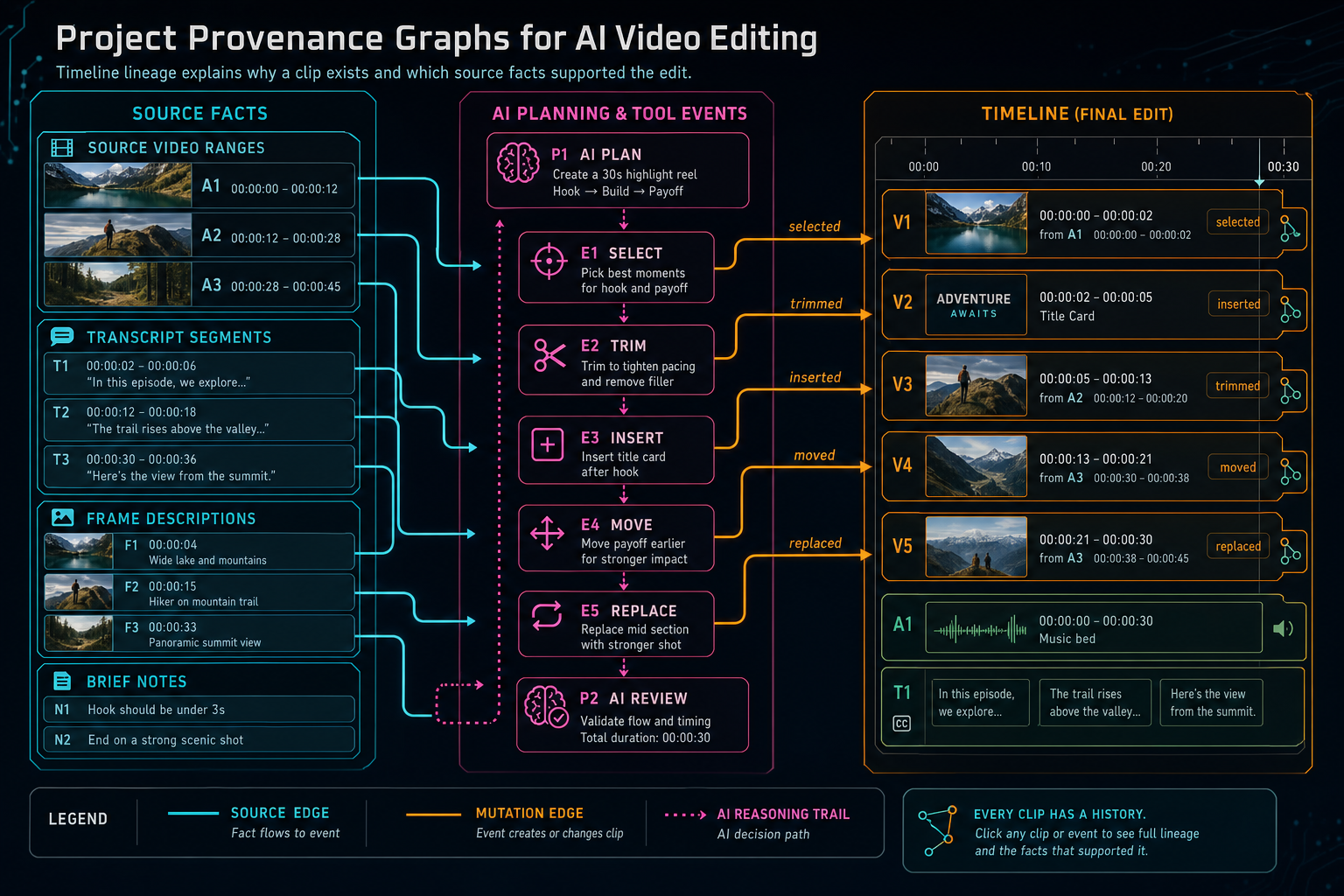
Timeline lineage explains why a clip exists and which source facts supported the edit.
Connect Generated Assets to Render Manifests
AI video editors generate media as well as edit uploaded footage. A music bed, overlay, voiceover, caption file, thumbnail, or repaired proxy is not a temporary side effect. It is a project asset with lineage. The graph should preserve the prompt or structured request, provider, model, output type, storage path, owner, project, run, tool event, timeline placement, and render inclusion. Score a timeline
Render manifests are where this pays off. A verified export should be able to list the source videos, generated music, overlays, voiceovers, captions, and effect settings that contributed to the output. That manifest does not have to be a user-facing legal document. It can be an internal product record that powers review screens, troubleshooting, storage cleanup, collaboration, and future export formats.
The practical failure mode is easy to picture. A creator generates a music bed, the product stores it, the timeline references it, and a render includes it. Later the creator reports that the export has the wrong soundtrack. Without provenance, the team has to compare UI state, object storage, and render logs. With a graph, the product can inspect which generated asset was placed, which render manifest included it, and whether another run replaced the timeline clip after export.
The same structure supports creative reuse. A generated asset can remain in the media panel after it is removed from a timeline. The user can regenerate a similar asset from its original prompt. A later AI run can ask whether a project already has a suitable music bed. The product can show generated media as durable creative material instead of disposable model output.
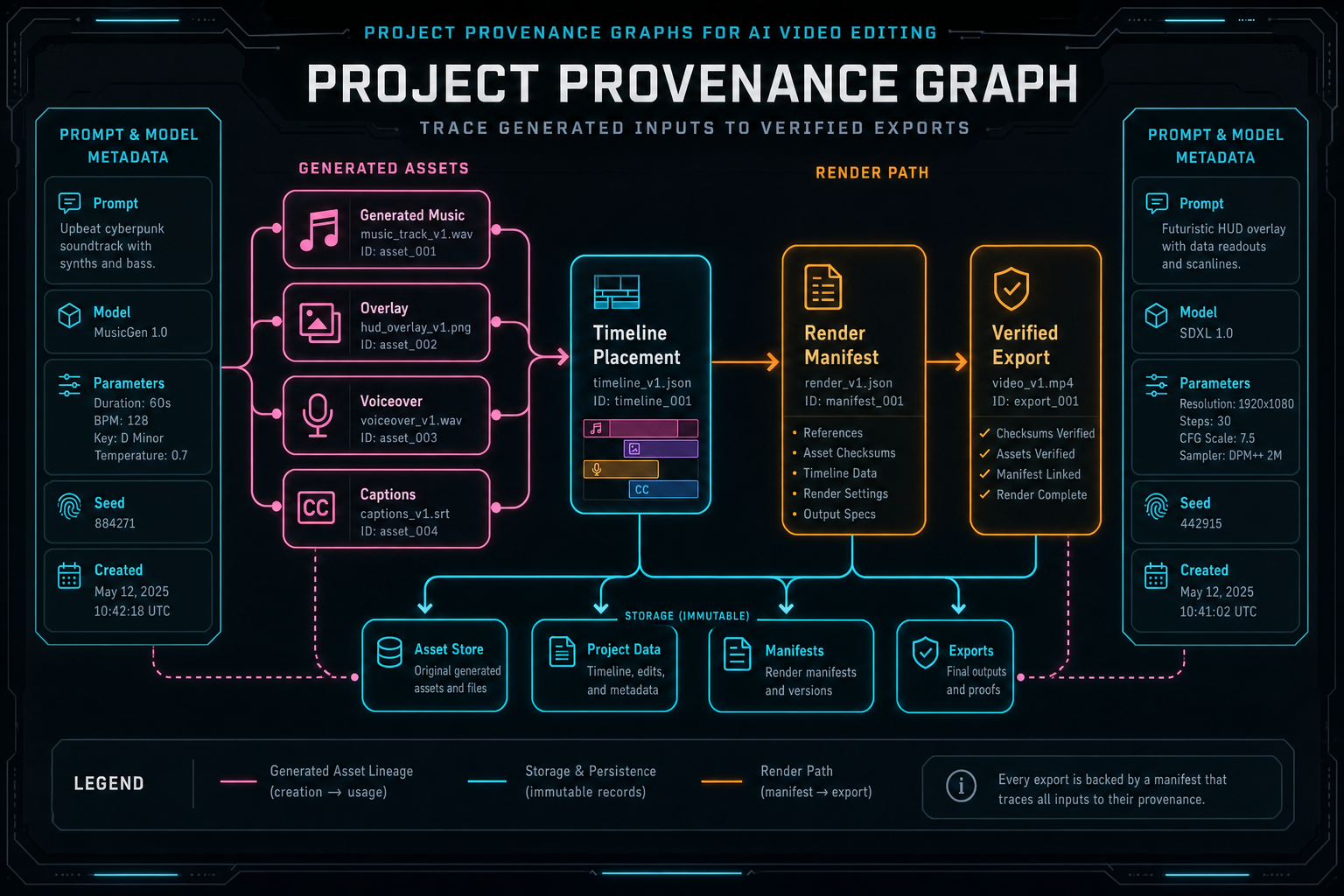
Render manifests are stronger when they can trace generated inputs back to project provenance.
Make Ownership an Edge, Not an Afterthought
A provenance graph is only useful if it respects ownership. Every source object, generated asset, AI run, timeline mutation, render, share link, and repair job should remain scoped to the user, project, and collaboration context that authorized it. AI does not weaken that boundary. If anything, it makes the boundary more important because agents can perform multiple actions quickly. Explore your media graph
The backend should resolve graph nodes through product records, not arbitrary URLs supplied by the client. A render worker should receive project-scoped asset references. An AI edit run should read only media the user can access. A generated output should inherit project ownership. A public share or native app deep link should preserve the same access rules used in the browser.
This matters for security, but it also matters for debugging. When an object storage path is missing, the repair system should know which project expected it and which user can see the repair result. When a collaborator creates an AI-generated asset, the graph should know the actor and the owning project. When an export is shared, the manifest should not leak private asset references outside the access boundary.
Ownership is therefore part of provenance, not a separate middleware concern. The graph should be able to answer who created this, who owns this, who can view this, and which project context makes this valid. Those fields keep AI video editing aligned with normal product rules even when the workflow feels conversational.
Design the Graph to Be Repairable
Video projects fail in partial ways. The original upload can succeed while frame analysis fails. A transcript can exist without speaker labels. A generated overlay can upload but fail to attach to the timeline. A render can complete but fail verification. A repair system cannot fix these cases if the project only has a single failed state. Upload a real shoot
A provenance graph gives repair jobs a target. Instead of project broken, the system can identify frame descriptions missing for video X, generated asset Y missing object storage path, render Z references stale timeline state, or tool event Q failed after asset creation but before placement. The repair job can attach to the broken node or edge, run the narrow retry, and record the result back into the graph.
This is one reason status vocabulary matters. Requested, processing, completed, skipped, failed, stale, retrying, repaired, and verified should mean different things. A missing original object is not the same as a pending transcript. A malformed model response is not the same as a storage upload failure. A graph with specific failure states lets the UI speak clearly and lets workers avoid repeating expensive work.
Repairability also helps users during active editing. If a refresh happens mid-upload, the product can reconstruct upload and processing state from durable records. If an AI run partially succeeds, the editor can show what was created and what still needs attention. If a render fails verification, the product can point to the asset or timeline relationship that needs repair. That is a better experience than a generic retry button with no explanation.
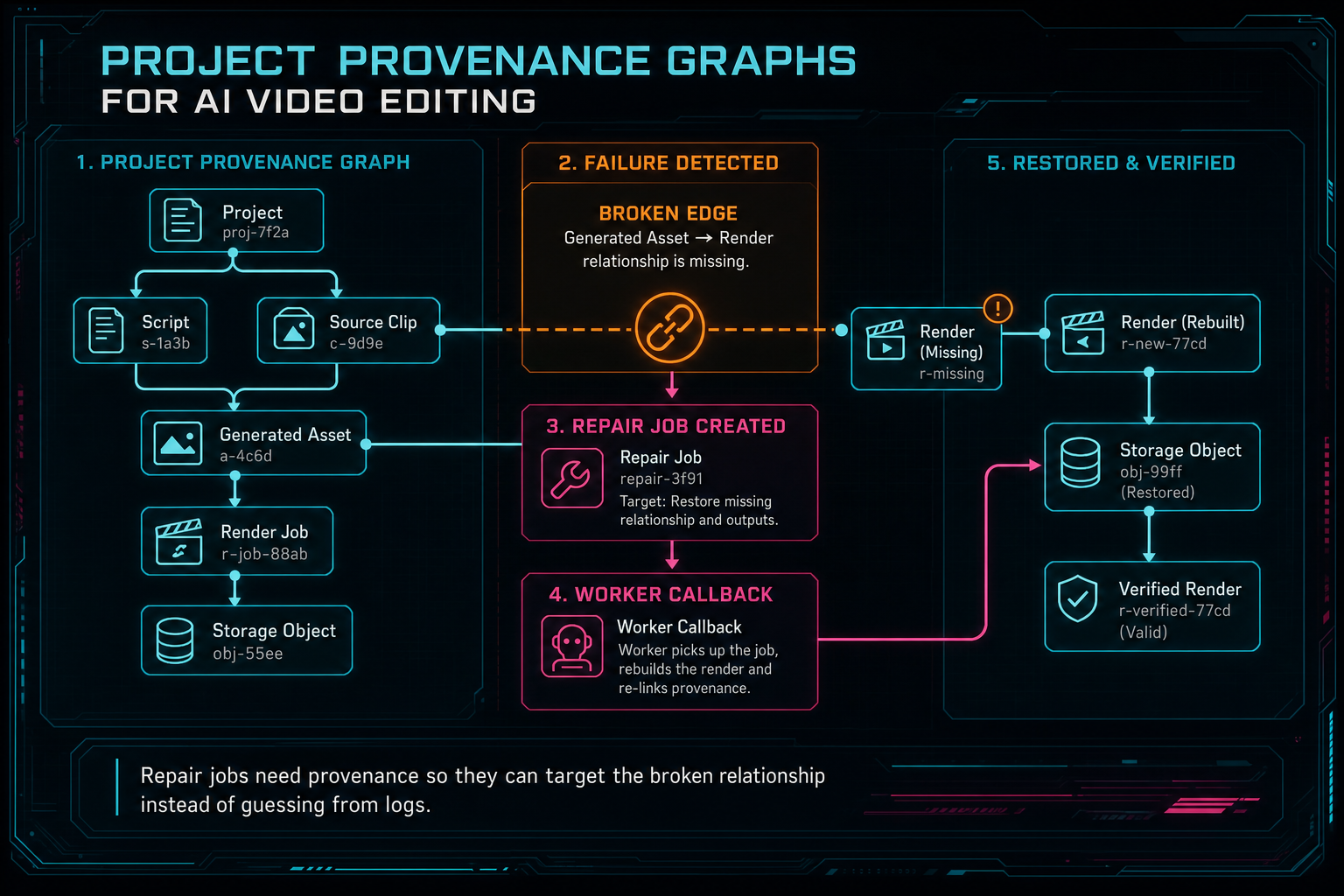
Repair jobs need provenance so they can target the broken relationship instead of guessing from logs.
Build for the Queries the Product Will Ask
The graph should be designed around product queries, not abstract completeness. Start with the screens and workflows that need answers. The media panel needs to group source footage, generated assets, renders, and processing status. The AI run inspector needs prompt, plan, tool events, outputs, and affected timeline objects. The render detail view needs input assets, settings, verification state, and storage references. The repair view needs broken states and prior attempts. Open the edit-run receipts
Those workflows imply specific indexes and relationship paths. You will need to fetch all assets for a project by type and status. You will need to fetch all tool events for a run in order. You will need to fetch timeline clips and their source assets. You will need to fetch render artifacts and their input manifest. You will need to find failed or stale derived assets for remediation. Naming those queries early keeps the graph practical.
A common mistake is to push every relationship into a flexible JSON blob because AI workflows seem unpredictable. Some extension fields are useful, especially for provider-specific metadata, but the core relationships should be typed. Project ID, user ID, source media ID, asset ID, run ID, tool event ID, timeline clip ID, render ID, status, storage key, and timestamps are not incidental details. They are the joins that make the product work.
The public SEO lesson is the same as the engineering lesson: specificity builds credibility. Developers searching for AI video editor architecture, AI workflow audit trails, or creative asset provenance are trying to understand how a real system holds together. A project provenance graph is the answer when it is described as queryable product infrastructure, not as a vague promise of transparency.
Implementation Checklist
First, define the graph vocabulary. Write down the node types and edge types your editor needs: source media, frames, transcripts, AI runs, tool events, timeline clips, generated assets, renders, reviews, and repairs. Keep this vocabulary visible in schema names, API responses, and UI labels so the product speaks the same language as the backend. Render a timeline free
Second, make AI tools write graph records. The model can propose edits, but server-side tools should validate ownership, apply mutations, and create durable events. Store enough context to reconstruct the action: actor, project, run, input assets, command, output records, status, and error details when relevant.
Third, connect generated media to both prompts and timeline usage. Store provider and model metadata, but do not stop there. The asset should point to storage, the run that created it, the tool event that placed it, and the render that included it. This is what turns generated output into editable project material.
Fourth, make render verification graph-aware. A verified render should know the timeline state and assets it consumed. When export bugs happen, the product should inspect the manifest and graph relationships before asking users to recreate the problem.
Finally, design repair as a graph operation. A repair job should not operate from a vague support note. It should point to the missing object, failed derived asset, stale render, or broken relationship. When the repair completes, the graph should show what changed.
The Result
A project provenance graph turns AI video editing from a sequence of impressive model calls into a reliable editing system. It connects user intent to source media, source media to derived intelligence, derived intelligence to AI planning, AI planning to tool events, tool events to timeline state, timeline state to generated assets and renders, and failures to repair jobs. Open the edit-run receipts
That structure is why VibeChopper can make voice-driven editing feel direct without losing the engineering discipline underneath. Creators can describe the edit they want. The system can ground the request in project media, apply validated timeline changes, generate assets when needed, render the result, and keep a trail of what happened. The product stays simple at the surface because the graph carries the complexity below it.
For teams building AI video editing software, the core lesson is practical: do not let prompts, files, timeline changes, and renders drift apart. Give them IDs. Give them relationships. Give them ownership. Give them statuses. Then build UI and agent workflows that read from the same structure. The graph does not slow the creative workflow down. It is what lets the workflow remain trustworthy after the AI has moved fast.
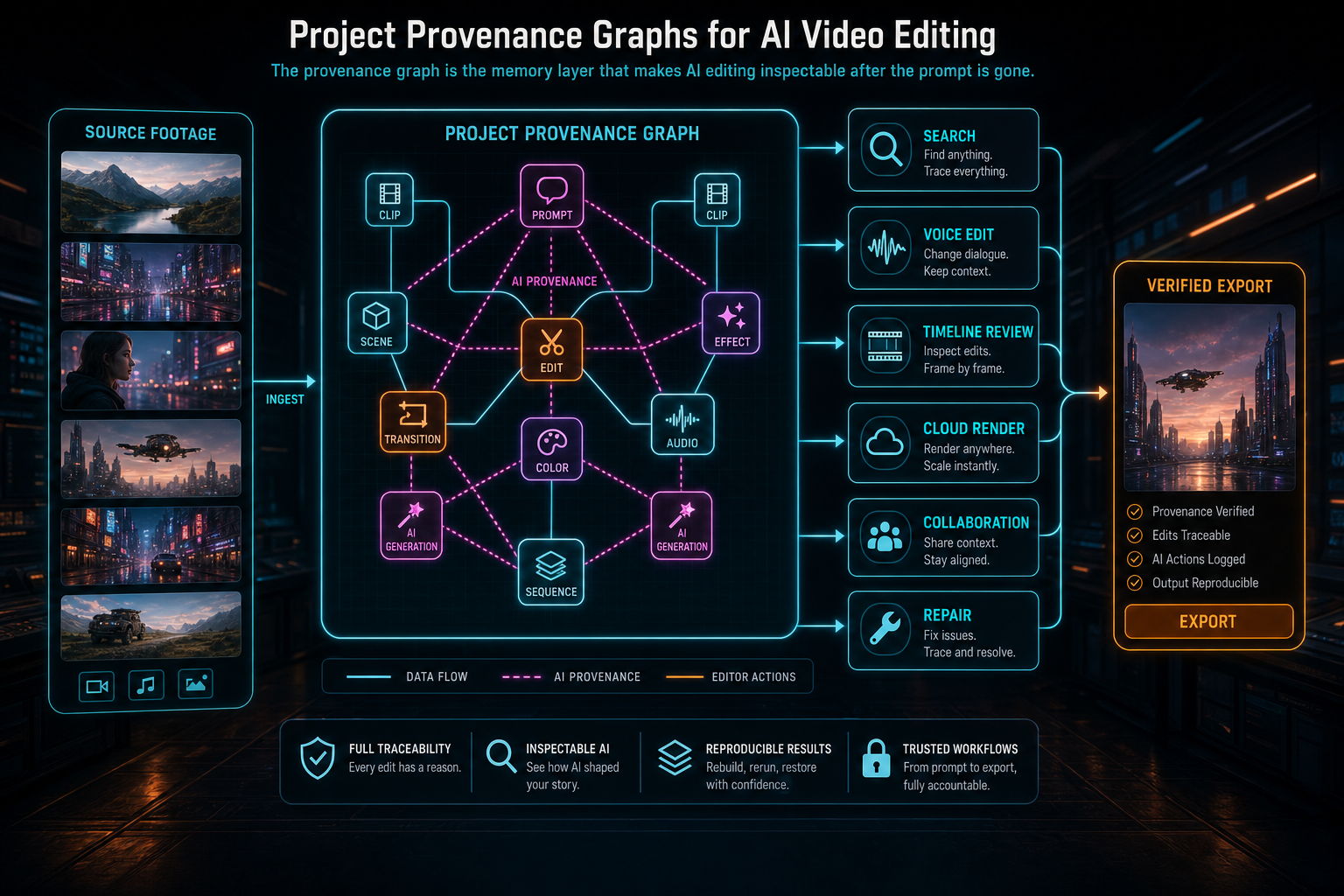
The provenance graph is the memory layer that makes AI editing inspectable after the prompt is gone.
Try the workflow
Open every feature from this post in the editor
These panels collect the features discussed above. Sign in once, finish your profile if needed, then the editor opens the first highlighted surface and walks through the tutorial.
Step 1
Inspect an AI edit run
Open the editor and see how plans, tool calls, artifacts, and render results stay connected.
Open the edit-run receipts →Step 2
Open the media asset graph
See generated audio, rendered assets, source clips, metadata, and provenance in the media panel.
Explore your media graph →Step 3
Upload footage with progress you can trust
Watch large video uploads, processing, transcript work, and original-file storage from one monitor.
Upload a real shoot →Step 4
Generate a music bed
Create AI music assets with prompts, metadata, provenance, and timeline placement.
Score a timeline →Step 5
Render a verified timeline
Export a project through the same storage-backed render path described in this article.
Render a timeline free →