
Why Provenance Is a Product Feature
Generated media provenance sounds like a compliance word until an editor needs it. A creator asks for a darker music bed, an AI-generated overlay, a voiceover take, a thumbnail, captions, or a render draft. The product creates something useful. Minutes later, the same creator asks where it came from, whether it belongs to this project, which prompt shaped it, which model produced it, why it landed on this timeline track, and whether the final export includes it. If the system cannot answer those questions, the asset is no longer product state. It is a loose file with a good story missing. Explore your media graph
VibeChopper treats generated media as project-owned artifacts. A generated asset has an owner, project, source request, prompt, provider, model, output type, storage path, tool event trail, timeline usage, and render relationship. The user does not need to inspect every field during a normal edit. The system still keeps the trail because video editing is a long workflow. Assets are uploaded, analyzed, generated, inserted, moved, trimmed, mixed, rendered, shared, and sometimes repaired. Provenance is what lets that workflow stay explainable.
This is especially important for AI video editing software because the model is not the product boundary. The model can write JSON, return audio, produce an image, summarize frames, or draft metadata. The editor still has to validate that output, store it, attach it to project records, and show users what changed. Generated media provenance is the contract between creative intent and durable editing state.
A useful mental model is simple: every generated output should be able to answer five questions. What request created me? Which model and settings produced me? Where is the output stored? Who can access and use me? Where do I affect the edit? The rest of the architecture is just making those answers reliable.
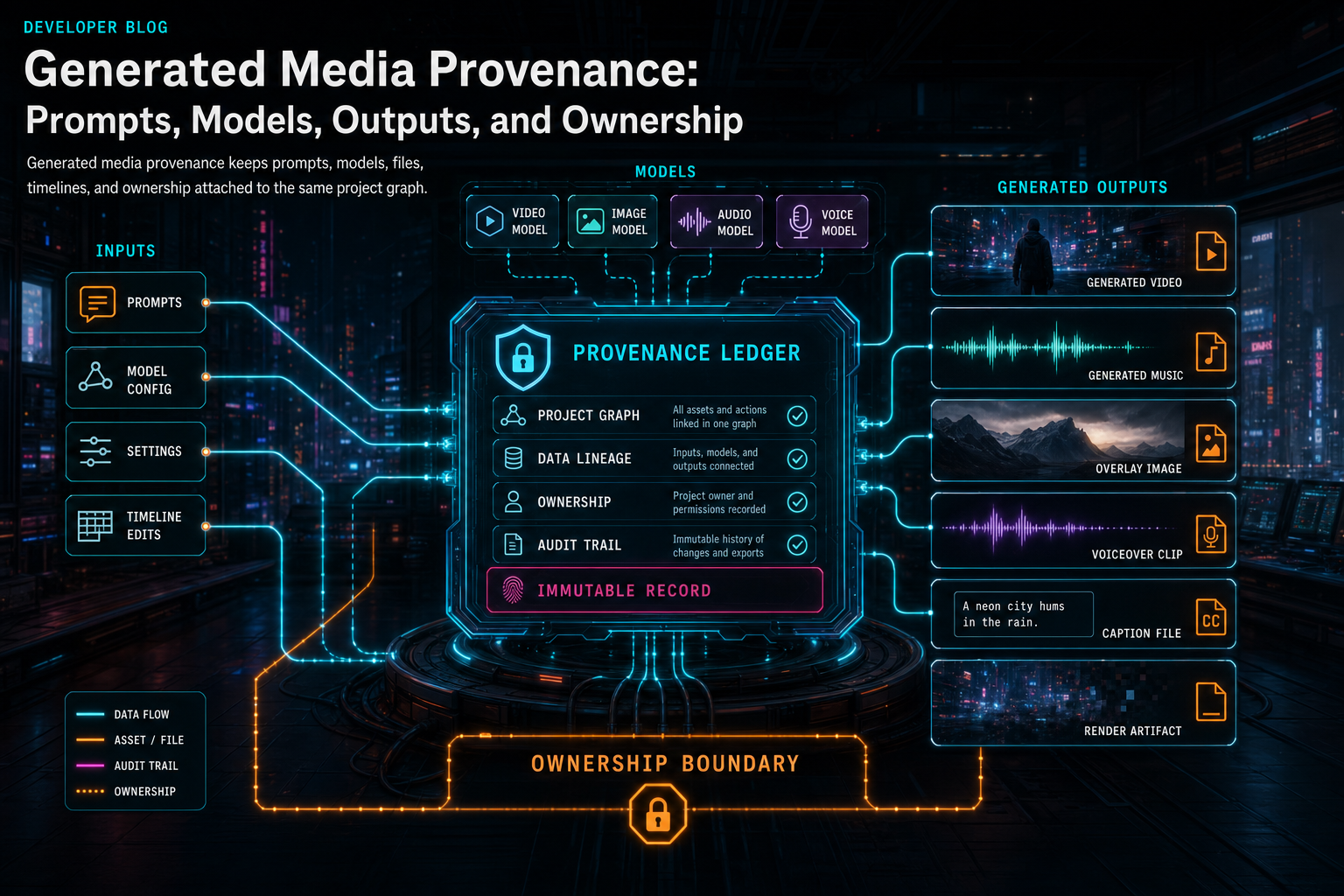
Generated media provenance keeps prompts, models, files, timelines, and ownership attached to the same project graph.
The Prompt Is Necessary, Not Sufficient
Teams often start provenance with the visible prompt: the exact words typed by the user. That is worth storing, but it is not enough. An AI editor usually transforms the user's request before calling a model. It may add project context, transcript snippets, selected clips, style instructions, duration constraints, safety constraints, output schemas, or a prompt written by a planning model. The final request sent to the generation model is often more specific than the original command. Open the edit-run receipts
A serious provenance record separates those layers. It can keep the user instruction, the planner summary, the final generation prompt, and any system constraints that shaped the output. For an AI music bed, that might include the user's instruction, the target timeline span, a note to avoid vocals, and the model-specific prompt sent to the music provider. For a generated overlay, it might include the selected clip, visual style, transparency requirement, and output dimensions. For captions, it might include transcript source IDs and formatting rules.
The provider and model fields matter just as much as the text. A record that says generated by AI is not enough for debugging, search, or user trust. The system should preserve provider, model, model version when available, request time, response status, usage metadata, output MIME type, and stable IDs for the edit run or tool call that requested the work. Those details explain why two similar prompts produced different assets and give operators enough context to diagnose failures.
This does not mean the public UI has to display a wall of metadata. The media panel can show a concise generated badge, title, source run, and prompt summary. The deeper record can remain available for audit trails, support, remediation, and future export manifests. The important part is that the information exists in structured fields instead of disappearing into logs.
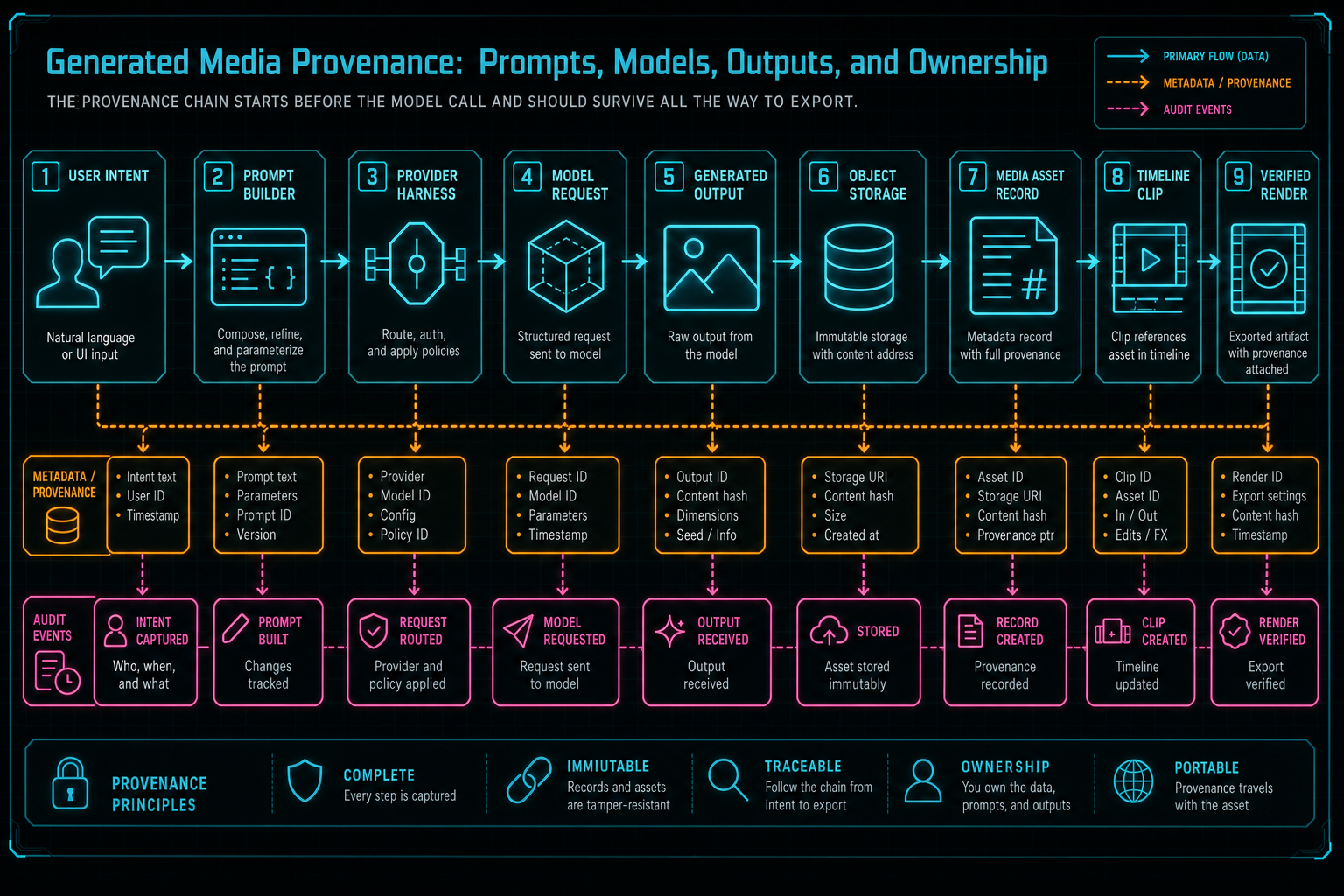
The provenance chain starts before the model call and should survive all the way to export.
Design the Generated Asset Record
A generated media asset record should not be modeled as an attachment with a fancy name. It needs enough shape to support search, ownership, rendering, retry, and explanation. At minimum, the record should include asset ID, owner user ID, project ID, asset kind, source type, status, title, description, tags, storage path, content type, size when known, duration or dimensions when known, prompt fields, provider fields, model fields, generation timestamps, and links to run IDs or tool event IDs. Explore your media graph
The source field is more important than it looks. A media library can contain user uploads, extracted frames, generated music, generated overlays, voiceovers, captions, thumbnails, and final renders. Treating all of them as files makes the UI simpler for a day and the system harder forever. Source type tells the product how to display the asset, how to search it, whether it should have a prompt summary, whether it can be regenerated, and which ownership rules apply.
The record should also store usage links. A generated asset becomes more valuable when the system can point from the asset to the timeline clip that uses it, from the clip back to the asset, from the edit run to the asset, and from a render artifact to the generated inputs included in the export. That link graph is what turns provenance from a static receipt into operational product memory.
Search text is another practical field. It can combine title, description, prompt summary, tags, transcript snippets, model name, and source run identifiers into an indexable string. Users should be able to find the generated bed they made for the intro, the overlay created for a product shot, or the voiceover attached to a revision. Provenance feeds discoverability, not only audits.
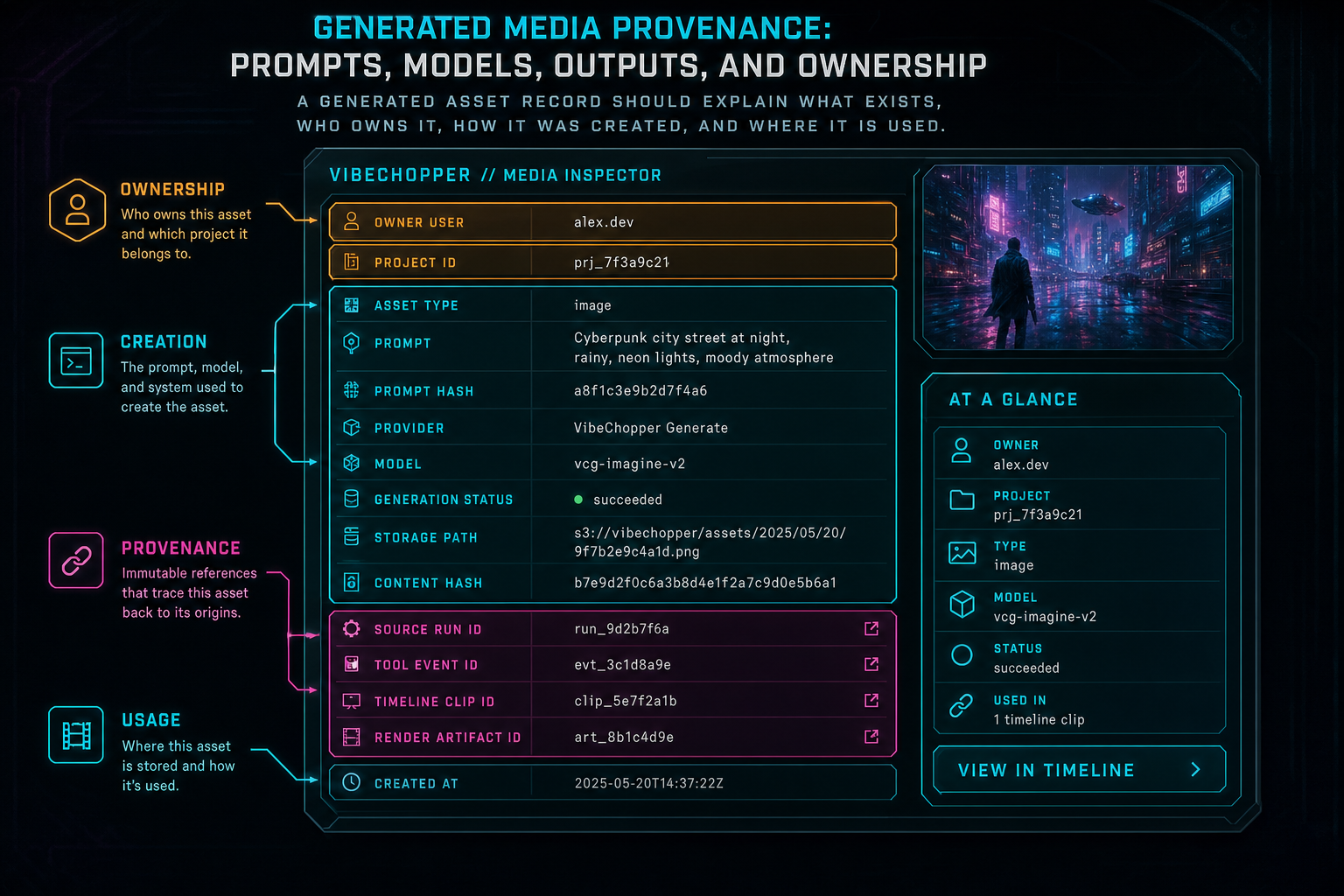
A generated asset record should explain what exists, who owns it, how it was created, and where it is used.
Ownership Is Part of the Chain
Generated media ownership starts at the request boundary. If an authenticated user generates an asset inside a project, the asset should inherit that user and project scope. If a collaborator triggers generation, the record should preserve both the actor and the project owner or team context. If an AI agent triggers generation as part of an edit run, the system should still know which user authorized the run and which project owns the result. Upload a real shoot
Object storage should follow the same boundary. The browser should not receive a raw bucket path and become responsible for enforcing access. The server can route object access through project-aware endpoints, signed URLs, or controlled object routes, but the canonical asset record should remain tied to project ownership. A generated output is not public because a model created it. It is private or shared according to the project's access rules.
Ownership also affects deletion, export, and remediation. If a user deletes a project, generated assets should be included in cleanup or retention policy decisions. If a collaborator leaves a shared project, their access to generated outputs should follow the collaboration model. If a repair job needs to retry generation or reconnect a missing asset, it should operate inside the same ownership boundary rather than bypassing it with privileged storage assumptions.
This is why provenance should include actor, owner, project, and visibility fields instead of only technical generation metadata. AI-generated media is still user data. The fact that a model produced the bytes does not remove the need for normal product controls around authentication, authorization, export, retention, and sharing.
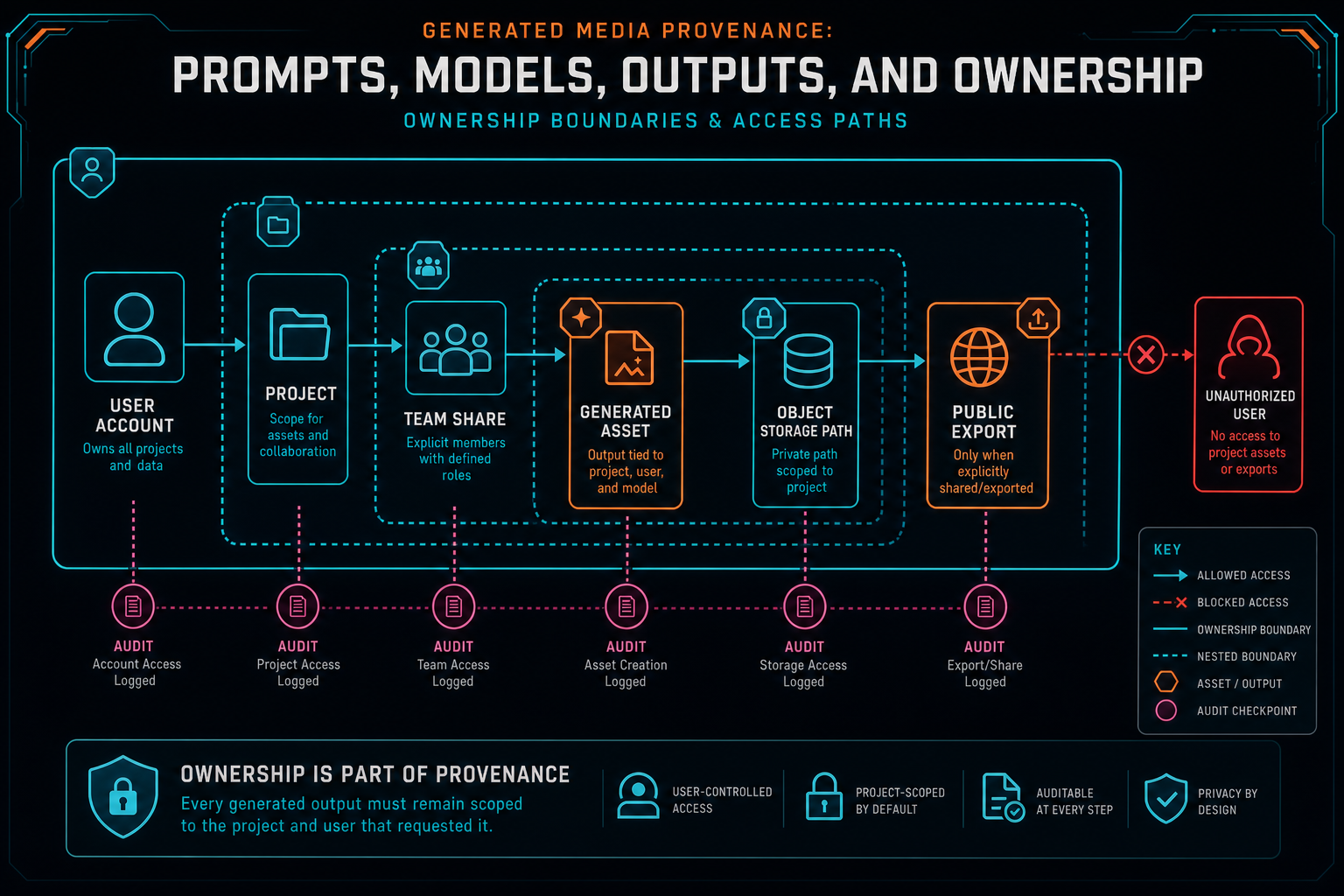
Ownership is part of provenance because every generated output must remain scoped to the project and user that requested it.
Connect Outputs to Timeline Usage
Generated media is not complete when the output file exists. A video editor works through timeline state. The generated music bed must be inserted on an audio track, trimmed, faded, and mixed. A generated overlay must land in the correct time range with dimensions, opacity, blend mode, and motion behavior. A voiceover must line up against the spoken section it replaces or supports. Captions must connect back to transcript segments and timeline timecodes. Render a timeline free
That means the asset record and timeline record need a bridge. The asset says what was generated and where it is stored. The timeline clip says how that asset is used in the edit. The tool event says what action connected them. A render artifact can then record which generated assets contributed to the final export. This chain lets the product explain not only that an asset exists, but that it mattered to the output.
The distinction helps users during normal editing. If a creator moves a generated music clip, the asset remains the same while timeline usage changes. If they delete the clip, the asset might remain in the media graph for later reuse. If they render the timeline, the export can include a manifest that points back to the generated inputs. The system does not need to guess from file names because the relationships are explicit.
AI edit runs benefit from the same linkage. A run can show that it generated a music bed, inserted it at a certain time, adjusted volume, applied fades, and rendered a draft. When a user reviews the result, the assistant can point to actual state changes instead of narrating an intention. That is the difference between an AI assistant that sounds confident and one that is backed by inspectable project data.
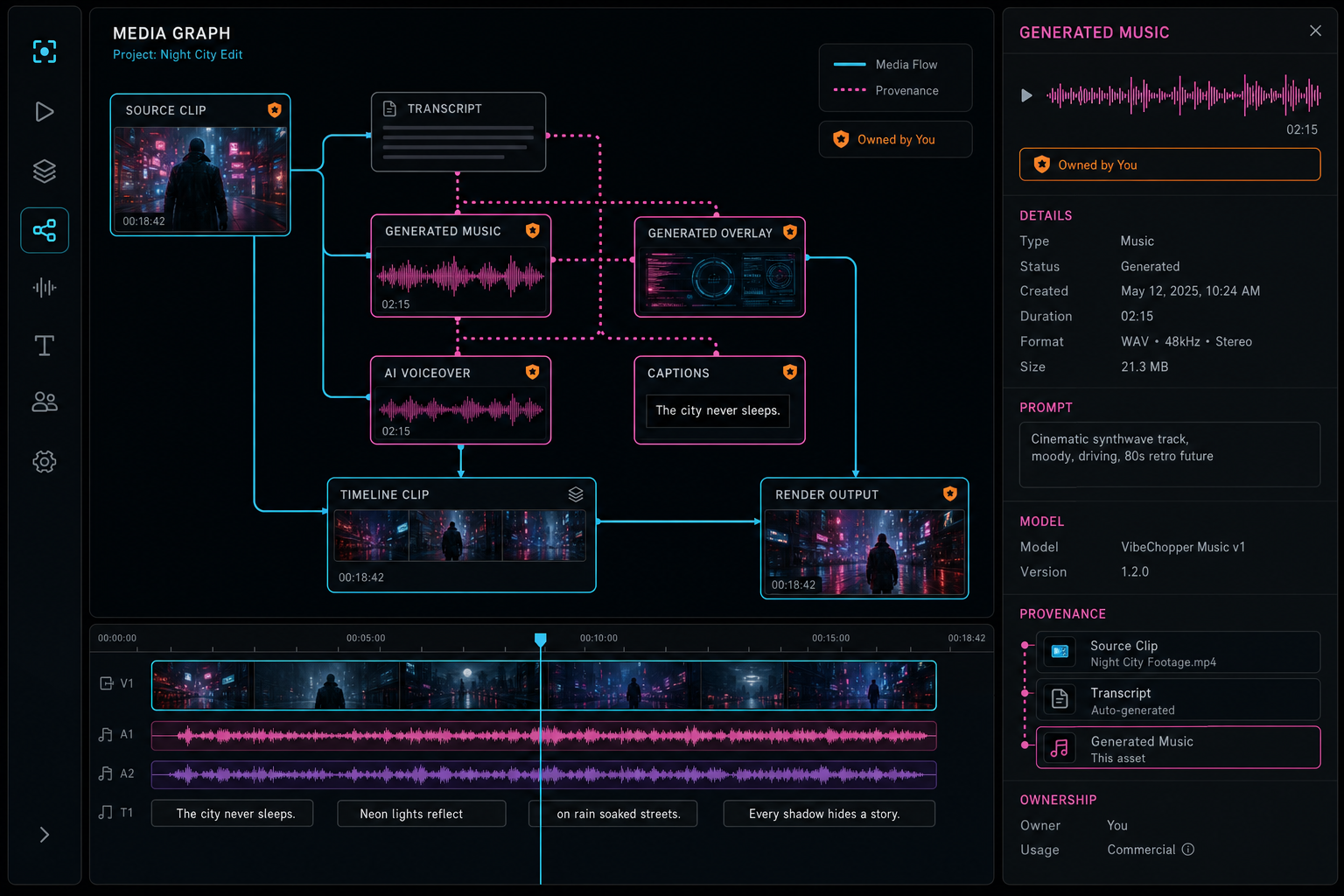
The media graph makes generated assets visible as first-class project state instead of hidden side effects.
Failure State Belongs in Provenance
Generated media pipelines fail in partial ways. The prompt can be invalid. The model can return malformed output. The provider can rate limit. The upload to object storage can fail after generation succeeds. The asset record can be created while timeline insertion fails. A render can fail later because the generated file is missing or incompatible. If the system only records success, every partial failure becomes a mystery. Open the edit-run receipts
A better lifecycle includes requested, prompt built, model called, output received, uploaded, recorded, inserted, rendered, skipped, failed, retrying, and repaired. Not every asset needs every state, but every system needs a vocabulary that distinguishes no-op, skipped, transient failure, permanent failure, and completed work. Those states let the UI show useful progress and let remediation jobs target the broken edge.
The retry story should keep the original request. If a provider rate limit clears, the product may retry with the same prompt and model. If the model is deprecated or unavailable, the system may retry with a replacement model while preserving the original provider attempt. If storage upload failed, the product should not call the model again unless the output bytes were lost. Provenance keeps retries efficient by recording where the previous attempt stopped.
This also protects user trust. A creator should not see a generic failure if the system already generated the asset but could not insert it on the timeline. The product can say the asset was created and offer to place it again. A support workflow can inspect the failed transition rather than asking the user to recreate the whole prompt. Failure state is not a side note; it is part of the asset's history.
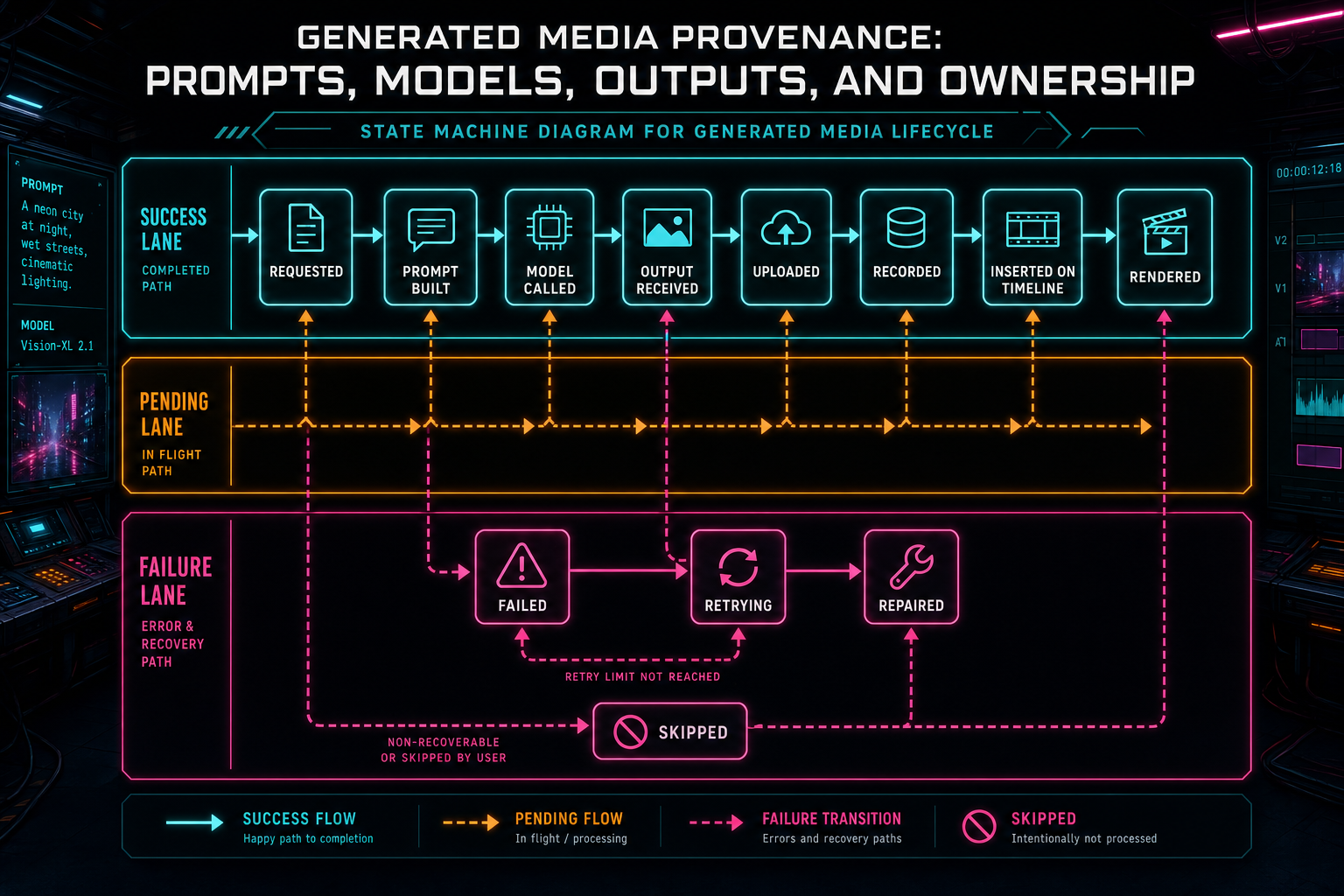
Provenance includes failure state so retries and remediation can target the broken edge.
How to Talk About Provenance Publicly
Generated asset provenance is technical infrastructure, but it also belongs in product language. Users comparing AI video editors want speed, quality, and control. Provenance is how a product proves control. It supports statements like: generated music is stored as an editable project asset, AI outputs remain tied to your project, renders can trace generated inputs, and the editor can show what an AI run changed.
For SEO, the useful keyword cluster is broader than provenance. Searchers may use phrases like AI generated asset metadata, AI video editor audit trail, creative asset provenance, AI media asset management, prompt history, generated music ownership, or video asset metadata. The article should answer those terms with concrete architecture instead of abstract governance language.
Credibility comes from specificity. Say that prompts, models, provider status, storage paths, ownership, timeline usage, and render outputs are linked. Explain why a model response is not the same as a product artifact. Describe failure states and retries. Show how the media graph helps users find generated outputs later. That is more useful than promising that AI is transparent without naming the records that make it transparent.
The public story should also avoid legal overreach. Product provenance can record how an asset was generated and who owns access inside the application. It should not pretend to settle every external copyright or licensing question on its own. The practical claim is strong enough: inside the editor, generated media remains traceable, scoped, searchable, and connected to the final output.
Implementation Checklist
Start with a typed generated asset model. Give each asset a stable ID, owner, project, source type, status, storage reference, content metadata, prompt metadata, provider metadata, and timestamps. Avoid hiding critical details in free-form JSON until the core query paths are known. Structured fields make it easier to build media panels, audit trails, render manifests, and repair jobs. Explore your media graph
Create tool events around generation and placement. The generation event should capture request, provider, model, status, and output reference. The placement event should capture the timeline mutation that used the asset. If those events are separate, the system can preserve a generated file even when timeline insertion fails. That separation also makes the edit run easier to explain.
Route all object access through ownership-aware server paths. Store durable object keys in the asset record, but expose them through product URLs that can enforce authentication, authorization, and retention policy. The media graph should never depend on a browser-only memory of where a generated file went.
Finally, make render verification consume provenance. The final export should know which generated assets were inputs, which timeline clips used them, and which AI run or user action requested the render. Once the render artifact carries that relationship, provenance stops being a backend-only detail and becomes part of the finished creative workflow.
The Result
Generated media provenance is the difference between an AI feature and an AI editing system. A feature can ask a model for an output. A system can explain how that output was requested, which model produced it, where it lives, who owns it, how it entered the timeline, and whether it affected the final render.
VibeChopper's architecture keeps those concerns connected: prompts and provider calls live beside tool events, generated assets live in the media graph, object storage remains project-scoped, timeline clips point back to their sources, and render verification can follow the chain. The creator gets a fast workflow. The product keeps the context needed to trust the workflow later.
That is the practical standard for AI video editing software. Let models create useful media, but never let the outputs drift away from the project graph. Every prompt, model call, output file, ownership boundary, and timeline usage should leave enough structure for the editor to answer what happened. When that is true, generated media becomes durable creative material instead of a temporary model response.
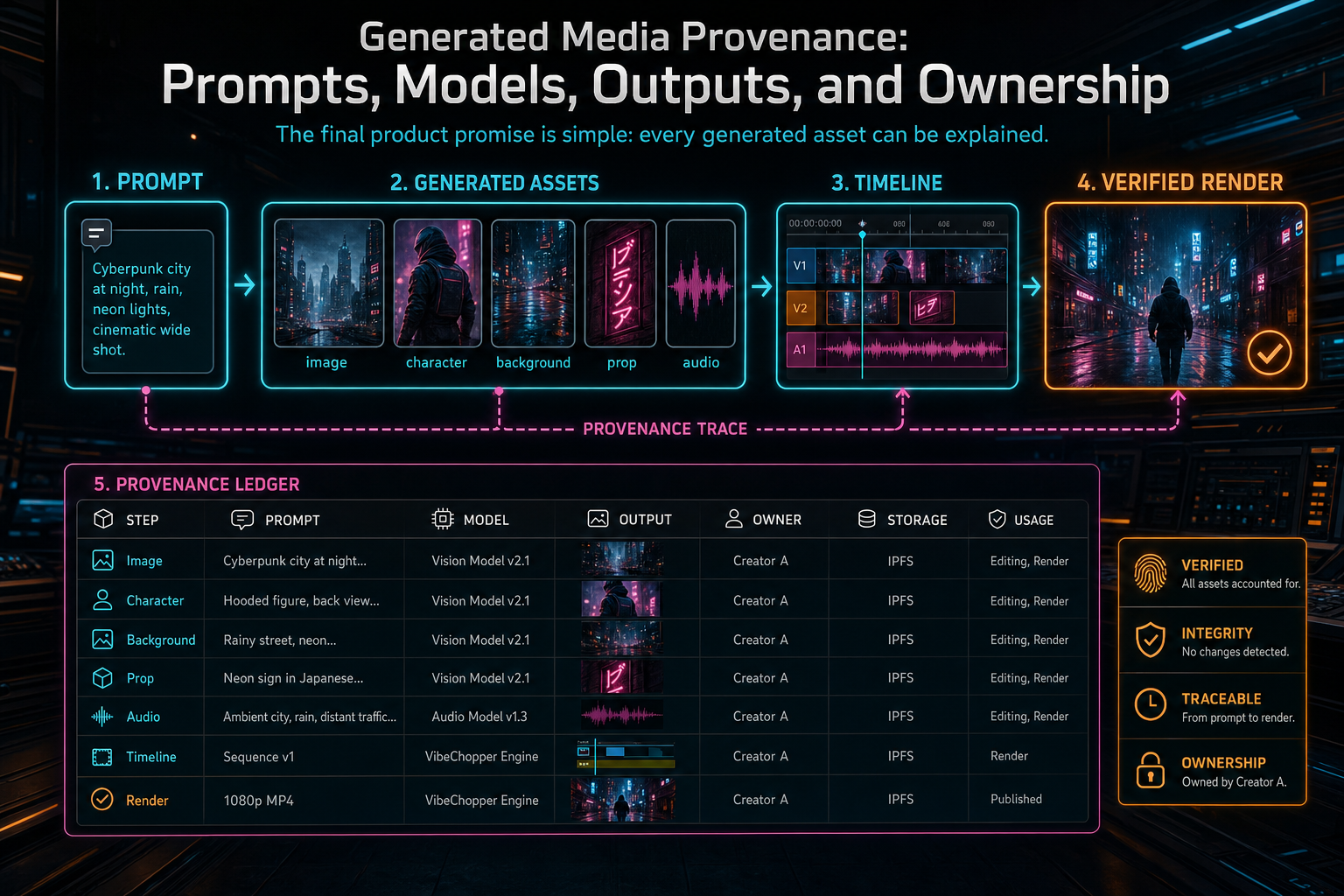
The final product promise is simple: every generated asset can be explained.
Try the workflow
Open every feature from this post in the editor
These panels collect the features discussed above. Sign in once, finish your profile if needed, then the editor opens the first highlighted surface and walks through the tutorial.
Step 1
Open the media asset graph
See generated audio, rendered assets, source clips, metadata, and provenance in the media panel.
Explore your media graph →Step 2
Inspect an AI edit run
Open the editor and see how plans, tool calls, artifacts, and render results stay connected.
Open the edit-run receipts →Step 3
Generate a music bed
Create AI music assets with prompts, metadata, provenance, and timeline placement.
Score a timeline →Step 4
Upload footage with progress you can trust
Watch large video uploads, processing, transcript work, and original-file storage from one monitor.
Upload a real shoot →Step 5
Render a verified timeline
Export a project through the same storage-backed render path described in this article.
Render a timeline free →