
Media Asset Management Is Not a File Browser
Media asset management for an AI video editor starts where a normal file browser runs out of vocabulary. A file browser can show a name, size, type, date, and thumbnail. That is useful, but it does not tell the editor whether the original object is safely stored, whether frames have been extracted, whether those frames have useful AI descriptions, whether audio exists, whether transcript segments are searchable, whether generated music came from a known prompt, whether an overlay was created by a model, or whether a rendered export includes a specific asset. Explore your media graph
An AI editor needs those answers because the product does not only play media. It reasons about media. When a user asks VibeChopper to find the product shot, cut around a sentence, add a generated music bed, assemble a rough draft, or render a final export, the editor needs a dependable map of project assets. That map has to connect source footage, derived metadata, generated assets, timeline references, exports, AI edit runs, and repair context.
That is the difference between media storage and media asset management. Storage answers where the bytes live. Asset management answers what the bytes mean, who owns them, how they were created, what derived intelligence exists, where they are used, and what still needs to be done. For AI video editing software, that distinction is not academic. It determines whether a prompt-driven workflow can be trusted.
VibeChopper treats asset management as a product layer. Uploads, frame extraction, transcripts, generated music, overlays, render artifacts, media processing summaries, and AI edit runs all contribute to the same project memory. The user still sees a direct editing surface: upload footage, ask for edits, review the timeline, and export the video. Underneath, the asset system keeps enough structure for the editor and the agent to agree about what exists.
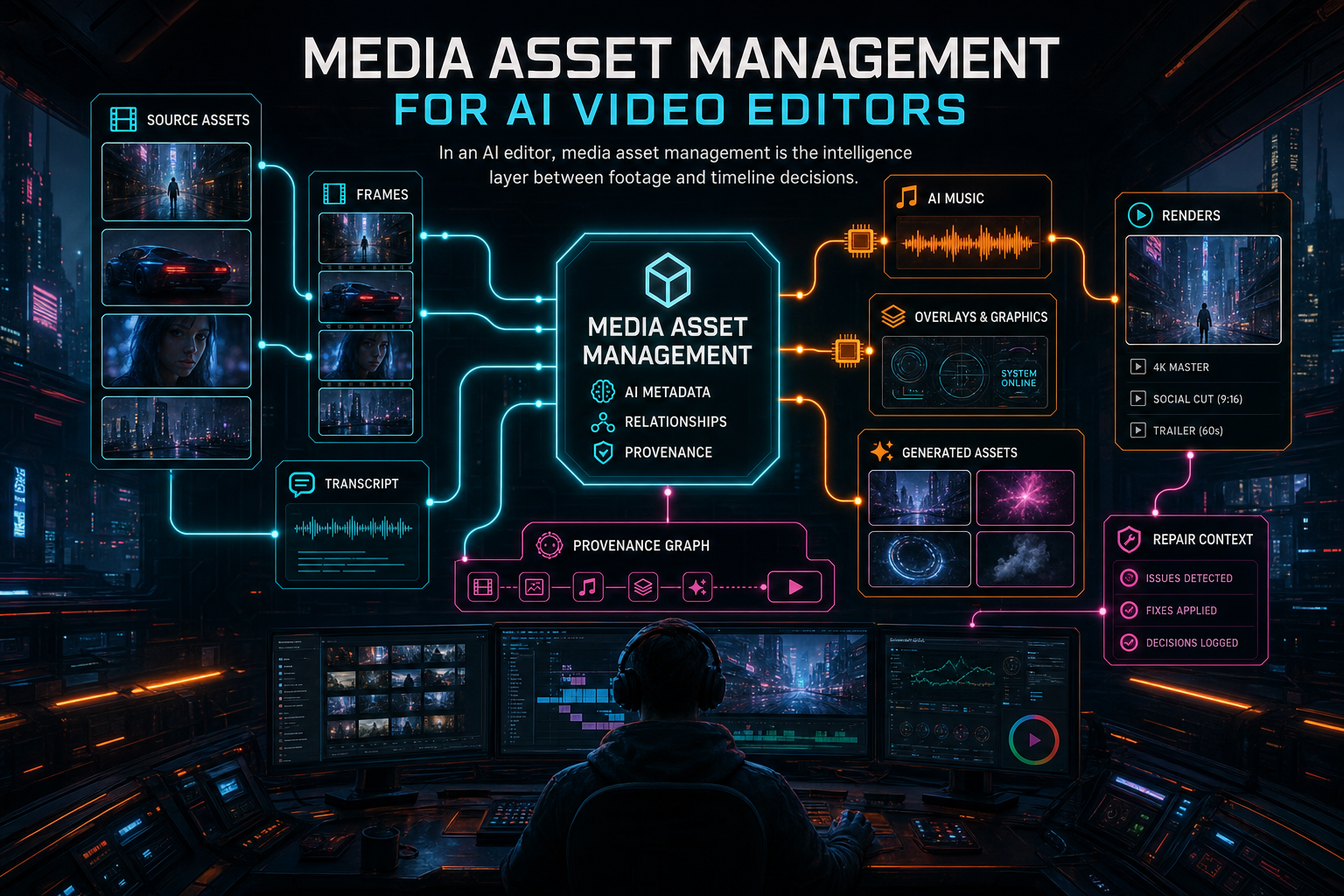
In an AI editor, media asset management is the intelligence layer between footage and timeline decisions.
Start With an Asset Graph
The most practical model is an asset graph. It does not have to be an actual graph database on day one. It does need graph-shaped thinking: assets are nodes, relationships are first-class, and each edge should explain why two records belong together. A source video is linked to its original object path. Extracted frames are linked to the video and timestamps. Frame descriptions are linked to frames and model output. Transcript segments are linked to audio and time ranges. Timeline clips are linked back to source videos and source ranges. Renders are linked to the timeline, project, export settings, and storage artifact. Open the edit-run receipts
Generated assets need the same treatment. AI music is not just an audio file. It has a prompt, model, generation settings, owner, project, storage path, duration, and timeline placement. AI overlays are not just PNGs or WebM files. They have prompts, model metadata, object paths, dimensions, alpha behavior, and usage in a clip interval. Voiceovers, captions, thumbnails, repaired files, and proxy files all deserve explicit lineage.
This graph gives the AI editor a working memory that is stronger than chat history. A chat transcript may contain the user's request. The asset graph contains the project facts the system can act on. If the user says, use the energetic music from the last draft but swap in the new product close-up, the system needs to know which music asset was generated, which draft used it, which source clip contains the product close-up, and whether that source clip has analysis metadata good enough to locate it.
The graph also improves human interfaces. A media panel can filter source clips, generated assets, exports, and plan attachments without pretending they are the same kind of object. A timeline inspector can show where an asset came from. A render details page can list the assets included in an export. A repair workflow can identify which missing derived asset should be regenerated. The same relationships that help an AI agent also make the product easier to understand.
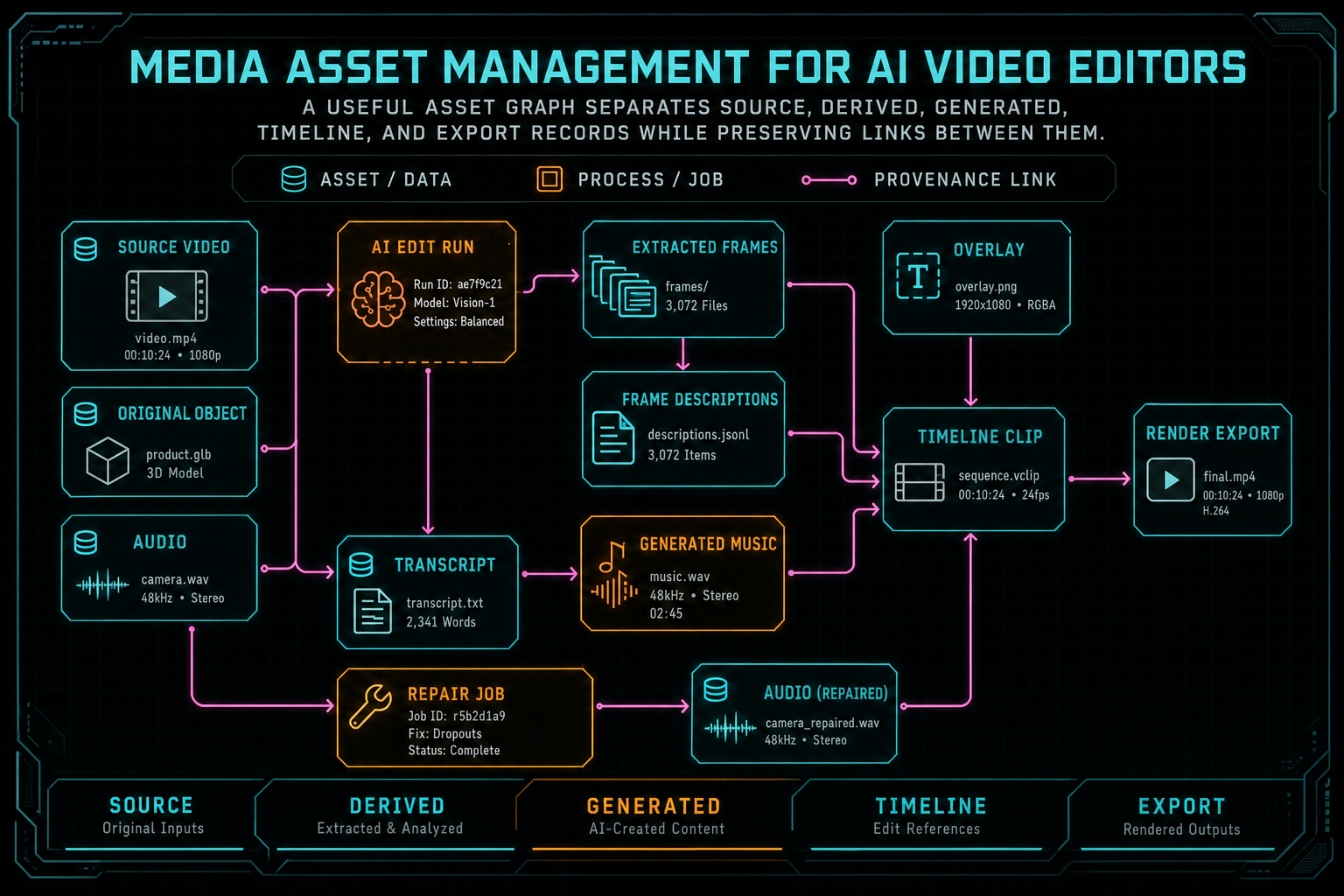
A useful asset graph separates source, derived, generated, timeline, and export records while preserving links between them.
Ingestion Is the Beginning of Intelligence
Many online video editors treat ingestion as the moment a file arrives. For an AI video editor, ingestion is not complete until the media is intelligible. A source file should become a project video record. The original object should be stored in a durable, user-scoped path. Frames should be extracted at useful intervals. Visual descriptions should be written for frames. Audio should be captured when available. Transcript segments should be indexed with time ranges. Metadata such as generated title, description, duration, dimensions, and content type should be attached. Upload a real shoot
This is why resumable upload and processing telemetry matter. Large videos fail in boring ways: browser memory pressure, network drops, refreshes, mobile backgrounding, duplicate uploads, partial audio extraction, and slow AI analysis. If asset management depends on a single happy-path upload callback, the graph will drift from reality. The system needs upload sessions, per-file status, bytes transferred, object storage state, and named processing jobs.
The important design choice is to separate original readiness from derived readiness. A video can have its original file stored while frame descriptions are still processing. A transcript can be pending while visual search is ready. Metadata can fail while the source clip remains editable. A proxy can be missing without invalidating the original footage. Collapsing all of that into one ready flag creates bad UI and bad AI behavior.
VibeChopper's media processing summaries model that distinction. The editor can reason about original upload status, frames, AI descriptions, audio, transcripts, generated metadata, proxy state, exports, plan assets, and active work. That summary is not a replacement for the asset graph. It is the current health report for the graph. It tells the product what is usable now, what is still running, what is missing, and what can be repaired.
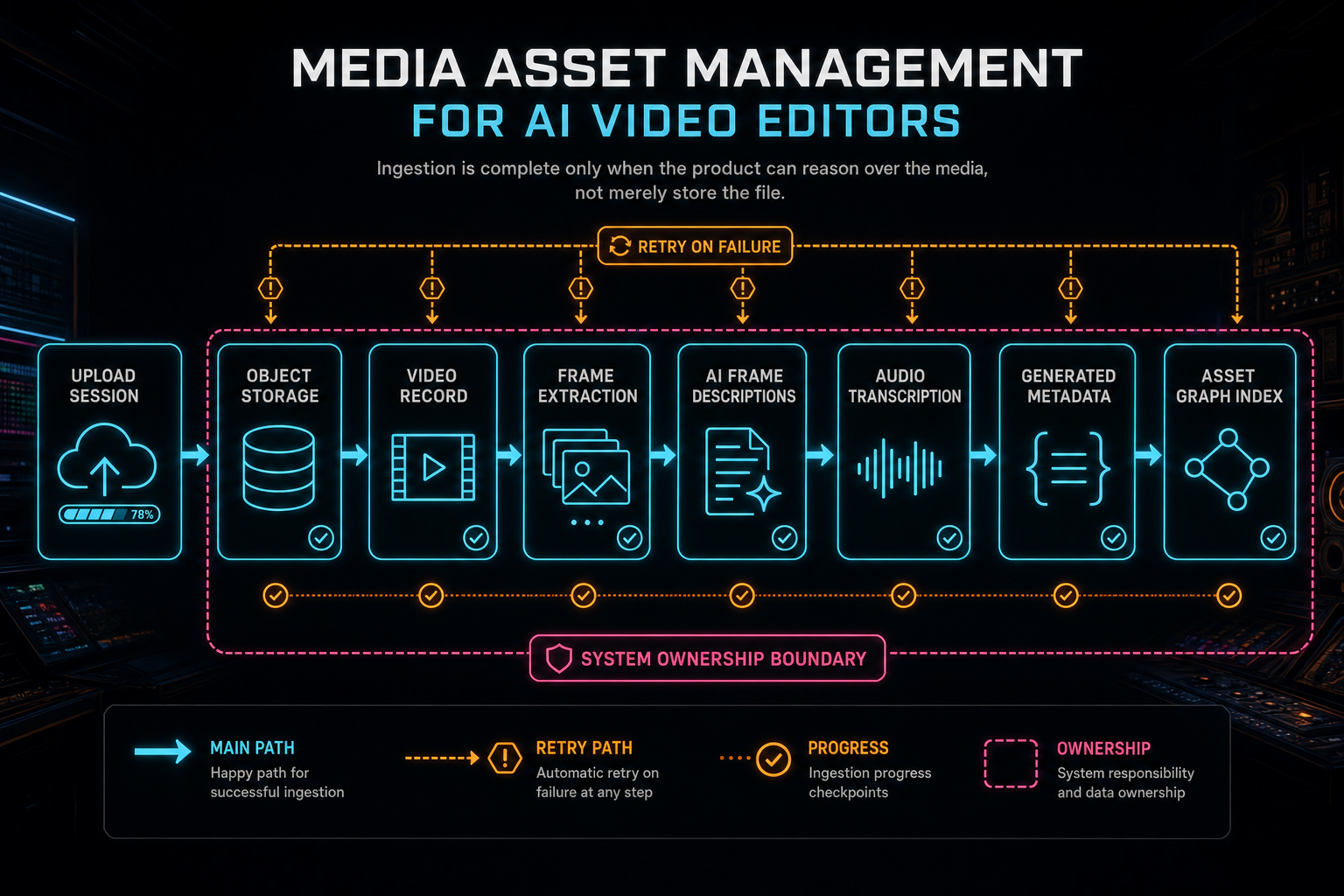
Ingestion is complete only when the product can reason over the media, not merely store the file.
Metadata Should Be Editable Intelligence
The useful metadata in an AI video editor is not only descriptive. It is operational. A frame description lets the system find a shot. A transcript segment lets the system cut by dialogue. Speaker labels let the system preserve or remove a voice. A generated title and description help users recognize footage. A clip's source range lets the compositor reconstruct the edit. A timeline event lets an audit trail explain why a mutation happened. Explore your media graph
Search is the obvious beneficiary. Users expect to find footage by words, not by remembering file names. They search for logo reveal, wide shot, laughter, pricing slide, quiet intro, or a spoken phrase. AI-generated frame descriptions and transcripts make that possible. But the deeper value is that search metadata becomes editing metadata. Once the system can find the phrase, it can cut around it. Once it can identify the product shot, it can place it over the voiceover. Once it knows the music asset's duration and prompt, it can reuse or replace it intelligently.
Metadata quality matters. Placeholder descriptions, failed analysis strings, and generic labels should not rank like real intelligence. Transcript segments need time ranges that survive timeline edits. Generated asset metadata should include prompt and model fields rather than a vague AI asset badge. Export metadata should include format, resolution, file size, duration, storage path, and verification state. The asset graph is only as useful as the facts it preserves.
A practical rule is to ask whether metadata can drive a product action. If it can only decorate a card, it is nice to have. If it can search, cut, retry, render, verify, explain, or repair, it belongs in the core asset model. Media asset management for AI video should prioritize metadata that changes what the editor can safely do.
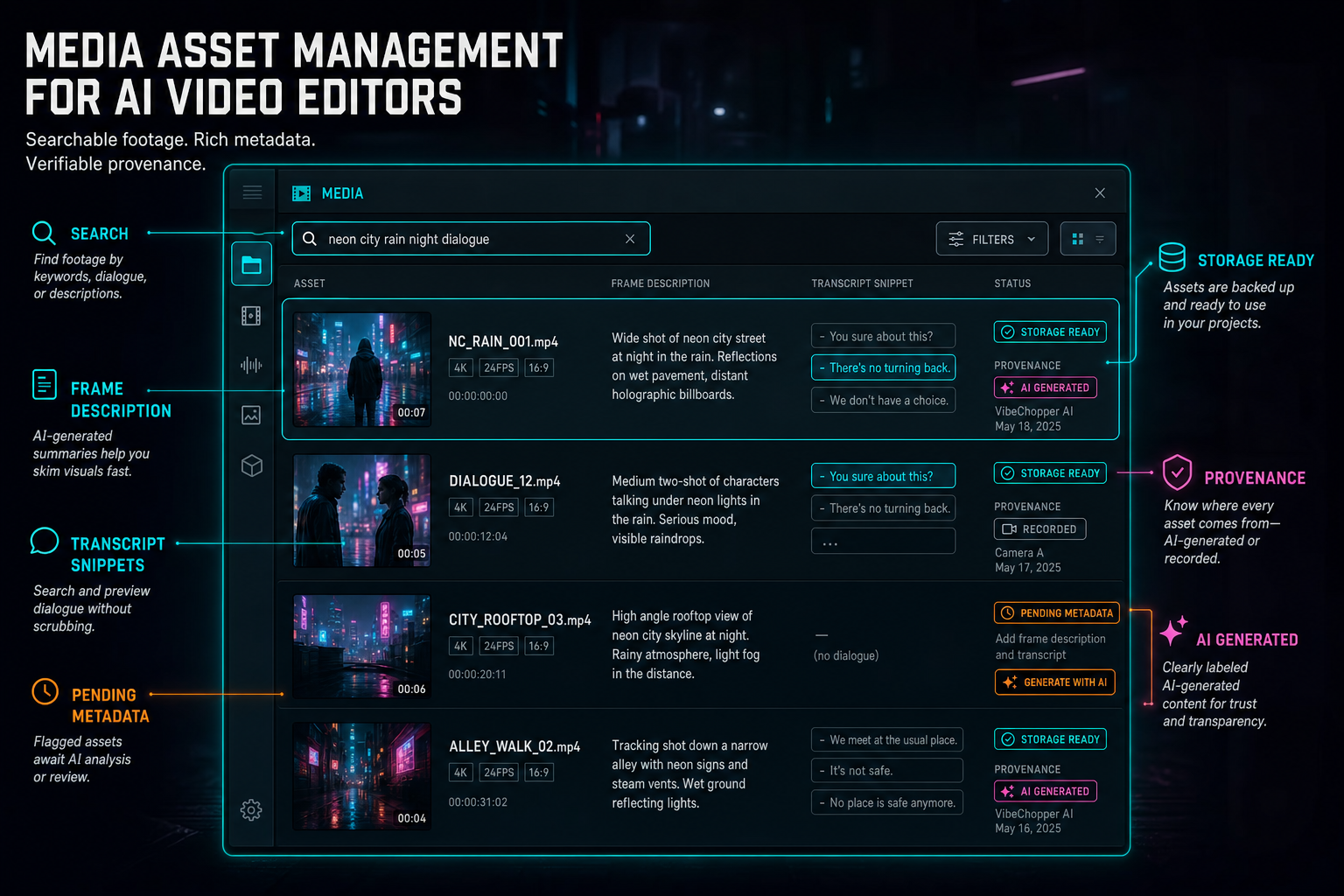
The media panel becomes more useful when every asset carries searchable metadata and provenance.
Generated Assets Need Lineage
AI editors create media as well as manipulate it. Music beds, voiceovers, overlays, thumbnails, captions, titles, and repair artifacts can all be generated or transformed by models. Without lineage, generated media becomes a folder of mysterious files. With lineage, it becomes a set of assets that can be reviewed, reused, replaced, credited, and debugged. Score a timeline
Lineage starts with the generation request. Store the prompt or structured request, the model family, the provider when appropriate, timing, owner, project, and output metadata. Then store where the result landed: object storage path, content type, duration, dimensions, file size, and asset ID. Finally, store how it is used: timeline placement, clip association, export inclusion, AI edit run ID, and any review or verification result.
This helps users in ordinary ways. They can tell which track was generated for a draft. They can regenerate a similar music bed. They can remove an overlay from a timeline and still keep the underlying asset. They can inspect whether a rendered export included a generated voiceover. They can keep a project clean without losing creative history.
It also helps the backend. If a render fails because a generated overlay object is missing, the repair system can trace that overlay back to its generation job. If a user reports that a music bed disappeared, the product can inspect whether the asset exists, whether it is attached to the timeline, whether the render included it, and whether a storage path failed. Asset lineage makes generated media operational instead of magical.
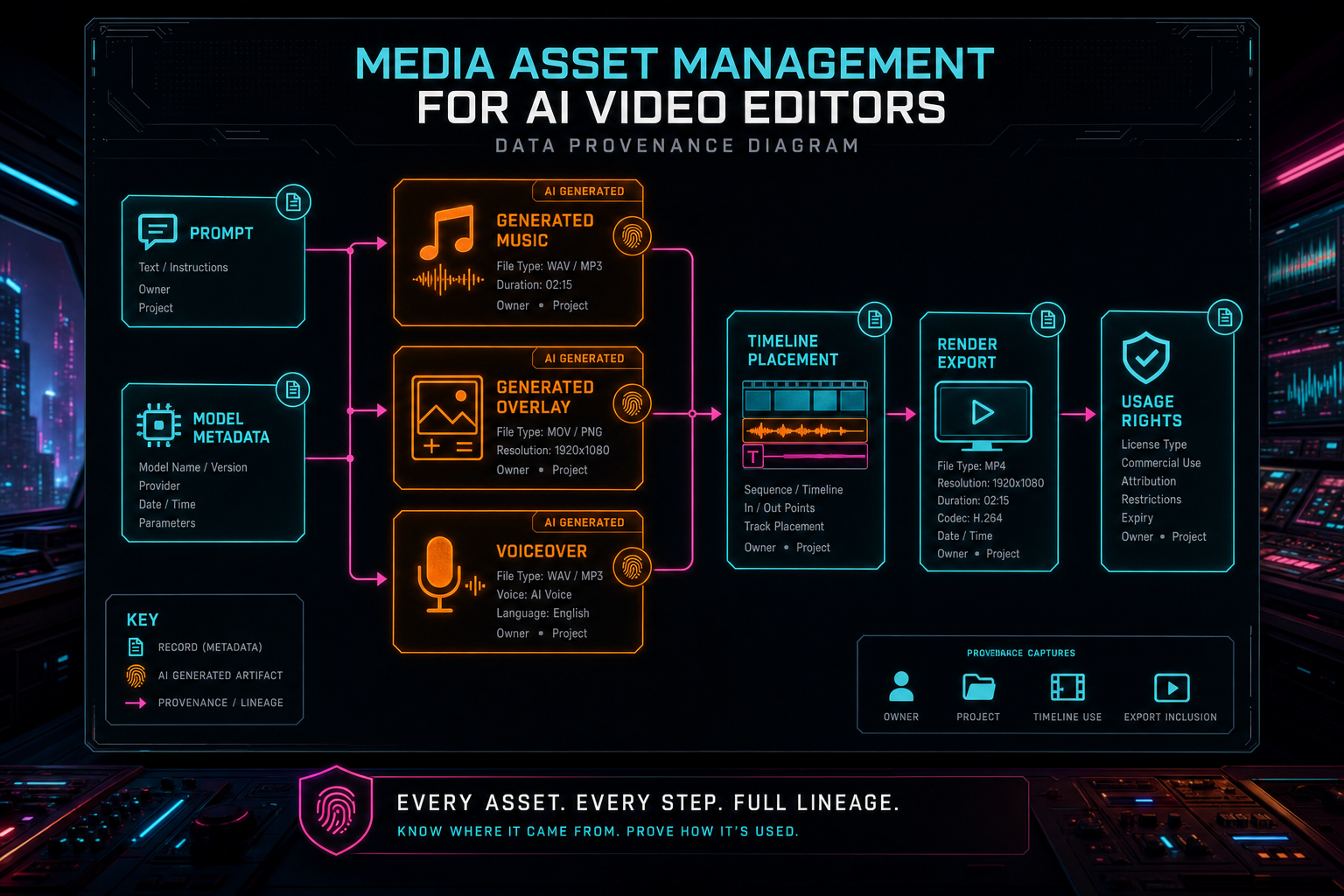
Generated assets need lineage: prompt, model, owner, project, timeline use, and export inclusion.
AI Edit Runs Need Media Context
An AI edit run should not operate on an anonymous project blob. It should see the media context it needs and leave behind the records future systems need. Before planning, the run needs source assets, transcripts, frame intelligence, generated assets, selected timeline state, project brief attachments, and readiness information. During execution, it should create tool events and timeline mutations. After execution, it should attach artifacts such as generated music, overlays, renders, and review notes. Open the edit-run receipts
That does not mean dumping the entire database into a prompt. The asset system should provide compact, structured context. For example: selected source clips with durations and transcript availability, frame description highlights, named generated assets, active timeline clips, missing media warnings, and relevant plan attachments. The model receives a useful editing brief. The backend keeps canonical state in typed records.
The asset graph then becomes the audit backbone. A user can ask why an AI assistant used a clip. The system can point to the transcript, frame description, plan asset, or tool event that supported the choice. A reviewer can inspect whether an AI-generated render came from the expected source media. A second-pass rubric can score a draft using both creative goals and asset facts.
This is one of the reasons product-final AI editors feel different from prompt demos. The model is not the only intelligence in the system. The surrounding asset layer gives the model grounded context, constrains actions to owned media, records what changed, and connects outputs back to project history.
Storage Paths Are Product Contracts
Object storage paths look like implementation details until the product needs to explain, repair, or render a project. Then they become contracts. A source object path should be scoped to the project and owner. A generated asset path should identify the project and asset. A render output path should identify the export. Temporary scratch paths should not masquerade as durable media. Download URLs can expire, but canonical storage references should remain stable. Render a timeline free
This matters for security as much as reliability. Render workers should resolve sources through trusted project records, not arbitrary user-supplied URLs. AI edit runs should only operate on assets the user can access. Collaboration and native app flows should preserve the same ownership rules. Repair jobs should receive redacted, structured asset references rather than loose credentials or raw temporary links.
The storage contract also helps cache and dedupe decisions. If the same original object is already stored and linked to a project video, the product can avoid repeating expensive work or can at least explain why a second upload resolves to existing media. If a generated asset is included in multiple timeline versions, the graph can show reuse instead of creating untraceable copies.
For developers building a cloud video editor backend, the recommendation is simple: treat storage references as durable fields in your media model. Do not make React components invent cloud paths. Do not pass untrusted URLs into render workers. Do not rely on temporary signed URLs as the only source of truth. The asset management layer should own the relationship between product records and object storage.
Make Assets Repairable by Design
Media-heavy products fail in partial ways. The source file can upload while transcript extraction fails. Frames can exist while descriptions are invalid. A generated overlay can be present but detached from the timeline. A render can complete but fail verification. A repair system cannot fix those cases if the asset model only knows video failed. Upload a real shoot
Repairable asset management names the missing lane. Missing source object. Missing frames. Incomplete frame analysis. Audio pending. Transcript failed. Metadata stale. Proxy missing. Export upload failed. Generated asset orphaned. Timeline reference points to a deleted object. Each named state can map to a retry, repair, user message, or escalation path.
This is where active job rows and media summaries become valuable. A support context packet can include asset state without asking an engineer to reconstruct the project from logs. A remediation worker can start with facts: which project, which video, which derived asset, which job failed, which storage path is expected, and what user-visible behavior broke. A public progress page can show repair stages because the repair job is attached to structured asset context.
The same design improves everyday UX. Users are more patient with long processing when the product can say what is happening. They are more confident retrying when the product can say what will be retried. They are less likely to lose work when a refresh reconstructs the project state from durable records. Repairability is not only an operations feature. It is part of the editing experience.
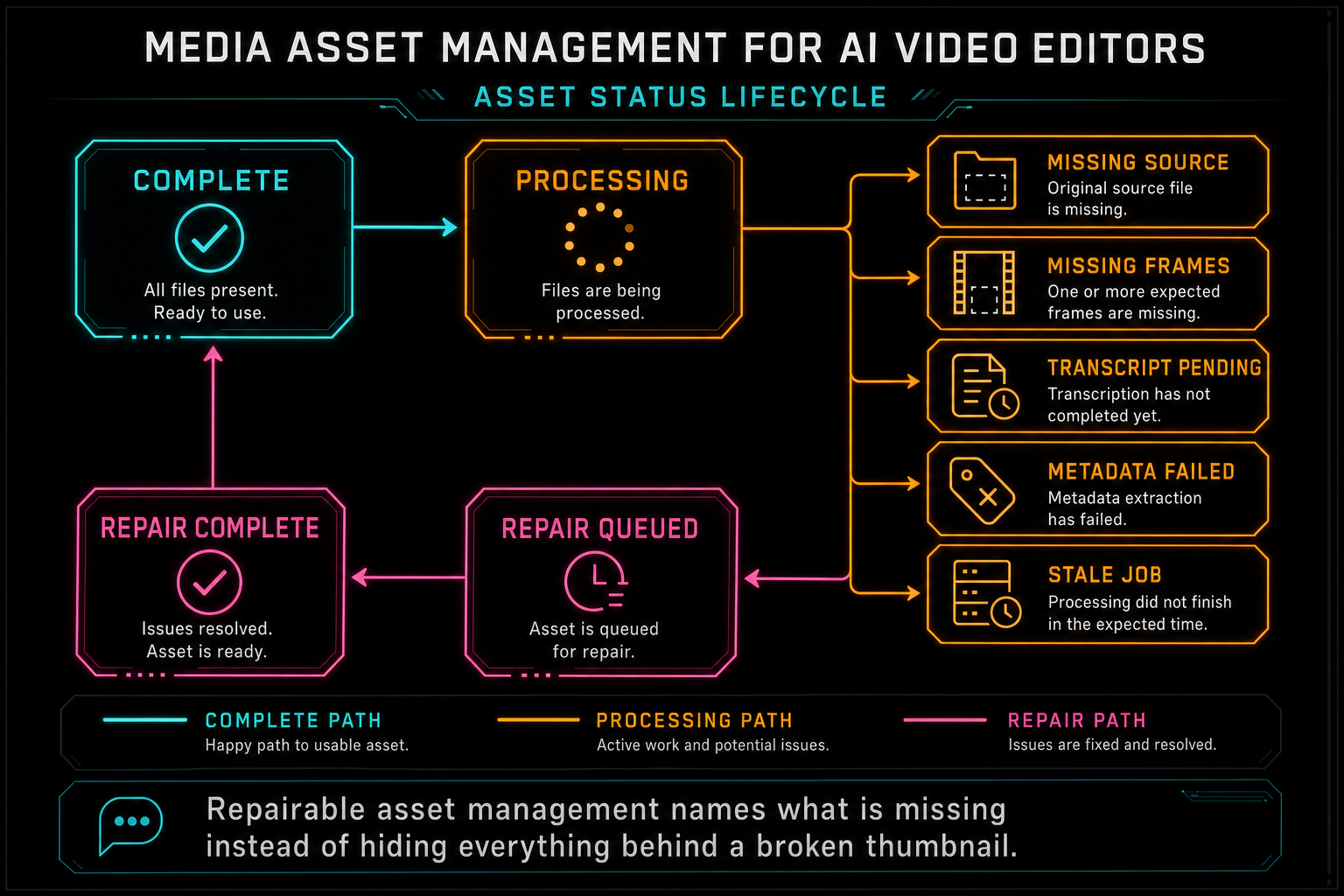
Repairable asset management names what is missing instead of hiding everything behind a broken thumbnail.
What Developers Should Copy
If you are building media asset management for an AI video editor, copy the graph shape first. Model source assets, derived assets, generated assets, timeline uses, exports, AI runs, and repair jobs as connected records. A relational database can support this well when the relationships are explicit. You do not need a fashionable graph stack to build a useful asset graph.
Copy the readiness split. Original file availability, frame extraction, AI frame descriptions, audio extraction, transcription, metadata, proxy creation, generated asset state, and export verification should be separate statuses. That precision gives the UI better messages, gives AI planning better constraints, and gives repair jobs better starting points.
Copy the provenance discipline. Generated media should carry prompts, model metadata, ownership, storage references, timeline placement, and export inclusion. Render artifacts should point back to timeline state and source media. AI edit runs should connect prompts, plans, tool events, and output artifacts. Provenance is what lets users and engineers trust the system after the creative rush is over.
Copy the storage boundary. Let server-side storage and media modules own object paths. Keep React focused on product interaction. Validate access at the API boundary. Resolve media through project-scoped records. Upload, render, and repair workers should all speak to the same asset model instead of inventing side channels.
The Result
The end result is a media system that creators feel as speed and developers recognize as structure. Users can search footage by meaning, cut by transcript, reuse generated music, inspect rendered exports, and recover from interrupted processing. AI agents can plan with grounded media context, execute timeline edits, attach generated artifacts, and leave behind an audit trail. Render and repair systems can find the assets they need without guessing. Explore your media graph
That is why media asset management is central to VibeChopper's AI video editing architecture. The product promise is simple: edit videos with your voice based on vibes. The implementation has to be precise because video projects are dense with source files, derived intelligence, generated media, object storage paths, timeline references, and long-running jobs.
A file browser can show what was uploaded. A media asset graph can explain what the project knows. For AI video editors, that explanation is the foundation for search, prompt editing, collaboration, rendering, provenance, and repair. The better the asset layer, the more natural the editor can feel on top of it.
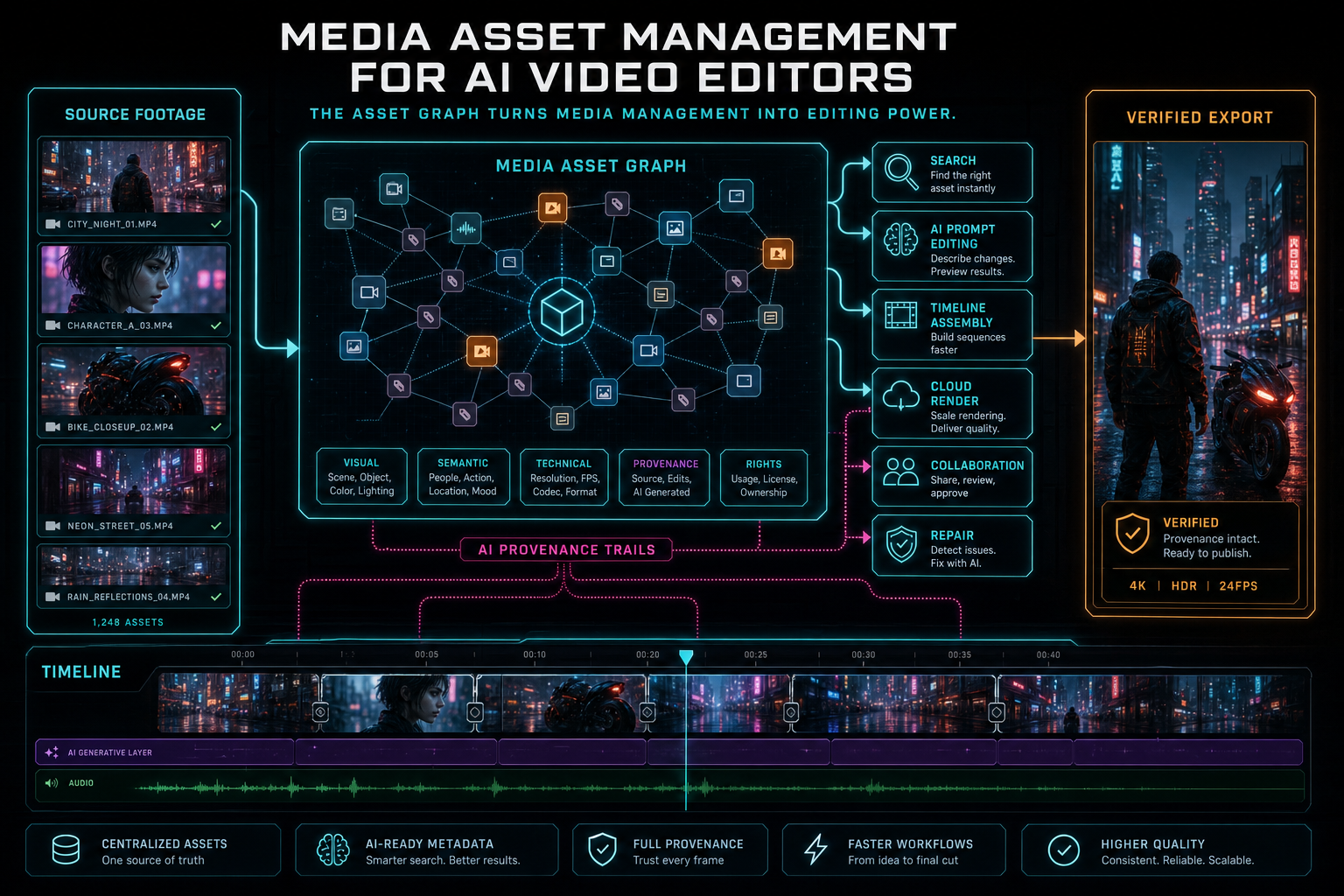
The asset graph turns media management into editing power.
Try the workflow
Open every feature from this post in the editor
These panels collect the features discussed above. Sign in once, finish your profile if needed, then the editor opens the first highlighted surface and walks through the tutorial.
Step 1
Open the media asset graph
See generated audio, rendered assets, source clips, metadata, and provenance in the media panel.
Explore your media graph →Step 2
Inspect an AI edit run
Open the editor and see how plans, tool calls, artifacts, and render results stay connected.
Open the edit-run receipts →Step 3
Upload footage with progress you can trust
Watch large video uploads, processing, transcript work, and original-file storage from one monitor.
Upload a real shoot →Step 4
Generate a music bed
Create AI music assets with prompts, metadata, provenance, and timeline placement.
Score a timeline →Step 5
Render a verified timeline
Export a project through the same storage-backed render path described in this article.
Render a timeline free →