
Native Auth Is a Continuity Feature
Native app auth is usually described as a security feature. It is that, but in a video editor it is also a continuity feature. A creator might start in the web editor, install the Mac app, open a TestFlight build on iPhone, inspect a project on iPad, and come back to the browser when they need a larger timeline. The login system has to make that path feel like one product, not four separate accounts. Create your editing login
That is the product shape behind VibeChopper's native auth work. The implementation evidence points to server/replitAuth.ts, client/src/pages/NativeCallback.tsx, /api/auth/native-link and /api/auth/native-debug in server/routes.ts, and native app download and app-link routes under /api/native-app/*. The same audit wave that names this post also includes owned auth, passkeys, upload telemetry, render verification, AI edit runs, and platform emails. Native auth sits inside that larger platform hardening story: keep users signed in, keep projects scoped, and keep editing state portable.
The browser remains the place where the user can complete a trusted sign-in ceremony. The native app can ask for a handoff, but it does not need to recreate every web auth concern. Instead, the app initiates a linking flow, the browser checks or creates the authenticated session, the server returns a narrow native-link payload, and the browser sends the app back through a custom URL scheme. The result is direct for the user: sign in once, approve the device, and keep editing.
The nearby CTA opens the secure account path because this native flow depends on a strong user identity first. VibeChopper can make device handoff feel smooth only because the account boundary has already been made explicit.
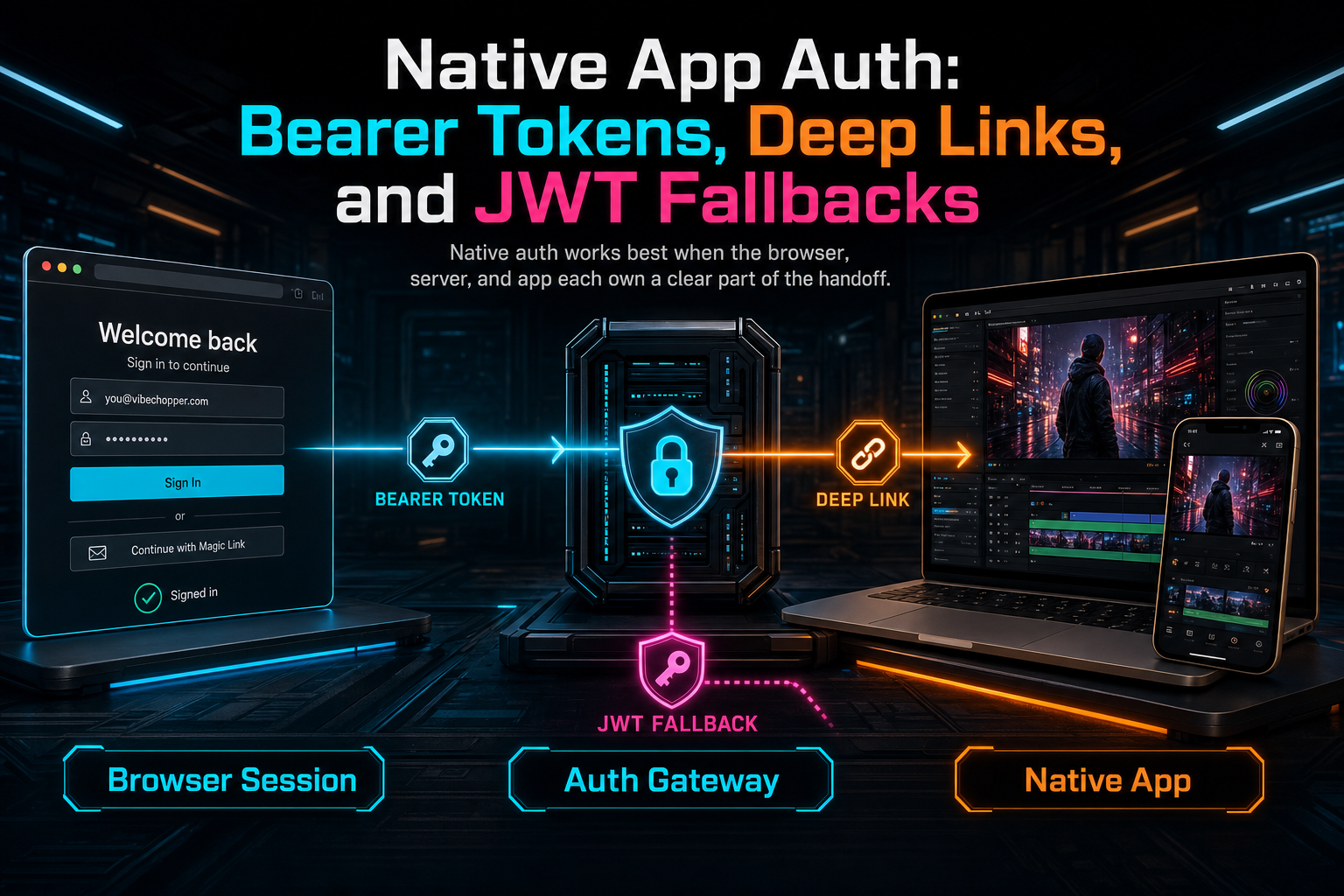
Native auth works best when the browser, server, and app each own a clear part of the handoff.
The Browser Owns the Ceremony
A reliable native auth flow starts by deciding where trust is established. In VibeChopper, the browser owns the login ceremony. The native app can open a URL that lands on /auth/native-callback with an auth value. The client callback page checks whether the browser is already authenticated through the normal web auth path. If not, it builds a safe returnTo value and sends the user through /api/login so the browser session can be established before handoff continues.
That sounds simple, but the separation prevents a lot of accidental complexity. The native app does not need to know how web login prompts, consent, refresh behavior, or session cookies are implemented. The callback page does not need to mutate projects. The auth route does not need to know about timeline UI. Each piece has one job: the app asks, the browser authenticates, the server exchanges session context for native payload, and the app receives the result.
server/replitAuth.ts reinforces that boundary with return-path normalization. A requested returnTo can be a path, or even an absolute URL that gets reduced to path, search, and hash. It must start with a single slash, cannot be a protocol-relative URL, and cannot point into /api/. If it fails those checks, the system falls back to /editor. That keeps the login flow useful for deep links while avoiding open redirect behavior.
Once the browser is authenticated, NativeCallback.tsx calls /api/auth/native-link and builds a vibechopper://callback URL. The payload can include the access token, ID token, refresh token, user ID, expiry, and the original auth value. Then the browser changes window.location.href to the native URL. If the app does not open immediately, the page keeps a button that lets the user try the handoff again. That button matters. Deep links cross operating system boundaries, so a good product gives the user a visible retry path.
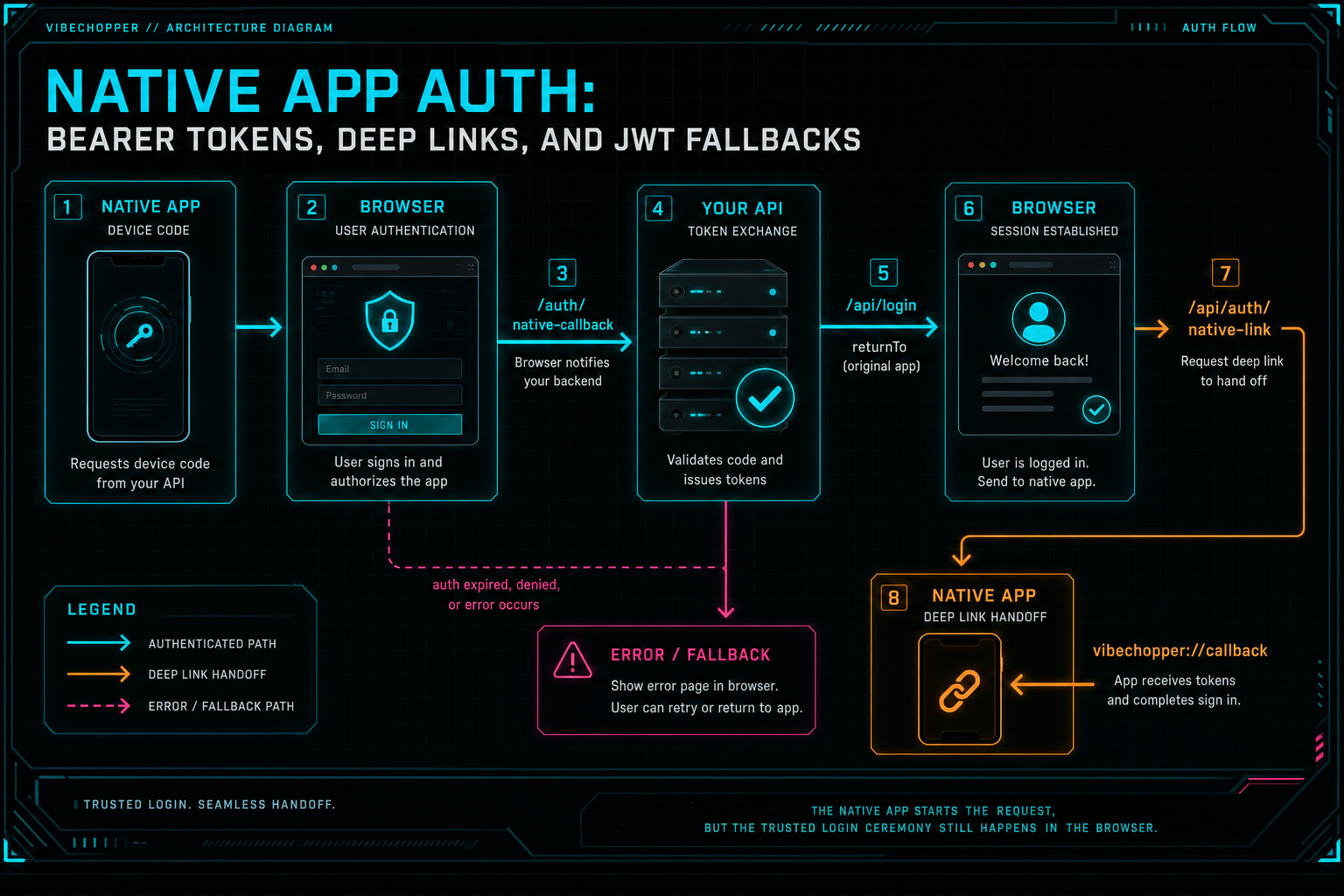
The native app starts the request, but the trusted login ceremony still happens in the browser.
One Auth Boundary, Many Token Shapes
Native clients do not always send credentials in the same shape as a browser. A web request may rely on the Express session and cookie. A native request may send an Authorization: Bearer ... header. A handoff route may include an x-native-token header or an auth query value. Debugging tools may include a hinted user ID while validating a linking path. The server should support those practical shapes without scattering auth decisions across business routes. Share a precise cut
That is why isAuthenticated in server/replitAuth.ts collapses those shapes at the boundary. It reads the authorization header, checks for a bearer token, falls back to x-native-token or an auth query token, and gathers optional user hints from headers or query parameters. If a bearer-like value exists, the middleware tries to produce a single authenticated req.user shape before downstream routes run.
The important part is not the specific header names. The important part is that timeline, media, render, upload, sharing, and native-app routes can keep using the same user-scoping discipline. They ask for getUserId(req). They check ownership. They return unauthorized when identity is missing. They do not parse bearer headers by themselves. That keeps security policy near the boundary and product behavior near the product route.
Deep links make this even more important. A shared timeline link, native app callback, install flow, or project handoff can carry context that feels like authentication to a user. Context is not identity. A selected clip, timestamp, device code, or install intent can help the product land the user in the right place, but the server still needs a verified or narrowed user before protected project state is returned.
VibeChopper's collaboration and sharing features use the same philosophy. A deep link can bring someone to an exact timeline view, but the route still has to decide what that actor is allowed to see or change. The inline CTA points to sharing because native auth and collaboration share a common lesson: links are navigation. Auth is authority.
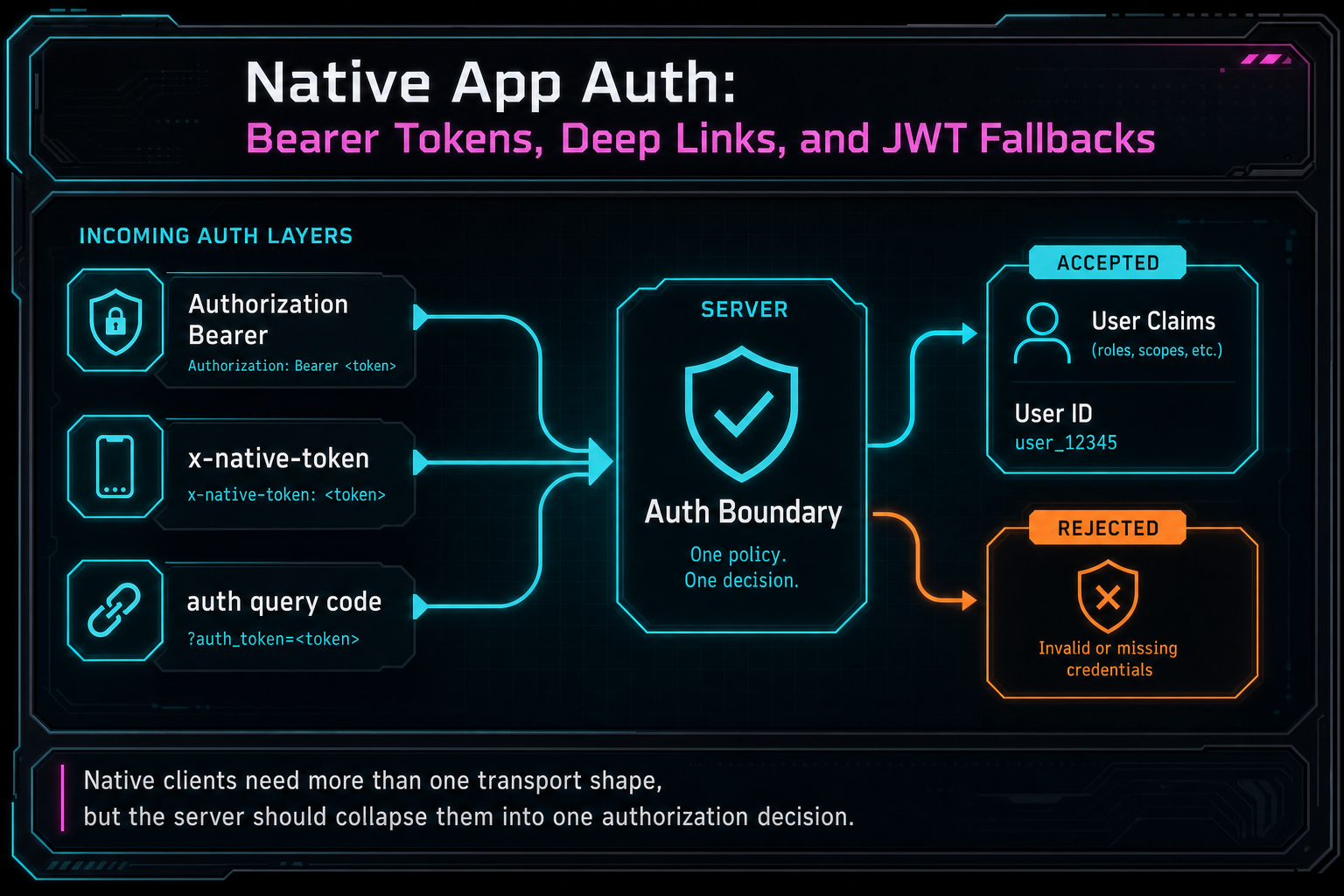
Native clients need more than one transport shape, but the server should collapse them into one authorization decision.
The JWT Fallback Ladder
The native auth middleware includes a pragmatic fallback ladder for bearer tokens. First, it tries to decode local JWT claims. If the token has a usable sub, the middleware constructs the user shape from those claims and treats the bearer as the access token. This path avoids making every native request depend on a live external userinfo call when the token already contains enough identity to scope the request.
If local decode does not produce a subject, the middleware attempts an OIDC userinfo lookup through the configured provider. That gives the system another way to validate a bearer and obtain claims. If that path fails but a hinted user ID exists, the middleware can still build a constrained user shape around that hint. If no bearer path works, the request falls back to the browser session path: check req.isAuthenticated(), inspect expiry, refresh with the stored refresh token if needed, and otherwise return 401.
This ladder is intentionally practical. Native app auth lives in the real world: token payloads vary, network calls fail, callback URLs get retried, and device handoff needs to work under imperfect conditions. The server still keeps a single output contract. Downstream code receives req.user, an access token when available, an expiry, and claims with a subject. If that cannot be produced, protected routes do not run.
There is a subtle but important distinction here. A JWT fallback is not permission to skip authorization. It is a way to establish the caller's identity shape when the token transport or validation path is different from a browser session. The next layer still needs ownership checks. A user ID produced from a native bearer is not allowed to access another user's project simply because the route was called by an app.
That is why the fallback belongs in auth middleware, not scattered through feature handlers. The more places a codebase has that say, "if native, trust this one field," the more likely one route will drift from the rest. VibeChopper keeps the ladder in one place so timeline edits, media access, uploads, renders, and device linking can all start from the same authenticated request shape.
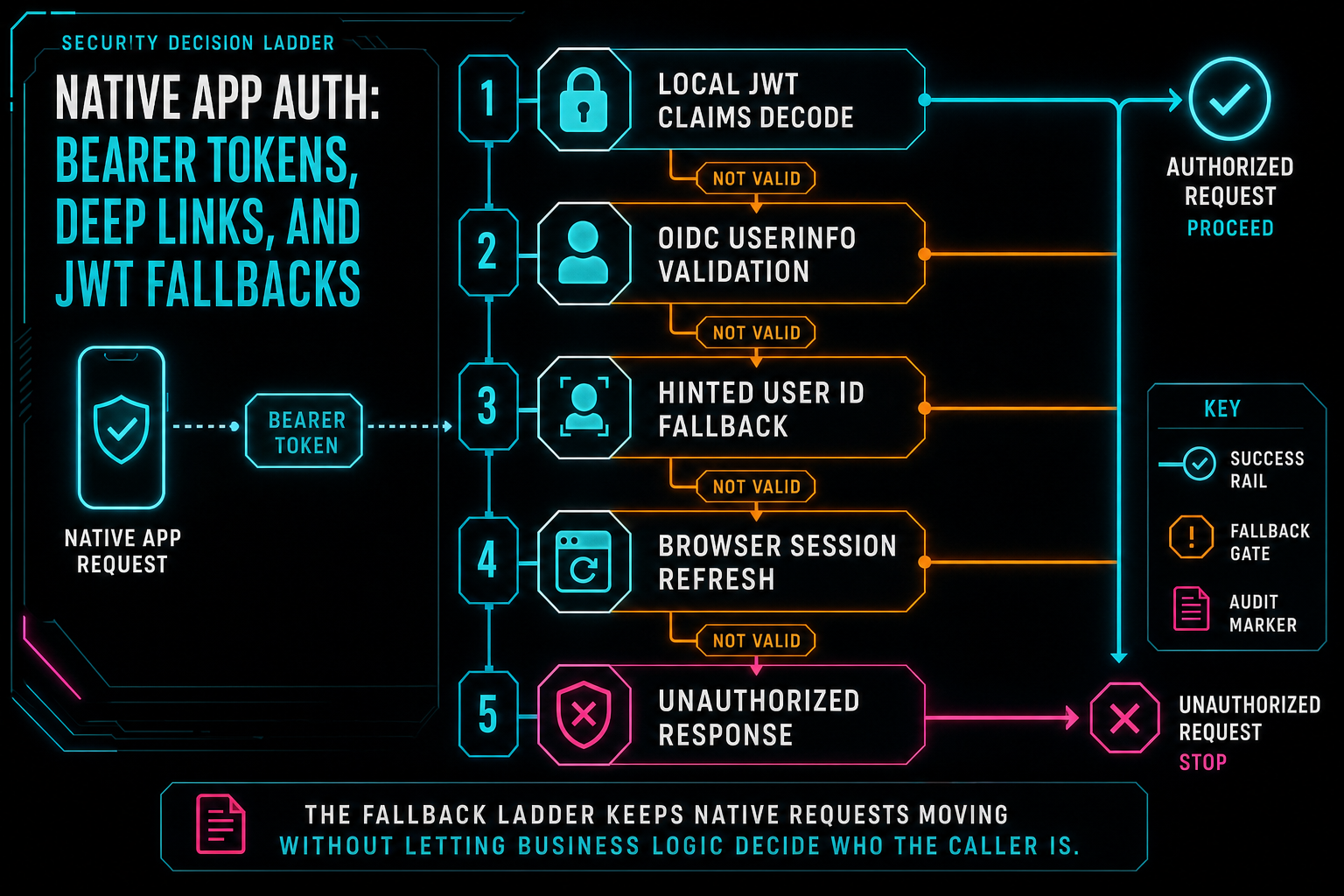
The fallback ladder keeps native requests moving without letting business logic decide who the caller is.
The Native-Link Payload
/api/auth/native-link is deliberately small. It runs behind auth middleware, reads the authenticated user, and returns the token, optional ID token, optional refresh token, user ID, expiry, and the auth query value. If there is no token or user ID, it returns a 400 instead of pretending the handoff succeeded. The route exists to finish the bridge from browser session to app session.
That narrow shape is a product decision. The native app needs enough to continue authenticated API work and associate the app session with the correct user. It does not need the entire browser session object. It does not need project data in the handoff payload. It does not need to receive private media lists before the app has made normal API requests with the resulting credentials.
The route also pairs with /api/auth/native-debug, which returns claims, the resolved user ID, and booleans showing whether access or refresh tokens are present. Debug endpoints like this are valuable when building native flows because failures often sit between systems: browser cookies, URL schemes, app entitlements, token payloads, provider behavior, or server middleware. A debug route gives engineers a way to verify the auth boundary before blaming the editor surface.
The client handoff code keeps that payload out of React state as much as possible. It fetches, builds the URL, appends token fields as query parameters, and redirects to the custom scheme. It also handles missing auth codes, loading sessions, unauthenticated users, fetch failures, and retry. The page is not the product destination. It is a controlled bridge.
Cross-Device State Is the Real Goal
The reason native auth matters is not the sign-in screen. It is everything after the sign-in screen. VibeChopper has projects, videos, clips, frames, transcript segments, transitions, motion keyframes, overlays, AI messages, generated artifacts, upload sessions, media processing summaries, shared timeline views, and render outputs. A native app that cannot reach the same user-scoped state is just a disconnected shell. Explore your media graph
Bearer-token auth gives native clients a way to call the same protected API surface as the browser. Deep links give the product a way to land the user in the right context. JWT fallback handling keeps identity resolution resilient across token shapes. Together, those pieces let the app participate in the same editing graph: upload footage, inspect media, open a timeline, render output, share a view, or continue work started on another device.
That is why this post belongs near upload telemetry and media provenance in the Developer Notes network. Original-file upload, server repair, render verification, and media summaries all become more valuable when the user can move between surfaces without losing identity. The app should not ask the creator to rebuild context by hand. It should open into the same project state the browser already knows.
The media graph CTA and upload monitor CTA are here for that reason. They are not auth features on paper, but they show why auth exists. The account boundary lets VibeChopper safely connect source clips, generated artifacts, upload progress, and render outputs across devices. Sign in is the front door. Continuity is the room behind it.
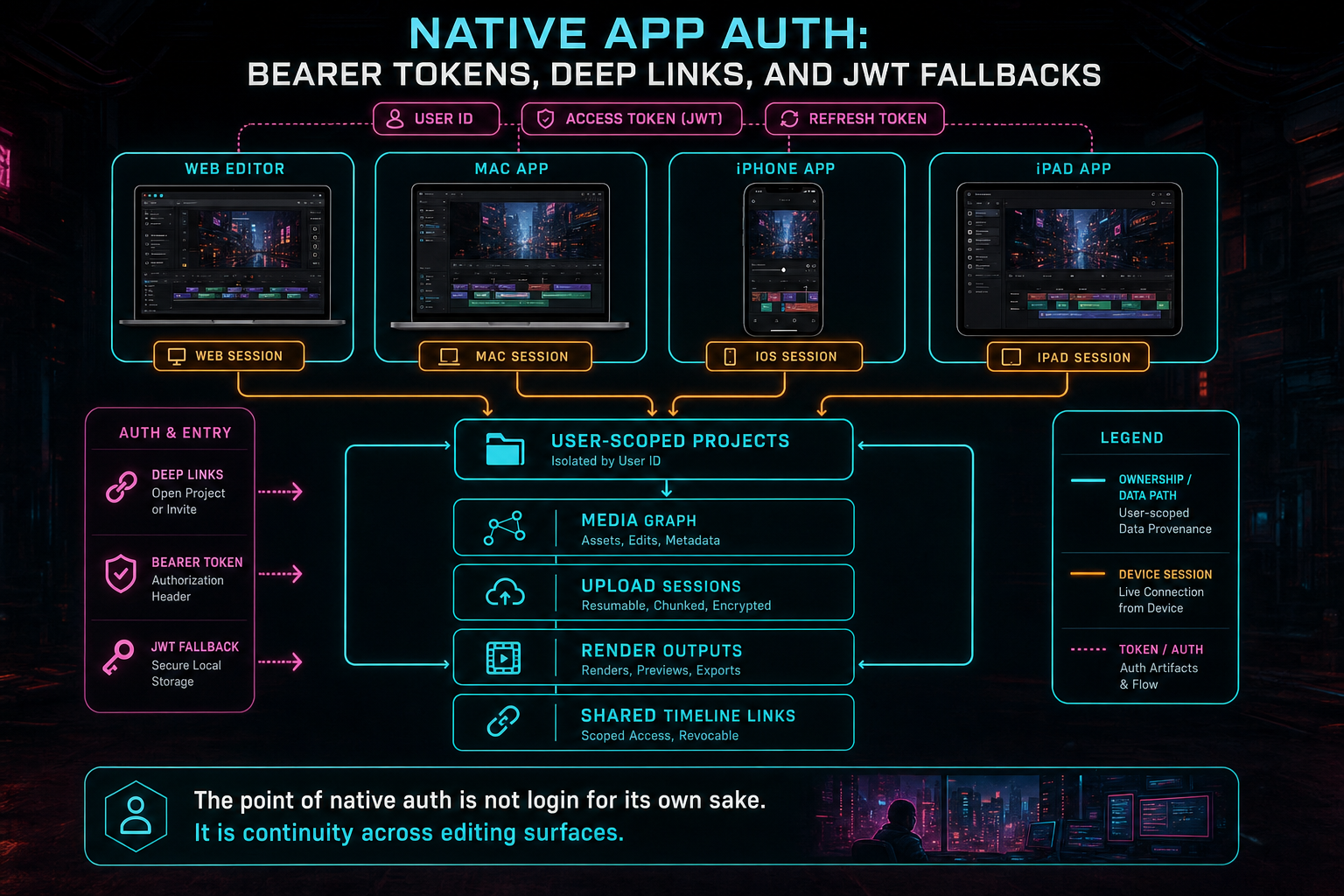
The point of native auth is not login for its own sake. It is continuity across editing surfaces.
What Developers Should Copy
If you are building native auth for a creative web app, start with the boundary. Decide where login happens, where tokens are exchanged, where claims are normalized, and where protected routes get the user ID. Keep those concerns close together. Do not let every feature route learn a slightly different version of native authentication.
Normalize return paths. A login flow that supports deep links should still reject unsafe redirects. Convert absolute URLs to local path form when appropriate. Reject protocol-relative values. Avoid API paths as post-login destinations. Fall back to a known product route when the requested destination is not safe.
Treat deep links as a handoff mechanism, not an authorization mechanism. A custom scheme URL can carry tokens or context after the server has done its work, but a deep link by itself should not unlock private state. The protected API still needs bearer validation, session validation, user scoping, and route-level ownership checks.
Build a fallback ladder, then keep it explicit. Local JWT decode can reduce dependency on external validation calls when claims are present. OIDC userinfo can validate tokens that do not decode locally. Hinted IDs can support narrow handoff paths during native linking. Browser sessions and refresh tokens can continue to serve web requests. Put the ladder in middleware and log failures clearly enough that support and engineering can tell which rung broke.
Give the user a retry surface. Native callback flows cross browsers, operating systems, installed-app state, and URL scheme registration. Even when the code is correct, the OS may not open the app on the first attempt. A small callback page with clear status, error text, and an open-again button can turn a fragile moment into a recoverable one.
The Result
The finished VibeChopper flow is direct. The native app starts a link request. The browser lands on /auth/native-callback. If the user is not authenticated, the page sends them through /api/login with a safe return path. Once the browser session exists, the callback page fetches /api/auth/native-link, receives the narrow token payload, and opens vibechopper://callback so the app can continue authenticated API work. Create your editing login
On the server, isAuthenticated accepts the practical credential shapes a native client may send: bearer authorization, native token header, auth query token, or browser session. It decodes JWT claims when possible, uses OIDC userinfo when needed, supports a constrained hinted-user fallback for native handoff cases, refreshes browser sessions when refresh tokens exist, and rejects the request when identity cannot be established. Downstream routes still use the same user-scoped project and media rules.
That is the balance VibeChopper wants. The sign-in flow feels light to the creator, but the server contract stays serious. Deep links move users between surfaces. Bearer tokens authenticate API calls. JWT fallback keeps handoff resilient. Ownership checks protect the timeline. Device continuity becomes a normal part of editing instead of a separate account problem.
Edit videos with your voice based on vibes should work wherever the editor lives: browser, Mac, iPhone, or iPad. Native app auth is one of the systems that makes that sentence true. It is not flashy infrastructure, but it is the bridge that lets a creator install the app and keep moving without losing the project, the media, or the timeline context they already built.
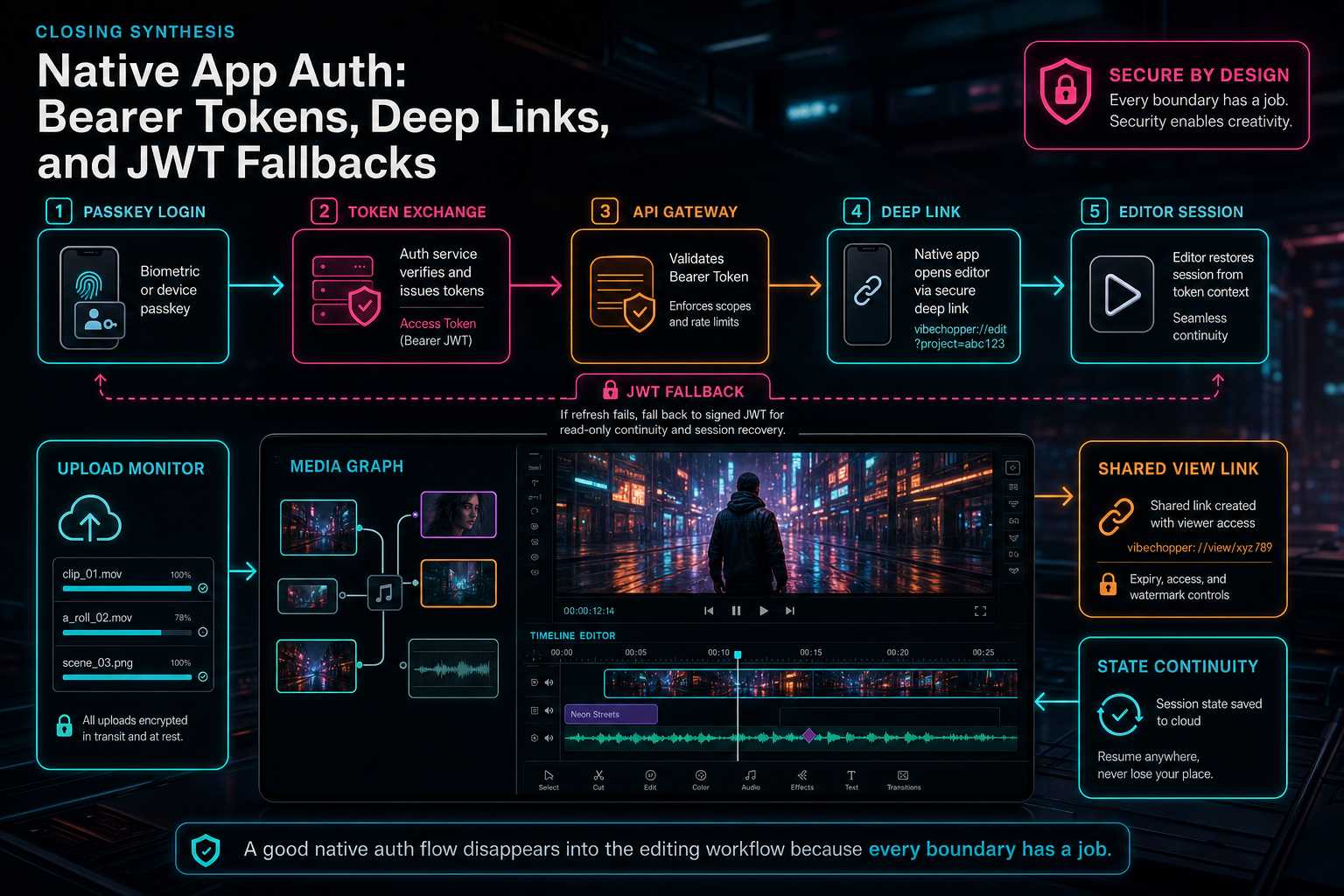
A good native auth flow disappears into the editing workflow because every boundary has a job.
Try the workflow
Open every feature from this post in the editor
These panels collect the features discussed above. Sign in once, finish your profile if needed, then the editor opens the first highlighted surface and walks through the tutorial.
Step 1
Create a secure editing account
Use email bootstrap and passkeys to get into the editor without password friction.
Create your editing login →Step 2
Share an exact timeline view
Send collaborators a deep link to the project, selected clip, timeline position, and discussion context.
Share a precise cut →Step 3
Open the media asset graph
See generated audio, rendered assets, source clips, metadata, and provenance in the media panel.
Explore your media graph →Step 4
Upload footage with progress you can trust
Watch large video uploads, processing, transcript work, and original-file storage from one monitor.
Upload a real shoot →