
Why Owned Auth Mattered
A video editor account is not just a login button. It is the identity spine for projects, source media references, transcript context, AI edit runs, render artifacts, shared timeline views, device handoff, feedback, and remediation. If the product cannot reliably know who owns that state, every other system has to compensate. VibeChopper already supported Replit Auth, but provider-only login was not enough for the product we wanted to ship. Create your editing login
The core requirement was direct and practical: let a creator prove control of an email address, create or recover a VibeChopper account from that proof, then encourage a passkey so the next sign-in is faster and stronger. No password database. No invented cryptography. No asking creators to remember another secret before they can edit videos with natural language. Email gets them in. WebAuthn makes the account feel native after that.
The implementation lives in server/auth/ownedAuth.ts, the auth tables in shared/schema.ts, and the product surface in client/src/components/auth/SignInDialog.tsx plus client/src/components/auth/PasskeyRegistrationDialog.tsx. The shape is intentionally boring in the places that should be boring. Challenges expire. Tokens are hashed before storage. Return paths are constrained. WebAuthn relies on the browser, the authenticator, SimpleWebAuthn, RP ID, origin, and user verification.
That combination gives VibeChopper a first-party access path while preserving the existing provider route as a compatibility lane. A creator can continue with Replit for now, but the owned path is available: confirm your email once, create a passkey, and get back to the editor. The result is product-final authentication that feels simple on the surface and has real account infrastructure underneath.
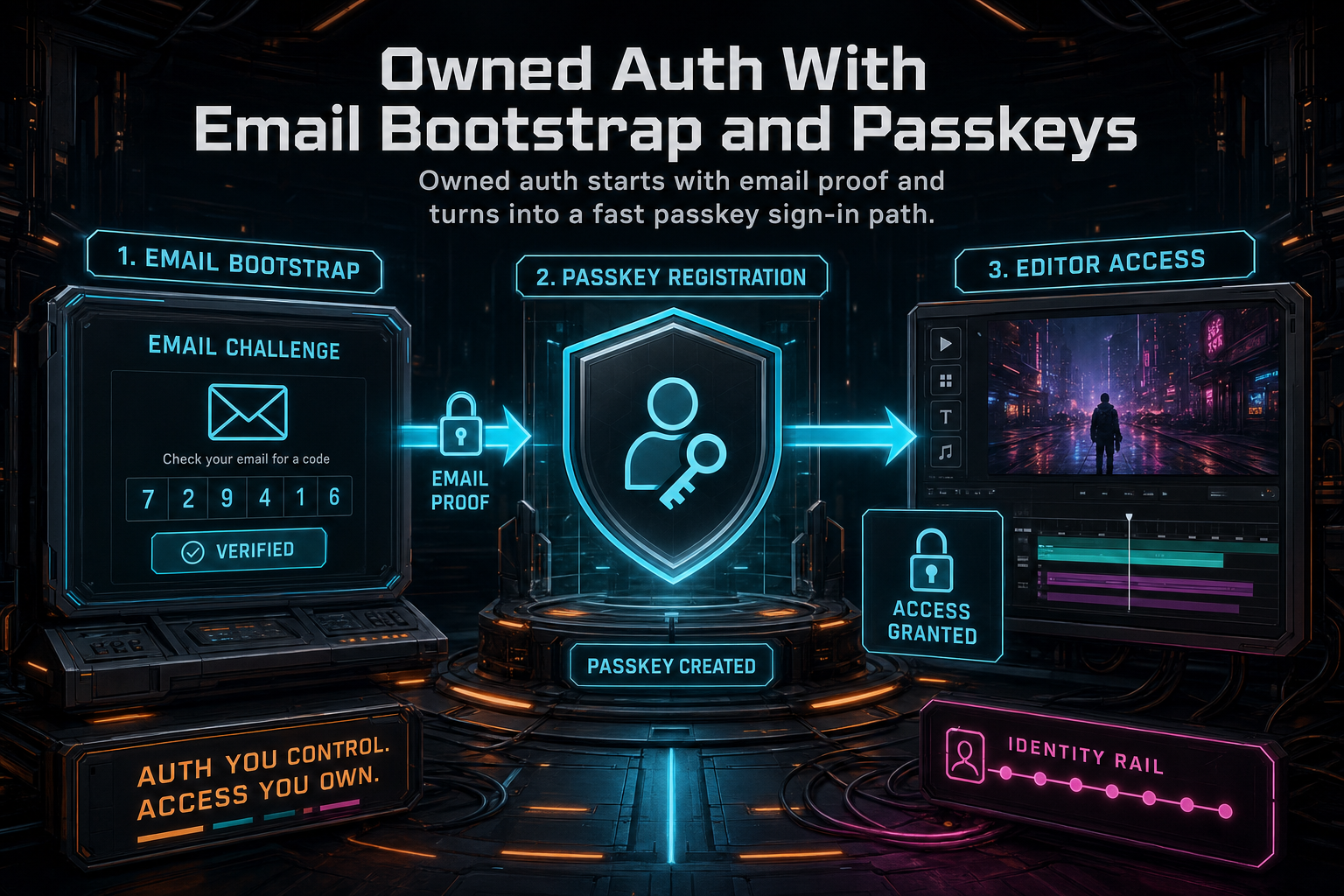
Owned auth starts with email proof and turns into a fast passkey sign-in path.
Email as Bootstrap, Not Password
The email flow begins with POST /api/auth/email/start. The client sends an email address and an optional returnTo. The server normalizes the email, checks whether a user already exists for that address, generates a 32-byte random token, generates a six-digit code, hashes both values with SHA-256, and stores a row in auth_email_challenges with a 15 minute expiration.
The database row carries enough context to make the flow auditable without storing the raw secret. It records the email, normalized email, optional existing user ID, purpose, token hash, code hash, safe return path, expiration, request IP, user agent, and creation time. The purpose becomes sign_in for an existing user and passkey_bootstrap for a new user. That naming matters because it tells future readers the product intent: email is the bridge into a first-party passkey account, not a long-term substitute for good device-native sign-in.
The email itself includes two paths. The creator can click a verification link containing auth_token, or type the six-digit code into the sign-in dialog. Both paths verify the same stored challenge. The link is convenient on the same device. The code is useful when the email opens elsewhere or a browser blocks a handoff. The product copy stays plain: confirm your email once, then create a passkey for fast sign-in on this device.
On verification, the server looks up an unconsumed, unexpired challenge by token hash or code hash. If the challenge points to an existing user, it uses that user. If not, it creates one through the storage layer with the normalized email. Then it marks the challenge consumed, inserts or updates the email identity in auth_identities, updates the user's email, and logs the request into the session. The whole transition happens inside a transaction for the durable records that must move together.
The distinction between bootstrap and password is the product lesson. VibeChopper does not ask users to create a password, store a password hash, reset a password, or guess whether their password manager saved the right domain. It asks for an inbox proof, then offers a passkey. Email remains useful for account discovery and recovery. Passkeys become the preferred daily route back into the editor.
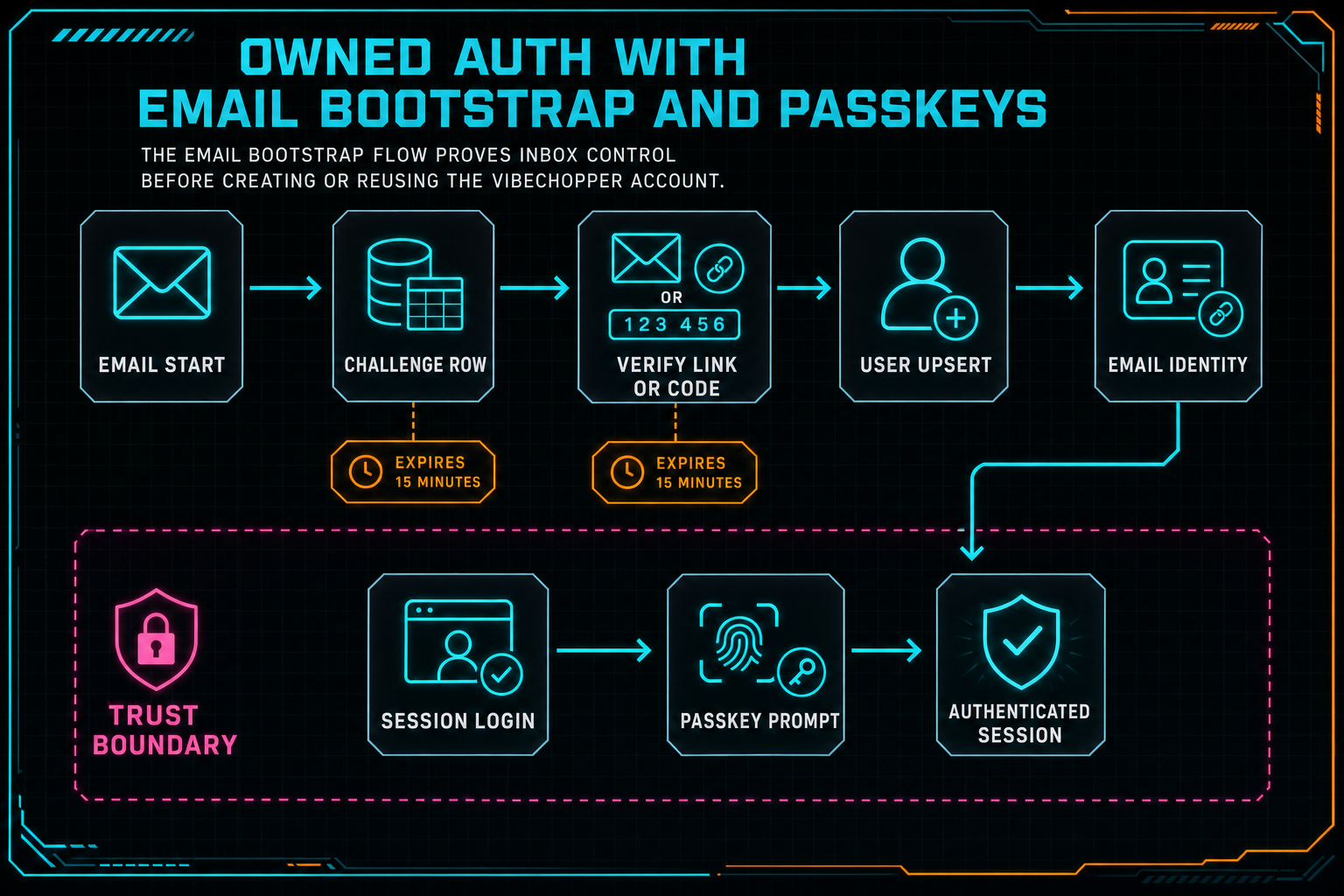
The email bootstrap flow proves inbox control before creating or reusing the VibeChopper account.
Safe Return Paths and Sessions
Authentication does not end when the user proves an email address. The product still has to send them to the right place. A blog CTA might point to /editor?intent=voice-edit. A share link might point to a project view. A native callback might need a narrower handoff. That makes return path handling a security boundary, not a convenience detail. Talk a cut into shape
VibeChopper keeps this constrained with safeReturnTo. The function accepts only same-origin relative paths, rejects protocol-relative strings, and caps the stored value length. That means the email link can carry a useful destination without becoming an open redirect. A successful verification returns the saved path, and the client navigates there after it invalidates the auth query.
The session login also translates the first-party user record into the shape expected by the existing Replit Auth-aware code. loginRequest builds a session user with claims.sub, email, profile fields, and an expiration. That compatibility layer matters because the rest of the app already scopes data by the authenticated user. Owned auth should strengthen the login path without forcing every project, route, and query to relearn identity at the same time.
This is a recurring pattern in VibeChopper infrastructure. New systems have to meet the product where it is. AI edit runs did not replace the timeline; they produced traceable tool events against it. Upload monitoring did not replace media storage; it made the pipeline observable. Owned auth does not discard existing user scoping; it gives that scoping a first-party sign-in path.
The Passkey Registration Contract
Once email is verified, the product asks the creator to create a passkey. The server endpoint for registration options calls SimpleWebAuthn's generateRegistrationOptions with the configured relying party name, RP ID, user ID, user name, display name, and existing credential exclusions. Attestation is set to none, resident keys are preferred, and user verification is required. Create your editing login
The RP configuration is resolved from environment and request context. PASSKEY_ORIGIN, PUBLIC_APP_URL, or APP_URL can define the origin. PASSKEY_RP_ID can override the relying party ID, and PASSKEY_RP_NAME can name the product, defaulting to Vibe Chopper. That configuration keeps local, staging, and production environments explicit while preserving a sane request-derived fallback.
The generated WebAuthn challenge is stored in auth_webauthn_challenges with the session ID, user ID, type, expiration, and creation time. Registration challenges expire after five minutes. The short lifetime is deliberate. WebAuthn is a ceremony between server, browser, authenticator, origin, and relying party. A stale challenge should not become durable auth material.
The browser then calls startRegistration from @simplewebauthn/browser. The authenticator produces the registration response, and the client posts it to /api/auth/passkeys/register/verify with a device name such as This Mac, This iPhone, This iPad, or This device. The server consumes the stored registration challenge and verifies the response against the expected challenge, expected origin, expected RP ID, and required user verification.
If verification passes, VibeChopper stores the passkey in user_passkeys: user ID, credential ID, credential public key, counter, credential device type, backup state, transports, display name, and timestamps. The credential ID is unique. Existing passkeys are excluded from new registration options. The account can have multiple devices over time, but each stored credential is a concrete public-key authentication method for that user.
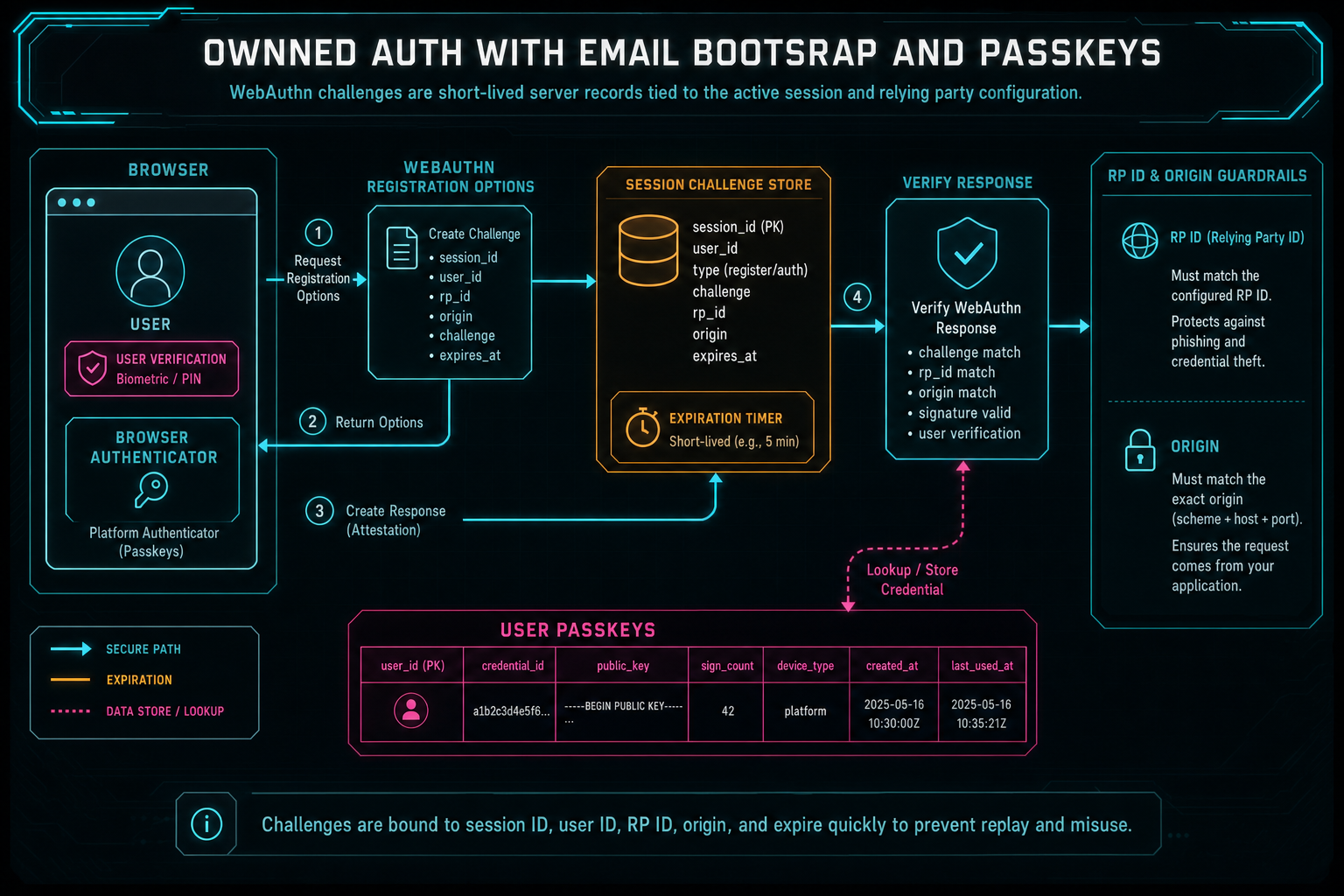
WebAuthn challenges are short-lived server records tied to the active session and relying party configuration.
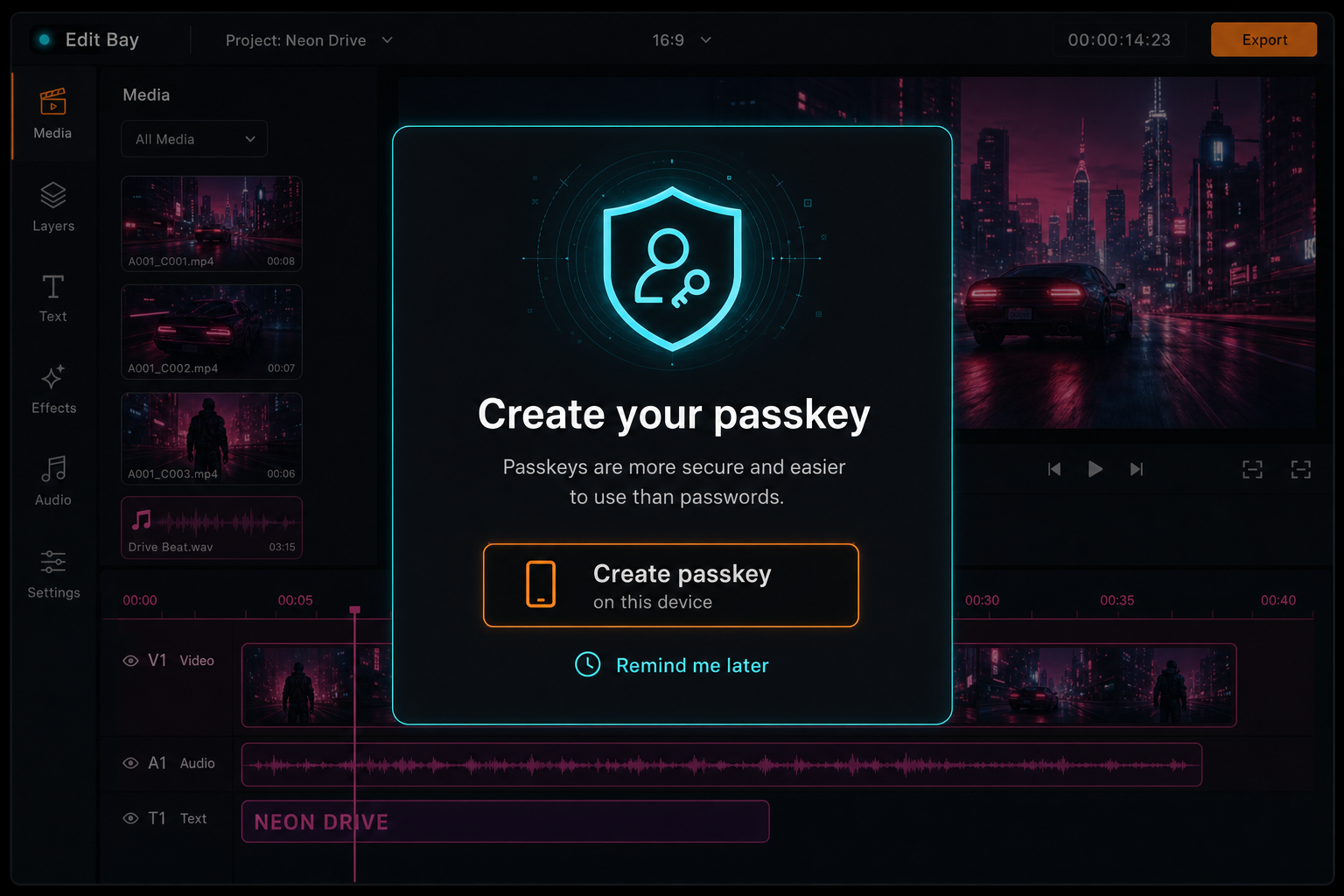
Passkey registration appears after email verification or inside the editor when the account has no passkey yet.
Authentication Without a Password Field
The passkey login path starts with /api/auth/passkeys/login/options. If the user typed an email, the server uses it to find known passkeys and returns an allow list. If not, the server can return authentication options without an allow list, letting discoverable credentials do their job where the platform supports them. Either way, the challenge is stored against the current session as an authentication challenge.
The browser calls startAuthentication, the authenticator asks for user verification, and the client posts the response to /api/auth/passkeys/login/verify. The server consumes the active authentication challenge, finds the passkey by credential ID, reconstructs the credential from the stored public key and counter, and verifies the response with SimpleWebAuthn. On success, it updates the counter and lastUsedAt, loads the owning user, and logs that user into the session.
There is no password field hidden somewhere else in the system. The durable secret stays with the user's authenticator. The server stores public keys and counters. The user proves possession through the WebAuthn ceremony. That is the right shape for a creative tool where login should be strong but should not dominate the workflow.
The surrounding data model keeps responsibilities separate. auth_email_challenges stores short-lived email proofs. auth_webauthn_challenges stores short-lived WebAuthn ceremonies. auth_identities stores durable provider and email identity links. user_passkeys stores durable public-key credentials. users remains the canonical application user record that projects, credits, media, editor state, and notifications can reference.
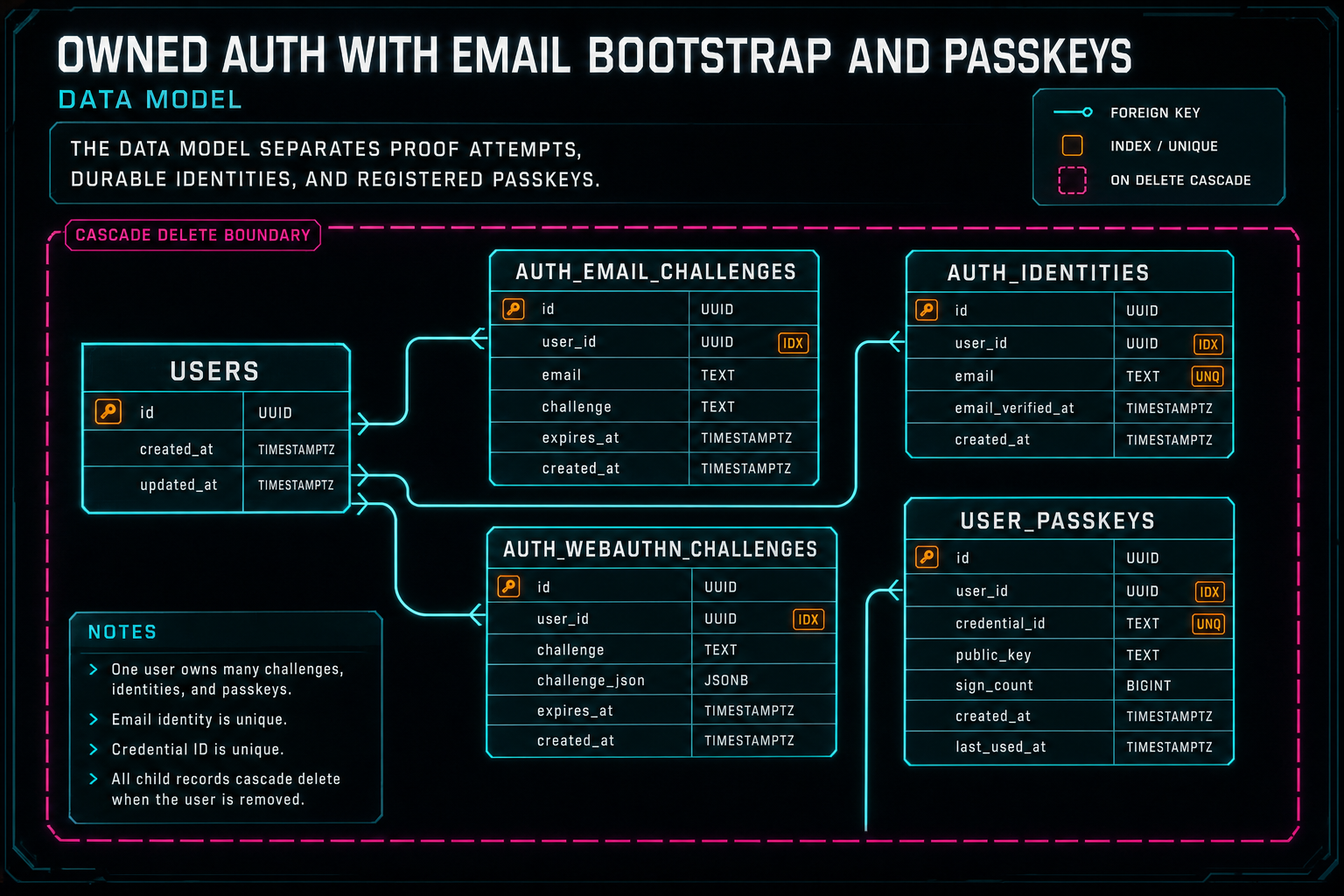
The data model separates proof attempts, durable identities, and registered passkeys.
The Product Surface
The public sign-in dialog intentionally avoids turning auth into a settings console. The first screen asks for email and offers two primary actions: email me a confirmation, or use a passkey. It also shows provider icons for future expansion and a Replit fallback while the migration path remains active. The copy says what happens: confirm your email once, then create a passkey for fast sign-in on this device. Share a precise cut
When the email challenge is sent, the dialog moves to verification. It tells the user that a confirmation link and code were sent to the masked email. If the user opens the link, the dialog detects auth_token in the URL, verifies it, invalidates /api/auth/user, and either moves to passkey creation or redirects to the saved return path. If the user types the code, the same server verification path runs.
Passkey creation is presented as the next useful action, not as a security lecture. The user has already proved the email and is signed in. The dialog says the email is confirmed and asks to create a passkey so this device can sign in instantly next time. The user can do it later, and the separate editor prompt can appear when an authenticated account has no passkey registered.
This matters for conversion because the product promise is editing, not authentication. People came to VibeChopper to describe edits, upload footage, inspect frames, share exact timeline views, or render a verified timeline. Auth should protect that work and get out of the way. The owned flow keeps the strongest ask, passkey creation, after the account is already real.
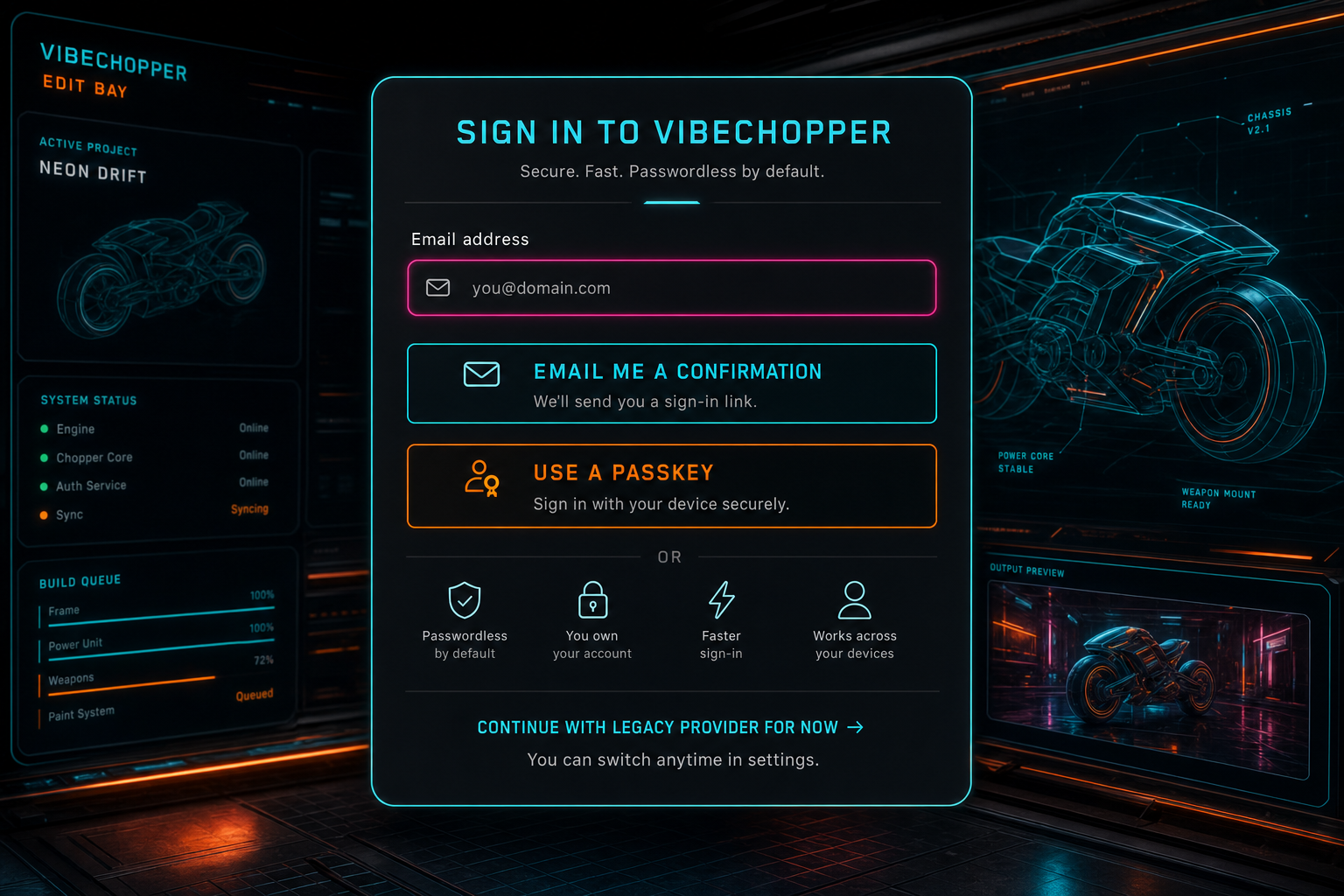
The sign-in surface keeps the path direct: confirm email, use a passkey, or continue with the legacy provider while migration finishes.
Security and Reliability Edges
The implementation is full of small boundary choices that make the system easier to trust. Email tokens and codes are hashed before storage. Email challenges expire after 15 minutes and are marked consumed. WebAuthn challenges expire after five minutes and are consumed before verification returns. Return paths are constrained to internal relative URLs. The email identity row uses a unique provider plus normalized email index so the same email identity cannot quietly fork across accounts.
The passkey registration path excludes existing credentials for the user, reducing duplicate device registrations. Authentication updates the WebAuthn counter and last used timestamp, giving the server a durable signal for credential use. Registration and authentication both require user verification, which means the platform authenticator should require a local unlock such as biometrics, device PIN, or an equivalent user-present verification method.
The server also preserves compatibility with the rest of the application. The session shape still includes claim fields used by Replit-authenticated paths. The client still invalidates the TanStack Query auth key after login, verification, and passkey changes. The editor can check whether the authenticated user needs passkey registration and show the passkey prompt without breaking users who entered through the legacy provider.
The failure cases are concrete. Missing token or code becomes verification_token_required. Expired or consumed email proof becomes verification_token_invalid. Missing WebAuthn state becomes webauthn_challenge_invalid. Failed passkey verification becomes passkey_registration_failed or passkey_authentication_failed. These messages are not public marketing copy, but explicit failure labels help developers connect UI errors, logs, and tests.
Why This Unlocks More Than Login
Owned auth is part of the access and collaboration pillar, but its impact spreads. A reliable user identity lets upload sessions survive refreshes. It lets media summaries attach to the right account. It lets AI edit runs, tool events, and render verification stay connected to the project owner. It lets feedback become a remediation job with enough context to follow up. It lets shared timeline views and native app handoff work from the same account model. Send feedback with context
This is why the implementation sits in the same platform hardening wave as provider harness work, AI edit runs, render verification, upload telemetry, DATA remediation, and platform emails. Each system answers a different question, but the product expectation is consistent: creator state should be durable, visible, and recoverable. Auth is the door into that state.
For a creative tool, the account model has to respect momentum. A user may arrive from a blog CTA, open the editor, upload multiple large clips, generate transcripts, ask for a voice edit, share a view, switch devices, and later report a bug from the project context. Provider-only login can start that journey, but owned auth gives VibeChopper more control over how the journey continues.
Passkeys also help the universal app story. Browser sessions, native callbacks, bearer tokens, and deep links are easier to reason about when the product owns a stable account identity and can connect device-native auth experiences back to the same user record. The passkey itself is web-first here, but the architecture points in the right direction: the account belongs to VibeChopper, not to a single sign-in provider.
What Developers Should Copy
If you are building owned auth for a product with existing provider login, copy the migration shape. Add a first-party path without forcing a flag day. Let email prove account ownership. Hash bootstrap tokens before storage. Expire and consume every challenge. Keep return paths internal. Link durable identities separately from one-time challenges. Preserve the session contract your app already uses while you migrate the entry point.
For passkeys, use a proven WebAuthn library and let the platform do the hard security work. Store server challenges with type, session, user, expiration, and consumed state. Verify registration and authentication against expected challenge, origin, RP ID, and user verification. Store credential IDs, public keys, counters, transports, device type, backup state, and friendly names. Never turn passkeys into a thin wrapper around a password flow.
Design the UI in the same order users experience trust. First, tell them what to do. Second, verify the thing they already understand, their email. Third, invite them to create a passkey because it makes the next sign-in faster. Keep legacy provider login available during migration. Make the account path feel like part of the editor, not a detour into enterprise identity jargon.
Finally, test the boundaries that matter. Expired challenges should fail. Consumed challenges should fail. Bad return paths should collapse to a safe route. Passkey registration should require the right active challenge. Auth query state should refresh after login. A system like this succeeds because small guarantees line up into a product experience that creators do not have to think about.
The Result
Owned auth gives VibeChopper a cleaner account foundation. Email bootstrap gets a creator into the product without a password. Passkeys make the next sign-in fast, device-native, and resistant to the usual password failure modes. The existing session and user-scoping model keeps working, which means projects, media, AI edits, renders, sharing, and feedback do not have to care which login path created the authenticated session.
The technical pieces are not exotic. Challenge rows, hashed tokens, safe return paths, identity links, WebAuthn registration, WebAuthn authentication, passkey storage, query invalidation, and a focused sign-in dialog. The value comes from the sequencing. Email proves the user. The server creates or reuses the account. The app signs them in. Then the product asks for a passkey at the moment it can clearly explain the benefit.
That is the VibeChopper version of secure auth for creative work. Keep the creator moving. Protect the timeline. Make account recovery and device handoff practical. Use boring server records where boring is good, and let modern authenticators handle the secret. The result is less friction at the door and a stronger platform once the user is inside.
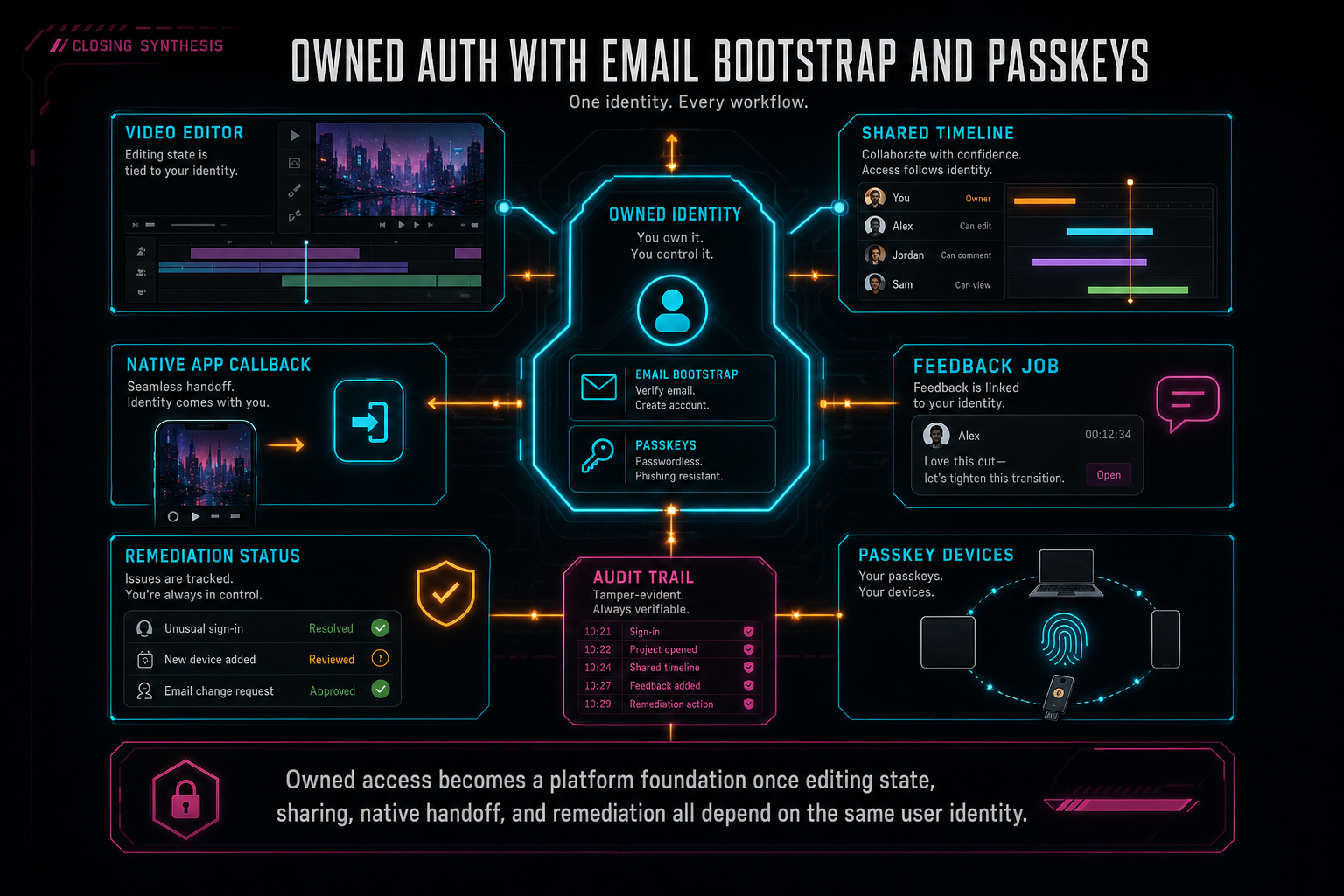
Owned access becomes a platform foundation once editing state, sharing, native handoff, and remediation all depend on the same user identity.
Try the workflow
Open every feature from this post in the editor
These panels collect the features discussed above. Sign in once, finish your profile if needed, then the editor opens the first highlighted surface and walks through the tutorial.
Step 1
Create a secure editing account
Use email bootstrap and passkeys to get into the editor without password friction.
Create your editing login →Step 2
Try voice-driven timeline edits
Describe the edit you want and let VibeChopper translate intent into timeline changes.
Talk a cut into shape →Step 3
Share an exact timeline view
Send collaborators a deep link to the project, selected clip, timeline position, and discussion context.
Share a precise cut →Step 4
Send contextual feedback
Capture voice or written feedback with project context so issues can become repairable jobs.
Send feedback with context →