
Sync Is a Product Contract
Multi-device video editing sync sounds simple until the editor has real media, real projects, and real users. A notes app can synchronize small text records. A video editor has source files, timeline clips, transcripts, frame analysis, generated assets, AI edit runs, upload sessions, render outputs, share links, and device-specific preview state. If those objects are not tied to one authenticated user and one canonical project graph, every device becomes a separate island. Create your editing login
VibeChopper treats sync as a product contract, not a cosmetic cloud feature. The web editor, iOS app, iPad app, and native desktop app all need to agree on who the user is, which projects that user owns, which media records are available, which long-running jobs are still active, and which rendered artifacts are safe to show. That means auth, storage, API shape, cache invalidation, object storage, and deep links are all part of the same sync story.
The key architectural choice is to avoid making any single device the source of truth. A browser tab can be the best place to upload, preview, and ask the AI editor for changes. An iPhone can be the fastest place to review a shot or check a link. An iPad can be the best inspection surface for a timeline and transcript. A native desktop app can feel better for heavier workflows. None of those surfaces should own the project permanently. The server owns canonical state, and every client presents a fast, local view of it.
That distinction keeps the product honest. Local device state can be optimistic, cached, or temporary. Canonical project state has to be authenticated, persisted, user-scoped, and recoverable. When a creator opens the same VibeChopper project on multiple devices, the product should feel continuous because each device is reading and mutating the same backend contract.
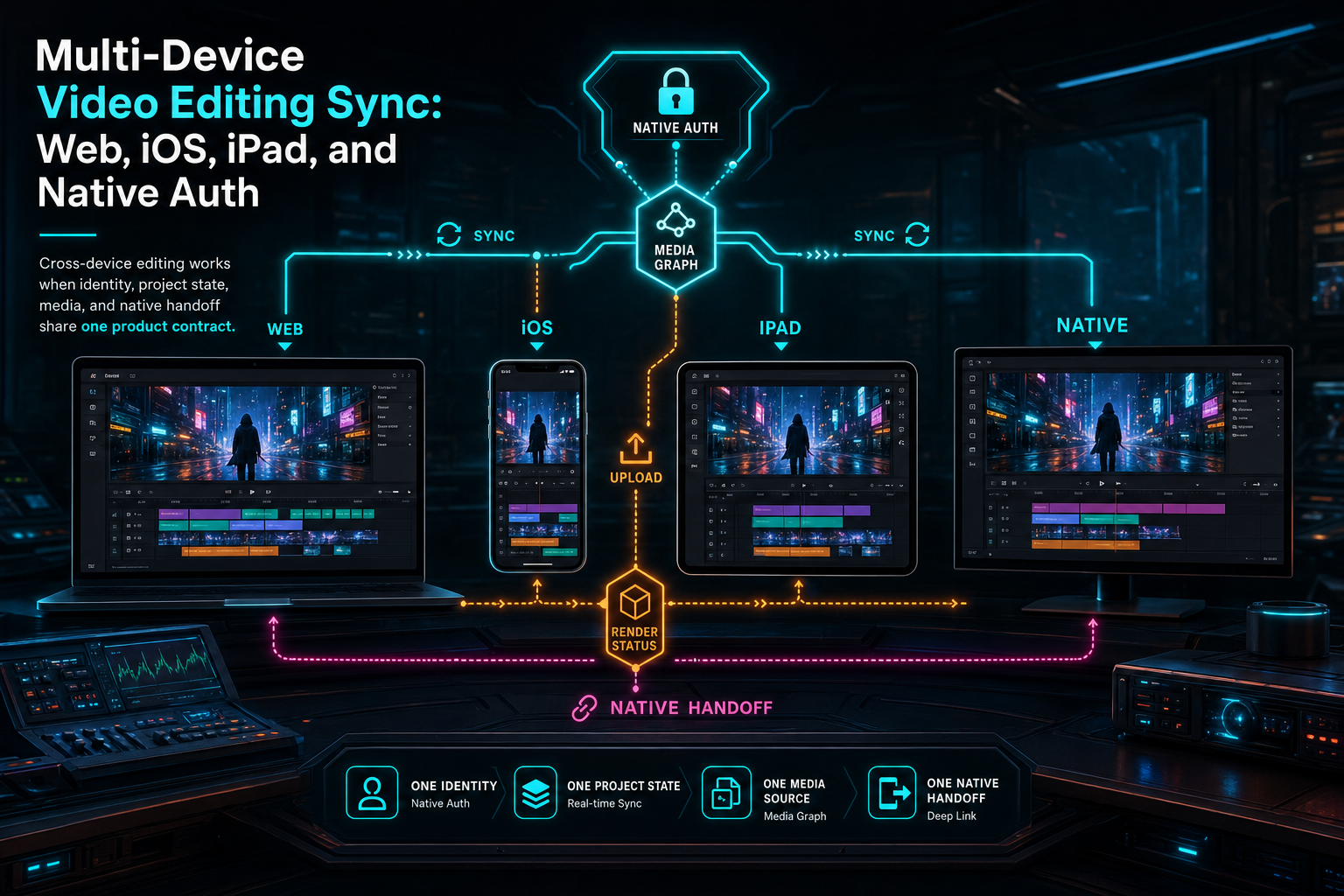
Cross-device editing works when identity, project state, media, and native handoff share one product contract.
One Auth Boundary for Web and Native
Cross-device sync starts with identity. The browser may rely on a session cookie. The native app may call APIs with Authorization: Bearer .... A native callback may carry an auth code or token-shaped value during handoff. A passkey sign-in may establish a first-party session before the app receives its native payload. Those transports differ, but the server should collapse them into one user identity before project routes run. Create your editing login
That is the lesson behind VibeChopper's native auth path. The browser owns the trusted login ceremony. If a native app needs to link, it opens a browser route such as /auth/native-callback. If the user is not signed in, the browser sends them through /api/login with a constrained return path. Once the browser session exists, the callback page asks /api/auth/native-link for a narrow handoff payload and opens the app through a custom scheme. The app then continues with bearer credentials against the same protected API surface.
The important part is not the custom scheme itself. The important part is that identity normalization remains centralized. Timeline, upload, render, media, and sharing routes should not each invent a native auth parser. They should receive an authenticated request shape, call the same user ID helper, and enforce the same ownership rules. A device type should never be a permission model.
Passkeys make this flow stronger because they give the product a first-party way to establish the user before native handoff. Email bootstrap proves account control. WebAuthn makes returning sign-in fast and device-native. From there, the app can receive scoped credentials and continue editing. The creator sees continuity; the server sees one user-scoped account graph.
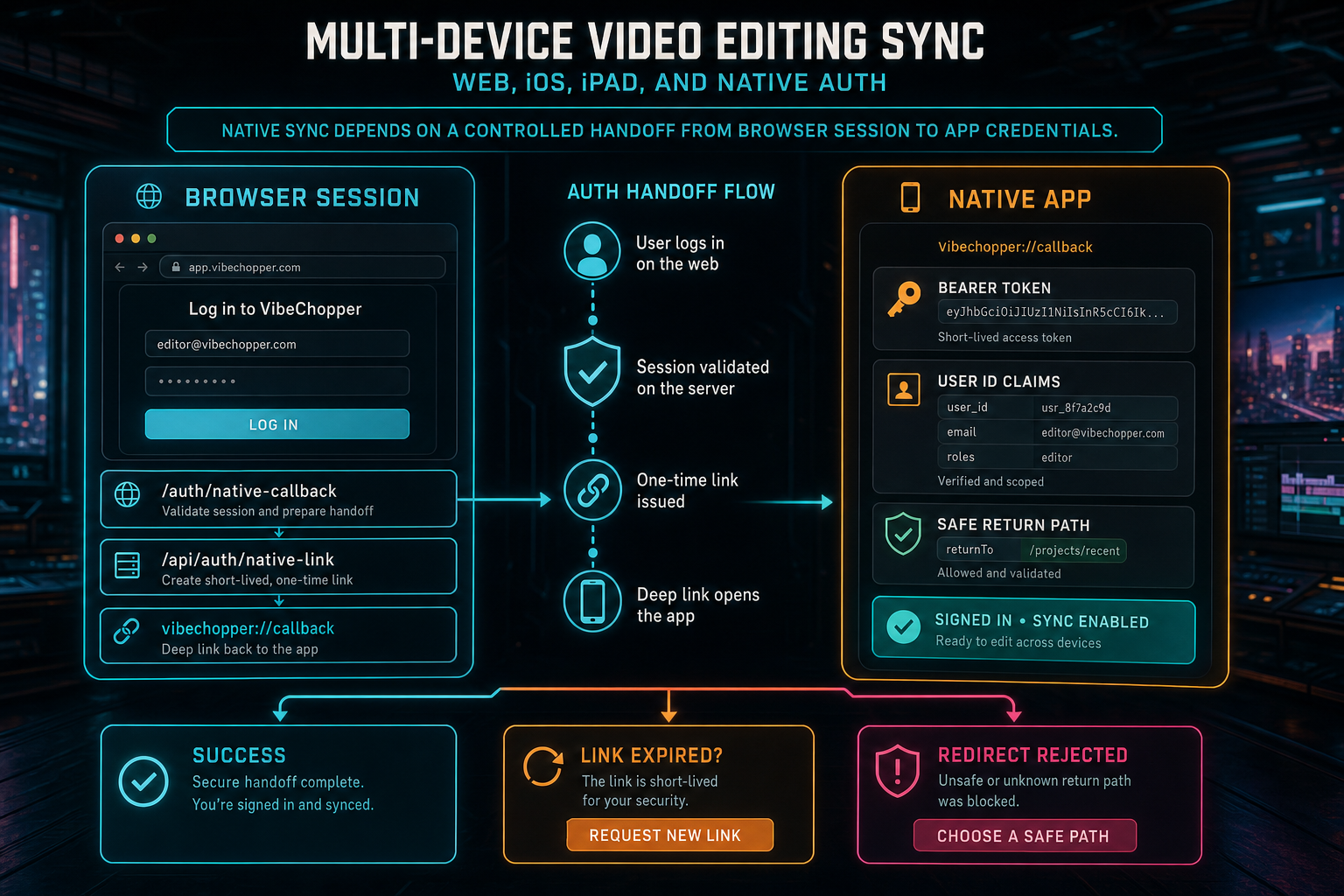
Native sync depends on a controlled handoff from browser session to app credentials.
The Shared Backend Contract
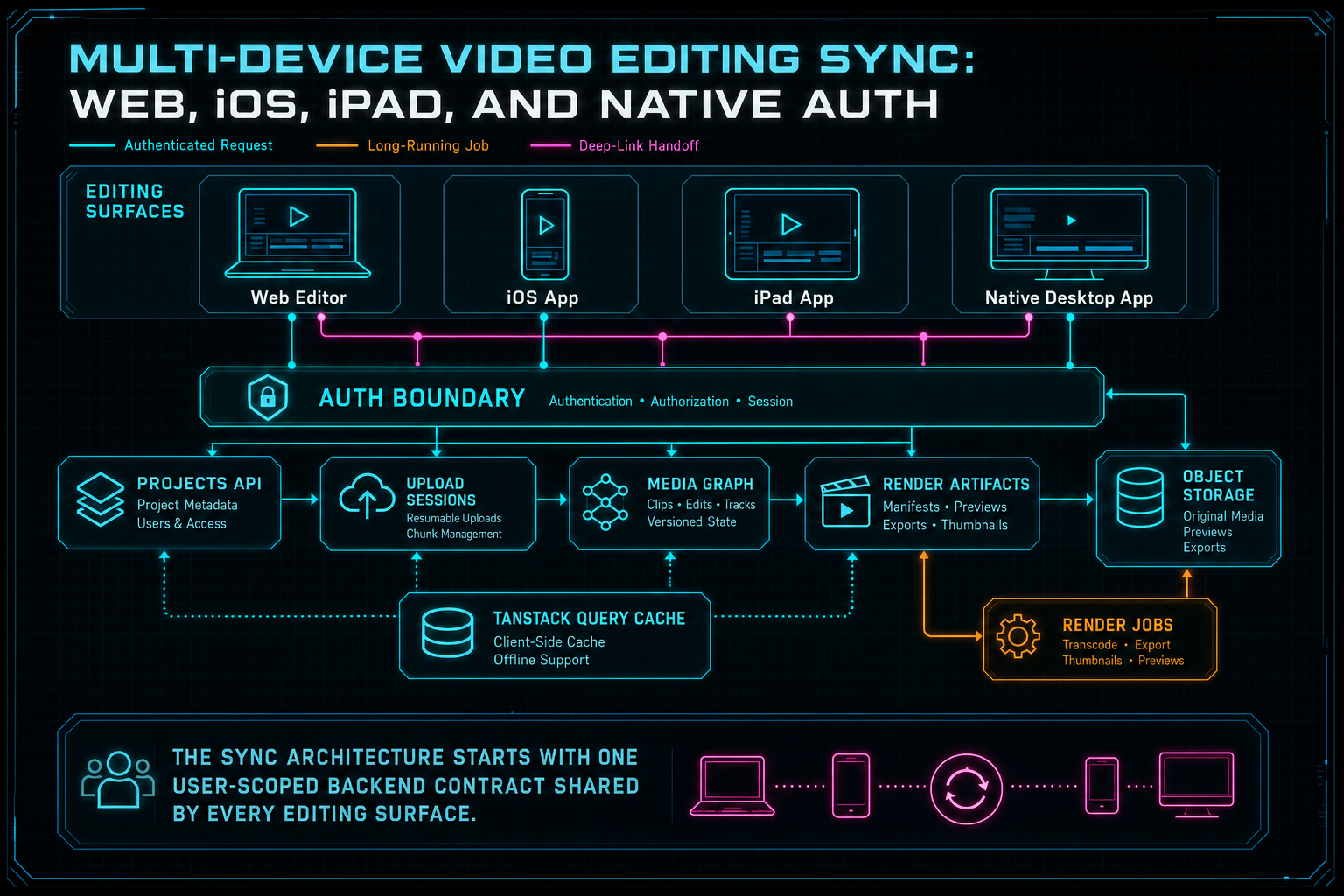
The sync architecture starts with one user-scoped backend contract shared by every editing surface.
Canonical State vs Device State
The cleanest sync systems separate canonical state from device state. Canonical state is what the server can defend: projects, timelines, media records, transcript segments, render jobs, generated assets, user identities, and sharing permissions. Device state is what makes the editor feel responsive: selected clip, scroll position, current playhead, preview buffering, local drag state, open panels, in-progress text input, and local media handles. Upload a real shoot
A web video editor especially needs this separation. Browser APIs can extract frames, read media metadata, and preview local files before every server-side process finishes. That is valuable, but those local handles are not durable sync state. Once the user expects another device to continue the edit, the backend needs persistent references: uploaded objects, processing summaries, extracted frame records, transcript rows, and source media metadata.
Upload sessions are a good example. A creator might begin a large upload in the web editor, refresh during processing, and later check the project from an iPad. If upload state exists only in one tab's memory, the product cannot explain what happened. If upload sessions, processing steps, and summaries are stored as server-side records, every device can tell the same story: source received, frames processing, transcript ready, upload failed, or retry available.
The same principle applies to renders. A render started from desktop should be visible from mobile after authentication. A verified export should show the same file size, duration, storage path status, and project link everywhere. Local preview state can vary by device. Canonical artifact state should not.
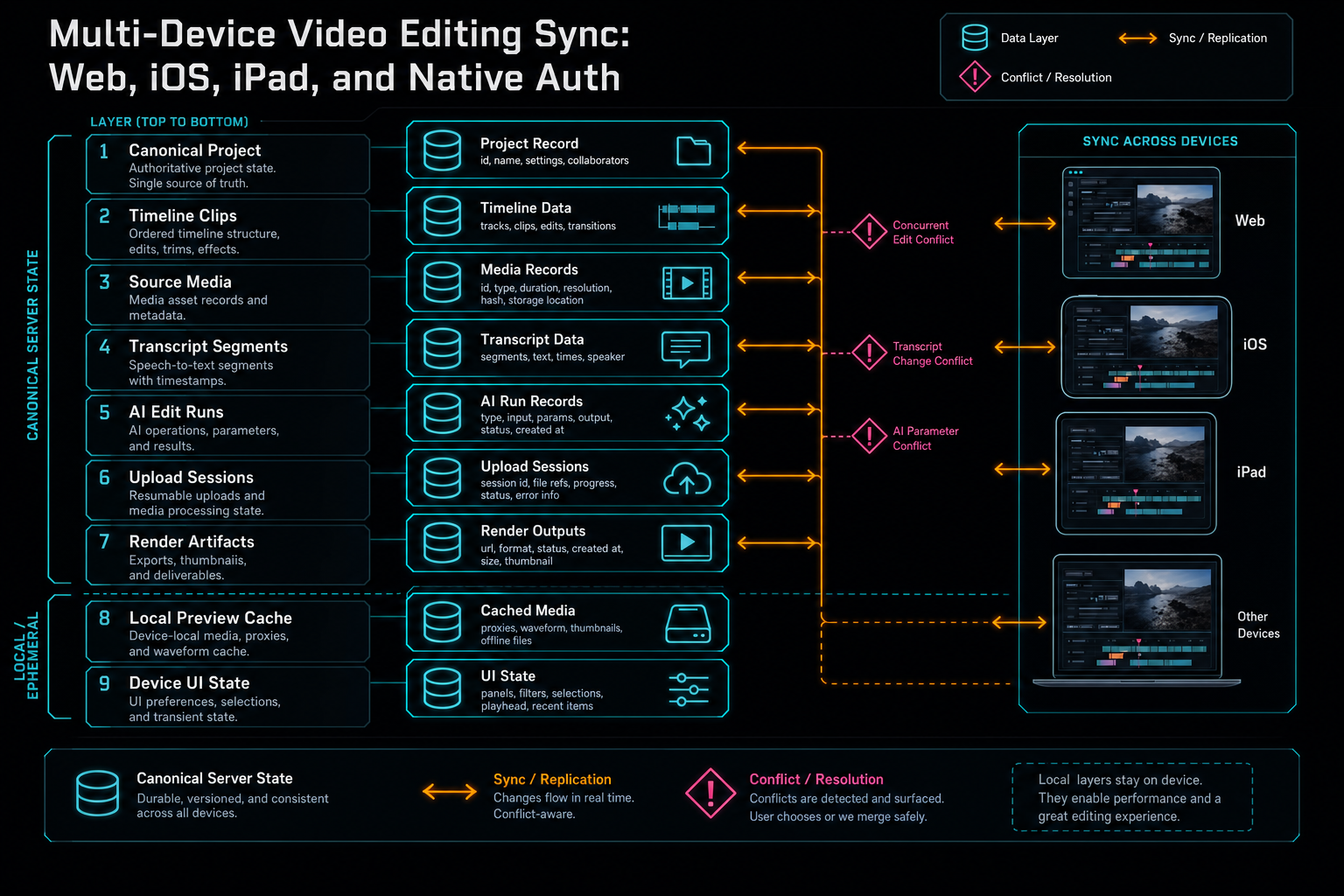
A synced editor has to separate canonical server state from local preview and ephemeral UI state.
Cache Invalidation and Conflicts
Most sync bugs are not dramatic distributed systems failures. They are stale caches, duplicate mutations, session expiry, missing ownership checks, and unclear user feedback. A user opens a project on iPad, trims a clip in the web editor, then returns to the iPad view. Which timeline version should the iPad show? A native app retries a mutation after a network timeout. Did the first request succeed? A user signs out in the browser while a native token remains active. Which routes still work? Share a precise cut
VibeChopper's web client uses TanStack Query patterns, which are well suited to this kind of server-state boundary. Query data can be cached locally, but mutations should invalidate or refresh the keys that represent canonical server records. The same idea has to exist conceptually in native clients even if the implementation is not TanStack Query: reads are cached views, writes return authoritative server results, and long-running job status should be fetched from durable endpoints.
For timeline mutations, versioning and idempotency are the two tools worth reaching for early. A timeline version or updated timestamp lets the server and client detect stale assumptions. An idempotency key or deterministic request identity keeps retries from duplicating expensive jobs or repeated tool actions. This matters more when AI agents are allowed to initiate edits, because the agent may retry after a timeout without knowing whether the first request reached the backend.
Conflict handling should be product-specific. A selected panel can simply refresh. A timeline edit may need to merge, reject, or ask the user to reload. A render request can often be deduplicated by project, timeline version, and output preset. A share link can point to a stable view even if the project changes later. The mistake is treating every device cache as equally authoritative. The backend should be the arbiter for canonical project state.
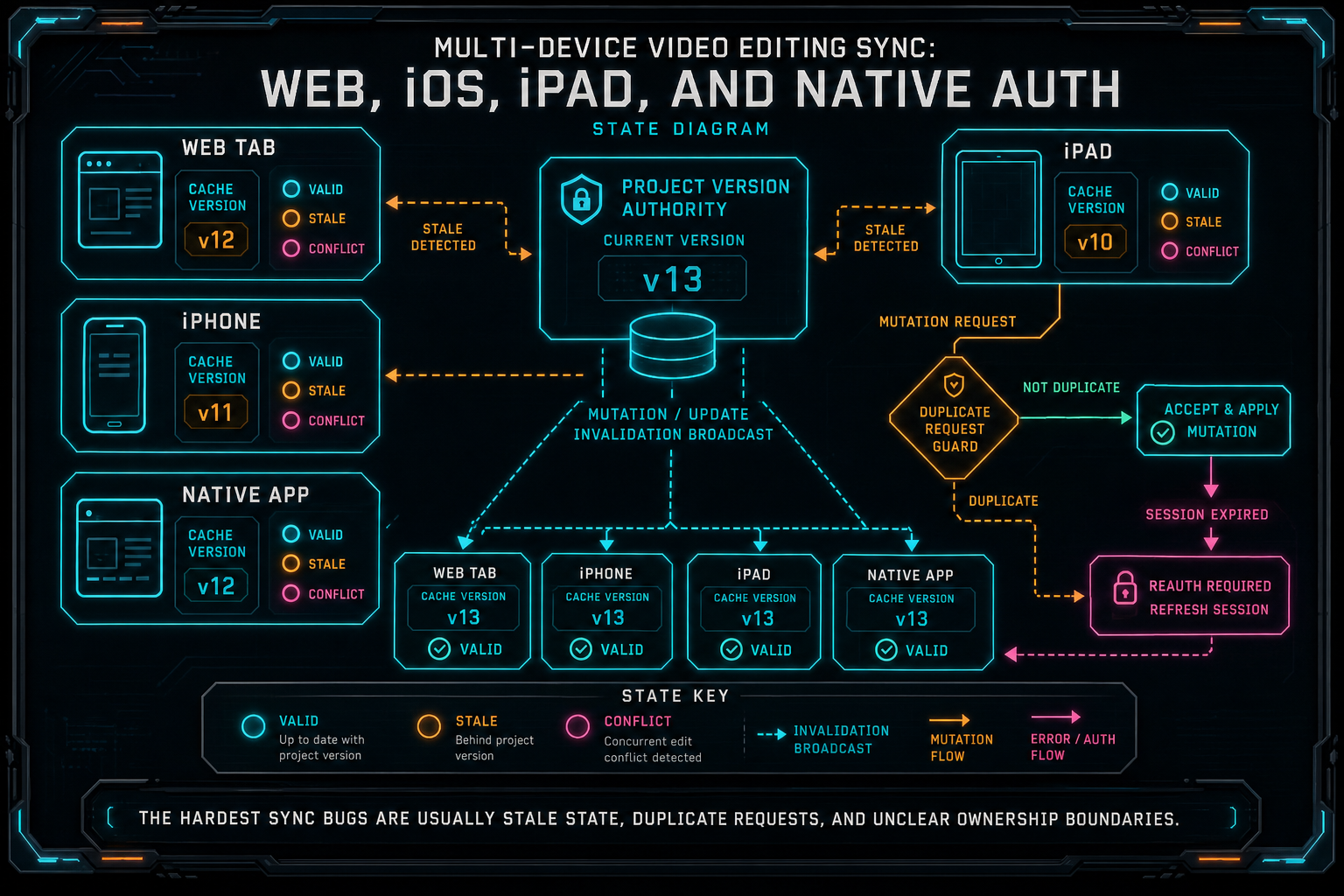
The hardest sync bugs are usually stale state, duplicate requests, and unclear ownership boundaries.
Upload and Render Continuity
The most visible cross-device promise is that heavy work keeps going. A creator should be able to upload footage, close a tab, open an iPad, and understand whether the clip is ready. They should be able to start a render from a desktop app and check the verified export from the browser. They should be able to click a shared view from a phone without losing the project context behind it. Upload a real shoot
That continuity depends on long-running jobs being first-class records. Upload progress should not be only a progress bar. It should be a session with status, source metadata, processing stage, failure code, retry path, and connection to the resulting media records. Render progress should not be only a spinner. It should be an export record with queued, encoding, uploading, verifying, complete, failed, or canceled states, plus a verified artifact when the job succeeds.
Once those records exist, devices can join the workflow at different times. The web editor can initiate an upload. The iPad can inspect the processed asset. The native desktop app can render the final timeline. The phone can open a shared link to review the result. Each surface is different, but the backend state is the same.
AI editing makes this especially important. If an AI run assembles a rough cut, adds music, applies effects, and triggers a render, the output should not be a loose URL. It should be connected to the run, timeline version, media graph, and project owner. That is what lets another device explain what happened instead of merely playing a file.
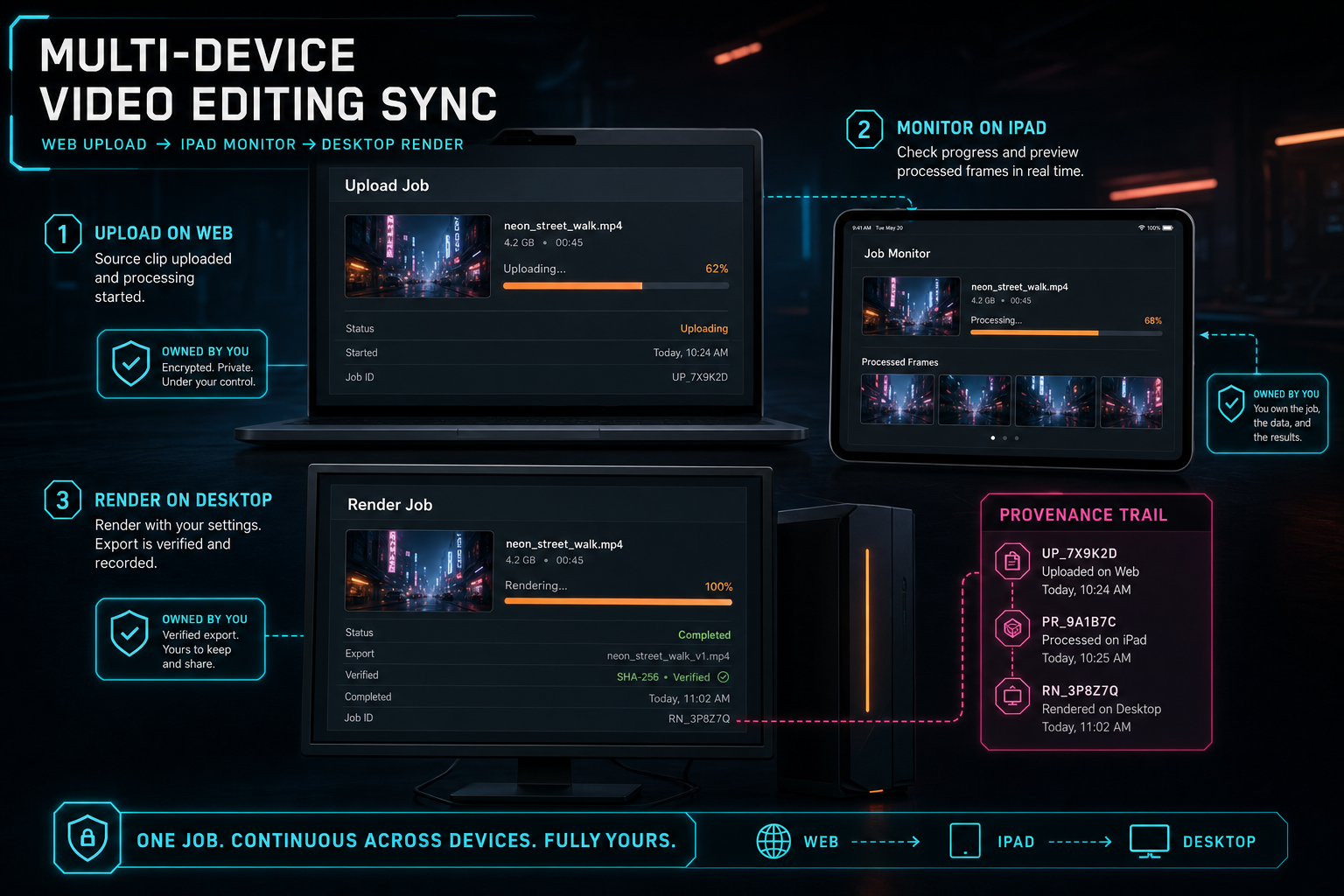
Upload and render jobs need durable records because users move between devices while work is still running.
What Developers Should Copy
If you are building multi-device video editing sync, start by naming your source of truth. The server should own authenticated user identity, project ownership, saved timelines, media records, job records, generated assets, render artifacts, and share permissions. Devices should own responsive UI, local preview state, and temporary interaction state. Do not ask local device memory to become your sync database.
Normalize authentication at the boundary. Support browser sessions and native bearer tokens if your product needs both, but collapse them into one request identity before feature routes execute. Keep ownership checks on every protected project, media, upload, render, and sharing route. Treat deep links as useful navigation, never as proof that a caller is allowed to access private project data.
Make long-running work durable. Uploads, frame extraction, transcription, AI edit runs, and renders should all have records that survive refresh and device changes. Return stable IDs from mutation endpoints. Expose status endpoints that every client can read. Separate user-safe failure messages from internal diagnostics. Give retries idempotent request shapes where duplicate work would be expensive.
Design for stale state. Every client cache will eventually be wrong. Mutations should return authoritative server state or trigger invalidation. Timeline changes should carry enough version context to detect stale writes. Native clients should handle expired sessions and rejected tokens without corrupting local project state. The product should make refresh, retry, and re-authentication ordinary instead of catastrophic.
The Result
The finished product feels simple. A creator signs in with email and passkey, opens the web editor, uploads footage, asks for an AI edit, reviews the timeline on iPad, checks a shared link on iPhone, and renders from the native desktop app. They do not think about session normalization, bearer tokens, object storage paths, upload session rows, media graph provenance, cache invalidation, or render verification. Create your editing login
The engineering contract underneath is serious. The browser and native apps use different transport details but converge on the same authenticated user. Project and media state lives on the server. Device caches are treated as views. Long-running work has durable records. Deep links carry navigation context, not authority. Render artifacts are verified and tied back to the timeline and project graph.
That is what multi-device video editing sync means in an AI-native editor. It is not only cloud save. It is continuity across identity, media, timeline, AI actions, upload recovery, sharing, and export. Web, iOS, iPad, and native apps can feel like one editor only when the backend gives them one dependable project reality to share.
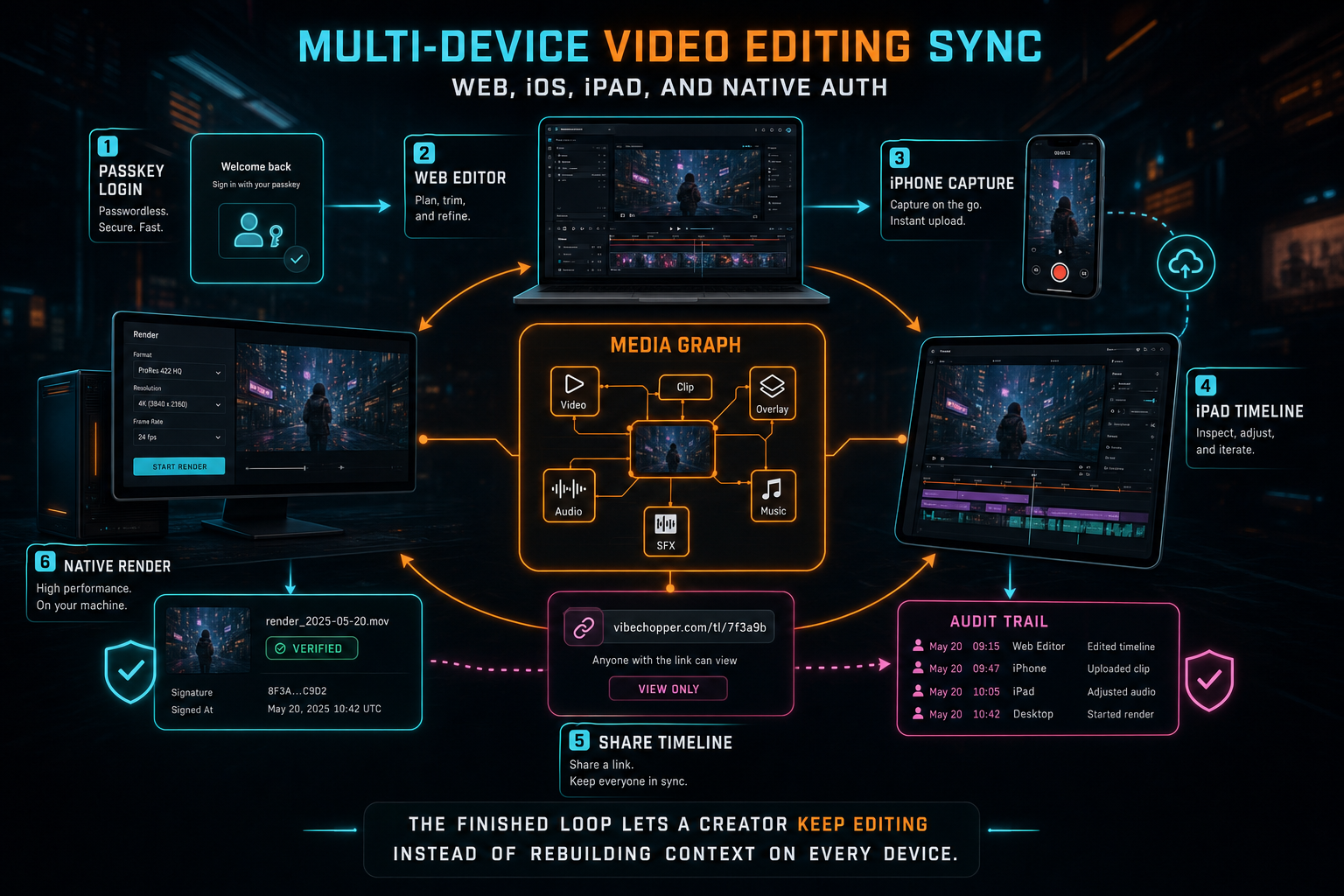
The finished loop lets a creator keep editing instead of rebuilding context on every device.
Try the workflow
Open every feature from this post in the editor
These panels collect the features discussed above. Sign in once, finish your profile if needed, then the editor opens the first highlighted surface and walks through the tutorial.
Step 1
Create a secure editing account
Use email bootstrap and passkeys to get into the editor without password friction.
Create your editing login →Step 2
Open the media asset graph
See generated audio, rendered assets, source clips, metadata, and provenance in the media panel.
Explore your media graph →Step 3
Upload footage with progress you can trust
Watch large video uploads, processing, transcript work, and original-file storage from one monitor.
Upload a real shoot →Step 4
Share an exact timeline view
Send collaborators a deep link to the project, selected clip, timeline position, and discussion context.
Share a precise cut →Step 5
Render a verified timeline
Export a project through the same storage-backed render path described in this article.
Render a timeline free →