
The Browser Is the Front Line
A browser-based video editor wins or loses in the first few seconds after a user picks a file. If the editor feels like a slow upload form, the user does not experience editing. If the editor can show the source, scrub the clip, start a timeline, and expose progress while the cloud catches up, it feels like software instead of a waiting room. That local feeling is the point of putting video work in the browser. Upload a real shoot
But the browser is not the whole architecture. It is the front line. A web video editing app has access to the user's file, media playback APIs, canvas extraction, audio preparation, local preview, keyboard shortcuts, drag handles, and timeline state. Those capabilities are excellent for immediacy. They are poor as permanent truth. Tabs refresh. Mobile browsers throttle work. Hardware decode varies. Memory pressure changes behavior. Local blobs disappear. A product-grade editor has to treat browser work as useful, bounded, and replaceable by persisted records.
VibeChopper's browser-based architecture is built around that split. The user should feel local responsiveness while the system creates cloud durability. The browser handles preview and interaction. The server owns identity, permissions, project state, upload sessions, media records, provider calls, object storage paths, and render jobs. The database gives each important thing a durable name. Object storage gives media bytes somewhere stable to live. AI features read from those records instead of from whatever happened to exist in a tab at one moment.
That is the core design principle behind local UX and cloud persistence: do local work to make the editor feel alive, then convert that work into server-owned product state as early and clearly as possible.
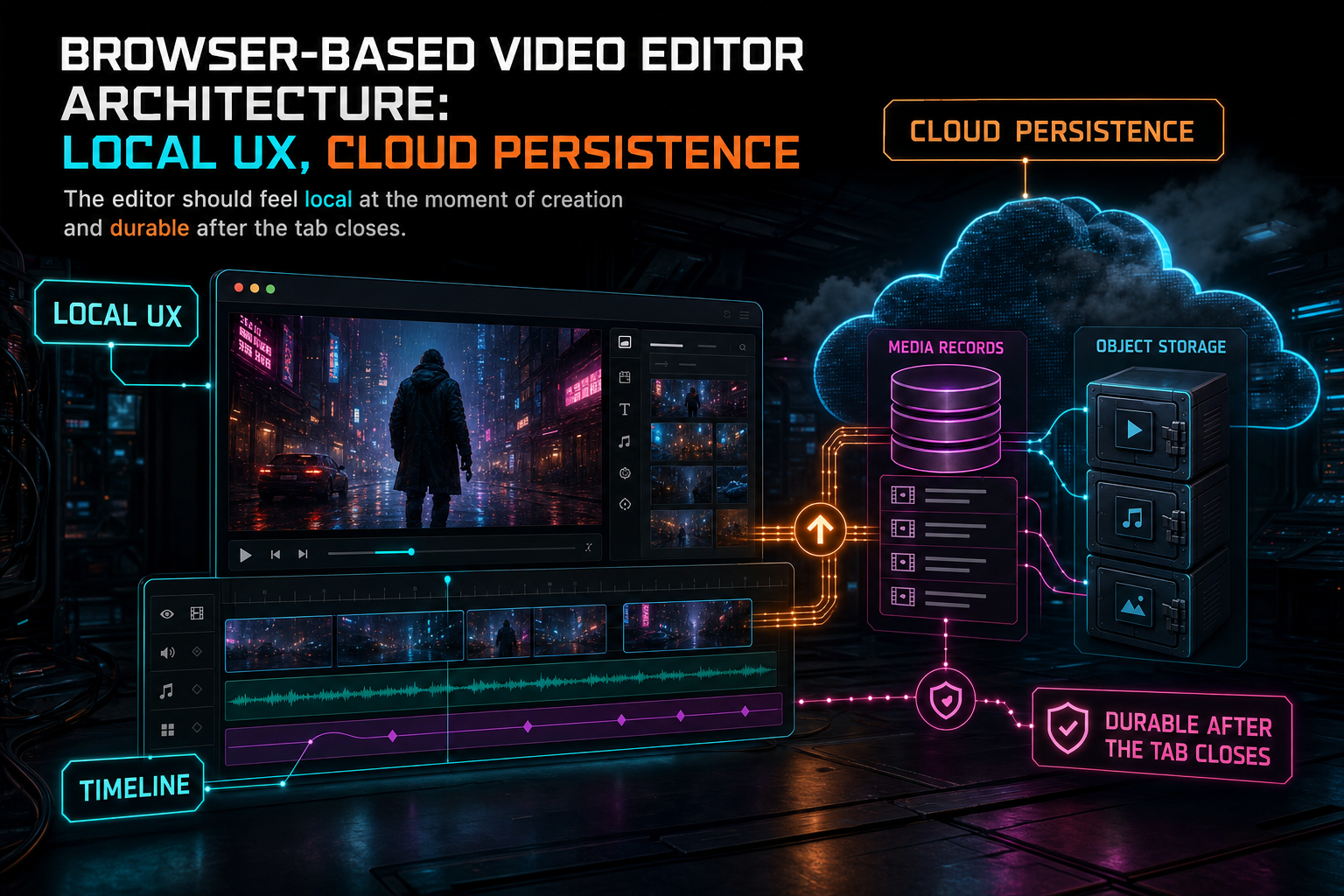
The editor should feel local at the moment of creation and durable after the tab closes.
The Boundary Between Local and Cloud Matters
The most important architectural decision in an online video editor is not which component renders the timeline. It is where the authority boundary sits. The browser can know what the user is doing right now. The server must know what the product can trust later. Mixing those responsibilities creates subtle bugs: renders that reference temporary URLs, AI commands that reason over missing frames, timelines that survive in React state but not in the project, uploads that looked complete locally but never created durable records.
A clean boundary makes the system easier to reason about. The browser owns interaction state: active selection, visible zoom range, playhead movement, drag previews, local decode status, optimistic progress, and transient controls. The server owns canonical state: projects, videos, clips, frames, transcript segments, upload sessions, generated assets, AI edit runs, render jobs, sharing permissions, and storage references. The UI can be optimistic, but it should reconcile with server truth.
This is especially important when the editor includes AI. A model should not be asked to edit a project based on hidden local state that the server cannot validate. If the model proposes a cut against a clip ID, the server needs that clip ID in canonical project state. If the model references a transcript segment, that segment needs to be persisted. If the model asks to add generated music, the result needs a media artifact with provenance. Local UX can make the request feel fast, but cloud persistence makes the result defensible.
The practical rule is simple: anything needed after refresh, needed by AI, needed by render, needed by collaboration, or needed by support belongs in persisted product state. Everything else can stay local until it crosses one of those boundaries.
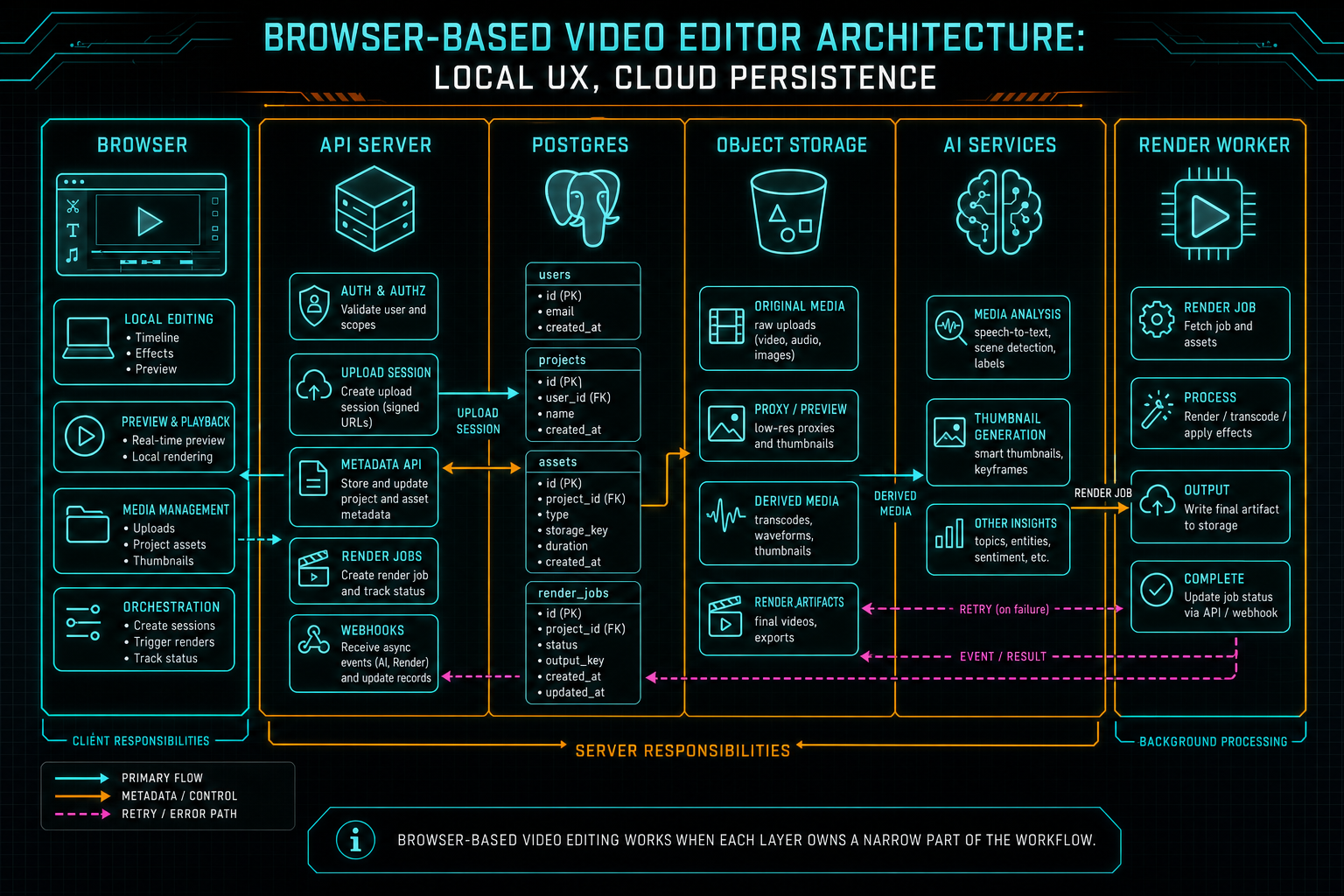
Browser-based video editing works when each layer owns a narrow part of the workflow.
The Local UX Contract
A good browser-based video editor gives the user immediate control before the backend has finished every expensive task. Local preview should begin from the selected file. The timeline should accept clips quickly. The user should be able to scrub, mark ranges, inspect thumbnails as they become available, and see processing status without blocking the whole workspace. This is what makes the editor feel native even though it runs in a tab. Talk a cut into shape
The local UX contract has limits. The editor should avoid holding more media blobs than needed. It should not assume every browser can decode every file with the same seeking behavior. It should distinguish between preview-ready and cloud-ready. It should show progress by stage rather than flattening source upload, frame extraction, audio preparation, transcript work, and AI analysis into one vague percentage. It should let users start thinking creatively while still being honest about what is durable.
For AI-assisted editing, local responsiveness also changes how prompts feel. A creator can point at the current playhead, select a range, or ask for a rough cut while watching the clip. The prompt is richer because it is grounded in a live editing context. The architecture still has to package that context safely. The selected range, clip references, transcript spans, and media readiness must be translated into a context snapshot the server can validate.
The browser is good at interaction because it is close to the person. It is not good at being the archive. The best local UX designs embrace that distinction instead of fighting it.
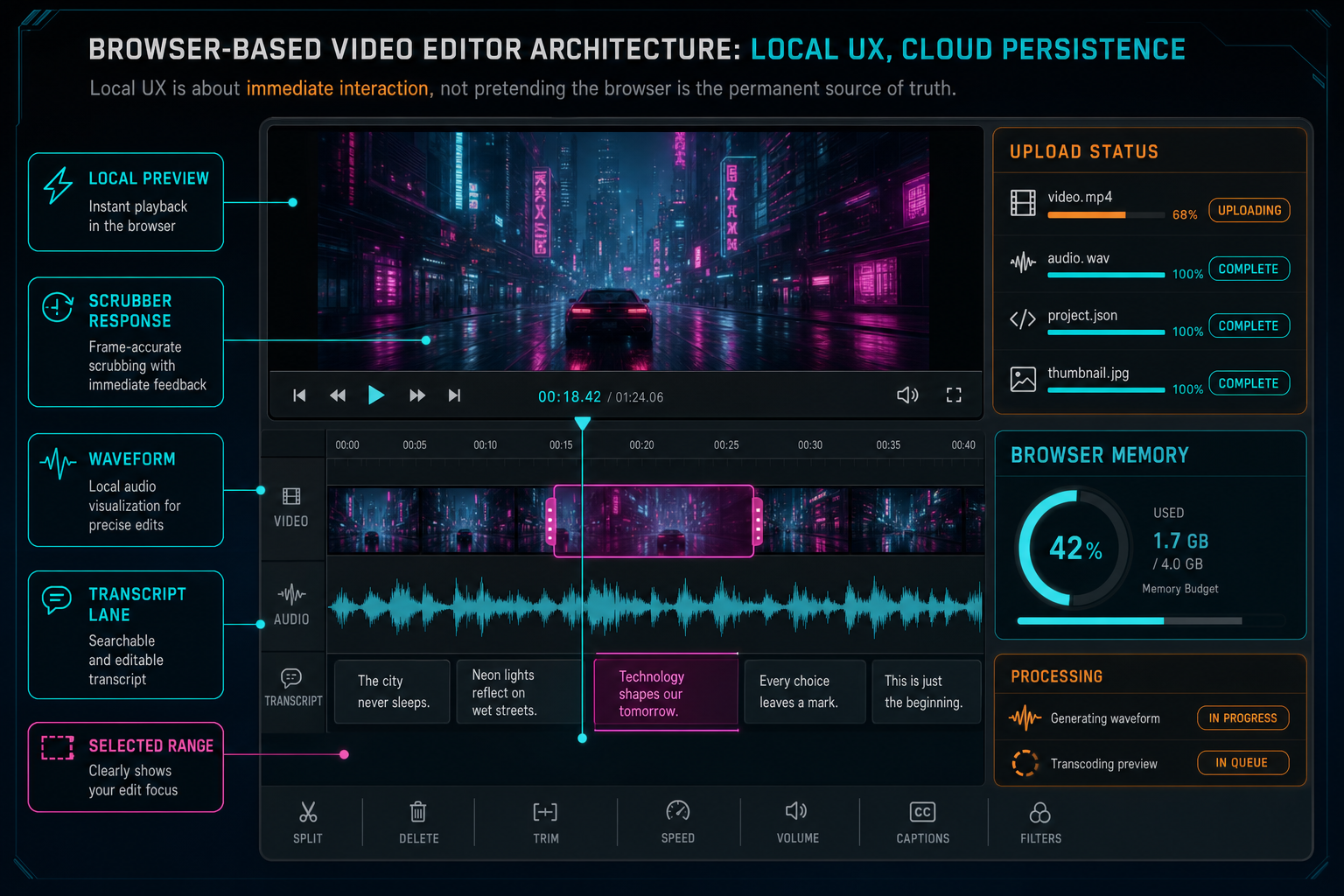
Local UX is about immediate interaction, not pretending the browser is the permanent source of truth.
Cloud Persistence Is a Lifecycle
Cloud persistence is often reduced to the sentence upload the file. That is too small for video editing. A source file becomes useful through a lifecycle: the browser sees a local file, preview becomes available, an upload session starts, the original is stored, frames are derived, audio is prepared, transcripts are written, AI descriptions are attached, metadata is summarized, the timeline references the media, and renders use the stored source. Each step has a status and a failure mode. Upload a real shoot
Treating persistence as a lifecycle gives the product better recovery. If the original is stored but frame extraction failed, the system can retry frame extraction. If frames exist but descriptions are missing, the AI analysis step can resume without asking for a new upload. If a transcript is pending, the editor can still allow visual editing while marking transcript-aware features as not ready. If a render was created but verification failed, the project can preserve the timeline and show a repairable output state.
This lifecycle also improves the user interface. Instead of one spinner, the editor can show meaningful states: original stored, frames processing, transcript ready, AI context ready, render verified. Those states teach users what the product is doing without exposing unnecessary backend detail. They also reduce duplicate requests because the UI can show that a stage is already running or already complete.
For developers, the key is to model these states explicitly. Do not infer persistence from the presence of a URL in client memory. Use upload session records, media processing summaries, object storage references, and canonical project records. Then make the UI read those records through normal data fetching so refreshes and reconnects restore the same truth.
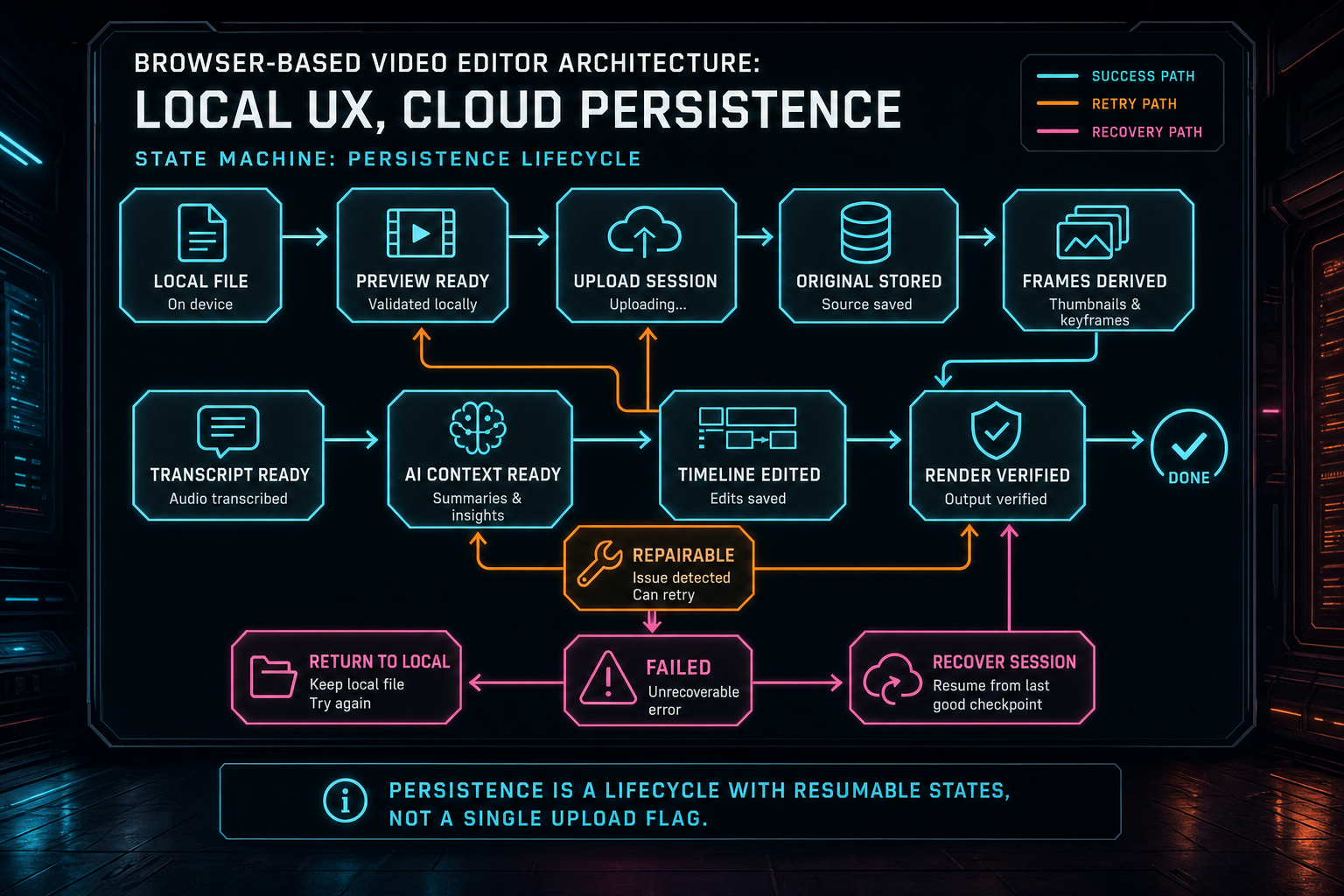
Persistence is a lifecycle with resumable states, not a single upload flag.
Media Records Make AI Editing Possible
A browser-based editor can feel like a local tool, but an AI video editor needs structured memory. The model cannot reason over a user's disappearing tab. It needs media records: clips, frames, transcripts, descriptions, generated assets, timeline events, and render artifacts. Those records turn raw media into editing context. Explore your media graph
Frame records tell the AI what appears visually and when. Transcript segments tell it what was said, who said it, and where the dialogue lives. Clip records tell it which source ranges are on the timeline. Generated media records tell it which music, overlays, voiceovers, or images came from prompts and where they were placed. Render records tell it what output exists. Together, those objects form a project graph the AI can use for search, planning, critique, and revision.
This is why cloud persistence is not merely a storage concern. It is AI infrastructure. A request like make the intro tighter depends on transcript timing, clip boundaries, frame descriptions, and current timeline state. A request like find the best product shot depends on extracted frames and visual analysis. A request like add a music bed under the second section depends on timeline ranges, generated asset provenance, and render readiness. The better the media records, the less the model has to guess.
VibeChopper keeps the model inside product boundaries. AI can propose edits, but persisted project state determines which clips, ranges, assets, and users exist. That makes the system safer and more useful. The AI layer becomes a planner over durable media context, not a privileged process improvising from loose files.
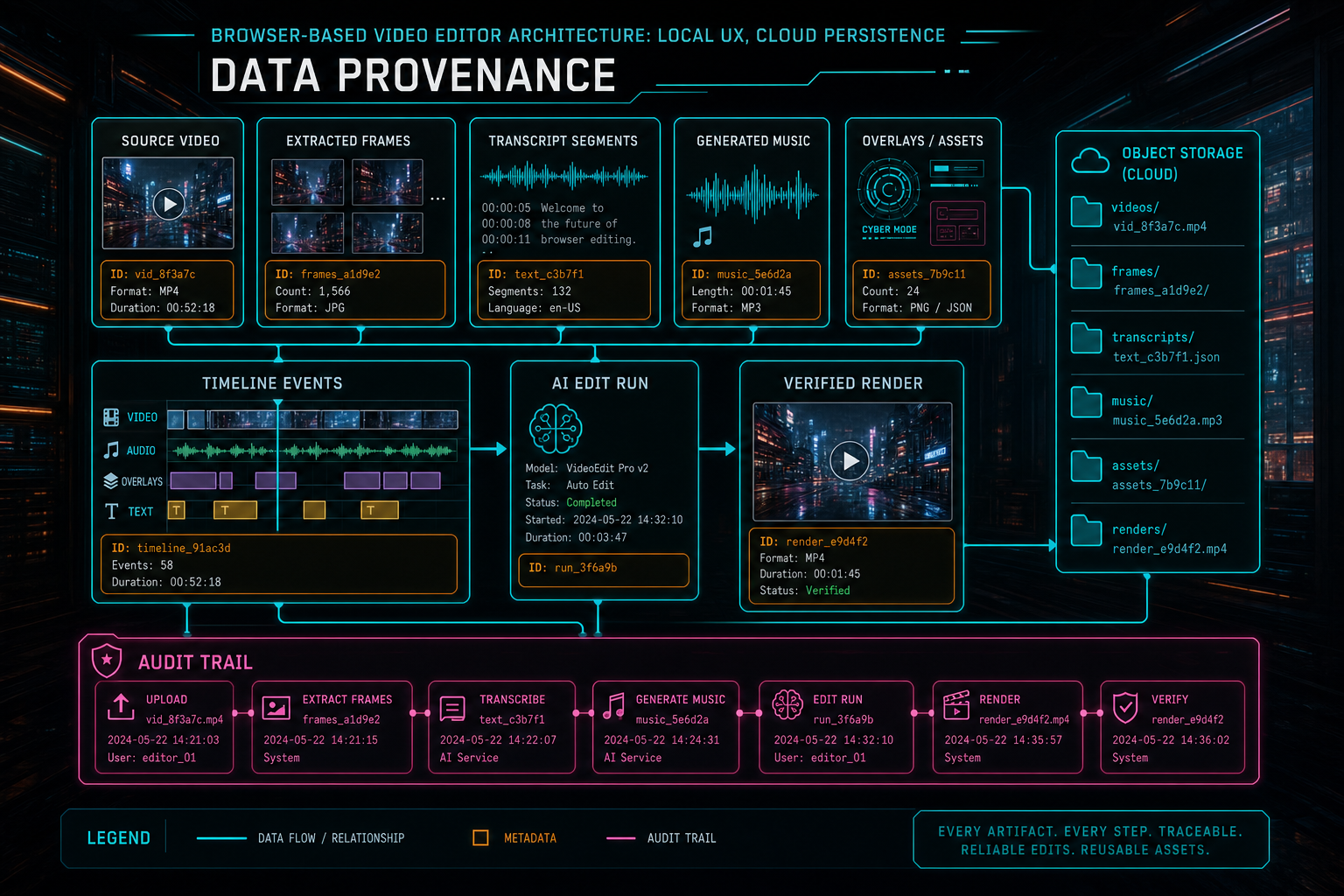
Cloud persistence gives every media artifact a durable identity the editor and AI can reuse.
Rendering and Sharing Need Server-Owned Sources
The clearest test of browser-based video editor architecture is export. If the timeline only works while the original tab holds a local file, it is not a cloud editor. A render worker needs server-resolvable sources, timeline records, effect definitions, generated assets, and output paths. It should not depend on a blob URL or a client-selected file handle that disappears when the session ends. Render a timeline free
Server-owned sources make rendering repeatable. The compositor can resolve original videos and generated assets through object storage references. It can read timeline records from the database. It can write output to a controlled path. Verification can then connect the render artifact back to the project, user, timeline, and storage object. If the output fails, the failure is a product state instead of a mysterious missing file.
Sharing has the same requirement. A collaborator opening a deep link needs canonical project data, not someone else's local browser state. A shared timeline view should resolve clips, transcripts, comments, selected ranges, and render artifacts from persisted records. The browser can make interaction smooth for each participant, but the shared object has to live in the cloud.
This is where online video editor architecture differs from a desktop NLE wrapped in a web shell. The cloud is not only a backup. It is the coordination layer for rendering, sharing, AI, recovery, and cross-device continuity.
Refresh Recovery Is a Product Requirement
A browser-based editor should assume the page will refresh at the worst possible moment. The user may close the laptop during an upload, lose network during transcript processing, reopen a project on another device, or click a deep link after a render job finishes. If the system treats the tab as the session of record, those normal events become data loss.
Recovery starts by persisting intent early. Create upload sessions before expensive media work. Save project and clip records as the timeline changes. Store original media when possible. Attach derived artifacts to stable records. Record processing stage and last error. Make mutations idempotent where duplicate requests are likely. Use server state to answer whether the next action is resume, retry, continue, or show complete.
The UI should then reconstruct the workspace from cloud records. A reopened project can show which media is ready, which stages are still processing, which frames are missing, which transcript segments are available, and whether a render output is verified. That experience is much better than asking the user to remember what happened before the refresh.
Recovery is also an SEO-relevant product claim because users searching for a browser based video editor are often worried about reliability. The technical answer is not vague reassurance. It is an architecture where refreshes, retries, background jobs, and stored media records are expected parts of the system.
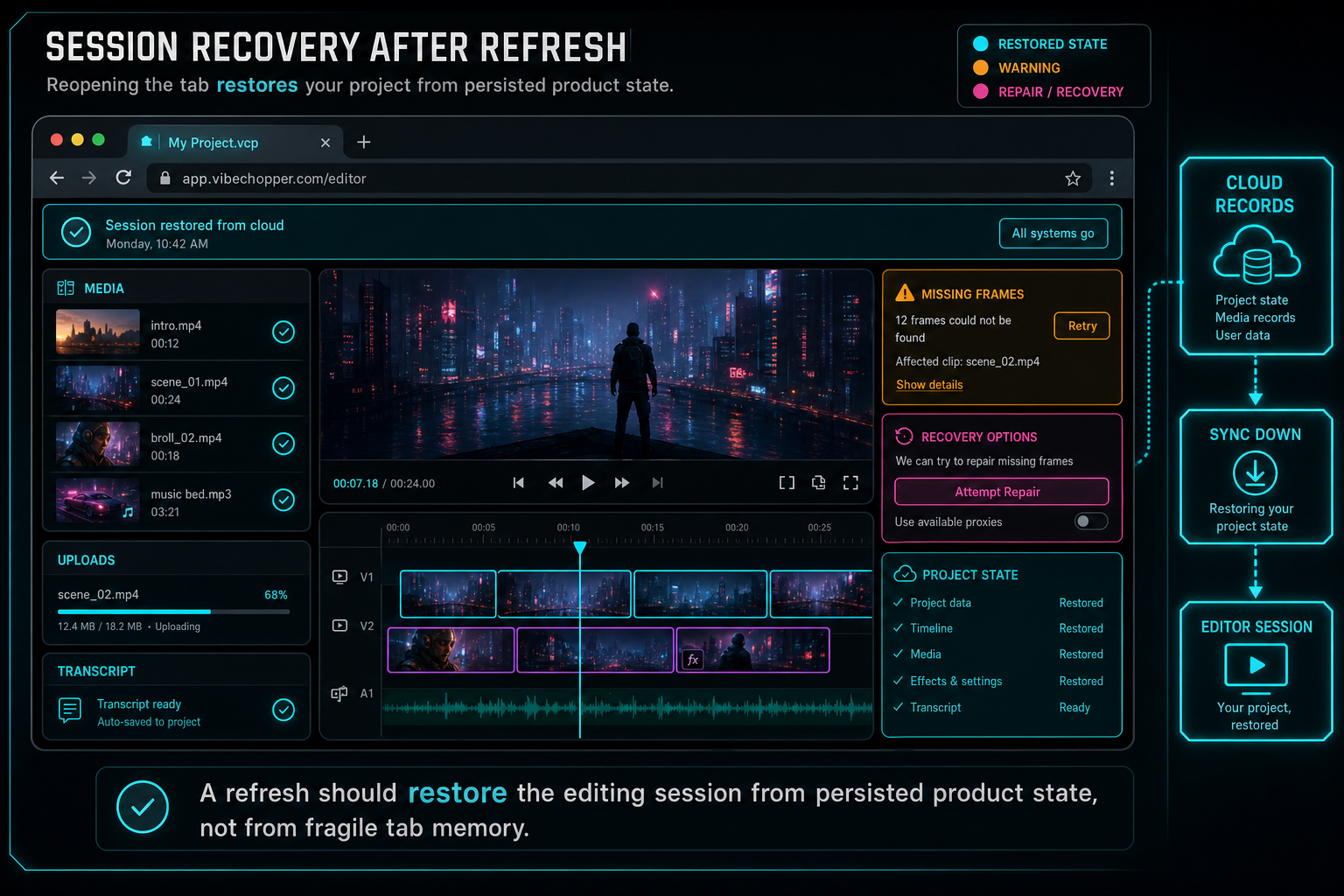
A refresh should restore the editing session from persisted product state, not from fragile tab memory.
What to Build First
If you are designing a browser-based video editor, start with the data boundary. Decide which concepts are canonical on the server: projects, media, clips, frames, transcripts, generated assets, edit runs, renders, and shares. Give those concepts stable IDs and ownership checks. Then let the browser build fast interaction on top of that contract.
Next, build the upload and persistence lifecycle. Separate local preview from original storage. Track stages for frame extraction, audio processing, transcript generation, AI analysis, and render verification. Make stage records durable enough that a refresh can continue from the right place. The goal is not to eliminate failure. It is to keep the product oriented when failure happens.
Then build the AI context layer from persisted records. Do not send the model arbitrary UI state. Send selected, scoped, validated project facts: clip ranges, transcript spans, frame descriptions, asset metadata, timeline version, and tool capabilities. Validate model output against the same canonical state before it changes the timeline.
Finally, make rendering and sharing consume the same records as manual editing. If every feature uses the same project, media, timeline, and storage contracts, the editor becomes easier to maintain and easier to trust. The browser can stay fast because it is not asked to be the archive. The cloud can stay reliable because it is not asked to fake real-time interaction.
The Final Architecture
A strong browser-based video editor feels like it is running locally because the user's hands never wait for the whole distributed system. Preview starts quickly. The timeline responds. Upload progress is visible. The playhead moves. AI prompts can refer to the current editing context. That is the local UX promise.
The same editor behaves like a cloud product because important state survives. Source media is stored. Derived frames, audio, transcripts, and metadata become records. AI edit plans reference canonical IDs. Generated assets carry provenance. Renders resolve server-owned sources and produce verified artifacts. Sharing and recovery use persisted project state instead of fragile tab memory. That is the cloud persistence promise.
VibeChopper's architecture joins those promises deliberately. The browser is the fast creative surface. The server is the authority boundary. Postgres holds product meaning. Object storage holds durable media bytes. AI operates over validated context. Render infrastructure turns timelines into output the product can prove. The result is an online video editor that can feel immediate without pretending local memory is enough, and can be durable without making every creative action feel remote.
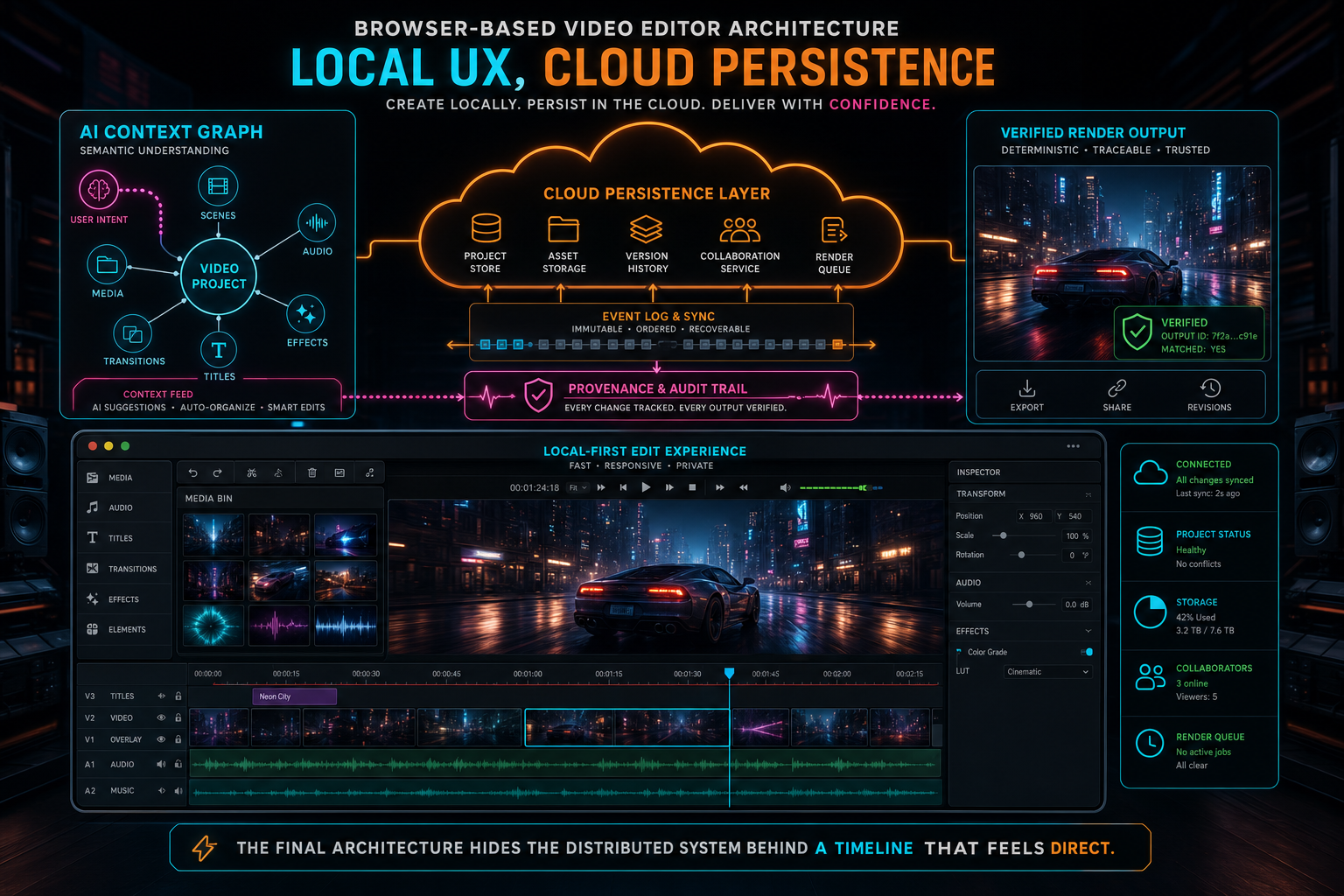
The final architecture hides the distributed system behind a timeline that feels direct.
Try the workflow
Open every feature from this post in the editor
These panels collect the features discussed above. Sign in once, finish your profile if needed, then the editor opens the first highlighted surface and walks through the tutorial.
Step 1
Upload footage with progress you can trust
Watch large video uploads, processing, transcript work, and original-file storage from one monitor.
Upload a real shoot →Step 2
Try voice-driven timeline edits
Describe the edit you want and let VibeChopper translate intent into timeline changes.
Talk a cut into shape →Step 3
Open the media asset graph
See generated audio, rendered assets, source clips, metadata, and provenance in the media panel.
Explore your media graph →Step 4
Render a verified timeline
Export a project through the same storage-backed render path described in this article.
Render a timeline free →Step 5
Share an exact timeline view
Send collaborators a deep link to the project, selected clip, timeline position, and discussion context.
Share a precise cut →