
Generated Music Needs Lineage
A generated music bed feels simple when it works. The editor asks for lift under the hook, a darker bed under the setup, or a clean resolution cue near the end. The soundtrack appears on the timeline. The creator trims it, fades it, and keeps moving. That is the product experience VibeChopper wants: describe the edit, get a usable asset, and keep creative momentum. Score a timeline
The backend cannot treat that audio as a loose file. A generated soundtrack has questions attached to it. What prompt created it? Which model answered? Which AI edit run requested it? Did the request come from a plan, a second-pass scoring agent, or a direct user instruction? Where was the file stored? Which clip on the timeline points to it? If the timeline is rendered later, can the render still explain that the music bed was generated for this project?
That is why VibeChopper treats AI music as an artifact with provenance. The evidence path for this post starts in server/geminiLyriaMusic.ts and continues through server/aiChatEditHarnessRoutes.ts. The audit references commits da58e09 and 273087d for generated audio provenance, prompts, model metadata, and timeline insertion. The implementation is not just a model call. It is a chain from intent to asset to timeline state.
The result is practical. Users get an editable music bed. Developers get a traceable record. Support and remediation flows get enough context to repair or explain a project. Future render verification can inspect the asset chain instead of guessing how an audio file entered the edit.
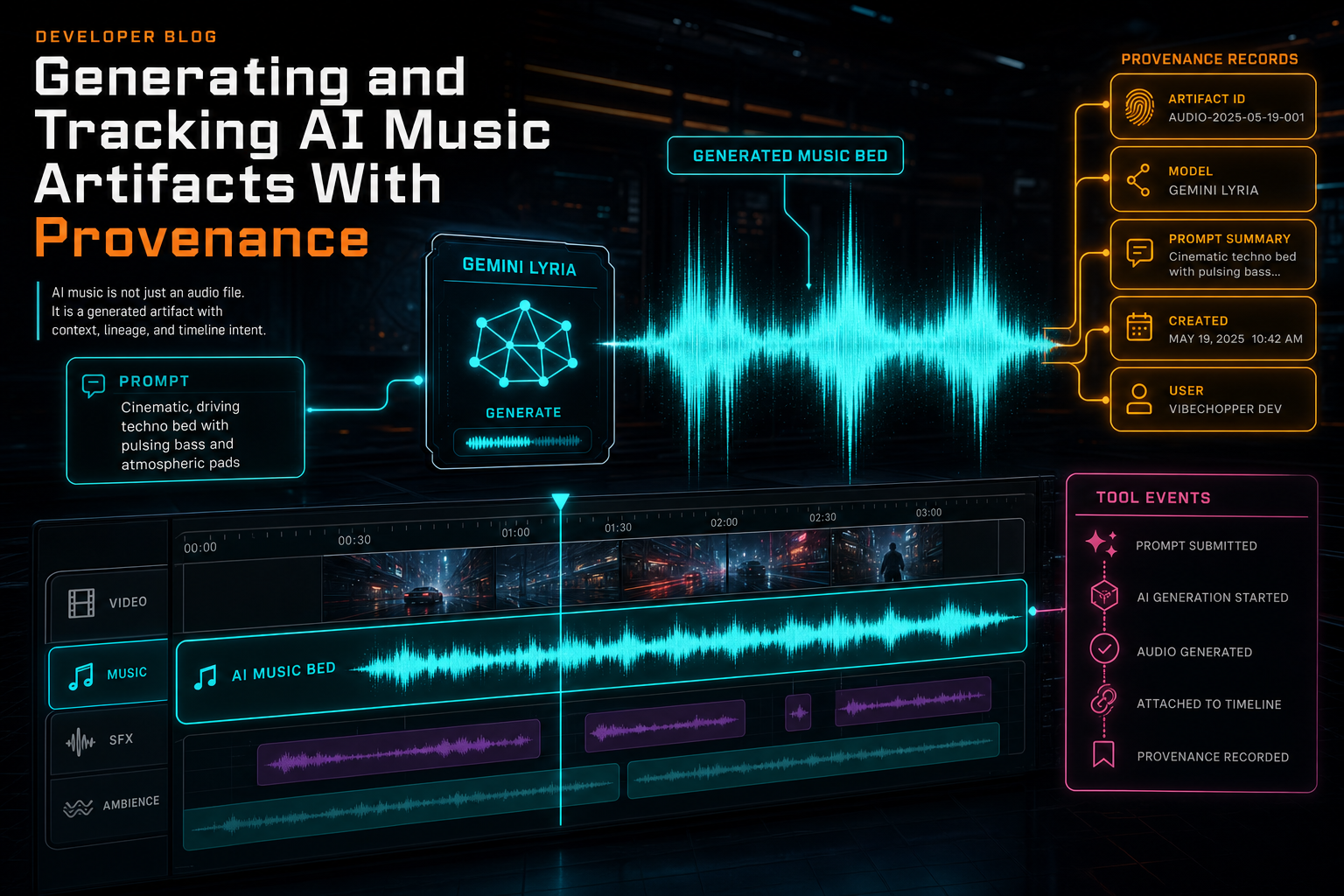
AI music is not just an audio file. It is a generated artifact with context, lineage, and timeline intent.
From Edit Plan to Music Prompt
Music generation starts before the audio model sees a request. In VibeChopper, AI edit planning can produce segment intent: hook, setup, proof, turn, resolution, dialogue priority, energy, and pacing. The music path reads that plan and converts it into a targeted prompt for an instrumental bed. That matters because the right soundtrack is not just a genre. It is a timing decision. Open the edit-run receipts
A music prompt can carry the original user instruction, the planned edit shape, duration expectations, and the role the bed should play. The prompt builder avoids the vague request that every music generator has seen a thousand times: make it cinematic. Instead, it can ask for a low bed that stays out of the dialogue, a sparse lift under the reveal, or a clean ending tail that does not fight the CTA.
The Lyria request then adds operational constraints. The generation code asks for an instrumental music bed for a video edit, sets a target duration, and instructs the model to avoid vocals, copyrighted melodies, or spoken words. That is not legal advice or a magic shield. It is a product constraint encoded at the generation boundary because most video timelines need controllable background music, not surprise lyrics over the speaker.
The model choice is also explicit. The helper chooses lyria-3-clip-preview for shorter requests and lyria-3-pro-preview when duration calls for the longer route, unless a caller requests a model directly. That keeps model selection near the generation function instead of scattering it across product code. The edit harness can ask for music; the music module decides the default Lyria route.
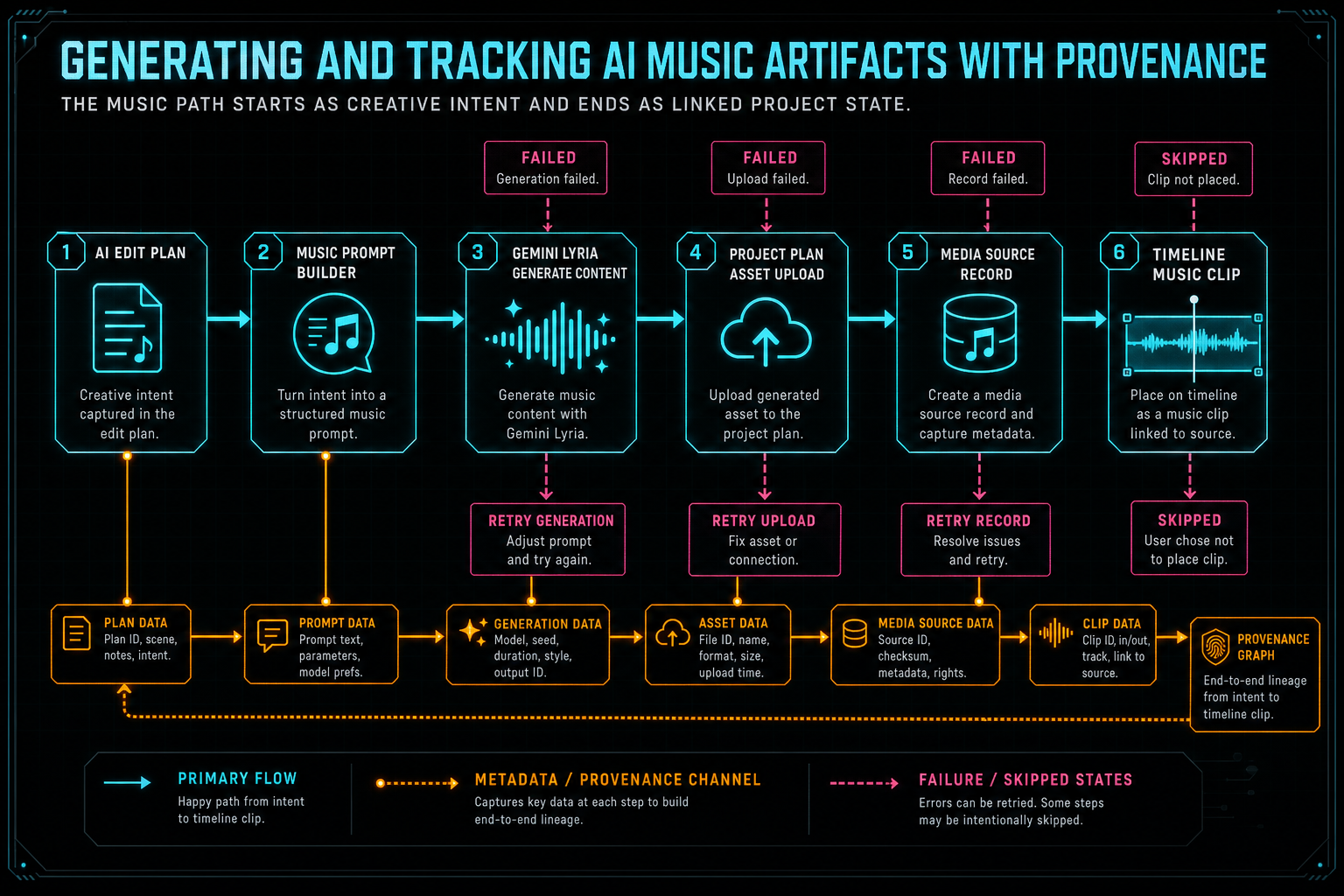
The music path starts as creative intent and ends as linked project state.
The Generation Contract
The generateGeminiLyriaMusic contract accepts the pieces that make provenance possible: userId, projectId, optional planId, optional runId, optional runItemId, optional toolEventId, the music prompt, prompt-writing provider and model, target duration, and optional model override. That input shape is a compact summary of the artifact's future lineage.
The function returns a status of completed, skipped, or failed. That small enum is important. A skipped generation is not the same as a broken generation. If Gemini Lyria is unavailable because the key or fallback path is not configured, the system can say the music pass was skipped. If the prompt is empty, it can skip without inventing an asset. If the provider returns no inline audio, it can fail with an error that points at the response shape.
When generation succeeds, the response is parsed for inline audio data. Text parts are also collected. In a music workflow, those text parts are not assumed to be useful lyrics, but they are kept as transcript-like context and as a signal that the response may have included text. The stored metadata includes lyrics, lyricsDetected, and transcript so downstream UI or review tools can inspect what happened instead of losing that response detail.
The audio file extension comes from the returned MIME type. WAV, MP3, OGG, and M4A paths are handled explicitly, with WAV as a fallback. That sounds like a small implementation detail, but it is part of artifact quality. A generated music record should not pretend every response is the same kind of file.
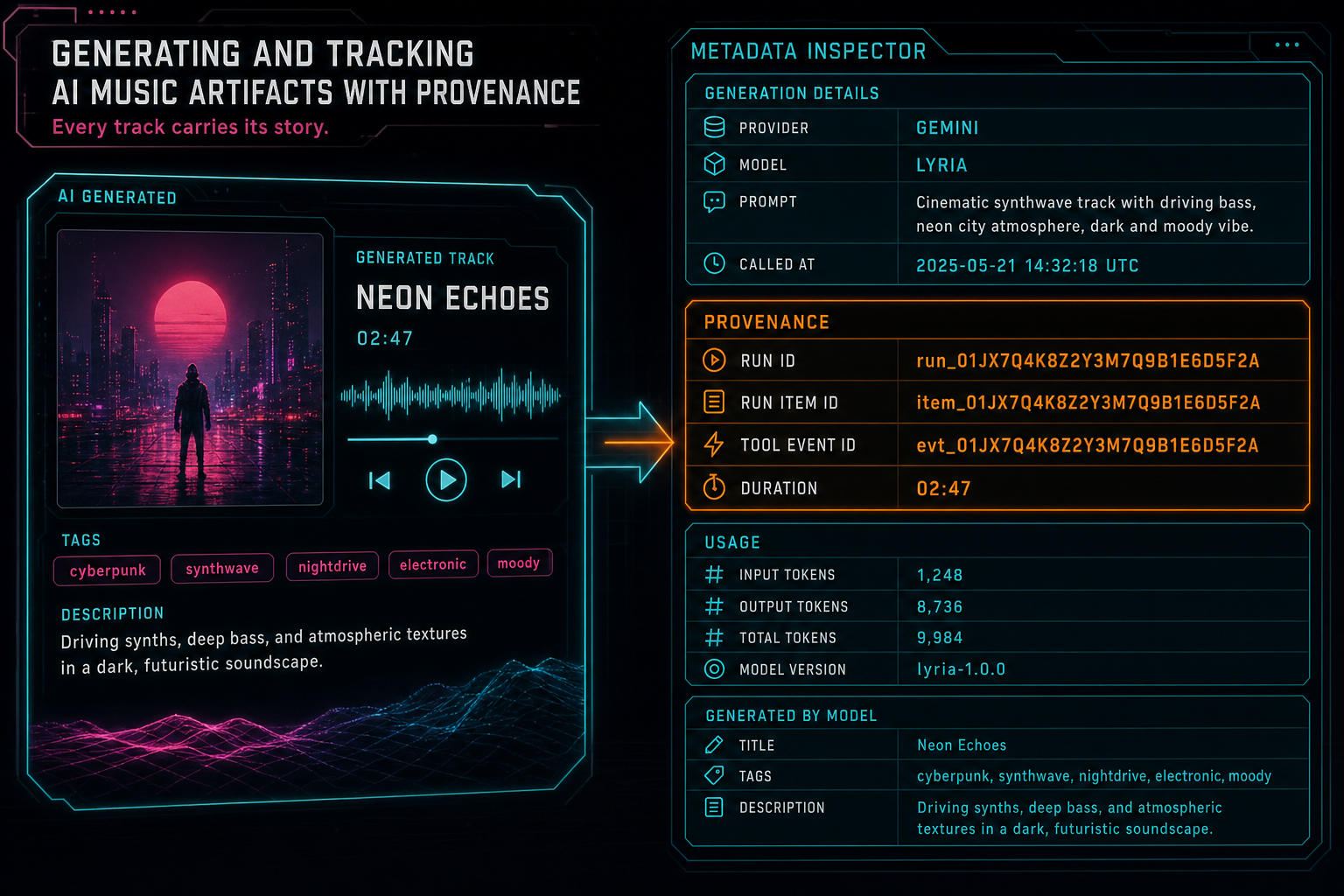
Provider, model, prompt, usage, run IDs, tool event IDs, duration, and generated descriptions travel with the asset.
Metadata Is the Product Memory
After the Lyria response is decoded, VibeChopper uploads the result as a project plan asset. The asset is not anonymous. It is created with kind: audio, source: ai_generated, project visibility, a generated title, a generated description, tags like generated-audio, generated-music, gemini, lyria, and music-bed, plus a metadata object that carries the provenance payload. Explore your media graph
That metadata records provider and model fields in more than one useful form: provider, model, generationProvider, generationModel, and generationApi. It also stores callTimestamp, the actor user ID, run and run item IDs, tool event IDs, the full prompt, prompt-writing provider and model, request metadata, provider usage metadata, duration, generated title, generated description, transcript, and detected text parts.
This is the difference between saving a file and saving an artifact. A file answers: can I play this audio? An artifact answers: why does this audio exist, which system created it, which request shaped it, who owns it, what timeline state depends on it, and what should be searched when the user looks for generated music later?
The search text follows that same idea. It includes the title, description, prompt, transcript, user ID, run IDs, tool event IDs, model, and tags. The point is not to expose internal IDs as user copy. The point is to make the asset retrievable and connectable inside the product. If a generated bed is referenced from an edit run, a plan, a media panel, or a support workflow, the stored asset has the vocabulary needed to find it.
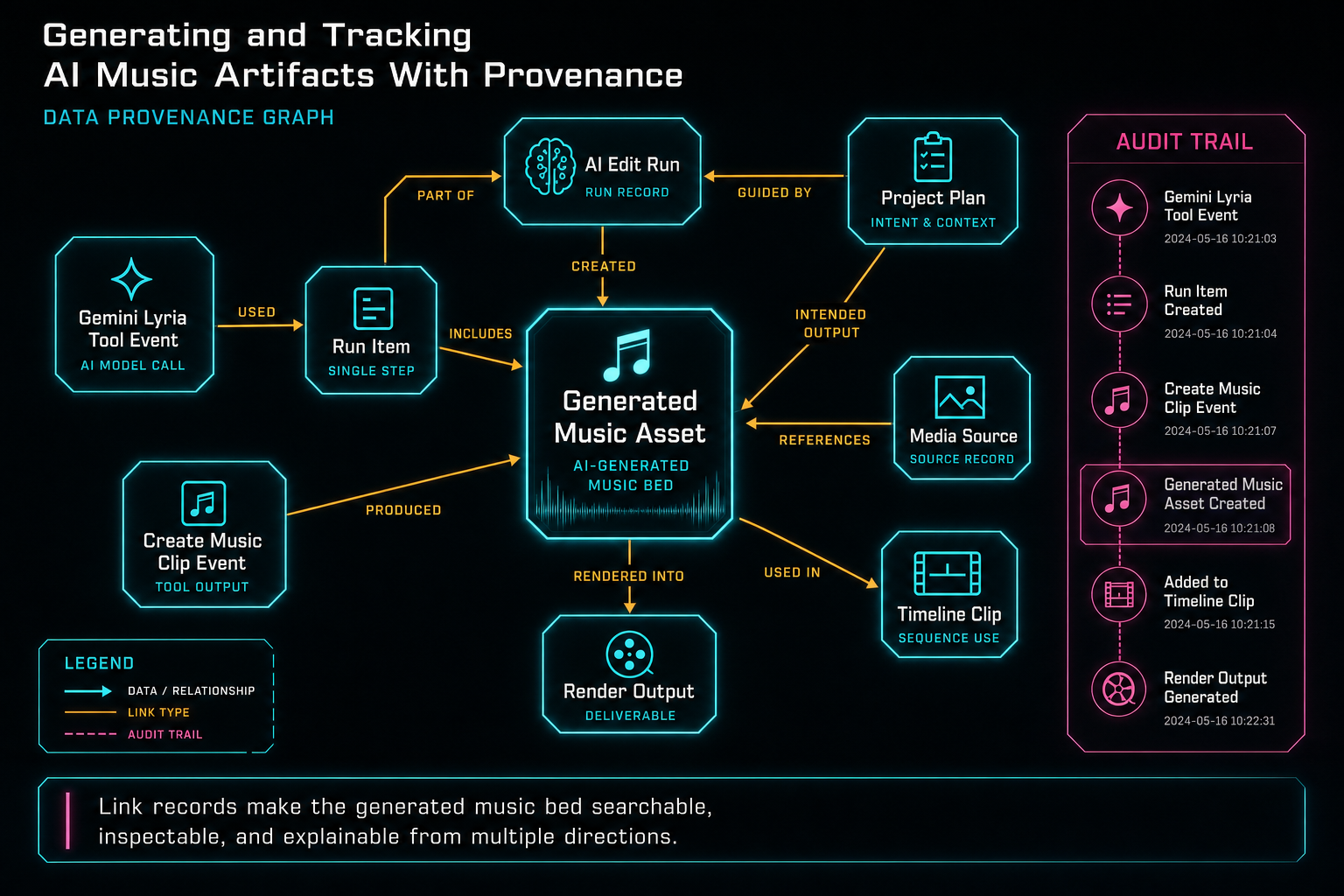
Link records make the generated music bed searchable, inspectable, and explainable from multiple directions.
Linking the Asset to the Timeline
A generated music file is still not finished when it lands in object storage. Editors work on timelines, not storage objects. The edit harness creates a media source record for the generated music, finds or creates an appropriate audio track, and inserts a music clip with content type music. The clip carries generated music tags, a role of generated_music_bed, source linkage, duration, fades, volume, and timeline position.
This step is where provenance has to bridge two worlds. The media asset is the durable generated artifact. The timeline clip is the editable representation. Users can move the clip, trim it, fade it, or mix it against dialogue. The asset record still needs to know which videoId, clipId, and trackId were produced from it, and the clip creation tool event needs to show what changed.
The route code appends a gemini_lyria_music tool event for generation and a create_music_clip tool event for insertion. When generation completes, the asset is updated with the generation tool event ID. When clip creation completes, the asset metadata gains the timeline video ID, clip ID, track ID, and create-music-clip tool event ID. Link records connect the asset to the run, the tool events, the generated media source, and the timeline clip.
That gives VibeChopper multiple ways to answer the same provenance question. From the timeline, the product can find the generated asset. From the media panel, it can find the clip that uses the asset. From the AI edit run, it can show the music generation tool event and the clip insertion event. From a render, later systems can trace back to the generated audio that contributed to the output.
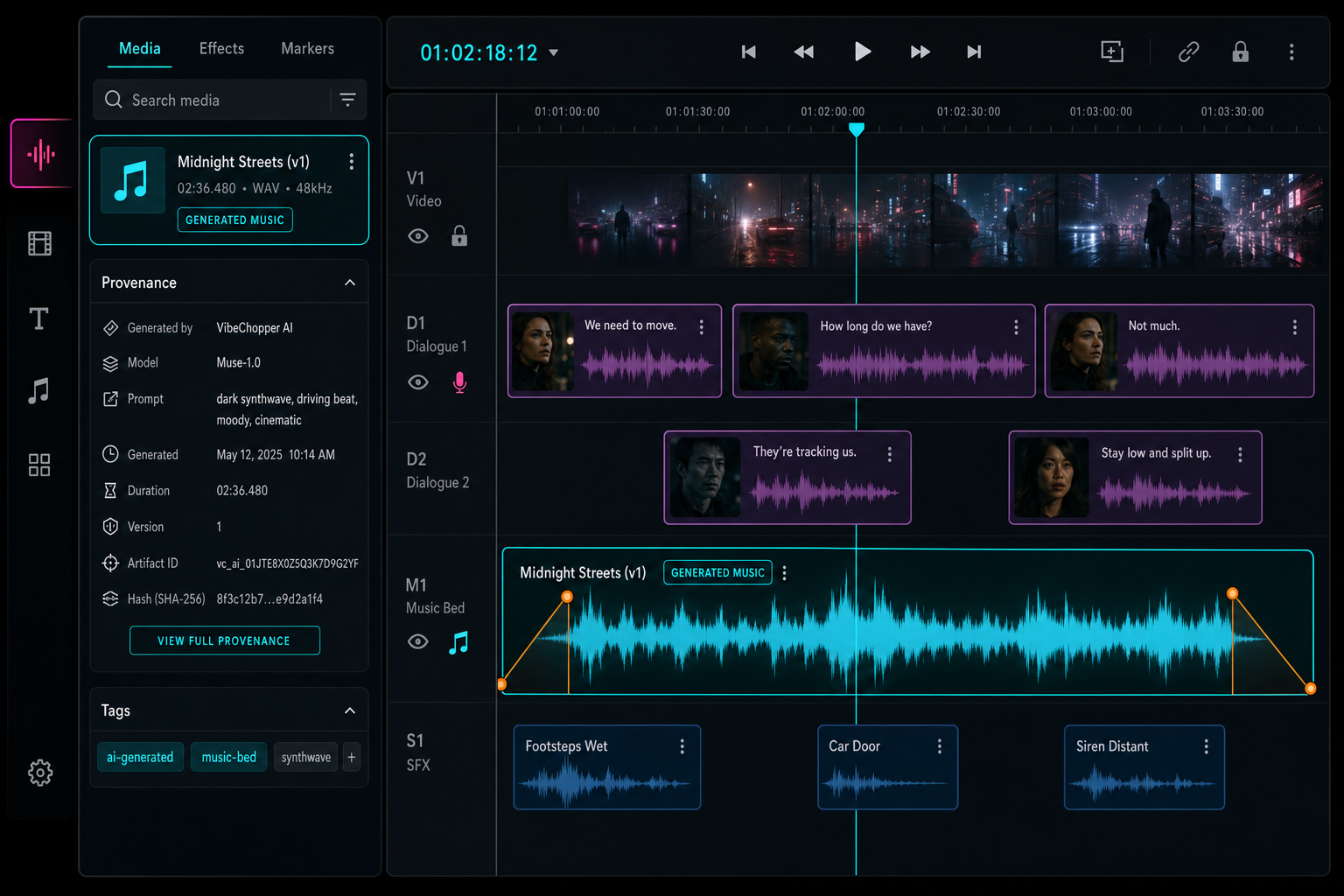
The user sees an editable music bed, while the backend keeps its generated identity attached.
Failure Is State, Too
Music generation can fail in ways that matter to the product. The provider might be unavailable. A project might have no usable music prompt. The model might return a response without inline audio. Upload can fail. Clip insertion can fail if the returned asset does not have a browser-openable object URL. A mature editor does not collapse those cases into a generic error.
The Lyria function returns skipped and failed states with reasons or errors. The edit harness records tool events with completed or failed status. If generation completed but clip creation did not, the product can still preserve the generated asset and explain that timeline insertion failed. If generation was skipped because configuration was unavailable, the edit run can show that the music pass did not execute instead of pretending the plan had no audio intent.
This distinction helps users and operators. A creator should not lose the rest of an AI edit because a music model was unavailable. A developer should be able to inspect whether the problem happened at generation, upload, link creation, media source creation, or clip insertion. A remediation job should receive enough context to retry or repair the specific broken edge.
In practice, this is the same engineering posture as render verification and DATA remediation. Generated outputs need status, storage paths, affected timeline ranges, IDs, and errors that can be acted on. Provenance is not only for success. It is also how failed work becomes diagnosable work.
Why This Matters to Creators
Most creators do not wake up hoping to inspect provider metadata. They want the right sound under the right cut. They want a music bed that supports the voice, respects the pacing, and can be adjusted without opening a separate production tool. Provenance earns its keep when it makes that experience steadier. Score a timeline
Because generated music is stored as a project asset, it can show up in the media panel as generated audio instead of a mysterious upload. Because the timeline clip is linked back to that asset, the editor can preserve context when the clip is moved or rendered. Because tool events record generation and insertion, the AI edit run can explain what happened. Because metadata stores prompt and model information, future review tools can help answer whether a bed matches the requested vibe.
This also keeps the product honest. VibeChopper does not need to imply that AI music is magic. It can say what it did: planned a music bed from the edit context, generated an instrumental asset through Gemini Lyria, saved the asset with provenance, inserted it onto an audio track, and linked the result to the edit run. That is a concrete promise.
The CTA cards in this section point to the two user-facing sides of the system. Generate a music bed to see the creative workflow. Render a verified timeline to see how generated artifacts continue into export. The connective tissue is the same: the system keeps enough context to trust what it created.
Design Lessons
First, build the artifact model before you add more generation buttons. AI features multiply quickly. Music, voiceover, overlays, captions, thumbnails, titles, and summaries can all become generated assets. If each feature saves files differently, the media system turns into a pile of exceptions. A shared artifact pattern gives every generated output a place to store provider, model, prompt, owner, status, storage, links, and search context.
Second, separate generation from placement. The Lyria call creates audio. The clip insertion step decides how that audio appears in the timeline. Keeping those steps separate makes failures clearer and gives users more flexibility. An asset can exist even if placement needs repair. A clip can be moved without rewriting the asset history.
Third, make tool events visible to the rest of the system. Generation and placement are product events, not internal noise. They affect the timeline, media library, render path, and support story. Recording them as first-class events lets the editor show a trace instead of a shrug.
Fourth, store the prompt that actually generated the asset. If a later system only knows the user's original message, it may miss the planner's transformed music instruction. Provenance should include the final prompt sent to the model, plus the provider and model that helped write it when applicable.
The Result
Generating music for a video editor is not only an audio problem. It is a state problem. The product needs to know how the bed was requested, how it was generated, where it was stored, how it entered the timeline, and how it should be explained later.
VibeChopper's AI music path keeps that chain intact. Gemini Lyria handles the generation. Project plan assets preserve the generated audio and its metadata. Tool events record the generation and insertion steps. Link records connect the artifact to runs, plans, media records, clips, and future render outputs. The creator sees a usable music bed. The system keeps the receipt.
That is the larger pattern behind AI-assisted editing. Let models create useful material, but do not let the material float away from the project graph. A music bed should carry its origin all the way to export. When provenance is built into the path, generated assets become durable parts of the edit instead of disposable surprises.
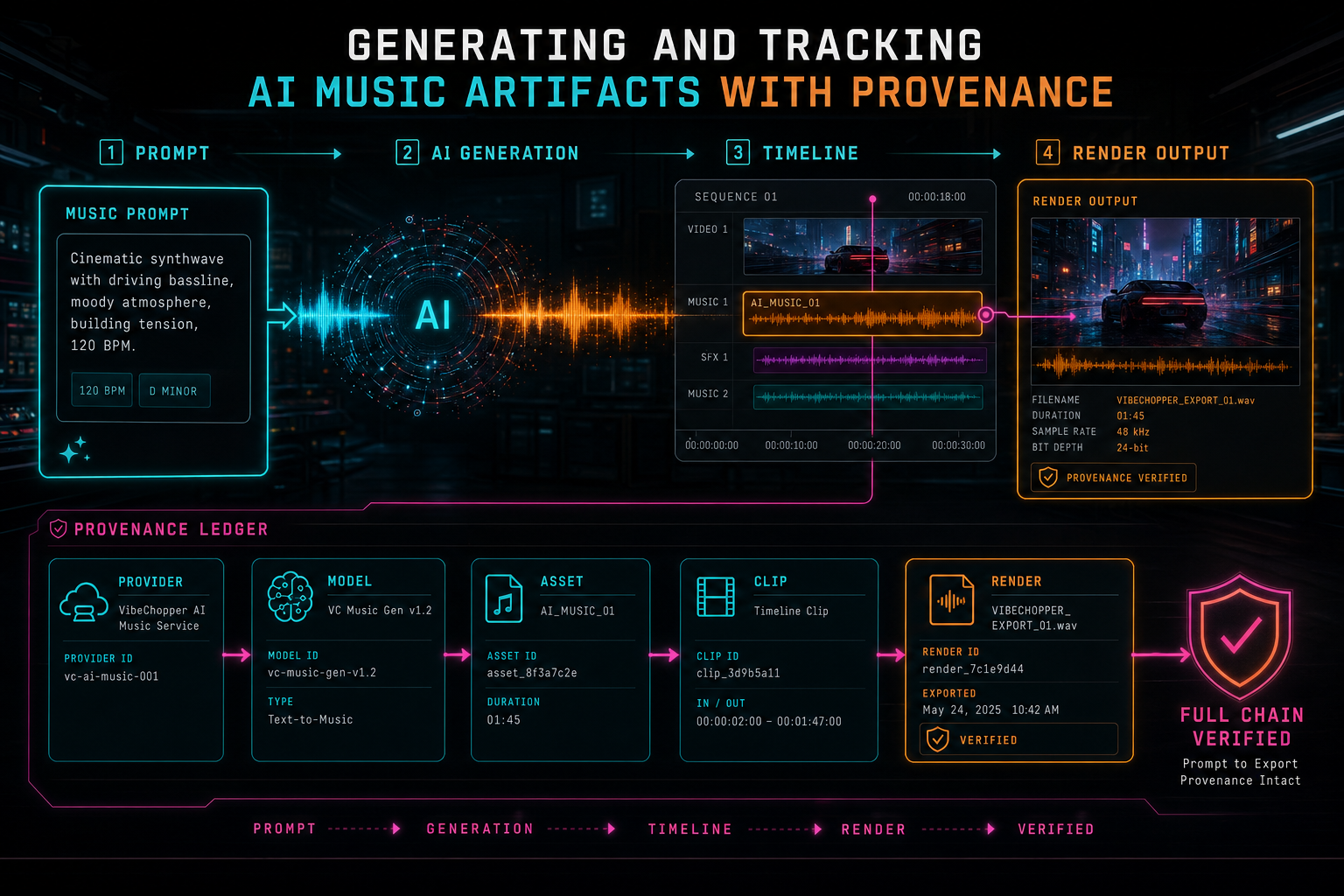
Provenance lets generated music survive the full path from prompt to export.
Try the workflow
Open every feature from this post in the editor
These panels collect the features discussed above. Sign in once, finish your profile if needed, then the editor opens the first highlighted surface and walks through the tutorial.
Step 1
Generate a music bed
Create AI music assets with prompts, metadata, provenance, and timeline placement.
Score a timeline →Step 2
Inspect an AI edit run
Open the editor and see how plans, tool calls, artifacts, and render results stay connected.
Open the edit-run receipts →Step 3
Open the media asset graph
See generated audio, rendered assets, source clips, metadata, and provenance in the media panel.
Explore your media graph →Step 4
Render a verified timeline
Export a project through the same storage-backed render path described in this article.
Render a timeline free →