
AI Editors Should Study Boring Editor Infrastructure
The most useful lesson from open-source video tools is not that every AI video editor should copy a desktop nonlinear editor feature for feature. The lesson is that serious editing products are built on boring, explicit infrastructure. Kdenlive is a long-running open-source nonlinear editor from the KDE ecosystem. MLT is the multimedia framework underneath Kdenlive and other tools, providing a timeline-oriented engine for producers, filters, transitions, and consumers. Those public facts are enough to make the architectural lesson clear: the editor experience can be creative and flexible only when the internal media contract is strict. Talk a cut into shape
AI video editors often start from the opposite direction. A team builds a prompt box, sends project context to a model, receives text that sounds like an edit, and then tries to make the timeline obey. That can produce an impressive demo. It does not automatically produce video editing software. Video editing has source media, tracks, time ranges, transitions, effects, proxy files, audio sync, generated assets, render settings, and export artifacts. If the model becomes a shortcut around those concepts, the product becomes fragile.
VibeChopper takes the other path. The user can describe a change in natural language, but the system still has to translate that intent into native timeline operations, media records, tool events, and verified render artifacts. That is where open-source editor discipline matters. Kdenlive and MLT are not AI products, and this post does not claim private knowledge about their maintainers or internal decisions. The point is broader: mature open-source media tools expose patterns that any credible AI video editor should respect.
The category is crowded with very different products. Desktop editors such as Adobe Premiere Pro, DaVinci Resolve, Final Cut Pro, and Kdenlive prioritize timeline depth. Online tools such as CapCut, VEED, Kapwing, Clipchamp, and Runway prioritize speed, templates, generative workflows, or browser access. AI video editing software has to satisfy both expectations. It must feel fast and conversational while preserving the deterministic behavior users expect from an editor. Open-source video tools show how much of that trust comes from the engine below the interface.
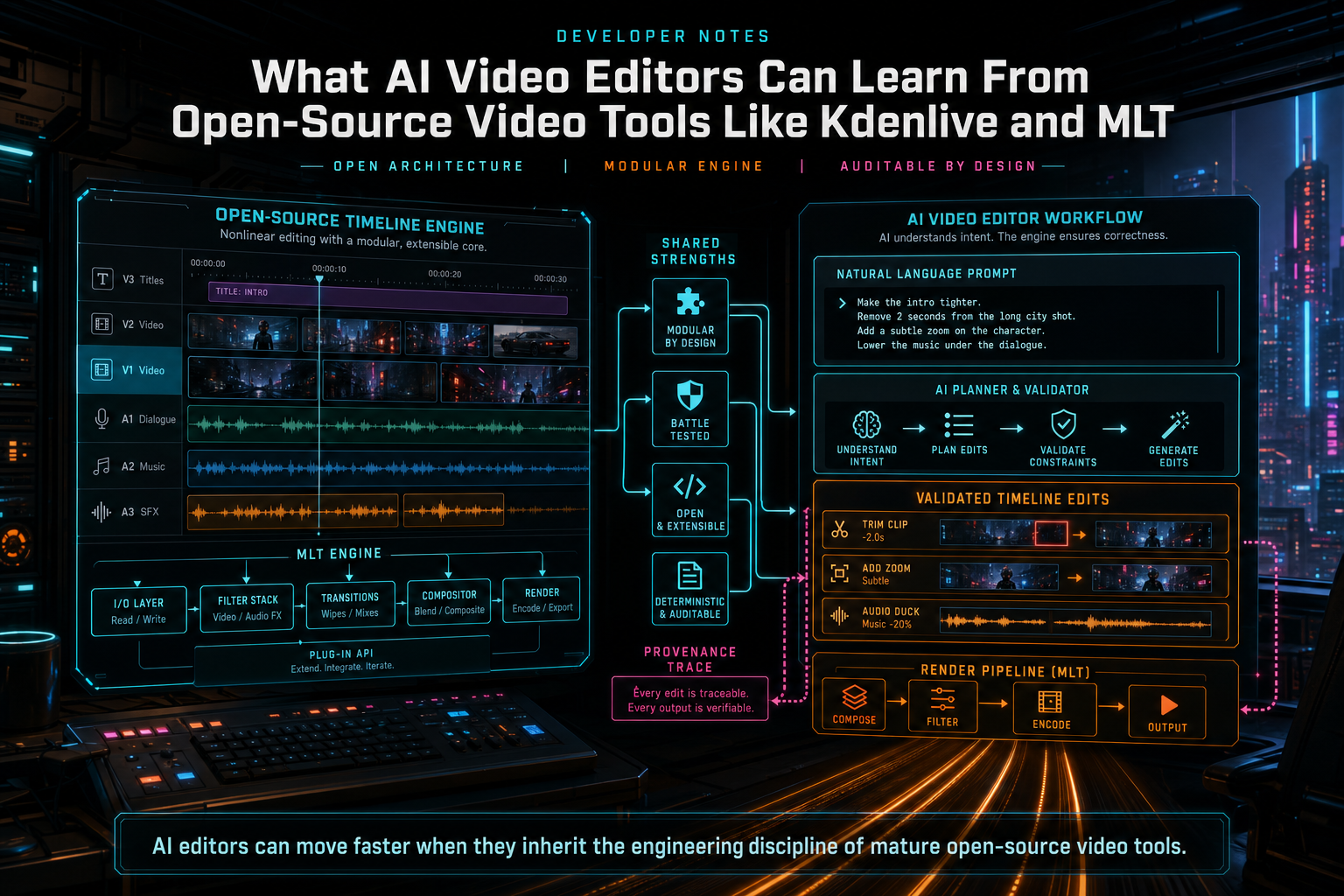
AI editors can move faster when they inherit the engineering discipline of mature open-source video tools.
The Timeline Is the Product Contract
A nonlinear editor is built around a timeline contract. Clips sit on tracks. Clips reference source media. A timeline range maps to a source range. Effects have parameters. Transitions connect clip edges. Audio and video may be linked, muted, detached, mixed, or rendered through different rules. An editor can have a friendly UI, but the engine must still answer basic questions with precision: what media is active at this time, what transformations apply, and what should the render produce? Open the edit-run receipts
That contract is the first thing an AI editor should protect. A model can suggest that the opening should be tighter or that a speaker pause should be removed, but the application has to convert that suggestion into valid operations: trim this clip to this source range, split here, remove this timeline interval, add this transition, or insert this generated asset. The model output should never become an unvalidated mutation of project state.
This is a place where Kdenlive and MLT are useful reference points without needing to imitate their code. MLT's public model talks in terms of media services such as producers, filters, transitions, and consumers. Kdenlive gives users an editor surface over a multitrack project. The architectural idea is portable: keep media interpretation, timeline transformation, and output generation as explicit product concepts. AI should propose changes inside that system, not replace the system with prose.
In VibeChopper, an AI edit run follows that principle. The prompt is recorded. A scoped context snapshot is assembled from project data. The AI layer returns structured reasoning. Validation checks ownership, clip IDs, time ranges, and tool capabilities. Native editor tools apply accepted changes. Tool events and artifacts preserve the audit trail. The user experiences this as a conversational edit, but the product experiences it as a sequence of typed operations.
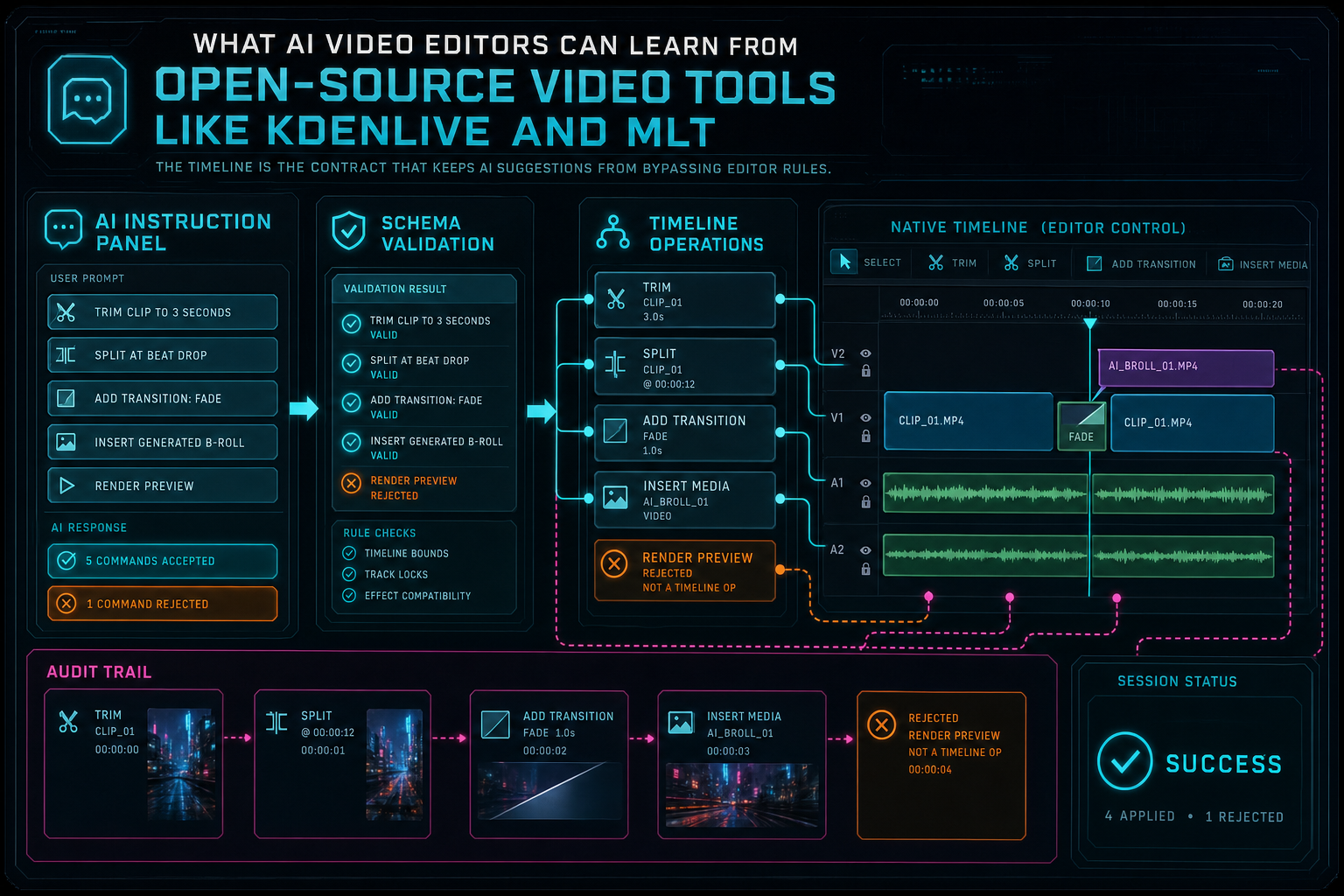
The timeline is the contract that keeps AI suggestions from bypassing editor rules.
Plugins Are a Design Pattern, Not Just an Extension Feature
Open-source media systems tend to survive by making boundaries explicit. A framework may support different decoders, effects, transitions, output consumers, or UI layers. That modular shape is valuable even when the implementation is not literally a third-party plugin platform. It prevents the editor from becoming one pile of assumptions about media, rendering, and interface state. Try the effects pass
AI editors need the same boundary discipline. The AI planner should not know how to decode every codec. The frame analysis system should not own timeline mutation. The transcript service should not decide render settings. The render worker should not accept arbitrary instructions from model text. Each subsystem needs a narrow contract: input shape, output shape, ownership rules, failure modes, and provenance records.
Effects are a good example. A weak AI editor lets a model say make it cinematic and then stores that phrase somewhere near a clip. A stronger editor maps the intent to product-owned effect parameters: color adjustment, zoom, blur, speed change, transition, overlay, or caption style. Those parameters can be previewed, inspected, rendered, undone, and tested. This is the same spirit as mature editing engines: effects are data and execution rules, not loose commentary.
Plugin-shaped architecture also makes provider choice less dangerous. A model provider can improve, regress, rate-limit, or change response formats. The editor should not collapse when that happens. VibeChopper routes text and JSON completions through a provider harness so the rest of the product can keep speaking in validated editing concepts. That is the AI equivalent of keeping a media engine from being hardwired to one decoder or one export path.
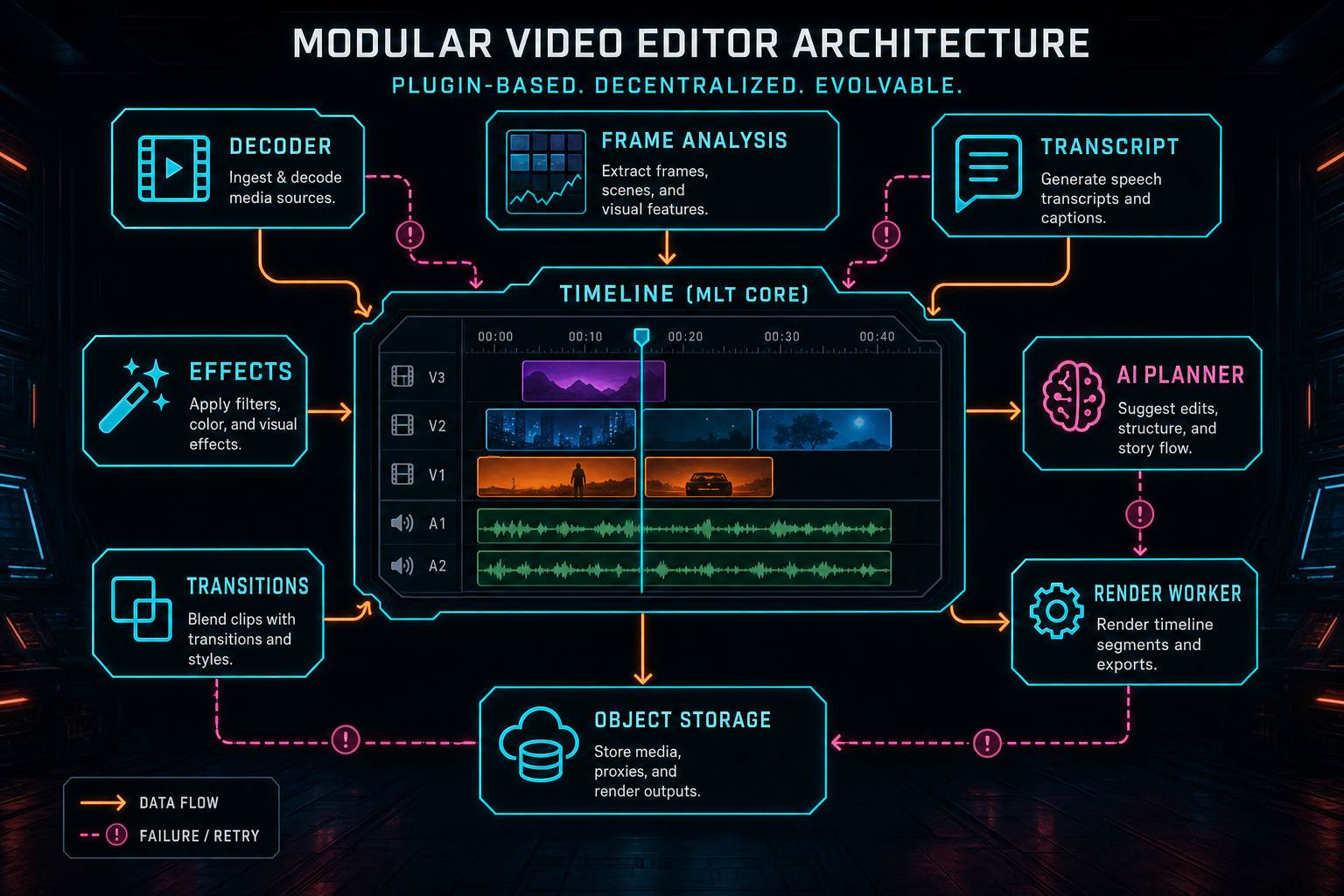
Plugin-shaped boundaries let an editor evolve media, effects, AI, and render layers independently.
Proxy Workflows Teach AI Editors About Readiness
Open-source and professional video editors both have to deal with heavy media. High-resolution camera originals can be expensive to decode, move, and preview. Proxy workflows answer that problem by letting editors cut against lighter representations while preserving the link to original media for export. The details vary across tools, but the product lesson is stable: fast interaction and final fidelity are different concerns, and the editor must keep their relationship explicit. Explore your media graph
AI editors need a broader version of the same idea. A browser-based editor may create local previews, upload original media, extract frames, transcribe audio, generate thumbnails, analyze shots, create proxies, and later send a project to a cloud renderer. Each derived asset exists because it makes some workflow faster or smarter. But derived assets are only trustworthy when the product knows where they came from and whether they are ready.
That is why VibeChopper treats upload progress, frame extraction, transcript processing, media summaries, generated audio, overlays, and render artifacts as part of one media graph. An AI request to remove silence depends on transcript readiness. A request to find the best product shot depends on frame analysis. A request to render the final cut depends on source media and generated assets being available through storage. The assistant can be conversational, but the backend needs readiness signals.
The open-source lesson is practical: do not hide derived media behind temporary filenames and hope the UI remembers what happened. Give each source, proxy, analysis result, generated asset, and render artifact a durable identity. Connect those identities to the project and timeline. Then AI can reason over media without guessing, and the user can still export from the right source of truth.
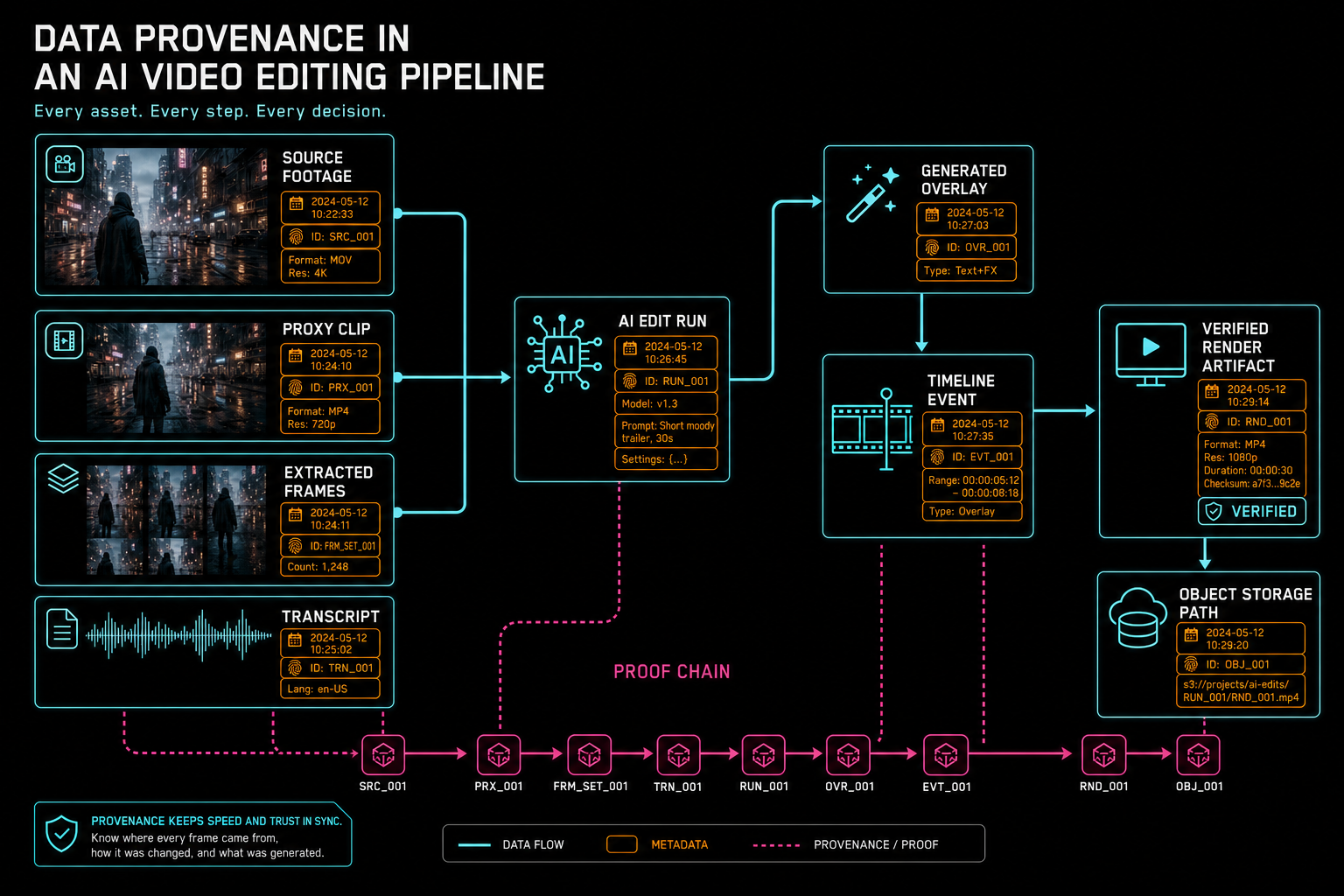
Proxy media and generated artifacts need provenance so fast editing does not lose trust.
Rendering Must Remain Deterministic
MLT's public vocabulary includes consumers: services that output the result of the media graph. In everyday product language, that is the export path. Whether a tool uses MLT, FFmpeg directly, a platform media stack, or a custom renderer, the same rule applies: rendering should consume canonical project state, not the memory of an AI conversation. Render a timeline free
This is where AI video editors can get into trouble. If a prompt created a timeline, the final render should read the timeline. If the AI generated an overlay, the render should read the stored overlay asset and its timeline placement. If a transcript edit removed a sentence, the render should read the resulting clip ranges and caption state. The renderer should not ask the model what it meant again. Creative intent belongs upstream. Rendering belongs to deterministic media rules.
Determinism does not mean there are no failures. Media files can be missing. Object storage can be temporarily unavailable. Effects can be unsupported in a given export preset. A worker can run out of scratch space. A timeline can contain invalid references if a bug slipped through. The product-grade response is not to hand the problem back to the model. It is to return structured render status, stable failure codes, retry categories, and verification results.
VibeChopper's cloud render path follows that product shape. Render jobs connect to project ownership, timeline state, media records, object storage, and verification. When an AI edit run triggers a render, the output artifact remains attached to the run and the media graph. That connection is what lets a user review not only the MP4, but the workflow that produced it.
Inspectability Is a Feature
Open-source tools have a cultural advantage: people can inspect behavior, report issues, and reason about the system. A commercial AI editor does not need to expose every internal implementation detail to every user, but it should adopt the same respect for inspectability at the product level. If an automated edit changes a timeline, users and developers should be able to understand what changed. Open the edit-run receipts
That starts with recording the AI run. What was the user request? Which project context was included? Which plan was proposed? Which commands passed validation? Which commands were rejected? Which media artifacts were created? Which render was produced? These are not just logs for engineers. They are product facts that support undo, review, collaboration, support, and trust.
Inspectable design also improves SEO substance because it gives the product real technical claims. Instead of saying only that VibeChopper is an AI video editor, the Developer Notes can explain how the editor turns prompt intent into tool calls, media provenance, render verification, and recoverable status. That is more credible than generic AI language because it matches the work a real editor backend must do.
For developers building AI video editing software, the rule is simple: make every generated or automated thing point back to a cause. A transcript cut should point to transcript spans and timeline events. A generated music bed should point to prompt and metadata. A rendered export should point to source media, generated assets, export settings, and verification. An AI plan should point to the native tools that executed it.
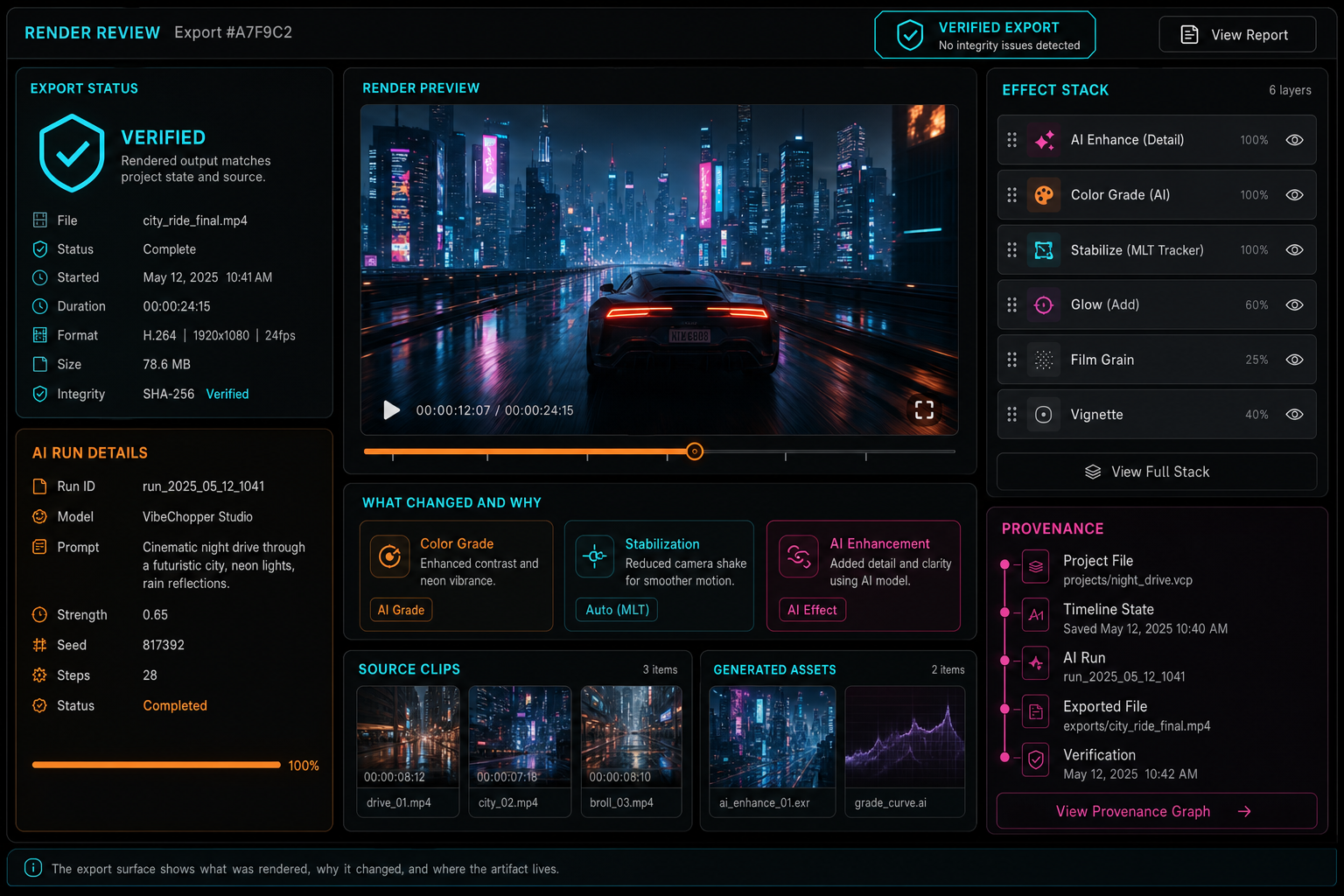
The export surface should show what was rendered, why it changed, and where the artifact lives.
What Not to Copy From Desktop Editors
Open-source desktop editors are valuable teachers, but an online AI editor should not blindly copy desktop assumptions. Browser and cloud products have different constraints. They need authenticated storage, resumable uploads, server-side rendering options, collaborative links, product telemetry, and AI provider boundaries. A desktop-first workflow may assume local files and local compute. A web-first AI editor needs explicit server records for the same concepts.
The right move is to copy the contracts, not necessarily the interface. Copy the idea that the timeline is structured. Copy the idea that media transformations are explicit. Copy the idea that derived media must remain linked to originals. Copy the idea that effects and transitions are parameterized operations. Copy the idea that exports consume a media graph. Then adapt those ideas to the browser, object storage, user sessions, and AI runs.
This difference matters for product positioning. A browser video editor should not pretend to be a clone of every desktop NLE. It should win on the workflows that the web and AI make better: uploading from anywhere, editing through prompt and timeline context, generating assets, preserving audit trails, sharing exact review states, and rendering verified outputs. The engine discipline from open-source tools makes those workflows dependable.
A Practical Checklist for AI Video Editors
First, define the timeline contract before the prompt contract. Write down the operations your editor truly supports: trim, split, reorder, transition, effect, speed change, generated media insert, caption update, render request, and export verification. If a model cannot express its plan through those operations, the product does not support that edit yet.
Second, keep media services separated. Upload, proxy creation, frame extraction, transcription, generated assets, effects, rendering, and storage should each have clear input and output shapes. AI can coordinate those services, but it should not collapse them into one untyped action.
Third, treat readiness as data. The assistant should know whether frames exist, whether transcript analysis is complete, whether generated assets are available, whether original media is stored, and whether a render is already in progress. Readiness prevents the AI from making confident suggestions on missing evidence.
Fourth, make rendering deterministic. The final export should read canonical timeline and media state. If an AI run initiated the render, store that relationship as provenance. If verification fails, keep the status visible and recoverable.
Fifth, expose inspection surfaces. A creator may only need a concise explanation, but the product should preserve the prompt, plan, tool calls, media artifacts, and render results. That is the difference between an AI feature that feels magical once and an editor that remains useful across real projects.
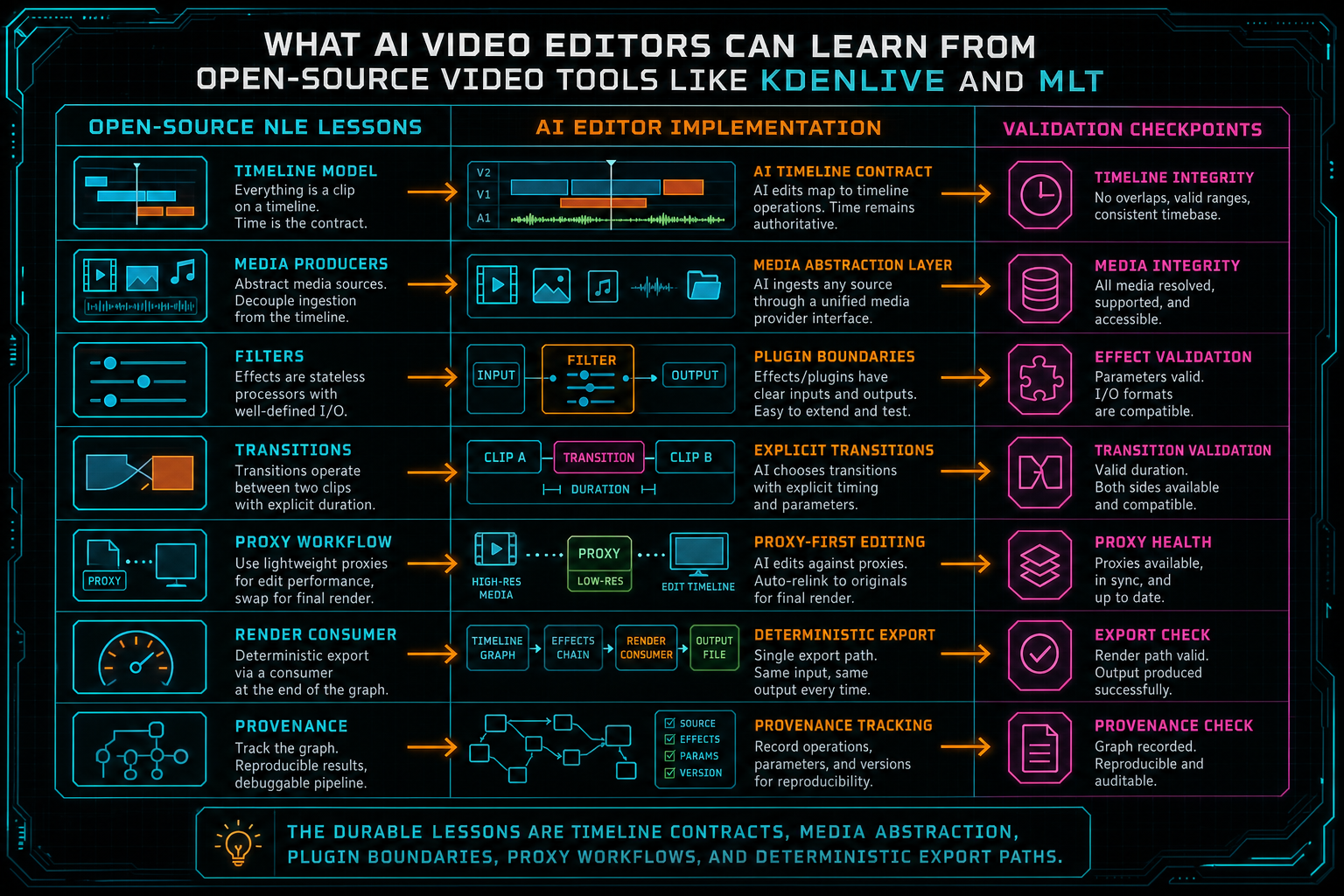
The durable lessons are timeline contracts, media abstraction, plugin boundaries, proxy workflows, and deterministic export paths.
Open-Source Discipline, AI Speed
The best AI video editor is not the one that lets the model touch the most state. It is the one that gives the model useful context, then routes its suggestions through editor-owned contracts. Open-source tools like Kdenlive and frameworks like MLT are reminders that video editing is a systems problem before it is an AI problem. Timelines, media services, effects, proxies, rendering, and exports all need stable identities and rules.
That does not make AI less important. It makes AI more useful. When the system has a real timeline contract, natural language can become precise edits. When media has provenance, generated assets can be trusted. When render jobs are verified, AI drafts can become reviewable exports. When tool events are recorded, creators can understand what changed.
VibeChopper's product surface is built for that combination: prompt speed with timeline discipline, browser convenience with cloud rendering, and AI automation with inspectable provenance. The user gets to edit by describing intent. The system still behaves like editing software. That is the lesson worth taking from mature open-source video tools: creativity moves faster when the underlying contracts are clear.
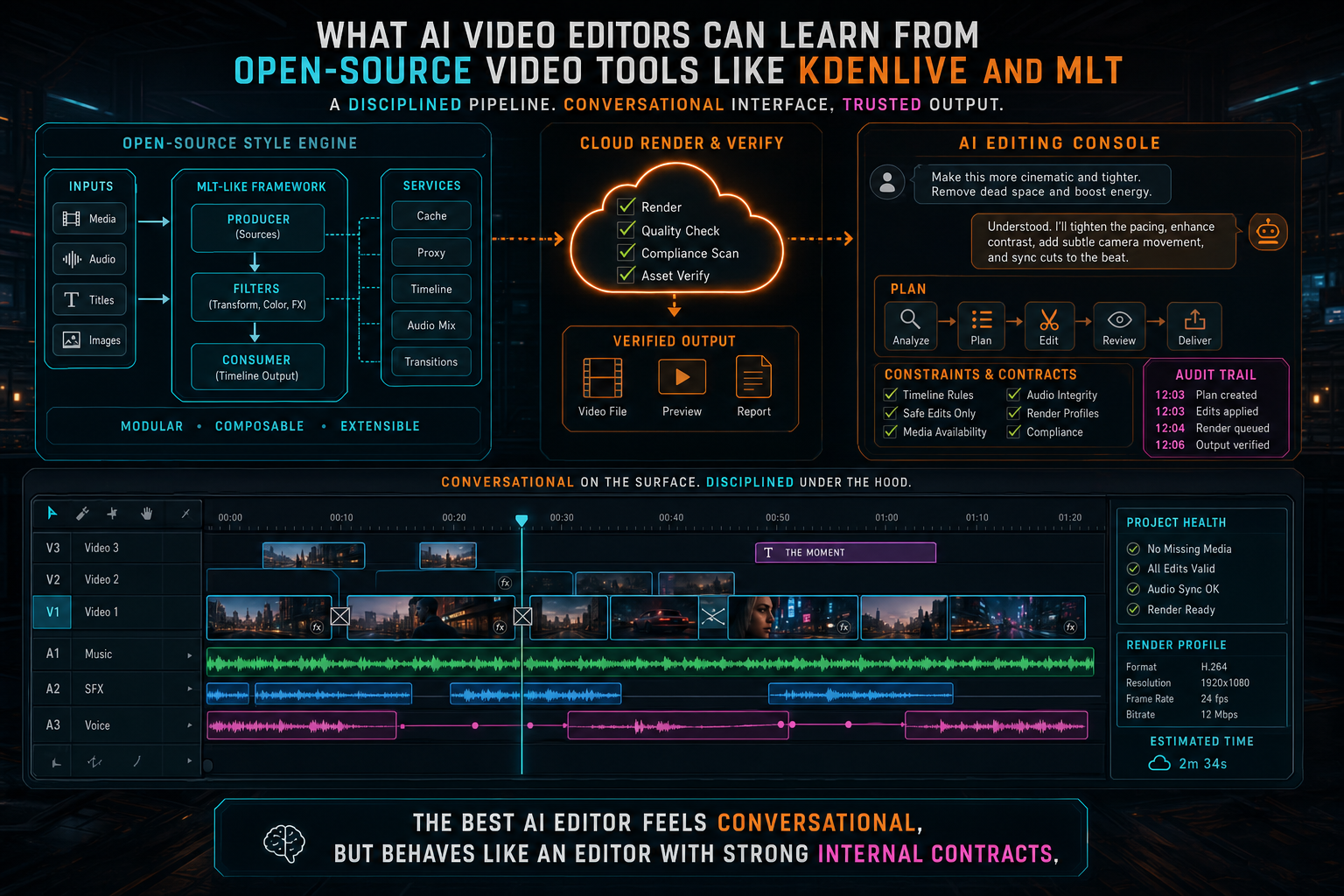
The best AI editor feels conversational, but behaves like an editor with strong internal contracts.
Try the workflow
Open every feature from this post in the editor
These panels collect the features discussed above. Sign in once, finish your profile if needed, then the editor opens the first highlighted surface and walks through the tutorial.
Step 1
Try voice-driven timeline edits
Describe the edit you want and let VibeChopper translate intent into timeline changes.
Talk a cut into shape →Step 2
Inspect an AI edit run
Open the editor and see how plans, tool calls, artifacts, and render results stay connected.
Open the edit-run receipts →Step 3
Apply timeline effects
Try clip effects, speed ramps, color passes, and export-ready compositor behavior.
Try the effects pass →Step 4
Open the media asset graph
See generated audio, rendered assets, source clips, metadata, and provenance in the media panel.
Explore your media graph →Step 5
Render a verified timeline
Export a project through the same storage-backed render path described in this article.
Render a timeline free →