
Overview
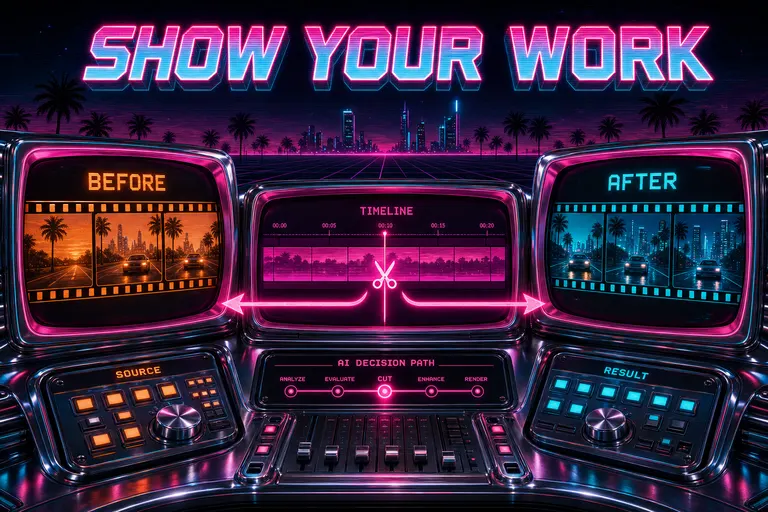
A retrofuture chrome control room with neon-pink CRT screens showing before/after film strips, magenta arrows tracing the AI's decision path
The "trust me bro" trap
You asked the AI to cut your video. It came back with a draft. Three clips removed. One transition softened. A lower-third under the founder's chin. The chat said: Done. I trimmed the dead air and tightened the open.
Cool. Cool cool cool.
You watched it. One of those cuts felt wrong. Right at the part where she was leaning in — that was a real beat, that should have stayed. Why did the model pull it? Did it think she was clearing her throat? Was the laugh in there the laugh you cared about, or the polite one from the other side of the table?
You scrolled the chat. The AI said I trimmed the dead air. It did not say which dead air. It did not say which clip. It did not say which second. It just said the verb.
That's the "trust me bro" trap. The model writes a sentence, you nod, the cut moves, and you have no idea whether to push back or shut up. Most AI editors stop right there.
We built VibeChopper to do the opposite. We built it to show its work.
Every cut, every swap, every overlay, every grade, every render — they came in with receipts. A card. With a frame strip. With a transcript range. With a clip pill that named the clip. With a before/after timeline diff. With a button that jumped you to the spot at the exact second.
You stopped having to take the AI's word for it. You started reading the receipts.
That's what shipped on May 17. Native editor tool-call UI that turned every AI move into a thing you could inspect, click, and override.
Tool-call cards — before/after timeline diffs
Here's the unit of trust.
When the AI ran an edit, the harness fired a tool event — a tool name, a status, a structured input, a structured output, and a visualization. A view of what that tool actually touched.
Each event became a card. The card lived inline in the AI chat, next to the model's chat bubble. Four states: pending, running, completed, failed — a clock, a spinner, a green check, a red alarm. You could see, in real time, where the run was. Not a progress bar. A receipt being printed line by line.
For any tool that moved clips — trims, splits, swaps, inserts, reorders — the card rendered a before/after timeline diff. Two skinny bars side by side. Before in soft orange. After in cyan. Each labeled with its time range. Each diff entry titled with what changed (replace, trim, extend, swap). You did not have to imagine what the cut did. You looked at the diff.
That mock up there isn't a wireframe. That's the actual shape the card took — checkmark on the left, title in the middle, status badge on the right, then the meat of the receipt stacked underneath. Clip identity pill. Frame strip. Transcript range. Two buttons at the bottom.
The buttons did two things. Jump and play at 0:14 scrolled to the spot and played it. Focus in timeline scrolled to the spot and stopped, so you could nudge from there. Either way, the cut you were trying to evaluate was on your screen in a second.
This is what "show your work" meant in practice. A card of evidence. With a button that put you on the evidence.
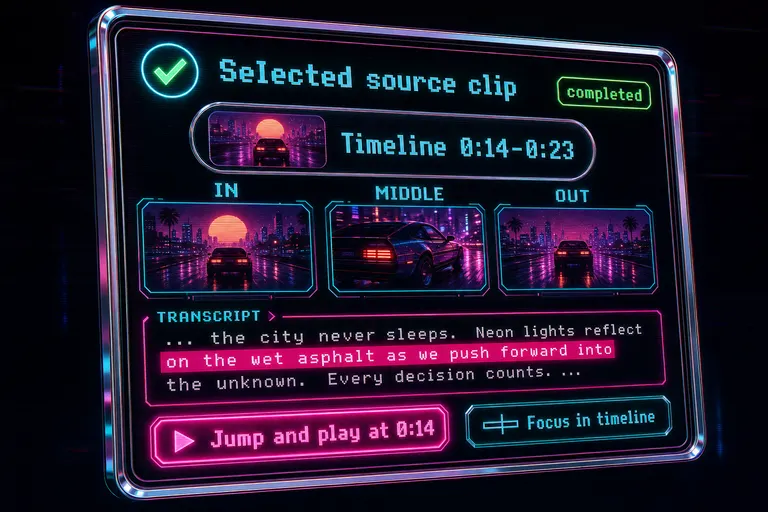
Mock screenshot of a single tool-call card with a status badge, clip identity pill, frame strip, transcript range, and timeline jump button
Clip identity pills + transcript-range previews
If the diff was the geometry of the change, the clip identity pill was its name tag.
Every card that touched a clip pinned a pill near the top. Thumbnail. Title. The timeline range. The source range from the original media when relevant. When the AI said it picked a clip, you knew which clip. Not "that GoPro file." Not "the wide shot." The actual thumbnail. The actual title. The actual seconds.
If the pill said Timeline 0:14-0:23 and the source said Source 1:42-1:51, you knew the AI had reached into clip-something-from-camera-A at one minute forty-two and pulled nine seconds out of it. No ambiguity.
Sometimes the AI hadn't resolved the clip yet. The pill rendered a Clip evidence pending placeholder. Honest. A literal "the receipt isn't ready yet, hang on."
Then the transcript range preview. This one was the receipt I was proudest of.
For any tool that touched audio, the card showed a three-row transcript window. One row of context before. One row (or up to three) of the actual range the AI selected, highlighted in magenta. One row of context after.
You did not have to scroll the transcript panel and squint. The model put the line on the card. Speaker labels included. Time codes included. The highlighted row glowed hotter than the context rows so your eye landed where the cut landed.
If the line in magenta wasn't what you cared about? If the AI grabbed the question instead of the answer? You knew, in one glance, before you scrubbed a single frame.
That's a level of audit nobody else in this market was showing. Every single time we used somebody else's AI editor, we caught the model trimming the wrong word and only realized it after a full playback. That's tax. We removed the tax.
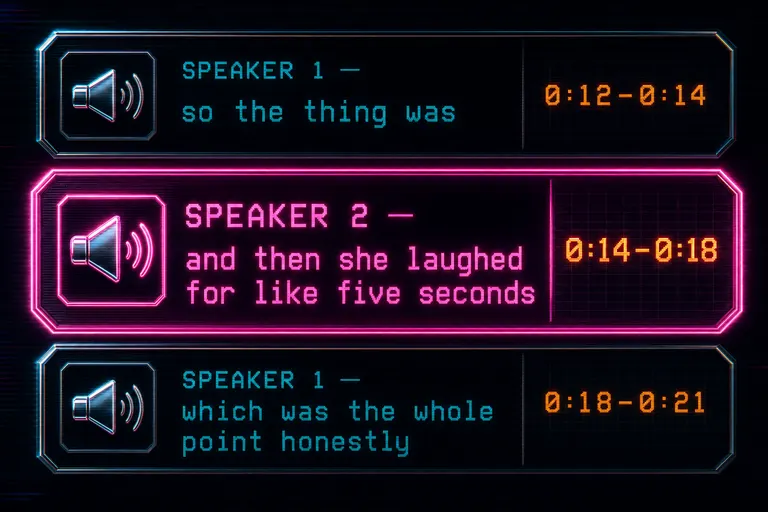
Mock screenshot zooming in on a transcript range preview with a speaker label and one highlighted line bracketed by surrounding context
Frame strips — what the AI saw
Audio's half the cut. The other half is the picture. See why the AI cut what it cut free
For any tool that selected a clip — source selection, swap candidates, B-roll insertion, the whole "the AI picked an image" family — the card rendered a three-frame strip. IN. MIDDLE. OUT. Three thumbnails in a row. Three timestamps under them. Three lines of AI-written description under each one.
You did not have to open the media library and scrub a clip to remember what was in it. The card was the clip's preview. First frame, middle frame, last frame. AI descriptions under each — the same descriptions the model used to decide. If the AI said "subject and guest laughing, mouths open, wide shot," that line wasn't generated for the card. It was the actual description from the frame analysis that the model used to pick that clip in the first place.
The frame strip wasn't a marketing prop. It was the same image and the same caption the harness used to make the call. You and the AI looked at the same evidence, from the same source of truth.
When the strip was empty, the card said Frame preview unavailable with a placeholder. A literal blank with a label, so you knew the evidence was pending, not missing.
The card stacked everything top to bottom: header, clip pill, frame strip, transcript range, before/after diff, sometimes candidates reviewed, sometimes the visible rationale, and the jump buttons. You read top to bottom. You knew what happened in five seconds.
::
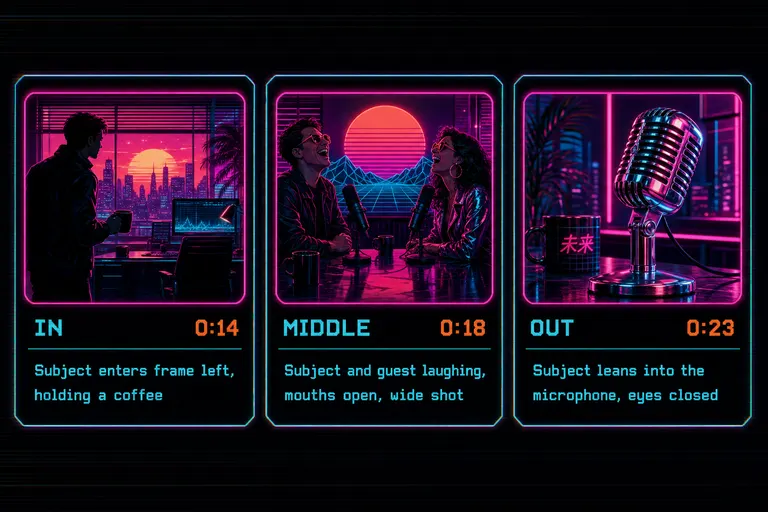
Mock screenshot of the three-frame IN / MIDDLE / OUT strip with thumbnail tiles and AI descriptions beneath each frame
Deep-link jump-to-the-cut
A receipt you can't act on is just paperwork.
Every card ended with two buttons. Jump and play. Focus in timeline. Both were deep links to the same timeline you were editing on, scrolled to the right second, with the right clip selected.
The play button moved the playhead and started the cut. You watched the actual sequence with the actual transitions. If it felt right, you closed the chat and kept going. If it felt wrong, you used the focus button on a different card.
The focus button moved the playhead and didn't play. That was for the surgical move — nudge a frame, trim a half-second, pull up the clip's properties panel and start editing the move the AI made. The card put you exactly where the AI's hands were. From there, your hands took over.
Behind those buttons, the system kept a small structured object — a TimelineDeepLink — with a start time, an end time, a clip id, a video id, and a label. The card rendered the label. The button passed the object up. The editor scrolled.
One more detail: when the event carried a developer-level structured payload, the card had a small details disclosure at the bottom. Closed by default. One click and you got the full input object, the full output object, the exact JSON shape the harness recorded. You did not need it to use the card. But if you wanted to see the raw structured data, it was right there.
That picture's the shape of trust. The model said I trimmed this. The card showed you what the trim ate. The button took you to the cut. The disclosure (if you wanted it) showed you the raw call. Four layers of receipt for one verb. You stopped having to trust. You started having to agree.
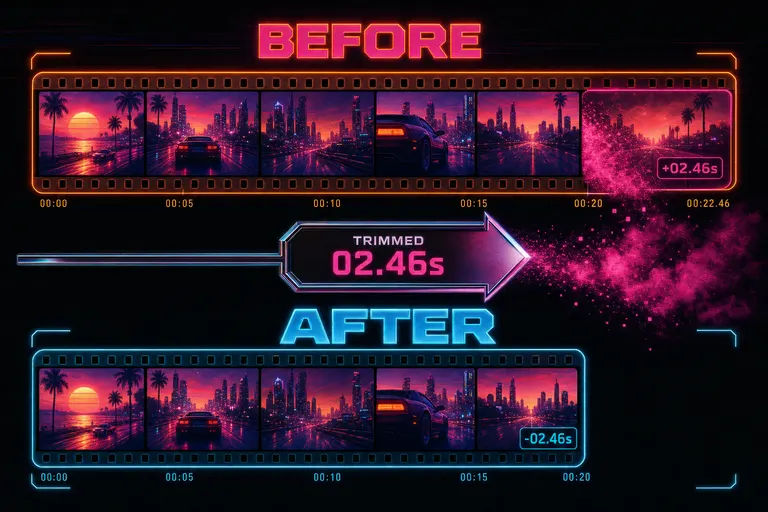
Two parallel filmstrips labeled BEFORE and AFTER with a chrome diff indicator showing the trimmed seconds dissolving into pink mist
How the events made it to your eyeballs
The harness fired tool events as it ran. Each event was one of ten types — message deltas, run created/updated, run-item updates, tool_event_started when a tool kicked off, tool_event_updated while it ran, tool_event_completed when it finished, timeline snapshots, and a timeline_changed signal whenever the project state moved. Open the tool trace
You did not have to know those names. The card showed up. The card filled in. You read it. You clicked.
Under the hood, those events were the spine of the receipt system. Every card was a render of one or more of those events. The server published them. The chat subscribed. The card knew its status because the event carried its status. The card knew its rationale because the event carried its rationale. The frame strip came from the visualization layer on the server, which resolved frames from the project's media and attached them to the event payload.
That spine was what made the receipts honest. The card couldn't lie about what the AI did, because the card was rendered from what the AI did. Not from a summary the model wrote afterward. From the actual structured event the tool fired.
If the receipt didn't exist, the card said so. Resolved frames, transcript, and timeline links are still pending. A visible acknowledgement that the evidence was on its way.
The streaming side worked over Server-Sent Events on /api/projects/:projectId/editor-events/stream. Open the chat, the connection opens. Run starts, events stream in. Card updates in place. You watched the receipts get drawn in real time, like a coach calling out reps. Source selected. Trim queued. Trim completed. Snapshot taken. Music planned. Render verified.
By the time the AI said Done, you had already read most of the receipts.
::
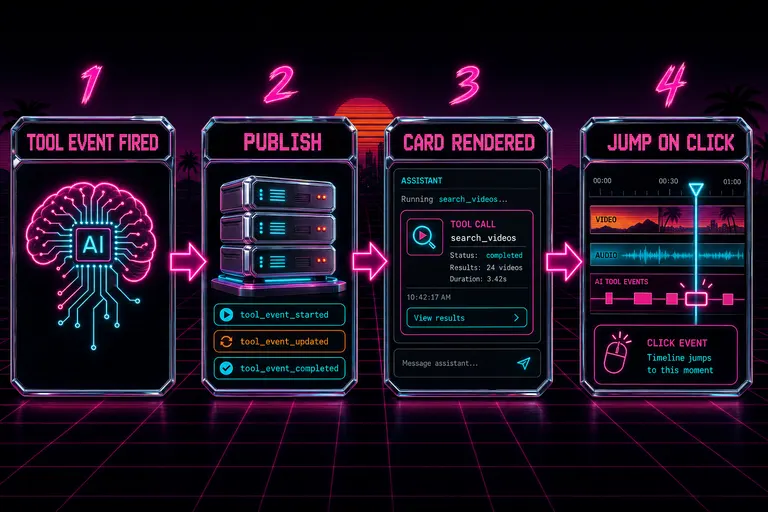
Diagram of the editor event flow: harness fires tool events, server publishes them, the chat renders cards, the timeline jumps on click
When you disagree with the AI
This is the section I think about the most.
A receipt is only worth what it costs to argue with. If the AI shows its work and you can't override the result, you didn't get more power — you got a more polite cage. So the override flow was the other half of this build, and it's the half that made the receipts matter.
You read a card. The AI selected a source clip — the wide shot of the founder mid-laugh — and the receipt showed three frames, the transcript line, the timeline range, and the candidates it reviewed. Two other candidates listed under "Candidates reviewed," each with a thumbnail, a score, and the AI's reason for not picking it.
You looked at it and went no, the second candidate is the one. The first one's eye-line is wrong.
You clicked Focus in timeline on the AI's pick. You watched it for two seconds. You confirmed it. You opened the clip-swap dialog on that exact clip. The dialog already had the candidate list pre-loaded — the receipt was the same data structure the swap dialog consumed. You picked candidate two. The swap applied.
The instant you did that, autosave fired a snapshot. The history panel got a new entry. The AI's run continued — but now it ran with your pick on the board. The next tool event worked against the timeline as you'd left it. Not its own draft. Yours.
That's the override flow in one sentence: read the receipt, jump to the cut, swap the clip, watch the snapshot save, keep going.
The AI is fast. The AI is consistent. The AI is right most of the time. But the AI doesn't know about the conversation you had with the founder at lunch. It doesn't know that the laugh in candidate one is the polite laugh from the room, and the laugh in candidate two is the real one because you remember what the room sounded like.
Your taste is your share of the cut. The AI's draft is the AI's share. The cards turned that into a real partnership. You read what the AI did. You agreed where you agreed. You overrode where you disagreed. The next pass, the AI worked from your decisions. Not its own.
That's not "human in the loop." That's the human and the AI both leaving fingerprints on the cut, and both being inspectable.
That's me in the room when the cards landed. I am not posing. I am reading the receipts. Because I built this to be the editor I wanted at 1:47am — the one that doesn't hand me a draft and say trust me. The one that hands me a draft and says here's exactly what I did, here's exactly where, here's why I picked this and not that, here's the button to go look.
You finished the run with one of three feelings. You closed the chat and shipped it. You overrode three cards and re-ran the polish. You overrode the whole sequence and rolled back to a snapshot. All three were fine. None of them were "trust me bro."
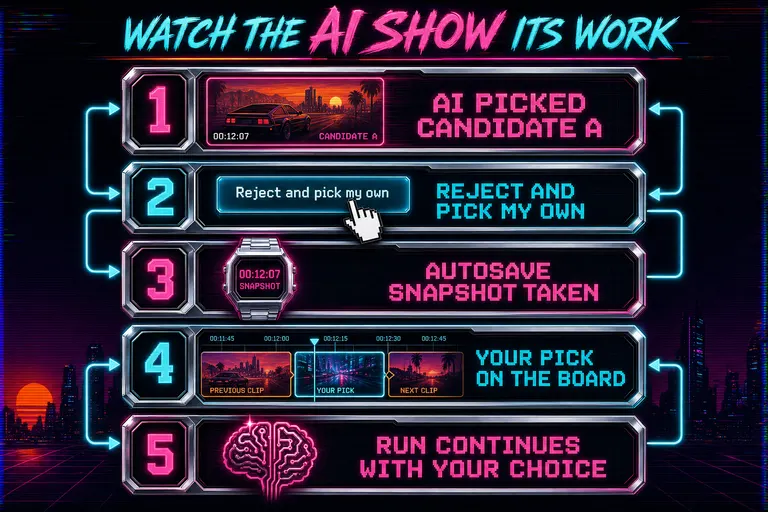
Diagram showing the override flow: card surfaces a candidate, user disagrees, snapshot saved, manual change applied, run continues
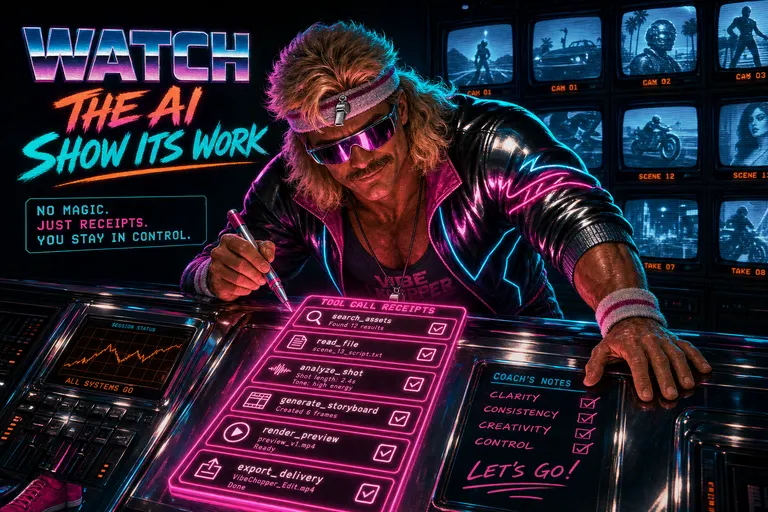
Gnarles Chopper in a sweatband leaning over a chrome console of glowing tool-call cards, holding a magenta marker, nodding at the receipts
A small note about confidence
A lot of AI editors write confident sentences. Most of them are confident even when they shouldn't be.
The cards carried a little badge for that. When the model recorded its own confidence about a pick — and the harness asked the model to record it on every selection — the card showed it. Low confidence. Medium confidence. High confidence. No numerical hand-wave. The model's own honest assessment that it was guessing harder on this one than on the last one.
A low-confidence card got a second look. A high-confidence card got skimmed. The badge made the receipts faster to read and more honest at the same time. The model recorded them on the event. The card rendered them off the event. Same source of truth all the way through.
What this changed about working with the AI
Before the cards: I asked the AI to do something. The AI did it. If something was off, I scrubbed around looking for what changed, opened the snapshot browser, rolled back, and tried a different prompt. The AI was a black box with a play button.
After the cards: I asked the AI to do something. The AI streamed receipts. I read each one as it came in. By the time the run finished, I already knew which cards I agreed with and which ones I'd push back on. I overrode the disagreement cards in place. I watched the draft once for vibe, not for forensics. I shipped.
The cards didn't make the AI smarter. They made me faster — because I stopped having to play detective every time it ran. The detective work moved to the front of the conversation. By the time the verb landed, I'd already agreed or disagreed with the noun.
This is what trust looks like when it's earned, not requested. The model doesn't ask you to take the W. The model hands you a receipt and lets you read it.
Drop in a shoot. Type a brief. Watch the cards roll in. Read the receipts. Click Jump and play on the ones you want to feel. Click Focus in timeline on the ones you want to fix. Override the ones you disagree with. Watch the snapshots save. Ship the cut.
That's the gym. Sets and reps. Cards and clicks. Receipts and decisions.
If you came to this post from Tell It What You Want. Watch It Cut., the cards are the other half of that story — the chat sends the verb, the cards show the receipt. If you came from Drop a Brief. The AI Reads It Before Cutting., the cards are how you check whether the AI read your brief the way you meant it. If you came from the developer side, the companion piece — Native editor tool events — walks through the event schema and the SSE stream that powers all of this.
The receipts kept printing. The cards kept landing. The cuts kept getting better. Your taste stayed in the room.
See you on the timeline.
— Gnarles
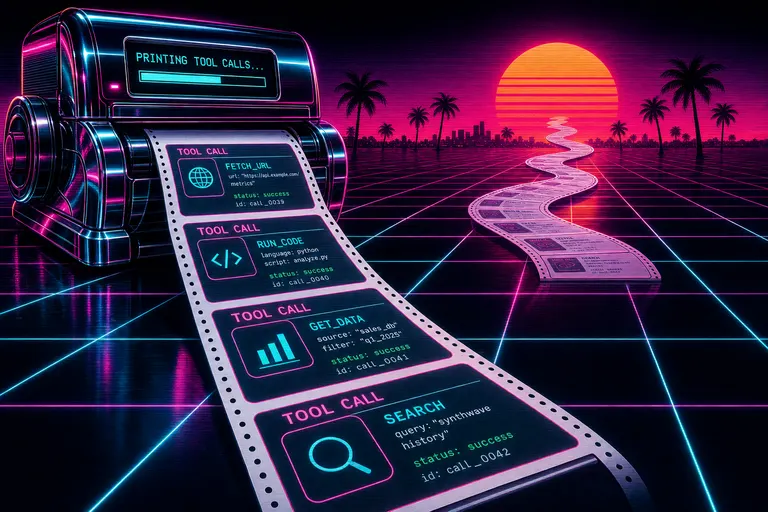
A long chrome receipt roll printing out tool-call cards into a magenta sunset over a palm-tree grid horizon
Try the workflow
Open every feature from this post in the editor
These panels collect the features discussed above. Sign in once, finish your profile if needed, then the editor opens the first highlighted surface and walks through the tutorial.
Step 1
See why the AI cut what it cut
Open the editor and watch the tool-call cards roll in — every cut comes with a frame, a transcript line, and a button that jumps you to it.
See why the AI cut what it cut free →Step 2
Open the tool trace
Expand any AI run and read the receipts — clip pills, before/after diffs, candidates reviewed, and the rationale the model recorded.
Open the tool trace →