
Overview
It's the same conversation you've had a hundred times. The client sends a four-minute voice note. The producer paperclips three Polaroids to a Slack message — "this is the vibe." Somebody emails a Google Doc called BRIEF_FINAL_v3_USE_THIS_ONE.md. You read everything, you put on your headphones, you sit down, and you start cutting.
That's the job. Read the brief first. Cut second.
For two and a half years of AI editors, the brief disappeared the moment you tried to hand it over. You'd paste a paragraph and hope the system held onto it. You'd upload a voice note and watch it become a filename. You'd attach a mood-board image and the AI would politely tell you it couldn't see it. Metadata. Window dressing. The brief was a sticker on the outside of the box, and the AI was inside wondering why nobody told it what to cut.
We fixed that. VibeChopper read your brief before it touched the timeline. Voice note, image, markdown, plan document — whatever you attached became real model context.
Section 1 — The junior editor analogy
Think about the last time you handed a project to someone who wasn't you. A junior editor, a freelancer, a friend who owed you a favor. You didn't say "make the video good." You sent a packet.
A voice note where you talked through the cold open. A few reference stills — that one Wes Anderson frame, that one Kogonada hallway, the specific shade of magenta from a music video you couldn't stop thinking about. A markdown brief with the run order, the runtime target, the client's three non-negotiables, and the two things you secretly wanted to break. Maybe a previous cut for tone.
Mixed media. Specific. Weird in the places that mattered.
Sitting down alone, your brain held all of it. Sitting down with an AI, none of it crossed the threshold. The AI was the junior editor who showed up without the packet. You'd start every conversation explaining the same things, because the conversation didn't have a packet attached to it either.
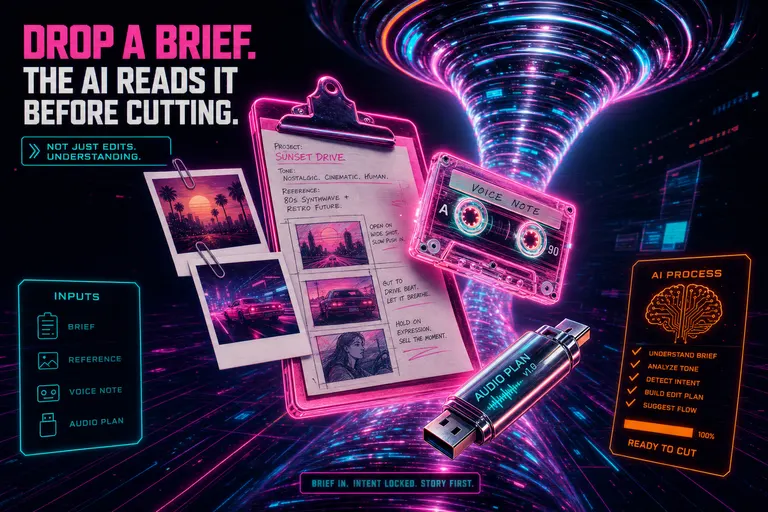
VibeChopper's attachment tray was the packet. You dropped mixed media into the chat, the system tagged it, transcribed it, stored it, and — the part that mattered — folded the contents into the document the AI read before it picked the first cut.
Section 2 — What you could attach
The attachment tray sat right under the chat input. Two buttons: File and Image. Speak a voice note and the system stored it as audio automatically. Seven kinds of plan asset rode the same rails — any of them could ride along with a chat turn. Attach a brief, let it cut free
The seven kinds, as they actually existed in the codebase:
markdown— A plain markdown plan. A brief, a script, a treatment, a shot list, a beat sheet.audio— A voice note. Recorded in the app or uploaded aswebm,ogg,mp3,m4a,aac,wav,flac, and a handful of other audio mime types. The system transcribed it. The transcript rode into the dossier with the file.image— A reference frame, a mood-board still, a storyboard panel.png,jpeg,webp,gif. The image landed in the dossier with its description and metadata.file— A generic uploaded file. Sidecar transcripts, paste-from-anywhere notes, attachments that didn't fit a tidier label but still belonged in the packet.diagram— A diagram with stored syntax. A flow exported as text-form diagram code. Useful for explaining a structure rather than a vibe.timeline_snapshot— A saved snapshot of a previous timeline. The AI read this when you wanted "do it more like this version."timeline_render— A finished render output attached as a tone or pacing reference, with its description and any markdown notes you'd written.
Every attachment was stored as a project_plan_asset row, scoped to your project, served from private object storage with the right content type — audio came back as audio/m4a or audio/aac and played in the dialog, images came back as the right image/* so previews didn't break.
Two ways to drop attachments. Right from the chat input — click the paperclip, pick a file. Or from the plans sidebar — open any asset, hit Attach to chat. Both landed in the same tray under the input as a row of chips with title, kind, and a "transcript ready" marker when audio had been processed. Trash to remove. Send to commit.
::
Section 3 — How the brief became context, not metadata
Here's the part that broke other tools, and the part we got right.
The easy thing — the thing most AI editors did — was record the attachment as a database row and tell the model "the user attached a file called brief.md." That's metadata. The model knew that you attached something. It did not know what you attached.
We did the harder thing. Every planning turn, the server built a markdown dossier — a long structured document with your source inventory, transcript anchors, visual frame descriptions, chat history, and version history. The model read top to bottom; order changed what it weighted.
We added a section to that document. The heading, verbatim, in the code:
```
Attached Plan And Media Prompts
These user-attached assets are explicit instructions for this request. Use them to plan the edit, then verify every cut against source frame/transcript evidence. ```
Under that heading, every attachment got its own subsection containing:
- Title and asset ID.
- Kind (audio, image, markdown, file, diagram, timeline snapshot, timeline render).
- Status (so the model knew if a transcript was still being generated).
- Mime type and storage path.
- Description and tags, if you'd added any.
Then — the part where the brief stopped being metadata — the asset's actual body landed in the dossier. Audio with a transcript? The transcript was inlined under a #### Transcript heading. Markdown asset? The full markdown was inlined under a #### Markdown heading. Diagram? The diagram syntax was inlined under a #### Diagram heading. The model didn't read a pointer to a file. It read the file.
The instruction line above the section was written for the model, not for you. "Use them to plan the edit, then verify every cut against source frame/transcript evidence." Gym English: the brief is the directive. The footage is the floor. Plan from the directive. Verify on the floor.
The brief said what to look for. The source inventory said what existed. The planning turn reconciled them. If the brief said "open on a wide shot of her laughing" and the laughs in the transcript were at 02:14, 04:01, and 08:33, the AI's job was to pick the laugh that opened best and cite the timestamp. Not invent a frame. Not ignore the brief because the footage was bigger.
Two inputs. One reconciled plan. The brief moved from metadata to context, and context moved from suggestion to instruction.
Section 4 — The model dossier — what the AI actually saw
The planning dossier was a real document. Sometimes hundreds of thousands of characters long. You could open it. We exposed it on purpose — the worst thing an AI editor could do was hide its homework. Open the planning dossier
The dossier had a fixed shape, top to bottom:
1. Source Inventory. Every video file, every frame description, every clip relationship. 2. Chat History. Recent chat turns, so the model knew the conversation it was inside. 3. Attached Plan And Media Prompts. Your packet — briefs, voice notes, mood-board images, snapshots. 4. Transcript Anchor — Start. A full transcript pass before the visual section, so the model saw the dialogue spine before it stared at frames. 5. Visual Sections. Frame-by-frame descriptions of every video. 6. Transcript Anchor — End. The transcript repeated before the output contract, so the model didn't lose the dialogue in the long visual middle.
Your brief landed at position three. Above the transcript anchor. Above the frame descriptions. That placement was on purpose — the model read your packet before it read the footage. That's how a real editor read a real handoff.
When the dossier had to be truncated to fit the model's context window, the middle of the visual section got trimmed first. The transcript anchors stayed. Your brief stayed. The model lost some granular frame descriptions before it lost the words you wrote.
The plans sidebar listed every attached asset with a status badge. Click into one and you got the markdown plan dialog — an audio player for voice notes with the transcript under it, an image preview for stills, a markdown render for briefs, a diagram syntax block for flow diagrams. Every asset had a rating slider from 0 to 100. If you'd marked a brief as a 92 and a reference still as a 40, the model saw that in the asset metadata.
There was a button labeled Attach to chat. Press it and the asset queued up for your next message. Attach the same brief to ten turns in a row without re-uploading. The packet stayed assembled. You just kept directing.
::
Section 5 — Walkthrough: brief, first draft, revision
Here's how it played out on a real cut.
Thirty-eight clips from a brand documentary shoot. The brief read, roughly: "Two minutes. Founder-led story. Open on a wide. Cut on a laugh. End on the warehouse pan. Don't use the b-roll from the third interview — colorist hated it."
Three things.
First, you dropped the brief in. Pasted it into a markdown plan, hit save, attached to chat. The dossier now had your two minutes, your wide-open instruction, your laugh-cut beat, your warehouse-pan ending, and your colorist veto.
Second, you dropped in the voice note. A forty-second walk-and-talk explaining why the warehouse mattered — the founder's first lease, the room where the first batch had shipped, the empty pallet by the loading dock she wanted the camera to linger on. The system transcribed the audio asset. The transcript landed under your markdown brief.
Third, you attached two reference frames. A still from a previous brand spot for the warehouse pan. A frame from the founder's TED talk for the wide-open laugh. Both image assets pinned to the next turn.
Then you typed: "Cut the two-minute version." Send.
The AI built a planning turn. It read the dossier top to bottom — brief at section three, voice note transcript right after, then chat history, transcript anchors, and frame descriptions of all thirty-eight clips.
The first draft came back as a real tool call. Not "I made a cut." It showed you the cut — clip identity pills, transcript ranges, frame thumbnails, deep-link buttons that scrolled the timeline to each change. The rationale cited the brief: "Opened on clip 12 — wide pan establishing the founder, transcript reads 'so we started in this room' which matches the brief's warehouse-origin beat."
The warehouse pan landed on the wrong frame — the AI picked the loading dock from the front, not the side with the empty pallet.
Second message, same chat. The brief and voice note were still attached — no re-upload. "Warehouse pan should be from the loading dock side, with the empty pallet visible. Voice note section about the first lease."
The second turn read the same dossier with one new line of chat history. The AI rebuilt the warehouse pan, picked the side-pan shot, cited the voice note in the rationale: "Voice note: 'I want the camera to linger on the empty pallet by the loading dock.' Selected clip 27, source range 04:18–04:34."
Three sentences from you. Two model turns. One revision. The brief drove both. Read the brief, cut to the brief, show your work, revise from the brief. The loop a human editor ran — at the speed a machine ran it.
Section 6 — What you didn't have to think about anymore
You didn't have to repeat yourself. The brief sat in the dossier across every chat turn. You wrote it once. The model read it every time.
You didn't have to translate. Voice notes stayed voice notes. The audio played in the dialog, but the content — the founder's actual words, the way she pronounced "pallet" — survived as text the model read. No rewriting as bullet lists. No summarizing. Attach and move on.
You didn't have to babysit. The model didn't lose the brief halfway through the cut. It didn't pretend the reference image wasn't there. The planning rubric required every cut to cite real source evidence — the brief was an instruction to find evidence that matched, not a license to hallucinate.
You attached the packet. You said what you wanted. The AI cut to the brief. You revised. You shipped. That was the rep.
Section 7 — The next rep
You shot it. You wrote the brief. You attached the brief. You asked for a cut. The AI read your brief, cited your brief, cut to your brief, and showed its work. The revision took one sentence. The brief did the heavy lifting.
This is what we meant when we said the directing voice in your head finally controlled the timeline — the voice didn't just type instructions into a chat box, it handed off a packet, the way you would to any other editor who respected your time. The packet was the instruction. The footage was the floor. The plan was the reconciliation.
For how the AI showed its reasoning after the cut landed, read "Watch the AI Show Its Work" — clip identity pills, transcript-range previews, and deep-link buttons that scrolled your timeline to the change. For how briefs and story structure played together, read "Edit by Story Structure, Not Clip Number". Hero's Journey, three-act, storyboard grid — all attached the same way. The engineering side lives in the developer companion: "Briefs Attached to Planning".
Drop the brief. Watch it cut. Revise from the brief, not from scratch.
See you on the timeline.
— Gnarles
Try the workflow
Open every feature from this post in the editor
These panels collect the features discussed above. Sign in once, finish your profile if needed, then the editor opens the first highlighted surface and walks through the tutorial.
Step 1
Attach a brief, let it cut
Drop a voice note, a mood board, or a markdown plan into the chat. Watch the AI plan the cut around it.
Attach a brief, let it cut free →Step 2
Open the planning dossier
See the document the AI actually read — attached briefs included, in their own pinned section.
Open the planning dossier →