
Overview

Stacked neon VHS cartridges flowing up a glowing chrome conveyor belt into a starlit cloud with a tiny moon on the horizon
The wedding-footage stress
You shot a wedding.
You came home with twenty clips. Three of them are forty minutes long because the camera operator never hit stop during the speeches. One is a vertical iPhone shot the bride's sister texted you. Two are 4K from a B-camera you only fired up for the first dance. Eighty gigabytes of footage, sitting on a laptop plugged into a hotel router with one bar of signal and a captive portal that logs you out every forty-five minutes.
You wanted to start the edit. You knew you couldn't. The edit didn't start until everything was ingested — every clip transcoded, every frame described, every spoken word transcribed — and the last time you did an ingest like this it ate a Tuesday.
This is the part of the job nobody puts in their reel. The babysitting. The "did the upload finish" tab-flip every six minutes. The coffee runs where you came back to find one file had silently failed at 87 percent. The 3am wake-up to refresh the page because you weren't sure if it was still going.
We built batch upload so you stopped babysitting and started sleeping. Twenty clips from a wedding. Hotel wifi. You went to bed. You woke up to a fully ingested, transcribed, AI-described shoot.
This is how that worked.
Batch upload, phase by phase
The first thing the upload dialog did was stop pretending an upload was one thing. Upload a whole shoot at once
An upload was three things, and you saw all three at once, on every file. The dialog grouped them into three labeled phases — Client Artifacts, Original Upload, and Server Repair — each one a chrome panel with its own progress bar and its own status light. Green if done. Cyan if active. Amber if stuck. Cyan-with-a-rewind-icon if resumable. Red if something actually broke.
Client Artifacts was the work your browser did before anything left the building. Your laptop pulled the video metadata — width, height, duration, framerate — walked through the file and extracted a frame every half-second into in-memory blobs, stripped the audio into a separate track for transcription, and hashed the original with MD5 so the server could tell us if it had seen this clip before. All on your machine. You saw the frame counter climb. You saw the audio-strip light flip green. You saw the metadata badge land before the upload had even begun.
Original Upload was the part that did leave the building — the full original video file going to your project's storage. This phase had a concurrency budget that adapted to your network. 50-megabit fiber? Six originals at once. Hotel wifi? Two. Phone with data-saver on? One. The hook read your connection, your device memory, your CPU count, and picked a rep count it could actually finish.
Server Repair was the part that happened after the originals landed. The server analyzed every frame with GPT-5-nano (Gemini fallback if the primary stumbled), ran the audio through gpt-4o-transcribe-diarize for speaker-labeled transcripts, and generated a title and description for the whole video from the combined context. This phase did not need your tab open. The dialog showed its progress so you knew when it was safe to start editing, but you could close the tab and the work kept marching.
Twenty files meant sixty status lights arranged into a single dense column — and at a glance, you saw exactly which phase any file was sitting in, and what would block what.
::
The granular stages inside those phases had real names. A file moved through queued → metadata → extracting → extracting_audio → uploading → uploading_original → analyzing → transcribing → generating_metadata → complete. You didn't memorize that list — the dialog rendered it. If a file got stuck at transcribing, you saw transcribing on the row. The status was the diagnosis.
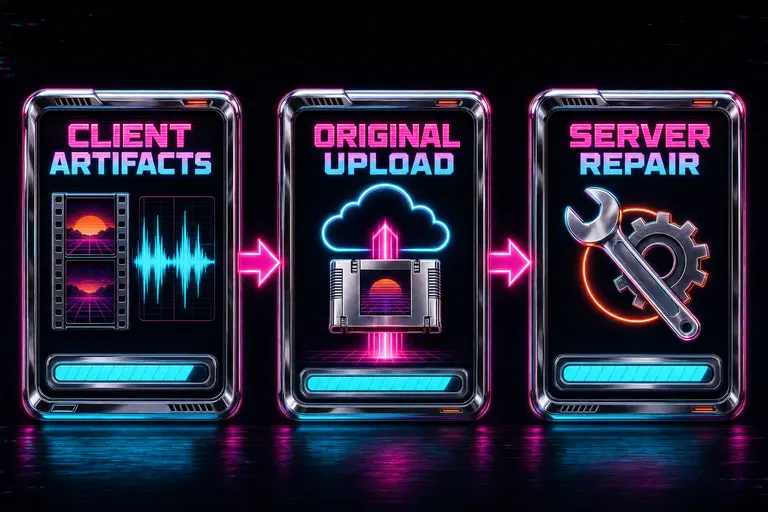
Diagram of the three upload phases — Client Artifacts, Original Upload, Server Repair — rendered as three glowing chrome panels with progress bars
Resume on disconnect
This is the part the wedding shooter cares about most.
You started the upload at 11pm. You went to bed at 11:40. Somewhere between then and 3am, the hotel router reauthenticated its DHCP lease. The captive portal logged you out. Your laptop went to light sleep. Your tab lost its websocket. The progress bars froze.
In the old world, that was the end of the run. You woke up to a half-finished queue and a folder full of stale temp data that had to be re-extracted from scratch.
In this world, the half-finished work was already on your disk.
Every frame the browser extracted, every audio chunk it stripped, every hashed identifier it computed — those got persisted into the browser's own private storage before going over the wire. The store used OPFS (Origin Private File System) where the browser had it, and fell back to IndexedDB where it didn't. Artifacts were keyed by project, batch, file, and kind — so the next time you opened the dialog with the same files, the system could tell which clips it had prepared and which still needed work.
When the wifi came back at 3am, three things happened in order. The dialog detected the reconnect. It read the resume vault and asked the server which originals had already landed (and which had been deduped via MD5). It marked every artifact already on disk as resumable — cyan light with a rewind icon — and resumed the upload from exactly the byte where it had stopped. Frames already extracted weren't re-extracted. Originals already finished weren't re-sent. Transcripts already completed weren't re-run.
If you closed the laptop entirely and reopened the project the next day, the system asked your browser for permission to read the original file handles you'd granted earlier. Where you'd already granted, it picked up silently. Where you hadn't, it gave you a single-click re-grant prompt.
We also asked your browser for persistent storage the first time you ran a big batch — the API that tells the browser please don't evict this data when you're low on disk. A small but real safety net against your half-finished ingest getting garbage-collected because you closed too many tabs.
A dropped wifi connection was no longer a punishment. It was an interruption. Reps in. Reps paused. Reps in again. The set finished.
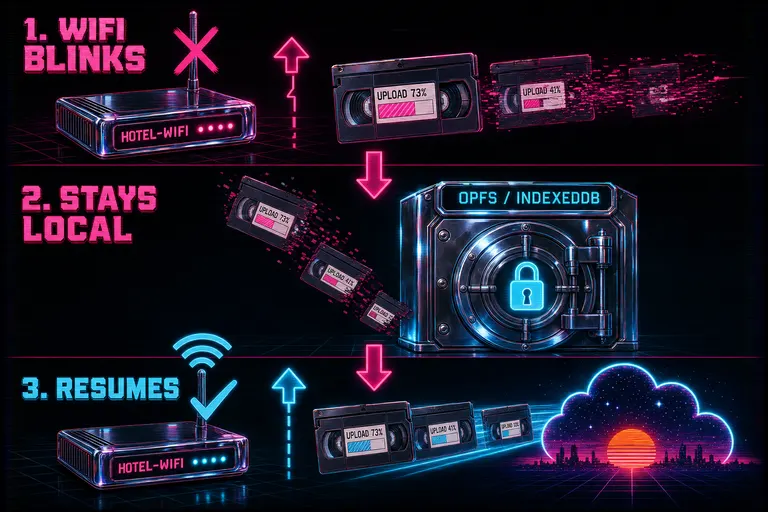
Diagram of resume flow — a hotel-wifi router blinks out, half-uploaded cartridges drop into an OPFS vault, then resume into the cloud when the signal returns
Mobile header-row monitor
Sometimes you walked out of the hotel to grab a coffee, the upload is still going, and your laptop is upstairs on a desk you can't see. Open the upload monitor
We moved the upload monitor to the top of the mobile editor's header row so you could watch a whole shoot ingest from the phone in your hand.
Before, the upload status was wedged into the secondary row next to the timecode — easy to miss, easy to swipe past. After the move, the header row showed two things side-by-side as soon as any upload was active: a cyan "Uploads" pill that opened the full monitor, and a small cyan ETA chip that read out the time-to-completion and the wall-clock finish time.
That's the whole change. But the ETA chip was the only piece of information you actually needed when you were three blocks from your laptop. ETA 4:21 meant four minutes and twenty-one seconds until everything was done. 11:48 PM meant that's the wall-clock time the last file would finish. You could put your phone down. You could buy the coffee. You could check again on the walk back.
Tap the pill and the full monitor opened in a sheet — every file row, every phase strip, every issue panel, every detail you'd see on the desktop dialog. From the phone. From the train. From the lobby couch. The upload monitor is not a confirmation screen — it's an ambient readout. It belongs where your eye already goes.
::
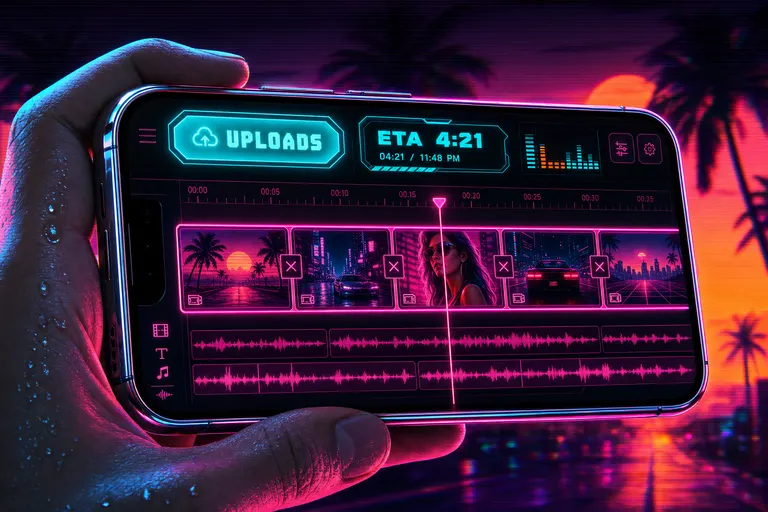
An iPhone in landscape showing a glowing cyan Uploads button and ETA chip pinned to the editor header row above a magenta timeline
What "fully processed" actually means
When all three phases turned green for every file, the project was ready to edit. Ready to edit meant five specific things:
1. Every frame had an AI description. Every half-second across every clip, the model had looked at the frame and written a sentence about what was in it. "A bride in a white dress laughing while her father holds her hand." Type her laughing into the search box and the matching frame surfaced with its match context. (Long version: "Your Footage, But Searchable Like Notion".) 2. Every spoken word was transcribed with a speaker label and a timecode. The audio went through gpt-4o-transcribe-diarize, which gave you not just what was said but who said it and when. The vow at 0:14:32 was attached to Speaker 2. The toast at 0:42:11 was attached to Speaker 4. 3. Every video had a generated title and description. The model read the combined frame descriptions and the transcript and wrote a short title and a one-paragraph description for each clip. You didn't have to name twenty files at 3am. 4. Every file's original was safely on your project's storage — deduped against any prior upload, hashed and verified. 5. Every artifact you'd need to edit on another device was already there. Frames, audio, transcripts, descriptions — all of it lived in the same project record the universal app pulled when you opened the file on your phone or your Vision Pro. (See "Edit From Your Couch. Or Your Phone. Or Vision Pro.".)
That's the receipt. When the dialog said done, the dialog meant done. The shoot was no longer raw footage. It was a searchable, transcribed, AI-narrated database you could direct from a chat panel.
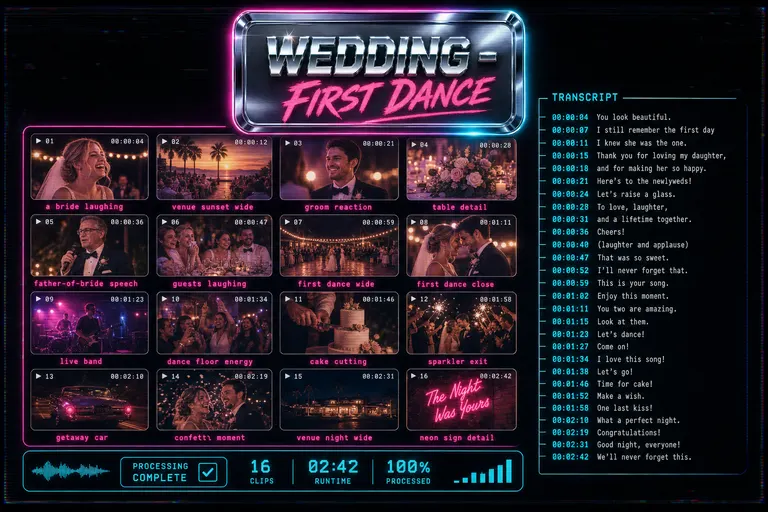
A glowing contact sheet of described frames over a transcript waterfall and a chrome title card — the 'fully processed' state of a shoot
Walkthrough: twenty clips overnight
Here's how it actually played out for the wedding.
11:02 PM. You dropped twenty files into the batch dialog. Twenty rows, three gray phase lights each. You clicked Start.
11:02 PM and four seconds. The first row's Client Artifacts light turned cyan. The frame counter climbed — 12, 47, 112 frames. The audio-strip light flickered on, settled green ninety seconds later.
11:06 PM. Three files moved into Original Upload. The concurrency budget read your one-bar wifi and decided two parallel originals was the rep count it could hit. Seventeen sat in queue.
11:14 PM. You went to bed.
12:38 AM. The hotel router did its thing. The websocket dropped. Eight files had finished. Four were mid-Original-Upload. Six were queued. The dialog froze. The artifacts didn't move from the disk.
3:11 AM. The router came back. The tab heard it. The dialog read the resume vault and marked twelve files resumable. The four mid-upload files resumed from their last completed byte. The six queued files entered upload. The eight finished files got skipped.
6:47 AM. The last server-side title finished generating. Every row's three lights were green. 20 of 20 complete.
7:20 AM. You woke up. Checked your phone. Header chip said idle. You opened the project. Every frame was described. Every word transcribed. Every clip had a title. You typed into the AI chat: make a four-minute reception cut, opening on the bride laughing during the toast.
The cut started before you finished your coffee. The tool ran the set. You ran the morning.

Gnarles Chopper in his sweatband and warmup jacket coaching a glowing chrome conveyor belt of VHS cartridges into the night sky, clipboard in hand
The next rep
Burnout isn't a character flaw. It's a tool problem. Half the burnout in this job is waiting — for a render, for an upload, for a transcription you have to kick off in a separate tab and alt-tab back to. Every minute you spent watching a progress bar was a minute the tool was supposed to be working for you and was instead asking you to keep it company.
We built batch upload so the tool could keep its own company. You drop the shoot. The browser does the prep. The server does the analysis. The vault keeps the work safe when the wifi goes. The phone in your pocket tells you when it's done. Your hands are free for the part of the job that actually needs them — the directing, the cutting, the taste.
If you want the engineering side of how the resume vault works under the hood — OPFS vs IndexedDB, file handles, the persistent-storage handshake, the server-side telemetry that lets the client trust the resume — the developer companion "The Resumable Upload" walks the wire.
Drop in the shoot. Watch the three phases tick. Close the laptop. The set finishes itself.
See you on the timeline.
— Gnarles

A magenta sunrise over a chrome grid-floor horizon with a finished, glowing timeline laid across the foreground, palm trees in silhouette
Try the workflow
Open every feature from this post in the editor
These panels collect the features discussed above. Sign in once, finish your profile if needed, then the editor opens the first highlighted surface and walks through the tutorial.