
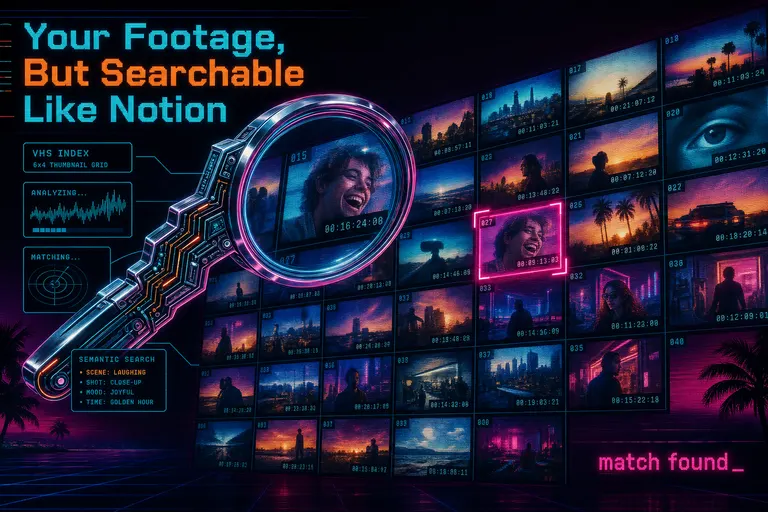
Overview
Gnarles here. You shot it. You named the file final_FINAL_v3.mov. You meant to log it. You never logged it. Now it's three weeks later and your client wants the shot where she laughed — and you have forty-seven GoPro files, two A-cam takes, and a B-cam that didn't get slated.
This is the moment that broke you the last time. Not the cut. The finding.
We built the search index for this exact moment. Every frame got described. Every word got transcribed. Every speaker got labeled. And the second you type three words you remember from a clip, the system tells you where it lives, with the matching snippet pasted right under the thumbnail so you don't have to guess.
This post is the receipt. What got indexed, how to type your way to it, and why a synthwave editor app started looking a lot more like a Notion database than a NLE.
The "I Know I Shot This" Pain
You know the loop. You scrub. You scrub past it. You scrub back. You hover for the preview thumbnail to render. You squint. You scrub again. Forty-seven files, two-and-a-half hours of footage, and the moment you need is somewhere in there.
The old answer was log everything before you edit. Camera assistants did this for years. They watched dailies, wrote down what was in every shot, slated the takes, named the files. You came in the next morning and every shot was findable. The job got done because someone — usually unpaid, usually a junior — had pre-loaded the search index in their head.
Solo creators don't have that. You shot it, you carry it, you cut it. You are the AC and the editor and the colorist. Logging is the first thing that falls off the truck when the deadline tightens, and it falls off every time. The editor app waited for you on the other side, mute. It didn't know anything about your footage.
That's not editing. That's archive labor. We took the archive labor off your plate.
Frame Analysis: Every 0.5 Seconds, Described
When you uploaded a clip, the system pulled a frame every half-second. That's the default, baked into the batch processor — every 0.5 seconds, all the way through the runtime of your video. Search your footage like a database free
Then each one of those frames went out to a vision model. Primary model: GPT-5-nano, the fast lightweight vision pass. Fallback: Gemini 2.5 Flash, used when GPT-5-nano stumbled. The prompt to the model was direct — describe the scene, the people, what they're doing, their expressions, the objects, the text or graphics on screen, the lighting, the camera angle, anything moving. Concise. Comprehensive.
The description came back as plain prose. "A woman in a yellow raincoat laughing as she pulls a dog away from a puddle. Mid shot, golden-hour backlight, slight handheld jitter." That string got attached to the frame in your project. Permanent record. Searchable from the first keystroke.
A two-minute clip became two hundred and forty described moments. A ten-minute interview became twelve hundred. A wedding shoot of twenty ten-minute clips became twenty-four thousand described frames. You didn't watch them. They were watched by the model, and the model wrote down what it saw.
A contact sheet shows you the picture. The frame index shows you the picture plus the model's read on it, plus the time. That third column — the read — is what makes the search work.
Why Half a Second
Half a second is short enough to catch the moment a face changes. The smile that breaks. The eyes that close. The hand that lifts. Every two seconds and you'd miss the micro-beats. Every tenth of a second and you'd pay for a hundred near-identical descriptions of the same blink. Half a second was the breakpoint — fine enough to catch a beat, coarse enough to not waste compute on duplicates.
When the Model Stumbled
Vision models stumble. They time out. They hit rate limits. They sometimes return a one-word answer or an apology. We didn't accept those. The retry loop ran infinitely with exponential backoff — every frame got re-tried until a real description came back, switching to the Gemini fallback when GPT-5-nano kept stalling.
The promise wasn't "we'll try to describe your footage." The promise was: every frame will get a real description. By the time you sat down to search, the index was complete.
::
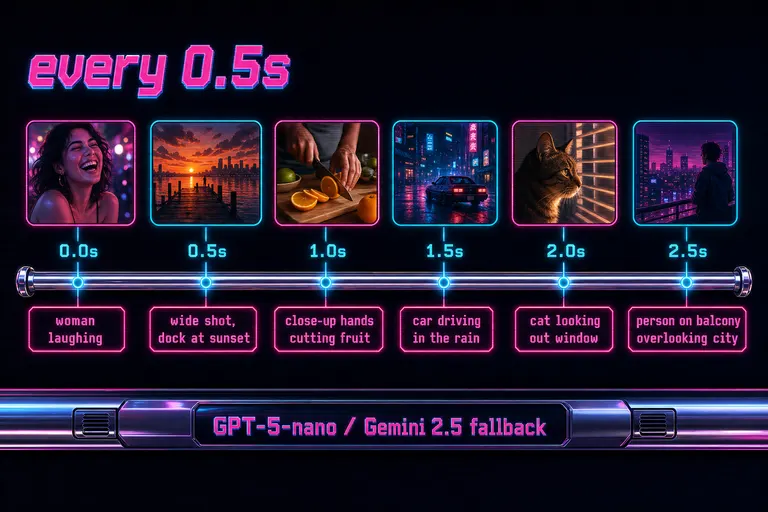
Diagram showing a video timeline sliced every half-second into frames, each labeled with a short AI description
Transcript with Diarization: Speakers Labeled, Searchable
The frames were half the story. The other half was the words.
Every audio track got transcribed too. On the OpenAI path, that was gpt-4o-transcribe-diarize — a transcription model that didn't just write down the words, it separated the speakers. The output came back as segments. Each segment had a start time, an end time, the dialog, and a speaker label: "Speaker 1," "Speaker 2." If the model heard a third voice, it labeled "Speaker 3." If only one person was talking the whole time, every segment got tagged "Speaker 1" and you got a clean monologue index.
The Gemini path did the same thing — same prompt shape, same diarized output, same JSON schema with text, startTime, endTime, speaker. The fallback was invisible to you. You got a transcript. The transcript had speakers. The transcript was searchable from a single input box in the panel.
This mattered for the same reason the frame descriptions mattered: you don't remember the timestamp. You remember "the part where she said the thing about the dog." You remember "where my co-host laughed at me." You don't remember which take it was on, or which clip it was in, or where on the timeline it landed.
You typed "the dog." You got every segment with "the dog" in it, with the speaker who said it, with the time it started and the time it ended. One click. You were at that moment in the timeline.
A Real Diarization Win
The diarization mattered most on interviews and podcasts. When you and the guest were trading lines, the transcript didn't read as a single wall of text — it read as a conversation. Speaker 1, Speaker 2, Speaker 1, Speaker 2. You could search just your lines. You could search just their lines. You could find the moment the guest laughed at your joke — the single line you wanted as the cold-open hook — without scrubbing a forty-minute recording.
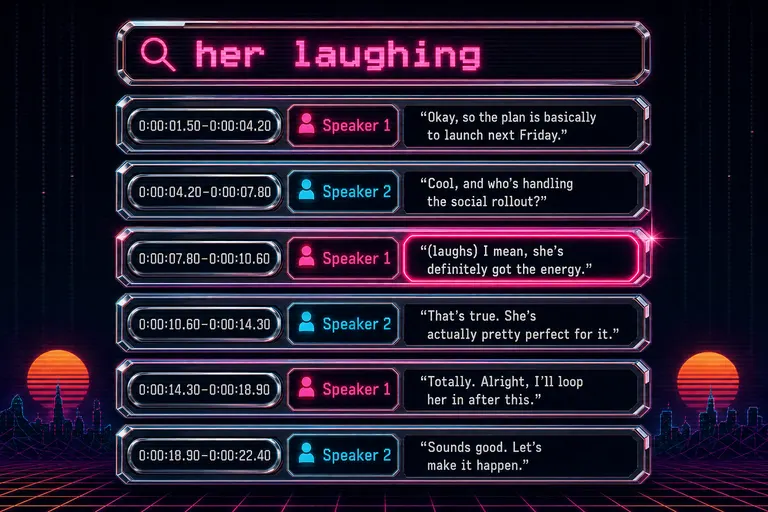
Diagram showing a stacked transcript with timestamps and two color-coded speaker labels
Match-Context Snippets: See *Why* It Matched
This is the part that turned the search from a list-of-results into a result.
When you typed a query and a frame's description matched, the system didn't just highlight the thumbnail and call it done. It cracked open the description, found your match, pulled the forty characters before and the forty characters after, and laid that snippet under the thumbnail with the match wrapped in a magenta inline mark.
You typed "laughing." The thumbnail showed a woman's face. The snippet read: ...the moment where she laughs as the light catches her... — match: laughs.
You knew, instantly, before you ever clicked the frame, that this was the right one. The grammar told you. The neighboring words told you.
That's the difference between a search engine and a librarian. A search engine hands you a stack and says "look through these." A librarian opens the book to the page and points at the line. The match-context snippet was the librarian's finger.
When the snippet started mid-word, the system stretched the window outward to the nearest space so it broke on a clean word boundary — ...the moment where she laughs..., not ...nt where she laughs.... Small thing. The kind of polish you only notice because you don't notice it.
The snippets weren't summaries. They were receipts. They proved the match was real and let you read the context in one beat. No paraphrase. No commentary. Just the sentence the match was in, with the match highlighted.
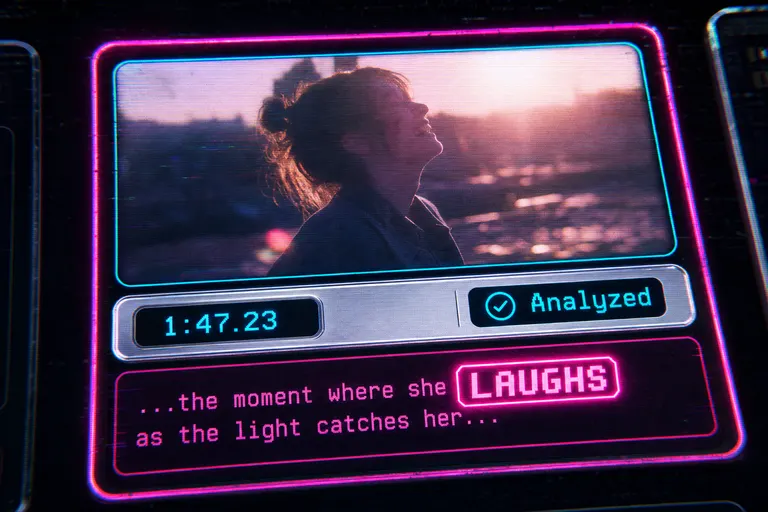
Close-up mock screenshot of a single frame card with the matched description snippet expanded below it
Real Searches That Worked
Here's the kind of query that paid for the index in a single use. Open your media panel
"her laughing" — A wedding pre-roll. Twenty clips, ten minutes each. The bride had laughed in one specific moment near the end of the toast clip. You couldn't remember which clip. You typed it. Three frames came back, all from the same minute of footage, all with the snippet reading some version of ...her laughing at the maid of honor.... Click. There it was. Twelve seconds into the cut.
"wide drone shot dock" — A travel reel. You knew you had a wide aerial of a dock at sunset. You didn't remember which file. You typed it. The frame index found six wide-aerial matches; two were over water, one was over the dock. The snippet read ...wide drone shot over a wooden dock at golden hour, water glinting.... The other matches showed wide drone shots of fields and highways — you saw the snippets, you ruled them out instantly, you grabbed the dock one.
"the part about the dog" — A podcast interview. You knew the guest had told a story about her rescue dog. You didn't know when. You typed it into the transcript search. The panel filtered to three segments. The first one — [0:14:22.50–0:14:38.10] Speaker 2: "...so we got the dog from a shelter in Albuquerque..." — was the open of the anecdote. Click. The transcript panel jumped to that timestamp. You highlighted from there and used a Cmd+click on the closing segment to bound the clip. Cold open written.
"close-up hands" — A cooking video. You needed B-roll inserts of hands chopping. Thirty-eight matching frames came back. You eyeballed the snippets, picked the four cleanest, dropped them on the B-roll track.
"yellow raincoat" — A short documentary. The protagonist wore a yellow raincoat in only one scene. You typed two words. Every frame from that scene lit up. The rest of the footage darkened in the grid. The scene was isolated by color. You bounded the edit by clicking the first and last matched frame and pulled that range to the timeline.
None of these searches required you to remember a timestamp. None of them required you to remember a file name. They required you to remember what you saw or what you heard — which is what you actually remember.
::
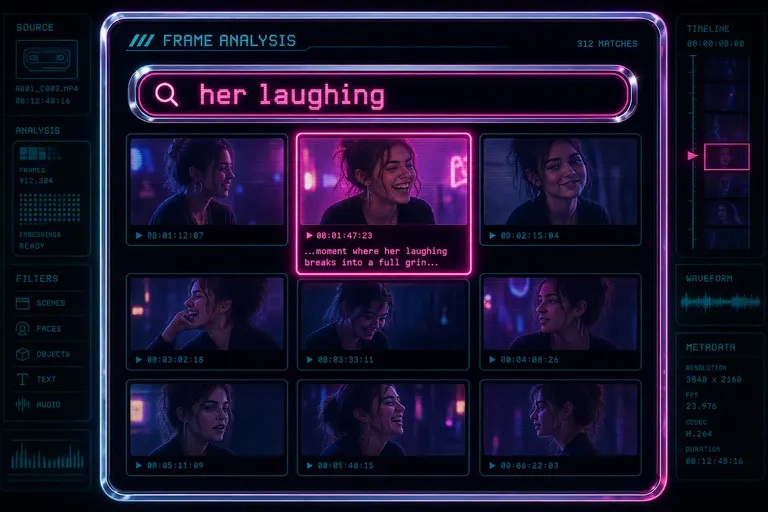
Stylized mock screenshot of the frame grid with a filter query and a single matching thumbnail glowing
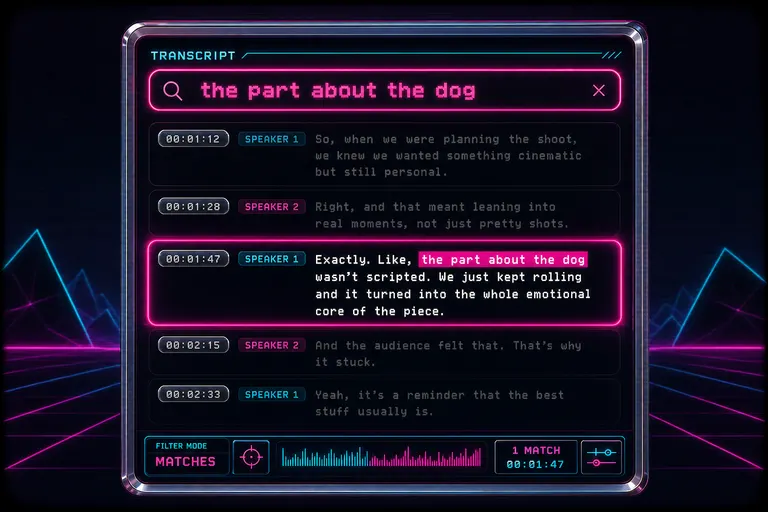
Stylized mock screenshot of the transcript panel filtered to a single matching segment
The Taste-On-Top-Of-Search Workflow
Search is the floor. Taste is the room.
The frame index didn't make the cut for you. It made the find trivial so you could spend the saved time on the part of editing that actually pays your audience back: which moment, how long, what comes after. The part that has your fingerprints on it.
Here's the rhythm we wanted you in.
Type. Skim snippets. Pick three. Watch three. Pick one.
That's a thirty-second loop. Used to be a thirty-minute loop. The thirty minutes you got back is the thirty minutes you can spend re-cutting the trim. Or building the cold open. Or scoring the beat. Or sleeping.
The rhythm worked because the snippets were honest. You weren't trusting a model to choose for you. You used the model's read as a librarian's finger, then made the call yourself. The taste was still yours. The toil was the model's.
This is the principle the whole product runs on. The AI never replaces the cut. The AI removes the labor between you and the cut so the cut gets your full attention. Search is the cleanest example.
Once the index existed, the natural-language edit chat — the "make a 30-second trailer of the best moments" panel — had something real to work with. The chat read the frame descriptions and the transcript when it built its plan. The same index that let you find a clip let the AI find a clip when it drafted a cut for you. Same labor, paid off twice. Chat side covered in Tell It What You Want. Watch It Cut.
The upload that fed all this? You didn't babysit it. You dropped the shoot in, walked away, came back to a fully described, fully transcribed, fully indexed archive. That workflow lives in Upload All of It. Watch It Process. Don't Babysit.
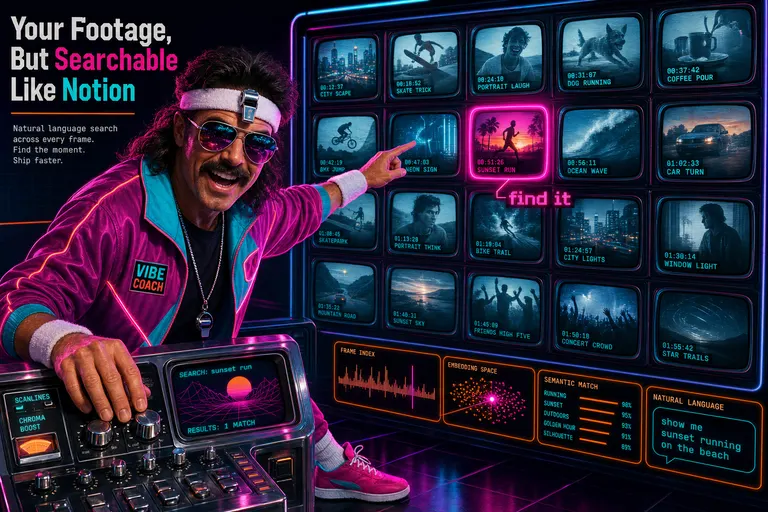
Gnarles Chopper standing at a glowing chrome CRT contact-sheet wall, coaching the camera while pointing at a matched frame
The Quiet Move: Your Footage Became a Database
The thing that snuck up on creators on their first run wasn't the AI chat or the speed ramps or the voiceover generator. Those were the loud features. The quiet one was this: at some point in their second project, they realized they were treating their footage like a Notion database.
They typed a description into a search bar and got rows back.
That's a file-system shift. The old metaphor was "footage is a folder full of opaque files." The new one is "footage is a queryable index with thumbnails and transcripts as columns." Tables get queried, not scrolled. You stop being scared of opening a folder of forty-seven GoPro files because it's not a folder anymore — it's a table.
You can't unsee a searchable shoot.
What to Type First
If you've got footage sitting in the panel and you want to feel the shift in a single minute, try one of these. They are the queries that paid off the index for our first hundred users.
- A noun from your shoot —
dog,dock,microphone,whiteboard. The frame index will surface every moment that subject appears. - A color plus a noun —
yellow raincoat,red car,green wall. Strong filter, good for isolating a scene. - An emotion plus a person —
her laughing,kid crying,groom smiling. The descriptions caught faces and expressions. - A camera move or framing —
wide shot,close up,aerial,tracking shot. The descriptions caught technique. - A dialog phrase you remember — three or four words from a quote. The transcript will pull the segment, the speaker, and the timestamps.
- A speaker plus a word — search the transcript for "Speaker 2 funny" if you want every moment your guest landed a punchline.
Each of these used to be a manual scrub. Each of these became a keystroke.
The archive isn't a graveyard anymore. It's a room with the lights on. Your footage is in there, listening for the first word you type.
For the engineering side of how the frame extraction and the dual-model retry loop actually got built, the developer companion lives at the frame extraction post — same story, told from the side of the keyboard that wrote the retries.
Drop a shoot in. Type a word you remember. Watch the frame light up. That's the rep. Sets and reps. Keep the pace.
See you on the timeline.
— Gnarles
Distant chrome library of glowing VHS spines stretching to a synthwave palm-tree sunset
Try the workflow
Open every feature from this post in the editor
These panels collect the features discussed above. Sign in once, finish your profile if needed, then the editor opens the first highlighted surface and walks through the tutorial.