
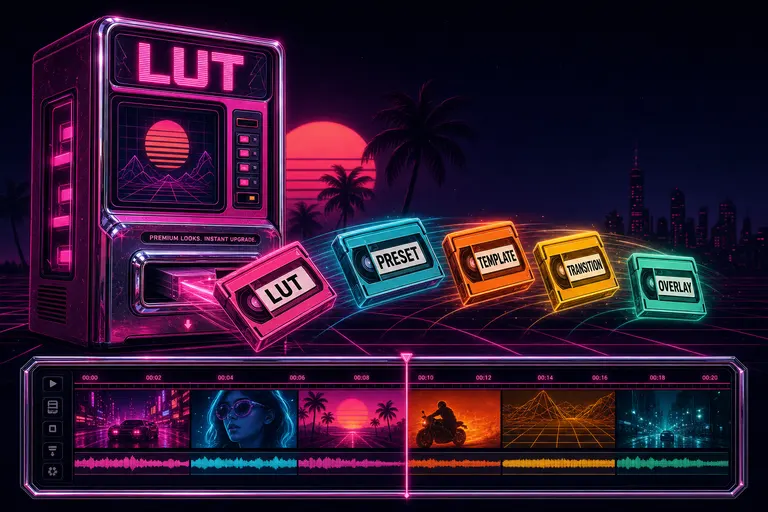
Overview
Gnarles here. Time to talk about the looks that live in someone else's brain.
You've watched a cut on someone else's feed and thought: what is that grade? Warm skin, lifted blacks, the saturation pulled just enough that the room reads "remember this" instead of "phone clip." You chased it. You moved sliders. You got close. You moved on, because the cut had to ship at midnight and you weren't a colorist.
The look in your head is real. It just didn't live in your library yet. The Marketplace was where it moved in.
1. The "I Wish I Had That Look" Problem
There are two kinds of editing time. There's the time you spend on the cut — your taste, your pacing, your beats. And there's the time you spend rebuilding things other people have already built better than you ever will. A cinematic LUT. A clean lower-third style. A transition pack that doesn't look like a 2014 wedding video. A narrative-framework template for a three-act explainer.
The second category isn't editing. It's tax. The tax of solo work.
The way you used to pay it: watch a colorist's eight-minute breakdown, eyeball the slider values, save the result as your own preset, hope it works on a different camera. Or buy a LUT pack in a separate tab, download a .cube file, import it, fail to find the right intensity, give up.
We built the second category into the editor. The colorist with the look you wanted? Their grade is a row in a table you can search. You preview it on your own clip. You add it to your library. You drop it on a clip. The colorist gets paid. You move on to the part of the cut that's yours.
That's what the Marketplace is. A library of looks, transitions, templates, overlays, narrative frameworks, sound effects, music, and prompt packs other creators built — searchable, previewable, applyable, with a credit ledger that pays the builder every time their asset gets used.
2. What's In The Marketplace — Twelve Asset Types
The Marketplace was never just LUTs. The twelve asset types live in server/marketplace.ts as a typed enum: Browse looks and presets free
- effect_preset — a saved stack of color and effect adjustments. The thing you'd build by stacking saturation, contrast, gamma, and a blur, then save as one click.
- lut — a lookup table. The cinematic grade. Loaded from a URL, applied with an intensity slider that defaults to seventy percent.
- template — a project skeleton. Beats, structure, placeholder clips. Drop your footage in.
- transition — a between-clip animation. Wipes, dissolves, glitches, light leaks.
- audio — a single audio asset. Stinger, drone, breath.
- overlay — a single transparent overlay graphic. Title card, callout, shape.
- overlay_pack — a bundle of overlays from one creator with a coherent visual identity.
- narrative_framework — a story structure. Hero's Journey, three-act, problem-agitate-solve. Your clips get assigned to roles inside it.
- prompt_pack — a bundle of AI prompts. Caption styles, voiceover scripts, brief templates.
- music — a full music track, license-clean, with mood and genre tags.
- sound_effect — a one-shot. The pop, the swoosh, the whoosh.
- footage — actual clip files. B-roll a creator licensed and put up for re-use.
The categories that organize them on the browser: color_grading, effects, transitions, audio, templates, overlays, color, intro, lower_third, storytelling, marketing, educational, entertainment.
The browser reads those categories from GET /api/marketplace/categories and groups search results by type. You filter by type, category, style (cinematic, energetic, minimal), mood (happy, dramatic, chill), genre (vlog, documentary, music_video), and a price range. Sort by Most Popular, Newest, Highest Rated, Price Low to High, or Price High to Low. Toggle Free Only. The search bar accepts free-text and runs across name, description, and tags.
The featured row at the top pulls assets marked isFeatured = true and approved for public listing — the looks an admin spotlighted. The rest of the grid is paginated, twenty at a time.
::
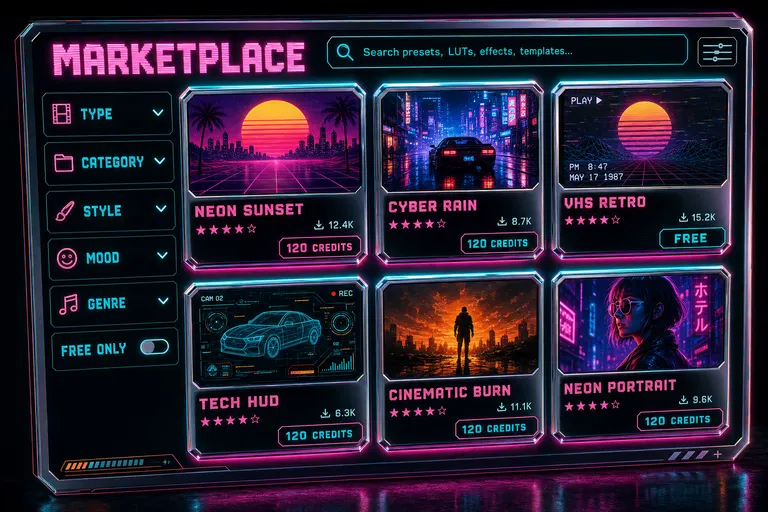
A stylized marketplace browser grid showing six asset tiles with thumbnails, ratings, downloads, and price tags in credits
3. The Credit Ledger — How The Colorist Gets Paid
The Marketplace runs on credits. One paid asset costs a price. Your account has a balance. The balance lives on the users table as an integer. Every movement is audited.
Here's how a purchase moves through the database. The function is deductCredits in server/credits.ts. It runs inside a real db.transaction. First it does SELECT ... FOR UPDATE on your row in the users table — a row lock, so two purchases racing each other can't both think they have enough balance to buy the same asset. If your balance is too low, it throws InsufficientCreditsError with status 402 and body {code: "INSUFFICIENT_CREDITS", required, available}. If your balance is fine, it subtracts, updates your row, and inserts a row into credit_transactions with the amount, the new balance, a reason, the asset ID, and a metadata blob.
The same pattern runs in reverse for refunds. If a purchase insert fails — a unique constraint, a transient DB error — the purchase path catches it and calls refundCredits, which writes a positive entry into credit_transactions with reason refund. You don't lose credits because the database got grumpy.
There's also a real refund route: POST /api/marketplace/:id/refund runs refundAssetPurchase, which deletes the library row, decrements the asset's download count (with a GREATEST(... - 1, 0) floor so it can't go negative), and restores credits in the same audited path. If you bought a look that didn't fit your project, you can give it back.
Free assets skip the ledger. addFreeAsset checks the price is zero or null, makes sure you don't already own it, and inserts a library row with source: 'free'. No credit movement. Some of the best work on the Marketplace is free — creators offering a free pack to drive attention to a paid one. The system treats free as first-class.
The reason the ledger matters isn't the math. It's that the colorist who built the warm-skin LUT you keep using sees a paid download every time it gets applied. The number is auditable, refundable, tied to a real row in your library. That's how a marketplace becomes a livelihood instead of a giveaway.
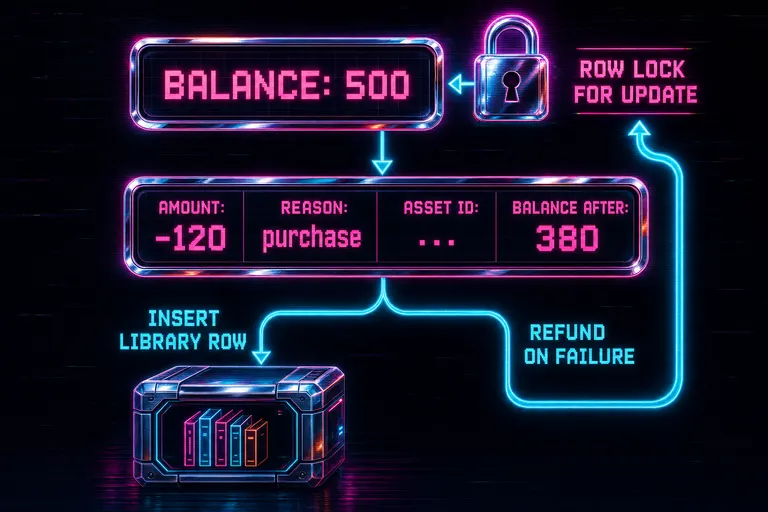
Diagram of the credit ledger — user balance row locked, deduction recorded, library row inserted, refund branch on failure
4. Preview Before Purchase
The cardinal sin of preset marketplaces is making you pay before you see. We didn't.
Every asset's detail panel has a preview. For a LUT, it's a side-by-side: raw clip on one side, LUT applied on the other, intensity slider underneath. For a transition, it's the actual animation rendered between two clip thumbnails. For a music track, it's a waveform you can scrub.
The preview panel reads GET /api/marketplace/:id and renders the asset's previewVideoUrl or thumbnailUrl, the creator's display name (pulled from a LEFT JOIN on users so the colorist gets the credit), the average rating (from assetReviews rows), the review count, and the download count. If the asset is a preset, it shows the underlying config — the actual saturation value, the actual contrast curve. Real numbers.
The browser also surfaces related assets — the four most-downloaded items of the same type — so you can comparison-shop a LUT against three other warm-skin LUTs before you commit.
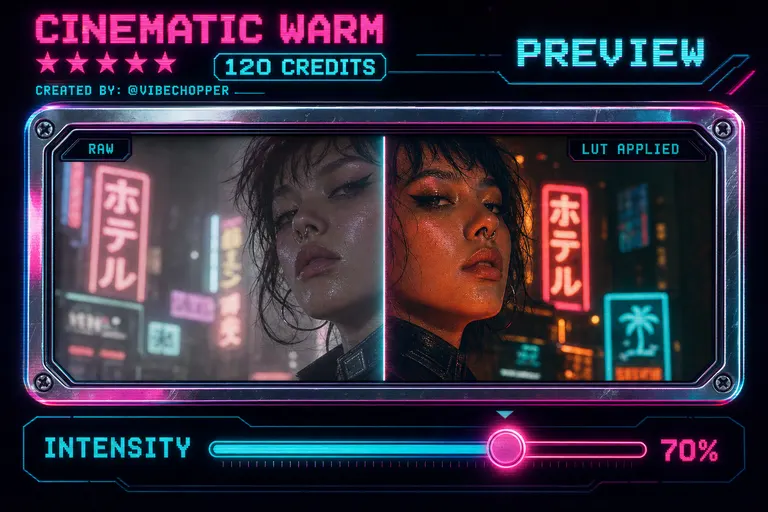
A preview panel showing a clip with a LUT applied next to the same clip without it, a slider underneath labeled INTENSITY
5. Apply To A Clip — The One-Click Flow
You bought the look. Or grabbed a free one. Now it's in your library. Applying it to a clip is one click. Open the marketplace
Every asset you've added shows up at GET /api/library, filterable by type, favorites, and sort order. Click any library item, pick a clip, hit Apply. The endpoint is POST /api/library/:id/apply. It increments the usage count, stamps a last-used timestamp, and applies the asset based on its type.
Effect presets and LUTs apply through the same effect-preset pipeline. The asset config is read as an array of effects, and applyEffectPreset writes them to the clip in one transaction. Transitions and narrative frameworks return their config so the editor can mount them. Music, sound effects, overlay packs, and footage return their asset URLs so the editor can drop them on a track.
The fast path — the one we sweated over — is apply directly from the Marketplace browser, without going through the library page first. That's POST /api/clip-effects/from-preset. It accepts a library item ID or a public marketplace asset ID. If you point it at a public marketplace asset you haven't added yet, it does a lazy import — automatically adding the asset to your library before applying. Free assets and assets you already own lazy-import. Paid assets return a 402 with the standard {code, required, available} body so the editor can prompt you to confirm the spend.
The lazy-import removes a step you'd otherwise forget. You hover a preset, hit Apply, the system silently adds the row, runs the apply, the clip changes. Two-step flows lose people. One-step flows let people work.
The apply response carries a created array of new effect IDs and a beforeEffectIds array of the IDs that existed before, so the editor's undo stack can roll the whole apply back as one operation. You apply a LUT, you hate it on your shot, you hit Undo. The whole apply is gone. No surgery.
::
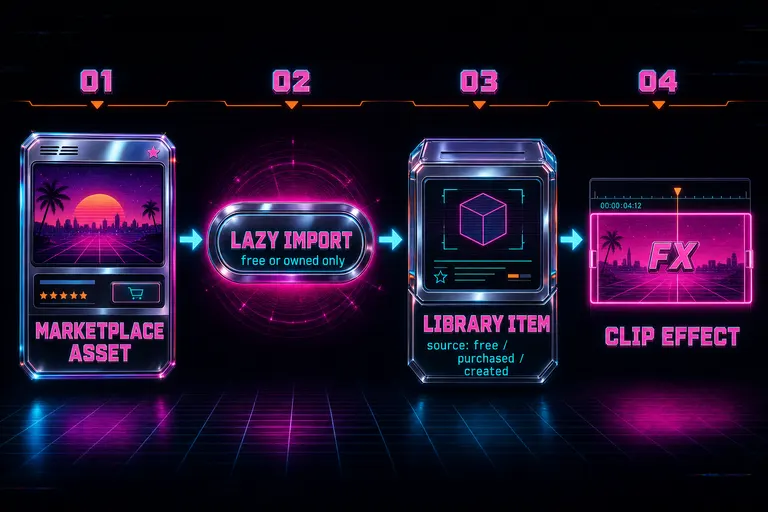
Diagram of the apply flow — marketplace asset to library item to clip effect, with the lazy-import step highlighted
6. Walkthrough — Buy A LUT, Apply It, Swap If It Doesn't Fit
Let's run a rep. Wedding edit. Phone footage, 4K, slightly flat out of the camera. You want a warm cinematic grade on the reception act.
Rep 1: Browse. Open the Marketplace browser. Type "warm skin" into the search bar. Filter Type → LUT. Style → Cinematic. Sort by Highest Rated. Four results land.
Rep 2: Preview. Click the top result. The side-by-side preview shows a flat phone clip on the left and a warmer, deeper-shadow version on the right. Intensity at seventy percent. Three reviews, all five stars, one says "perfect on indoor LED lighting." That's your reception.
Rep 3: Buy. Hit Apply. Your balance is 500 credits. The LUT is 120. The ledger path runs: row-locks your balance, deducts 120, inserts a purchased library row, writes a transaction with reason: 'purchase', increments the asset's download count, returns the new balance: 380. Under a second.
Rep 4: Apply. The same call fired applyLibraryAsset, which wrote a LUT-type clip effect to your selected clip at the default seventy percent intensity. Hit play. The reception clip is warmer, skin tones read deeper, the shadows have a hint of teal.
Rep 5: Decide. You scrub the rest of the act. The LUT looks great on the close-ups, slightly aggressive on the wide of the dance floor. You bring the intensity down on that one clip to fifty. Your purchase is intact. The LUT is in your library now, applied at different intensities on different clips.
Rep 6: Swap if you have to. If the look didn't fit at all, you'd hit refund. POST /api/marketplace/:id/refund runs refundAssetPurchase. The library row deletes, the download count decrements, credits return via refundCredits, the audit trail shows the deduction and the matching refund. The colorist's earnings reflect the actual install base, not an impulse buy.
That's the whole loop. Browse, preview, buy, apply, customize, refund if needed. Five minutes and 120 credits for a grade that would have cost you an hour and a half of slider work.
The Marketplace runs underneath the rest of the editor. If you've been using the adjustment-layer track to spread one color treatment across a whole act, the LUT from your library is the canvas — pick the layer, set the LUT, set the intensity, every clip in the range picks it up. If you've been generating lower-thirds for a series, an overlay pack gives you a coherent look to drop onto every episode without rebuilding it.
The point of the Marketplace was never "another store." It was: the looks and structures and sound another creator built well — better than you would on your own time — are now first-class atoms in your editor. You don't rebuild. You don't open a separate app. You don't import a .cube file. You search, you preview, you click, you apply.
Your taste is still yours. The execution moved into the library.
See you on the timeline.
— Gnarles
Gnarles in a chrome-rim sweatband holding up a glowing LUT cartridge like a trophy, grinning at the camera
Try the workflow
Open every feature from this post in the editor
These panels collect the features discussed above. Sign in once, finish your profile if needed, then the editor opens the first highlighted surface and walks through the tutorial.