
Overview
Premiere built the muscle. Now you need the cardio.
That's the whole thesis of this post, and I'm going to defend it for the next 3,800 words — respectfully, specifically, and with the receipts on the table. Premiere Pro is a real tool. A generation of editors learned the craft on its timeline. I'm not here to trash Adobe. I'm here to tell you when the math turns against you.
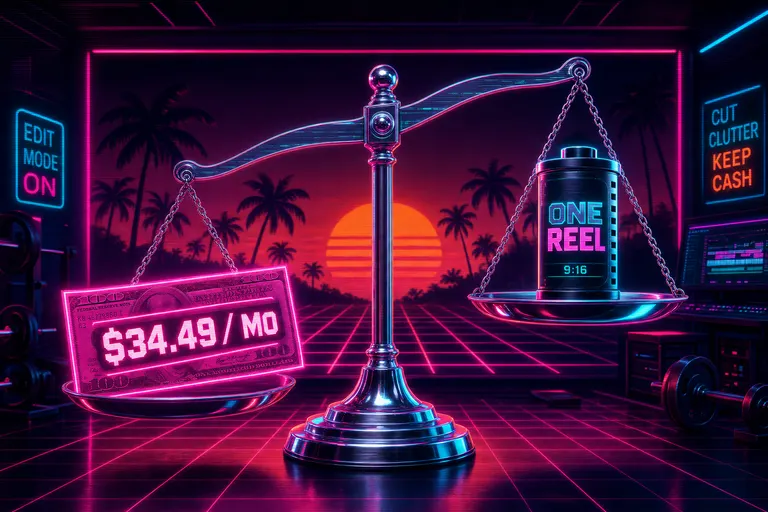
It's 2026. You're paying somewhere between $19.99 and $34.49 a month for Premiere depending on which tier you signed up for (Costbench, April 2026; TemperStack, 2026). You're shipping three Reels a week. You opened the application, you stared at the bin, you closed it, you opened CapCut. You felt a little ashamed.
Don't. Tools have purposes. The question isn't whether Premiere is good — it is. The question is whether Premiere is yours in 2026. Let's run the rep.
Gnarles in his neon warmup jacket spotting a younger editor at a vintage Premiere Pro workstation, chrome whistle around his neck
1. What Premiere Built
Before we talk about who should leave, let's be honest about what Premiere built.
Premiere taught a generation how to cut. The razor tool. The ripple delete. The J-cut and the L-cut. The dual-monitor source/program layout that became muscle memory for every working editor between 2010 and 2025. We owe it that. I've watched students go from "I can't even import a clip" to "I just cut a wedding film" inside Premiere because the muscle was honest — every action mapped to a glyph, every glyph mapped to a keyboard shortcut, every shortcut to a finished frame.
Premiere is also the lingua franca of professional post. Editors talk to colorists in Premiere. Colorists send notes back through Premiere. Sound designers receive AAFs from Premiere. Networks deliver to Premiere. When the assistant editor at A24 hands the dailies to the lead editor on a feature, the assembly lives in a Premiere project file. That ecosystem is real and it took twenty years to build.
I will not call Premiere "bloated." I will not call it "legacy." I will not call it "your dad's editor." Those are cheap shots from people who never finished a real piece of work in it. Premiere is professional infrastructure for professional post production, and if that's your job, this post is not for you. Close the tab. Go cut something nice.
The rest of you — the creators who somehow ended up paying for professional infrastructure to make a ninety-second TikTok — let's keep going.
2. The Pricing in May 2026, the Math by Use Case
Here's what Adobe charges in April 2026, verbatim from two pricing aggregators:
- Monthly subscription (no commitment):
$34.49/monthper Costbench - Annual, paid monthly:
$22.99/monthper Costbench and confirmed at the same price on TemperStack under "Premiere Pro Single App" - Annual, prepaid:
$21.99/monthper Costbench - Student & Teacher:
$19.99/monthper Costbench (also$19.99/moon TemperStack's student tier) - Creative Cloud Standard (20+ apps):
$54.99/monthper TemperStack - Creative Cloud Pro (20+ apps + Firefly credits):
$69.99/monthper TemperStack - Creative Cloud Business:
$35.99/monthper TemperStack
The median customer pays $297 per year, according to Costbench's data from 155 verified transactions. So if you're on the no-commitment monthly tier paying the full $34.49 — you're paying $116 more per year than the median Premiere customer. The flexibility is costing you a hundred dollars.
That's the surface number. Now run it against use case.
The wedding videographer
You shoot a wedding once a month. You spend three weekends cutting it. Premiere is the right tool — multi-cam, 4K, color grading, mastered audio, FCPXML hand-off to your colorist if you have one. Even at $34.49/mo, you're spending $413.88/year and billing the client $3,500 to $8,000 per wedding. The math is fine. Stay.
The brand-content freelancer
You cut four to six client deliverables a month. Half of them go to social, half to in-store screens. Premiere's the right tool here too — your clients ask for .prproj files, your edit-bay collaborators expect to open your bins, the project lives for a year of revision rounds. Stay.
The three-Reels-a-week creator
You record on your phone or a mirrorless. You cut vertical. You ship the same day, or you don't ship at all. You will never, in the lifetime of this account, open a multi-cam sync. You will never deliver to a network. You will never receive an AAF from a sound designer named Greg. You are paying for infrastructure you don't use.
At $22.99/month on the annual plan, you're spending $275.88 a year for a tool whose primary value proposition — the professional ecosystem — you don't touch. If you cut 156 short-form videos in a year (three a week), that's $1.77 per video in software cost alone. That's not insane. But it's not free, either. And the time cost of staying in a heavy-NLE workflow when your output is short-form is the real wedge.
The podcast clipper
You record an hour, you ship five clips. Premiere's transcript tools have gotten better, but you're stretching the application past its center of gravity. You don't need bins. You don't need ingest. You need speak the line, find the line, cut the line. We'll get to who owns that lane in a minute (it's Descript, mostly).
The "I learned Premiere because YouTube told me to" creator
This is the one I want to look in the eye. You're a year into making videos. You watched the Casey Neistat tutorial. You bought the Creative Cloud subscription because Casey did. You spend half your edit time fighting the app — wrong sequence settings, mis-linked media, the cache folder ate your disk. You've never cracked the multi-cam panel. You've never used a J-cut deliberately. You're doing what amounts to a three-clip cut and a music bed, but you're doing it in a tool built for Stranger Things.
You don't have a Premiere problem. You have a "matching the tool to the work" problem. That's a tool problem, and it's the kind we solve.
The hidden cost — hardware and time
There's a line item Adobe's pricing page won't show you: the machine. Premiere is a hungry application. The official system spec assumes 16GB of RAM, a dedicated GPU, and a fast SSD scratch disk. In practice, creators tell me they replaced their laptops a year sooner than they planned because Premiere's previews started stuttering on 4K footage. A new MacBook Pro is $1,999. Amortize that over three years and the "tool cost" goes up by another $55 a month. The aggregator pages don't surface that — only Vagon hints at it when they describe Resolve as "requires high-performance hardware," and the same critique applies to Premiere.
Then there's time. Premiere's startup-to-first-cut overhead — launch the app, mount the project, link the media, build the proxies, set the sequence — is conservatively five minutes on a healthy rig and twenty on a sluggish one. If you're shipping daily short-form, that's two and a half hours a week you spend waiting for an application to be ready. Multiply by 52. That's 130 hours a year of staring at a loading bar. Premiere isn't doing this to be rude. It's doing this because the application was designed for sessions that last six hours, not six minutes. You're using a hammer to put in a thumb tack.
3. Who Premiere Is Genuinely For in 2026
Let me be specific so I'm not arguing against a strawman.
Premiere is genuinely the right tool if you:
1. Cut multi-cam dramas, narrative shorts, or weddings with three or more camera angles syncing to a single timecode. Multi-cam in Premiere is a mature, well-keyboarded workflow. Nothing in the "AI editor" category matches it. Not us. Not anyone.
2. Deliver to a broadcast or streaming pipeline with technical specs (loudness, color space, container) that require precise control. Premiere's master settings handle this. The "drag-and-drop" tier of editors doesn't.
3. Collaborate inside a post-production ecosystem where the assistant editor preps the bins, the lead editor cuts, the colorist takes the FCPXML or .prproj to Resolve, the sound designer receives an AAF, and final mastering happens in another Adobe app like Audition or After Effects. The whole hand-off chain assumes Premiere is one of the stops.
4. Work in a long-form format — feature documentary, episodic series, long-form YouTube essays over 30 minutes — where you live inside a project for weeks. The cost of learning Premiere amortizes over the project length.
5. Use After Effects daily for motion graphics and need round-tripping with Dynamic Link. Round-tripping is real. We don't have it. DaVinci has Fusion. Premiere has After Effects. That's an Adobe-shaped advantage.
If three or more of those describe your work, your $34.49/month is the cheapest piece of your production. Stop reading and go cut something.
4. Who Premiere Isn't For in 2026
Now the reverse list. Premiere is the wrong tool if you:
1. Ship more than two short-form videos per week and don't deliver any of them to a broadcast spec. The application's startup time alone — open Premiere, wait for the bin to mount, wait for the cache to warm, wait for the proxies — eats more of your day than the actual edit. 2. Edit on your phone, your iPad, your couch, or your subway commute. Premiere has Premiere Rush, which is fine, but Rush is a separate product with a separate file format, and the round-trip isn't seamless. If "mobile" is part of your real workflow, Premiere's desktop-first design is fighting you. 3. Want to talk to your edit — describe what you want, watch it happen. Premiere has Firefly's Quick Cut now (per The Neuron's explainer), but it's a panel inside an app built for clicking. The application still expects you to drive. We built VibeChopper because the application should drive once you tell it where to go. 4. Don't have multi-cam, color grading, or AAF delivery in your actual workflow. If you can't name a Premiere feature you used last month that you'd genuinely miss, the tool isn't earning its keep. 5. Spend more time configuring sequence settings than cutting. This is a sign. The tool is heavier than the work. 6. Get burned out at 1am because the application demands you click five hundred times to do what a one-sentence brief could describe.
That last one isn't a feature complaint. It's a life complaint. Burnout isn't a character flaw — it's a tool problem. We've written about that in our burnout post, and the math from TheCreatorEconomy's 2026 report is unforgiving. 62% of full-time creators report burnout. The single biggest time-sink? Editing. Heavy NLE editing. The kind Premiere is built for.
If you do broadcast work, that's the cost of the craft. If you do TikTok, that's the cost of the wrong tool.
5. The Five-Way Map
Here's the honest comparison. Five tools, three questions each. Premiere, DaVinci Resolve, CapCut Pro, Descript, and VibeChopper. Try VibeChopper free
Adobe Premiere Pro
- Price:
$22.99–$34.49/month(Costbench) - Best for: Multi-cam, broadcast, narrative, color-graded long-form, agency post-production hand-off.
- Weak spot for short-form creators: Subscription cost, startup overhead, no native chat-driven editing, mobile is a separate product.
DaVinci Resolve
- Price: Free for the standard version; $295 one-time for DaVinci Resolve Studio (per Vagon's roundup and PlayPlay's comparison).
- Best for: Color grading. Full stop. Nobody touches Resolve's color page. Indie filmmakers cutting on a budget. Anyone whose final-frame quality is determined by how the image grades.
- Weak spot for short-form creators: The application is a colorist's tool first and an editor's tool second. The learning curve is real — Vagon notes the "page-based interface" requires patience, and PlayPlay flags it as "steep learning curve, requires high-performance hardware." If you're trying to cut a Reel between meetings, Resolve is asking you to study. We wrote a whole post on this — DaVinci Resolve is not hard, but it's wrong for most creators in 2026.
CapCut Pro
- Price:
$19.99/monthafter the Jan 2026 price hike (PiunikaWeb). - Best for: Template-driven short-form. Speed. Mobile-first workflow. The TikTok/Reels creator who wants a look without building it.
- Weak spot: Templates are not edits. They're costumes. Also, the price doubled and the formerly-free features (auto-captions, BG removal, 1080p export) are paywalled. Lots of creators are migrating — that's its own post.
Descript
- Price: From
$24/monthfor the Creator tier (verify on Descript's pricing page before quoting in client work — prices shift quarterly). - Best for: Transcript-driven editing. Podcasts. Talking heads. Anything where the words are the primary edit surface. If you can edit by deleting sentences in a Google Doc, Descript is uncanny.
- Weak spot: When the edit you want isn't "delete word 47" but "make this section feel anxious," transcript editing stalls. Music, pacing, b-roll, mood — these live outside the transcript. We compared the two interfaces head-to-head: Descript vs VibeChopper, when text-based editing hits its ceiling.
VibeChopper
- Price: Free tier; paid tiers for higher render minutes and team features. (Pricing on the marketplace page when you log in.)
- Best for: Chat-driven and voice-driven editing. Creators who want to describe the cut and watch it happen — trim, split, transition, overlay, polish, voiceover. Short-form. Daily Reels. Subway-commute edits. The 30-minutes-a-day creator routine.
- Weak spot — and I'm not going to lie about this: VibeChopper is not the right tool for multi-cam dramas, color-critical narrative work, or professional dailies hand-off. We don't have a colorist's grading panel. We don't sync four cameras to timecode. If you're cutting a music video for a record label and the director needs frame-accurate color round-trip with Resolve, you're not our customer yet. Premiere is. We respect that.
::
That's the five-way map. Notice what I didn't do: I didn't say "VibeChopper does everything Premiere does, for free." That would be a lie. I said Premiere is the right tool for some work, and the wrong tool for other work, and here are five tools that occupy specific lanes — and you pick the one that matches the lane you're driving in.
PlayPlay's competitor roundup names ten alternatives. Vagon's names six. PeerToPeerMarketing's lists Movavi, CapCut, Filmora, Shotcut, iMovie, and Resolve. All of those tools are real. None of them is "the answer." The answer is the tool that fits the work you ship.
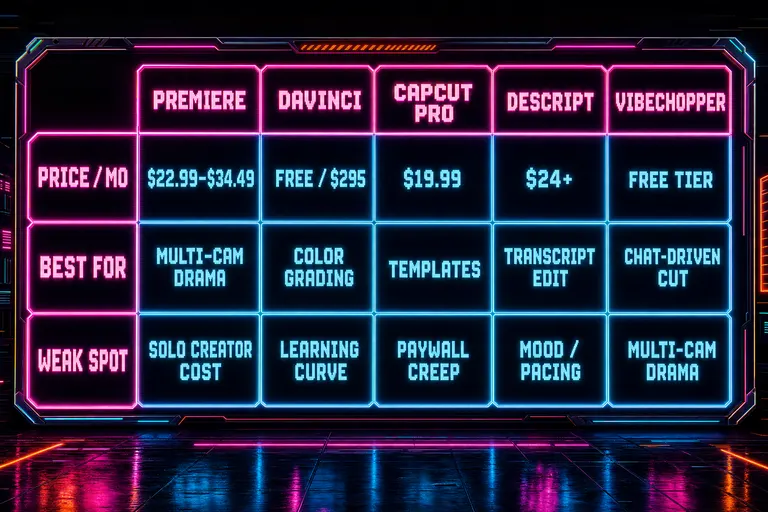
Five-way comparison matrix diagram showing Premiere, DaVinci, CapCut Pro, Descript, and VibeChopper across rows for price, best-for, and weak-spot
6. The Decision Tree — When to Switch
If you're already a Premiere user, the question isn't "is Premiere bad?" The question is "is Premiere right for me in 2026?" Here's the tree I'd walk a creator down.
Question 1: Are you cutting daily short-form?
- No → Question 2.
- Yes → Question 3.
Question 2: Multi-cam, broadcast, or narrative delivery?
- Yes → Stay on Premiere. You're using the tool for what it was built for. The $22.99 to $34.49 is the cheapest line item on your project budget.
- No → You might be on DaVinci Resolve. Or you might be over-toolting yourself. Read on.
Question 3: Do you need chat or voice to draft your cut?
- Yes → VibeChopper. The whole product is built around "tell it what you want, watch it cut." If your edit lives in your head and your hands hate the timeline, this is the lane.
- No → Question 4.
Question 4: Do you live in a transcript?
- Yes → Descript. Transcript-as-primary-interface is their whole bet, and they're good at it. Podcast clippers, talking-head creators, vlog cutters — Descript earns its keep.
- No → Question 5.
Question 5: Is your budget under $25 a month?
- Yes → CapCut (template-first) or VibeChopper (chat-first). CapCut owns the template aesthetic; VibeChopper owns the conversation. Pick the one that matches how you make decisions.
- No → You're back in Premiere or Resolve territory. Both are real options.
That tree isn't going to satisfy anyone who wants a single "X is better than Y" verdict. I'm not selling that verdict. I'm selling honesty about lanes, because the alternative is creators paying $34.49 a month for a tool they don't use the muscle of.
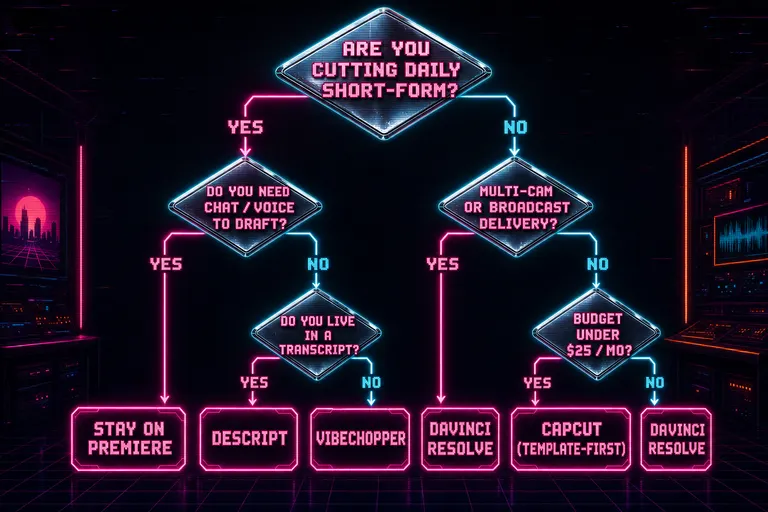
Decision tree diagram for Premiere users: starts with 'Are you cutting daily short-form?' branching down through four questions to a recommended tool at each leaf
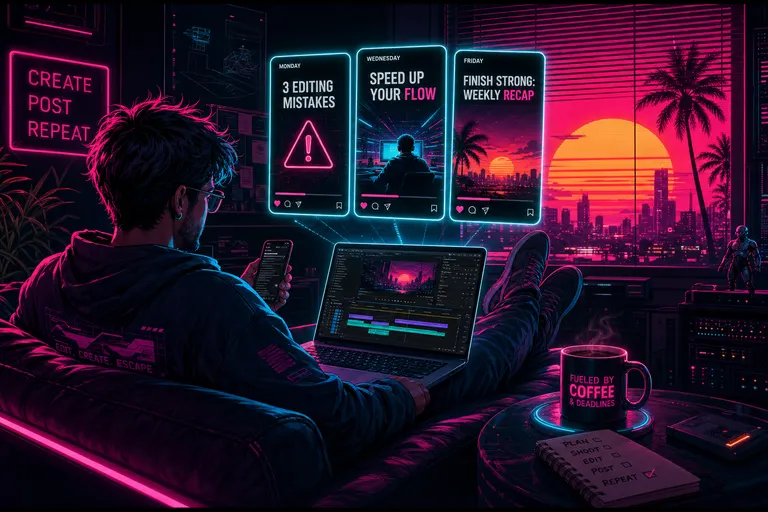
A solo creator on a couch with a phone and laptop, three vertical 9:16 Reel frames floating above the laptop showing a week's worth of posts
7. Migration — How to Leave Without Losing Anything
So you're a Premiere user. You've decided your work doesn't need what Premiere is for. You want to try VibeChopper, or Resolve, or Descript, or CapCut. Here's how you leave clean. Export to FCPXML if you change your mind
Export your Premiere project as FCPXML
Premiere can export to FCPXML, which is the open interchange format originally built for Final Cut Pro X. From Premiere: File > Export > Final Cut Pro XML. You get a .fcpxml file with your timeline, clip in/out points, transitions, and audio levels preserved.
FCPXML is the universal handshake of the editing world. DaVinci Resolve imports it. Final Cut Pro imports it. We import it. (Importing a Premiere project directly via .prproj is harder — that file format is proprietary, but Premiere's FCPXML export is the bridge.)
Or export an EDL for the deepest archive
EDL — Edit Decision List — is the oldest portable timeline format in the business. It's a plain-text file that describes each cut as a reel, an in-point, an out-point, and a destination. It's not pretty. It's not feature-rich. It will still be readable in fifty years when whatever subscription you signed up for is dead.
From Premiere: File > Export > EDL. You get a .edl file that any NLE on the planet can ingest.
Bring the timeline into VibeChopper
VibeChopper exports six formats from day one — MP4, MOV, WebM, Generic XML, FCPXML, and EDL — and the FCPXML and EDL paths are built specifically so your timeline isn't trapped. We verified this in the codebase before publishing — the format list lives in the export dialog, and the generators sit in our server's xmlExport.ts (FCPXML version 1.10, EDL with non-drop-frame timecode). If you ever decide chat-driven editing isn't your lane and you want to round-trip back into Premiere, your timeline goes with you.
We wrote a whole post on the export surface — Export For Anywhere — MP4, FCPXML, EDL, WebM — because portability was a feature we built before we shipped the AI chat. The cut belongs to the creator, not to the application that drew it.
Archive your media
Before you cancel any subscription, archive the raw media. Move your source clips to an external SSD or a cloud bucket. Don't trust any application — Premiere, VibeChopper, anyone — to be the only place your originals live. Tools change. Files don't have to.
Keep one trial month overlap
Don't cancel Premiere the same day you start a VibeChopper trial. Run them in parallel for one full billing cycle. Cut one project in each. The point isn't to A/B-test the applications — the point is to make sure your existing client commitments aren't disrupted by a tool change mid-revision. The cost of a month of Premiere is $22.99 to $34.49 (Costbench). The cost of telling a client "I lost your project file because I migrated tools" is unbounded. Pay the overlap.
Don't migrate during a delivery week
The other rule: don't switch tools the week a deliverable is due. Pick a quiet week — between projects, between client rounds, between months. Cut a personal piece on the new tool first. Learn the lanes. Then bring client work over.
The migration flow
Here's the rep:
1. Export FCPXML from Premiere. 2. Archive raw media to external storage. 3. Open VibeChopper. Start a project. Upload your raw media. 4. Open the AI chat. Describe the cut you want. ("Make a 30-second highlight from the wedding ceremony, music under, name supers for the bride and groom.") 5. Watch it cut. Adjust by chat. Polish. 6. Export from VibeChopper — back to FCPXML, EDL, or finished MP4, your call.
If you don't like it after one project, you've lost ten minutes and learned a new tool. If you do like it, you cancel Premiere on the next billing cycle, save $275.88/year, and keep all your timelines portable forever.
::
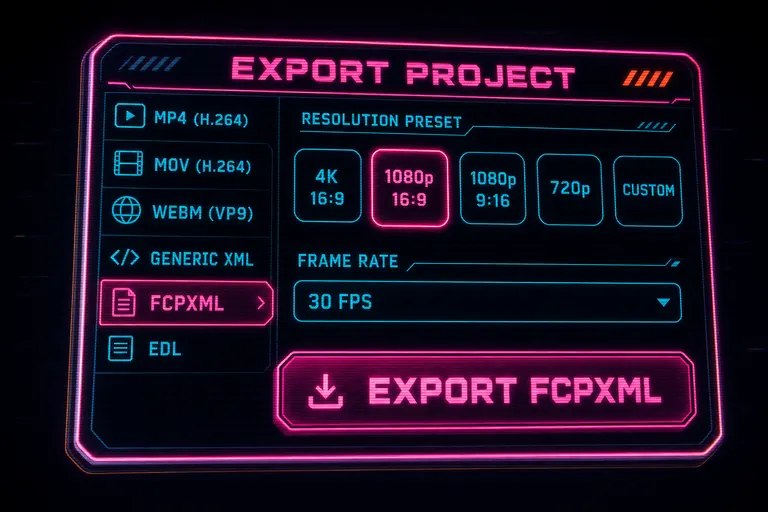
Mock screenshot of the VibeChopper export dialog with FCPXML selected, showing the format list, resolution presets, and a download button
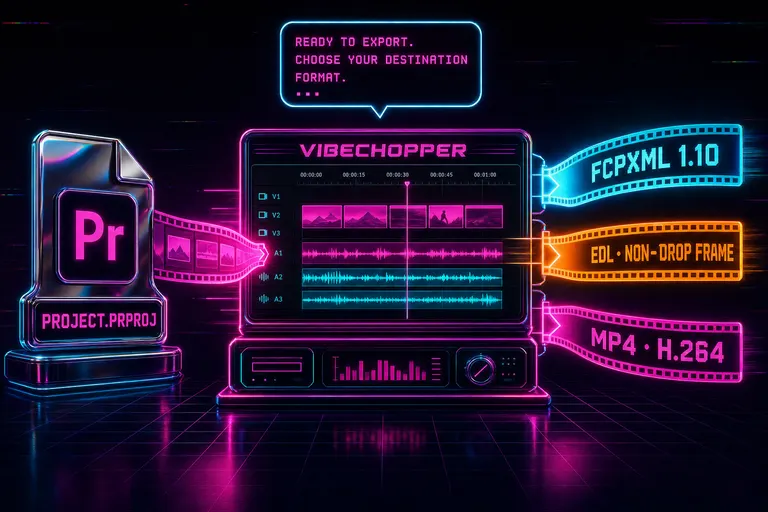
A migration flow illustration showing a Premiere project file unspooling into a VibeChopper timeline and out the other side as FCPXML, EDL, and MP4 ribbons
The Verdict, Such As It Is
I told you at the top: Premiere built the muscle. Now you need the cardio.
What that means: Premiere is the heavy weight in the gym. If you're training for a powerlifting competition — a feature, a multi-cam wedding, a broadcast deliverable, an agency cut — load the bar. Lift heavy. Premiere will spot you.
But most of you aren't training for a powerlifting competition. Most of you are doing the equivalent of a daily run. Three Reels a week. A morning vlog. A subway-commute cut on the way home. You don't need heavy weights for that. You need a pair of running shoes and a route. The cardio is fast, repeatable, and it doesn't wreck your back.
The question I want you to ask yourself is not "is Premiere good?" It is. The question is "does the work I ship need what Premiere is for?"
If yes — stay. We respect the lift.
If no — try the cardio. Drop a shoot into VibeChopper. Describe the cut. Watch what happens. If you hate it, you've lost ten minutes and your timeline is still portable as FCPXML. If you love it, you've found your lane.
You shot it. You've got a story in your head. The cut is already there — you just need an instrument that fits the music.
Reps in. Reps out. Make the next one ship.
— Gnarles

Gnarles raising his chrome whistle to his lips at sunrise on a neon grid floor, a fresh timeline glowing in the distance
Try the workflow
Open every feature from this post in the editor
These panels collect the features discussed above. Sign in once, finish your profile if needed, then the editor opens the first highlighted surface and walks through the tutorial.
Step 1
Try VibeChopper free
Drop in a shoot. Chat the cut. See if the cardio replaces the gym membership.
Try VibeChopper free →Step 2
Export to FCPXML if you change your mind
Six formats — MP4, MOV, WebM, Generic XML, FCPXML, EDL. Your timeline is portable on day one.
Export to FCPXML if you change your mind →