
What CapCut Alternative Means Technically
CapCut helped make quick video editing feel approachable for a large audience. Its public product identity is associated with mobile-friendly creation, short-form social edits, templates, captions, effects, music, and fast export workflows. That is a real achievement. A serious CapCut alternative should not pretend those expectations do not exist. Users now expect a video editor to feel immediate, visually rich, and accessible without requiring them to think like a traditional NLE operator. Talk a cut into shape
The technical question is what kind of alternative you are building. A clone of a quick social editor is one answer. A browser-based AI timeline editor is another. VibeChopper is closer to the second path: upload footage, inspect media context, ask for edits in natural language or voice, mutate a real timeline through native tools, preserve provenance, and render a verified export. The product can still serve creators who want short-form edits, but the architecture is centered on durable timeline state rather than only quick effects.
That distinction matters for SEO because the phrase CapCut alternative often hides several intents. Some people want a free online video editor. Some want automatic captions. Some want templates and social resizing. Some want an AI video editor that can understand a request like tighten the intro, keep the best product explanation, add captions, and export a clean draft. Those last workflows require deeper infrastructure than a simple effect picker.
A credible alternative has to respect the standard that CapCut and other modern editors set for speed while choosing a backend that can survive AI-driven changes, refreshes, uploads, retries, collaboration, and verified exports. The rest of this post focuses on that backend.
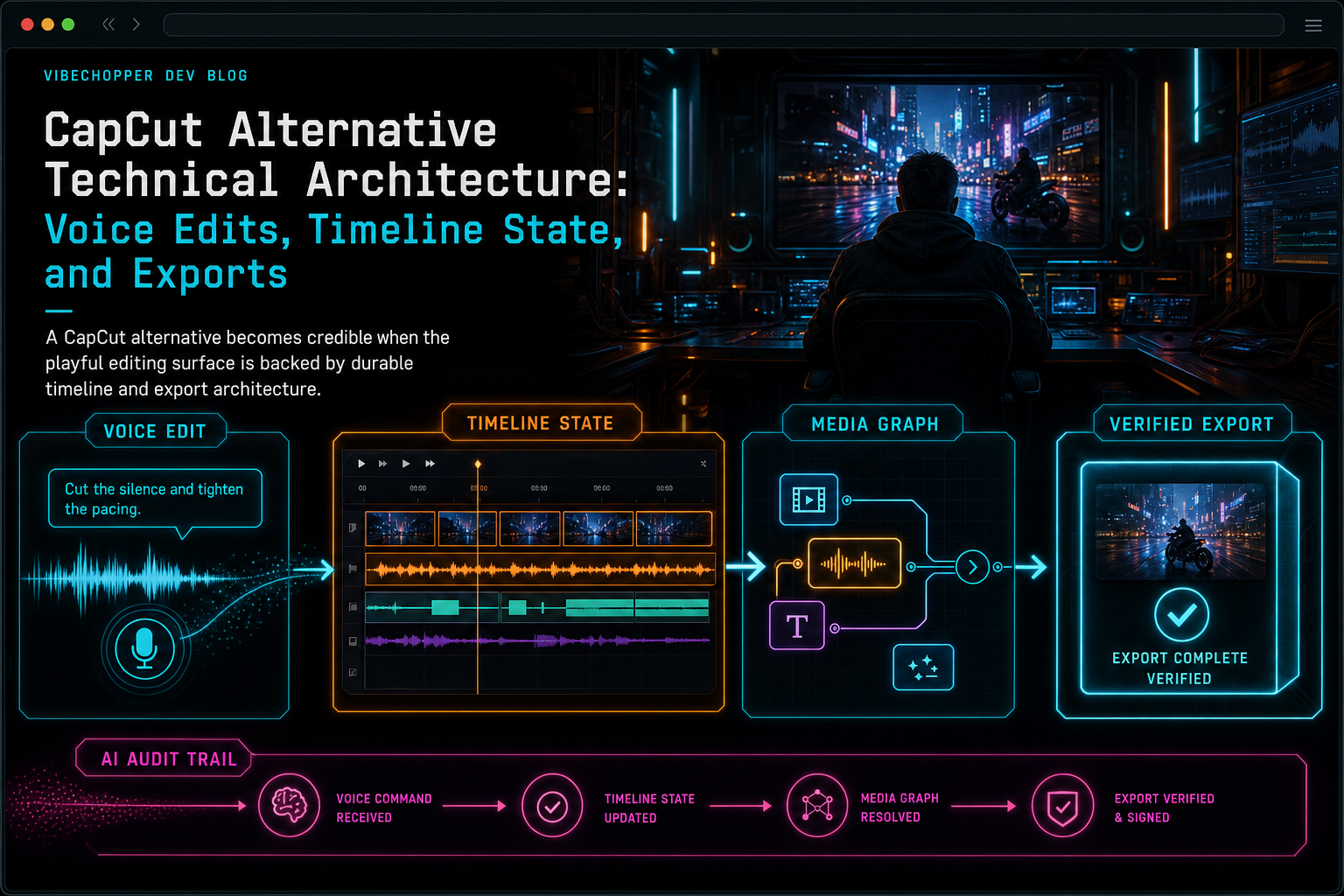
A CapCut alternative becomes credible when the playful editing surface is backed by durable timeline and export architecture.
Voice Edits Are Product Contracts
Voice editing sounds like a microphone feature, but the microphone is only the input. The real system begins after speech becomes intent. A user might say, cut the awkward pause before the demo, make the second answer shorter, add upbeat music, and render a vertical version. That sentence combines transcript reasoning, visual context, timeline operations, generated assets, output settings, and an export request. Talk a cut into shape
The unsafe implementation is to pass that text to a model and let the model directly rewrite project state. The durable implementation treats the voice request as the start of a product contract. First, capture the prompt and the user's project scope. Then assemble relevant context: transcript segments, speaker labels, frame descriptions, selected clips, current timeline ranges, available media, and supported tools. Then ask the model for a structured plan. Then validate that plan before any timeline mutation happens.
The validation boundary is what makes voice editing credible. The system should check that clip IDs exist, time ranges are legal, media belongs to the user, requested operations are supported, generated assets have storage records, and stale context is detected. If the voice request asks for an edit that cannot be executed safely, the product should explain the blocker rather than inventing state.
VibeChopper's AI edit run pattern exists for this kind of workflow. The prompt, context snapshot, plan, tool calls, artifacts, and status stay connected. That makes voice editing feel conversational without making the backend casual. A user can speak naturally, but the system still changes the timeline through typed tools.
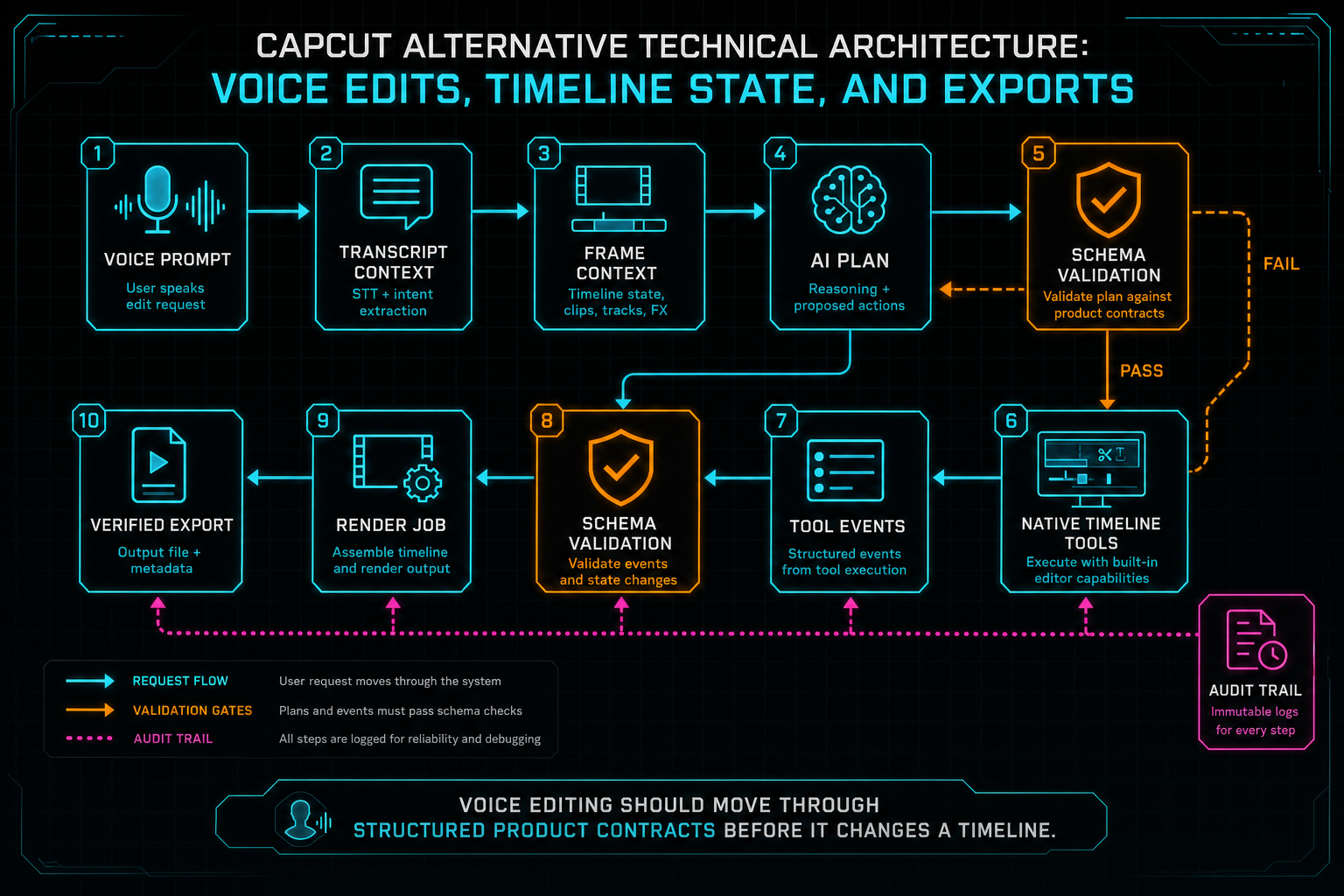
Voice editing should move through structured product contracts before it changes a timeline.
Fast Surface, Durable State
CapCut-style editing set a high bar for speed. A creator expects to upload or capture media, preview immediately, add captions, trim clips, apply effects, and export without reading documentation. A browser-based alternative has to deliver that responsiveness even though the browser is not a durable source of truth. Upload a real shoot
The browser is excellent at the first mile: local preview, waveform and thumbnail rendering, quick selections, drag handles, keyboard shortcuts, voice capture, and progress feedback. It is less reliable as the only owner of long-running media state. Tabs refresh. Mobile browsers suspend. Large files stress memory. Codec behavior varies. Network conditions change. A creator can close the laptop during upload and come back later expecting the product to know what happened.
That is why upload sessions, processing summaries, and server-owned media records matter. The UI can remain fast, but each meaningful operation needs a server-side counterpart: source video records, transcript records, frame analysis records, generated asset records, timeline tool events, render jobs, and object storage references. When the browser reconnects, the product can rebuild the editing surface from durable state.
This is not a rejection of quick editing. It is the architecture that lets quick editing become dependable. A CapCut alternative for professional or AI-assisted workflows needs both: the immediate feel of a modern creator tool and the recovery behavior of a system that expects long-running work to be interrupted.
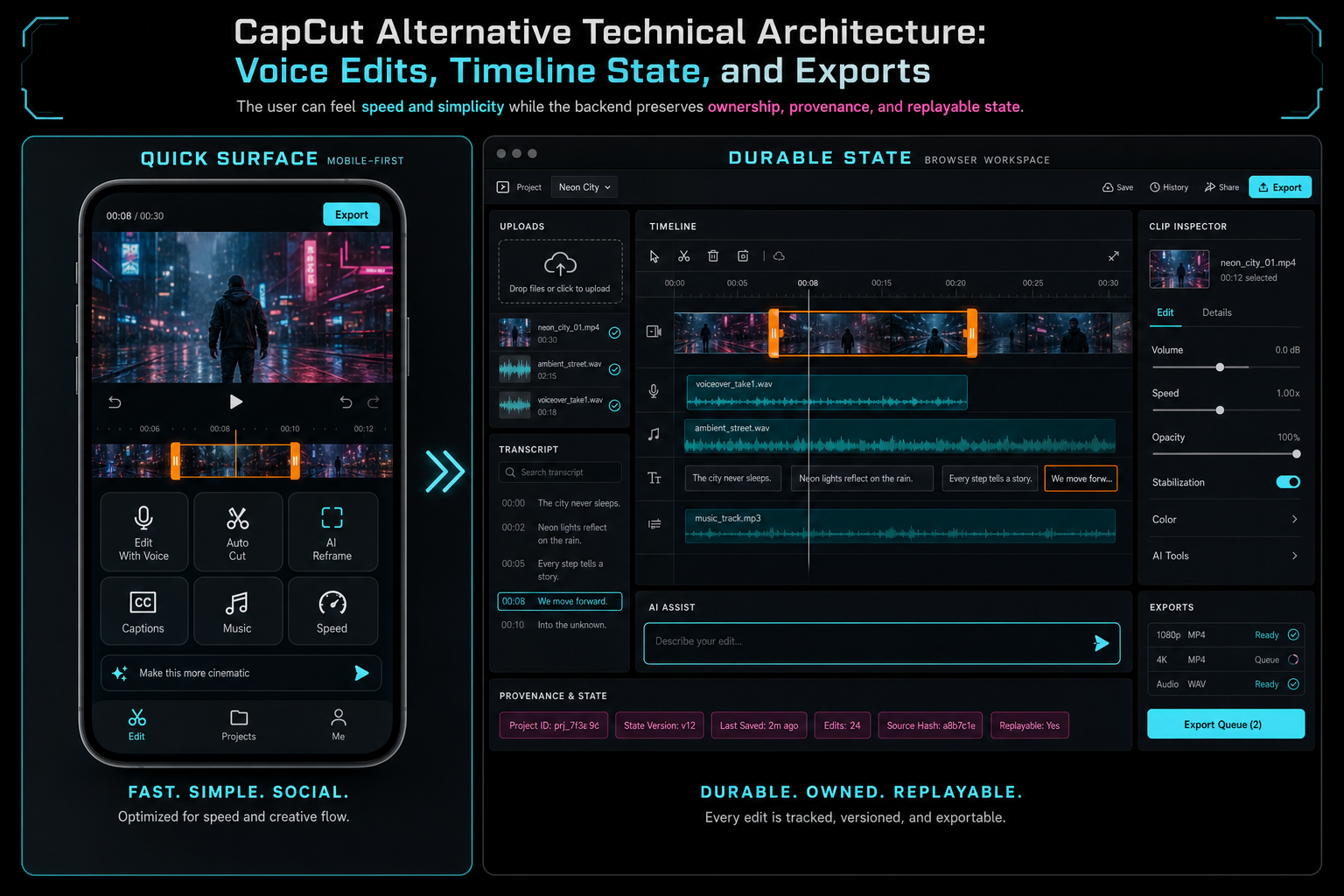
The user can feel speed and simplicity while the backend preserves ownership, provenance, and replayable state.
Timeline State Is the Center
A quick editor can organize many workflows around the output asset: choose a clip, add effects, create captions, export for a platform. An AI timeline editor needs a stronger canonical object. In VibeChopper, the timeline is the shared contract between manual edits, transcript edits, voice edits, generated assets, and exports. Explore your media graph
Timeline state should describe tracks, clips, source ranges, timeline ranges, trim points, track order, transitions, effects, overlays, generated music, voiceovers, caption or subtitle artifacts, and render settings. It should also preserve enough identity to answer ownership and provenance questions. Which source video produced this clip? Which transcript segment did this caption come from? Which prompt generated this music bed? Which AI edit run added this overlay? Which render artifact used this timeline version?
That level of structure gives AI something useful to operate on. A model does not need arbitrary write access to a project document. It needs a constrained list of tools and a context package that describes the timeline. The model can propose a trim, split, delete, add overlay, add music, add voiceover, or render request. The application validates the proposal and applies it through the same native tool path a human UI action would use.
The payoff is consistency. Manual edits, voice edits, transcript-driven edits, and AI-generated edits all produce the same kind of timeline events. Undo, audit trails, render verification, and remediation can look at one product record instead of trying to reverse engineer what happened from chat messages.
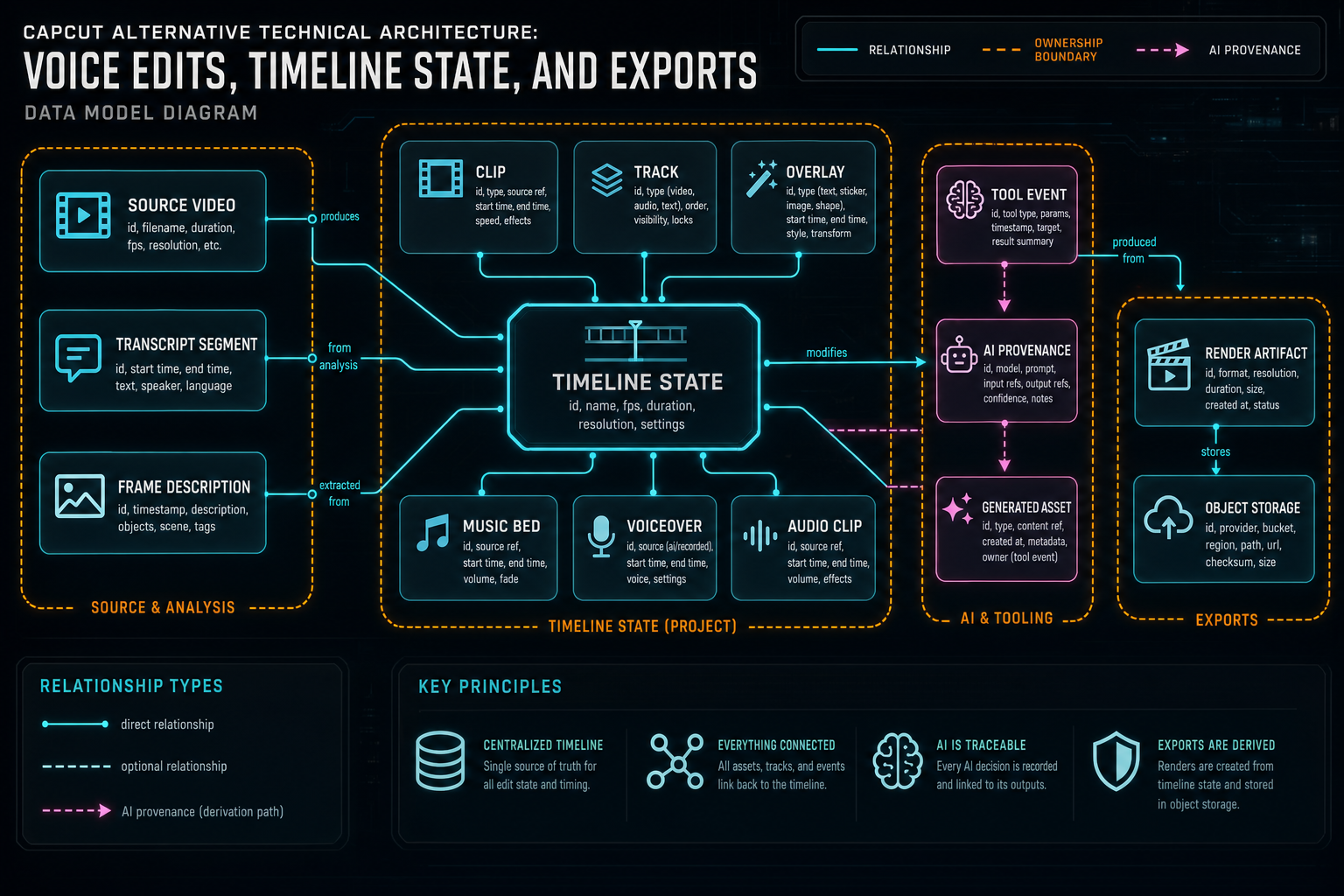
Timeline state is the center of the system: source media, generated assets, AI decisions, and exports all connect there.
Transcripts and Frames Make Voice Edits Useful
Voice commands are most useful when the editor understands the footage. A request like cut the slow intro needs audio and visual context. A request like use the part where I explain the pricing needs transcript search. A request like cover that jump cut with product b-roll needs frame descriptions or media tags. Without that context, voice editing becomes a generic assistant guessing about a timeline it cannot see. Talk a cut into shape
Transcripts turn dialogue into editable structure. Segment timing, speaker labels, word or phrase ranges, and confidence metadata let the system map spoken content back to source media and timeline clips. Frames turn visual moments into searchable evidence. A frame description can identify a screen, product shot, face, whiteboard, outdoor scene, or slide. Together, transcripts and frame records give the AI planner material to reason with.
The storage model matters here. Transcript text should not be a temporary caption file, and frame descriptions should not be throwaway debug output. They should be project-scoped records with media references. When the user asks for an edit by voice, the system can retrieve the relevant context, include it in the AI run, and keep a snapshot of what evidence was used.
This also helps keep the product honest. If the AI cannot find the requested quote or visual moment, it should say so. If the transcript is incomplete because upload processing failed, the editor can surface that state. A good CapCut alternative does not need to pretend every voice command is possible. It needs to make possible commands dependable and impossible commands legible.
Exports Are Where Trust Lands
Every editor eventually meets the export button. For a quick mobile edit, export may feel like the final step of a simple local workflow. For a browser-based AI editor, export is a distributed systems problem wrapped in a user-friendly button. The product has to resolve source media, generated assets, timeline state, effects, captions, audio, output format, storage, progress, and failure states. Render a timeline free
VibeChopper's export architecture treats the render as a server-owned job. The browser requests an export for a project and output shape. The server validates ownership and timeline state. The compositor resolves media through storage records rather than untrusted client URLs. FFmpeg or equivalent render logic builds the output. The result is uploaded to durable object storage. Verification connects the finished artifact back to the project, media graph, and AI edit run when one requested it.
That verification step is important for AI workflows. If a user says, make a punchier version and export it, the system should know which prompt started the work, which tools ran, which timeline was rendered, where the file landed, and whether the artifact is usable. A disconnected download URL is not enough for an editor that wants auditability and repair.
Export progress also has to survive real usage. Users refresh during encoding. Networks drop during upload. A render worker can fail after creating partial scratch files. Object storage can have transient errors. The public API should expose stages, retryability, blockers, and final artifact metadata. The UI can keep the experience simple, but the product record should be explicit.
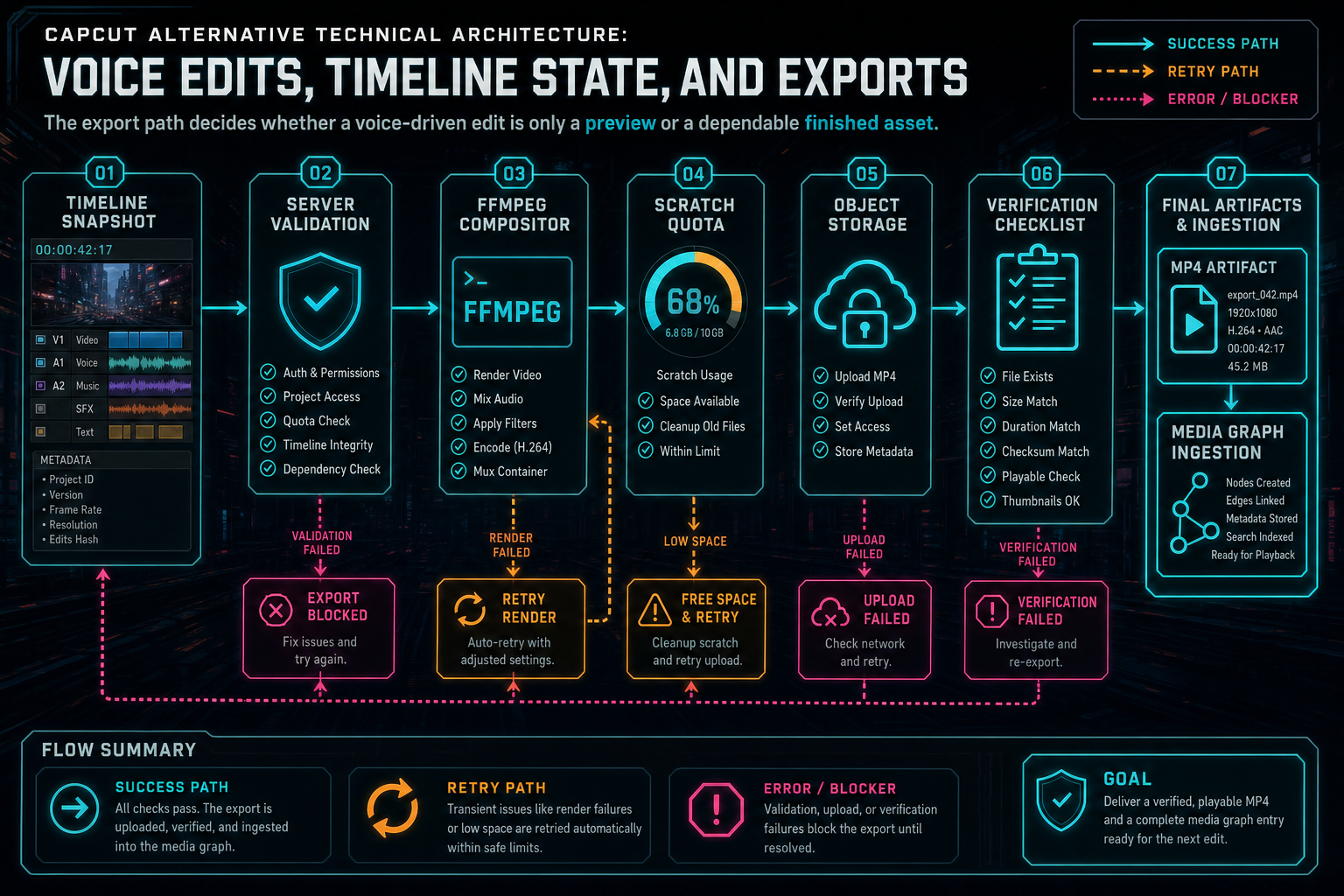
The export path decides whether a voice-driven edit is only a preview or a dependable finished asset.
Compare Workflow Fit, Not Feature Lists
A useful CapCut alternative comparison should be respectful and specific. CapCut is popular because it meets real creator needs: speed, approachability, effects, captions, social formats, and a low-friction editing path. Those strengths are not invalidated because another product chooses a different architecture.
The comparison should ask what workflow the user actually needs. If the priority is fast social production with familiar templates and mobile-first editing, a CapCut-style workflow may be exactly right. If the priority is AI-assisted editing over owned footage, voice commands that become inspectable timeline operations, durable media provenance, browser upload recovery, and verified cloud exports, then an AI timeline architecture is the more relevant comparison.
Feature lists change quickly in video software. Captions, templates, effects, background tools, music, and resizing are all important, but they do not fully describe the system. Developers should look at the deeper questions: What is the canonical project object? Can AI actions be inspected after the fact? Do transcripts and frames become reusable context? Are generated assets stored with provenance? Can exports be verified? Does the product recover after refresh or partial failure?
Those questions are not only engineering hygiene. They determine the user experience when work gets serious. The creator may not ask for provenance by name, but they will care when an export cannot be found, a voice edit cannot be explained, a generated asset disappears, or a refreshed browser loses processing state.
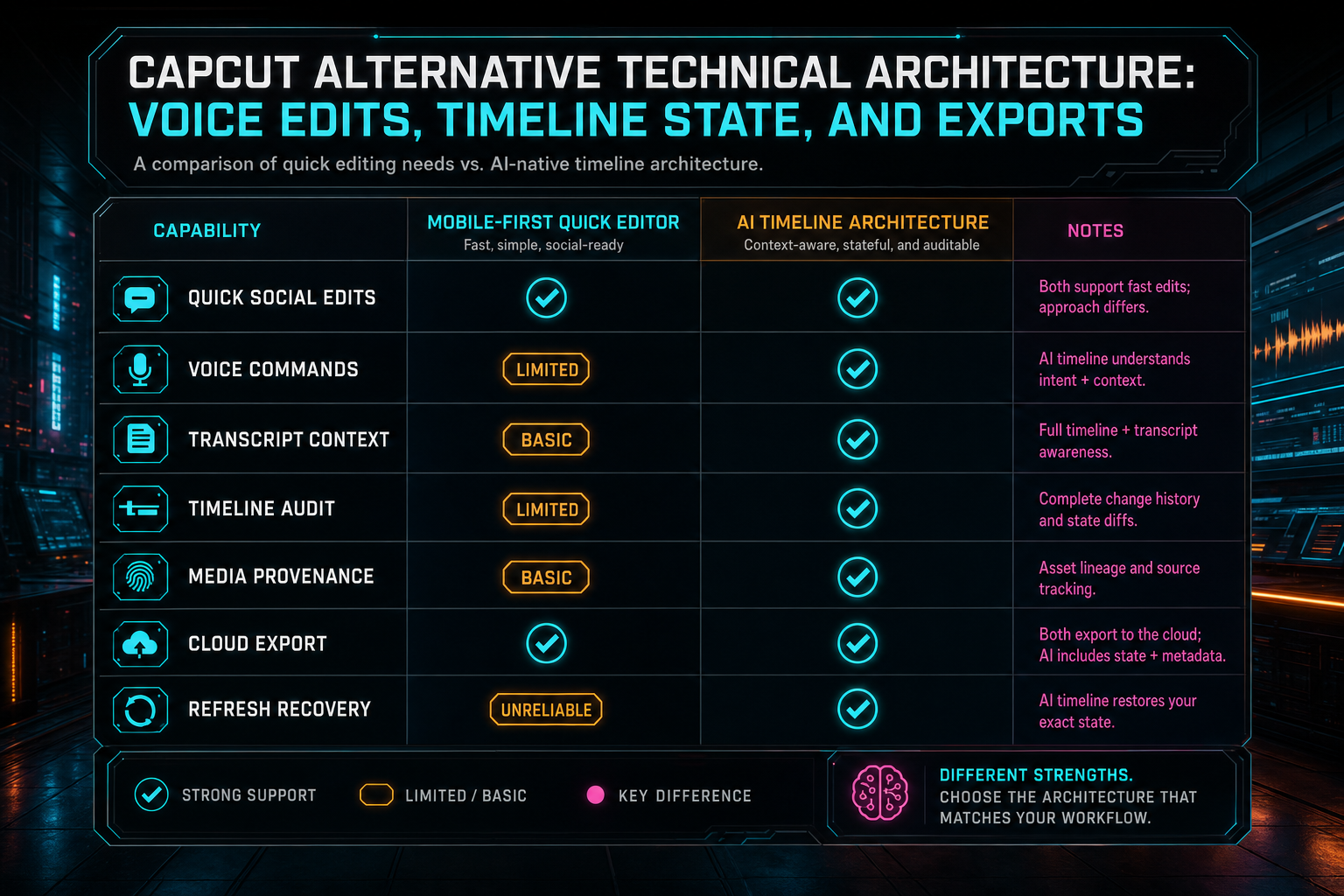
A useful alternative comparison focuses on architecture and workflow fit, not cheap shots at established tools.
What Developers Should Copy
If you are building a CapCut alternative, copy the speed expectations first. The editing surface should feel direct. Upload progress should be visible. Preview should be responsive. Captions and transcript interaction should feel native. Voice commands should be easy to start. Export should be obvious. Open the edit-run receipts
Then build the durable contract under it. Store source media records, transcript segments, frame descriptions, generated assets, timeline events, AI edit runs, and render artifacts as first-class product data. Use object storage through server services. Validate every route against user and project ownership. Treat AI output as a plan that must pass schema and timeline validation before it mutates state.
Copy the audit trail pattern as well. A voice command should produce a traceable run: prompt, context, plan, tool calls, events, artifacts, and status. A render should produce a traceable artifact: export ID, output settings, storage path, verification result, and relationship to the timeline. That evidence makes debugging, support, collaboration, and future automation dramatically easier.
Finally, choose the product center intentionally. A template-first editor, a mobile-first social editor, a caption-first browser tool, and a voice-driven AI timeline editor can all be good products. They should not accidentally share the same backend assumptions. The architecture should match the promise.
The Result
A strong CapCut alternative is not just a different set of buttons around video clips. It is a different answer to where creative state lives. In VibeChopper's architecture, the browser gives creators a fast surface, voice and text provide natural control, AI plans propose edits, native tools mutate the timeline, media records preserve provenance, and the cloud render path verifies the finished export. Talk a cut into shape
That stack lets the product keep two promises at once. The creator gets a simple workflow: upload footage, ask for a change, refine the timeline, and export. The platform gets the structure it needs: ownership checks, typed tool calls, recoverable processing, reusable context, object storage paths, render status, and audit trails.
That is the technical heart of a credible AI video editor alternative. The user should not have to understand timeline state, provider boundaries, scratch quotas, or verification metadata. The product should. When the architecture carries that weight, voice edits can feel natural, exports can be trusted, and the editor can grow beyond a quick editing surface into a dependable creative system.
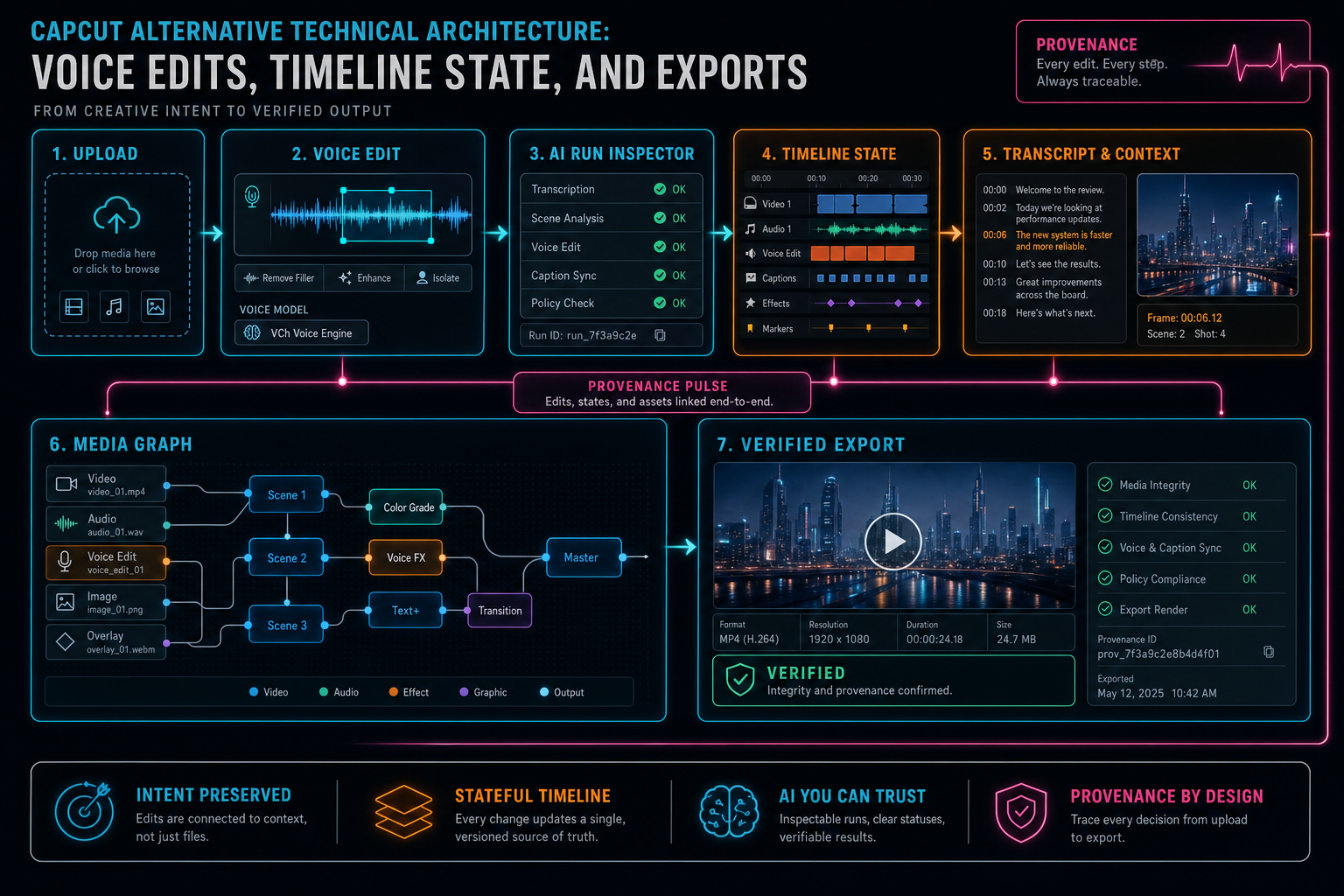
The alternative is not only the UI. It is the stack that keeps creative intent connected to the final video.
Try the workflow
Open every feature from this post in the editor
These panels collect the features discussed above. Sign in once, finish your profile if needed, then the editor opens the first highlighted surface and walks through the tutorial.
Step 1
Try voice-driven timeline edits
Describe the edit you want and let VibeChopper translate intent into timeline changes.
Talk a cut into shape →Step 2
Inspect an AI edit run
Open the editor and see how plans, tool calls, artifacts, and render results stay connected.
Open the edit-run receipts →Step 3
Upload footage with progress you can trust
Watch large video uploads, processing, transcript work, and original-file storage from one monitor.
Upload a real shoot →Step 4
Open the media asset graph
See generated audio, rendered assets, source clips, metadata, and provenance in the media panel.
Explore your media graph →Step 5
Render a verified timeline
Export a project through the same storage-backed render path described in this article.
Render a timeline free →