
Same Category, Different Architecture
The phrase AI video editor now covers a wide range of products. Some tools help generate social videos from prompts. Some specialize in captions, translations, avatars, screen recordings, templates, brand kits, background cleanup, or quick browser exports. Some are closer to traditional non-linear editors with tracks, clips, effects, and render jobs. Those products may compete for the same search phrase, but they do not necessarily share the same infrastructure center. Talk a cut into shape
VEED.IO is a useful public reference point because it is widely positioned as a browser-based AI video creation and editing platform. Its public product pages emphasize online editing, AI video generation, subtitles and captions, dubbing, text-to-speech, avatars, templates, background and noise removal, translation, screen recording, compression, and social-ready output. That is a broad creation-suite pattern: reduce production friction for many common video jobs inside the browser.
VibeChopper is built around a more timeline-centered pattern. The product surface still lives in the browser, and it still depends on uploads, transcripts, frame analysis, generated assets, and cloud rendering. The infrastructure center, though, is prompt-to-timeline editing. A user can describe the change they want, and the system translates that intent into validated timeline operations, media records, AI edit runs, object storage references, and renderable output.
This post is not an attempt to declare one pattern universally better. A creator making fast social assets may value a broad browser creation suite. A team building AI-assisted editing infrastructure may care more about timeline state, provenance, retry behavior, and render verification. The engineering lesson is that AI video editing software should be evaluated by the shape of its contracts, not only by the list of visible AI tools.
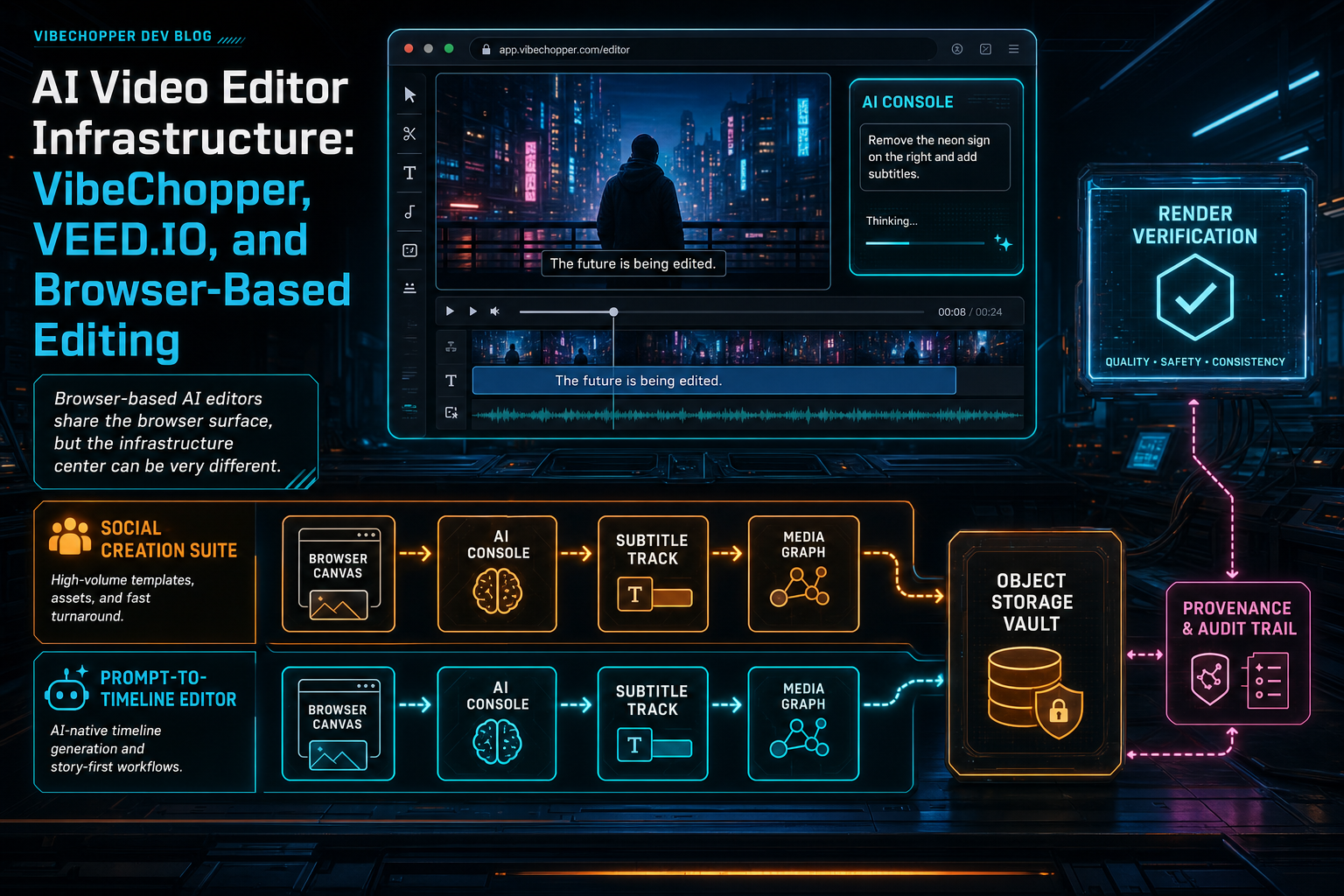
Browser-based AI editors share the browser surface, but the infrastructure center can be very different.
The Browser Is the Shared Surface
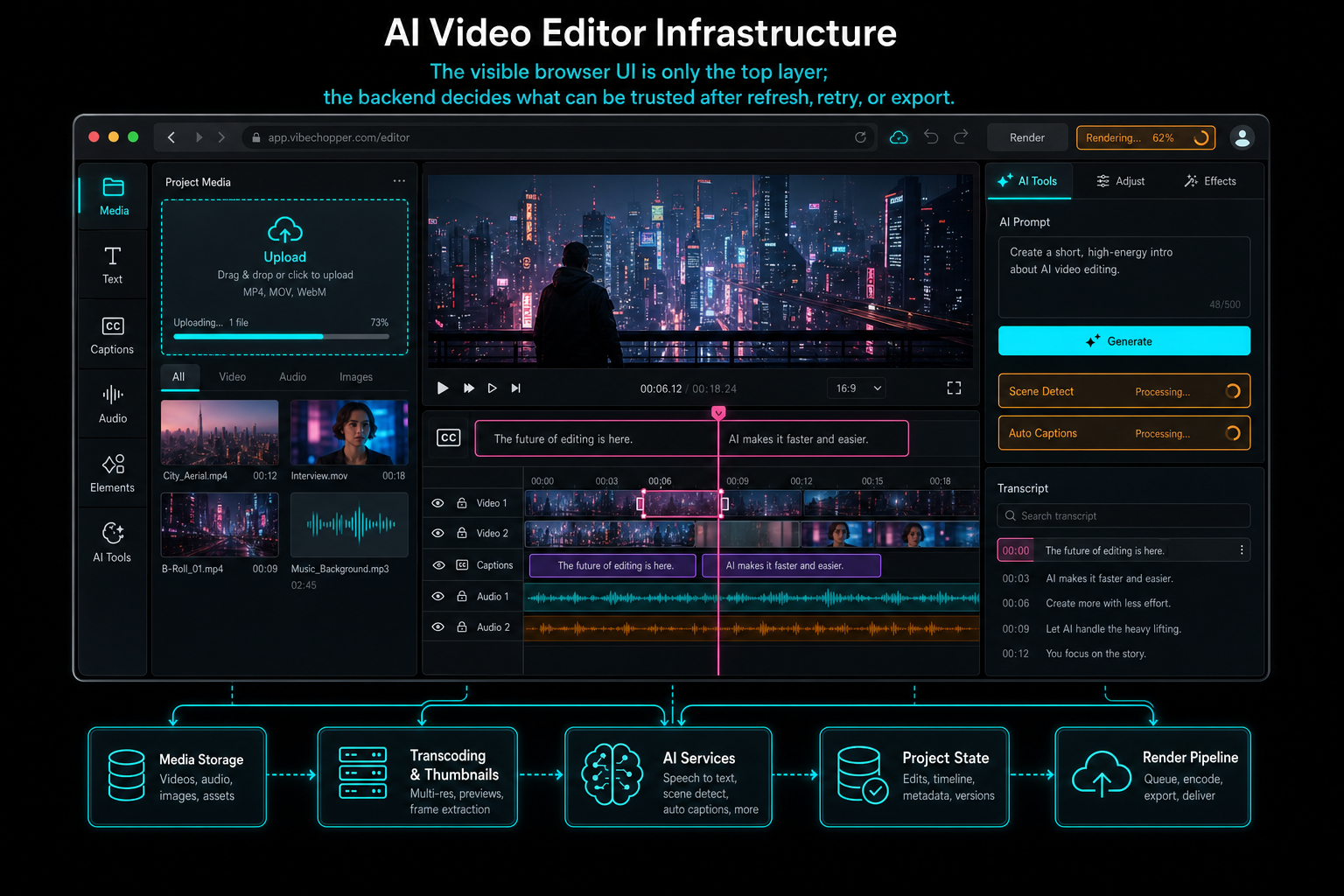
The visible browser UI is only the top layer; the backend decides what can be trusted after refresh, retry, or export.
Creation Suite Pattern vs Prompt-to-Timeline Pattern
A creation-suite pattern groups many useful production jobs behind approachable browser tools. The user might start with a prompt, a script, a screen recording, a video upload, or a template. The system can generate a short video, create subtitles, translate captions, add voiceover, apply a style, remove background noise, or prepare a shareable export. VEED.IO's public positioning fits this broad pattern: the product is presented as a way to create and edit videos online with many AI-assisted tools in one place. Open the edit-run receipts
A prompt-to-timeline pattern starts from a different assumption: the project timeline is the core object. The user may still upload footage, generate music, create captions, and render exports, but those activities serve a timeline that can be inspected, edited, revised, and verified. AI is not just a generator at the front of the workflow. It is an assistant that can reason over existing media and propose operations on clips, tracks, transcript spans, effects, generated assets, and render settings.
That difference changes the API design. In a creation-suite pattern, a feature API may be organized around tasks: generate this video, subtitle this file, translate this caption track, remove this background, export this asset. In a prompt-to-timeline pattern, the API needs stronger project state: context snapshots, structured plans, tool calls, timeline event streams, media graph records, object storage references, and render verification. A model suggestion is not enough. The product has to prove which timeline changed and why.
The distinction also affects failure handling. If an auto-caption job fails, the product can show that a caption task failed and let the user retry. If an AI timeline edit partially fails, the system needs to know more: whether the plan was generated, which tool call failed, whether any clip mutations landed, whether generated assets exist, whether the render was queued, and whether the timeline should roll forward, retry, or expose a repair state. Timeline-centered AI needs an audit trail.
VibeChopper's AI edit run model exists for that reason. The prompt, context, plan, tool calls, artifacts, and status are connected. That makes AI editing less magical in the best possible way. Users can ask for changes naturally, while the product keeps the edit grounded in structured state.
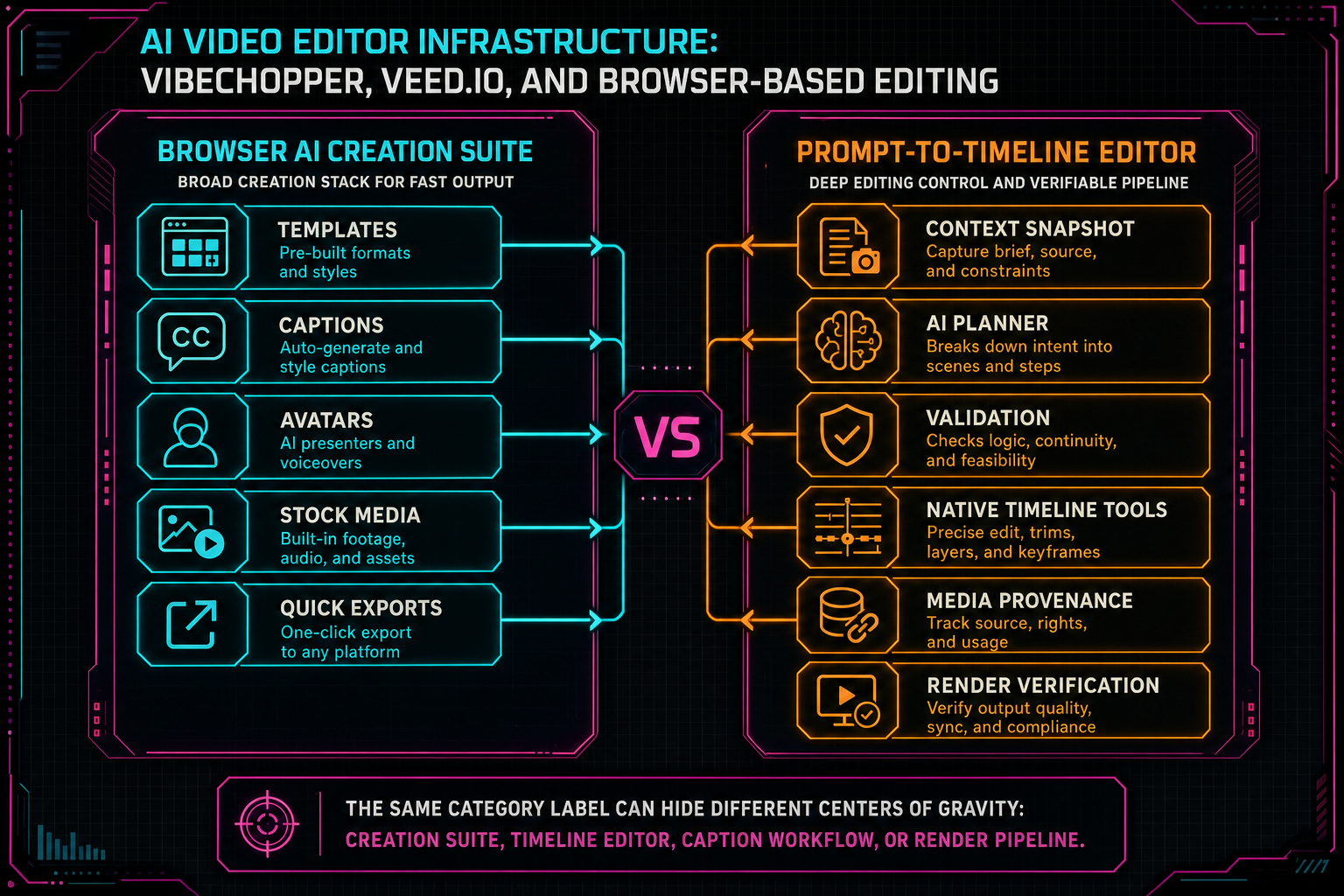
The same category label can hide different centers of gravity: creation suite, timeline editor, caption workflow, or render pipeline.
Captions, Transcripts, and AI Context
Captions are one of the clearest examples of how similar-looking features can have different architectural roles. In many online video editors, captions are a high-value output feature. The user uploads a video, the system detects speech, creates subtitles, lets the user correct the text, styles the captions, and exports hardcoded subtitles or caption files. VEED.IO publicly emphasizes automatic subtitles, caption styling, translation, and downloadable subtitle formats as important parts of its editing workflow. Talk a cut into shape
In a prompt-to-timeline editor, transcripts and captions are also output features, but they are additionally AI context. A transcript segment is not only text that appears on screen. It can be a searchable time range, a speaker-labeled editing primitive, a source for cutting dead air, a way to find a quote, or an explanation for why an AI assistant chose a particular trim. Caption data becomes part of the reasoning layer.
That changes storage requirements. The system should not treat subtitle text as a temporary export option. It should preserve transcript segments with timestamps, speaker labels when available, source media relationships, project ownership, edit history, and links to timeline clips. When the user asks to cut the slow intro, find the best product explanation, tighten the second answer, or build a short from the strongest quote, the AI layer needs transcript data it can trust.
The same applies to frame descriptions. A browser editor can sample visual frames for preview, but an AI editor needs persisted frame records if it wants to search visuals, identify scenes, build summaries, or reason about b-roll. The infrastructure question is not simply whether the product has captions or visual AI. It is whether those outputs become durable, scoped, reusable project context.
Media Provenance Is the Hidden Differentiator
AI video tools create and transform many kinds of assets: uploaded source files, extracted frames, audio tracks, transcripts, captions, generated voiceovers, avatars, images, overlays, music beds, thumbnails, render previews, and final exports. In a quick workflow, those assets can feel like temporary byproducts. In a durable editor, they need identities. Explore your media graph
Provenance answers practical questions. Who owns this asset? Which project does it belong to? Was it uploaded, extracted, generated, translated, rendered, or repaired? Which source clip or prompt produced it? Which model or processing job was involved? Where are the bytes stored? Which timeline version used it? Can the system render it again, delete it safely, or explain it to a user?
This is where VibeChopper's media graph orientation matters. Object storage holds bytes, but product records hold meaning. A generated music bed is not just an audio file. It is a prompt, model metadata, storage path, project relationship, and possible timeline placement. A frame image is not just a JPEG. It is a timestamped visual sample tied to a video and possibly an AI description. A render output is not just an MP4. It is the result of a timeline version and a compositor job that can be verified.
A public comparison of AI video editors often focuses on visible features: subtitles, avatars, templates, background removal, stock clips, text-to-speech, resizing, export formats, and price. Those are important for users. Developers also need to ask how the platform remembers what it created. Media provenance is the difference between a clever tool and a system that can support search, undo, collaboration, repair, audit trails, and future AI workflows.
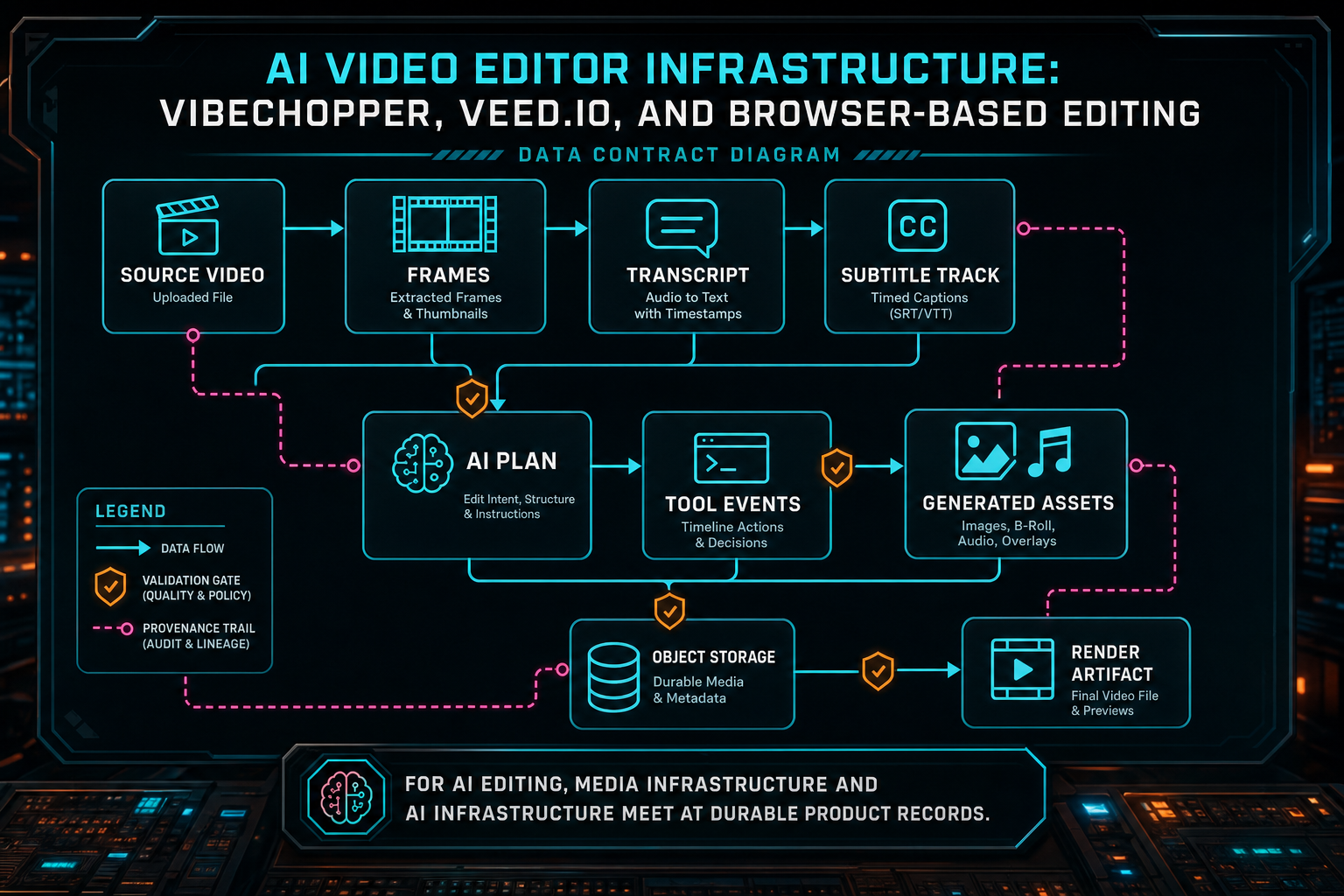
For AI editing, media infrastructure and AI infrastructure meet at durable product records.
Rendering and Verification Decide What Is Real
In a browser editor, preview and export are different promises. Preview can be interactive and approximate. Export needs to be repeatable. Once a project includes cuts, captions, audio levels, generated media, overlays, transitions, speed changes, and AI-applied edits, the render path becomes the final judge of whether the product state is coherent. Render a timeline free
A task-oriented online editor may hide much of that complexity behind a simple export button. That can be the right user experience. The infrastructure still has to resolve source media, apply transformations, encode output, store the result, and return a usable asset. If the product focuses on short social videos, templates, or captioned exports, the render system can be optimized for those common shapes.
A prompt-to-timeline editor has to be stricter about timeline semantics. The render worker should consume the same timeline state that manual and AI tools mutate. It should resolve media through server-owned records, not arbitrary client references. It should handle scratch storage responsibly. It should write final artifacts to durable object storage. It should attach output metadata to the project and verify that the artifact belongs to the intended user, timeline, and render job.
Verification is especially important for AI edits. If a model-assisted operation changed the timeline and queued a render, the product should be able to answer whether the render completed, which output object was created, what timeline version it represents, and whether any step failed. That does not make the UI more complicated for the creator. It makes the simple export button trustworthy.
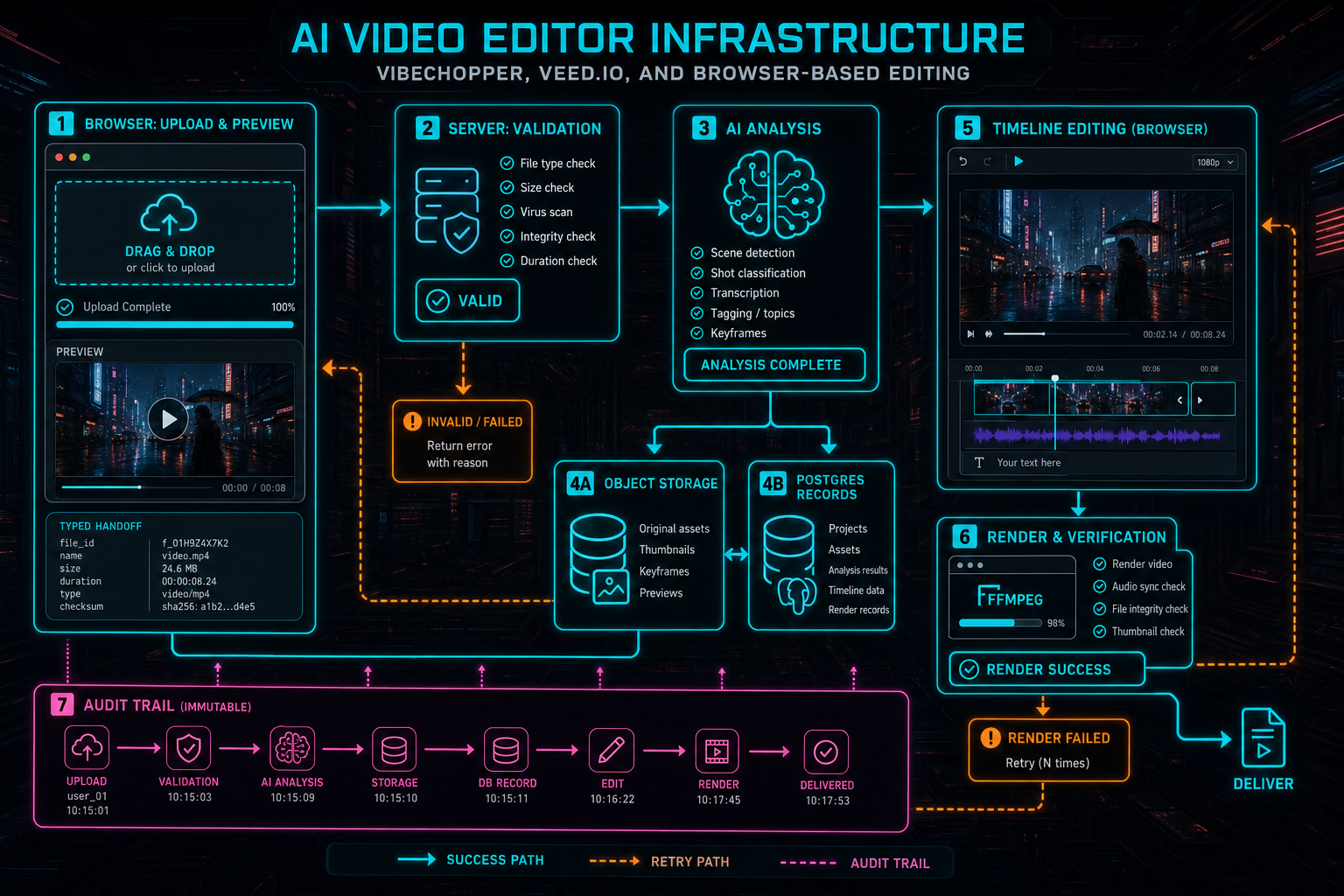
Browser-based editing becomes reliable when each layer has a narrow, typed handoff.
AI Provider Boundaries Keep the Product Portable
Modern AI video platforms often combine multiple AI capabilities: text generation, image understanding, speech recognition, translation, text-to-speech, avatars, image generation, video generation, music generation, and classification. Public product surfaces rarely expose how many models are involved. They should not have to. A creator wants the result. Open the edit-run receipts
For developers, the key is to keep provider behavior behind product contracts. A model can summarize frames, draft a plan, transcribe audio, translate captions, generate a voiceover, or propose an edit. The application still needs schemas, validation, retry policy, usage tracking, fallback rules, and malformed-output handling. Without that boundary, the product becomes coupled to one provider's response shape and failure modes.
VibeChopper's provider harness pattern exists to keep AI calls from leaking through the whole editor. The timeline layer should not care whether a plan came from one model or another. The media graph should not care which transcription provider produced a segment once the segment is validated and stored. The render layer should not care which AI assistant decided to add a generated asset, only that the asset exists with a storage reference and provenance.
This is not a criticism of any specific AI video product. It is a category requirement. AI tools are changing quickly, and browser-based editors need room to adopt better models without rewriting every route, component, and media workflow. The stable unit should be the product record: transcript segment, frame description, plan, tool call, generated asset, render job, verification result.
How to Compare Without Trash Talk
A useful comparison between VibeChopper, VEED.IO, and other browser-based video editors should avoid lazy claims. It is not credible to say one product is simply better because it has one feature another product lacks. It is also not useful to reduce mature online editors to a single capability. VEED.IO's public surface covers a broad set of creator workflows. VibeChopper's public architecture emphasizes AI-assisted timeline editing, provenance, upload reliability, and render verification. Those are different product bets.
The right comparison questions are architectural. What is the canonical project object? Is the timeline central, or is the output asset central? Are transcripts only captions, or are they edit context? Are generated assets stored with provenance? Does the AI assistant produce structured plans or direct prose? Can tool calls be inspected after the fact? Does browser processing have server fallback? Are render artifacts verified against project state? Can uploads and long-running jobs resume or recover?
Those questions are more durable than feature checklists. Feature lists change every month in AI video editing. Infrastructure choices shape the product for years. A caption tool can add better styles. A generation workflow can add another model. A timeline editor can add another effect. But if the underlying platform does not preserve ownership, provenance, validation, and renderable state, every new feature inherits uncertainty.
For users, this kind of comparison helps choose the right tool for the job. If the goal is fast social content assembled from prompts, stock media, subtitles, avatars, and templates, a broad creation suite may be the best fit. If the goal is AI-assisted editing over owned footage with inspectable timeline changes and durable media state, a prompt-to-timeline architecture is worth looking at closely.
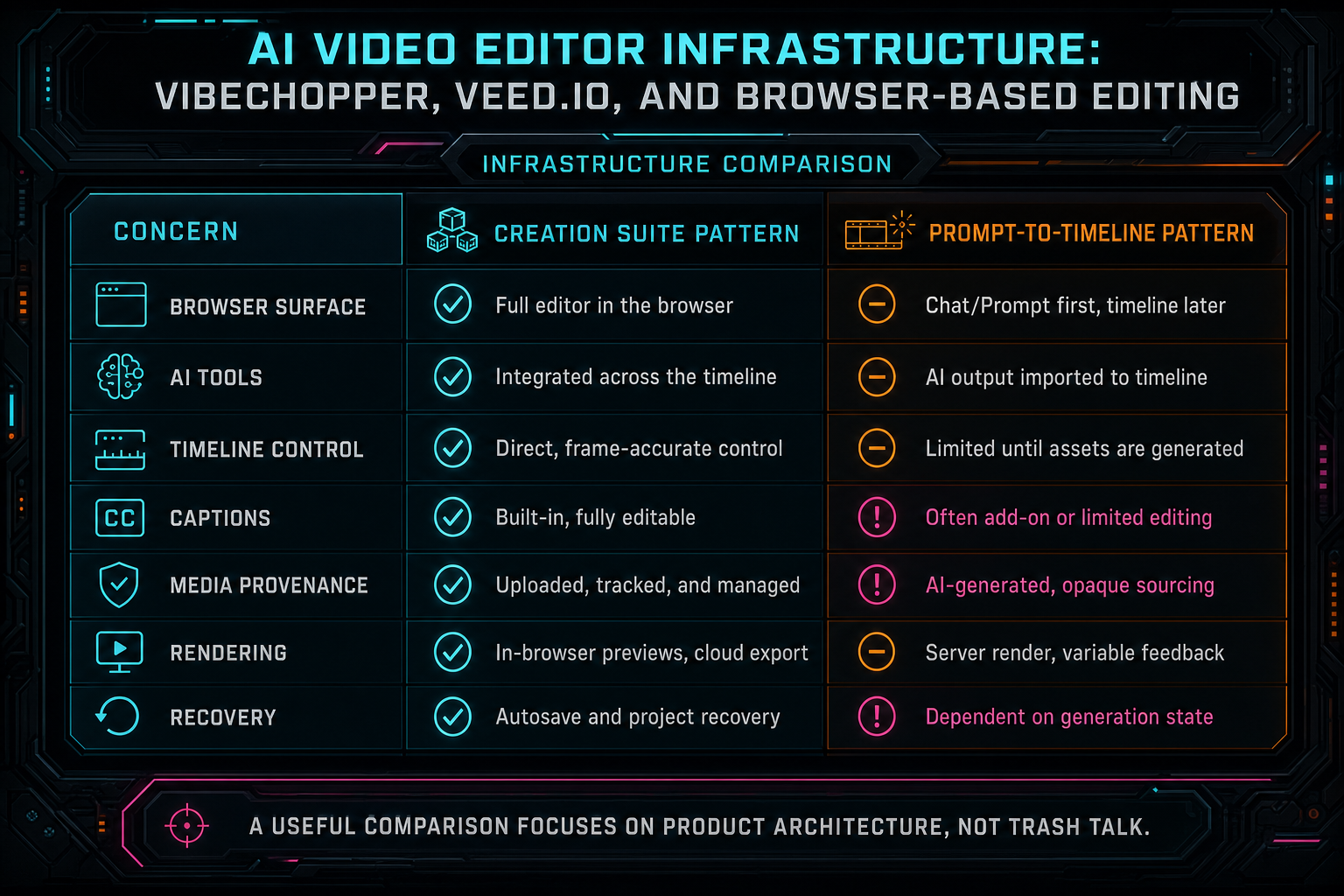
A useful comparison focuses on product architecture, not trash talk.
What Developers Should Copy
If you are building an AI video editor, copy the discipline behind the strongest browser tools. Make the browser feel immediate. Give users fast upload feedback, responsive preview, caption editing, timeline interaction, and visible processing state. The web app should not feel like a form wrapped around a batch job. Upload a real shoot
Then copy the server-owned truth model. Authenticate every project operation. Store durable media records. Treat transcripts, captions, frame descriptions, generated assets, and renders as first-class data. Route object storage through trusted services. Make server fallback converge on the same records the browser path uses. Keep progress and retry state in the API, not only in component state.
For AI, copy the boundary pattern. Use context snapshots instead of unbounded project dumps. Ask models for structured outputs. Validate every proposed action. Turn accepted actions into native editor tools. Record tool events. Preserve generated asset provenance. Make render jobs consume product state, not model prose. Store enough metadata that a failed run can be inspected and retried.
Most importantly, choose your product center deliberately. A broad AI creation suite, a caption-first editor, a template engine, a prompt-to-video generator, and a timeline-centered AI editor can all be legitimate browser video products. They should not share the same backend by accident. The infrastructure should match the promise the product makes to users.
The Final Stack
Browser-based AI video editing is now a large category, not a single architecture. VEED.IO is a strong example of the broad online creation-suite direction: many AI-assisted video tools packaged for accessible browser workflows. VibeChopper represents a different engineering center: an AI editor where natural language drives validated timeline changes, and where media processing, provenance, object storage, and render verification are part of the same system. Talk a cut into shape
That distinction matters because users experience both products through similar surfaces: upload a file, type a prompt, edit in the browser, add captions, preview, export. The surface similarity can hide different backend responsibilities. A prompt-generated social video workflow and an inspectable prompt-to-timeline workflow need different records, different failure handling, and different proof that the final output matches the user's intent.
The practical takeaway is simple. Do not evaluate AI video editing infrastructure by the prompt box alone. Look at the handoffs behind it: browser processing, server validation, media records, AI context, timeline tools, generated asset provenance, object storage, progress recovery, and render verification. That is where browser-based editing becomes production software.
VibeChopper's final product shape is built for that stack. Creators can upload footage, ask for edits, inspect media, work with transcripts and generated assets, refine the timeline, and render the result. The infrastructure underneath keeps the creative flow grounded in product-owned state. That is the difference between an AI feature and an AI video editor architecture.
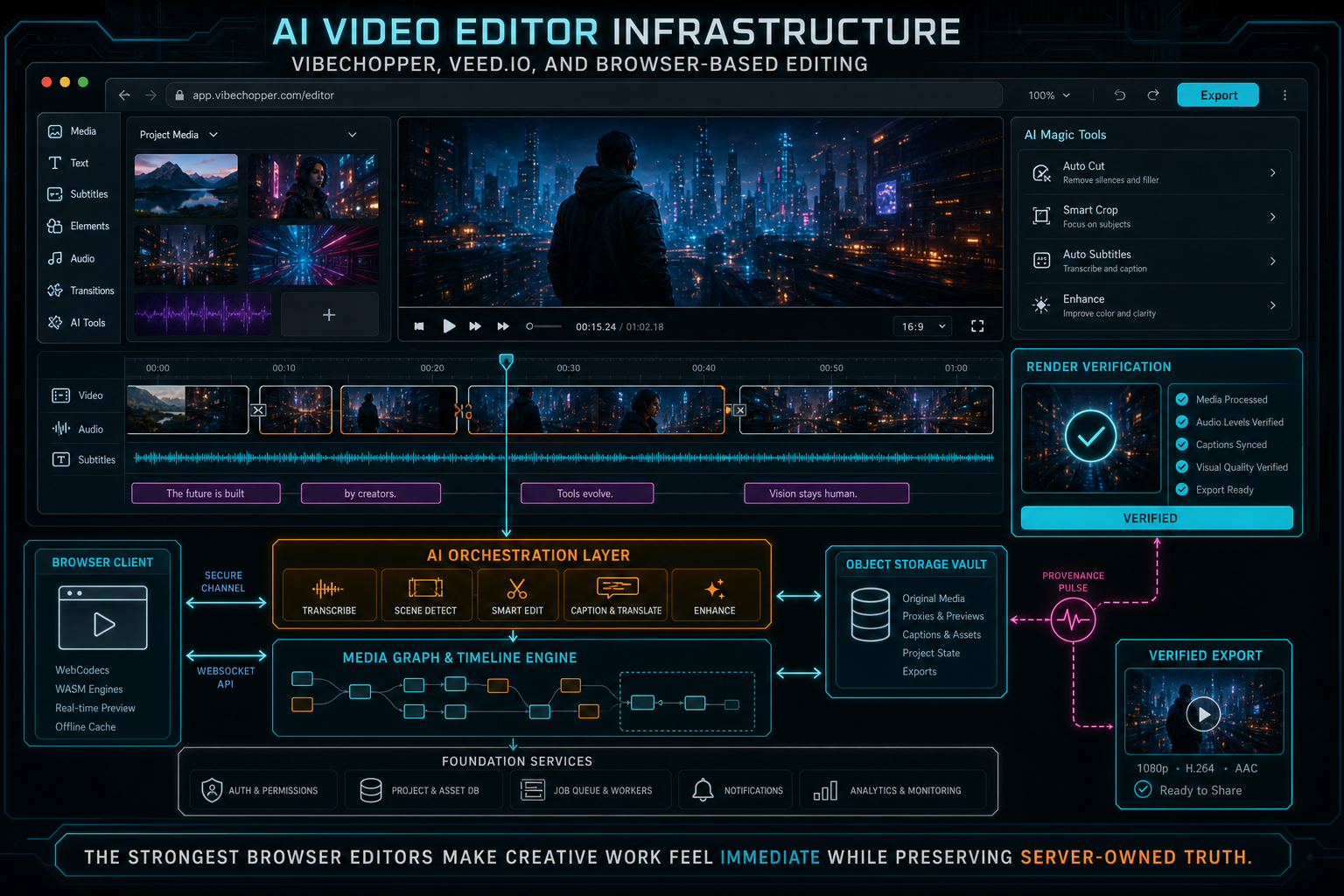
The strongest browser editors make creative work feel immediate while preserving server-owned truth.
Try the workflow
Open every feature from this post in the editor
These panels collect the features discussed above. Sign in once, finish your profile if needed, then the editor opens the first highlighted surface and walks through the tutorial.
Step 1
Try voice-driven timeline edits
Describe the edit you want and let VibeChopper translate intent into timeline changes.
Talk a cut into shape →Step 2
Upload footage with progress you can trust
Watch large video uploads, processing, transcript work, and original-file storage from one monitor.
Upload a real shoot →Step 3
Inspect an AI edit run
Open the editor and see how plans, tool calls, artifacts, and render results stay connected.
Open the edit-run receipts →Step 4
Open the media asset graph
See generated audio, rendered assets, source clips, metadata, and provenance in the media panel.
Explore your media graph →Step 5
Render a verified timeline
Export a project through the same storage-backed render path described in this article.
Render a timeline free →