
Subtitles Are Not Just an Overlay
Automatic subtitles look simple from the outside. Upload a video, wait for speech recognition, and draw text over the frame. That surface is useful, but it understates the infrastructure required for a product-grade video transcription editor. Captions need accurate timing. Transcript-based editing needs stable text ranges that can become timeline operations. AI editing needs dialogue context, speaker turns, silence spans, and confidence signals. Rendering needs subtitle style, safe areas, sidecar files, burned-in captions, and export verification. Upload a real shoot
VibeChopper treats subtitles and transcripts as shared editing infrastructure. The same uploaded media can produce audio artifacts, transcript segments, speaker labels, searchable dialogue, automatic captions, text-driven cuts, AI edit context, and render-ready subtitle output. That means the transcript cannot live as a loose blob of text beside the project. It has to be tied to user ownership, source media, clip timing, timeline state, object storage paths, and the media graph.
This matters because the market has trained users to expect more than static captions. Descript made text-based editing familiar. CapCut, VEED, Kapwing, Riverside, Clipchamp, and OpusClip normalized automatic captions for online video workflows. Premiere Pro, DaVinci Resolve, and Final Cut Pro users expect caption output that survives professional review and export. The developer challenge is to combine approachable automatic subtitles with timeline-grade correctness.
A credible automatic subtitles system is therefore a data system. It starts with audio extraction and transcription, but the durable value comes from how the product stores, normalizes, edits, renders, and verifies the resulting timed text.
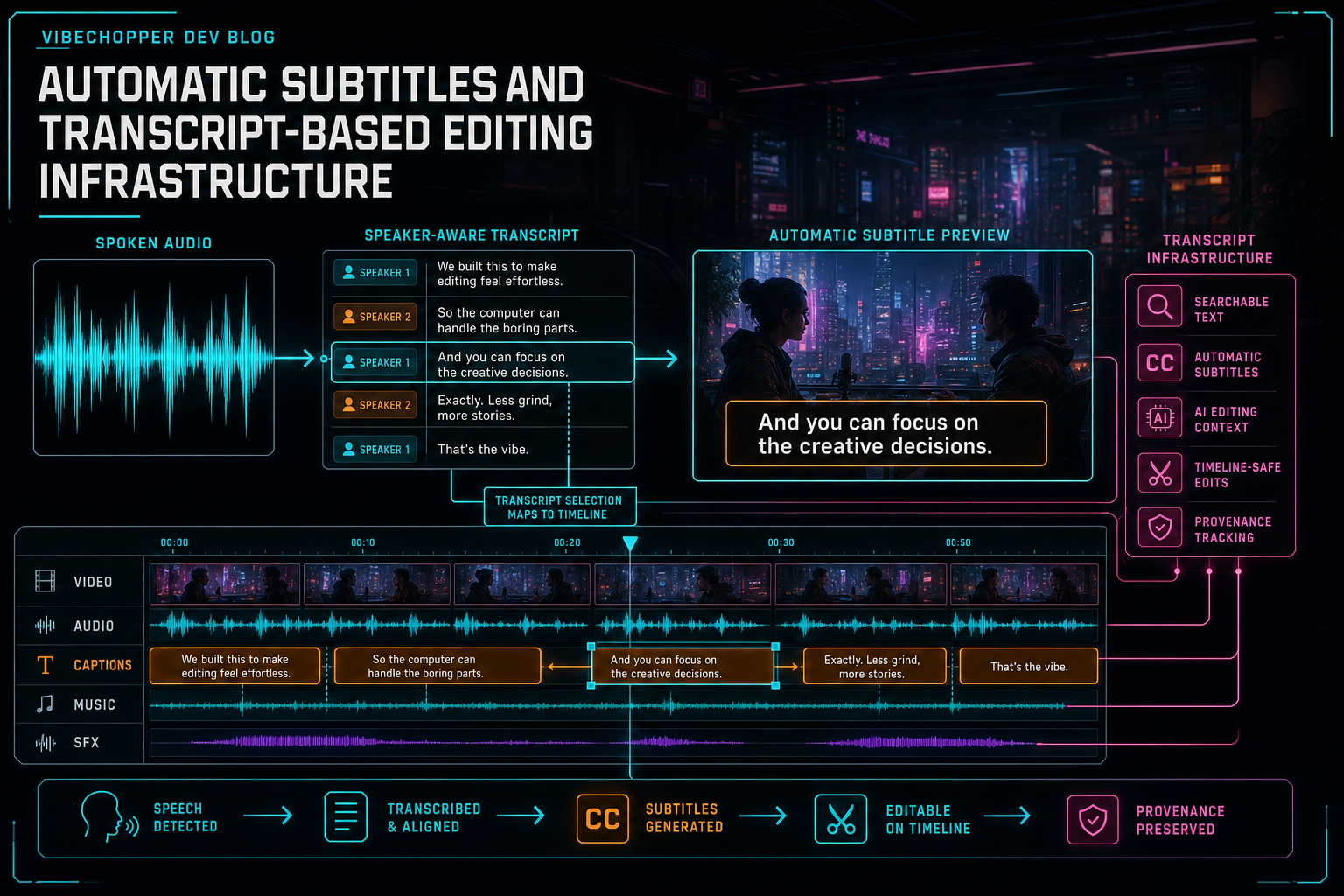
Transcript infrastructure turns speech into searchable text, automatic subtitles, AI editing context, and timeline-safe cuts.
The Audio-to-Transcript Pipeline
The pipeline begins when the editor has a source video that belongs to an authenticated user and project. The browser may extract audio early so the experience feels immediate, while the server can also derive audio later from the original file for repair or fallback. Either path should promote the audio artifact into project-owned media state instead of treating it as a temporary side effect. Explore your media graph
From there, the transcription provider returns text with timing. For a video editor, segment timing is not enough by itself. The system should preserve start time, end time, speaker identity when available, text, provider metadata, language, confidence signals, source audio reference, source video reference, and processing status. Word-level timings are especially valuable because the user may select a phrase in the transcript and expect the timeline to follow.
Diarization adds another layer. Speaker labels help creators search interviews, build social clips, remove rambling setup, and preserve the right answer in a rough cut. They also help AI planning. A prompt like cut to the customer when they mention onboarding becomes much easier to ground when speaker turns, transcript text, and frame summaries can be assembled into one scoped context snapshot.
The normalizer is the quiet part of the system. It converts provider-specific output into the product's transcript contract. It handles punctuation quirks, segment splitting, speaker label continuity, timestamp precision, missing confidence values, unsupported languages, and retry metadata. A provider can change shape, but the transcript panel, AI planner, subtitle renderer, and media graph should still consume the same internal structure.
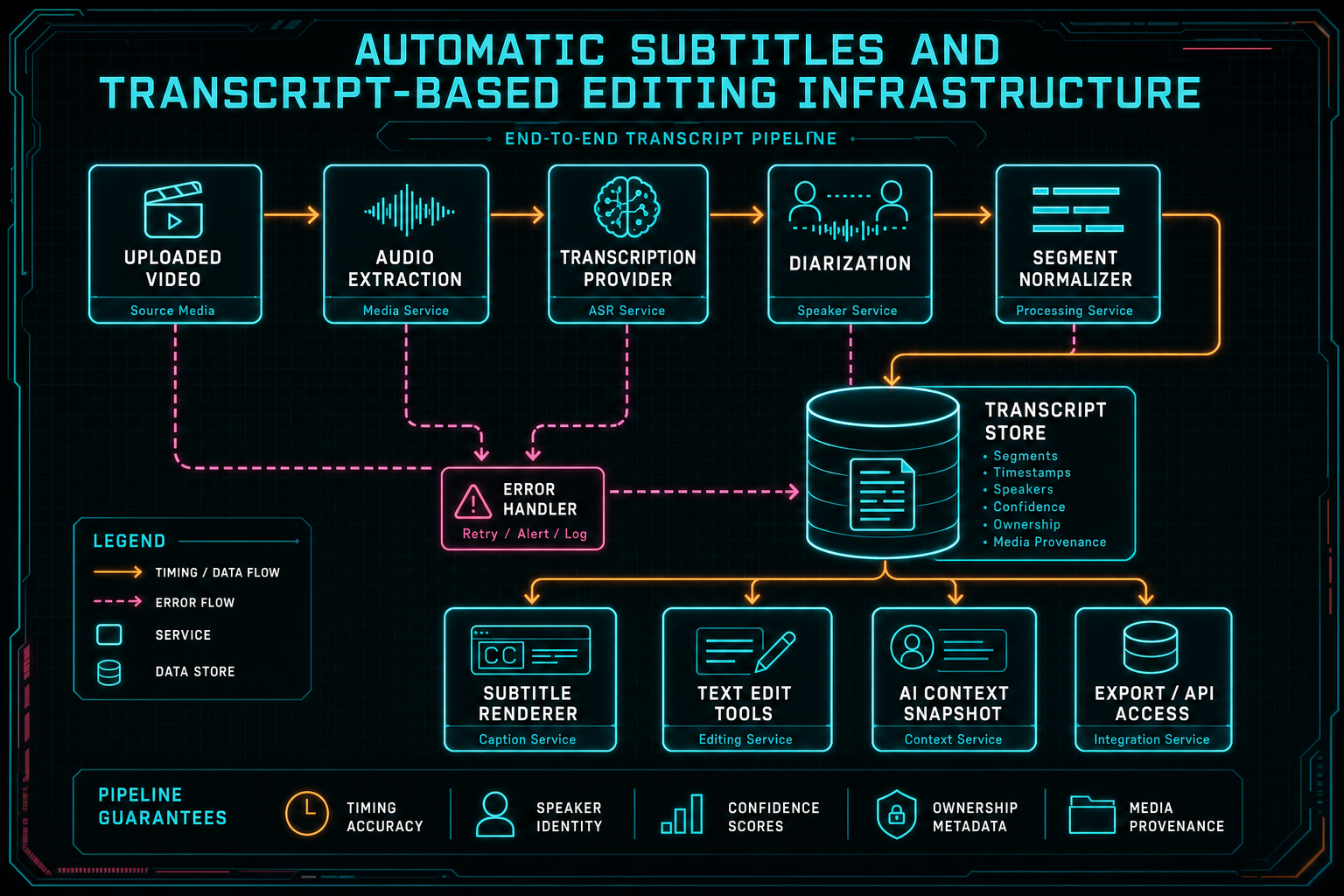
The transcript pipeline has to preserve timing, speaker identity, confidence, ownership, and media provenance.
The Transcript Is an Editor Surface
Once text has timing, the transcript becomes part of the editor, not only a read-only aid. Users expect to search for a phrase, click a sentence, jump the playhead, select a speaker turn, remove a repeated line, create captions, and ask the AI assistant to tighten a spoken section. Each of those actions depends on a reliable mapping from text to media time. Talk a cut into shape
The UI can be friendly, but the data path underneath should be strict. A transcript row should know which video or timeline source it came from. A selected range should resolve to concrete segment IDs and time boundaries. A playhead jump should use media time that can be translated into current clip or timeline position. A search result should keep enough context that a user can decide whether the match belongs in the final edit.
The biggest design trap is pretending the transcript is the timeline. It is not. It is a timed representation of speech from source media or a rendered sequence. The timeline may contain trims, speed changes, gaps, overlays, music, and repeated clips. Transcript-based editing has to reconcile text ranges against the current timeline before it mutates anything. That reconciliation is what separates a useful video transcription editor from a text area with a delete button.
For VibeChopper, the transcript panel also feeds natural language editing. A creator can select dialogue and ask for a tighter cut. The AI layer can see the selected transcript range, nearby speaker turns, clip state, frame descriptions, and available tools. The model can suggest the edit, but the product still validates and executes timeline commands.
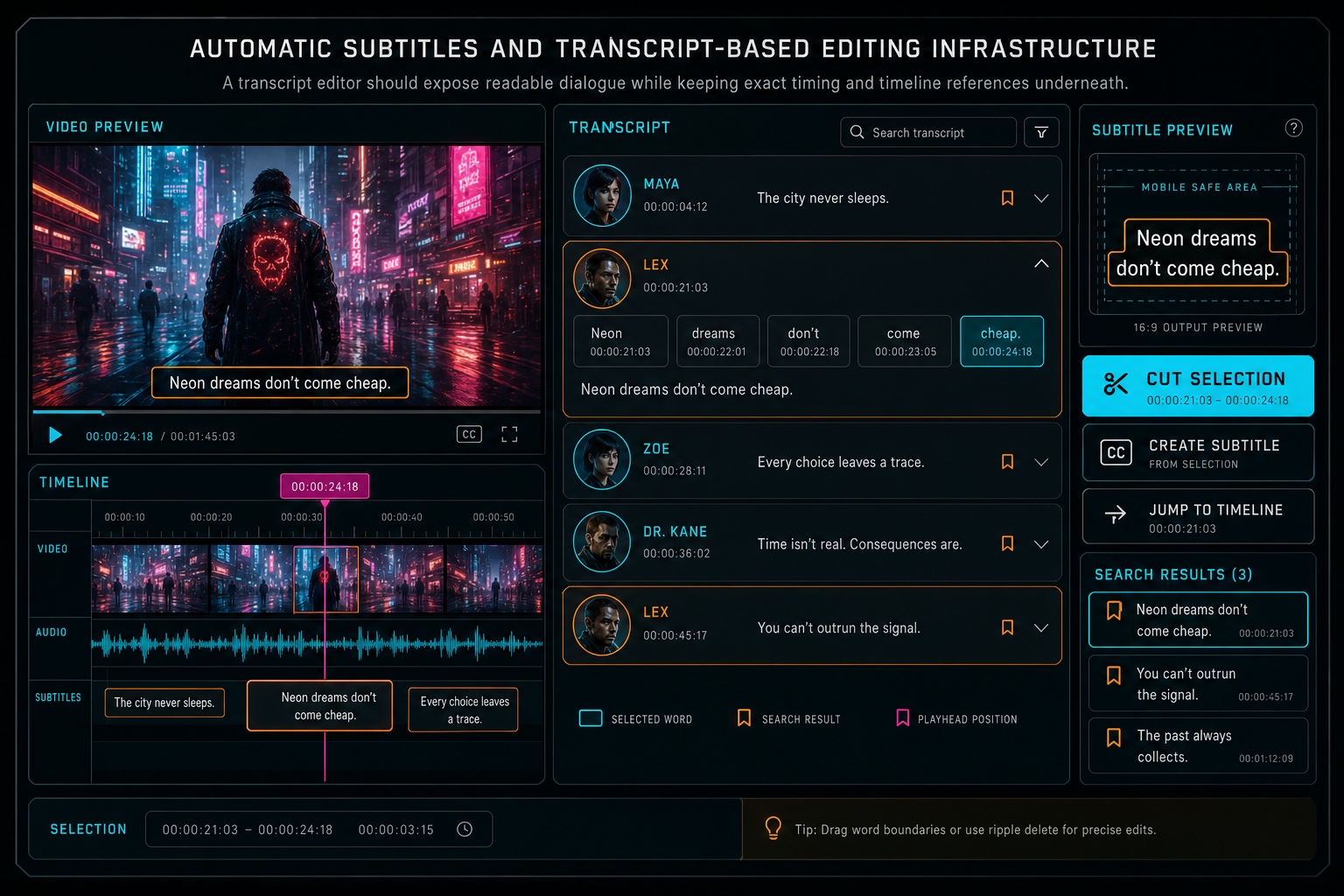
A transcript editor should expose readable dialogue while keeping exact timing and timeline references underneath.
From Text Selection to Timeline Cut
Editing video by text sounds direct: select words and remove them. The implementation is more careful. The product first maps the selected words to transcript segments and word time ranges. It then determines which source video and which timeline clips contain those times. It checks whether the range crosses clip boundaries, whether the selection starts or ends too close to an existing edit, whether linked audio and video should move together, and whether ripple behavior is allowed. Open the edit-run receipts
Only after that reconciliation can the system produce native timeline commands such as split, trim, delete, ripple close, or create a reviewable edit run. If the selected text maps to media that is not currently on the timeline, the product may offer a source preview instead of a destructive cut. If the transcript was generated from a previous render rather than the source clip, the system has to know that too. The origin of the transcript changes the safety of the operation.
This is why transcript-based editing belongs near the same validation layer as AI tool calls. A text selection is another kind of user intent. It still has to pass ownership checks, schema checks, media lookup, timeline bounds checks, duplicate request protection, and stale state handling. The transcript can propose a time range, but the editor owns the timeline mutation.
Auditability is useful here. If a text edit removes a sentence, the project should be able to record the selected transcript range, resolved clip IDs, generated split points, resulting tool events, and updated timeline state. When a user reviews the edit later, the product can explain why the cut happened and which words drove it.
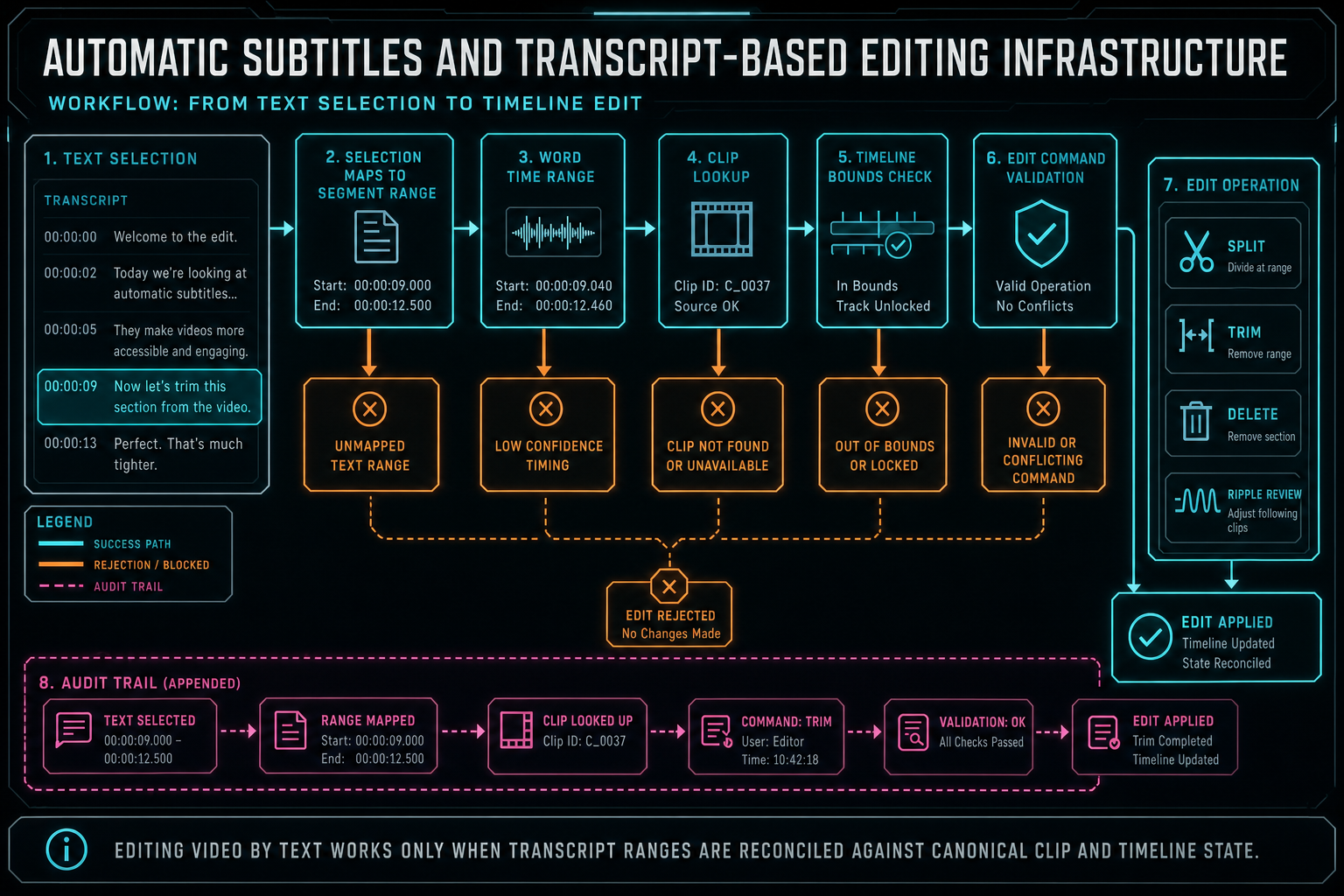
Editing video by text works only when transcript ranges are reconciled against canonical clip and timeline state.
Automatic Caption Output Has Multiple Targets
Subtitles have at least three product targets. First, the editor preview needs live caption display so the creator can review timing and style. Second, export may need burned-in captions for social platforms where users watch muted video. Third, professional or accessibility workflows may need sidecar files such as SRT or WebVTT. A strong architecture supports all three without forking the transcript truth. Render a timeline free
The preview target is interactive. It needs fast lookup by playhead time, safe-area layout, readable styling, speaker-aware display choices, and a way to show what will happen after timeline trims. The renderer should avoid unreadable caption density and should expose style controls as product state rather than hidden CSS. If captions are part of the final creative output, their style needs to be saved with the project.
The burned-in render target is deterministic. The server-side compositor needs exact text, timing, style, video dimensions, font choices, positioning, and clip timing after edits. If a timeline cut removed a phrase, the burned-in subtitle should not resurrect it. If the user changed caption color or placement, the export should preserve it. Subtitle rendering is part of the same contract as effects, transitions, overlays, and audio mix.
The sidecar target is a data export. SRT and WebVTT are not visual renders; they are timed text artifacts. They should include normalized timing and text from the same transcript or caption state used by the editor. Their provenance should identify the source project, language, transcript version, and export time. That lets a user or downstream platform know what the sidecar represents.
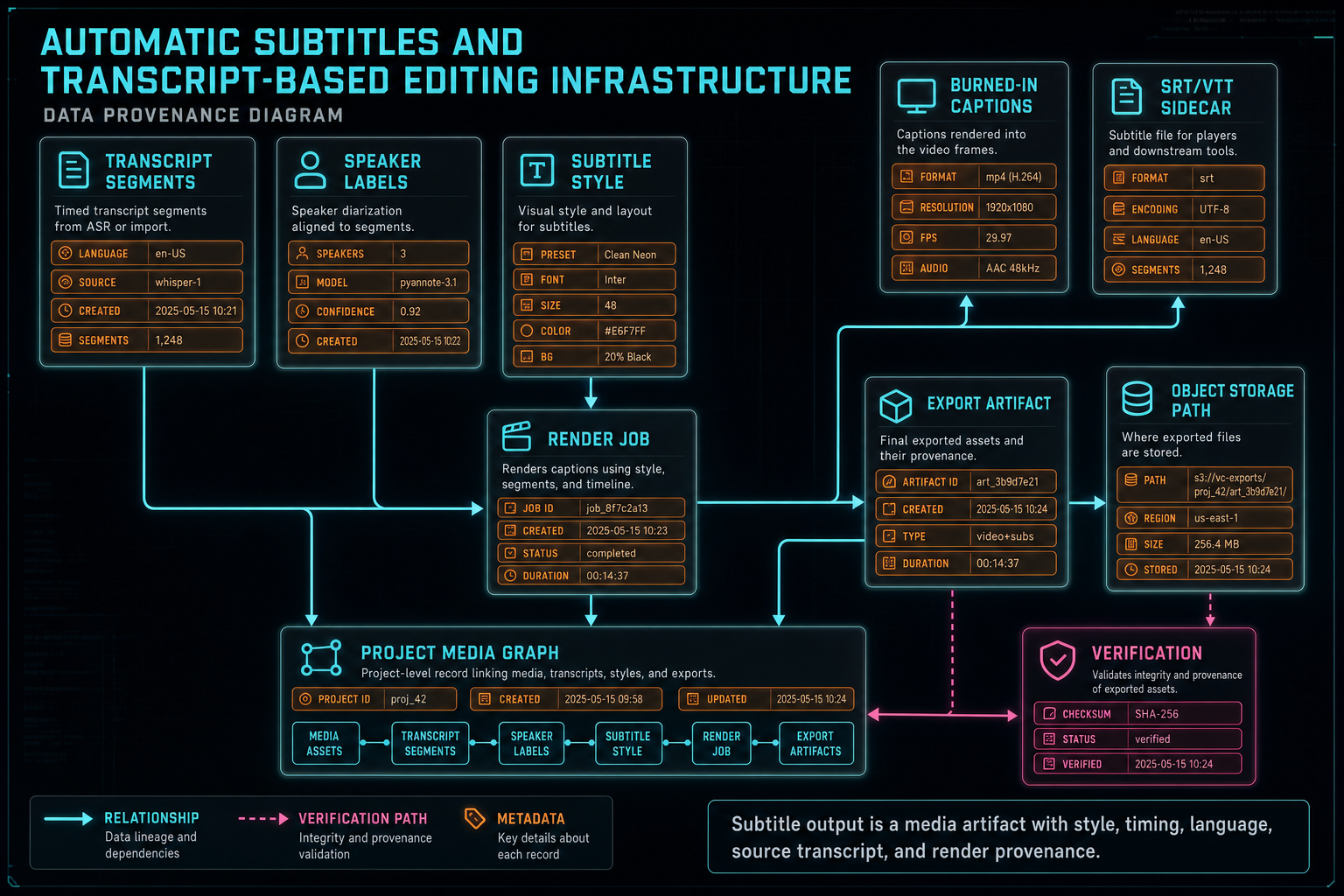
Subtitle output is a media artifact with style, timing, language, source transcript, and render provenance.
Transcript Provenance and Versioning
Transcript state changes over time. A user may correct a name, merge speaker labels, split a segment, remove filler words, translate captions, or regenerate a transcript after a cleaner audio extraction. The architecture needs versioning rules so those changes do not corrupt existing edits.
A practical model distinguishes raw provider output, normalized transcript segments, user-edited transcript text, caption styling, and timeline edit history. Raw output is useful for debugging and retry comparison. Normalized segments are the main product surface. User edits are corrections and creative decisions. Caption styling belongs to the visual output. Timeline operations remain separate from transcript text even when text selection triggered them.
Versioning also protects AI workflows. If an AI edit run used transcript version 3 to plan a rough cut, the run should record that fact. If the user later corrects the transcript, the old run remains explainable. A future review pass can decide whether updated transcript text should change the cut, but the product should not silently rewrite history.
The media graph makes this easier. A transcript belongs to source media or a timeline render. Caption exports belong to transcript and style versions. Render artifacts belong to timeline and caption state. Feedback, repair, and AI planning can all refer to those records without guessing which text was current at the time.
Transcripts as AI Editing Context
For AI editing, transcripts are one of the highest-value context sources in the project. They expose what was said, who said it, when it happened, where silence exists, where repetitions occur, and which phrases may matter for a title, hook, or social cut. Frame analysis can explain what the camera sees, but transcript context explains the story being told. Talk a cut into shape
The context snapshot should still be scoped. A model does not need the entire transcript for every task. If the user selected a clip, the snapshot can include nearby dialogue, speaker turns, silence spans, frame descriptions, current timeline state, and available tools. If the user asks for a subtitle style change, the snapshot can focus on caption settings and representative segments. If the user asks for a rough cut, the snapshot can include more structure: topic changes, high-energy quotes, filler words, and repeated sections.
Structured output matters as much here as it does for any AI edit. The model can propose removing filler words, keeping a particular quote, inserting a subtitle emphasis, or cutting between speakers. But the product has to convert that proposal into validated operations. Transcript text is evidence for an edit, not a free pass to mutate the timeline.
Provider fallback also becomes simpler when the transcript contract is stable. Different AI providers may prefer different prompt formats, but they can all receive the same normalized transcript facts. VibeChopper can use a provider harness to package those facts, validate the response, and record which provider influenced the edit run.
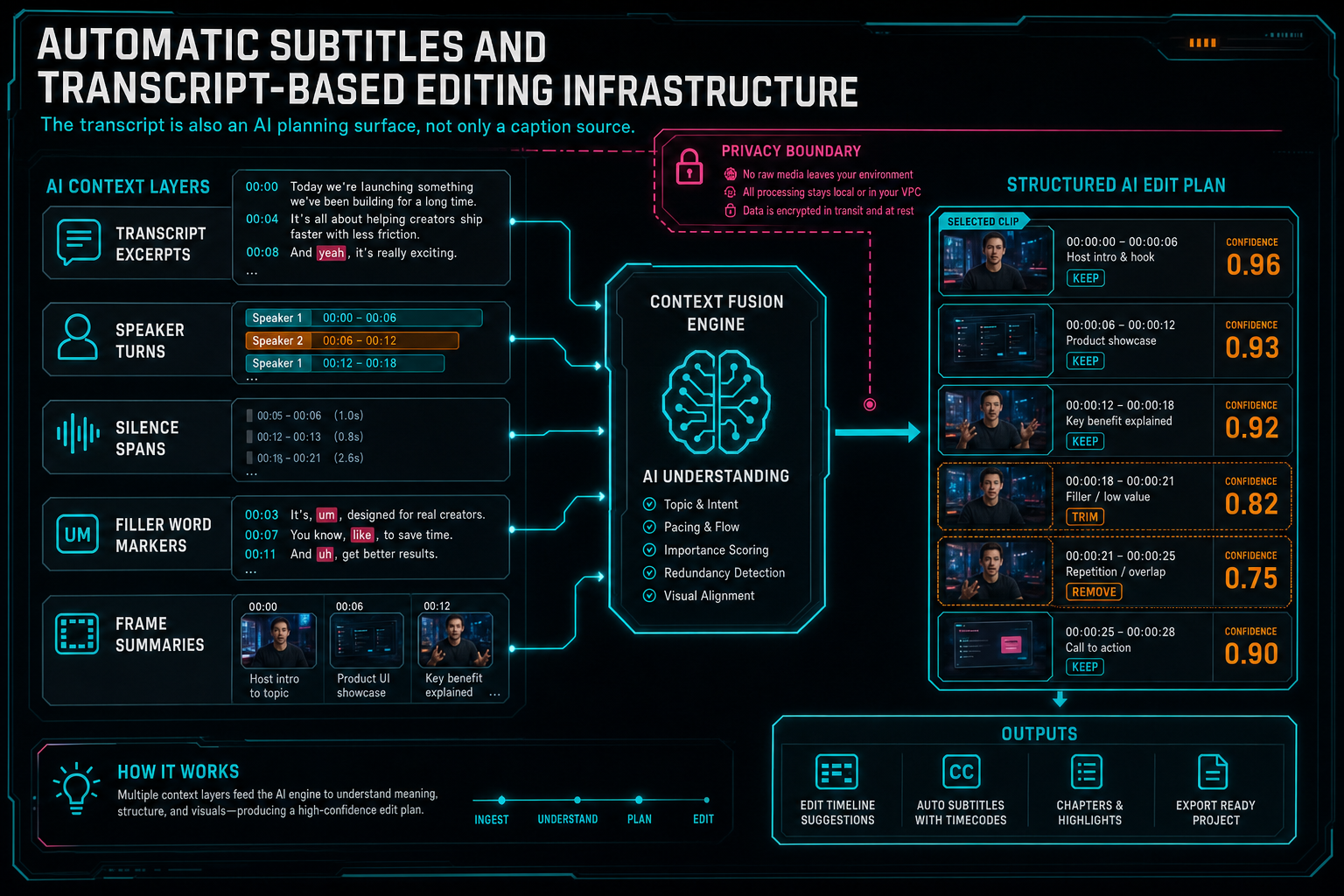
The transcript is also an AI planning surface, not only a caption source.
Failure Modes to Design For
Automatic subtitles fail in predictable ways. Audio extraction can fail in the browser. A source file may finish uploading after the user has already started editing with partial artifacts. A transcription provider may return malformed timing, unsupported language metadata, missing speaker labels, or low confidence text. Users may refresh mid-transcription, retry the same file, or correct transcript text while a render is queued.
A product-grade system names those states. Audio can be pending, extracted, uploaded, repaired, failed, or superseded. Transcript jobs can be queued, running, complete, complete with warnings, failed, retrying, or stale because source media changed. Caption rendering can be preview-ready, export-ready, blocked by transcript state, or failed during compositor verification. The UI should show the creator what is usable now and what needs repair.
Idempotency is important. Retrying a transcription job should not create duplicate transcript panels. Replaying a webhook should not duplicate segments. Retrying a caption export should return the existing artifact when the same transcript and style version already rendered. A duplicate text-cut request should not delete the same speech twice. These are ordinary distributed systems problems wearing a media product costume.
The recovery path should preserve work. If provider transcription fails but server audio exists, the product can retry. If browser audio extraction fails but original upload completed, the server can repair. If diarization is unavailable, the transcript can still be useful without speaker labels. If word-level timing is missing, segment-level editing can remain available while phrase-precise cutting is disabled.
What Developers Should Build First
Start with the transcript data contract. Define source media references, segment IDs, text, start time, end time, speaker label, language, confidence, provider metadata, processing status, and version. Decide whether word timings are required or optional. Decide how corrected text is stored without losing provider output.
Next, build the audio extraction and repair path. Browser extraction can make the product feel fast, but server repair gives the system a durable fallback when device capabilities, memory pressure, codecs, or permissions get in the way. The transcript pipeline should know which audio artifact it used and how to retry safely.
Then build transcript-to-timeline reconciliation before building aggressive text editing features. Given a transcript range, the system should answer which source media it belongs to, which clips contain it, whether the range is on the current timeline, what command would be needed, and whether that command is safe. That logic is the foundation for edit video by text workflows.
After that, add automatic subtitle output. Preview captions, burned-in captions, and sidecar exports can share transcript state, but each has different requirements. Treat style and timing as saved product data. Treat render output as a verified artifact. Treat sidecar files as export artifacts with provenance.
Finally, feed the same transcript contract into AI planning. Do not build a separate prompt-only transcript path. The more product features share the same timed text source of truth, the easier it becomes to make automatic subtitles, search, cuts, AI rough cuts, and render verification agree with each other.
The Final System
The finished creator experience is straightforward. Upload footage. VibeChopper extracts or repairs audio, generates a speaker-aware transcript, shows automatic subtitles, lets the user search and edit by dialogue, passes selected transcript context into AI edit runs, and renders captions through the same verified export path as the rest of the timeline. Upload a real shoot
The engineering underneath is stricter than the surface. Transcript segments are user-scoped and media-scoped. Text selections are reconciled against canonical timeline state. AI plans cite transcript evidence but still pass validation. Caption styles are saved as project state. Rendered subtitle output and sidecar files keep provenance. Failures become visible processing states instead of silent loss.
That is the infrastructure difference between automatic captions as a feature and transcript-based editing as a system. Captions help viewers understand the video. Transcripts help the editor understand the media. When those two paths share timing, provenance, validation, and render verification, the product can let creators edit by text without giving up timeline control.
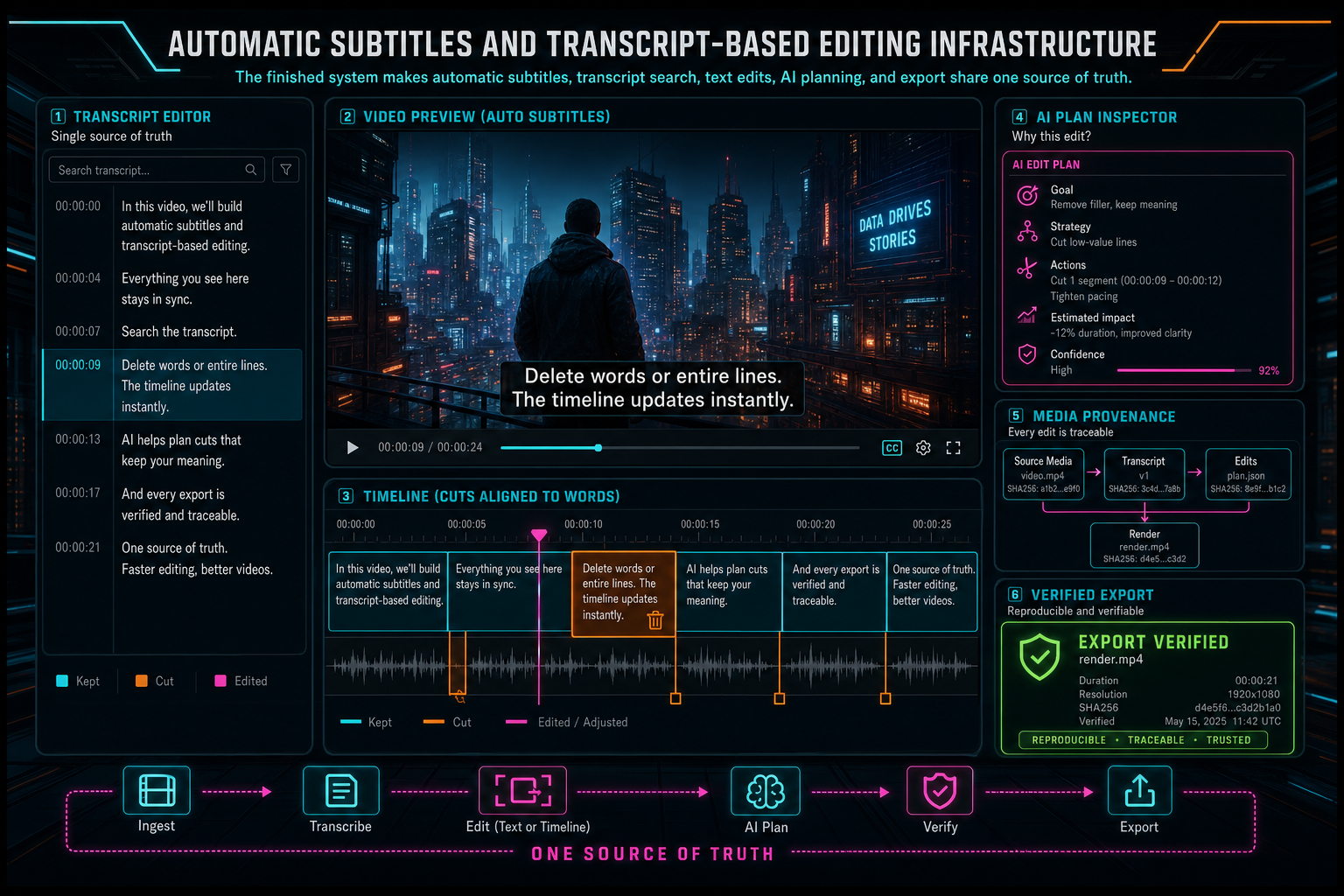
The finished system makes automatic subtitles, transcript search, text edits, AI planning, and export share one source of truth.
Try the workflow
Open every feature from this post in the editor
These panels collect the features discussed above. Sign in once, finish your profile if needed, then the editor opens the first highlighted surface and walks through the tutorial.
Step 1
Upload footage with progress you can trust
Watch large video uploads, processing, transcript work, and original-file storage from one monitor.
Upload a real shoot →Step 2
Open the media asset graph
See generated audio, rendered assets, source clips, metadata, and provenance in the media panel.
Explore your media graph →Step 3
Try voice-driven timeline edits
Describe the edit you want and let VibeChopper translate intent into timeline changes.
Talk a cut into shape →Step 4
Inspect an AI edit run
Open the editor and see how plans, tool calls, artifacts, and render results stay connected.
Open the edit-run receipts →Step 5
Render a verified timeline
Export a project through the same storage-backed render path described in this article.
Render a timeline free →