
Why Briefs Belong in the Plan
A natural-language video editor has to preserve more than the words in the chat box. When a creator asks VibeChopper to build a launch teaser, tighten a customer story, or make a short version for a specific audience, the useful instruction is rarely a single sentence. The real instruction is the brief around the sentence: what the piece is for, which clips matter, what tone to hold, what claims to avoid, how long the result should be, and which assets have to stay attached to the story. Open the edit-run receipts
That is the reason VibeChopper treats briefs and assets as first-class inputs to AI edit planning. The plan step is the place where creative intent becomes product state. A prompt can be conversational, but the resulting plan needs structure. It has to name the intended outcome, reference source material, describe candidate timeline actions, preserve assumptions, and give downstream tool calls enough context to act without guessing.
The implementation audit for this post points to server/chatPlans.ts, server/aiChatEditHarnessRoutes.ts, and commit 8eadb3a. Those references sit inside the 2026-05-17 to 2026-05-18 platform hardening wave that also included provider harness work, AI edit runs, native tool events, render verification, compositor effects, upload telemetry, owned auth, passkeys, and platform emails. Brief-backed planning is part of that same theme: make AI editing visible, recoverable, and tied to the assets the editor actually owns.
The planning layer also gives the product a better way to handle collaboration between the creator and the AI. The creator can speak in outcomes: stronger opening, calmer ending, more product detail, less setup, keep the quote, use the new shot. The AI can reason about how those outcomes might translate into structure. The server can preserve the parts that matter as records. That division of labor is what keeps the workflow from becoming either a rigid form or an untraceable model monologue.
The user-facing promise is still simple. Describe your edit, attach the context that matters, and let the editor do the precision work. The engineering challenge is making sure that context survives the trip from chat to plan to tool call to timeline to render. A plan-backed edit is how VibeChopper keeps that chain intact.
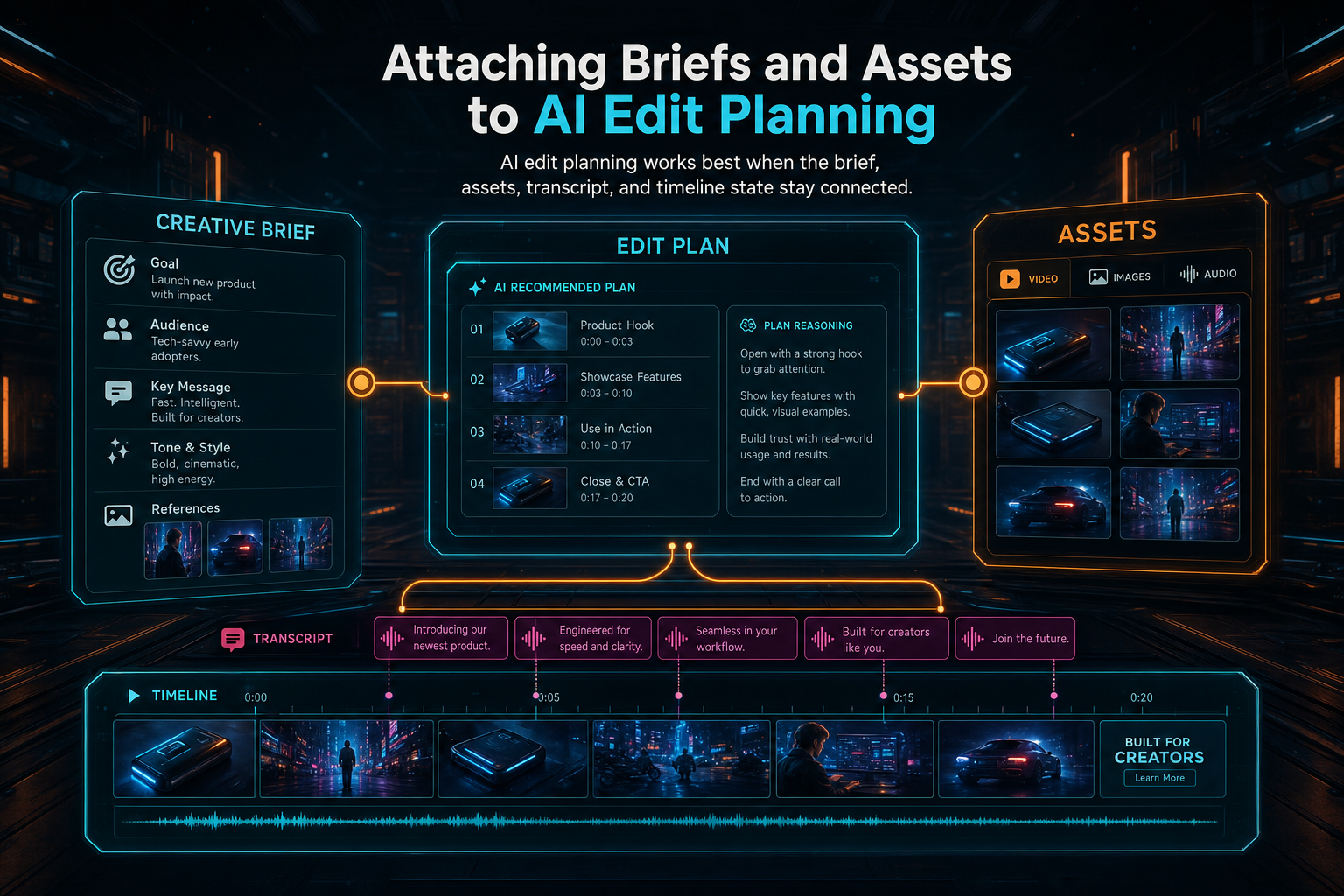
AI edit planning works best when the brief, assets, transcript, and timeline state stay connected.
Prompt Text Is Not Enough
Plain prompt text is too lossy for serious editing. It can express taste, but it cannot safely carry every constraint that a timeline needs. A creator might say, "make the first thirty seconds feel more urgent, use the new product shots, keep the founder quote, and do not mention pricing." That request contains a duration target, tone guidance, positive asset selection, protected transcript content, and a prohibited topic. If all of that remains a blob of text, each later step has to rediscover it.
VibeChopper's planning boundary exists to stop that drift. The editor can collect a chat instruction, project state, current selection, available media, transcript spans, frame descriptions, generated assets, and previously attached brief details. The server can then produce a structured plan that separates goals from evidence and proposed actions. That gives the rest of the system a better contract than "the model said something plausible."
This is especially important when the edit crosses media types. A launch cut might pull from source footage, transcript ranges, generated music, image overlays, and render settings. A recap might depend on speaker labels, beat timing, and a must-use end card. A tutorial might need to keep steps in sequence while trimming pauses aggressively. The plan is where those dependencies become explicit.
A structured plan also gives the UI something useful to show before it mutates the timeline. The editor can display the intended story shape, the assets it expects to use, the evidence it found, and the operations it is preparing. That preview does not have to expose every internal field, but it should make the edit feel legible. Users trust automation more when they can see the difference between "the AI is thinking" and "the AI has a plan that targets these specific clips."
The point is not to make the creator fill out a bureaucratic form. The point is to let natural language stay natural while the backend turns important parts into durable fields. VibeChopper can keep the interface fast and direct because the server does the work of preserving context after the chat message leaves the screen.
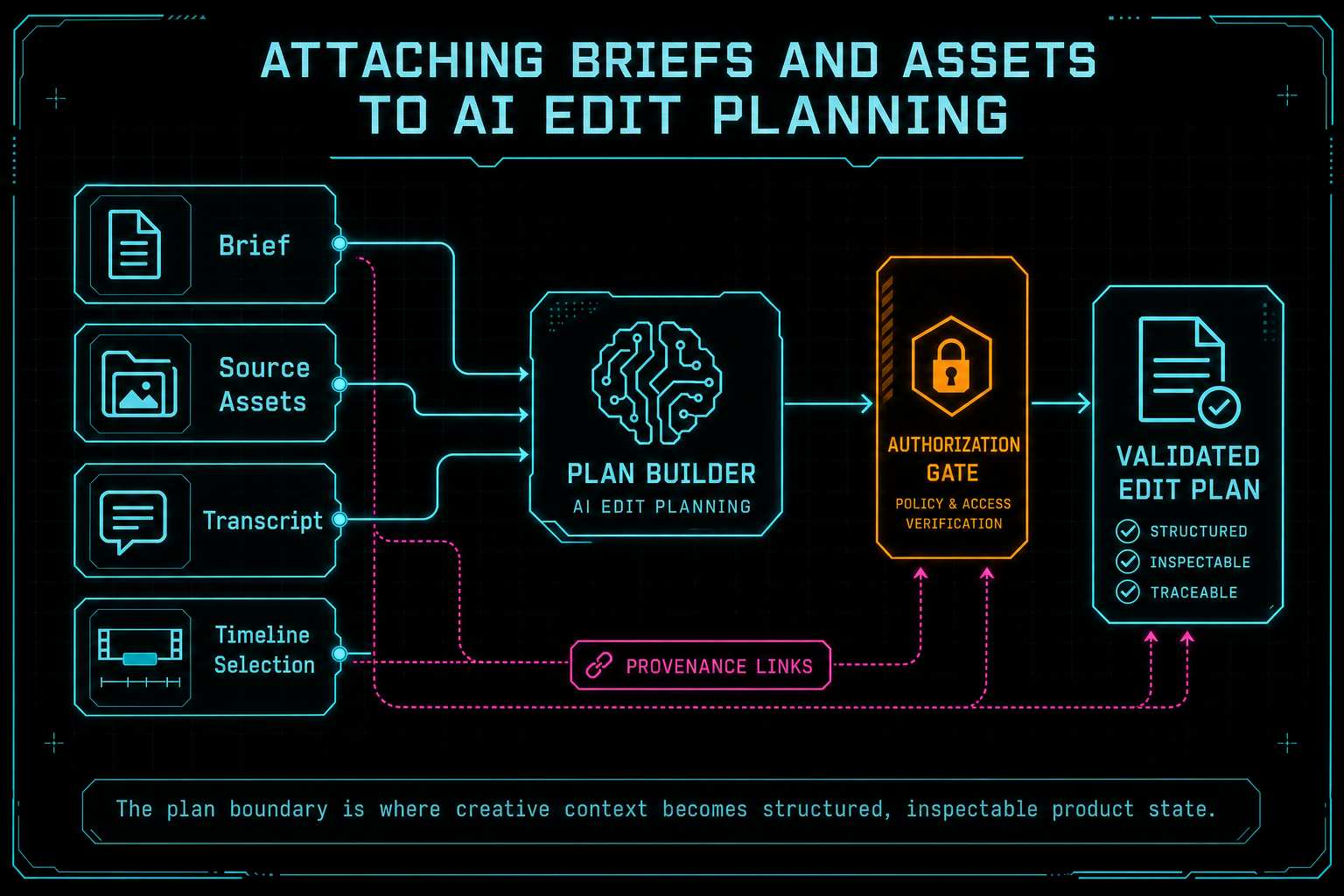
The plan boundary is where creative context becomes structured, inspectable product state.
What a Brief Carries
A useful edit brief is small, specific, and reusable. It can carry the goal of the edit, the target audience, a tone range, a rough duration, a list of required assets, a list of assets or claims to avoid, publishing constraints, and success criteria. It can also record references that the AI should consider evidence rather than suggestion: transcript lines, clip IDs, frame description ranges, uploaded brand assets, generated music prompts, or a previous render artifact. Talk a cut into shape
That distinction matters. A brief is not just extra prompt seasoning. It tells the planning layer what the creator has already decided. If the brief says the founder quote is required, the plan should not trim it away to hit a duration target without surfacing the tradeoff. If the brief says to avoid pricing, the plan should treat pricing references as exclusion zones. If the brief says the new product shot is mandatory, the asset resolver should verify that the shot exists and can be used before the tool queue starts.
In a product-final workflow, this lets creators edit by vibe without surrendering precision. They can ask for the feeling of a faster cut, but the plan still knows which asset has to open the piece. They can ask for a warmer ending, but the plan can keep the required call to action. They can ask for a tighter story, but the plan can preserve speaker attribution and transcript-backed meaning.
The nearby CTA opens voice-driven editing because that is where the value becomes obvious. A brief-backed voice edit is not a model improvising on a blank page. It is a model reasoning over a project with named context, and then handing proposed work back to a system that can validate and execute precise edits.
This also makes follow-up prompts better. After the first plan exists, the next instruction can modify the plan instead of rebuilding the entire creative context. "Make it tighter" can refer to the same audience, required clips, avoid list, and music bed. "Use the alternate ending" can resolve against the same asset set. The conversation becomes cumulative because the product has a place to store the working brief.
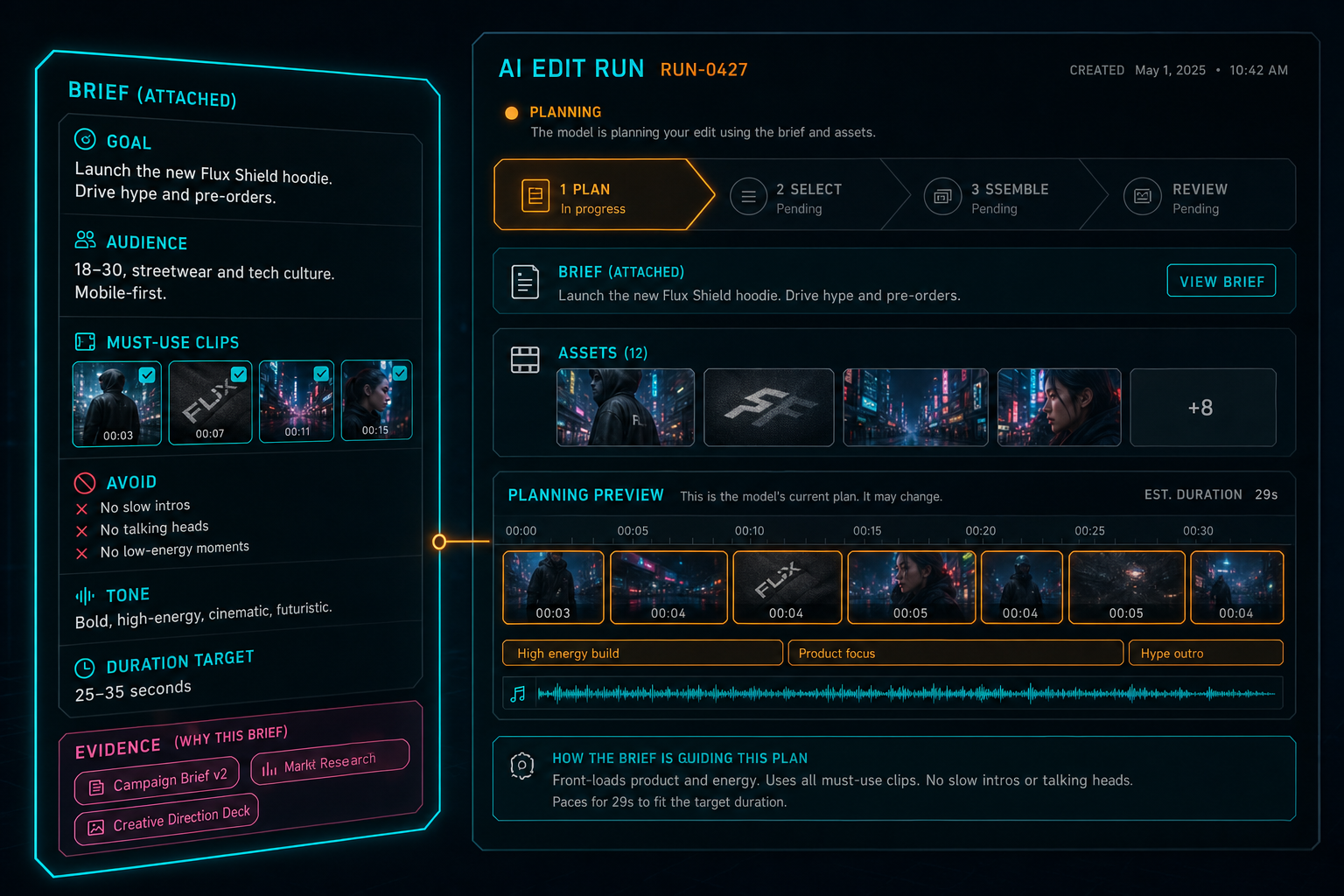
A brief is not decoration. It gives the planning step constraints the model can use and the product can audit.
Assets Are Part of the Instruction
In video editing, assets are not passive files. They are instructions with pixels, audio, provenance, and constraints attached. A source clip may contain the best take of a line. A transcript span may identify the exact sentence that should anchor the story. A generated music bed may carry a prompt, model metadata, duration, and mood. An overlay may be tied to a brand moment. A render artifact may represent an approved version that future cuts should respect. Explore your media graph
That is why asset attachment belongs before tool execution, not after. When a plan references an asset, VibeChopper needs to know whether the asset belongs to the current project, whether the current user can access it, whether the asset has usable metadata, whether it is ready for timeline insertion, and whether it has processing state that would make the edit unreliable. These checks are server responsibilities. The model can propose an asset. The product verifies that the proposal is legal and useful.
The media graph CTA points to the broader product surface behind this idea. Source clips, generated audio, rendered assets, thumbnails, transcripts, frame descriptions, overlays, and processing summaries become more valuable when they are connected. A plan can use that connected context to avoid generic editing advice and propose changes that fit the actual project.
This also protects against a subtle failure mode in AI creative tools: context collapse. A model might know that the user mentioned a clip earlier, but unless the product attaches a stable asset reference, the next step may not know which clip was meant. Stable asset references let the plan survive retries, fallbacks, refreshes, and later inspection.
Asset awareness also helps the system choose the right kind of edit. A transcript-backed clip can support dialogue trimming. A visually rich product shot can support a b-roll insert. A generated music bed can support pacing changes, but only if the timeline can align the audio asset with the intended section. Planning with assets means the AI is not just writing an edit recipe. It is checking what ingredients are actually on the table.
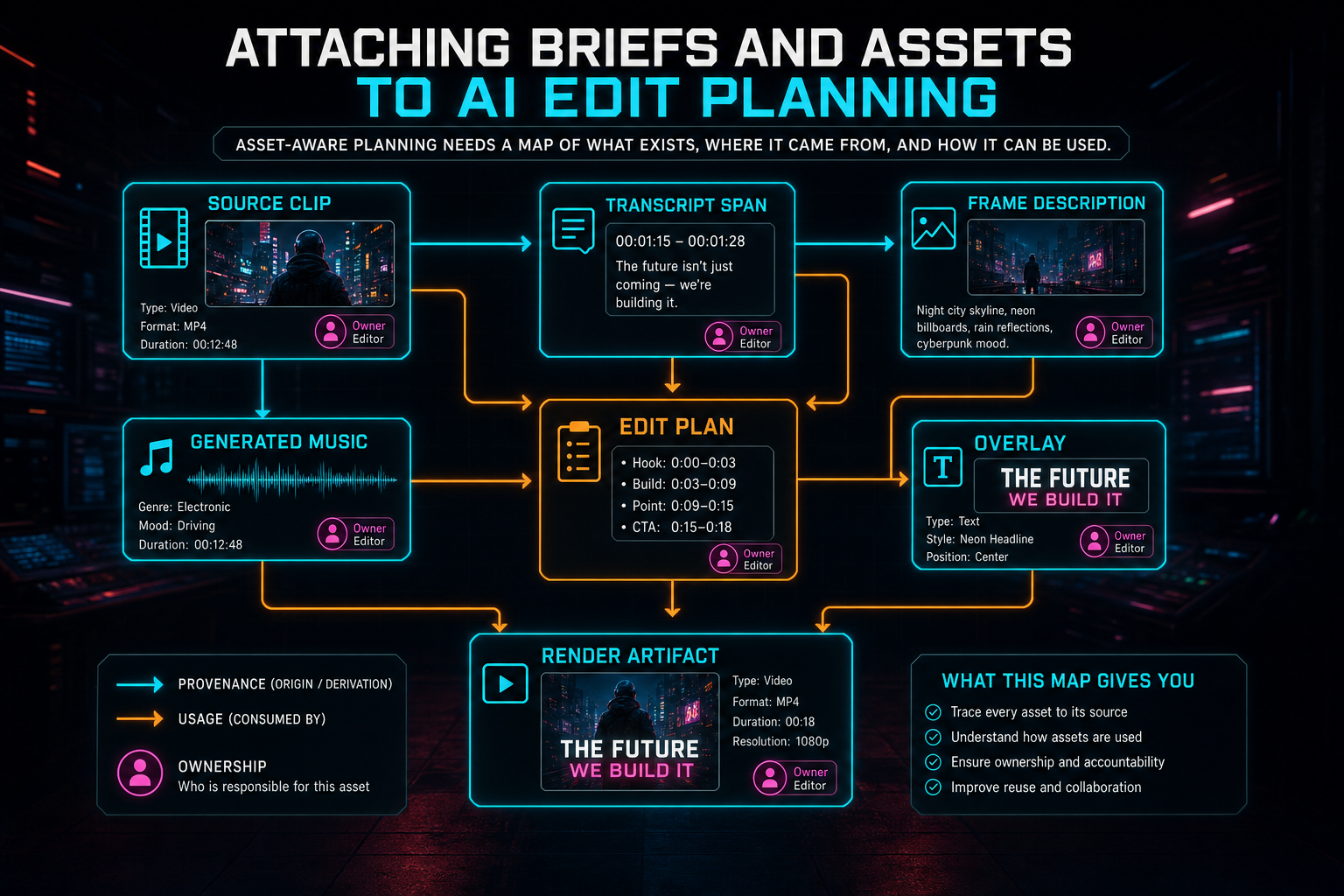
Asset-aware planning needs a map of what exists, where it came from, and how it can be used.
Planning Before Tool Calls
The plan step creates a preflight phase. That matters because editor tools mutate state. Once a tool trims a clip, inserts an asset, adds a transition, or changes timing, the system needs to explain what happened and preserve undoable project history. Running tools directly from a raw chat completion skips the moment where the product can ask whether the proposed edit is complete, authorized, and coherent. Open the edit-run receipts
A brief-aware plan gives VibeChopper a place to resolve references before mutation. The plan can say which clip is being targeted, which transcript span justifies the target, which generated asset should be inserted, which duration goal is driving the cut, and which user instruction caused the action. The asset resolver can then turn human-level descriptions into stable project IDs and bounded time ranges. Authorization checks can confirm ownership. Validation can reject impossible edits before the timeline changes.
This makes AI edit runs easier to inspect. Instead of a black box that jumps from chat to timeline, the user and the engineering team can see the planned intent, tool queue, artifacts, and result. That does not remove the creative flexibility from AI. It makes that flexibility accountable. The plan can still propose a bold cut. It just has to name what it is doing.
The design also improves retries. If a provider returns malformed output, the harness can request repair against the same brief and asset context. If one provider fails, a fallback can receive the same structured inputs. If a downstream tool rejects a missing asset, the system can report the missing reference without losing the rest of the plan. The brief and assets are not trapped inside one transient completion.
That preflight phase is also where VibeChopper can avoid duplicate work. Natural-language interfaces invite repeated clicks and follow-up requests, especially when a job takes more than a moment. A durable plan can give the server an idempotent handle for the intended operation. If the same request arrives again, the product can compare it to the existing plan, continue the in-flight work, or produce a clear superseding plan instead of blindly applying the same timeline mutation twice.
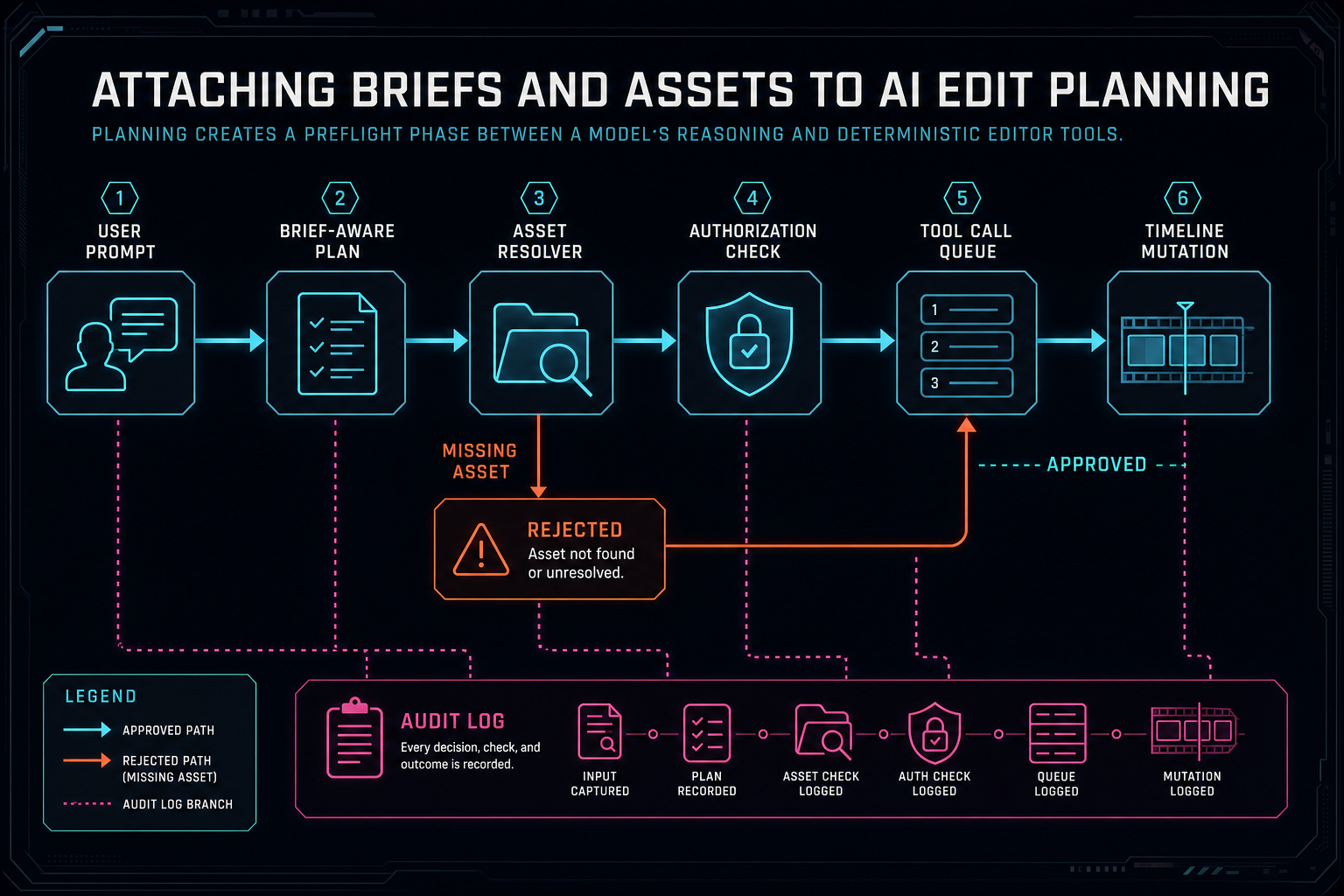
Planning creates a preflight phase between a model's reasoning and deterministic editor tools.
Data Model Lessons
The first lesson is to keep plan data separate from chat transcript text. Chat is conversation. Plans are operational records. A chat message can be informal and ambiguous. A plan needs fields the server can validate: status, owner, project, selected assets, proposed actions, evidence references, assumptions, error states, and any generated artifacts tied to the edit. Keeping those concepts separate lets the product preserve the human conversation without asking it to double as a database schema.
The second lesson is to keep asset references stable. A plan should not depend on a filename, a visible label, or a one-off phrase like "the clip where she smiles." Those are useful for display and search, but tool execution needs IDs, time ranges, processing states, and ownership checks. The model can help identify candidate material. The server should resolve and persist the references that tools will use.
The third lesson is to record evidence close to the decision. If a plan trims a section because a transcript span is dead air, keep the transcript reference near that planned action. If a plan chooses a clip because frame analysis describes a product close-up, keep the frame evidence attached. If a plan inserts generated music because a brief asked for a faster, brighter finish, keep the music asset and prompt lineage attached. That evidence becomes useful for review, repair, and future planning.
The fourth lesson is to model failure as product state. A plan can be drafted, validated, partially blocked, ready for tools, executed, superseded, or failed. Those states are more useful than a spinner. They let the UI show what is happening, let the backend resume or stop work safely, and let support or remediation systems understand where a workflow broke.
The fifth lesson is to keep the plan useful after execution. Once tools run, the plan should still help explain why the timeline looks the way it does. That means preserving enough result data to compare planned operations with actual tool events, generated artifacts, and render outcomes. A plan that disappears after success is just a temporary prompt wrapper. A plan that remains attached becomes part of the edit history.
What Creators Feel
Most creators will never think about plan records, asset resolvers, or validation boundaries. They will notice that the editor remembers what they meant. They will notice that a follow-up instruction can refer to the same brief without retyping every constraint. They will notice that required clips stay required, avoid lists stay respected, and generated assets remain traceable after the timeline changes.
That is the practical payoff. A creator can say, "make this feel more like the launch version, but keep the customer quote and the new music bed," and VibeChopper can reason over a plan instead of starting from scratch. The AI has enough context to be useful, and the product has enough structure to stay precise.
This is also how VibeChopper keeps the brand promise grounded. Edit videos with your voice based on vibes does not mean abandoning timeline accuracy. It means the creator gets to speak in creative intent while the editor handles frame, transcript, clip, asset, and render details. Brief-backed planning is one of the layers that makes that translation feel natural.
The best version feels almost boring in the right way. The creator asks for an edit, sees the plan, adjusts the parts that matter, and watches the timeline change with the right clips and assets in place. The drama is in the creative decision, not in fighting the software. That is the product experience this infrastructure is built to support.
How Plans Connect the Platform
Plan-backed editing becomes more powerful when it connects to the rest of the platform instead of living as an isolated AI feature. VibeChopper already has surrounding systems that benefit from structured context: provider harness logging, AI edit runs, native editor tool events, media processing summaries, generated music provenance, render verification, upload telemetry, and remediation workflows. A chat plan gives those systems a shared object to point at.
For example, the provider harness can record which model helped produce the plan and whether validation required repair. The AI edit run can show the plan next to tool calls and artifacts. Tool events can explain how each planned action changed the timeline. Media summaries can connect inserted assets back to their source clips or generated prompts. Render verification can confirm that the exported artifact came from the planned timeline state. If a user reports that the result missed the brief, remediation has a clearer starting point than a loose chat transcript.
This is the practical reason to preserve creative context across tool calls. The brief is useful before the edit, but it is also useful after the edit. It tells reviewers what the system was trying to accomplish. It tells support what constraints were supposed to be respected. It tells future AI passes what decisions are already settled. Without that attached context, every downstream system has to infer intent from the final timeline, which is slower and less reliable.
There is also a product loop here. Plans make edits explainable. Explainable edits make review easier. Review creates better feedback. Better feedback improves the next plan. That loop depends on structured records, not just smarter prompts. The model can help with reasoning, but the product earns trust by keeping the reasoning connected to visible evidence and actual editor behavior.
Engineering Rules of Thumb
The first rule is to attach context at the earliest responsible moment. If a user provides a brief, capture it before asking a model to plan. If the request references a selected clip, carry that selection into the plan request. If assets are still processing, represent that state explicitly instead of pretending every asset is ready. Early context prevents later ambiguity.
The second rule is to keep human language and machine references side by side. A creator may remember an asset as "the gym shot with the neon sign." The server should resolve that to an asset ID, a time range, and any relevant frame or transcript evidence. Both forms matter. Human labels help the UI stay readable. Machine references keep execution reliable.
The third rule is to design for interruption. AI edit planning may involve model calls, validation, asset lookup, and tool execution. Any of those can fail or be paused. A durable plan object gives the system a place to resume, cancel, supersede, or explain the workflow. That is better than hiding everything inside one request lifecycle.
The fourth rule is to make the plan honest. If the model is uncertain, the plan should say so. If an asset is missing, the plan should block or ask for help. If the duration target conflicts with a required quote, the plan should surface the tradeoff. A confident but false plan is worse than a cautious one because it invites the product to mutate the timeline under bad assumptions.
The Result
Attaching briefs and assets to AI edit planning turns a chat request into a durable workflow. The brief keeps the creative goal in view. Asset references keep the plan tied to real project material. Evidence references keep decisions explainable. Validation and authorization keep the server in charge. Tool calls then operate from a plan that can be inspected, retried, repaired, and rendered. Render a timeline free
That is the difference between an impressive prompt response and a product-grade AI edit. VibeChopper is not asking a model to casually edit a video in the abstract. It is asking the model to help plan work inside a project that has owners, media, transcripts, generated artifacts, timeline state, and export paths. The plan gives that work a shape.
When the plan reaches rendering, the same context continues to matter. A verified timeline export should be traceable back to the clips, generated assets, and instructions that shaped it. The final button nearby points at the render path because the story does not end with planning. The goal is an edit a creator can play, review, export, and trust.
Brief-backed planning is quiet infrastructure, but it changes the feel of the editor. The AI can carry creative context across steps. The product can prove what changed. The user can keep moving. That is the standard for natural-language video editing: let the vibe drive the request, then make every important piece of context survive the trip to the timeline.
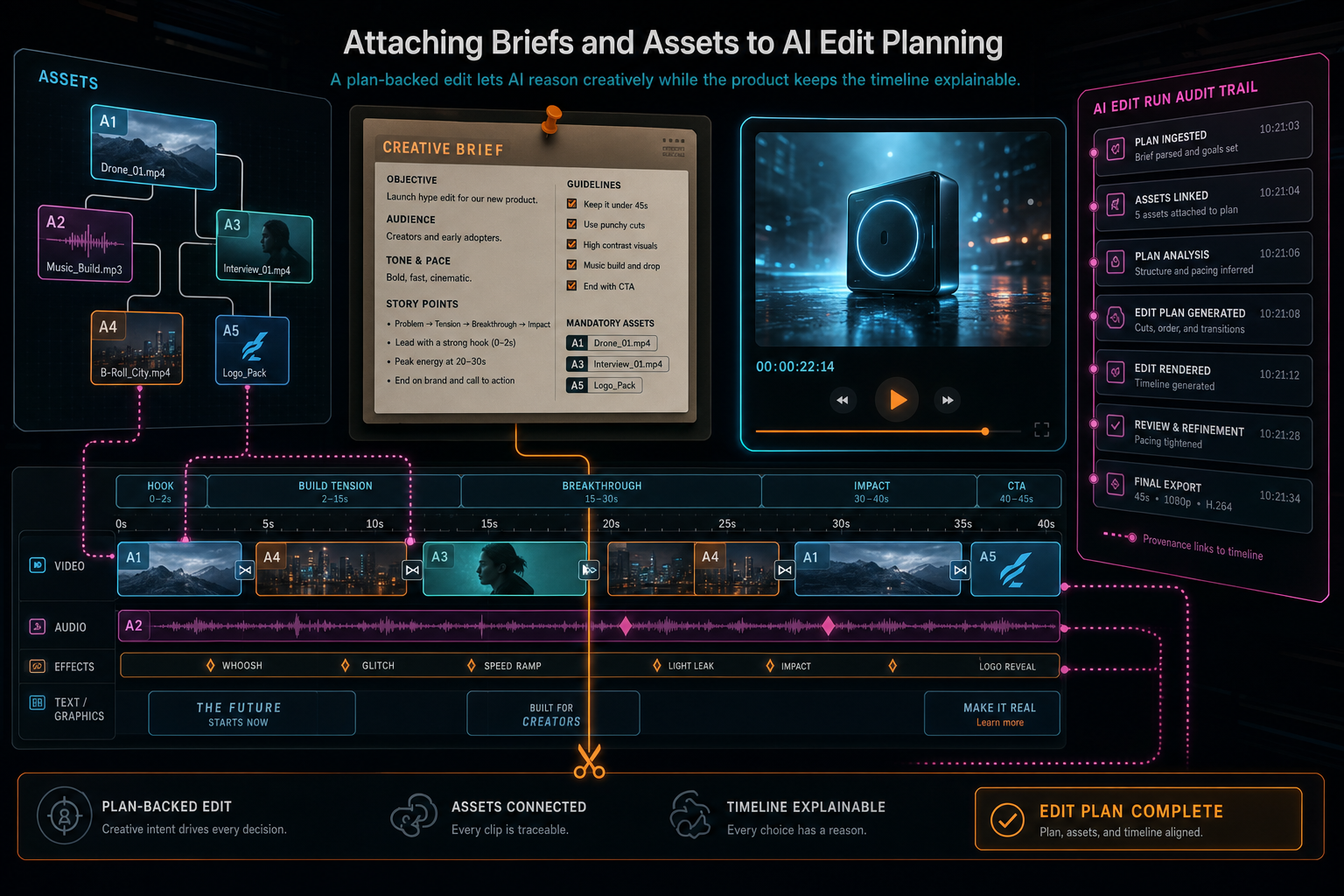
A plan-backed edit lets AI reason creatively while the product keeps the timeline explainable.
Try the workflow
Open every feature from this post in the editor
These panels collect the features discussed above. Sign in once, finish your profile if needed, then the editor opens the first highlighted surface and walks through the tutorial.
Step 1
Inspect an AI edit run
Open the editor and see how plans, tool calls, artifacts, and render results stay connected.
Open the edit-run receipts →Step 2
Try voice-driven timeline edits
Describe the edit you want and let VibeChopper translate intent into timeline changes.
Talk a cut into shape →Step 3
Open the media asset graph
See generated audio, rendered assets, source clips, metadata, and provenance in the media panel.
Explore your media graph →Step 4
Render a verified timeline
Export a project through the same storage-backed render path described in this article.
Render a timeline free →