

Overview
Gnarles here. Let's talk about the one weak clip.
You watched the cut back. The story is there. The pacing is there. But there's one shot at 0:46 that doesn't belong. Not bad enough to delete. Not good enough to leave. The rep where your form broke and you knew it the second the bar hit your chest.
You know what's wrong. You know roughly what should be there instead. The problem is, you shot forty-two clips on this project, and the right replacement is somewhere in the stack. Twenty minutes of scrubbing for one swap. Two hours if the cut needed five. That's the math that wrecks a Saturday.
We built the Swap Clip dialog so you'd stop doing the math.
1. The "that one shot" feeling
Every cut has them. The clip you accepted on the first pass because it was fine, and then watched on the second pass and clocked exactly what was wrong. The wrong wide when you needed a tight. A pan that drifted left when the next clip cuts in from the right.
You don't need a different story. You need a different clip in the same slot. The timeline shape stays. The duration stays. The clip identity changes. One in, one out. Same beat.
And here's the thing the swap problem hides: you already shot the replacement. Probably more than once. The right shoe is at the bottom of the gym bag — you just don't want to dig through forty other shoes to find it. The swap dialog dug for you.
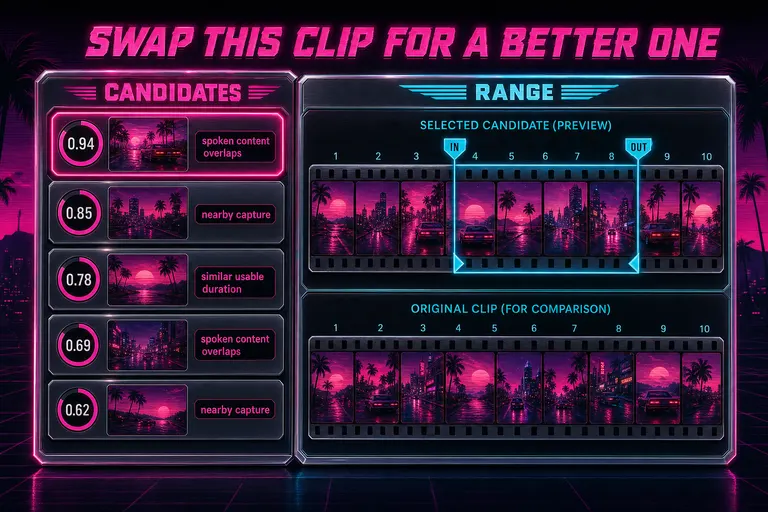
A stylized depiction of the Swap dialog — left column lists candidate videos with score rings, right column previews the selected clip's filmstrip and in/out handles
2. How swap candidates got picked
Right-click a clip on the timeline. Hit Swap. The dialog opened with a ranked list of candidates from your project. Each candidate carried a numeric score and a short list of reasons — the receipts for why it ranked where it did. Find a better clip for this beat
The ranking wasn't one algorithm. It was six small ones, blended. Read off the code, not invented:
1. Filename neighbors. The default mode. Your camera named files in capture order — CLIP_0042.MOV, CLIP_0043.MOV — and the system collated them by natural numeric order. The five files on either side of your current source got top billing. Fastest mode; ran without touching AI descriptions or transcripts.
2. Time similarity. Videos with a shotOrderIndex or an uploadedAt near your source scored higher. Eight shots either way on shot order. A one-week window on upload timestamp. Clips shot in the same session beat clips shot last month.
3. Duration similarity. A candidate that could comfortably fill the slot scored full marks. Too short to cover the timeline duration? Marked candidate source is shorter than the current timeline slot — still listed, but warned before you committed.
4. Metadata token overlap. The AI-generated title and description of your source video tokenized against the same fields on the candidate. Stop words dropped out. Real words — rocket, bride, toast — counted. Cosine-like normalization, so a short matching title didn't accidentally outrank a richer one.
5. Transcript overlap. The one that surprised people. Spoken words inside the source clip's range tokenized against spoken words inside a candidate range. "Engine ignition" said in two takes from two cameras? The system found both.
6. Frame description overlap. Every frame in your project carried an AI description. Descriptions inside the source range tokenized against descriptions inside the candidate range. A rocket on a launch pad found a rocket on a launch pad.
In combined mode, the signals blended with fixed weights: metadata 0.22, time 0.20, duration 0.20, transcript 0.20, frames 0.18. Filename held to zero in combined because it had its own dedicated lane. The blend ran only over signals that actually had data — if a video had no transcript, that signal sat out the round instead of dragging the average down.
You could pin the system to a single signal too. The mode dropdown offered filename, combined, time, metadata, duration, transcript, frames. Honest editors picked one when they knew what was wrong. Same duration → duration. Same line spoken → transcript. Same kind of visual → frames. Next take → filename.
Same source video as a candidate? Score multiplied by 0.65 — not zero, because sometimes a different range of the same source is the right swap. Just ranked lower than clean alternatives. The dialog returned up to twenty candidates in combined and up to ten in filename. A list of five hundred is a search results page. A list of ten is a coach's clipboard.
::
3. The carousel UX
Open the dialog. The left column showed the ranked list. The right column showed the selected candidate's filmstrip — up to ten evenly-sampled frames spanning the candidate's duration — with two magenta handles bracketing a suggested in-and-out range. Underneath that, the current clip's filmstrip, for direct visual A/B.
Click a candidate. The filmstrip flipped. The handles snapped to a suggested range — the system used your source in-point as a hint and clamped to fit inside the candidate's actual duration. You watched the filmstrip the way you'd thumb a stack of contact sheets. Move on or commit.
The handles weren't decorative — you could drag them. The out-point auto-followed by the same duration as your timeline slot, so you didn't accidentally change the slot length. A 2.4-second slot stayed 2.4 seconds unless you specifically chose otherwise. A candidate too short to fill the slot got flagged before you could apply it. The system didn't quietly truncate your story.
The reasons chips on each candidate were short and load-bearing: nearby capture or shot order, similar usable duration, similar title or description, spoken content overlaps, visual frame descriptions overlap, same source media, ranked lower, X filenames before/after current source, or best available local metadata match when nothing else rang the bell. Reasons under threshold didn't get a chip. You weren't drowning in marketing language — you were reading a coach's notes.
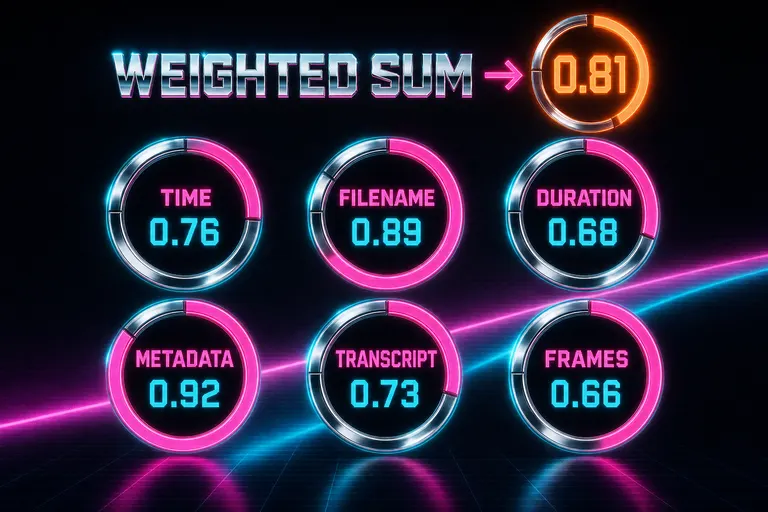
Six chrome match-score rings labeled time, filename, duration, metadata, transcript, frames, each partially filled with a magenta arc
4. When swap goes wrong — and how to override
The honest part. The system was right most of the time and wrong some of the time. Both are common. Here's how the wrongness showed up. Open the swap panel
The top candidate is the wrong vibe. Two clips of a rocket on a launch pad — one the dry-run, one the live ignition. Same metadata, same transcript, same frame description. Different feeling. You saw it in the filmstrip preview and moved on. Five seconds of looking beats twenty minutes of digging.
The right candidate isn't in the top ten. Rare, but real. Three moves: switch the mode (if combined missed it, transcript might find it; the dropdown sat in the dialog header). Use the search field — filter the ranked list by title, description, or reason chip. Or drop out and run Frame Search against the same indexed descriptions, then apply the swap manually.
The range suggestion is wrong. The system snapped to your source in-point. Sometimes that mapped cleanly. Sometimes the candidate started its action 0.8 seconds later. Drag the in-point handle. The out-point followed by the same duration. Twelve seconds of correction.
You don't want a swap — you want a cutaway. Different feature. Swap kept the slot duration; b-roll autopilot adds a cutaway over an existing audio bed. Right tool, right rep.
The override pattern was the same across all four: the dialog showed its work, you read the reasons, you either trusted them or you didn't. The system ranked the candidates. You applied.
::

Gnarles in a synthwave gym pointing at one weak clip on a glowing CRT timeline while a chrome carousel of replacements orbits behind him
5. The walkthrough
Concrete reps. A real swap, start to finish.
The cut: a 90-second product reel. The slot at 0:34 needed a wide of the studio. The clip currently in the slot was a wide, but the talent walked left right before the cut, and the next clip cuts in from a right-side angle. The eye broke.
Right-click the offending clip. Hit Swap. The dialog opened in filename mode. The five filename neighbors showed up first — your camera shot the studio wide in a sequence, so the neighbors were the four wides you didn't pick on the first pass. Hover the first one. The filmstrip showed the talent walking right. Match. Duration scored 1.0 — same camera, same setup, same length. Filename score 1.0 because it was the next file on disk. Total: 0.91. Apply.
The dialog closed. The timeline updated. The slot duration was unchanged. The audio bed was unchanged. You watched the cut. The eye moved cleanly into the next angle. Forty seconds, zero files scrubbed.
A harder walkthrough. The cut: a wedding highlight reel. The slot at 1:12 carried a toast. The audio was great. The video was a head-on tight on the speaker, but the speaker glanced offscreen for a beat right in the middle. You wanted to keep the audio and swap the picture to a wider table reaction at the same timecode.
Switch the mode to transcript. The ranker surfaced every clip whose spoken words overlapped the toast. The wide of the table — shot from camera B during the same toast — ranked third because that camera's transcript caught the same phrases. The filmstrip preview showed the table laughing in the right beat. Apply. The audio bed was linked separately from the video track, so the swap operated on the video clip only. Two minutes, most of that watching the filmstrip and deciding.
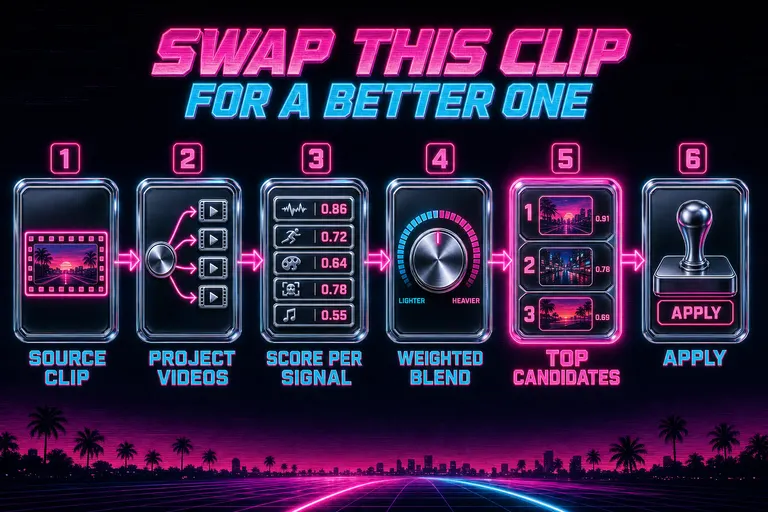
Diagram of the swap pipeline: source clip in → fan out to project videos → score per signal → weighted blend → ranked candidates out
6. The honest limits
A few things the system didn't do, so you'd know.
It didn't pull from outside your project. The candidate pool was your own media library scoped to the project — no external stock footage, no marketplace pulls. It didn't reanalyze on the fly; scoring used the data already indexed. If a video's transcript wasn't done yet, the transcript signal sat out the round and the others still ran. It didn't rank zero-duration videos. And it didn't make the cut for you — it put up to twenty candidates in front of you, ranked, with receipts. You did the picking. That's the contract.
7. The shape of the rep
Find the one weak clip. Right-click. Swap. Read the top three reasons. Hover the filmstrip. Apply or move on. Forty seconds for an easy swap, two minutes for a hard one. Multiply across however many weak clips you found on the second pass.
A four-minute video with five weak clips used to be an hour of digging. Now it's ten minutes of looking. The first 80% of the cut was already yours; this gave back the last 20% you'd been spending on shoe-search instead of taste.
You shot it. The system indexed it. The dialog ranked it. You picked.
See you on the timeline.
— Gnarles

A tight, polished timeline strip rolling out of a chrome cassette deck under a sunset palm-tree horizon, the replaced clip lit hot pink
Try the workflow
Open every feature from this post in the editor
These panels collect the features discussed above. Sign in once, finish your profile if needed, then the editor opens the first highlighted surface and walks through the tutorial.
Step 1
Find a better clip for this beat
Open the Swap dialog on any timeline clip. The system ranks alternatives from your own project by feel, duration, and capture time.
Find a better clip for this beat →Step 2
Open the swap panel
Already have the clip you want to replace? Right-click it. The carousel comes pre-ranked.
Open the swap panel →