
Email Is a Product Surface
Transactional email looks simple from the outside. Send a sign-in link. Tell a collaborator they were mentioned. Notify someone that feedback arrived. Report that a remediation job finished. The implementation can be sketched in an afternoon if the product treats email as a pile of one-off strings. Share a precise cut
That approach does not survive a real creative tool. VibeChopper uses email for identity, collaboration, feedback, repair status, and operational communication. Those messages land when the user is outside the editor, often on a phone, often in the middle of another task. The email has to say what happened, prove that it belongs to VibeChopper, offer the next action, and avoid leaking messy internal state. It is part of the product.
The implementation evidence is server/emailTemplates.ts, called out in the developer audit with commit 37c5aef. The module defines a shared platform email renderer and a set of purpose-built templates: auth sign-in, project share, DATA Remediation fixed, DATA Remediation failed, microphone feedback, and investor memo test. The test coverage in tests/emailTemplates.test.ts verifies that every catalog entry renders a subject, sender, HTML, and text fallback, and that dynamic project-share content is escaped while CTA URLs remain usable.
That combination is the important lesson. A good email system is not only visual polish. It is a contract. VibeChopper's contract says each message has a subject, HTML body, plain-text body, sender identity, CTAs, optional panels, optional metadata, and escaped dynamic content. Workflows can sound different, but they do not invent their own delivery surface every time.
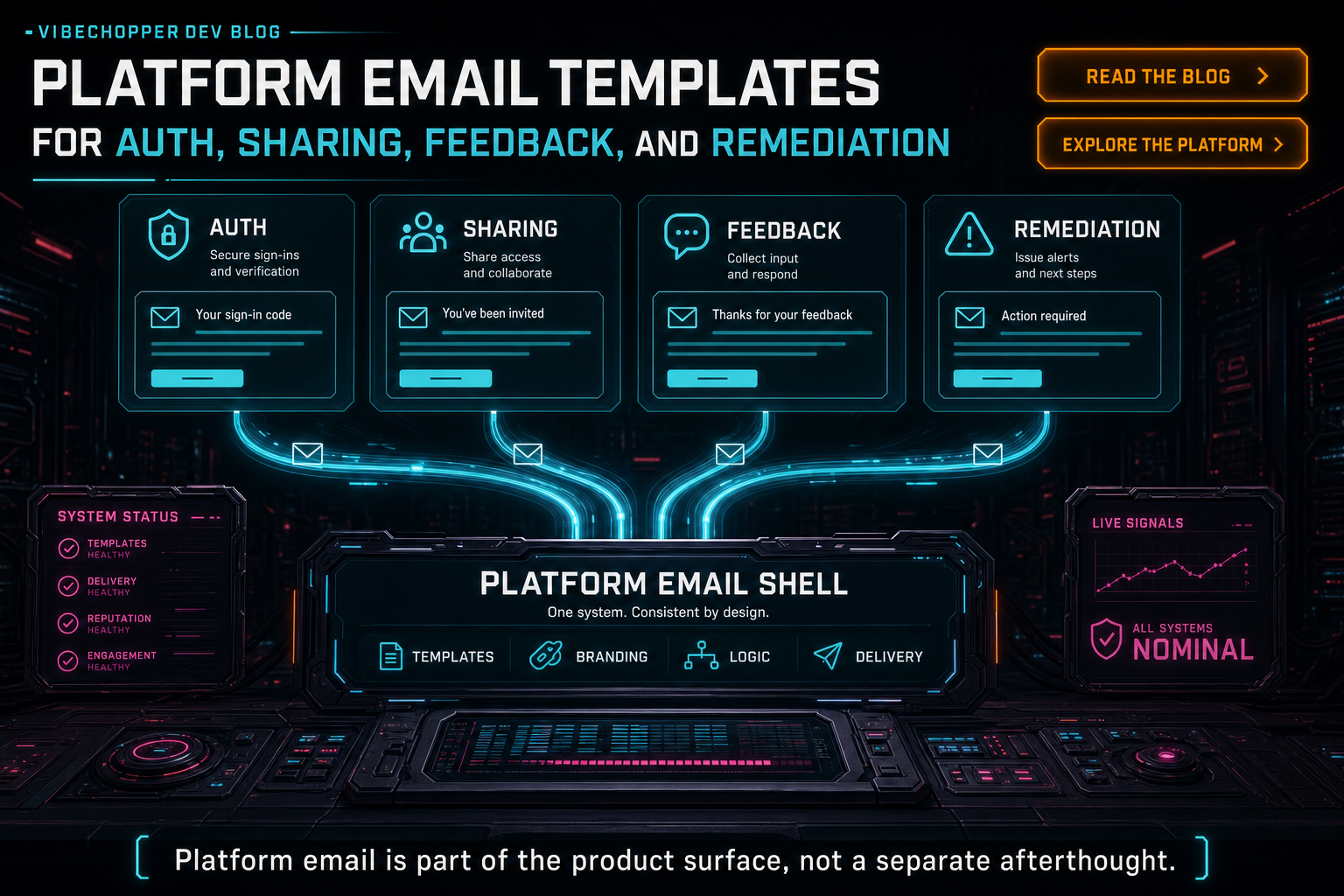
Platform email is part of the product surface, not a separate afterthought.
The Shared Renderer
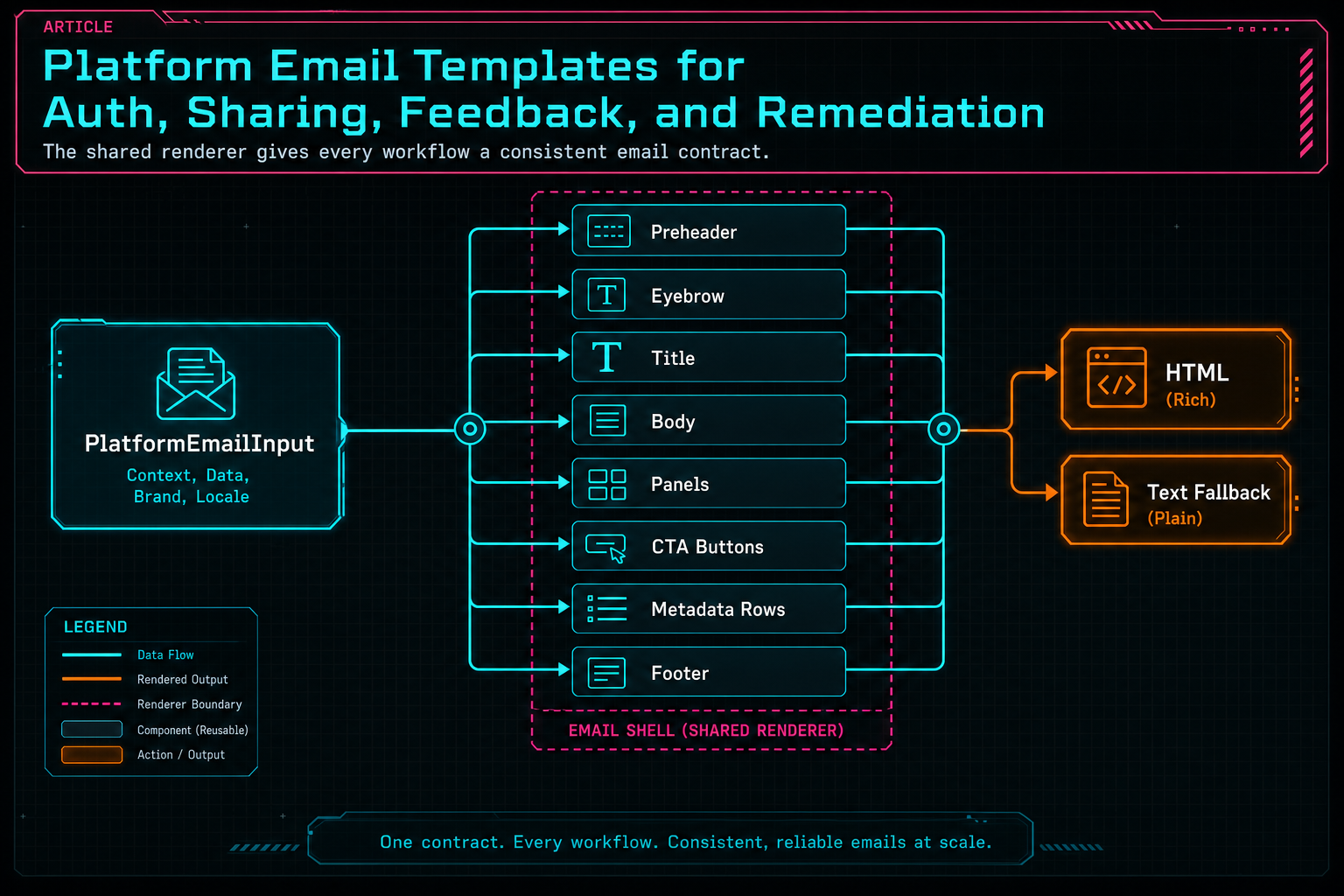
The shared renderer gives every workflow a consistent email contract.
Auth Email Has One Job
The auth sign-in template is intentionally direct. The subject is Confirm your Vibe Chopper sign-in. The email eyebrow is Secure sign-in. The title says Confirm your VibeChopper sign-in. The intro tells the user to use the link or code to finish signing in and explains that first-time users will be helped into passkey creation next. Create your editing login
That copy does not try to sell the whole product. Auth email has one job: help the right person get into the editor. The template includes a code panel, a primary Confirm email CTA, and expiration metadata. The code is useful when a browser handoff is awkward. The link is useful when the user is already on the right device. The expiration row sets expectations without making the body feel like a legal notice.
This email also shows why the platform shell should be shared. Account access is a trust moment. If the sign-in email looks unrelated to collaboration notifications or remediation updates, users have to spend extra attention deciding whether the message is real. VibeChopper uses consistent sender metadata, visual language, and footer language so the sign-in flow feels like part of the same editor rather than a disconnected auth vendor screen.
The passkey note matters because email bootstrap is not the destination. It is the bridge. The product can use email to verify possession, then help the user create stronger account access. For a creative editor with projects, uploads, generated assets, shared views, and remediation history, identity continuity is not a checkbox. It is what lets work survive across sessions and devices.
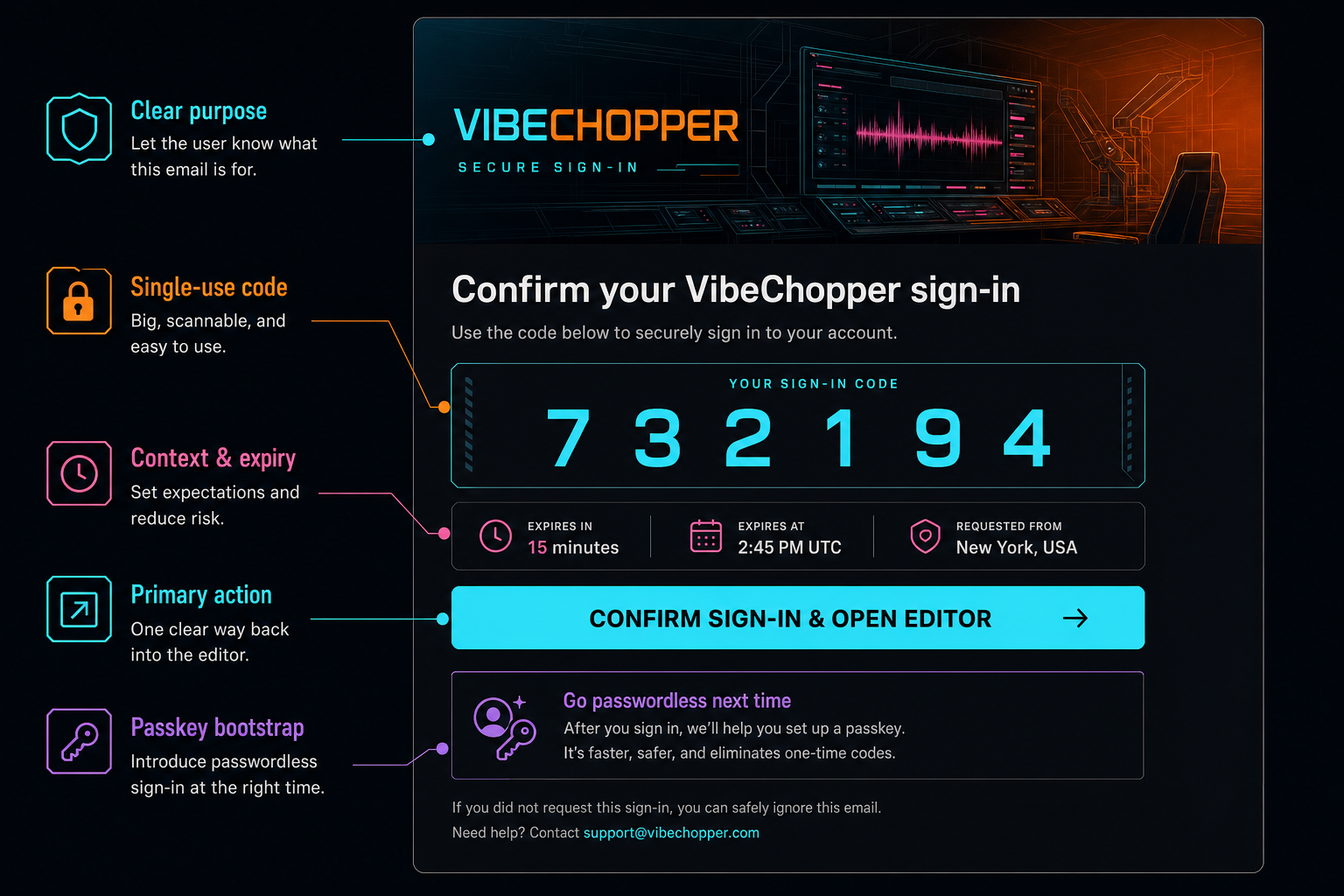
Auth email has one job: get the right person into the editor securely.
Sharing Needs Context
Project-share email has a different job. It is not proving identity. It is carrying collaboration context from the editor into an inbox. The subject says that one person mentioned the recipient in a project. The title says the sender shared a view. The intro uses the sender's note. A panel explains what they are looking at. The CTA opens the exact view. Share a precise cut
That exact-view idea is the whole point. A video project is too rich for a generic open project notification. The useful collaboration unit is often a timeline position, selected clip, frame, comment, or shared chat context. The template footer says that directly: the link opens the project, timeline position, selected clip, and shared chat context inside VibeChopper.
The dynamic fields are also the risky fields. Sender name, project title, note, frame description, thumbnail URL, recipient name, and link all come from product state. server/emailTemplates.ts routes those values through escapeHtml before inserting them into HTML. The focused test intentionally passes project-share content containing angle brackets and a script-shaped note, then asserts that the HTML does not contain a live script tag while the text fallback still contains the readable URL.
That is the developer lesson: collaboration email is both UX and boundary work. The message should preserve the human note, because the collaborator needs the creator's intent. It should preserve the machine link, because the editor needs to reopen the right context. It should escape the HTML, because user-authored content is not template markup. All three requirements belong in the same system.
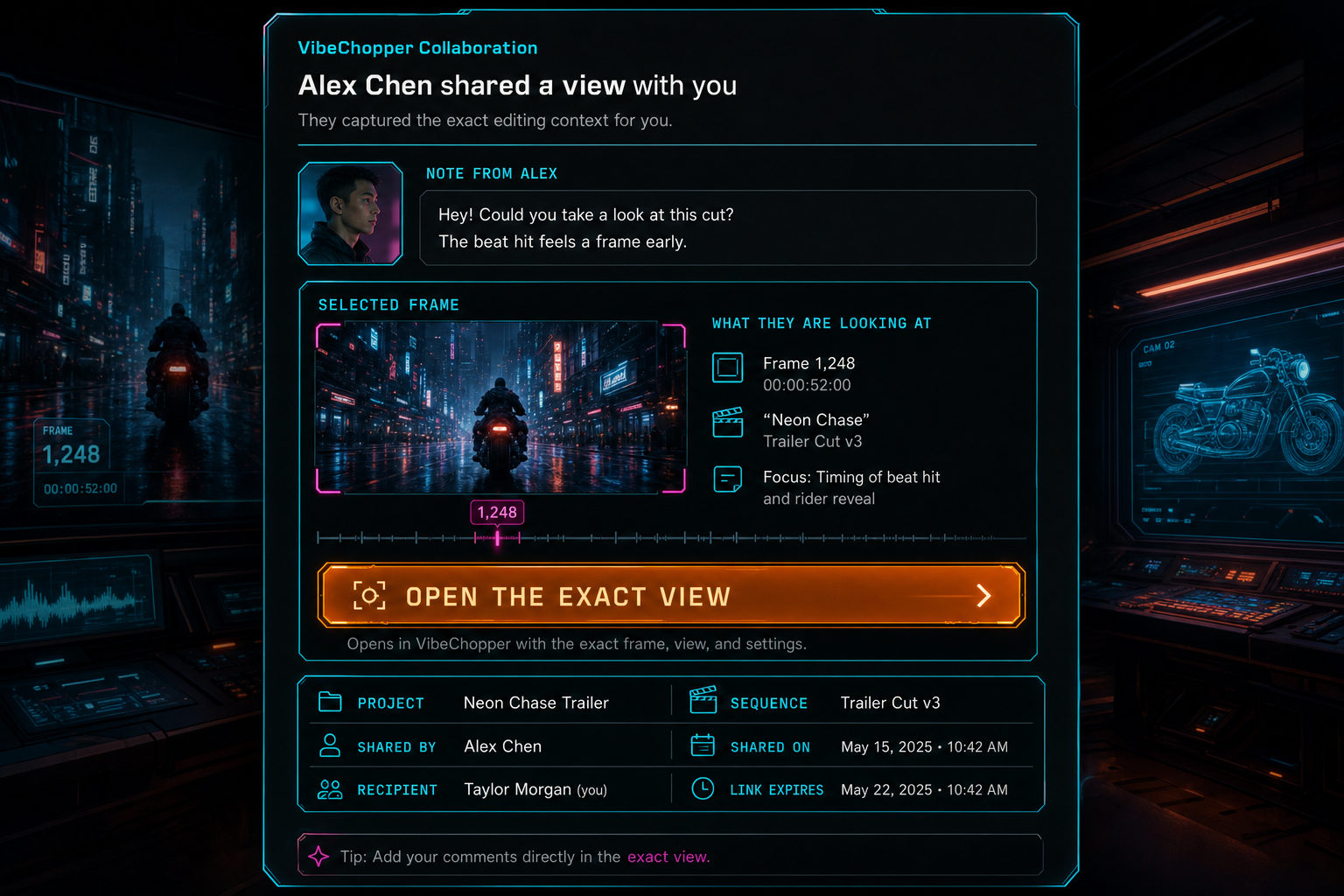
Sharing email carries the exact editing context a collaborator needs.
Feedback and Remediation
Feedback email is where VibeChopper's product voice becomes operational. The microphone feedback template sends a Gnarles alert: new microphone feedback subject, identifies the submitter, includes a transcript preview panel, links to the remediation tracker, links to the feedback record, and records session, project, feedback item, and remediation IDs as metadata. Send feedback with context
The email is lively, but it is not vague. The intro says microphone feedback arrived and that DATA Remediation has the context. The transcript panel gives the first readable signal. The CTAs separate status tracking from feedback inspection. The metadata rows give operators a way to connect the email back to durable system records. That makes the email an entry point into a repair workflow rather than a loose notification.
The fixed and failed remediation templates complete the loop. A fixed remediation email says Gnarles from DATA Remediation: your fix is live, opens VibeChopper, and provides a secondary status-tracking link. A failed remediation email says the job needs attention and includes a failure reason panel. Both messages use the same renderer and sender contract, but they speak to different states: user-facing success and operator-facing intervention.
That separation matters. Not every remediation event should sound like a celebration. Not every failure should be sent to the same audience. The template layer gives the product a way to be direct about state without flattening every event into the same notification. A fix is live. A job needs attention. Feedback arrived. Each message has a clear next action.
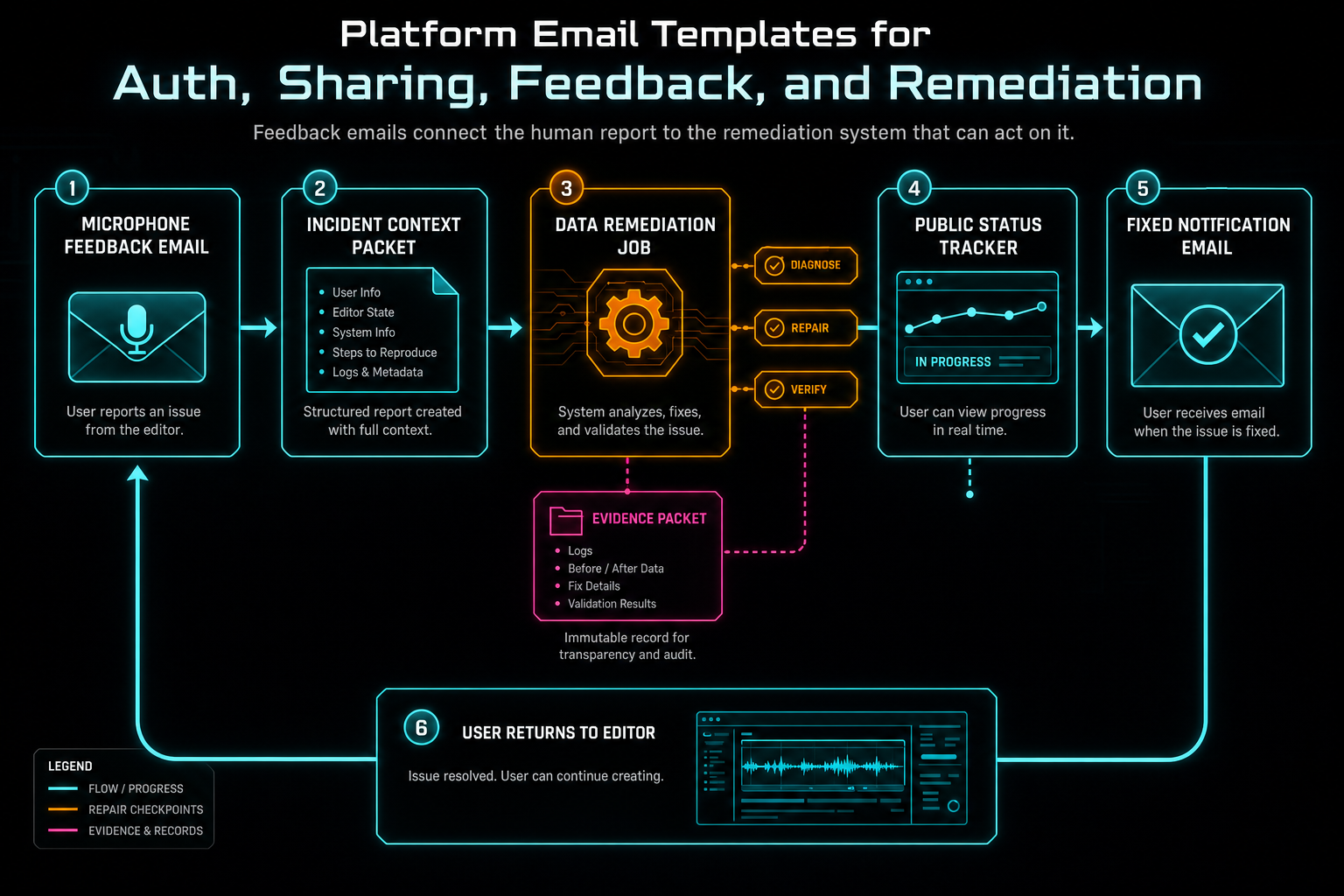
Feedback emails connect the human report to the remediation system that can act on it.
Safety, Accessibility, and Fallbacks
The least glamorous functions in the module carry a lot of the value. escapeHtml converts dynamic values before insertion into HTML. renderMetadataRows drops empty rows so templates do not show blank operational fields. absoluteOrEmpty prevents an empty thumbnail string from becoming a broken image tag. stripHtml produces a plain-text preview when the investor memo test template receives HTML without explicit text.
The CTA renderer keeps buttons consistent. Primary CTAs use the cyan-to-orange gradient. Secondary CTAs stay transparent with a cyan border. Labels and URLs are escaped for HTML. The design is not just aesthetic. Consistent button treatment lets readers distinguish the main action from supporting actions across auth, sharing, feedback, and remediation messages.
The renderer also includes a hidden preheader. When a template does not provide one, it falls back to intro or title. That is small, but inbox preview text is often the first product copy a user sees. Leaving it to random HTML fragments is a missed chance to make the message understandable before it is opened.
The text fallback is equally practical. Some clients block images. Some users prefer plain text. Some delivery debugging tools inspect text first. The fallback includes panel content, CTA URLs, and metadata rows. That means the operational content is not trapped in a visual design. The email can still do its job when HTML rendering is limited.
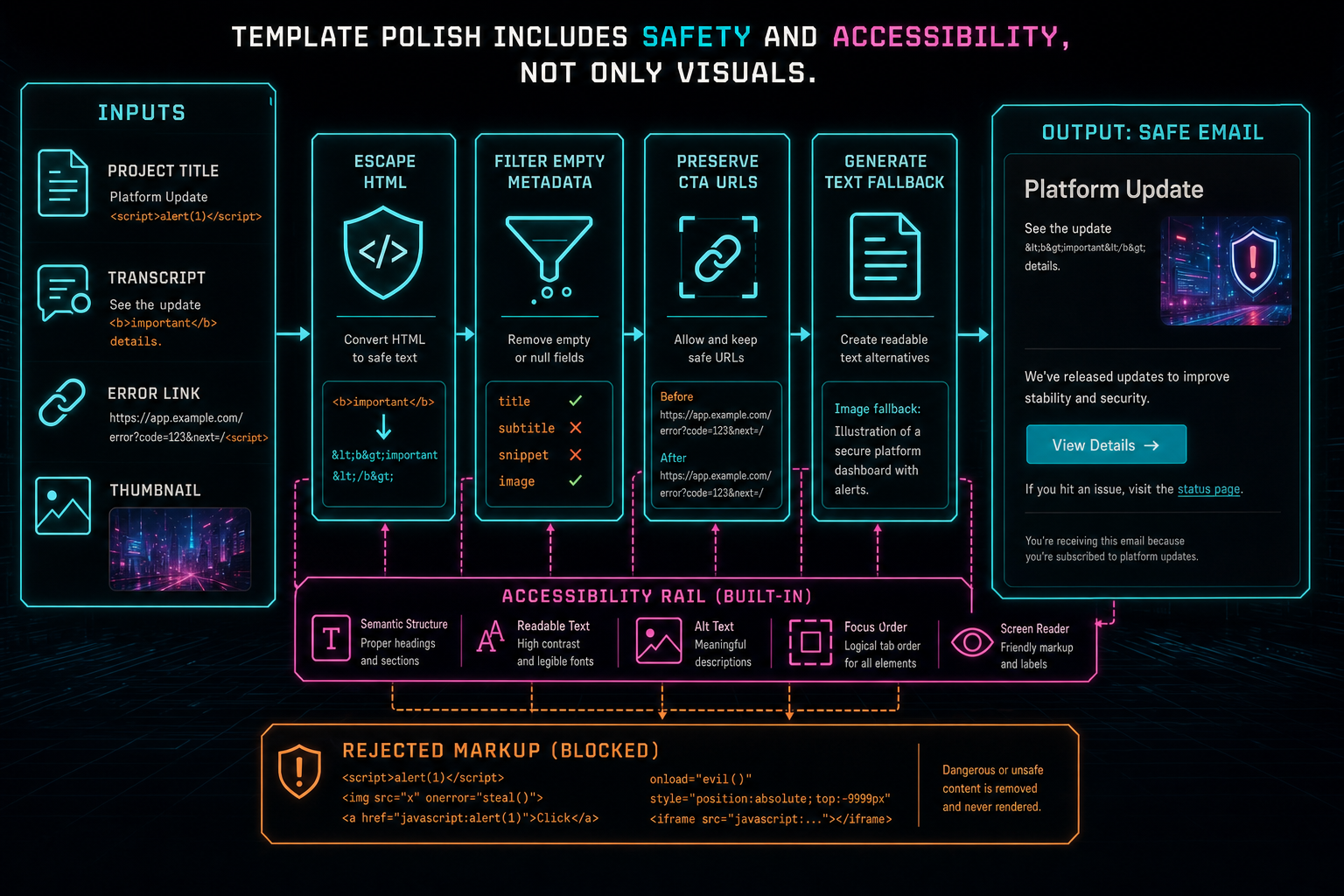
Template polish includes safety and accessibility, not only visuals.
Preview Catalog as Infrastructure
renderEmailPreviewCatalog is a quiet but important piece of the system. It renders sample versions of every platform template with realistic URLs, sender identities, sample project data, a sample remediation job, microphone feedback text, and an investor memo draft. The catalog returns template IDs, names, subjects, senders, HTML, and text. Open the edit-run receipts
A preview catalog gives developers and operators a stable way to inspect email output without triggering real user workflows. It also creates a natural test target. The test asserts the exact catalog IDs: auth-sign-in, project-share, data-remediation-fixed, data-remediation-failed, microphone-feedback, and investor-memo-test. When a new platform template is added, the catalog and tests make that addition visible.
This pattern mirrors the broader VibeChopper approach to AI edit runs, render verification, media summaries, and remediation status. If a workflow is important, give it an inspectable artifact. Email output is no different. Developers should be able to preview it, test it, and reason about it as structured product behavior instead of hoping a string builder still looks right in an inbox.
The catalog also protects brand consistency. It puts auth, collaboration, remediation, feedback, and investor communication next to each other. If one template drifts into a different voice, button style, footer, or sender identity, the mismatch becomes easier to see. The system is small, but it creates pressure toward coherence.
What Developers Should Copy
If you are building transactional email for a product, copy the shape before the exact visual treatment. Start with a shared renderer that owns the shell, escaping, button styles, metadata rows, text fallback, and footer. Let workflows provide typed inputs rather than hand-writing entire HTML documents for every event. That keeps identity consistent and makes reviews possible.
Make dynamic content explicit. A project share message may include user-authored notes. A feedback message may include transcript text. A remediation failure may include an error string. Treat all of that as data, not markup. Escape by default. Preserve URLs deliberately. Test the paths where user content and CTA links appear in the same email.
Give every workflow a next action. Auth confirms email. Sharing opens the exact view. Feedback opens the tracker or feedback record. Remediation fixed opens the product and status page. Failed remediation gives operators the job and failure reason. Emails should shorten the distance between the event and the next useful action.
Finally, render previews and text fallbacks as part of the contract. A template that only works when viewed through one HTML client is not a reliable platform message. A template that cannot be previewed is hard to review. A template without text fallback is incomplete. These are infrastructure concerns, not polish tickets.
The Result
VibeChopper's platform email layer turns transactional messages into a coherent product surface. The same shell can confirm sign-in, carry an exact collaboration view, report microphone feedback, tell a user that a fix is live, warn an operator that remediation failed, and preview an investor memo. Each workflow keeps its purpose. The platform keeps the contract.
The technical choices are intentionally practical: typed template IDs, shared rendering, escaped dynamic content, metadata filtering, CTA tone variants, text fallbacks, preheaders, sender ownership, preview catalog coverage, and focused tests. None of those pieces are dramatic alone. Together they make email dependable enough to sit next to auth, sharing, feedback, and remediation.
For creators, the effect is simple. The message tells them what happened and where to go next. For developers, the lesson is direct: email should not be the place where product systems lose structure. Keep the event, the action, the context, and the trust boundary visible all the way into the inbox.
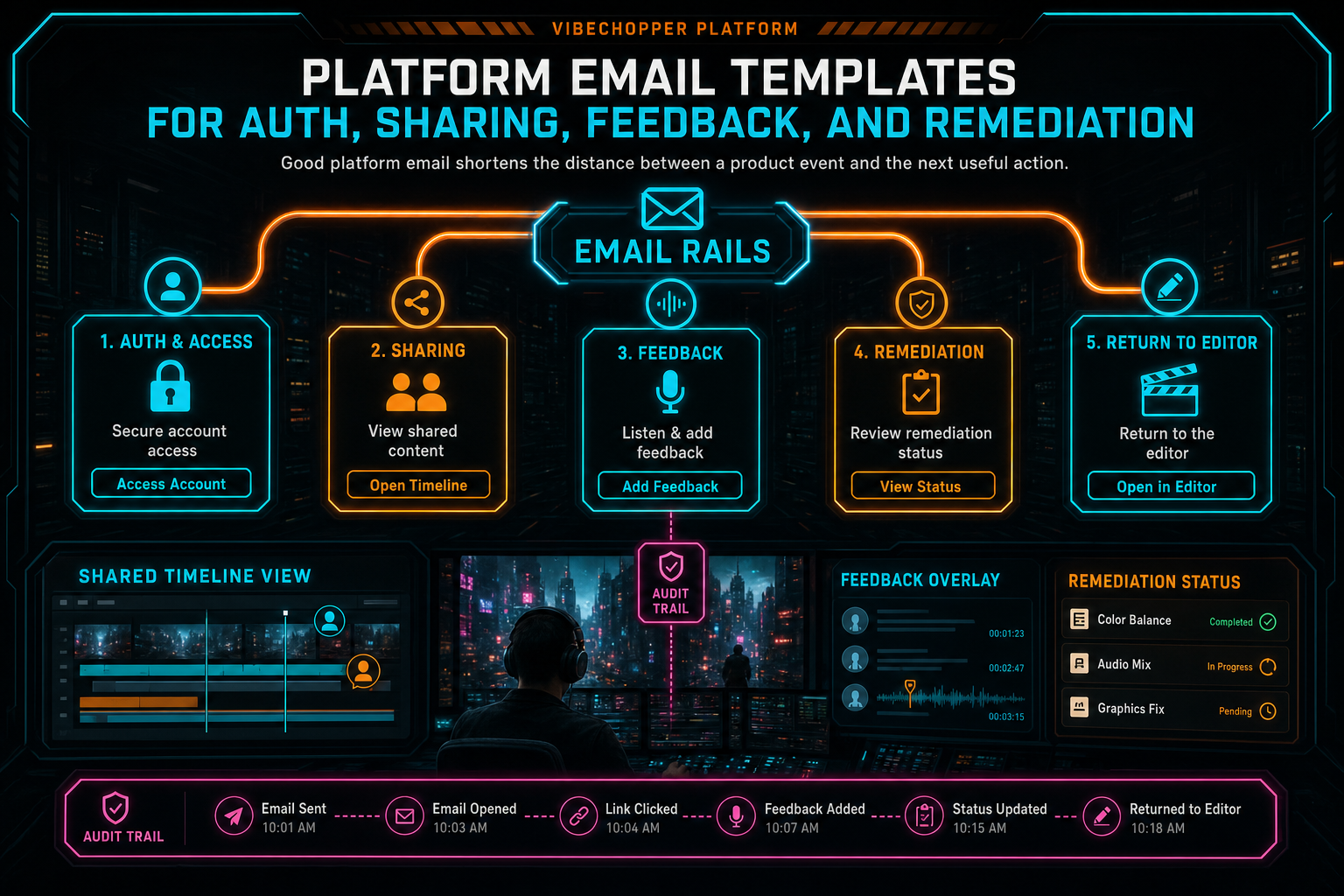
Good platform email shortens the distance between a product event and the next useful action.
Try the workflow
Open every feature from this post in the editor
These panels collect the features discussed above. Sign in once, finish your profile if needed, then the editor opens the first highlighted surface and walks through the tutorial.
Step 1
Share an exact timeline view
Send collaborators a deep link to the project, selected clip, timeline position, and discussion context.
Share a precise cut →Step 2
Create a secure editing account
Use email bootstrap and passkeys to get into the editor without password friction.
Create your editing login →Step 3
Send contextual feedback
Capture voice or written feedback with project context so issues can become repairable jobs.
Send feedback with context →Step 4
Inspect an AI edit run
Open the editor and see how plans, tool calls, artifacts, and render results stay connected.
Open the edit-run receipts →